What Is the Post-Quantum Cryptography ML-KEM? I Tried Generating and Recovering a Shared Secret with Web Crypto on Cloudflare Workers

This page has been translated by machine translation. View original
Hello! I'm Yuji Nishimura from the Operations Department!
APIs for key encapsulation and decapsulation using ML-KEM have been added to the Web Crypto API in Cloudflare Workers. The publication date shown on the official Changelog is October 1, 2026.
This time, I'll enable the webcrypto_modern_algorithms flag locally. I'll try it up to the point where the byte sequence of the shared secret obtained by ML-KEM-768 encapsulation matches the shared secret recovered by decapsulation. Implementing encrypted communication and configuring TLS are out of scope.
What is ML-KEM?
ML-KEM is a post-quantum key encapsulation mechanism (KEM) that the U.S. National Institute of Standards and Technology (NIST) standardized on August 13, 2024 as FIPS 203. It is based on CRYSTALS-Kyber, which was selected in NIST's post-quantum cryptography standardization project. Its security rests on the hardness of a lattice problem called Module Learning With Errors (MLWE).
FIPS 203 explains the background as follows.
- If a large-scale quantum computer is realized, public-key cryptography that depends on the hardness of integer factorization or the discrete logarithm problem (including elliptic curves) will be put at risk
- ML-KEM is currently considered secure even against attackers with quantum computers
A familiar example of a scheme that depends on the elliptic-curve discrete logarithm problem is X25519 (elliptic-curve Diffie-Hellman), the most commonly used key exchange in TLS 1.3. The Cloudflare documentation also states that X25519 can be broken by Shor's algorithm (an algorithm that quickly solves integer factorization and discrete logarithms on a quantum computer).
A KEM is not a mechanism for encrypting the data you want to send itself. It is a mechanism for two parties to come to hold the same shared secret over a public communication channel. FIPS 203 says that the shared secret established this way is combined with a symmetric-key cryptographic algorithm and used for encryption and authentication.
Parameter sets
FIPS 203 has three parameter sets; the larger the trailing number, the higher the security and the heavier the processing. The security category is a NIST classification that expresses how the computational effort required to break it compares with, for example, a block cipher of a specified key length; the larger the number, the stronger the category.
| Parameter set | Security category | Public key | Ciphertext | Shared secret |
|---|---|---|---|---|
| ML-KEM-512 | 1 | 800 bytes | 768 bytes | 32 bytes |
| ML-KEM-768 | 3 | 1,184 bytes | 1,088 bytes | 32 bytes |
| ML-KEM-1024 | 5 | 1,568 bytes | 1,568 bytes | 32 bytes |
FIPS 203 recommends ML-KEM-768 as the default parameter set, as it balances a sufficient security margin with reasonable performance. On Workers, ML-KEM-768 and ML-KEM-1024 can be used, and this time I'll use ML-KEM-768.
What is it used for?
The main use is migrating the key exchange of communications to one that is prepared for quantum computers. It serves as a countermeasure against "harvest now, decrypt later" attacks (collecting and storing encrypted communications now, then decrypting them in the future with a quantum computer).
- TLS hybrid key exchange:
X25519MLKEM768, which combines X25519 and ML-KEM-768, is used by Cloudflare and by Chrome, Firefox, Safari, and others. The Cloudflare documentation describes this as a construction in which, even if an unexpected weakness is found in ML-KEM, security equivalent to that of today's X25519 is maintained. - Application-layer encryption: This is a usage where you encapsulate a shared secret with the recipient's public key, then use that shared secret as-is, or after key derivation, as a symmetric key to encrypt data. It suits cases where, outside of TLS, you want to create data that only a specific party can decrypt.
According to Cloudflare's support status page, hybrid key exchange is enabled by default in Chrome 131 and later, Firefox 132 and later (desktop), Safari 26 and later, and so on. If you connect to a site behind Cloudflare over TLS 1.3 and the client supports it, this key exchange is used. In other words, the moment you view a site behind Cloudflare in a supported browser, TLS ML-KEM is being used even if you aren't aware of it.
What has been added to the Web Crypto API in Workers this time is a feature for calling ML-KEM directly from application code, as in the second use case. The same change also added ML-DSA, a post-quantum signature scheme.
The three operations of ML-KEM
The code this time uses the following three operations in line with the draft of Modern Algorithms in the Web Cryptography API.
- The recipient generates a public key and a private key with
generateKey()and hands the public key to the sender. - The sender passes the public key to
encapsulateBits()and obtains the shared secretsharedKeyand the encapsulation ciphertextciphertext. The sender sendsciphertextto the recipient. - The recipient passes the private key and
ciphertexttodecapsulateBits()and recovers the same shared secret.
Only the public key and ciphertext travel over the communication channel; the shared secret itself is never sent. In this sample, the processing for both the sender and the recipient is done within a single request to the same Worker.
Preparing a temporary project
The test environment is as follows (as of October 11, 2026). I ran it inside a disposable Docker container.
| Item | Version |
|---|---|
| OS | Ubuntu 24.04.5 LTS (container), aarch64 |
| Node.js | 24.21.0 |
| npm | 11.19.0 |
| Wrangler | 4.146.0 |
| workerd (the Workers runtime Wrangler uses for local execution) | 1.20261001.1 |
| compatibility date | 2026-10-01 |
Wrangler 4.146.0 is the version released on October 1, 2026 (UTC), the same day as the Changelog. The latest at the time of writing (October 11, 2026) is 4.149.0 (workerd 1.20261006.1), and I confirmed that with the flag it returns HTTP 200 with the same JSON, and without the flag it returns HTTP 500 with the same NotSupportedError.
Create a new working directory and install Wrangler inside the project with its version pinned.
mkdir -p mlkem-local-tip/src
cd mlkem-local-tip
npm init -y
npm i -D wrangler@4.146.0
npx wrangler --version
With npm 11.19.0, a warning npm warn install-scripts workerd@1.20261001.1 (postinstall: node install.js) appeared during installation. This time I proceeded without approving it (npm install-scripts approve), and the following steps worked as they were.
Enabling the flag and running the sample
Save the following configuration in the project root.
{
  "name": "mlkem-local-tip",
  "main": "src/index.js",
  "compatibility_date": "2026-10-01",
  "compatibility_flags": ["webcrypto_modern_algorithms"]
}
In this configuration, in addition to compatibility_date, I specify the Web Crypto modern algorithms compatibility flag. I'll compare the behavior without the flag later on.
The following Worker places the official Changelog sample inside an HTTP handler and adds processing that returns the byte lengths of the shared secret and ciphertext and the result of the equality check. The values of the private key and shared secret are not included in the response.
export default {
  async fetch() {
    const algorithm = "ML-KEM-768";
    const keyPair = await crypto.subtle.generateKey(algorithm, false, [
      "encapsulateBits",
      "decapsulateBits",
    ]);
    const { sharedKey, ciphertext } = await crypto.subtle.encapsulateBits(
      algorithm,
      keyPair.publicKey,
    );
    const recoveredSharedKey = await crypto.subtle.decapsulateBits(
      algorithm,
      keyPair.privateKey,
      ciphertext,
    );
    const original = new Uint8Array(sharedKey);
    const recovered = new Uint8Array(recoveredSharedKey);
    const equal = original.length === recovered.length &&
      original.every((byte, index) => byte === recovered[index]);

    return Response.json({
      algorithm,
      sharedKeyBytes: sharedKey.byteLength,
      recoveredSharedKeyBytes: recoveredSharedKey.byteLength,
      ciphertextBytes: ciphertext.byteLength,
      equal,
    });
  },
};
Start wrangler dev in local mode.
WRANGLER_SEND_METRICS=false npx wrangler dev --local --ip 127.0.0.1 --port 8791 --show-interactive-dev-session=false
Telemetry sending and the interactive UI are disabled (not required for operation). When Ready on http://127.0.0.1:8791 is displayed, access it from another terminal.
curl -sS -w '\nstatus=%{http_code}\n' http://127.0.0.1:8791/
The result was HTTP 200, and the following JSON was returned.
{"algorithm":"ML-KEM-768","sharedKeyBytes":32,"recoveredSharedKeyBytes":32,"ciphertextBytes":1088,"equal":true}
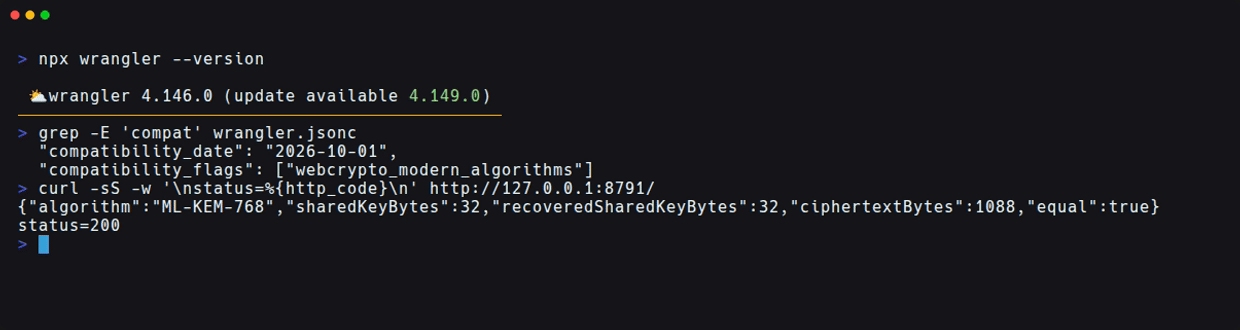
ciphertextBytes is the length of the encapsulation ciphertext. The shared secret's 32 bytes and the ciphertext's 1,088 bytes match the ML-KEM-768 sizes listed in FIPS 203. equal: true indicates that the shared secrets on the generating side and the recovering side matched in every byte.
What happens without the flag
For comparison, I saved a configuration for the same project with only the flag omitted. I used a different port and ran the same src/index.js.
{
  "name": "mlkem-local-tip-control",
  "main": "src/index.js",
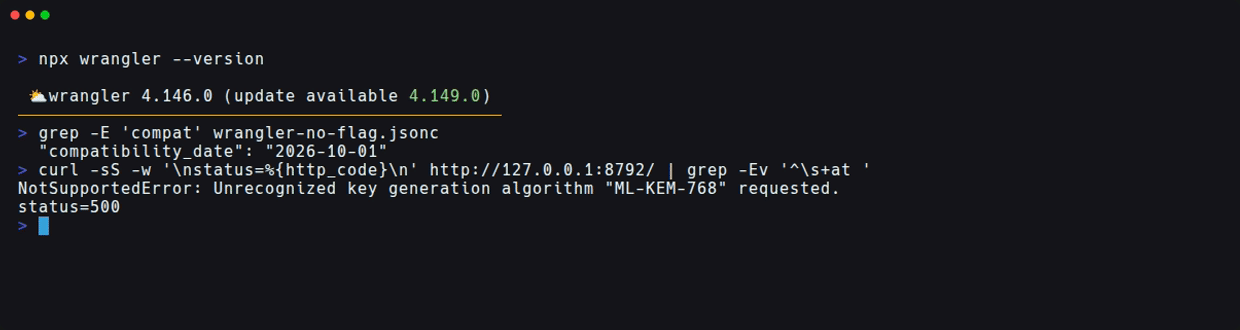
  "compatibility_date": "2026-10-01"
}
WRANGLER_SEND_METRICS=false npx wrangler dev --config wrangler-no-flag.jsonc --local --ip 127.0.0.1 --port 8792 --show-interactive-dev-session=false
After startup, I ran the following in another terminal.
curl -sS -w '\nstatus=%{http_code}\n' http://127.0.0.1:8792/
The result was HTTP 500, and the following error occurred at the generateKey() call (line 4 of src/index.js). The path in the stack trace is the working directory inside the test container (the image was captured with the stack trace lines omitted).
NotSupportedError: Unrecognized key generation algorithm "ML-KEM-768" requested.
    at Object.fetch (file:///work/proj/src/index.js:4:41)
| Condition (code and compatibility date are the same) | Observed result |
|---|---|
| With flag | HTTP 200, shared secrets match |
| Without flag | HTTP 500, NotSupportedError at key generation |
When you've finished the verification, press Ctrl+C in the terminal where each wrangler dev was started to stop it.
What the local verification confirmed
What I confirmed this time is key generation, encapsulation, and decapsulation with ML-KEM-768. The execution environment was the local workerd used by Wrangler 4.146.0 and 4.149.0. I have not tried an environment deployed to Cloudflare, communication with other clients, execution on macOS or Windows, or ML-KEM-1024.
The official supported algorithms table says ML-KEM-768 and ML-KEM-1024 are available and ML-KEM-512 is not. Also, the compatibility flags documentation does not state a date on which this flag becomes enabled by default. The supported algorithms page states that the API is based on a draft still under development and may change in the future.
Summary
ML-KEM is a standard method for establishing a shared secret that is considered hard to break even with quantum computers. It is already used by default in the TLS of major browsers, and on Workers too, enabling the flag lets you call it directly from application code.
To try ML-KEM-768 in Web Crypto on Cloudflare Workers, in addition to compatibility_date, specifying the webcrypto_modern_algorithms flag was required. With the flag set, everything from key generation to decapsulation worked in local wrangler dev, and I could confirm that the shared secrets match. Before incorporating ML-KEM into existing Web Crypto code, it seems a good idea to use this minimal code to check that it works with the combination of runtime and flag you will use.