
Xcode 26 + UIDesignRequiresCompatibility environment has an issue with misaligned tap positions on UISegmentedControl

This page has been translated by machine translation. View original
Currently, I am working on validating the update of the development environment to Xcode 26. The implementation of Liquid Glass is still under discussion, and we've decided to release with UIDesignRequiresCompatibility set to YES (which disables liquid glass) for now.
During this process, I discovered a bug where tap positions on UISegmentedControl are not being recognized correctly. This article reports the details and reproduction conditions of this bug.
Bug Overview
When tapping an unselected UISegmentedControl, there is a discrepancy between where you tap and which segment actually gets selected.
Specifically, when tapping the rightmost segment (index: 3), the leftmost segment (index: 0) gets selected instead.
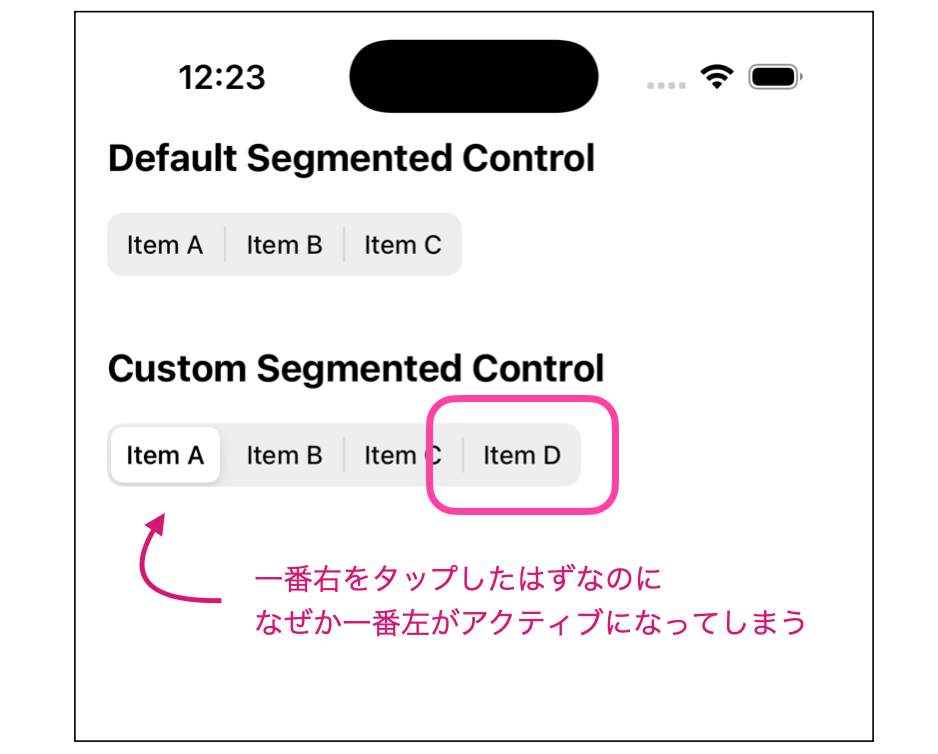
Test Environment
- MacBook Pro (16-inch, 2023), Apple M2 Pro
- macOS 15.7.3
- Xcode 26.1.1, 26.2
- iOS 18.5, 26.2
- iPhone 16 Pro Simulator and physical device
Conditions for Occurrence
This bug occurs when all of the following conditions are met:
- Building with Xcode 26.x
- Setting
UIDesignRequiresCompatibilitytoYES - Positioning UISegmentedControl with Auto Layout, left-aligned
- Dynamically changing the display items of UISegmentedControl
The fourth condition is particularly important. The issue does not occur with statically configured segments in Storyboard, but only when segments are added dynamically using insertSegment(withTitle:at:animated:).
Steps to Reproduce
1. Project Setup
I've prepared a minimal reproduction project.
2. CustomSegmentedControl Implementation
Extend UISegmentedControl and add a method to dynamically set segments.
import UIKit

class CustomSegmentedControl: UISegmentedControl {

    func setSegments(titles: [String]) {
        removeAllSegments()
        titles.forEach { title in
            insertSegment(
                withTitle: title,
                at: numberOfSegments,
                animated: false
            )
        }
    }
}
3. ViewController Implementation
Place two UISegmentedControl on the Storyboard and connect them via IBOutlet.
import UIKit

class ViewController: UIViewController {

    // Top SegmentedControl (standard)
    @IBOutlet weak var topSegmentedControl: UISegmentedControl!

    // Bottom SegmentedControl (custom)
    @IBOutlet weak var bottomSegmentedControl: CustomSegmentedControl!

    override func viewDidLoad() {
        super.viewDidLoad()

        // Set to unselected state
        topSegmentedControl.selectedSegmentIndex = UISegmentedControl.noSegment

        // Set segments using custom method
        bottomSegmentedControl.setSegments(
            titles: ["Item A", "Item B", "Item C", "Item D"]
        )
        bottomSegmentedControl.selectedSegmentIndex = UISegmentedControl.noSegment
    }
}
4. Info.plist Configuration
Set UIDesignRequiresCompatibility to YES.
<key>UIDesignRequiresCompatibility</key>
<true/>
5. Verification
- Launch the app
- Tap the right edge of
CustomSegmentedControl("Item D") - The left edge ("Item A") gets selected instead
Expected vs. Actual Behavior
| Expected Behavior | Actual Behavior | |
|---|---|---|
| Tap on right edge | "Item D" (index: 3) gets selected | "Item A" (index: 0) gets selected |
Possible Cause
When UIDesignRequiresCompatibility is set to YES, compatibility processing is performed with iOS 26's new design system. In this compatibility processing, I suspect that the hit test area for dynamically added segments is not being calculated correctly.
Workarounds
The workarounds I've confirmed so far are as follows:
Workaround 1: Set UIDesignRequiresCompatibility to NO
If application requirements allow, setting UIDesignRequiresCompatibility to NO can avoid this issue.
<key>UIDesignRequiresCompatibility</key>
<false/>
However, this will apply iOS 26's new design, which could affect the entire UI. As mentioned earlier, according to our migration plan, we cannot adopt this method yet as we're not ready to set this flag to NO.
Workaround 2: Use Static Segments
Define segments statically in Storyboard and avoid dynamic changes from code. This won't work if you need to change segments dynamically.
Methods Tried but Unsuccessful
Calling layoutIfNeeded()
I thought calling layoutIfNeeded() after adding segments might solve the issue, but unfortunately, this approach didn't work:
bottomSegmentedControl.setSegments(titles: ["Item A", "Item B", "Item C", "Item D"])
bottomSegmentedControl.layoutIfNeeded()
Summary
I've confirmed a bug in iOS 26 / Xcode 26 environment where the tap position on UISegmentedControl is misaligned.
Conditions for occurrence:
- Built with Xcode 26.x
UIDesignRequiresCompatibility= YES- Positioned with Auto Layout
- Segments set dynamically
This bug has been reported via Feedback Assistant. I hope this information helps other developers encountering similar issues.
This article reflects information as of iOS 26 / Xcode 26.2. The issue may be fixed in future updates.
Related Links
- GitHub Repository
- Apple Developer Forums: 813511
- Feedback Assistant: FB21712773