About Zendesk's Advance Notice of API Token Authentication Deprecation - How to Investigate the Impact Scope and Trying the OAuth Migration

This page has been translated by machine translation. View original
Introduction
Zendesk is deprecating API tokens as an authentication method for API requests.
All API tokens will be permanently disabled on April 30, 2027. Only Support API tokens are affected; messaging and Chat tokens are not in scope.
Starting July 28, 2026, tokens that have not been used for 30 days will be automatically deactivated, and after October 27, 2026, it will no longer be possible to create new API tokens. Integrations with long execution intervals, such as monthly batches, will stop working before the final deadline.
The migration target is OAuth. For some webhooks, it is noted that migrating to action flows may be easier than migrating to OAuth.
This article covers how to determine whether your organization is affected and the results of actually migrating to OAuth and making API calls.
Target Audience
- Those operating integrations that use Zendesk API tokens
- Zendesk administrators who want to determine whether their organization is affected
Verification Environment
- Zendesk verification instance
- OAuth client type: Confidential
- Grant: Client Credentials
- API calls: curl
- Verification date: August 19, 2026
References
- API リクエストの認証方法としての API トークンの提供終了に関するお知らせ (公式アナウンス、日本語)
- Announcing the removal of API tokens as an authentication method for API requests (同、英語)
- Migrating from API tokens to OAuth access tokens (開発者ドキュメント)
Background: Deprecation Schedule
The official documentation states that the deprecation will take place in the following 3 phases.
| Date | What Happens |
|---|---|
| 2026-07-28 | Tokens unused for 30 or more days are deactivated in bulk. Going forward, tokens unused for 30 days are automatically deactivated, and tokens that remain inactive for 60 days are permanently deleted. Accounts created on or after this date cannot create or use API tokens |
| 2026-10-27 | Existing accounts will no longer be able to create new API tokens from either the admin panel or the API. Existing active tokens can be used until April 30, 2027 |
| 2027-04-30 | All remaining tokens are permanently disabled. They cannot be reactivated. The API token management page will also be removed from the Admin Center |
The APIs in scope include the Ticket Management API, Help Center API, and Voice API. Items that will stop working if migration is not completed in time include webhooks that call back to your own Zendesk account, custom scripts for automation and data synchronization, third-party integrations built by external developers, and middleware workflows where agents do not directly interact with the Zendesk interface.
Investigating Whether You Are Affected
Open "Apps and Integrations > API > API Tokens" in the Admin Center. A deprecation notice banner and a list of registered tokens will be displayed.
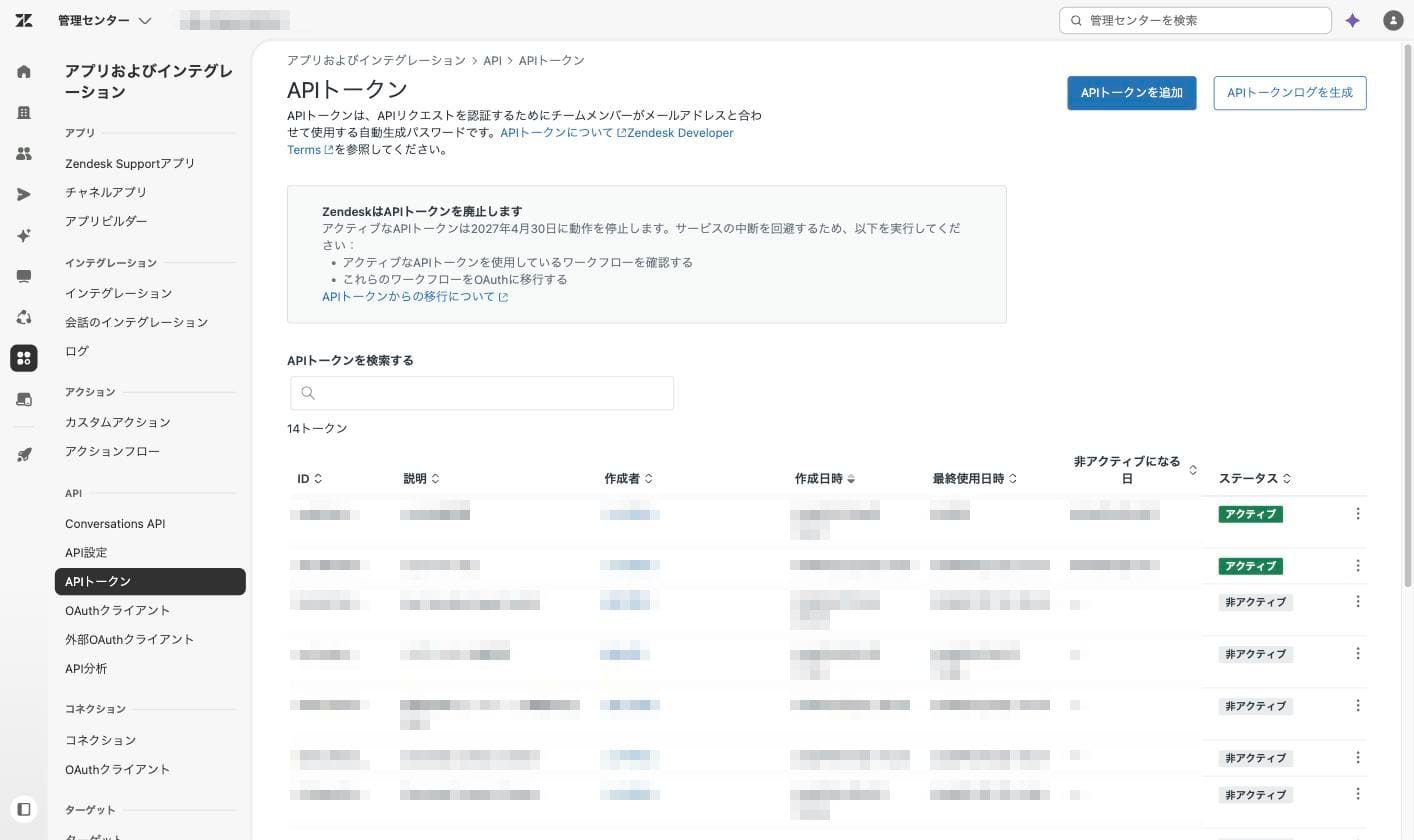
The columns in the list are "ID," "Description," "Created by," "Created date," "Last used date," "Date becoming inactive," and "Status." The column to pay attention to is "Date becoming inactive." If a date appears there, the token will stop working on that date if no action is taken.
Verification: Migrating to OAuth
The following describes the actual steps to migrate to OAuth. Assuming server-to-server integration without user authorization, the client credentials flow is used.
Creating an OAuth Client
Open "Apps and Integrations > API > OAuth Clients" in the Admin Center and select "Add OAuth Client."
For the client type, choose either Public or Confidential. Public is for clients running in environments where credentials cannot be stored securely, such as mobile apps or web apps. In this case, use of PKCE is required. Confidential is for clients running on servers where credentials can be stored securely. Since only Confidential supports the client credentials flow, Confidential was selected this time.
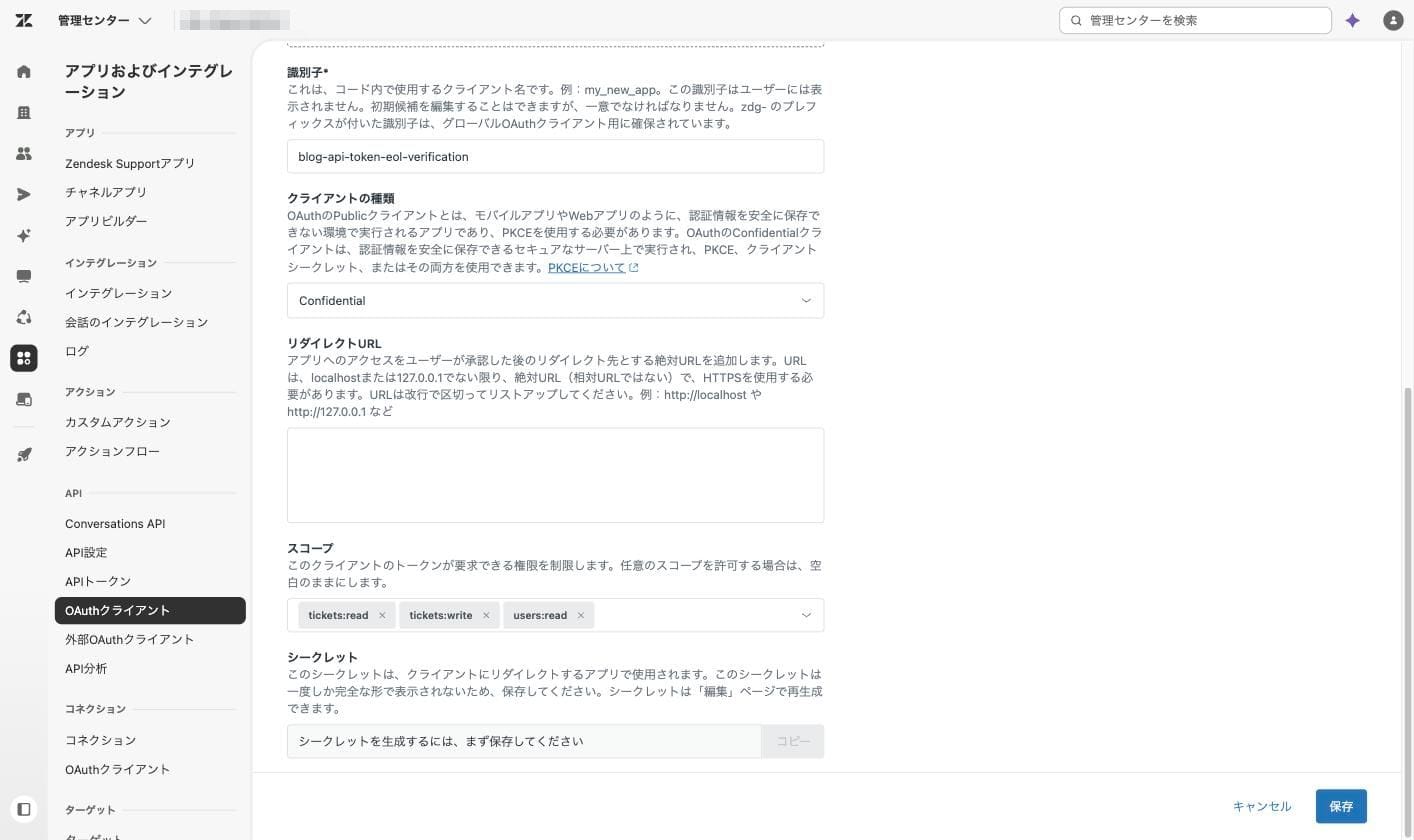
The "Scopes" field specifies the maximum permissions this client can request. Leaving it blank allows any scope to be requested, so only the necessary ones should be selected. This time, three scopes were chosen: tickets:read, tickets:write, and users:read.
Upon saving, a secret is issued. It cannot be viewed again later. Make a note of it immediately. If you forget to do so, it can be regenerated from the "Regenerate" option on the edit screen.
Obtaining an Access Token
Send the client ID and secret to /oauth/tokens.
curl -X POST "https://{subdomain}.zendesk.com/oauth/tokens" \
  -H "Content-Type: application/x-www-form-urlencoded" \
  --data-urlencode "grant_type=client_credentials" \
  --data-urlencode "client_id={client ID}" \
  --data-urlencode "client_secret={secret}" \
  --data-urlencode "scope=tickets:read users:read"
The response was as follows.
{
  "access_token": "eyJraWQi...",
  "token_type": "bearer",
  "expires_in": 1800,
  "scope": "tickets:read users:read"
}
expires_in is 1800 seconds, or 30 minutes. The client credentials flow does not return a refresh token. When the token expires, run the same request again to obtain a new token.
Rewriting the API Request
Only the authentication portion changes.
# Before migration: Basic authentication with API token
curl "https://{subdomain}.zendesk.com/api/v2/tickets.json" \
  -u "{email address}/token:{API token}"

# After migration: OAuth access token
curl "https://{subdomain}.zendesk.com/api/v2/tickets.json" \
  -H "Authorization: Bearer {access token}"
Both returned HTTP 200 and retrieved the same tickets. Only the authentication header needs to be rewritten; the endpoint and response format remain unchanged.
What Happens When Scopes Are Insufficient
When attempting to create a ticket with a token that only has tickets:read, HTTP 403 was returned with the following response.
{"error":"Forbidden","description":"You are missing the following required scopes: tickets:write, write"}
The missing scope names are included in the response. This means you can add the necessary scopes as you go, without having to enumerate all the endpoints being called in advance.
On the other hand, if a request exceeds the scope limit configured for the OAuth client, HTTP 400 is returned at the token acquisition stage.
{"error":"invalid_scope","error_description":"The requested scope is invalid, unknown, malformed, or exceeds the previously granted scope."}
organizations:read is a valid scope that exists in the scope list, but since it was not included in this client's limit, it was rejected and no token was issued.
Whether 403 or 400 is returned indicates where the fix should be made. For 403, review the scope specification in the token request; for 400, review the client configuration in the Admin Center.
Verifying Who Is Executing the Request
GET /api/v2/users/me.json was called using the obtained token.
{
  "id": 11950397250831,
  "name": "Verification admin",
  "role": "admin"
}
No user credentials were sent in this request whatsoever. Only the client ID and secret were sent. Even so, the request was treated as being made by the admin who created the OAuth client.
When an actual ticket was created, the same ID appeared in both requester_id and submitter_id.
{
  "id": 2400,
  "requester_id": 11950397250831,
  "submitter_id": 11950397250831,
  "via": { "channel": "api" }
}
Summary
Zendesk API tokens will be completely shut down on April 30, 2027. The migration itself is not difficult if it only involves rewriting the authentication header. More importantly, it is worth deciding in advance how the change in executing user and the implementation of token renewal will be handled. Note that the content of this article is based on the official documentation and verification environment as of August 19, 2026.