Adding classification functionality "for free" to LLM pipelines with asyncio.gather

This page has been translated by machine translation. View original
Introduction
When operating a RAG system, the need to "classify user inquiries" often arises to improve search accuracy. Identifying the target software, classifying the problem category, determining the escalation destination——with this information, you can rerank search results and inject context into prompts.
However, making an additional LLM call for classification increases latency. Many teams struggle with the question of whether classification is worth sacrificing user-perceived response speed.
In this article, I'll introduce a pattern using Python's asyncio.gather() to run lightweight LLM classification in parallel behind the I/O wait time of KB searches, adding classification functionality with zero latency increase. This is a technique actually adopted in the development of a service desk AI.
Prerequisites & Environment
- Python 3.12 + FastAPI
- Amazon Bedrock (Claude Haiku 4.5 / Claude Sonnet 4.5)
- OpenSearch Serverless (vector search)
- Anthropic Python SDK (
anthropic[bedrock])
Pipeline Overview
First, let me show the overall structure of the RAG pipeline covered in this article.
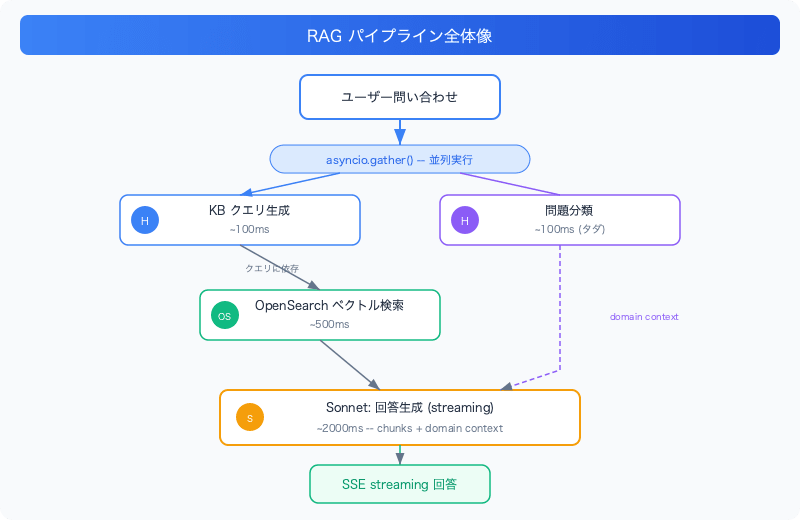
The key is the dependency relationships between two Haiku calls (query generation + problem classification) and the OpenSearch search.
- Query generation and problem classification are mutually independent (both take the user's raw text as input)
- OpenSearch depends on the results of query generation
- The final answer depends on all results
This dependency graph reveals where parallelization is possible.
What Happens with Sequential Execution
With naive sequential execution, it looks like this.
# Sequential execution (naive implementation)
kb_query = await generate_kb_query(messages)          # ~100ms
problem_ctx = await classify_problem(raw_query)       # ~100ms
chunks = await retrieve_from_kb(kb_query, top_k=5)    # ~500ms
# Total: ~700ms (overhead before answer generation)
Classification adds 100ms. It's "just 100ms," but in chat UIs sensitive to response time, it affects perceived performance.
Parallelizing with asyncio.gather
With asyncio.gather(), you can run independent async functions simultaneously.
First Turn: Parallelizing Query Generation and Classification
On the first turn, query generation and classification are executed simultaneously from the user's raw text.
async def _chat_stream(request: ChatRequest) -> AsyncGenerator[str]:
    is_first_turn = not any(m.role == "assistant" for m in request.messages)

    if is_first_turn:
        # 2 Haiku calls in parallel: query generation + problem classification
        kb_query, problem_ctx = await asyncio.gather(
            generate_kb_query(request.messages),
            classify_problem(request.messages[0].content),
        )
        # KB search depends on query generation results, so run sequentially here
        chunks = await retrieve_from_kb(kb_query, top_k=request.top_k)
        # ※ From here, generate streaming answer using chunks and problem_ctx (yield)
asyncio.gather() schedules the passed coroutines simultaneously and waits until all of them complete. The return value is a list in the same order as the arguments.
Second Turn Onward: Parallelizing KB Search and Classification
From the second turn onward, query generation requires conversation context (answers to clarifying questions), so query generation runs first. Instead, KB search and classification are parallelized.
    else:
        # Turn 2+: query generation needs conversation context, so run first
        kb_query = await generate_kb_query(request.messages)

        # Parallelize KB search (I/O bound) and classification (CPU bound)
        chunks, problem_ctx = await asyncio.gather(
            retrieve_from_kb(kb_query, top_k=request.top_k),
            classify_problem(kb_query),
        )
The key point is that the combination of what's parallelized changes depending on the turn. The principle is to accurately understand dependencies and only gather processes that are independent at that point in time.
Why It's "Free"
The reason this pattern is effective lies in the asymmetry of bottlenecks.
| Process | Model | Typical Latency | Nature |
|---|---|---|---|
| Query generation | Haiku | ~100ms | LLM inference (lightweight) |
| Problem classification | Haiku | ~100ms | LLM inference (lightweight) |
| KB search | OpenSearch | ~500ms | Network I/O |
| Answer generation | Sonnet | ~2000ms | LLM inference (heavyweight) |
When running in parallel with asyncio.gather(), the slowest process determines the overall latency.
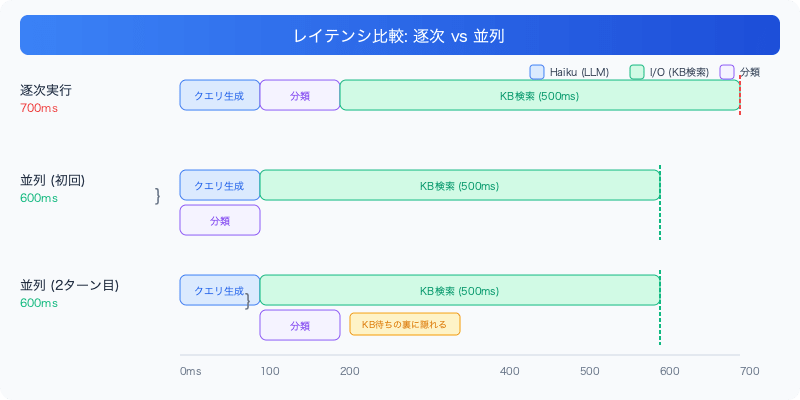
On the second turn, KB search and classification run in parallel after query generation (100ms). Since the classification latency is completely hidden behind the KB search, the total latency doesn't change whether or not classification is added. Both patterns complete in 600ms compared to 700ms with sequential execution.
Classification Function Implementation
Let's look at the implementation of the classification function classify_problem().
from pydantic import BaseModel, Field

class ProblemClassification(BaseModel):
    """Classification results for problem domain and category"""
    software: str | None = Field(
        None,
        description="Target software name (e.g., Exchange Online, SAP)"
    )
    category: str | None = Field(
        None,
        description=(
            "Problem category: Authentication/Login / Permissions/Access / "
            "Installation/Updates / Performance / Data/Files / "
            "Settings/Configuration / Other"
        ),
    )
The schema for classification results is defined with a Pydantic model. The description in Field is used directly as the tool use schema passed to the LLM.
async def classify_problem(query: str) -> ProblemClassification:
    """Classifies the problem domain and category.
    Executed in parallel with KB search via asyncio.gather, so zero latency increase.
    """
    tool_schema = ProblemClassification.model_json_schema()

    try:
        response = await _client.messages.create(
            model=settings.bedrock_haiku_model_id,  # Haiku 4.5
            messages=[{"role": "user", "content": query}],
            system=(
                "Analyze the service desk inquiry and identify "
                "the target software and problem category. "
                "Return null if unknown."
            ),
            max_tokens=100,
            temperature=0.0,
            tools=[{
                "name": "classify_problem",
                "description": "Classify the target software and problem category of an inquiry",
                "input_schema": tool_schema,
            }],
            tool_choice={"type": "tool", "name": "classify_problem"},
        )
        for block in response.content:
            if block.type == "tool_use" and block.name == "classify_problem":
                return ProblemClassification(**block.input)
        return ProblemClassification(software=None, category=None)
    except Exception:
        logger.warning("classify_problem failed silently", exc_info=True)
        return ProblemClassification(software=None, category=None)
There are three important design points.
1. Guaranteed Structured Output via Tool Use
By specifying tool_choice={"type": "tool", "name": "classify_problem"}, the LLM always returns JSON conforming to the specified schema. Unlike the approach of parsing with json.loads() and validating, there are no issues with markdown fence contamination or JSON truncation.
2. Failures Don't Stop the Main Flow
Classification is merely supplementary information that's "nice to have." If an exception occurs, the default values (software=None, category=None) are returned, and the main RAG flow continues as normal. By default, asyncio.gather() raises an exception for the entire gather if any coroutine raises one, but since this implementation catches exceptions internally, the gather will never be interrupted.
3. Haiku + Short max_tokens
Since classification only extracts 2 fields, max_tokens=100 is sufficient. Using a lightweight model (Haiku) × short output minimizes both latency and cost.
Utilizing Classification Results: Domain Context Injection
Classification alone is meaningless. Value is only created by injecting results into the main LLM's prompt.
def _build_domain_context(
    ticket_sw_map: dict[int, str],
    problem_ctx: ProblemClassification,
) -> str:
    """Builds domain context to inject into Sonnet's prompt"""
    # Prioritize software information extracted from KB chunks
    sw_counts = Counter(ticket_sw_map.values())
    kb_software = [sw for sw, _ in sw_counts.most_common(2)]
    systems = kb_software or (
        [problem_ctx.software] if problem_ctx.software else []
    )

    return (
        f"\n\n## Domain Context (System Automatic Analysis)\n"
        f"- Target System: {'、'.join(systems) or 'Unknown'}\n"
        f"- Problem Category: {problem_ctx.category or 'Unknown'}"
    )
Having this domain context injected into Sonnet's (the answer generation model's) prompt resulted in the following improvements.
- Reduction of redundant clarifying questions: "Can't log in to Exchange Online" → Sonnet doesn't ask about the system, but asks about specific symptoms like error codes
- Optimized questions based on category: For the "Authentication/Login" category it asks for "error codes," for "Permissions/Access" it asks "what operation fails"
- Automatic escalation destination determination: Searches for the system owner from the software name and includes it in the response
Prioritizing Evidence from KB Chunks
There's another implementation detail I care about. There are two sources for determining the software name, and they differ in reliability.
# Extract software names from KB chunks via regex (based on actual data)
ticket_sw_map = _extract_software_from_chunks(chunks)

# Haiku classification (inferred from query text only)
_ctx_sw = problem_ctx.software

# Prioritize KB evidence, fall back to Haiku classification if absent
_kb_sw = [
    sw for sw, _ in Counter(ticket_sw_map.values()).most_common()
    if sw not in _GENERIC_SW
]
dominant_sw = _kb_sw[0] if _kb_sw else _ctx_sw
Software names extracted from KB chunks are evidence based on actual ticket data. On the other hand, Haiku classification is inference from query text alone, carrying a risk of misclassification. Therefore, the fallback priority is: KB evidence → Haiku classification → None.
Caveats When Using asyncio.gather
Wrap Blocking Functions with to_thread
When using synchronous libraries like boto3 or opensearch-py for KB search, not wrapping them with asyncio.to_thread() will block the event loop.
async def retrieve_from_kb(query: str, top_k: int = 5) -> list[dict]:
    def _blocking() -> dict:
        client = get_opensearch_client()
        return client.search(index=index_name, body=search_body)

    # Run the synchronous function in a thread pool to avoid blocking the event loop
    response = await asyncio.to_thread(_blocking)
    return _parse_response(response)
If you forget this, even though you think you're parallelizing with asyncio.gather(), the blocking function will stop other coroutines and the parallelization effect will be lost.
Decide on an Error Handling Strategy
asyncio.gather() has a return_exceptions parameter.
# Default: if even one exception occurs, the entire gather raises an exception
results = await asyncio.gather(task_a(), task_b())

# return_exceptions=True: exceptions are included in results
results = await asyncio.gather(task_a(), task_b(), return_exceptions=True)
In this implementation, classify_problem() catches exceptions internally and returns default values. This makes the calling code simpler and type-safe. Using return_exceptions=True makes the return value a union type of Exception | T, requiring isinstance checks.
Supplement: Correspondence with JavaScript's Promise.all
asyncio.gather() is nearly the same concept as JavaScript's Promise.all(). Here's a correspondence table for implementing the same pattern in Node.js.
// Python: await asyncio.gather(task_a(), task_b())
const [kbQuery, problemCtx] = await Promise.all([
  generateKbQuery(messages),
  classifyProblem(rawQuery),
])
asyncio.gather() |
Promise.all() |
|
|---|---|---|
| Basic behavior | Runs all coroutines concurrently, waits for all to complete | Runs all Promises concurrently, waits for all to complete |
| Return value | List in argument order | Array in argument order |
| On error | One failure raises exception for all (default) | One failure rejects all |
| Collecting errors | return_exceptions=True |
Use Promise.allSettled() |
| Concurrency model | Single-thread event loop | Single-thread event loop |
The pattern in this article of "hiding lightweight LLM calls behind I/O-bound processing" can be applied as-is in Node.js. As long as the bottleneck is network I/O, the same principle applies regardless of language to obtain "free" processing time.
Summary
- By using
asyncio.gather()to hide lightweight LLM calls behind I/O-bound processing, classification functionality can be added with zero latency increase - The basis for parallelization decisions is the dependency graph: only gather processes that are mutually independent
- Classification functions should be designed so that failures don't stop the main flow (because it's supplementary information)
- Synchronous libraries must be wrapped with
asyncio.to_thread(), otherwise parallelization won't work - Classification results are utilized by injecting context into prompts, leading to improved clarifying question quality and automatic escalation destination determination
This pattern is not limited to "classification" — it can be applied broadly to any lightweight preprocessing that can be done during the I/O wait time of the main process. Summary generation, language detection, tone analysis——as long as the bottleneck is I/O, asyncio.gather() can obtain "free" processing time.