
Trying Automatic Caching of Aurora PostgreSQL Query Results in ElastiCache for Valkey with the Remote Query Cache Plugin of AWS Advanced JDBC Wrapper 4.0.1

This page has been translated by machine translation. View original
I'm Ishikawa from the Cloud Business Division. I heard that with the Remote Query Cache Plugin added in AWS Advanced JDBC Wrapper 4.0.1, you can automatically cache SELECT results in Amazon ElastiCache for Valkey just by adding a SQL comment hint, so I tried it out against Aurora PostgreSQL.
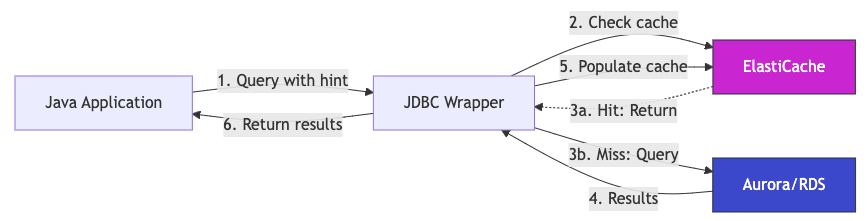
On May 19, 2026, the AWS Database Blog published "Automated JDBC query caching with the AWS Advanced JDBC Wrapper". It is an article introducing the Remote Query Cache Plugin introduced in AWS Advanced JDBC Wrapper 4.0.1. With almost no changes to the application code, simply adding a /* CACHE_PARAM(ttl=...) */ comment to your SQL lets you cache the results in Amazon ElastiCache for Valkey.
Until now, query result caching has tended to be implemented by mixing code that calls Redis clients such as Jedis or Lettuce into the business logic, and both selecting the target queries and refactoring the application were heavy tasks. The Remote Query Cache Plugin is built into the connection layer as a JDBC Wrapper plugin, so it is said to be distinctive in that you can add a cache layer without touching the code that executes Statements.
What is the Remote Query Cache Plugin?
The Remote Query Cache Plugin is a read-through cache plugin that is enabled simply by specifying remoteQueryCache in the JDBC Wrapper's wrapperPlugins. When you write a comment hint such as /* CACHE_PARAM(ttl=300s) */ in your SQL, the result set of that SELECT is stored in Valkey using the database user name, schema name, and SQL string as the key, and subsequent identical queries are returned directly from Valkey. If the cache backend does not respond, it is designed to fall back to the database to obtain the result.
The main specifications that can be read from the official documentation are as follows.
- Supported databases: PostgreSQL / MySQL / MariaDB (via JDBC)
- The maximum TTL is 180 days (indefinite caching is not possible)
- Retrieval of CLOB / BLOB is not supported
- IAM authentication, TLS connections, health checks, and CloudWatch-like metrics are built in
In addition to the plugin itself, you need to separately add io.valkey:valkey-glide 2.3.0 or later and org.apache.commons:commons-pool2 2.11.1 or later to the classpath as runtime dependencies.
Trying it out
Prerequisites
- An AWS account (verification was done in the Tokyo region, ap-northeast-1)
- Aurora PostgreSQL in the same VPC (this time Serverless v2, engine 16.4, 0.5–1.0 ACU) and ElastiCache for Valkey Serverless (engine 8)
- The application runs from an EC2 instance in the VPC (t3.small, Amazon Linux 2023)
- Build and execution use OpenJDK 21 + Maven 3.8.4 (the compiler targets Java 17)
Since the main purpose of this verification is not performance comparison, Aurora and Valkey are set up in minimal configurations, and I proceed with a products table containing 100 rows of data.
Verified: Preparing Aurora and Valkey
I created the Aurora cluster, the Aurora instance, and ElastiCache Valkey Serverless in sequence. Since this is for verification, backup retention and deletion protection are disabled.
% aws rds create-db-cluster \
  --db-cluster-identifier blog-jdbc-aurora \
  --engine aurora-postgresql --engine-version 16.4 \
  --master-username blogadmin --master-user-password '***' \
  --database-name sampledb \
  --db-subnet-group-name blog-jdbc-dbsng \
  --vpc-security-group-ids sg-xxxxxxxx \
  --serverless-v2-scaling-configuration MinCapacity=0.5,MaxCapacity=1.0 \
  --no-deletion-protection --backup-retention-period 1 --storage-encrypted

% aws rds create-db-instance \
  --db-instance-identifier blog-jdbc-aurora-1 \
  --db-cluster-identifier blog-jdbc-aurora \
  --engine aurora-postgresql --db-instance-class db.serverless
% aws elasticache create-serverless-cache \
  --serverless-cache-name blog-jdbc-cache \
  --engine valkey --major-engine-version 8 \
  --security-group-ids sg-xxxxxxxx \
  --subnet-ids subnet-xxxxxxxx subnet-yyyyyyyy
After logging in to EC2 and confirming that I could connect from a PostgreSQL client, I create the test table.
dev=# CREATE TABLE products (
  id    INTEGER PRIMARY KEY,
  name  TEXT NOT NULL,
  price INTEGER NOT NULL
);
CREATE

dev=# INSERT INTO products (id, name, price)
SELECT
  g,
  'product-' || lpad(g::text, 4, '0'),
  (g * 17 + 100)
FROM generate_series(1, 100) AS g;

INSERT 0 100
 row_count
-----------
       100
(1 row)
Verified: Maven project and Java sample
In the Maven project's pom.xml, I declare the PostgreSQL driver, commons-pool2, and valkey-glide in addition to the JDBC Wrapper itself. At first I forgot valkey-glide and got ClassNotFoundException: glide.api.GlideClient at startup, so be sure to add it.
<?xml version="1.0" encoding="UTF-8"?>
<project xmlns="http://maven.apache.org/POM/4.0.0">
  <modelVersion>4.0.0</modelVersion>
  <groupId>example</groupId>
  <artifactId>jdbc-cache-demo</artifactId>
  <version>1.0.0</version>
  <packaging>jar</packaging>

  <properties>
    <maven.compiler.source>17</maven.compiler.source>
    <maven.compiler.target>17</maven.compiler.target>
    <project.build.sourceEncoding>UTF-8</project.build.sourceEncoding>
  </properties>

  <dependencies>
    <dependency>
      <groupId>software.amazon.jdbc</groupId>
      <artifactId>aws-advanced-jdbc-wrapper</artifactId>
      <version>4.0.1</version>
    </dependency>
    <dependency>
      <groupId>org.postgresql</groupId>
      <artifactId>postgresql</artifactId>
      <version>42.7.4</version>
    </dependency>
    <dependency>
      <groupId>org.apache.commons</groupId>
      <artifactId>commons-pool2</artifactId>
      <version>2.12.0</version>
    </dependency>
    <dependency>
      <groupId>io.valkey</groupId>
      <artifactId>valkey-glide</artifactId>
      <classifier>linux-x86_64</classifier>
      <version>2.3.0</version>
    </dependency>
  </dependencies>

  <build>
    <plugins>
      <plugin>
        <groupId>org.codehaus.mojo</groupId>
        <artifactId>exec-maven-plugin</artifactId>
        <version>3.4.1</version>
        <configuration>
          <mainClass>example.App</mainClass>
        </configuration>
      </plugin>
    </plugins>
  </build>
</project>
The Java code for verification is simple: it creates one connection with wrapperPlugins=remoteQueryCache specified, then runs a SELECT without a hint twice and a SELECT with a hint twice.
package example;

import java.sql.Connection;
import java.sql.DriverManager;
import java.sql.ResultSet;
import java.sql.Statement;
import java.util.Properties;

public class App {

    public static void main(String[] args) throws Exception {
        String jdbcUrl = System.getenv("JDBC_URL");
        String dbUser = System.getenv("DB_USER");
        String dbPassword = System.getenv("DB_PASSWORD");
        String cacheEndpoint = System.getenv("CACHE_ENDPOINT");

        Properties props = new Properties();
        props.setProperty("user", dbUser);
        props.setProperty("password", dbPassword);
        props.setProperty("wrapperPlugins", "remoteQueryCache");
        props.setProperty("cacheEndpointAddrRw", cacheEndpoint);
        props.setProperty("cacheUseSSL", "true");
        props.setProperty("cacheConnectionTimeoutMs", "10000");

        try (Connection conn = DriverManager.getConnection(jdbcUrl, props)) {
            String hintQuery =
                "/* CACHE_PARAM(ttl=300s) */ SELECT id, name, price FROM products WHERE id < 10 ORDER BY id";
            String plainQuery =
                "SELECT id, name, price FROM products WHERE id < 10 ORDER BY id";

            System.out.println("=== Query A (no hint, executed twice) ===");
            runAndReport(conn, plainQuery, "A-1");
            runAndReport(conn, plainQuery, "A-2");

            System.out.println();
            System.out.println("=== Query B (CACHE_PARAM hint, executed twice) ===");
            runAndReport(conn, hintQuery, "B-1 (miss expected)");
            Thread.sleep(1500);
            runAndReport(conn, hintQuery, "B-2 (hit expected)");
        }
    }

    private static void runAndReport(Connection conn, String sql, String label) throws Exception {
        long t0 = System.nanoTime();
        int rows = 0;
        try (Statement stmt = conn.createStatement();
             ResultSet rs = stmt.executeQuery(sql)) {
            while (rs.next()) {
                rows++;
            }
        }
        long elapsedMs = (System.nanoTime() - t0) / 1_000_000;
        System.out.printf("[%s] rows=%d elapsed=%d ms%n", label, rows, elapsedMs);
    }
}
Maven build and execution
Resolve dependencies and compile. The first time, Maven fetches the JDBC Wrapper and valkey-glide from Maven Central, so it takes 3 to 5 minutes.
cd /opt/jdbc-cache-demo
mvn -q -DskipTests dependency:resolve compile
If there are no build errors and you are returned to the prompt, it was successful.
The JDBC URL scheme is jdbc:aws-wrapper:postgresql://..., and the plugin is enabled by passing wrapperPlugins=remoteQueryCache and cacheEndpointAddrRw in the Properties. After confirming that the environment variables have been exported, run it.
echo "JDBC_URL=${JDBC_URL}"
mvn -q exec:java
Verified: Checking the plugin's behavior
The results of running mvn exec:java twice on EC2 are as follows. The elapsed on each line is a millisecond value calculated on the client side from the difference of System.nanoTime().
=== Query A (no hint, executed twice) ===
[A-1] rows=9 elapsed=36 ms
[A-2] rows=9 elapsed=2 ms

=== Query B (CACHE_PARAM hint, executed twice) ===
WARNING: [HEALTHY?SUSPECT] blog-jdbc-cache-xxxxx.serverless.apne1.cache.amazonaws.com:6379 READ failed: CONNECTION - glide.api.models.exceptions.TimeoutException: Request timed out
WARNING: Failed to read result from cache. Treating it as a cache miss.
[B-1 (miss expected)] rows=9 elapsed=10381 ms
[B-2 (hit expected)] rows=9 elapsed=7 ms
Query A, without a hint, does not go through the cache and is executed as plain JDBC; the second run after warm-up took 2 ms, a value close to Aurora's bare responsiveness.
For Query B, with the hint, the initial connection setup of the Glide client took time on the first run, B-1, and the cache read timed out even after I extended cacheConnectionTimeoutMs to 10 seconds. After the timeout, only a WARNING log was output and no exception was thrown to the application; I could observe the fallback behavior of fetching the result from the database and returning it. In the next run, B-2, the result was returned in 7 ms, which is thought to be reading the entry written asynchronously in the background of B-1.
What I want to point out here is that, compared with Aurora's 2 ms after warm-up, B-2 on a Valkey hit at 7 ms is actually slower. This shows that "a cache is not necessarily always faster." I'll dig deeper in the discussion section.
Verified: CloudWatch metrics
When I checked the CloudWatch metrics on the Valkey side (AWS/ElastiCache, dimension clusterId=blog-jdbc-cache), 2 CacheMisses and 2 CacheHits were recorded in the time window of the verification.
## Valkey CacheHits (per minute)
| Sum |            Time              |
+-----+------------------------------+
|  2.0|  2026-05-20T03:13:00+09:00   |

## Valkey CacheMisses (per minute)
| Sum |            Time              |
+-----+------------------------------+
|  2.0|  2026-05-20T03:12:00+09:00   |
As a result of running it twice, B-1 occurred twice (= 2 misses) and B-2 occurred twice (= 2 hits), so the counts match, confirming that writes to and reads from Valkey are being performed by the plugin. NewConnections was recorded at 14 to 19 per minute, which also shows the behavior of Glide establishing multiple TCP connections each time the JVM starts.
Not verified: IAM authentication / Spring Boot integration / full-scale load testing
Due to constraints on verification time and sample scale, I could not verify these as of the writing of this article. According to the official documentation, ElastiCache IAM authentication is supported by specifying cacheName, cacheIamRegion, and cacheUsername, and it can also be used in Spring Boot applications simply by replacing the JDBC URL and properties in application.yml.
The aws-samples jdbc-caching-demo provides a performance comparison UI combining Spring Boot 3.4 and React 18, so it is a useful reference if you want to run a more full-scale load test.
Discussion
How to read the result that going through the cache was slower
The latency measurements this time were as follows.
| Measurement | Path | Observed value |
|---|---|---|
| A-2 | Aurora direct (after warm-up) | 2 ms |
| B-2 | Via Valkey (cache hit) | 7 ms |
A-2 was faster, and B-2 with the Remote Query Cache Plugin actually added about 5 ms of overhead. I think this is not a defect of the plugin, but a natural result of the verification query being "a query that is fast enough on Aurora alone."
This query is a SELECT that returns 9 rows from a 100-row table, and by the time A-1 ran, Aurora's buffer pool, plan cache, and connection were all warm. The 2 ms that Aurora returns in A-2 is roughly equal to "RTT within the VPC + result set serialization time," and it is structurally difficult to build a faster path than this. On the other hand, on a cache hit the following overhead is added.
- Cache key calculation by the plugin (hash of user / catalog / SQL)
- Issuing a GET to Valkey over TLS
- Passing through Glide's asynchronous processing wrapper
- Deserializing the retrieved bytes into a JDBC
ResultSet-compatible object
The straightforward interpretation of this result is that the sum of these came to about 5 ms, exceeding A-2. Conversely, unless the response from Aurora alone is well over 5 ms, it is hard for the plugin to deliver its benefits.
Cases where the Remote Query Cache Plugin works and doesn't work
Organizing this together with the official documentation, the following kinds of queries are a good fit.
Cases where the Remote Query Cache Plugin works
- The execution cost is heavy (multi-table JOINs, aggregations, sorts, window functions, or cases where full table scans are unavoidable)
- The result set is large, and Aurora-side I/O or network transfer dominates
- Concurrency is high, and you want to hold down the cost of adding Aurora reader instances
- The same query is issued repeatedly within the TTL (e.g., reference queries for master data or configuration)
- The application is far from Aurora in terms of AZ/region, so the DB round trip itself is long
Cases where the Remote Query Cache Plugin doesn't work / is actually slower
- As in this case, lightweight SELECTs that Aurora can return in a few milliseconds
- Queries whose result sets are extremely small, so that serialization/deserialization cost accounts for most of the response time
- Queries whose results change every time (the cache hit rate drops)
- Queries containing CLOB / BLOB (explicitly unsupported in the documentation)
- Long-term caching requirements exceeding the 180-day TTL
When introducing it, rather than thinking "just adding a cache makes things faster," the realistic order is to first observe plain Aurora, extract the queries that are bottlenecks, and then choose the CACHE_PARAM targets from among them.
Other operational considerations
- The Glide timeout that occurred in the first B-1 was reproduced even after I extended
cacheConnectionTimeoutMsfrom 2 seconds to 10 seconds, so cases where access to the cache is not ready in time right after JVM startup (cold start) are expected. However, it is reassuring that, thanks to the design of emitting a WARNING and falling back to the database, the application was still able to obtain the results. - A mistake in declaring dependencies can be noticed through
ClassNotFoundException, but the need to specify theclassifierofvalkey-glideto match the OS can easily cause trouble, so it would be wise to prepare an operation that switches the classifier for each CI/CD base image or runtime environment. - Because I connected without authentication this time, a WARNING "For better security, please use user/password based auth or IAM auth." was output at startup. In production, using IAM authentication or user/password is a prerequisite.
Conclusion
I tried the Remote Query Cache Plugin of AWS Advanced JDBC Wrapper 4.0.1 with a configuration of Aurora PostgreSQL Serverless v2 + ElastiCache for Valkey Serverless. Mechanisms that cache query results with a decorator approach sandwiched between JDBC drivers like this have existed for quite a long time. However, the big advantage is that the application-side code changes come down to just specifying wrapperPlugins and adding SQL hints, and it looks like it would work well for improving the responsiveness of rarely changing master-data queries.
The ability to use it in combination with other JDBC Wrapper plugins (failover, read/write splitting, Secrets Manager) is also attractive, and I felt it is especially worth considering for enterprise applications backed by Aurora.
Just between us, I also considered whether it could be used as a cache layer for Amazon Redshift Serverless, but because Redshift Serverless rejects the extra_float_digits=3 that the PostgreSQL JDBC Driver sends in the startup packet, it failed at the handshake before the Wrapper and Plugin features even came into play. I hope this article is helpful to someone.
