![[Update] Next-generation Amazon OpenSearch Serverless is now generally available, and since standby costs are now zero, I tried out vector search](https://images.ctfassets.net/ct0aopd36mqt/wp-thumbnail-b383cfad7452c18278d4772c71cae640/70681da1d5cfd4b8d3a7edcc29830075/amazon-opensearch-service?w=3840&fm=webp)
[Update] Next-generation Amazon OpenSearch Serverless is now generally available, and since standby costs are now zero, I tried out vector search

This page has been translated by machine translation. View original
This is Ishikawa from the Cloud Business Division. The next generation of Amazon OpenSearch Serverless has become generally available. According to AWS's announcement, the architecture has been redesigned with agentic AI workloads in mind, auto-scaling is up to 20 times faster compared to the previous generation, and up to 60% cost reduction is achievable compared to configurations that provision for peak load. I tried everything from Collection Group scale-to-zero to vector search.
The biggest feature is that the configuration now uses a shared storage layer with completely separated compute, eliminating the minimum OCU requirement and enabling "scale-to-zero" (scaling capacity down to zero during idle periods). It is designed for dynamic workloads where AI agents only spin up vector search or retrieval steps when needed.
What is Next-Generation OpenSearch Serverless
Introduction of Collection Groups
In the next-generation version, a new management unit called Collection Group has been introduced. A Collection Group is a container that manages the OCU (OpenSearch Compute Unit) capacity upper and lower limits at the group level, with multiple collections sharing that capacity. If no lower limit (minimum capacity) is specified, it becomes scale-to-zero, where OCUs scale down to zero after 10 minutes of inactivity and recover in approximately 10 seconds.
At launch, two collection types are supported: SEARCH for full-text search and VECTORSEARCH for vector search (the previous generation's TIMESERIES is not supported at launch). Indexing, search, storage, and Vector Index GPU acceleration are each metered and billed independently.
Separation of Storage and Compute
The biggest change is the separation of compute (OCU: OpenSearch Compute Unit) and storage, with the introduction of a distributed shared storage layer. This allows compute and storage to be scaled independently of each other.
| Item | Classic (Previous) | NextGen (Next Generation) |
|---|---|---|
| Minimum Capacity | 2 OCU (always running) | 0 OCU (scale-to-zero possible) |
| Storage | Local storage | Distributed shared storage |
During periods of low traffic, compute scales down to zero, and spins up in seconds when requests arrive. Note that a cold start occurs on the first request when recovering from zero (see "Usage Considerations" below for details).
Architecture
The architecture looks like the following diagram.
What's New
The main changes are as follows.
- Scale-to-zero and pay-per-use billing: Compute scales down to zero during unused periods. You pay only for what you use, enabling up to 60% cost reduction compared to continuously provisioning peak capacity
- Up to 20x faster auto-scaling: Scales from zero to thousands of requests per second up to 20 times faster than the previous generation
- Collection Groups: An organizational unit that allows multiple collections to share compute capacity. It enables efficient resource utilization in multi-tenant environments where collections are separated per tenant but capacity is shared
- Resource-based endpoints: In addition to per-collection endpoints, account (region)-level endpoints are provided. Since multiple collections can be accessed from a single connection by specifying a header, connections from multiple VPCs or on-premises environments are simplified
- GPU-accelerated vector index construction: HNSW vector index construction for VECTORSEARCH collections is automatically offloaded to AWS-managed GPU compute when it can be accelerated by GPU. There is no need to separately provision or manage GPU instances, and usage is billed as OCU on a pay-per-use basis. The time required for large-scale vector data ingestion and updates can be reduced compared to CPU-only approaches (the official blog introduces this as up to 10x faster and approximately 1/4 the index creation cost)
- Integration with agent/AI development platforms: Described below
Integration with Agent/AI Development
AI agents generate dynamic loads such as executing hundreds of parallel vector queries for inference and then going idle. The next-generation version with scale-to-zero and fast auto-scaling is well-suited for such workloads, greatly improving affinity with generative AI application development.
- Vercel integration: Integration via AWS Marketplace enables building a production-ready search backend in seconds
- Integration with Kiro: Using OpenSearch Launchpad (Kiro Powers), you can plan your architecture with guided assistance
- OpenSearch Agent Skills: Skill sets that encapsulate domain knowledge and multi-step execution logic can be used from coding platforms such as Claude Code, Cursor, and Codex
Supported Collection Types
The next-generation version supports two collection types: full-text search (SEARCH) and vector search (VECTORSEARCH). Time-series (TIMESERIES) collections are not currently supported.
Supported Regions
Available in all commercial AWS regions where Amazon OpenSearch Serverless is currently available.
Pricing Impact
With Amazon OpenSearch Serverless, rather than choosing instance types, you are billed for compute (OCU: OpenSearch Compute Unit) and storage usage. In NextGen, since compute can scale to 0 (scale-to-zero), pay-per-use billing is the default.
Pay-per-usage billing applies to OCUs used for indexing, search, and GPU acceleration, as well as storage (GB-month). Since indexing, search, storage, and GPU acceleration are metered and billed independently, GPU acceleration costs can be identified separately in the billing breakdown. A key feature is that scale-to-zero reduces compute billing during idle periods.
For NextGen with a collection group minimum OCU = 0, there is a 10-minute idle retention period after the last request that is subject to billing.
For example, assuming workers that start up on search requests (equivalent to Search 2 OCU, with standby enabled), intermittent usage accumulates as "usage time + 10 minutes."
| Actual Usage | Effective OCU runtime (usage + 10 min idle) | Estimated Cost |
|---|---|---|
| 10-second search × 1 time | Approx. 10 minutes | 2 OCU × (10/60)h × $0.334 ≈ $0.11 |
| 3-minute search × 1 time | Approx. 13 minutes | 2 OCU × (13/60)h × $0.334 ≈ $0.14 |
| No requests at all | 0 minutes | $0 |
For details, see the pricing page.
Creating from the Management Console
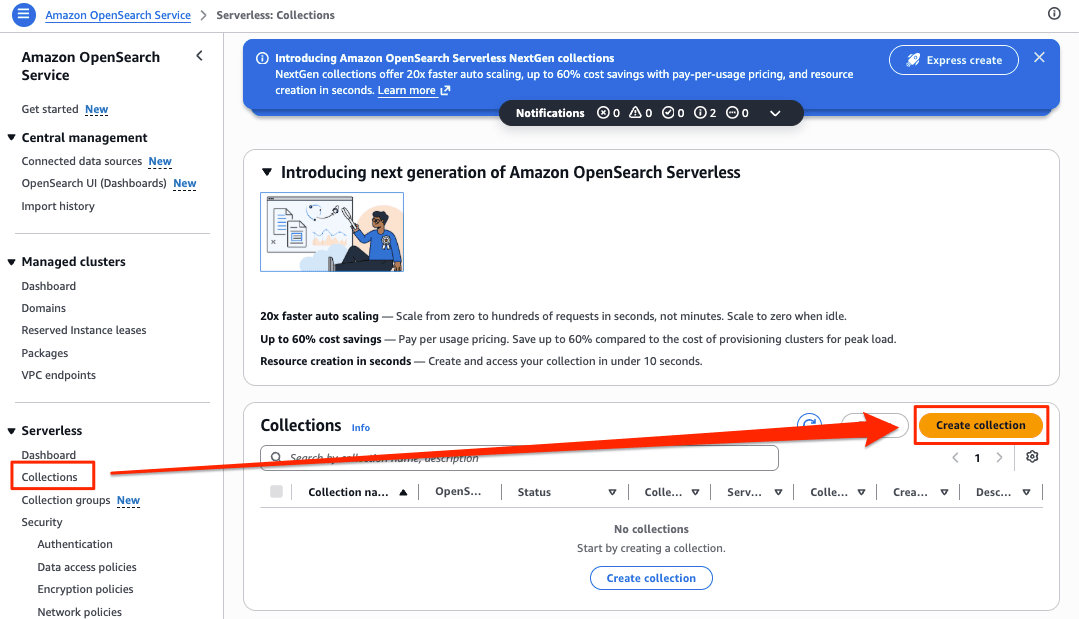
In the management console, select "Create collection" from the Serverless menu of Amazon OpenSearch Service. The next-generation version offers "Express create" that requires no configuration, allowing you to provision a collection with default settings in seconds.
Click the [Create collection] button from the Amazon OpenSearch Serverless screen in the management console.
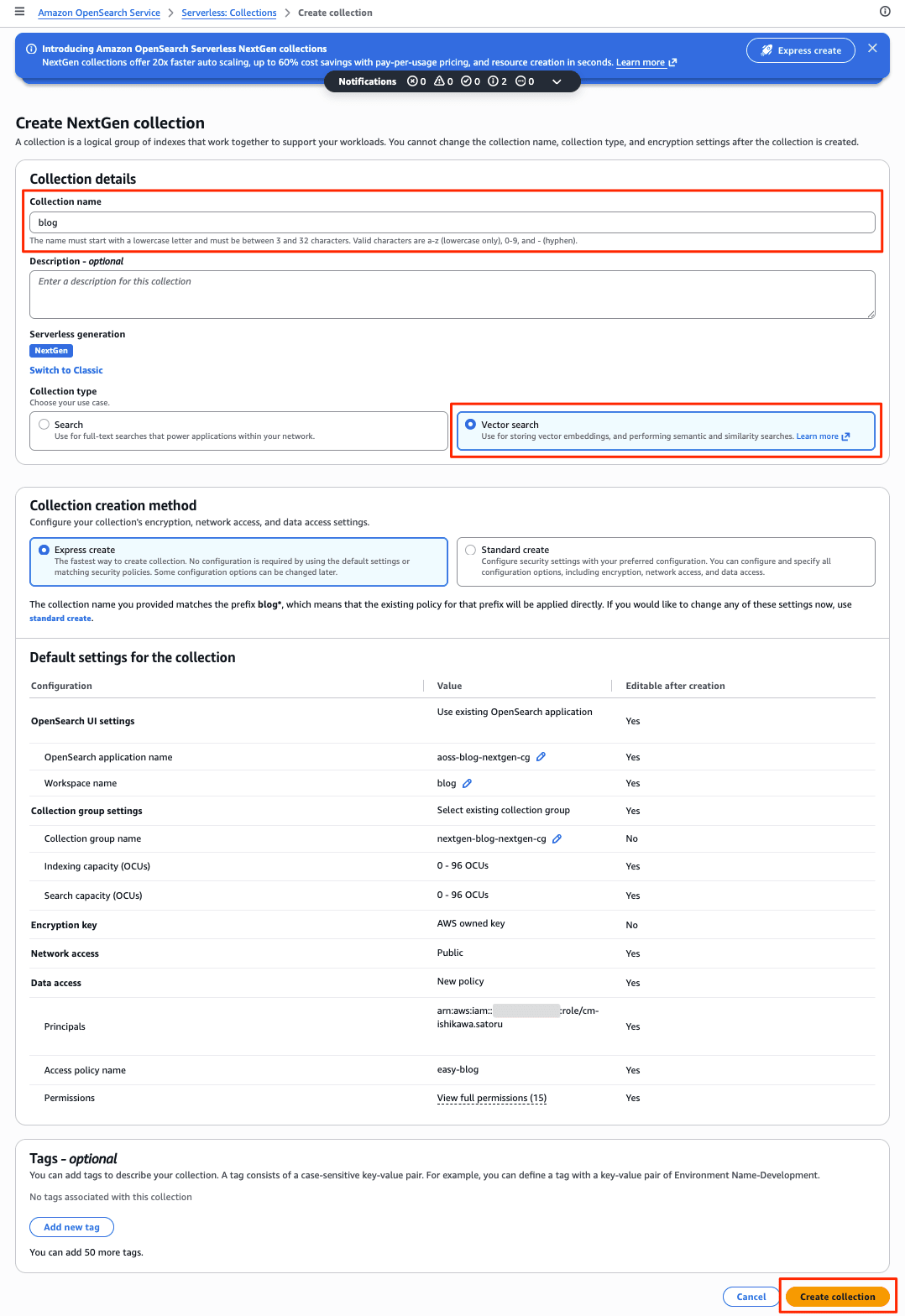
Enter the Collection name, leave the Serverless Generation as default, and change the Collection type to Vector Search. After that, create using Express create (default).
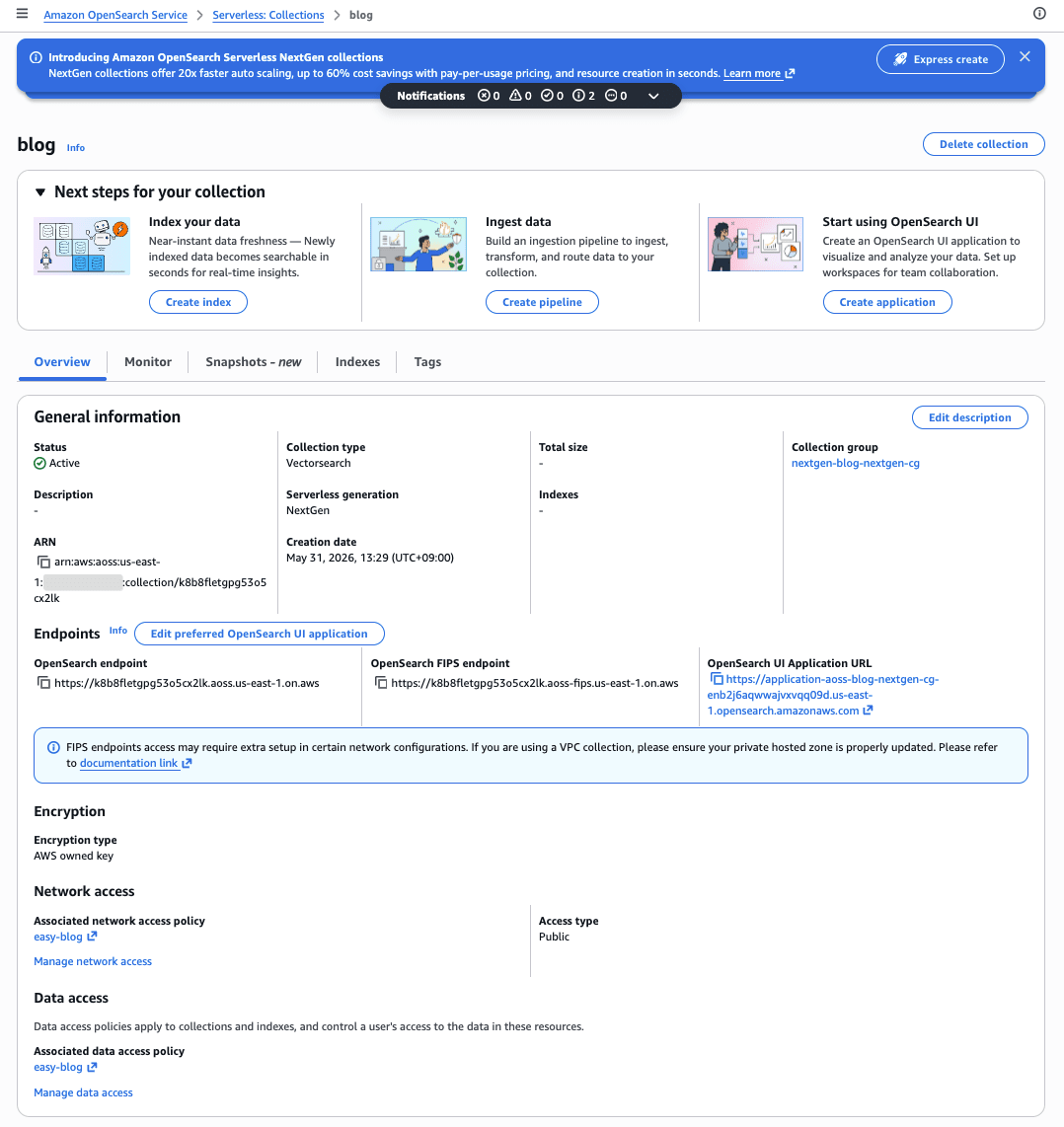
Creation starts immediately and completes in about 1 minute.

Collection Group, Collection (Vector Search), and others are created automatically.
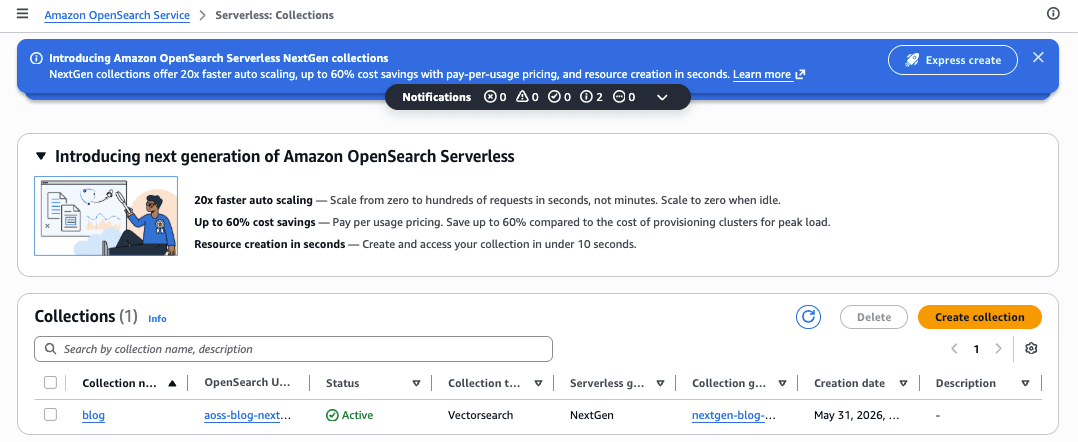
The created Collection can be confirmed from the list.
Trying It Out
For quick testing, the management console is recommended; for reproducibility, AWS CLI is the way to go.
This time, we use AWS CLI to create a VECTORSEARCH collection, define a vector index using the new control plane create-index API, insert product data, and verify that knn vector search works.
Prerequisites
- AWS account (verification uses a sandbox account)
- AWS CLI v2.34.57 (required for creating next-generation version. Since v2.34.42 does not have the
--generationoption forcreate-collection-groupand would create a Classic collection, an update to a version that supports--generation NEXTGENis required) - Python 3 + boto3 1.43.14 + opensearch-py 3.2.0 (for SigV4 signed access to the data plane)
- Verification region:
us-east-1(Tokyo region is also possible)
Note that as of AWS CLI v2.34.42, the following commands for the next-generation version have been added: create-collection-group / list-collection-groups / batch-get-collection-group / update-collection-group / delete-collection-group, and create-index / get-index / update-index / delete-index.
Check the Account Capacity Limit
First, check the OCU capacity limit for the account.
% aws opensearchserverless get-account-settings --region us-east-1
{
    "accountSettingsDetail": {
        "capacityLimits": {
            "maxIndexingCapacityInOCU": 10,
            "maxSearchCapacityInOCU": 10
        }
    }
}
The limit was 10 OCU for both indexing and search. Set the Collection Group capacity limit within this range. (Same result in the Tokyo region.)
Create the Three Policies: Encryption, Network, and Data Access
Even with the next-generation version, an encryption policy (required), network policy, and data access policy are needed before creating a collection. First, create the encryption policy (AWS-owned key).
% aws opensearchserverless create-security-policy --name blog-nextgen-enc --type encryption \
  --policy '{"Rules":[{"ResourceType":"collection","Resource":["collection/blog-nextgen-vec"]}],"AWSOwnedKey":true}' \
  --region us-east-1
{
    "securityPolicyDetail": {
        "type": "encryption",
        "name": "blog-nextgen-enc",
        "policyVersion": "MTc4MDIyMzk4NTE3NF8x",
        "policy": {
            "Rules": [
                {
                    "Resource": [
                        "collection/blog-nextgen-vec"
                    ],
                    "ResourceType": "collection"
                }
            ],
            "AWSOwnedKey": true
        },
        "createdDate": 1780223985174,
        "lastModifiedDate": 1780223985174
    }
}
Next, create the network policy (public access).
% aws opensearchserverless create-security-policy --name blog-nextgen-net --type network \
  --policy '[{"Rules":[{"ResourceType":"collection","Resource":["collection/blog-nextgen-vec"]},{"ResourceType":"dashboard","Resource":["collection/blog-nextgen-vec"]}],"AllowFromPublic":true}]' \
  --region us-east-1
{
    "securityPolicyDetail": {
        "type": "network",
        "name": "blog-nextgen-net",
        "policyVersion": "MTc4MDIyNDAzMDE3NF8x",
        "policy": [
            {
                "Rules": [
                    {
                        "Resource": [
                            "collection/blog-nextgen-vec"
                        ],
                        "ResourceType": "collection"
                    },
                    {
                        "Resource": [
                            "collection/blog-nextgen-vec"
                        ],
                        "ResourceType": "dashboard"
                    }
                ],
                "AllowFromPublic": true
            }
        ],
        "createdDate": 1780224030174,
        "lastModifiedDate": 1780224030174
    }
}
Finally, create a data access policy granting the execution role full access to the collection and index.
% aws opensearchserverless create-access-policy --name blog-nextgen-data --type data \
  --policy '[{"Rules":[{"ResourceType":"index","Resource":["index/blog-nextgen-vec/*"],"Permission":["aoss:*"]},{"ResourceType":"collection","Resource":["collection/blog-nextgen-vec"],"Permission":["aoss:*"]}],"Principal":["arn:aws:iam::<aws_account_id>:role/cm-ishikawa.satoru"]}]' \
  --region us-east-1
{
    "accessPolicyDetail": {
        "type": "data",
        "name": "blog-nextgen-data",
        "policyVersion": "MTc4MDIyNDIwMzUzNF8x",
        "policy": [
            {
                "Rules": [
                    {
                        "Resource": [
                            "index/blog-nextgen-vec/*"
                        ],
                        "Permission": [
                            "aoss:*"
                        ],
                        "ResourceType": "index"
                    },
                    {
                        "Resource": [
                            "collection/blog-nextgen-vec"
                        ],
                        "Permission": [
                            "aoss:*"
                        ],
                        "ResourceType": "collection"
                    }
                ],
                "Principal": [
                    "arn:aws:iam::<aws_account_id>:role/cm-ishikawa.satoru"
                ]
            }
        ],
        "createdDate": 1780224203534,
        "lastModifiedDate": 1780224203534
    }
}
All three were created successfully.
Create a Collection Group (scale-to-zero)
This is the key part of the next-generation version. Specify --generation NEXTGEN to use the next-generation version (omitting it results in Classic). Additionally, NextGen Collection Groups require --standby-replicas ENABLED, and specifying DISABLED results in a ValidationException with the message StandbyReplicas cannot be set to DISABLED for NEXTGEN collection groups. (Classic allowed DISABLED as well). For --capacity-limits, specifying only the maximum capacity and omitting the minimum capacity enables scale-to-zero. In this case, the maximum was set to 2 OCU.
% aws opensearchserverless create-collection-group --name blog-nextgen-cg \
  --generation NEXTGEN \
  --standby-replicas ENABLED \
  --capacity-limits "maxIndexingCapacityInOCU=2,maxSearchCapacityInOCU=2" \
  --region us-east-1
{
    "createCollectionGroupDetail": {
        "id": "9drrer2c1r5zlgg61d3i",
        "arn": "arn:aws:aoss:us-east-1:<aws_account_id>:collection-group/9drrer2c1r5zlgg61d3i",
        "name": "blog-nextgen-cg",
        "standbyReplicas": "ENABLED",
        "createdDate": 1780224231731,
        "capacityLimits": {
            "maxIndexingCapacityInOCU": 2.0,
            "maxSearchCapacityInOCU": 2.0,
            "minIndexingCapacityInOCU": 0.0,
            "minSearchCapacityInOCU": 0.0
        },
        "generation": "NEXTGEN"
    }
}
The response includes "generation": "NEXTGEN", confirming at the CLI level that it was created as a next-generation version. The fact that min... in capacityLimits is 0.0 (no minimum capacity = scale-to-zero) is also a characteristic of the next-generation version.
Create a VECTORSEARCH Collection
Create a VECTORSEARCH collection belonging to the created Collection Group. Specifying the parent with --collection-group-name is unique to the next-generation version. Set the collection to --standby-replicas ENABLED to match the Collection Group. Since the generation is inherited from the Collection Group, there is no --generation on the create-collection side.
% aws opensearchserverless create-collection --name blog-nextgen-vec \
  --type VECTORSEARCH \
  --collection-group-name blog-nextgen-cg \
  --standby-replicas ENABLED \
  --region us-east-1
{
    "createCollectionDetail": {
        "id": "8kz9vpajkj4gvm8um9he",
        "name": "blog-nextgen-vec",
        "status": "CREATING",
        "type": "VECTORSEARCH",
        "arn": "arn:aws:aoss:us-east-1:<aws_account_id>:collection/8kz9vpajkj4gvm8um9he",
        "kmsKeyArn": "auto",
        "standbyReplicas": "ENABLED",
        "deletionProtection": "DISABLED",
        "vectorOptions": {
            "ServerlessVectorAcceleration": "ENABLED"
        },
        "createdDate": 1780224282589,
        "lastModifiedDate": 1780224282589,
        "collectionGroupName": "blog-nextgen-cg"
    }
}
In the response, vectorOptions.ServerlessVectorAcceleration is automatically set to ENABLED. This indicates that GPU acceleration (faster vector index construction) is enabled by default in the next-generation version.
The status has become CREATING. Poll the status using batch-get-collection and wait.
% aws opensearchserverless batch-get-collection --ids 8kz9vpajkj4gvm8um9he --region us-east-1
{
    "collectionDetails": [
        {
            "id": "8kz9vpajkj4gvm8um9he",
            "name": "blog-nextgen-vec",
            "status": "ACTIVE",
            "type": "VECTORSEARCH",
            "arn": "arn:aws:aoss:us-east-1:<aws_account_id>:collection/8kz9vpajkj4gvm8um9he",
            "kmsKeyArn": "auto",
            "standbyReplicas": "ENABLED",
            "deletionProtection": "DISABLED",
            "vectorOptions": {
                "ServerlessVectorAcceleration": "ENABLED"
            },
            "createdDate": 1780224282589,
            "lastModifiedDate": 1780224287330,
            "collectionEndpoint": "https://8kz9vpajkj4gvm8um9he.aoss.us-east-1.on.aws",
            "fipsEndpoints": {
                "collectionEndpoint": "https://8kz9vpajkj4gvm8um9he.aoss-fips.us-east-1.on.aws"
            },
            "collectionGroupName": "blog-nextgen-cg"
        }
    ],
    "collectionErrorDetails": []
}
This time it became ACTIVE in approximately 15 seconds (the equivalent verification with the previous Classic generation took about 4 minutes, so the next-generation version has significantly faster provisioning). The format of the issued collectionEndpoint is <collection-id>.aoss.<region>.on.aws, which differs from Classic's <collection-id>.<region>.aoss.amazonaws.com. Also, in the next-generation version, a per-collection dashboardEndpoint is not issued (access via the OpenSearch UI).
Define the Vector Index Using the Control Plane create-index
In the next-generation version, you can define an index using the control plane create-index API. A convenient feature is that index mappings can be defined from the CLI without sending SigV4-signed requests to the data plane endpoint. Create an index with a 3-dimensional knn_vector field.
% aws opensearchserverless create-index --id 8kz9vpajkj4gvm8um9he --index-name products \
  --index-schema '{"settings":{"index":{"knn":true}},"mappings":{"properties":{"description":{"type":"text"},"category":{"type":"keyword"},"embedding":{"type":"knn_vector","dimension":3}}}}' \
  --region us-east-1
The command completed successfully. Check the definition with get-index.
% aws opensearchserverless get-index --id 8kz9vpajkj4gvm8um9he --index-name products --region us-east-1
{
    "indexSchema": {
        "products": {
            "settings": {
                "index": {
                    "knn.remote_index_build": {
                        "enabled": "true"
                    },
                    "number_of_shards": "2",
                    "provided_name": "products",
                    "knn": "true",
                    "creation_date": "1780224440004",
                    "custom_doc_id_enabled": "true",
                    "number_of_replicas": "0",
                    "uuid": "kdylfZ4B-lPmRp_CNsUL",
                    "version": {
                        "created": "137247827"
                    }
                }
            },
            "mappings": {
                "properties": {
                    "category": {
                        "type": "keyword"
                    },
                    "description": {
                        "type": "text"
                    },
                    "embedding": {
                        "mode": "on_disk",
                        "type": "knn_vector",
                        "dimension": 3,
                        "compression_level": "32x"
                    }
                }
            },
            "aliases": {}
        }
    }
}
We confirmed that knn is enabled and embedding is defined as knn_vector (dimension 3). Settings that were not specified but were automatically added are characteristic of the next-generation version. These include custom_doc_id_enabled: true (custom document ID support), knn.remote_index_build.enabled: true (GPU acceleration = remote index build), and embedding's mode: on_disk and compression_level: 32x (32x compression is the default). engine / method are not specified (they cannot be configured in the next-generation version as they are automatically optimized).
Ingest Data and Perform Vector Search
Ingesting documents (_bulk / _doc) and vector search (_search) still require SigV4-signed requests to the data plane endpoint. Use AWSV4SignerAuth from opensearch-py, the AWS-recommended client, with the signing service name aoss for access.
Verification code: dataplane_vector_search.py (click to expand)
#!/usr/bin/env python3
"""Data plane verification for next-generation OpenSearch Serverless (VECTORSEARCH, NextGen).

Signs with SigV4 using AWSV4SignerAuth from the AWS-recommended official client opensearch-py,
ingests documents into the products index defined via control-plane create-index,
and executes knn vector search. The signing service name is 'aoss'.
The next-generation version supports custom document IDs, so id is specified explicitly.
"""
import argparse
import time

import boto3
from opensearchpy import OpenSearch, RequestsHttpConnection

try:
    from opensearchpy import AWSV4SignerAuth
except ImportError:  # Compatibility with older versions
    from opensearchpy.helpers.signer import AWSV4SignerAuth

REGION = "us-east-1"
SERVICE = "aoss"
# Next-generation endpoint format: <collection-id>.aoss.<region>.on.aws
HOST = "8kz9vpajkj4gvm8um9he.aoss.us-east-1.on.aws"
INDEX = "products"

credentials = boto3.Session().get_credentials()
auth = AWSV4SignerAuth(credentials, REGION, SERVICE)

client = OpenSearch(
    hosts=[{"host": HOST, "port": 443}],
    http_auth=auth,
    use_ssl=True,
    verify_certs=True,
    connection_class=RequestsHttpConnection,
    pool_maxsize=20,
    timeout=30,            # Absorbs cold start (~10 seconds) from scale-to-zero
    max_retries=3,
    retry_on_timeout=True,
)

# The next-generation version supports custom document IDs, so id is specified
# These are "dummy 3-dimensional vectors" manually defined for illustration, not generated by an actual embedding model
# Dimension 1 ≈ audio-likeness / Dimension 2 ≈ furniture-likeness / Dimension 3 ≈ accessories
DOCS = [
    {"id": "p001", "description": "Wireless noise-cancelling headphones", "category": "audio",       "embedding": [0.92, 0.10, 0.08]},
    {"id": "p002", "description": "Bluetooth portable speaker",           "category": "audio",       "embedding": [0.85, 0.20, 0.12]},
    {"id": "p003", "description": "Ergonomic mesh office chair",          "category": "furniture",   "embedding": [0.10, 0.90, 0.20]},
    {"id": "p004", "description": "Electric standing desk",               "category": "furniture",   "embedding": [0.12, 0.82, 0.30]},
    {"id": "p005", "description": "Mechanical RGB keyboard",              "category": "accessories", "embedding": [0.20, 0.25, 0.90]},
]

def index_docs():
    print("=== STEP 10-a: Document ingestion (custom doc ID / AWSV4SignerAuth, service=aoss) ===")
    for d in DOCS:
        body = {k: v for k, v in d.items() if k != "id"}
        resp = client.index(index=INDEX, id=d["id"], body=body)  # Next-generation version supports custom doc ID
        print(f"  id={d['id']} result={resp.get('result')} _id={resp.get('_id')}")
    print(f"Ingestion complete: {len(DOCS)} documents")

def search():
    print("\n=== STEP 10-b: knn vector search (retrying due to AOSS asynchronous refresh) ===")
    knn_query = {
        "size": 3,
        "query": {"knn": {"embedding": {"vector": [0.88, 0.15, 0.10], "k": 3}}},
        "_source": ["description", "category"],
    }
    print("Query vector: [0.88, 0.15, 0.10] (close to audio category), k=3")
    start = time.time()
    hits = []
    for attempt in range(1, 25):
        res = client.search(index=INDEX, body=knn_query)
        hits = res.get("hits", {}).get("hits", [])
        elapsed = int(time.time() - start)
        print(f"[Attempt {attempt}/{elapsed}s] took={res.get('took')}ms hits={len(hits)}")
        if len(hits) >= 3:  # Wait until all k=3 results are available (to avoid stopping at partial reflection)
            print("\n--- Search results (sorted by knn similarity score) ---")
            for h in hits:
                src = h["_source"]
                print(f"  _id={h['_id']} score={h['_score']:.5f}  [{src.get('category')}] {src.get('description')}")
            break
        time.sleep(6)
    if not hits:
        print("\n(Note: Reflection wait timeout)")
        raise SystemExit(2)

def main():
    parser = argparse.ArgumentParser(
        description="Data plane verification for next-generation OpenSearch Serverless (VECTORSEARCH)"
    )
    parser.add_argument(
        "-s",
        "--search-only",
        action="store_true",
        help="Skip document ingestion and run only knn vector search (useful for avoiding duplicate ingestion and checking ranking variance)",
    )
    args = parser.parse_args()

    if args.search_only:
        print("=== STEP 10-a: Skipping document ingestion (--search-only) ===")
    else:
        index_docs()
    search()

if __name__ == "__main__":
    main()
Documents are ingested with custom document IDs (p001 through p005) specified. The next-generation version supports custom doc IDs, so you can specify any ID with client.index(id=...) (equivalent to PUT /products/_doc/<id>) — this was not supported in Classic, which only allowed system-assigned IDs. Immediately after ingestion, search results appear gradually due to asynchronous refresh; in this case, all 5 documents were reflected in approximately 18 seconds.
=== STEP 10-a: Document ingestion (custom doc ID / AWSV4SignerAuth, service=aoss) ===
  id=p001 result=created _id=p001
  id=p002 result=created _id=p002
  id=p003 result=created _id=p003
  id=p004 result=created _id=p004
  id=p005 result=created _id=p005
Ingestion complete: 5 documents

=== STEP 10-b: knn vector search (retrying due to AOSS asynchronous refresh) ===
Query vector: [0.88, 0.15, 0.10] (close to audio category), k=3
[Attempt 1/18s] took=18117ms hits=3

--- Search results (sorted by knn similarity score) ---
  _id=p002 score=0.99621  [audio] Bluetooth portable speaker
  _id=p001 score=0.99552  [audio] Wireless noise-cancelling headphones
  _id=p004 score=0.48391  [furniture] Electric standing desk
For the audio-category query vector, audio category products (speaker and headphones) appeared at the top with high scores. Note also that the _id values specified at ingestion time (p001 and p002) are returned as-is. The scores also match the manually calculated score 1/(1+d²) using the squared L2 (Euclidean) distance d² (speaker: d²=0.0038 → 0.99621), confirming that vector search is working correctly.
| Rank | Product (_id) |
embedding | Query distance² d² |
Score 1/(1+d²) |
|---|---|---|---|---|
| 1 | speaker (p002) |
[0.85,0.20,0.12] |
0.0038 | 0.99621 |
| 2 | headphones (p001) |
[0.92,0.10,0.08] |
0.0045 | 0.99552 |
| 3 | standing desk (p004) |
[0.12,0.82,0.30] |
1.0665 | 0.48391 |
Note that when _source is not specified, the next-generation version excludes embedding from search responses. This is likely for latency and payload reduction purposes.
Discussion
Here is a summary of the insights and points to note gained from hands-on testing.
- Scale-to-zero and cost: By omitting the minimum capacity for the Collection Group, OCUs scale down to zero during idle periods. No charges were incurred during standby in this verification, and OCUs were actually active only for the brief periods of index creation, document ingestion, and search. Compared to the previous generation's "minimum 2 OCUs (4 OCUs with replicas enabled) always-on billing," the cost benefit for verification workloads or intermittent workloads is significant.
- Specify the generation with
--generation NEXTGEN(important): To use the next-generation version, specify--generation NEXTGENincreate-collection-group(omitting it defaults to Classic). After updating to v2.34.57,--generation(CLASSIC/NEXTGEN) becomes available, and you can confirm the generation by checking that"generation": "NEXTGEN"is returned in thecreate-collection-groupresponse. Collections inherit the generation of their Collection Group, so there is no--generationoption on thecreate-collectionside. - NextGen-specific constraints and behavior: The main differences from Classic confirmed on actual hardware are as follows.
- StandbyReplicas must be
ENABLED(DISABLEDresults inValidationException; Classic allowsDISABLED) - Custom document IDs are supported (
PUT /_doc/<id>allows specifying any ID; Classic did not support this and only allowed system-assigned IDs) - Search responses exclude the original vector by default (
embeddingis not included in_source; use_source: trueif needed) - Collection endpoint format is
<id>.aoss.<region>.on.aws(Classic uses<id>.<region>.aoss.amazonaws.com); nodashboardEndpointis issued - Provisioning is faster (approximately 15 seconds to collection ACTIVE; Classic takes approximately 4 minutes)
- GPU acceleration (
ServerlessVectorAcceleration) is enabled by default
- StandbyReplicas must be
- Control plane create-index: Being able to define index mappings from the CLI makes it easier to incorporate into IaC or setup scripts. However, document ingestion and search still require SigV4-signed requests to the data plane endpoint.
- SigV4 signing for the data plane is most reliable with opensearch-py: Initially, when manually signing with botocore's
SigV4Auth, requests without a body (GET-type requests andPUT /<index>) succeeded, but requests with a body (POST /_doc,_bulk,POST /_search) all returned 403 Forbidden. SinceGET /_searchsucceeded butPOST /_searchfailed with the same read permissions and the same resources, the issue was identified as a payload hash (x-amz-content-sha256) mismatch rather than a permissions problem. Switching to opensearch-py'sAWSV4SignerAuth(with signing service nameaoss) resolved the issue, so using the official client is recommended for data plane access. - Asynchronous refresh: Searches immediately after ingestion may return unstable results while waiting for reflection. It is safer to implement retry logic that accounts for a refresh period of several to tens of seconds.
- Minor CLI differences:
delete-collection-grouprequires--idrather than--name(specifying--nameresulted in a ParamValidation error). - Support status: At launch, only SEARCH and VECTORSEARCH collection types are supported; TIMESERIES is not supported. Additionally, the
engineproperty for VECTORSEARCH cannot be configured in the next-generation version (GPU acceleration is applied automatically and billed separately).
Closing Thoughts
We walked through the entire process with next-generation Amazon OpenSearch Serverless, from creating a Collection Group to setting up a VECTORSEARCH collection, defining an index via the control plane's create-index, and running vector search.
Scale-to-zero enables "pay only when you use it," and the ability to define indexes from the control plane makes it easier to integrate into workloads where AI agents spin up vector search as needed. On the other hand, data plane access for document ingestion and search still requires SigV4 signing as before, and using the official client opensearch-py is the most reliable approach.
For migrating from the previous generation, the recommended approach is to create a new Collection Group and collection and re-index data using Amazon OpenSearch Ingestion. For those considering a vector search infrastructure, trying out scale-to-zero and vector search behavior with a small collection first will give you a good sense of the cost and usability.

