![[Update] Amazon SageMaker Data Agent Now Supports Conversation History - I Actually Tried It Out](https://images.ctfassets.net/ct0aopd36mqt/wp-thumbnail-4e6e510f2f74e1cc7d0ec360f38d138a/c00e9d7f4e47022543b37632bc20bcc0/amazon-sagemaker?w=3840&fm=webp)
[Update] Amazon SageMaker Data Agent Now Supports Conversation History - I Actually Tried It Out

This page has been translated by machine translation. View original
This is Ishikawa from the Cloud Business Division. Amazon SageMaker Data Agent now supports conversation history, allowing you to retrieve past analysis sessions at a later time, so I tried it out in an Amazon SageMaker Unified Studio notebook.
What is Amazon SageMaker Data Agent?
Amazon SageMaker Data Agent is an AI assistant built into the notebooks and Query Editor of Amazon SageMaker Unified Studio. It generates code and execution plans from natural language prompts, and supports the analytical work of data engineers, analysts, and data scientists by integrating with data catalogs and business metadata.
Since its announcement in November 2025, Data Agent has been continuously expanded with new features, including Query Editor support and chart functionality in March 2026, and IAM Identity Center domain support in May 2026. Then on June 3, 2026, it newly added support for conversation history.
Conversation history is a feature that allows you to refer back to past conversations to resume analysis, reuse code previously generated by the agent, or continue troubleshooting in a notebook from where you left off. This feature is available from notebook and Query Editor workflows in all AWS Regions where Amazon SageMaker Data Agent is available.
What is Conversation History?
According to the official documentation, the specifications for conversation history are as follows.
- Conversations are automatically saved, with a retention period of 90 days
- Conversation titles are automatically generated after the first message is sent
- Conversation history can be accessed via the clock icon in the chat panel header
- Past conversations are listed in order of most recent activity, with each conversation displaying a title and the date and time of the last activity
- Selecting a conversation loads the full message history, including prompts and agent responses
- You can return to the current conversation using the back arrow
Trying It Out
Prerequisites
The environment used for verification is as follows.
- AWS account (sandbox)
- Amazon SageMaker Unified Studio domain (IAM domain,
domainVersionV2) - One project (notebook environment with Data Agent enabled)
- Region: Asia Pacific (Tokyo)
ap-northeast-1
Conversation history is a feature of the SageMaker Unified Studio chat UI, and no API is provided to manipulate conversation history from the AWS CLI or SDK. Therefore, all verification in this article was performed through UI operations in a browser.
Opening the Data Agent Panel
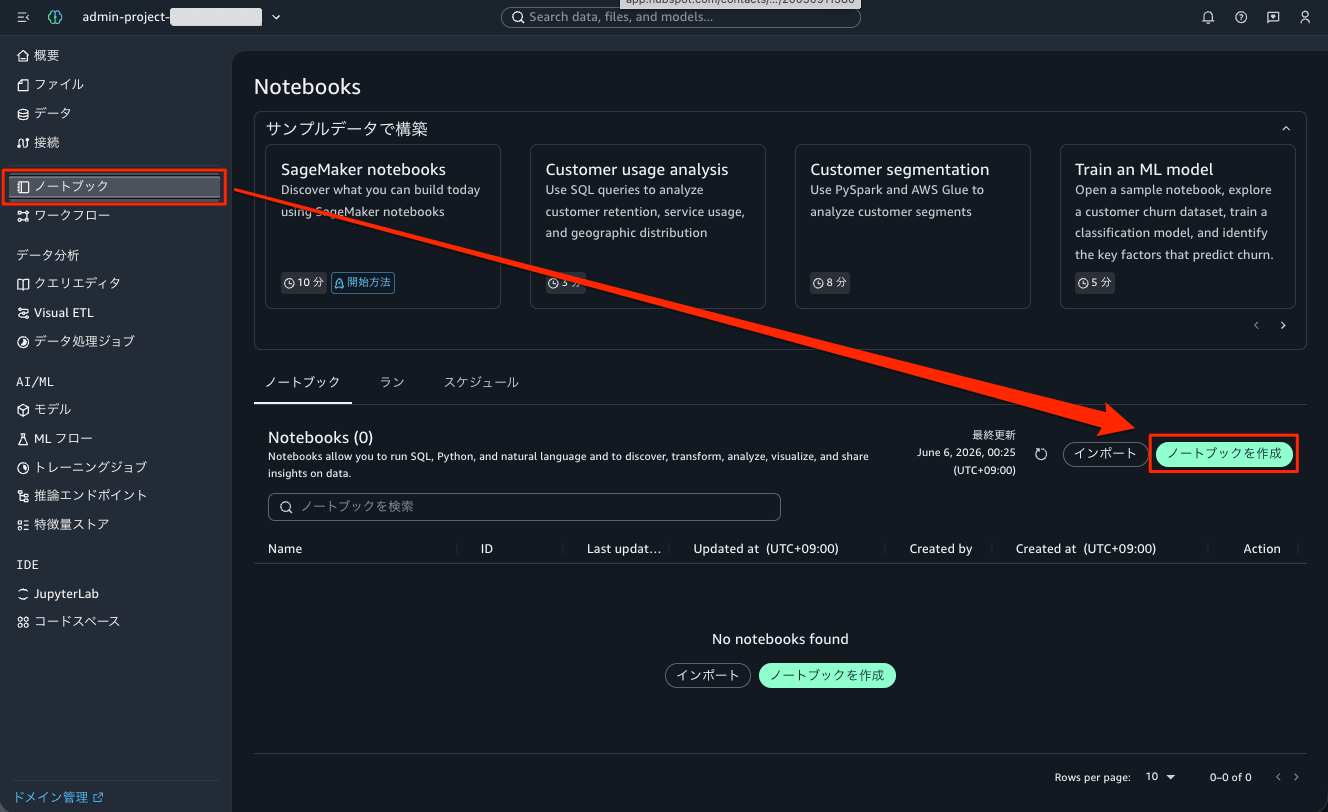
I signed in to SageMaker Unified Studio and created a new notebook from the project's "Notebooks." When the notebook is opened, the Data Agent chat panel is displayed on the right side of the screen.
The panel header contains buttons from left to right: "Conversation History (clock icon)," "New Conversation," and "Open/Close Chat." The conversation history feature we are trying out this time is accessed via this clock icon.
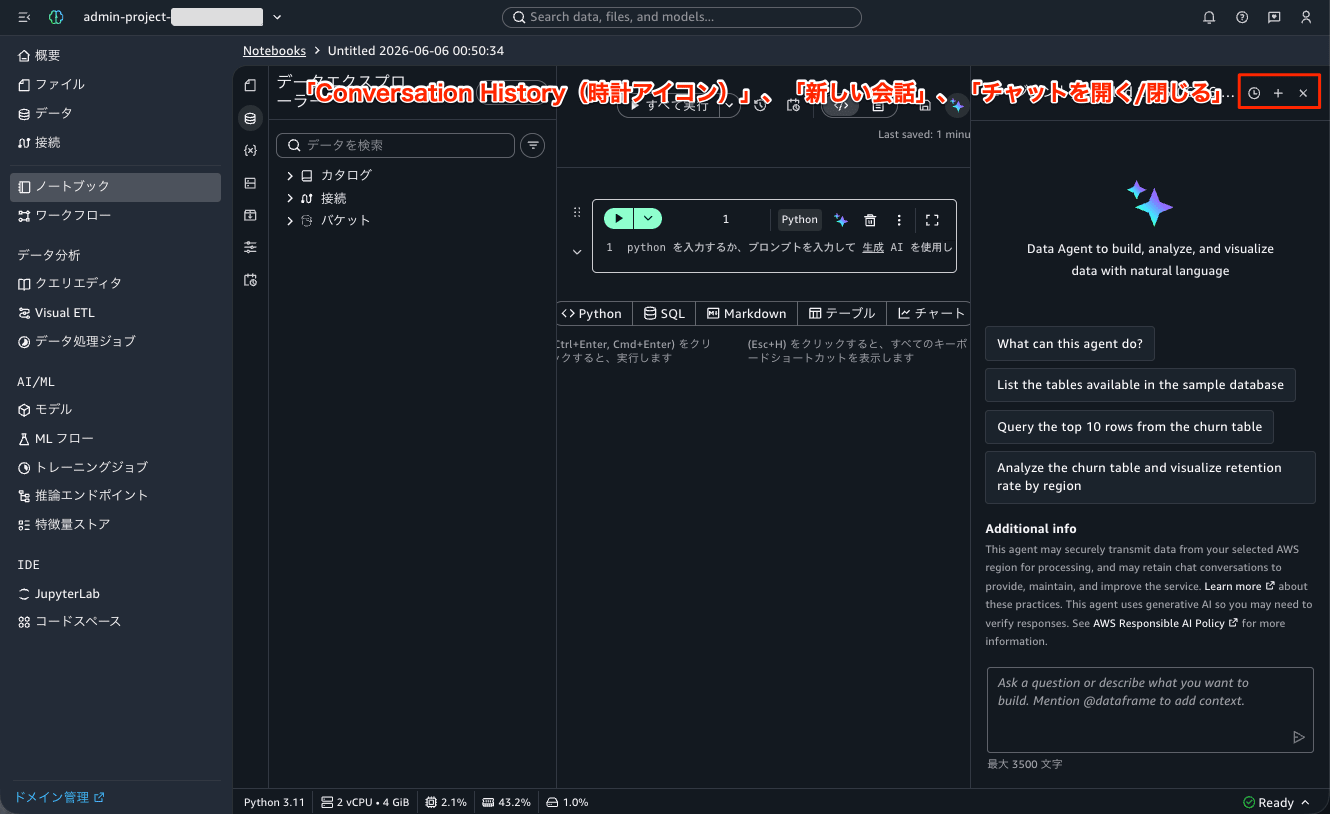
Once the notebook's compute (Python 3.11 / 2 vCPU / 4 GiB) becomes Ready, the chat input field becomes available.
Conversing with Data Agent in Japanese
First, as the first conversation, I tried asking a question in Japanese.
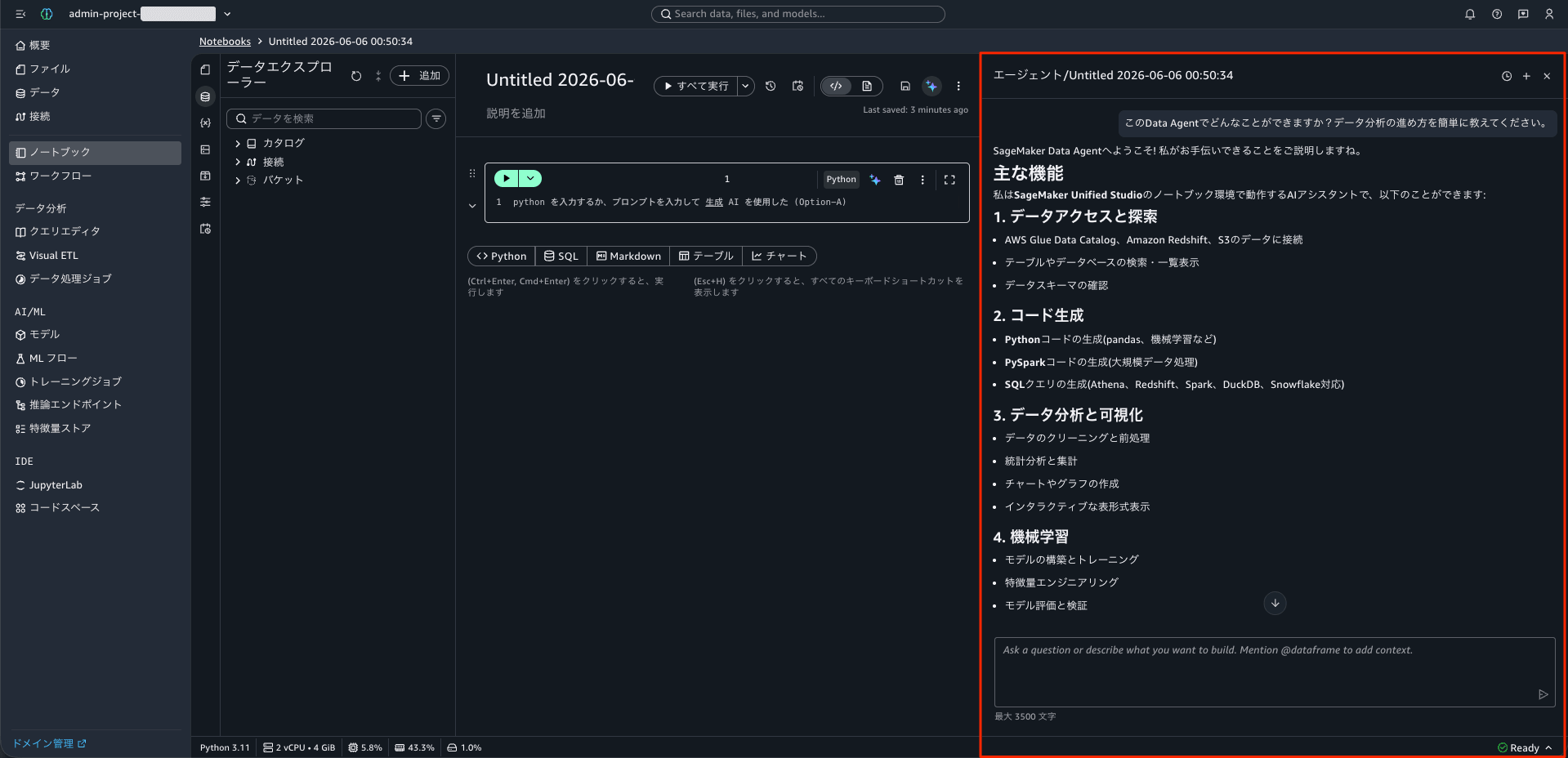
What can you do with this Data Agent? Please briefly explain how to proceed with data analysis.
Data Agent responded in Japanese, beginning with "Welcome to SageMaker Data Agent! Let me explain what I can help you with..." and explaining the main features.
Starting a New Conversation
To verify the conversation history, it was necessary to create multiple conversations. When I pressed the [New Conversation] button in the header, the following confirmation dialog appeared.
Creating a new chat will replace the current chat. Once you continue, you will not be able to return to this chat or its contents.
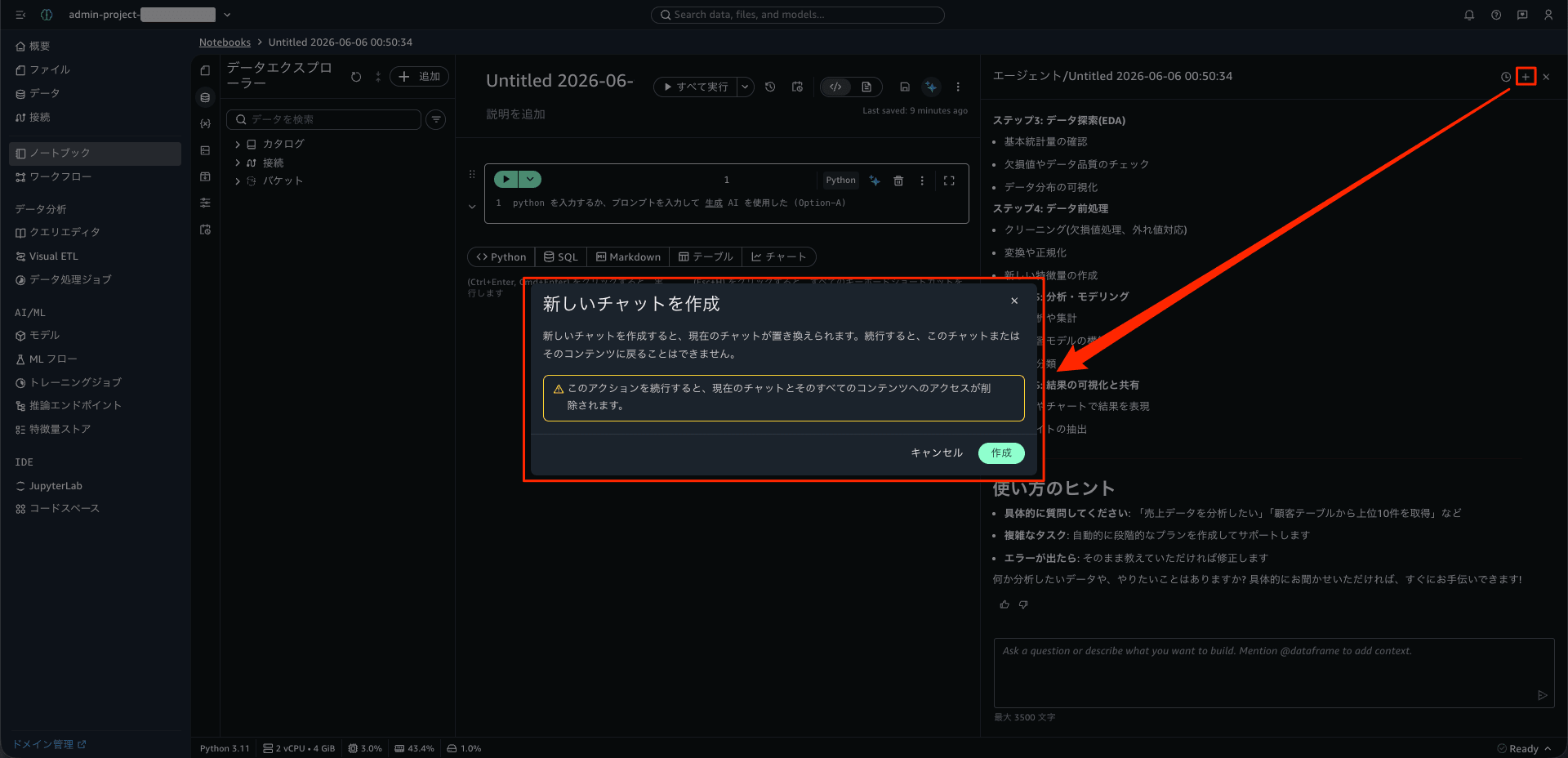
A warning is also included stating "Continuing this action will remove access to the current chat and all its contents." I was curious about the statement that you "cannot go back" even though past conversations should be preserved in the conversation history, but I will verify this later by opening the conversation history. Here, I pressed the [Create] button and proceeded to the second conversation.
Generating and Running Code
In the second conversation, I made the following request.
In Python, create a DataFrame with fictional monthly sales data for the three cities of Tokyo, Osaka, and Nagoya from January to June 2026, and visualize the sales trends by city in a line chart.
Data Agent understood the request, generated code, and presented an approval UI with [Accept and run] and [Reject all] options under "Review changes" before applying the code to the notebook cells. There is a mechanism that allows you to review the generated code before executing it.
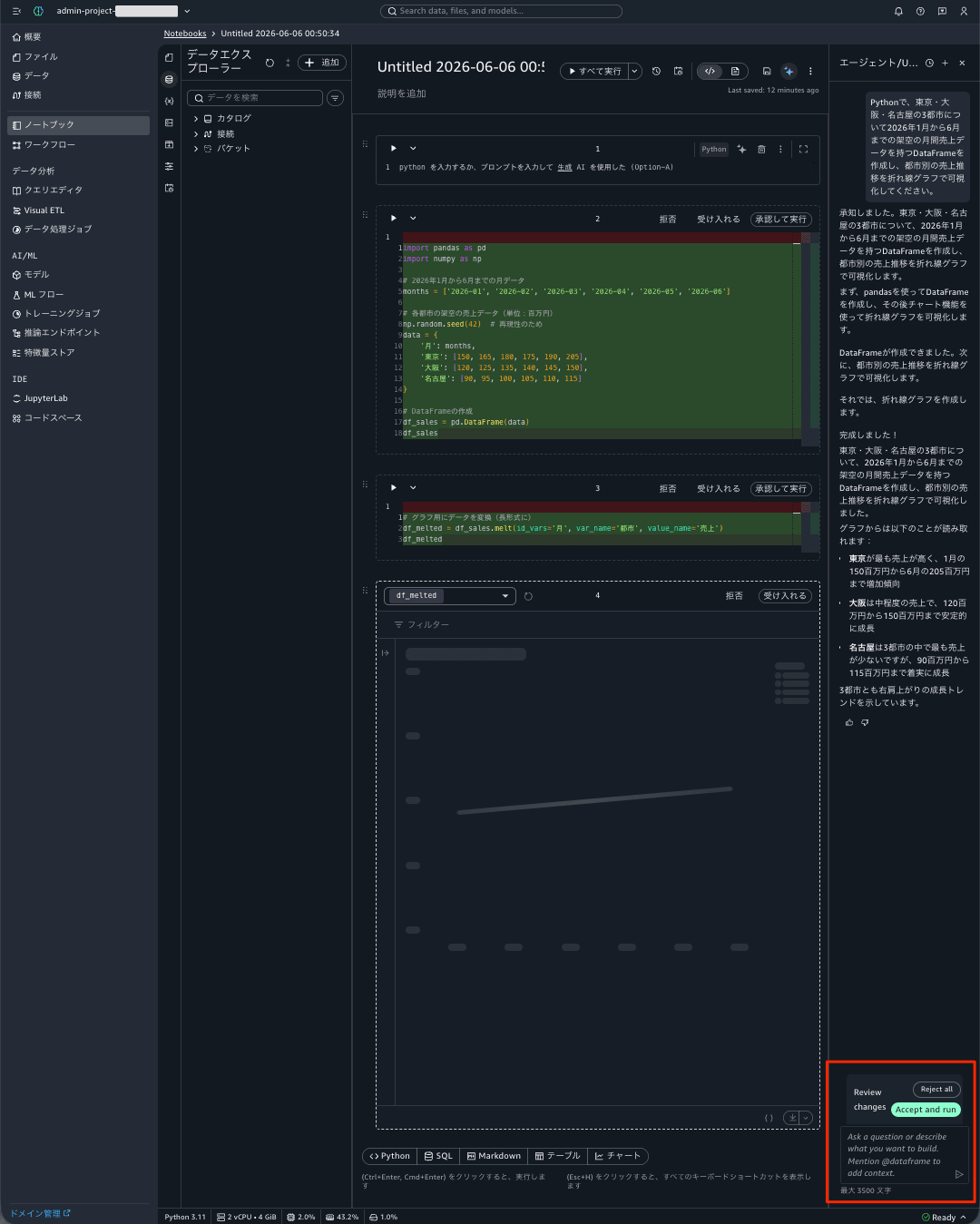
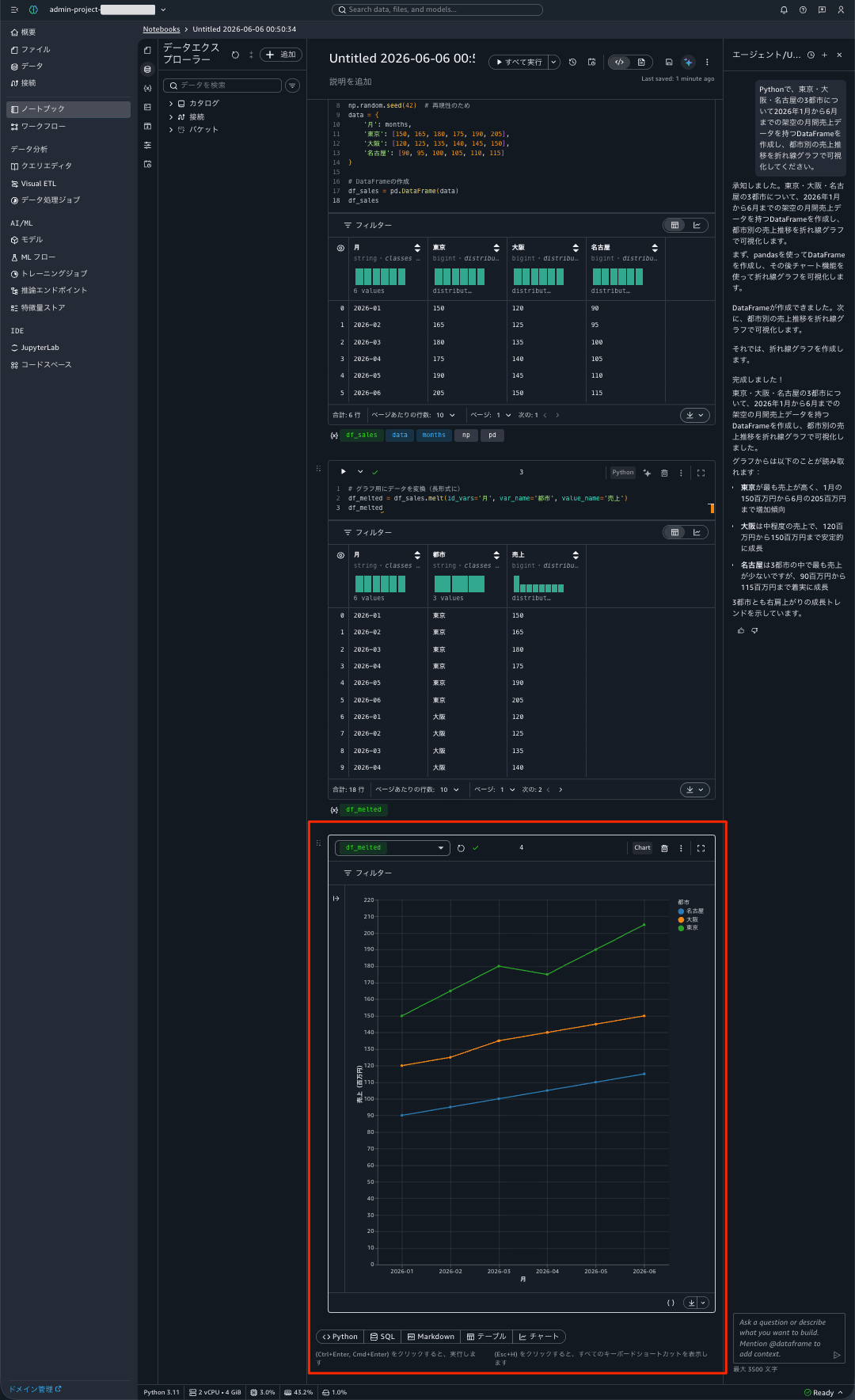
When I pressed the [Accept and run] button, the generated code was inserted into the notebook as two cells and executed, and the monthly sales DataFrame and a line chart showing the sales trends for Tokyo, Osaka, and Nagoya were actually rendered. Data Agent also provided insights such as "Tokyo has the highest sales, and each city tends to peak in May."
Opening Conversation History
Now for the main topic: conversation history. I pressed the clock icon (Conversation History) in the chat panel header.

The past conversations were displayed as a list.

The list displayed the following 2 items, with the most recent at the top.
- "In Python, create a DataFrame with fictional monthly sales data for the three cities of Tokyo, Osaka, and Nagoya from January to June 2026..." — June 6, 2026 01:01
- "What can you do with this Data Agent? Please briefly explain how to proceed with data analysis." — June 5, 2026 00:52
The title for each was automatically generated from the first message sent, and the date and time of the last activity is displayed for each conversation. It was also confirmed that they are listed in order of most recent activity, as stated in the documentation.
According to the official documentation, selecting a conversation from here loads the full message history including prompts and agent responses, and you can return to the current conversation using the back arrow. This time, I confirmed the display up to the history list.
Observations
After actually trying it out, here is a summary of what I learned and noticed.
- The relationship between the "cannot go back" warning and conversation history: The dialog when creating a "new conversation" states "you cannot return to the current chat" and "access to its contents will be removed." However, when I actually opened the conversation history, the first conversation that was supposedly replaced was still in the history with a title. The wording of the dialog is likely meant to convey that "you cannot go back to it as the currently active chat," and with the conversation history feature, the past conversations themselves are not lost and can be referenced later. I felt this warning message was somewhat prone to misunderstanding.
- Automatic title generation: While the documentation states that "titles are automatically generated," within the scope of what I tested, the text of the first message sent was used directly as the title (truncated at the end if long). This serves as a clue when searching for conversations later.
- 90-day retention period: Conversations are saved for 90 days. For analyses you want to keep referencing over a long period, it would be wise to separately save the notebook itself or the code.
- UI-only feature: Conversation history is a feature of the SageMaker Unified Studio chat UI, and no API is provided to list or retrieve conversation history from the AWS CLI / SDK. At this time, it is not possible to extract conversation logs programmatically.
- No issues using it in Japanese: Questions and answers were exchanged naturally in Japanese, and the generated code ran without any issues.
Closing
Amazon SageMaker Data Agent's conversation history is a feature that allows you to resume analysis in notebooks or Query Editor "from where you left off." After actually trying it out, I was able to confirm that multiple conversations are displayed in a list with titles and timestamps in order of most recent activity, making it easy to keep track of past exchanges.
In exploratory data analysis using Data Agent, conversations can get long through trial and error, or you may want to start a new conversation on a different topic. Previously, starting a new conversation made it difficult to return to previous exchanges, but with conversation history allowing you to look back up to 90 days, this feels like a subtle but impactful improvement for day-to-day work.
For those using Data Agent in SageMaker Unified Studio, I encourage you to check the clock icon in the chat panel. I hope this article is helpful to someone.
References
