![[Update] AWS MCP Server now supports cross-account and cross-role access, so I tried it with Claude Code](https://images.ctfassets.net/ct0aopd36mqt/348VnC3440CoUtpS4pd5NS/8a7182ab96a0851a72a88d40328811b3/aws.png?w=3840&fm=webp)
[Update] AWS MCP Server now supports cross-account and cross-role access, so I tried it with Claude Code

This page has been translated by machine translation. View original
This is Ishikawa from the Cloud Business Division. AWS MCP Server (AWS Model Context Protocol Server) now supports cross-account and cross-role access. AI coding agents can now operate across multiple AWS accounts and IAM roles within a single session without restarting the session.
I'll introduce this update in detail, from how it works to an implementation example using Claude Code, an AI coding agent.
What is AWS MCP Server
AWS MCP Server is a managed remote MCP (Model Context Protocol) server provided as part of the Agent Toolkit for AWS. It provides AI agents and coding assistants with secure access to AWS services using AWS Identity and Access Management (IAM) and SigV4 authentication.
It features the ability to execute over 15,000 AWS APIs via the call_aws tool, search and reference the latest AWS documentation, and run Python scripts in a sandbox environment. It became generally available in May 2026 and can be used from MCP-compatible clients such as Claude Code, Kiro, and Cursor.
Update Details
Previously, switching AWS accounts or IAM roles while an AI coding agent was working required stopping the AI coding session, updating the local AWS credentials, and restarting the MCP server.
With this update, AI agents can now specify a profile for each command, allowing seamless switching between accounts and roles without interrupting the session.
The main changes are as follows:
- AWS accounts and IAM roles can now be switched without restarting the session
- Specifying a profile explicitly for each request eliminates the risk of commands being executed against the wrong account
- No need to update local AWS credentials or restart the MCP server when changing profiles
- Supports integration with AI coding agents such as Kiro, Claude Code, and Codex
For example, a DevOps engineer can query CloudWatch logs across production and staging accounts to diagnose performance issues, or an application developer can update a Lambda configuration in one account while adjusting an S3 bucket policy in another account, all within a single conversation.
Supported Regions
AWS MCP Server is available in the following regions:
- US East (N. Virginia)
- Europe (Frankfurt)
Note that AWS API calls themselves can be made to any region.
How It Works
Cross-account and cross-role access is achieved through a combination of the open-source MCP Proxy for AWS and AWS MCP Server.
The flow of operation is as follows:
- Configure multiple profiles at proxy startup (using the
--profileflag or theAWS_MCP_PROXY_PROFILESenvironment variable) - The proxy adds an
aws_profileparameter to the schema of tools that require authentication (call_aws,run_script,get_presigned_url,get_tasks,suggest_aws_commands) - When the agent calls a tool, the proxy signs the request with the credentials of the specified profile and routes it
- No
aws_profilespecified: signs with the default (first) profile aws_profile="dev"specified: uses a dedicated connection signed with the credentials of thedevprofile- Invalid profile specified: rejected with an error along with a list of available profiles
- No
- The
aws_profileparameter is removed before forwarding to the backend, so the AWS MCP Server itself never receives this parameter
How to Use
Prerequisites
- Each profile you intend to use must be configured in
~/.aws/configand~/.aws/credentials mcp-proxy-for-awsversion 1.6.0 or later- Each profile must have the minimum IAM permissions required for the operations the agent will perform
Configuration
When configuring with CLI flags, the first profile becomes the default.
mcp-proxy-for-aws https://aws-mcp.us-east-1.api.aws/mcp --profile prod-readonly dev staging
When configuring with environment variables, use the following. This is useful for plugin integrations where CLI arguments cannot be changed.
AWS_MCP_PROXY_PROFILES="prod-readonly dev staging"
When AWS_MCP_PROXY_PROFILES is set, it takes precedence over --profile and AWS_PROFILE.
An example MCP client configuration is as follows:
{
  "mcpServers": {
    "aws-mcp": {
      "command": "uvx",
      "args": ["mcp-proxy-for-aws@latest", "https://aws-mcp.us-east-1.api.aws/mcp"],
      "env": {
        "AWS_MCP_PROXY_PROFILES": "prod-readonly dev staging"
      }
    }
  }
}
After configuration, simply ask the AI agent something like "Compare the Lambda invocation costs between the dev and prod accounts," and the agent will switch between profiles to carry out the investigation. The official documentation introduces use cases such as cross-account cost comparison, bulk security auditing of S3 buckets across multiple accounts, troubleshooting by comparing staging and production configurations, and EC2 instance inventory across all accounts.
Trying It Out
As an example of actual use from an AI agent, I tried connecting to Claude Code. Since I wanted to specify arbitrary profiles, I adopted the approach of creating a file named .mcp.json in the project root to be automatically loaded when claude starts. In the example below, two profiles, ishikawa and cloud-cons, are specified.
{
  "mcpServers": {
    "aws-multi": {
      "command": "uvx",
      "args": [
        "mcp-proxy-for-aws@1.6.0",
        "https://aws-mcp.us-east-1.api.aws/mcp",
        "--profile", "ishikawa", "cloud-cons"
      ]
    }
  }
}
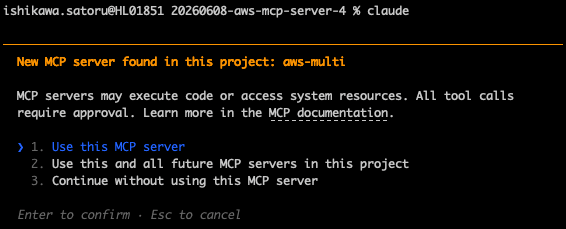
An approval prompt is displayed the first time Claude Code starts. Select "1. Use this MCP server."
Enter the following prompt in the familiar Claude Code interface. This time, I'll verify the behavior with a prompt that retrieves the AWS ACCOUNT IDs for the two profiles.
Please run
aws sts get-caller-identitywith both theishikawaandcloud-consprofiles and compare the AWS ACCOUNT IDs in a table.
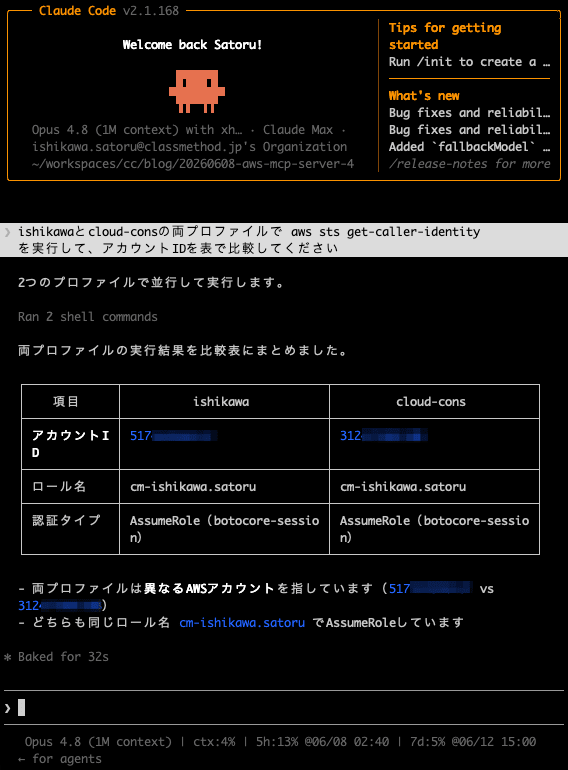
It recognized the available profiles from the schema's enum and description, and was able to use them appropriately without a human having to specify profile names in detail. The ability to complete a cross-account investigation like "Run aws sts get-caller-identity with both the ishikawa and cloud-cons profiles and compare the AWS ACCOUNT IDs in a table" with a single instruction is an experience that wasn't possible with the conventional fixed-at-startup approach.
Usage Notes
The official documentation highlights the following security considerations:
- Explicit allowlist: Only profiles declared at startup are available. Agents cannot discover or use other profiles in
~/.aws/config - Stateless routing: Each call has its own credentials, so parallel requests do not interfere with each other
- Least privilege: It is recommended to configure read-only profiles as the default and require explicit selection for write-enabled profiles
- Client-side control: Additional controls such as manual approval before using production profiles are configured via hooks or permission rules on the MCP client side
Note that this profile-switching feature is exclusive to AWS MCP Server and cannot be used when proxying to other MCP servers with MCP Proxy for AWS.
Closing Thoughts
Until now, cross-account and cross-role access was often achieved through workarounds using environment variables and configuration files. Going forward, the cross-account and cross-role access support in AWS MCP Server makes leveraging AI agents in multi-account environments significantly more practical. Because the design explicitly specifies a profile per request, you can complete investigation and operational tasks spanning multiple accounts in a single session while keeping the risk of accidental operations low.
For those operating AWS in a multi-account configuration, why not start by considering a setup with a read-only profile as the default?
