![[Update] I tried Agentic Search that converts natural language to search DSL using Amazon OpenSearch Serverless NextGen × Amazon Bedrock (Claude)](https://images.ctfassets.net/ct0aopd36mqt/wp-thumbnail-b383cfad7452c18278d4772c71cae640/70681da1d5cfd4b8d3a7edcc29830075/amazon-opensearch-service?w=3840&fm=webp)
[Update] I tried Agentic Search that converts natural language to search DSL using Amazon OpenSearch Serverless NextGen × Amazon Bedrock (Claude)

This page has been translated by machine translation. View original
This is from the Cloud Business Division's Ishikawa. Natural language search (Agentic Search) is now available on Amazon OpenSearch Serverless, so I tried building and testing it in the Tokyo region.
Users simply describe "what they are looking for" in Japanese or English, and the system interprets the intent, plans the optimal search strategy, generates OpenSearch DSL (Domain-Specific Language) queries, and returns results along with an explanation of its reasoning.
Behind the scenes, the built-in QueryPlanningTool powered by a large language model (LLM) converts natural language into DSL queries and orchestrates the appropriate tools to retrieve results. Configuration can be done via the API or OpenSearch Dashboards. Agentic Search is available in all AWS commercial regions where OpenSearch Serverless is offered.
Note that Agentic Search itself was first introduced in November 2025 for managed Amazon OpenSearch Service (version 3.3 and later), and this update makes it available for serverless collections as well.
This time, I will combine a next-generation (NextGen) OpenSearch Serverless collection with Amazon Bedrock's Claude Sonnet 4.6 to build a natural language search system for product data using the AWS CLI and the OpenSearch REST API.
What is Agentic Search
Agentic Search is a mechanism in which an autonomous agent understands user intent, selects appropriate tools, and generates and executes optimal queries. At its core is the QueryPlanningTool, which uses an LLM to convert natural language requests into OpenSearch DSL queries.
There are two types of agents: the conversational type, which handles multi-turn interactions, and the flow type, which efficiently processes single queries. Since this use case is simply generating DSL from natural language and performing a search, we will use a flow-type agent configured with a single QueryPlanningTool.
The processing flow is as follows.
For QueryPlanningTool to call the LLM, an ML connector and model pointing to an LLM such as Bedrock must be registered in advance.
Trying it out
Prerequisites
- Verification environment: Tokyo region (ap-northeast-1)
- Amazon OpenSearch Serverless NextGen (SEARCH Collection)
- Amazon Bedrock's Claude Sonnet 4.6 (inference profile
jp.anthropic.claude-sonnet-4-6) - Python 3,
boto3,requests, andrequests-aws4authinstalled locally
SigV4 signing is required to call the Amazon OpenSearch Serverless data plane (index creation, data ingestion, ML/agent APIs). This time, requests were signed using a Python script with the official AWS requests-aws4auth library. The signing service name is specified as aoss for the serverless data plane.
System Architecture
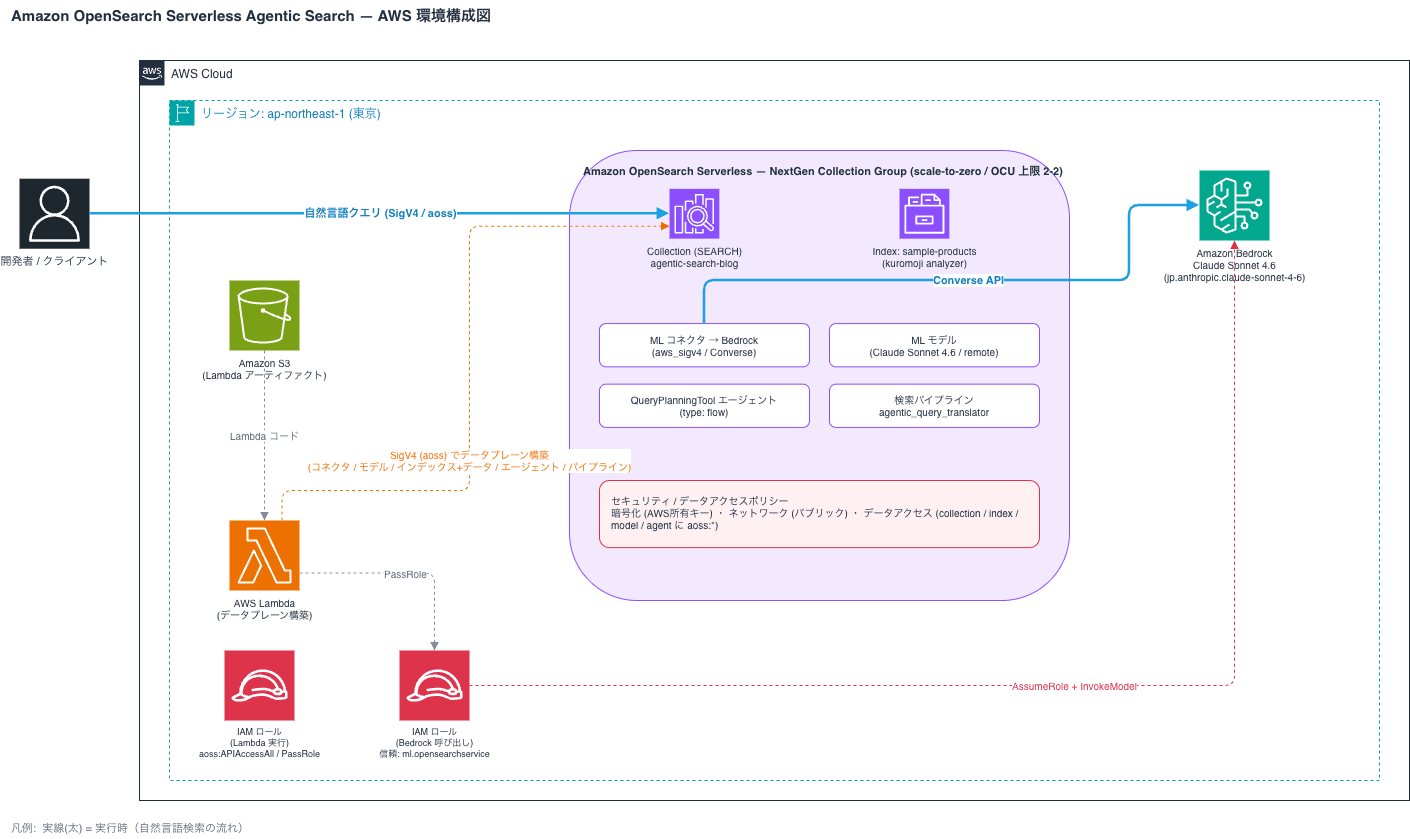
Creating an IAM Role for Bedrock Invocation
Create an IAM role for Amazon OpenSearch Serverless to call Amazon Bedrock. Since this is a role assumed by the serverless ML connector, specify ml.opensearchservice.amazonaws.com as the service principal in the trust policy.
% aws iam create-role --role-name OSAgenticBedrockRole \
  --assume-role-policy-document file://trust-policy.json
{
    "Role": {
        "Path": "/",
        "RoleName": "OSAgenticBedrockRole",
        "RoleId": "AROAXQ6Q7KC6T3LK553IF",
        "Arn": "arn:aws:iam::123456789012:role/OSAgenticBedrockRole",
        "CreateDate": "2026-06-21T07:52:26+00:00",
        "AssumeRolePolicyDocument": {
            "Version": "2012-10-17",
            "Statement": [
                {
                    "Effect": "Allow",
                    "Principal": {
                        "Service": [
                            "ml.opensearchservice.amazonaws.com",
                            "opensearchservice.amazonaws.com"
                        ]
                    },
                    "Action": "sts:AssumeRole"
                }
            ]
        }
    }
}

% aws iam put-role-policy --role-name OSAgenticBedrockRole \
  --policy-name bedrock-invoke --policy-document file://bedrock-policy.json
trust-policy.json
{
  "Version": "2012-10-17",
  "Statement": [
    {
      "Effect": "Allow",
      "Principal": { "Service": ["ml.opensearchservice.amazonaws.com", "opensearchservice.amazonaws.com"] },
      "Action": "sts:AssumeRole"
    }
  ]
}
bedrock-policy.json
{
  "Version": "2012-10-17",
  "Statement": [
    {
      "Effect": "Allow",
      "Action": ["bedrock:InvokeModel", "bedrock:InvokeModelWithResponseStream", "bedrock:Converse", "bedrock:ConverseStream"],
      "Resource": "*"
    }
  ]
}
The trust policy and permissions are configured as follows.
{
  "Version": "2012-10-17",
  "Statement": [
    {
      "Effect": "Allow",
      "Principal": { "Service": ["ml.opensearchservice.amazonaws.com"] },
      "Action": "sts:AssumeRole"
    }
  ]
}
On the permissions side, bedrock:InvokeModel and others are allowed.
Creating Security Policies and Data Access Policies
Before creating the collection, create an encryption policy (AWS Owned Key), a network policy (public access), and a data access policy.
% aws opensearchserverless create-security-policy --name enc-agentic-search-blog --type encryption --policy file://enc.json
{
    "securityPolicyDetail": {
        "type": "encryption",
        "name": "enc-agentic-search-blog",
        "policyVersion": "MTc4MjAyOTk0Nzc0Ml8x",
        "policy": {
            "Rules": [
                {
                    "Resource": [
                        "collection/agentic-search-blog"
                    ],
                    "ResourceType": "collection"
                }
            ],
            "AWSOwnedKey": true
        },
        "createdDate": 1782029947742,
        "lastModifiedDate": 1782029947742
    }
}
% aws opensearchserverless create-security-policy --name net-agentic-search-blog --type network --policy file://net.json
{
    "securityPolicyDetail": {
        "type": "network",
        "name": "net-agentic-search-blog",
        "policyVersion": "MTc4MjAyOTk3NjE2Ml8x",
        "policy": [
            {
                "Rules": [
                    {
                        "Resource": [
                            "collection/agentic-search-blog"
                        ],
                        "ResourceType": "collection"
                    },
                    {
                        "Resource": [
                            "collection/agentic-search-blog"
                        ],
                        "ResourceType": "dashboard"
                    }
                ],
                "AllowFromPublic": true
            }
        ],
        "createdDate": 1782029976162,
        "lastModifiedDate": 1782029976162
    }
}
% aws opensearchserverless create-access-policy --name data-agentic-search-blog --type data --policy file://data.json
{
    "accessPolicyDetail": {
        "type": "data",
        "name": "data-agentic-search-blog",
        "policyVersion": "MTc4MjAyOTk5ODE4N18x",
        "policy": [
            {
                "Rules": [
                    {
                        "Resource": [
                            "collection/agentic-search-blog"
                        ],
                        "Permission": [
                            "aoss:*"
                        ],
                        "ResourceType": "collection"
                    },
                    {
                        "Resource": [
                            "index/agentic-search-blog/*"
                        ],
                        "Permission": [
                            "aoss:*"
                        ],
                        "ResourceType": "index"
                    },
                    {
                        "Resource": [
                            "model/agentic-search-blog/*"
                        ],
                        "Permission": [
                            "aoss:*"
                        ],
                        "ResourceType": "model"
                    },
                    {
                        "Resource": [
                            "agent/agentic-search-blog/*"
                        ],
                        "Permission": [
                            "aoss:*"
                        ],
                        "ResourceType": "agent"
                    }
                ],
                "Principal": [
                    "arn:aws:iam::123456789012:role/cm-ishikawa.satoru"
                ]
            }
        ],
        "createdDate": 1782029998187,
        "lastModifiedDate": 1782029998187
    }
}
enc.json
{
  "Rules": [
    { "ResourceType": "collection", "Resource": ["collection/agentic-search-blog"] }
  ],
  "AWSOwnedKey": true
}
net.json
[
 {
   "Rules": [
     { "ResourceType": "collection", "Resource": ["collection/agentic-search-blog"] },
     { "ResourceType": "dashboard", "Resource": ["collection/agentic-search-blog"] }
   ],
   "AllowFromPublic": true
 }
]
In the data access policy, specify collection and index as resource types, and also model for ML resources and agent for agents, granting access to your own IAM role. If you forget the model and agent resource types, subsequent ML connector and agent registration will fail with a 403 error.
data.json:
[
  {
    "Rules": [
      { "ResourceType": "collection", "Resource": ["collection/agentic-search-blog"], "Permission": ["aoss:*"] },
      { "ResourceType": "index", "Resource": ["index/agentic-search-blog/*"], "Permission": ["aoss:*"] },
      { "ResourceType": "model", "Resource": ["model/agentic-search-blog/*"], "Permission": ["aoss:*"] },
      { "ResourceType": "agent", "Resource": ["agent/agentic-search-blog/*"], "Permission": ["aoss:*"] }
    ],
    "Principal": ["arn:aws:iam::123456789012:role/cm-ishikawa.satoru"]
  }
]
Creating the NextGen Collection
Create a next-generation (NextGen) collection group and then create a SEARCH-type collection on top of it. NextGen supports scale-to-zero, where the minimum OCU can drop to 0, which helps reduce costs during idle periods. To keep costs in check, the maximum OCU is set to 2. Note that in a NextGen collection group, standby replicas must be set to ENABLED.
% aws opensearchserverless create-collection-group \
  --name nextgen-agentic-search --standby-replicas ENABLED --generation NEXTGEN \
  --capacity-limits "maxIndexingCapacityInOCU=2,maxSearchCapacityInOCU=2"
{
    "createCollectionGroupDetail": {
        "id": "lw2twsdylfhs95wm8zw2",
        "arn": "arn:aws:aoss:ap-northeast-1:123456789012:collection-group/lw2twsdylfhs95wm8zw2",
        "name": "nextgen-agentic-search",
        "standbyReplicas": "ENABLED",
        "createdDate": 1782030106252,
        "capacityLimits": {
            "maxIndexingCapacityInOCU": 2.0,
            "maxSearchCapacityInOCU": 2.0,
            "minIndexingCapacityInOCU": 0.0,
            "minSearchCapacityInOCU": 0.0
        },
        "generation": "NEXTGEN"
    }
}

% aws opensearchserverless create-collection \
  --name agentic-search-blog --type SEARCH \
  --collection-group-name nextgen-agentic-search --standby-replicas ENABLED
{
    "createCollectionDetail": {
        "id": "mxrp0ih7g1itowz7om1m",
        "name": "agentic-search-blog",
        "status": "CREATING",
        "type": "SEARCH",
        "arn": "arn:aws:aoss:ap-northeast-1:123456789012:collection/mxrp0ih7g1itowz7om1m",
        "kmsKeyArn": "auto",
        "standbyReplicas": "ENABLED",
        "deletionProtection": "DISABLED",
        "createdDate": 1782030126378,
        "lastModifiedDate": 1782030126378,
        "collectionGroupName": "nextgen-agentic-search"
    }
}
The capacity of the created collection group shows a minimum OCU of 0 and a maximum OCU of 2, confirming that scale-to-zero is enabled. Once the collection status becomes ACTIVE, a collectionEndpoint is issued. With NextGen, this startup is extremely fast, becoming ACTIVE in a matter of seconds.
Registering the Bedrock Connector and Model
From here, the operations are performed against the collection endpoint using the OpenSearch REST API. Define an ML connector that calls the Bedrock Converse API and register it as a model. Specify the ARN of the IAM role created earlier in the connector's credential. Upon successful registration, a model_id is returned.
% export ENDPOINT=$(aws opensearchserverless batch-get-collection \
  --names agentic-search-blog --region ap-northeast-1 \
  --query "collectionDetails[0].collectionEndpoint" --output text)

% python3 aoss_rest.py POST "/_plugins/_ml/models/_register?deploy=true" \
  --endpoint "$ENDPOINT" --data @model_register.json
HTTP 200
{"task_id":"63bf1410-e908-4463-a715-a77a09d32f1f","status":"CREATED","model_id":"0927fff6-c24b-4387-9dcf-e592fa441e20"}
aoss_rest.py
#!/usr/bin/env python3
"""SigV4-signed REST client for the OpenSearch Serverless data plane.

Signing uses the official AWS method requests-aws4auth (service name 'aoss').

Usage:
  python3 aoss_rest.py <METHOD> <PATH> --endpoint <collection-endpoint> [--data '@file' | --data '{...}']
"""
import sys
import argparse
import boto3
import requests
from requests_aws4auth import AWS4Auth

def main():
    p = argparse.ArgumentParser()
    p.add_argument("method")
    p.add_argument("path")
    p.add_argument("--endpoint", required=True)
    p.add_argument("--region", default="ap-northeast-1")
    p.add_argument("--service", default="aoss")
    p.add_argument("--data")
    p.add_argument("--content-type", default="application/json")
    args = p.parse_args()

    creds = boto3.Session().get_credentials().get_frozen_credentials()
    awsauth = AWS4Auth(
        creds.access_key, creds.secret_key, args.region, args.service,
        session_token=creds.token,
    )

    body = None
    if args.data:
        if args.data.startswith("@"):
            with open(args.data[1:], "rb") as f:
                body = f.read()
        else:
            body = args.data.encode("utf-8")

    url = args.endpoint.rstrip("/") + args.path
    resp = requests.request(
        args.method, url, auth=awsauth,
        headers={"Content-Type": args.content_type}, data=body,
    )
    print("HTTP", resp.status_code)
    print(resp.text)
    sys.exit(0 if resp.ok else 2)

if __name__ == "__main__":
    main()
model_register.json
QueryPlanningTool requires the connector's request_body to contain parameters for the system prompt and user prompt. The request body for the Bedrock Converse API is configured as follows.
{
  "name": "Claude Sonnet 4.6 Query Planner",
  "function_name": "remote",
  "description": "Bedrock Claude Sonnet 4.6 for agentic query planning",
  "connector": {
    "name": "Bedrock Claude Sonnet 4.6 Connector",
    "description": "Bedrock Converse connector for Claude Sonnet 4.6",
    "version": 1,
    "protocol": "aws_sigv4",
    "parameters": {
      "region": "ap-northeast-1",
      "service_name": "bedrock",
      "model": "jp.anthropic.claude-sonnet-4-6"
    },
    "credential": {
      "roleArn": "arn:aws:iam::123456789012:role/OSAgenticBedrockRole"
    },
    "actions": [
      {
        "action_type": "predict",
        "method": "POST",
        "url": "https://bedrock-runtime.${parameters.region}.amazonaws.com/model/${parameters.model}/converse",
        "headers": { "content-type": "application/json" },
        "request_body": "{ \"system\": [{\"text\": \"${parameters.system_prompt}\"}], \"messages\": [${parameters._chat_history:-}{\"role\":\"user\",\"content\":[{\"text\":\"${parameters.user_prompt}\"}]}${parameters._interactions:-}]${parameters.tool_configs:-} }"
      }
    ]
  }
}
As a precaution, before setting up the agent, I ran a prediction using the model alone to verify that the Bedrock connection (IAM role delegation) was working correctly. hello was returned, and token usage was also retrieved successfully.
% python3 aoss_rest.py POST "/_plugins/_ml/models/0927fff6-c24b-4387-9dcf-e592fa441e20/_predict" \
  --endpoint "$ENDPOINT" --region ap-northeast-1 \
  --data '{"parameters":{"system_prompt":"You are a helpful assistant. Answer concisely.","user_prompt":"Reply with exactly one word: hello"}}'

HTTP 200
{"inference_results":[{"output":[{"name":"response","dataAsMap":{"metrics":{"latencyMs":696},"output":{"message":{"content":[{"text":"hello"}],"role":"assistant"}},"stopReason":"end_turn","usage":{"cacheReadInputTokenCount":0,"cacheReadInputTokens":0,"cacheWriteInputTokenCount":0,"cacheWriteInputTokens":0,"inputTokens":26,"outputTokens":4,"serverToolUsage":{},"totalTokens":30}}}],"status_code":200}]}
Creating an Index and Loading Japanese Sample Data
As search targets, we will create an index sample-products for Japanese product data (bulk.ndjson) with kuromoji as the morphological analysis engine. By specifying types in the mapping such as float for price, boolean for inventory, and keyword for category and brand, the QueryPlanningTool can generate more appropriate DSL.
% python3 aoss_rest.py PUT "/sample-products" --endpoint "$ENDPOINT" --region ap-northeast-1 --data @index_mapping.json
HTTP 200
{"acknowledged":true,"shards_acknowledged":false,"index":"sample-products"}

% python3 aoss_rest.py POST "/_bulk" --endpoint "$ENDPOINT" --region ap-northeast-1 \
  --data @bulk.ndjson --content-type "application/x-ndjson"
HTTP 200
{"took":15820,"errors":false,"items":[{"index":{"_index":"sample-products","_id":"F4sg6p4BYcptwQFi9Kob","_version":1,"result":"created","_shards":{"total":0,"successful":0,"failed":0},"_seq_no":0,"_primary_term":0,"status":201}},{"index":{"_index":"sample-products","_id":"GIsg6p4BYcptwQFi9Kob","_version":1,"result":"created","_shards":{"total":0,"successful":0,"failed":0},"_seq_no":0,"_primary_term":0,"status":201}},{"index":{"_index":"sample-products","_id":"GYsg6p4BYcptwQFi9Kob","_version":1,"result":"created","_shards":{"total":0,"successful":0,"failed":0},"_seq_no":0,"_primary_term":0,"status":201}},{"index":{"_index":"sample-products","_id":"Gosg6p4BYcptwQFi9Kob","_version":1,"result":"created","_shards":{"total":0,"successful":0,"failed":0},"_seq_no":0,"_primary_term":0,"status":201}},{"index":{"_index":"sample-products","_id":"G4sg6p4BYcptwQFi9Kob","_version":1,"result":"created","_shards":{"total":0,"successful":0,"failed":0},"_seq_no":0,"_primary_term":0,"status":201}},{"index":{"_index":"sample-products","_id":"HIsg6p4BYcptwQFi9Kob","_version":1,"result":"created","_shards":{"total":0,"successful":0,"failed":0},"_seq_no":0,"_primary_term":0,"status":201}},{"index":{"_index":"sample-products","_id":"HYsg6p4BYcptwQFi9Kob","_version":1,"result":"created","_shards":{"total":0,"successful":0,"failed":0},"_seq_no":0,"_primary_term":0,"status":201}},{"index":{"_index":"sample-products","_id":"Hosg6p4BYcptwQFi9Kob","_version":1,"result":"created","_shards":{"total":0,"successful":0,"failed":0},"_seq_no":0,"_primary_term":0,"status":201}},{"index":{"_index":"sample-products","_id":"H4sg6p4BYcptwQFi9Kob","_version":1,"result":"created","_shards":{"total":0,"successful":0,"failed":0},"_seq_no":0,"_primary_term":0,"status":201}},{"index":{"_index":"sample-products","_id":"IIsg6p4BYcptwQFi9Kob","_version":1,"result":"created","_shards":{"total":0,"successful":0,"failed":0},"_seq_no":0,"_primary_term":0,"status":201}}]}
bulk.ndjson
{"index":{"_index":"sample-products"}}
{"product_name":"UltraBook Pro 14","category":"laptops","brand":"Acme","price":1299,"rating":4.7,"in_stock":true,"description":"Lightweight 14-inch high-end laptop"}
{"index":{"_index":"sample-products"}}
{"product_name":"Budget Laptop 15","category":"laptops","brand":"Nimbus","price":699,"rating":4.1,"in_stock":true,"description":"Cost-performance-oriented 15-inch laptop"}
{"index":{"_index":"sample-products"}}
{"product_name":"Gaming Laptop X","category":"laptops","brand":"Vortex","price":1899,"rating":4.8,"in_stock":false,"description":"Gaming laptop equipped with high-performance GPU"}
{"index":{"_index":"sample-products"}}
{"product_name":"Wireless Earbuds","category":"electronics","brand":"Acme","price":149,"rating":4.3,"in_stock":true,"description":"Wireless earphones with noise reduction support"}
{"index":{"_index":"sample-products"}}
{"product_name":"4K Monitor 27","category":"electronics","brand":"Nimbus","price":459,"rating":4.6,"in_stock":true,"description":"27-inch 4K resolution LCD monitor"}
{"index":{"_index":"sample-products"}}
{"product_name":"Mechanical Keyboard","category":"electronics","brand":"Vortex","price":119,"rating":4.5,"in_stock":true,"description":"Mechanical keyboard with satisfying key feel"}
{"index":{"_index":"sample-products"}}
{"product_name":"Office Chair Ergo","category":"furniture","brand":"Comfy","price":329,"rating":4.2,"in_stock":true,"description":"Ergonomic chair that reduces fatigue even during long hours"}
{"index":{"_index":"sample-products"}}
{"product_name":"Standing Desk","category":"furniture","brand":"Comfy","price":549,"rating":4.4,"in_stock":false,"description":"Electrically height-adjustable standing desk"}
{"index":{"_index":"sample-products"}}
{"product_name":"Noise Cancel Headphones","category":"electronics","brand":"Acme","price":279,"rating":4.9,"in_stock":true,"description":"Noise-canceling headphones with high sound isolation"}
{"index":{"_index":"sample-products"}}
{"product_name":"Tablet 11","category":"electronics","brand":"Nimbus","price":599,"rating":4.0,"in_stock":true,"description":"Lightweight 11-inch tablet"}
index_mapping.json
{
  "mappings": {
    "properties": {
      "product_name": { "type": "text", "analyzer": "kuromoji" },
      "description": { "type": "text", "analyzer": "kuromoji" },
      "category": { "type": "keyword" },
      "price": { "type": "float" },
      "rating": { "type": "float" },
      "in_stock": { "type": "boolean" }
    }
  }
}
We loaded 10 products including laptops, electronics, and furniture. errors is false and all 10 items were successfully registered.
Registering the QueryPlanningTool Agent
We register a flow-type agent with one QueryPlanningTool. Specify the earlier model in model_id, and for response_filter specify the JSONPath $.output.message.content[0].text to extract the generated query from the Bedrock Converse (Claude) response. Upon successful registration, an agent_id is returned.
% python3 aoss_rest.py POST "/_plugins/_ml/agents/_register" --endpoint "$ENDPOINT" --data @agent.json
HTTP 200
{"agent_id":"ce5eaec8-f779-4d57-a314-9f59595f8e76"}
agent.json
{
  "name": "Agentic Search Product Agent",
  "type": "flow",
  "description": "NL to DSL query planning on sample-products",
  "tools": [
    {
      "type": "QueryPlanningTool",
      "parameters": {
        "model_id": "0927fff6-c24b-4387-9dcf-e592fa441e20",
        "response_filter": "$.output.message.content[0].text"
      }
    }
  ]
}
Executing Natural Language Queries (NL to DSL Conversion)
Now for the main topic. By sending a natural language question to the agent's _execute API, the generated DSL query is returned.
"Show me laptops under $800"
First, let's ask "Show me laptops under $800."
% python3 aoss_rest.py POST "/_plugins/_ml/agents/ce5eaec8-f779-4d57-a314-9f59595f8e76/_execute" \
  --endpoint "$ENDPOINT" \
  --data '{"parameters":{"question":"800ドル未満のノートパソコンを表示して","index_name":"sample-products"}}'

HTTP 200
{"inference_results":[{"output":[{"name":"response","result":"{\"size\":10,\"query\":{\"bool\":{\"must\":[{\"match\":{\"product_name\":{\"query\":\"ノートパソコン\",\"analyzer\":\"kuromoji\"}}}],\"filter\":[{\"range\":{\"price\":{\"lt\":800}}}]}},\"sort\":[{\"_score\":{\"order\":\"desc\"}}],\"track_total_hits\":false}"}]}]}
The generated DSL is as follows. "Under $800" was correctly converted to a range filter on price (lt: 800), and "laptop" was correctly converted to a multi_match query against product_name and description.
"Show me all out-of-stock items"
Next, when asked "Show me all out-of-stock items," a term filter with in_stock set to false was generated.
% python3 aoss_rest.py POST "/_plugins/_ml/agents/ce5eaec8-f779-4d57-a314-9f59595f8e76/_execute" \
  --endpoint "$ENDPOINT" \
  --data '{"parameters":{"question":"在庫切れの商品をすべて見せて","index_name":"sample-products"}}'

HTTP 200
{"inference_results":[{"output":[{"name":"response","result":"{\"size\":10,\"query\":{\"bool\":{\"filter\":[{\"term\":{\"in_stock\":false}}]}},\"sort\":[{\"_score\":{\"order\":\"desc\"}}],\"track_total_hits\":false}"}]}]}
"Show electronics with a rating of 4.5 or higher, sorted by highest rating"
Furthermore, for "Show electronics with a rating of 4.5 or higher, sorted by highest rating," a compound query was generated combining a term filter for category, a range filter for rating, and a descending sort by rating.
% python3 aoss_rest.py POST "/_plugins/_ml/agents/ce5eaec8-f779-4d57-a314-9f59595f8e76/_execute" \
  --endpoint "$ENDPOINT" \
  --data '{"parameters":{"question":"評価が4.5以上の電子機器を評価が高い順に表示","index_name":"sample-products"}}'

HTTP 200
{"inference_results":[{"output":[{"name":"response","result":"{\"size\":10,\"query\":{\"bool\":{\"filter\":[{\"term\":{\"category\":\"electronics\"}},{\"range\":{\"rating\":{\"gte\":4.5}}}]}},\"sort\":[{\"rating\":{\"order\":\"desc\"}}],\"track_total_hits\":false}"}]}]}
Conditions such as numeric ranges, boolean values, categories, and sort order were accurately translated from natural language text into DSL.
Performing End-to-End Search with a Search Pipeline
While _execute only generates DSL, using a search pipeline allows you to execute a search directly with the DSL generated from a natural language query and return the results. We create a pipeline that associates an agent with the agentic_query_translator request processor.
% python3 aoss_rest.py PUT "/_search/pipeline/agentic_search_pipeline" --endpoint "$ENDPOINT" \
  --data '{"request_processors":[{"agentic_query_translator":{"agent_id":"ce5eaec8-f779-4d57-a314-9f59595f8e76"}}],"response_processors":[{"agentic_context":{"dsl_query":true}}]}'
HTTP 200
{"acknowledged":true}
Specifying this pipeline, we pass natural language using an agentic query.
% python3 aoss_rest.py POST "/sample-products/_search?search_pipeline=agentic_search_pipeline" \
  --endpoint "$ENDPOINT" \
  --data '{"query":{"agentic":{"query_text":"800ドル未満のノートパソコンを表示して"}}}'
HTTP 200
{"took":2855,"timed_out":false,"_shards":{"total":0,"successful":0,"skipped":0,"failed":0},"hits":{"max_score":null,"hits":[]},"ext":{"dsl_query":"{\"size\":10,\"query\":{\"bool\":{\"must\":[{\"match\":{\"product_name\":{\"query\":\"ノートパソコン\",\"analyzer\":\"kuromoji\"}}}],\"filter\":[{\"range\":{\"price\":{\"lt\":800}}}]}},\"sort\":[{\"_score\":{\"order\":\"desc\"}}],\"track_total_hits\":false}"}}
The actual search results were returned. Of the three laptops ($1,299, $699, and $1,899), only "Budget Laptop 15" ($699) is under $800. As expected, only 1 result was returned, and ext.dsl_query also contains the generated DSL.
We confirmed that the entire flow works end-to-end: from the natural language request, through DSL generation, search execution, and result retrieval.
Discussion
Here we organize the insights and considerations gained from the actual testing.
- DSL generation accuracy is practical: Conditions such as numeric ranges (less than ~, greater than or equal to ~), boolean values (out of stock), categories, and sort order were accurately converted from Japanese text into DSL. The experience of being able to search OpenSearch in natural language, even for users unfamiliar with search DSL, is powerful.
- kuromoji is a prerequisite for Japanese free-text search: QueryPlanningTool's Japanese language understanding is good, and as long as the query falls into
term/rangefor structured fields likecategory, it works fine even in Japanese. On the other hand, for full-text search withmatch/multi_matchagainst Japanese text fields likedescription, the default analyzer concatenates consecutive katakana into a single token (e.g., "ハイエンドノートパソコン" becomes 1 token), resulting in 0 hits when searching for "ノートパソコン". If you intend to perform Japanese free-text search on description fields and similar, it is a prerequisite to set up kuromoji (Japanese morphological analysis) as the analyzer for text fields when creating the index. When kuromoji is applied, words are split into individual units such as "ハイエンド", "ノート", and "パソコン", making them findable withmatch. Note that the analyzer is applied at index time, so changing the setting requires recreating the index and reloading the data. - Easy cost savings with scale-to-zero: NextGen collections can reduce the minimum OCU to 0, avoiding charges during idle time. For short-term verification like this, costs can be significantly reduced.
- Generated DSL is transparently visible: By enabling
dsl_queryin theagentic_contextresponse processor of the search pipeline, the generated DSL is included in theextfield of the response. This allows you to verify "how the agent interpreted" the query, which is useful for debugging and validation. - Vector embeddings are not required: Since the QueryPlanningTool of Agentic Search is a feature that generates DSL from natural language, an embedding model is not needed unless vector search is also used. In this case, we were able to verify the configuration without embeddings using a SEARCH type collection.
- Pay attention to data access policy design: To use ML connector, model, and agent APIs, you need to add
modelandagentresource types to the data access policy. Without permission, a 403 will be returned. - Connector response_filter should match the model: The extraction target for the generated query differs depending on the LLM used, such as
$.output.message.content[0].textfor Bedrock's Claude (Converse API) and$.choices[0].message.contentfor OpenAI-based models. - Data plane signature uses
aoss: The SigV4 signature service name for the REST API isaossfor serverless. If the signature is incorrect, you get a 403 before authorization and troubleshooting the cause is time-consuming, so it's safer to use a proven implementation likerequests-aws4auth.
In this article we tried a single search with a flow-type agent, but using a conversational type would allow configuring interactive searches and multi-turn exchanges leveraging conversation memory. You can also use user_templates to generate DSL according to pre-defined search templates, which is effective when you want to control the shape of the generated queries.
Conclusion
We actually built and tested Agentic Search on Amazon OpenSearch Serverless NextGen in the Tokyo region. Using Claude Sonnet 4.6 from Amazon Bedrock as the LLM, we confirmed that we can generate OpenSearch DSL from natural language questions and retrieve search results in one end-to-end flow. Combined with the scale-to-zero of NextGen collections, you can provide a search experience without being conscious of search DSL while keeping idle costs low. This seems applicable for natural language search UIs and internal data search assistants.
Note that if you intend to perform full-text search on Japanese free text such as descriptions, setting up kuromoji (Japanese morphological analysis) for text fields is a prerequisite. Please refer to the Discussion section for details.
For those considering natural language search with OpenSearch Serverless, why not give it a try?
