![[アップデート] Amazon OpenSearch Serverless NextGen × Amazon Bedrock (Claude) で自然言語を検索 DSL に変換する Agentic Search を試してみた](https://images.ctfassets.net/ct0aopd36mqt/wp-thumbnail-b383cfad7452c18278d4772c71cae640/70681da1d5cfd4b8d3a7edcc29830075/amazon-opensearch-service?w=3840&fm=webp)
[アップデート] Amazon OpenSearch Serverless NextGen × Amazon Bedrock (Claude) で自然言語を検索 DSL に変換する Agentic Search を試してみた

クラウド事業本部の石川です。Amazon OpenSearch Serverless で自然言語による検索(Agentic Search)が利用できるようになりましたので、実際に東京リージョンで構築して試してみました。
ユーザーは「何を探しているか」を日本語や英語の文章で記述するだけで、システムが意図を解釈し、最適な検索戦略を計画して OpenSearch の DSL(ドメイン固有言語)クエリを生成し、推論内容の説明とともに結果を返します。
背後では、大規模言語モデル(LLM)を搭載した組み込みの QueryPlanningTool が自然言語を DSL クエリへ変換し、適切なツールをオーケストレーションして結果を取得します。設定は API または OpenSearch Dashboards から行えます。Agentic Search は、OpenSearch Serverless が提供されているすべての AWS 商用リージョンで利用できます。
なお、Agentic Search 自体は 2025 年 11 月にマネージド型の Amazon OpenSearch Service(バージョン 3.3 以降)向けに先行して導入されており、今回のアップデートでサーバーレスのコレクションでも利用できるようになりました。
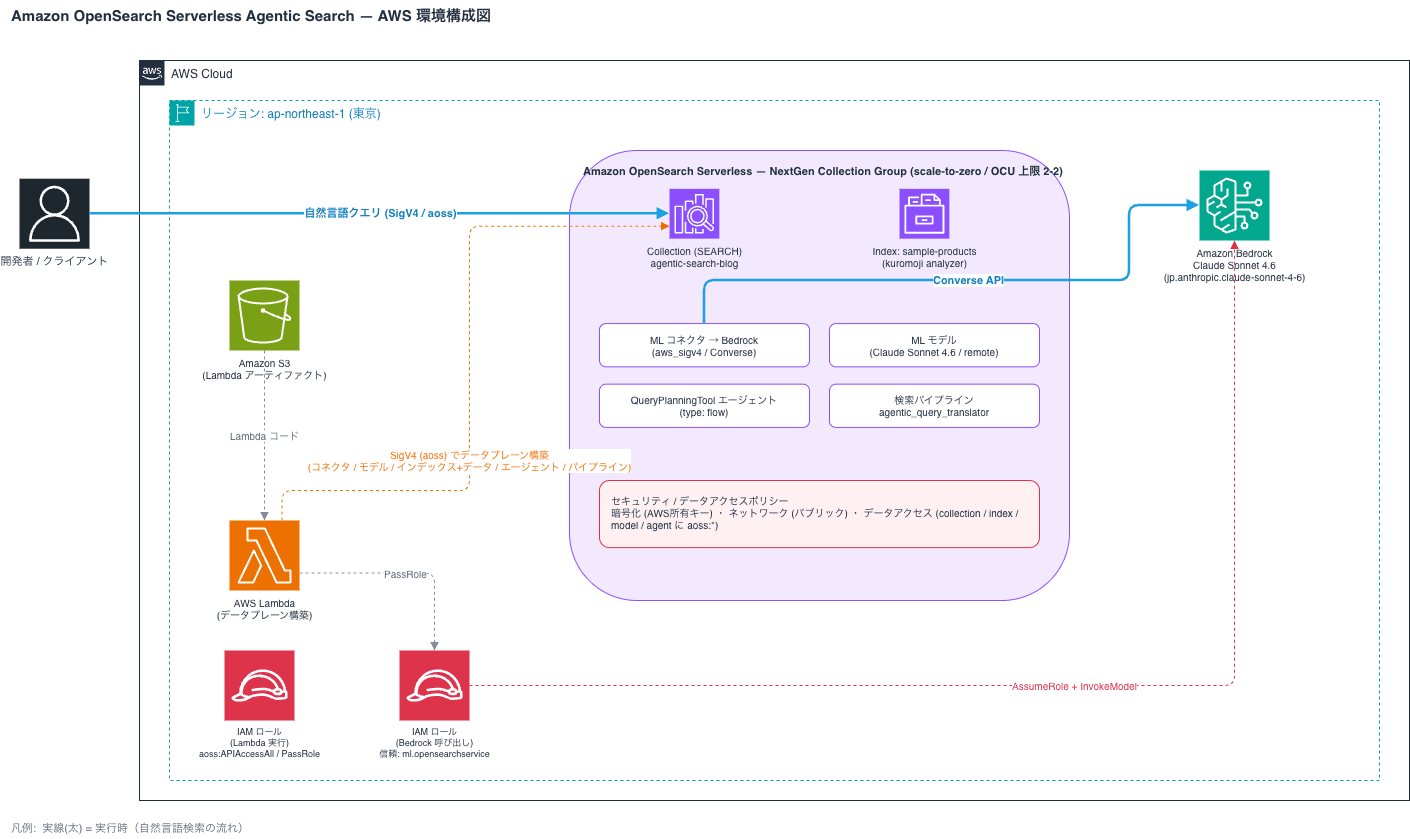
今回は、次世代(NextGen)の OpenSearch Serverless コレクションと Amazon Bedrock の Claude Sonnet 4.6 を組み合わせ、商品データに対する自然言語検索を AWS CLI と OpenSearch REST API で構築してみます。
Agentic Search とは
Agentic Search は、自律的なエージェントがユーザーの意図を理解し、適切なツールを選択して最適なクエリを生成・実行する仕組みです。中核となるのが QueryPlanningTool で、LLM を使って自然言語のリクエストを OpenSearch の DSL クエリに変換します。
エージェントには 2 種類あります。複数ターンの対話を扱う conversational 型と、単一の問い合わせを効率的に処理する flow 型です。今回は自然言語から DSL を生成して検索するというシンプルな用途のため、flow 型のエージェントに QueryPlanningTool を 1 つだけ持たせる構成にします。
処理の流れは次のとおりです。
QueryPlanningTool が LLM を呼び出すためには、Bedrock などの LLM への ML コネクタとモデルを事前に登録しておく必要があります。
やってみた
前提条件
- 検証環境: 東京リージョン(ap-northeast-1)
- Amazon OpenSearch Serverless NextGen(SEARCH Collection)
- Amazon Bedrock の Claude Sonnet 4.6(推論プロファイル
jp.anthropic.claude-sonnet-4-6) - ローカルに Python 3、
boto3、requests、requests-aws4authをインストール済み
Amazon OpenSearch Serverless のデータプレーン(インデックス作成・データ投入・ML/エージェント API)の呼び出しには SigV4 署名が必要です。今回は AWS 公式の requests-aws4auth を使った Python スクリプトでリクエストに署名しました。署名サービス名はサーバーレスのデータプレーン用の aoss を指定します。
システム構成
Bedrock 呼び出し用 IAM ロールの作成
Amazon OpenSearch Serverless が Amazon Bedrock を呼び出すための IAM ロールを作成します。サーバーレスの ML コネクタが引き受けるロールのため、信頼ポリシーのサービスプリンシパルには ml.opensearchservice.amazonaws.com を指定します。
% aws iam create-role --role-name OSAgenticBedrockRole \
  --assume-role-policy-document file://trust-policy.json
{
    "Role": {
        "Path": "/",
        "RoleName": "OSAgenticBedrockRole",
        "RoleId": "AROAXQ6Q7KC6T3LK553IF",
        "Arn": "arn:aws:iam::123456789012:role/OSAgenticBedrockRole",
        "CreateDate": "2026-06-21T07:52:26+00:00",
        "AssumeRolePolicyDocument": {
            "Version": "2012-10-17",
            "Statement": [
                {
                    "Effect": "Allow",
                    "Principal": {
                        "Service": [
                            "ml.opensearchservice.amazonaws.com",
                            "opensearchservice.amazonaws.com"
                        ]
                    },
                    "Action": "sts:AssumeRole"
                }
            ]
        }
    }
}

% aws iam put-role-policy --role-name OSAgenticBedrockRole \
  --policy-name bedrock-invoke --policy-document file://bedrock-policy.json
trust-policy.json
{
  "Version": "2012-10-17",
  "Statement": [
    {
      "Effect": "Allow",
      "Principal": { "Service": ["ml.opensearchservice.amazonaws.com", "opensearchservice.amazonaws.com"] },
      "Action": "sts:AssumeRole"
    }
  ]
}
bedrock-policy.json
{
  "Version": "2012-10-17",
  "Statement": [
    {
      "Effect": "Allow",
      "Action": ["bedrock:InvokeModel", "bedrock:InvokeModelWithResponseStream", "bedrock:Converse", "bedrock:ConverseStream"],
      "Resource": "*"
    }
  ]
}
信頼ポリシーと権限は次のようにしました。
{
  "Version": "2012-10-17",
  "Statement": [
    {
      "Effect": "Allow",
      "Principal": { "Service": ["ml.opensearchservice.amazonaws.com"] },
      "Action": "sts:AssumeRole"
    }
  ]
}
権限側では bedrock:InvokeModel などを許可しています。
セキュリティポリシーとデータアクセスポリシーの作成
コレクションの作成前に、暗号化ポリシー(AWS Owned Key)とネットワークポリシー(パブリックアクセス)、データアクセスポリシーを作成します。
% aws opensearchserverless create-security-policy --name enc-agentic-search-blog --type encryption --policy file://enc.json
{
    "securityPolicyDetail": {
        "type": "encryption",
        "name": "enc-agentic-search-blog",
        "policyVersion": "MTc4MjAyOTk0Nzc0Ml8x",
        "policy": {
            "Rules": [
                {
                    "Resource": [
                        "collection/agentic-search-blog"
                    ],
                    "ResourceType": "collection"
                }
            ],
            "AWSOwnedKey": true
        },
        "createdDate": 1782029947742,
        "lastModifiedDate": 1782029947742
    }
}
% aws opensearchserverless create-security-policy --name net-agentic-search-blog --type network --policy file://net.json
{
    "securityPolicyDetail": {
        "type": "network",
        "name": "net-agentic-search-blog",
        "policyVersion": "MTc4MjAyOTk3NjE2Ml8x",
        "policy": [
            {
                "Rules": [
                    {
                        "Resource": [
                            "collection/agentic-search-blog"
                        ],
                        "ResourceType": "collection"
                    },
                    {
                        "Resource": [
                            "collection/agentic-search-blog"
                        ],
                        "ResourceType": "dashboard"
                    }
                ],
                "AllowFromPublic": true
            }
        ],
        "createdDate": 1782029976162,
        "lastModifiedDate": 1782029976162
    }
}
% aws opensearchserverless create-access-policy --name data-agentic-search-blog --type data --policy file://data.json
{
    "accessPolicyDetail": {
        "type": "data",
        "name": "data-agentic-search-blog",
        "policyVersion": "MTc4MjAyOTk5ODE4N18x",
        "policy": [
            {
                "Rules": [
                    {
                        "Resource": [
                            "collection/agentic-search-blog"
                        ],
                        "Permission": [
                            "aoss:*"
                        ],
                        "ResourceType": "collection"
                    },
                    {
                        "Resource": [
                            "index/agentic-search-blog/*"
                        ],
                        "Permission": [
                            "aoss:*"
                        ],
                        "ResourceType": "index"
                    },
                    {
                        "Resource": [
                            "model/agentic-search-blog/*"
                        ],
                        "Permission": [
                            "aoss:*"
                        ],
                        "ResourceType": "model"
                    },
                    {
                        "Resource": [
                            "agent/agentic-search-blog/*"
                        ],
                        "Permission": [
                            "aoss:*"
                        ],
                        "ResourceType": "agent"
                    }
                ],
                "Principal": [
                    "arn:aws:iam::123456789012:role/cm-ishikawa.satoru"
                ]
            }
        ],
        "createdDate": 1782029998187,
        "lastModifiedDate": 1782029998187
    }
}
enc.json
{
  "Rules": [
    { "ResourceType": "collection", "Resource": ["collection/agentic-search-blog"] }
  ],
  "AWSOwnedKey": true
}
net.json
[
 {
   "Rules": [
     { "ResourceType": "collection", "Resource": ["collection/agentic-search-blog"] },
     { "ResourceType": "dashboard", "Resource": ["collection/agentic-search-blog"] }
   ],
   "AllowFromPublic": true
 }
]
データアクセスポリシーでは、リソースタイプとして collection・index に加えて、ML リソース用の model、エージェント用の agent を指定し、自分の IAM ロールにアクセス権を付与します。model と agent のリソースタイプを忘れると、後段の ML コネクタやエージェント登録が 403 で失敗します。
data.json:
[
  {
    "Rules": [
      { "ResourceType": "collection", "Resource": ["collection/agentic-search-blog"], "Permission": ["aoss:*"] },
      { "ResourceType": "index", "Resource": ["index/agentic-search-blog/*"], "Permission": ["aoss:*"] },
      { "ResourceType": "model", "Resource": ["model/agentic-search-blog/*"], "Permission": ["aoss:*"] },
      { "ResourceType": "agent", "Resource": ["agent/agentic-search-blog/*"], "Permission": ["aoss:*"] }
    ],
    "Principal": ["arn:aws:iam::123456789012:role/cm-ishikawa.satoru"]
  }
]
NextGen コレクションの作成
次世代(NextGen)のコレクショングループを作成し、その上に SEARCH 型のコレクションを作成します。NextGen は最小 OCU が 0 まで下がる scale-to-zero に対応しているため、アイドル時のコストを抑えられます。コスト上限を抑えるため、OCU の最大値は 2 に設定しました。なお、NextGen コレクショングループでは standby レプリカを ENABLED にする必要があります。
% aws opensearchserverless create-collection-group \
  --name nextgen-agentic-search --standby-replicas ENABLED --generation NEXTGEN \
  --capacity-limits "maxIndexingCapacityInOCU=2,maxSearchCapacityInOCU=2"
{
    "createCollectionGroupDetail": {
        "id": "lw2twsdylfhs95wm8zw2",
        "arn": "arn:aws:aoss:ap-northeast-1:123456789012:collection-group/lw2twsdylfhs95wm8zw2",
        "name": "nextgen-agentic-search",
        "standbyReplicas": "ENABLED",
        "createdDate": 1782030106252,
        "capacityLimits": {
            "maxIndexingCapacityInOCU": 2.0,
            "maxSearchCapacityInOCU": 2.0,
            "minIndexingCapacityInOCU": 0.0,
            "minSearchCapacityInOCU": 0.0
        },
        "generation": "NEXTGEN"
    }
}

% aws opensearchserverless create-collection \
  --name agentic-search-blog --type SEARCH \
  --collection-group-name nextgen-agentic-search --standby-replicas ENABLED
{
    "createCollectionDetail": {
        "id": "mxrp0ih7g1itowz7om1m",
        "name": "agentic-search-blog",
        "status": "CREATING",
        "type": "SEARCH",
        "arn": "arn:aws:aoss:ap-northeast-1:123456789012:collection/mxrp0ih7g1itowz7om1m",
        "kmsKeyArn": "auto",
        "standbyReplicas": "ENABLED",
        "deletionProtection": "DISABLED",
        "createdDate": 1782030126378,
        "lastModifiedDate": 1782030126378,
        "collectionGroupName": "nextgen-agentic-search"
    }
}
作成されたコレクショングループの容量は、最小 OCU が 0、最大 OCU が 2 となっており、scale-to-zero が有効であることを確認できました。コレクションのステータスが ACTIVE になると、collectionEndpoint が払い出されます。NextGen ではこの起動が非常に速く、数秒で ACTIVE になりました。
Bedrock コネクタとモデルの登録
ここからはコレクションのエンドポイントに対する OpenSearch REST API の操作です。Bedrock の Converse API を呼び出す ML コネクタを定義し、モデルとして登録します。コネクタの credential には先ほど作成した IAM ロールの ARN を指定します。登録に成功すると model_id が返ります。
% export ENDPOINT=$(aws opensearchserverless batch-get-collection \
  --names agentic-search-blog --region ap-northeast-1 \
  --query "collectionDetails[0].collectionEndpoint" --output text)

% python3 aoss_rest.py POST "/_plugins/_ml/models/_register?deploy=true" \
  --endpoint "$ENDPOINT" --data @model_register.json
HTTP 200
{"task_id":"63bf1410-e908-4463-a715-a77a09d32f1f","status":"CREATED","model_id":"0927fff6-c24b-4387-9dcf-e592fa441e20"}
aoss_rest.py
#!/usr/bin/env python3
"""OpenSearch Serverless データプレーンへの SigV4 署名付き REST クライアント。

署名は AWS 公式手法の requests-aws4auth(service 名 'aoss')を使用する。

使い方:
  python3 aoss_rest.py <METHOD> <PATH> --endpoint <collection-endpoint> [--data '@file' | --data '{...}']
"""
import sys
import argparse
import boto3
import requests
from requests_aws4auth import AWS4Auth

def main():
    p = argparse.ArgumentParser()
    p.add_argument("method")
    p.add_argument("path")
    p.add_argument("--endpoint", required=True)
    p.add_argument("--region", default="ap-northeast-1")
    p.add_argument("--service", default="aoss")
    p.add_argument("--data")
    p.add_argument("--content-type", default="application/json")
    args = p.parse_args()

    creds = boto3.Session().get_credentials().get_frozen_credentials()
    awsauth = AWS4Auth(
        creds.access_key, creds.secret_key, args.region, args.service,
        session_token=creds.token,
    )

    body = None
    if args.data:
        if args.data.startswith("@"):
            with open(args.data[1:], "rb") as f:
                body = f.read()
        else:
            body = args.data.encode("utf-8")

    url = args.endpoint.rstrip("/") + args.path
    resp = requests.request(
        args.method, url, auth=awsauth,
        headers={"Content-Type": args.content_type}, data=body,
    )
    print("HTTP", resp.status_code)
    print(resp.text)
    sys.exit(0 if resp.ok else 2)

if __name__ == "__main__":
    main()
model_register.json
QueryPlanningTool は、コネクタの request_body に system プロンプトと user プロンプトのパラメータが含まれていることを要求します。Bedrock Converse 用のリクエストボディは次のようにしました。
{
  "name": "Claude Sonnet 4.6 Query Planner",
  "function_name": "remote",
  "description": "Bedrock Claude Sonnet 4.6 for agentic query planning",
  "connector": {
    "name": "Bedrock Claude Sonnet 4.6 Connector",
    "description": "Bedrock Converse connector for Claude Sonnet 4.6",
    "version": 1,
    "protocol": "aws_sigv4",
    "parameters": {
      "region": "ap-northeast-1",
      "service_name": "bedrock",
      "model": "jp.anthropic.claude-sonnet-4-6"
    },
    "credential": {
      "roleArn": "arn:aws:iam::123456789012:role/OSAgenticBedrockRole"
    },
    "actions": [
      {
        "action_type": "predict",
        "method": "POST",
        "url": "https://bedrock-runtime.${parameters.region}.amazonaws.com/model/${parameters.model}/converse",
        "headers": { "content-type": "application/json" },
        "request_body": "{ \"system\": [{\"text\": \"${parameters.system_prompt}\"}], \"messages\": [${parameters._chat_history:-}{\"role\":\"user\",\"content\":[{\"text\":\"${parameters.user_prompt}\"}]}${parameters._interactions:-}]${parameters.tool_configs:-} }"
      }
    ]
  }
}
念のため、エージェント化の前にモデル単体で予測を実行し、Bedrock への接続(IAM ロールの委譲)が正しく機能するか確認しました。hello が返り、トークン使用量も取得できています。
% python3 aoss_rest.py POST "/_plugins/_ml/models/0927fff6-c24b-4387-9dcf-e592fa441e20/_predict" \
  --endpoint "$ENDPOINT" --region ap-northeast-1 \
  --data '{"parameters":{"system_prompt":"You are a helpful assistant. Answer concisely.","user_prompt":"Reply with exactly one word: hello"}}'

HTTP 200
{"inference_results":[{"output":[{"name":"response","dataAsMap":{"metrics":{"latencyMs":696},"output":{"message":{"content":[{"text":"hello"}],"role":"assistant"}},"stopReason":"end_turn","usage":{"cacheReadInputTokenCount":0,"cacheReadInputTokens":0,"cacheWriteInputTokenCount":0,"cacheWriteInputTokens":0,"inputTokens":26,"outputTokens":4,"serverToolUsage":{},"totalTokens":30}}}],"status_code":200}]}
インデックスの作成と日本語サンプルデータの投入
検索対象として、日本語の商品データ(bulk.ndjson)のインデックス sample-products (形態素解析エンジンにkuromoji)を作成します。価格は float、在庫は boolean、カテゴリやブランドは keyword といった型をマッピングで指定しておくと、QueryPlanningTool がより適切な DSL を生成できます。
% python3 aoss_rest.py PUT "/sample-products" --endpoint "$ENDPOINT" --region ap-northeast-1 --data @index_mapping.json
HTTP 200
{"acknowledged":true,"shards_acknowledged":false,"index":"sample-products"}

% python3 aoss_rest.py POST "/_bulk" --endpoint "$ENDPOINT" --region ap-northeast-1 \
  --data @bulk.ndjson --content-type "application/x-ndjson"
HTTP 200
{"took":15820,"errors":false,"items":[{"index":{"_index":"sample-products","_id":"F4sg6p4BYcptwQFi9Kob","_version":1,"result":"created","_shards":{"total":0,"successful":0,"failed":0},"_seq_no":0,"_primary_term":0,"status":201}},{"index":{"_index":"sample-products","_id":"GIsg6p4BYcptwQFi9Kob","_version":1,"result":"created","_shards":{"total":0,"successful":0,"failed":0},"_seq_no":0,"_primary_term":0,"status":201}},{"index":{"_index":"sample-products","_id":"GYsg6p4BYcptwQFi9Kob","_version":1,"result":"created","_shards":{"total":0,"successful":0,"failed":0},"_seq_no":0,"_primary_term":0,"status":201}},{"index":{"_index":"sample-products","_id":"Gosg6p4BYcptwQFi9Kob","_version":1,"result":"created","_shards":{"total":0,"successful":0,"failed":0},"_seq_no":0,"_primary_term":0,"status":201}},{"index":{"_index":"sample-products","_id":"G4sg6p4BYcptwQFi9Kob","_version":1,"result":"created","_shards":{"total":0,"successful":0,"failed":0},"_seq_no":0,"_primary_term":0,"status":201}},{"index":{"_index":"sample-products","_id":"HIsg6p4BYcptwQFi9Kob","_version":1,"result":"created","_shards":{"total":0,"successful":0,"failed":0},"_seq_no":0,"_primary_term":0,"status":201}},{"index":{"_index":"sample-products","_id":"HYsg6p4BYcptwQFi9Kob","_version":1,"result":"created","_shards":{"total":0,"successful":0,"failed":0},"_seq_no":0,"_primary_term":0,"status":201}},{"index":{"_index":"sample-products","_id":"Hosg6p4BYcptwQFi9Kob","_version":1,"result":"created","_shards":{"total":0,"successful":0,"failed":0},"_seq_no":0,"_primary_term":0,"status":201}},{"index":{"_index":"sample-products","_id":"H4sg6p4BYcptwQFi9Kob","_version":1,"result":"created","_shards":{"total":0,"successful":0,"failed":0},"_seq_no":0,"_primary_term":0,"status":201}},{"index":{"_index":"sample-products","_id":"IIsg6p4BYcptwQFi9Kob","_version":1,"result":"created","_shards":{"total":0,"successful":0,"failed":0},"_seq_no":0,"_primary_term":0,"status":201}}]}
bulk.ndjson
{"index":{"_index":"sample-products"}}
{"product_name":"UltraBook Pro 14","category":"laptops","brand":"Acme","price":1299,"rating":4.7,"in_stock":true,"description":"軽量14インチのハイエンドノートパソコン"}
{"index":{"_index":"sample-products"}}
{"product_name":"Budget Laptop 15","category":"laptops","brand":"Nimbus","price":699,"rating":4.1,"in_stock":true,"description":"コストパフォーマンス重視の15インチノートパソコン"}
{"index":{"_index":"sample-products"}}
{"product_name":"Gaming Laptop X","category":"laptops","brand":"Vortex","price":1899,"rating":4.8,"in_stock":false,"description":"高性能GPU搭載のゲーミングノートパソコン"}
{"index":{"_index":"sample-products"}}
{"product_name":"Wireless Earbuds","category":"electronics","brand":"Acme","price":149,"rating":4.3,"in_stock":true,"description":"ノイズ低減対応のワイヤレスイヤホン"}
{"index":{"_index":"sample-products"}}
{"product_name":"4K Monitor 27","category":"electronics","brand":"Nimbus","price":459,"rating":4.6,"in_stock":true,"description":"27インチ4K解像度の液晶モニター"}
{"index":{"_index":"sample-products"}}
{"product_name":"Mechanical Keyboard","category":"electronics","brand":"Vortex","price":119,"rating":4.5,"in_stock":true,"description":"打鍵感の良いメカニカルキーボード"}
{"index":{"_index":"sample-products"}}
{"product_name":"Office Chair Ergo","category":"furniture","brand":"Comfy","price":329,"rating":4.2,"in_stock":true,"description":"長時間でも疲れにくいエルゴノミクスチェア"}
{"index":{"_index":"sample-products"}}
{"product_name":"Standing Desk","category":"furniture","brand":"Comfy","price":549,"rating":4.4,"in_stock":false,"description":"電動昇降式のスタンディングデスク"}
{"index":{"_index":"sample-products"}}
{"product_name":"Noise Cancel Headphones","category":"electronics","brand":"Acme","price":279,"rating":4.9,"in_stock":true,"description":"高い遮音性を持つノイズキャンセリングヘッドホン"}
{"index":{"_index":"sample-products"}}
{"product_name":"Tablet 11","category":"electronics","brand":"Nimbus","price":599,"rating":4.0,"in_stock":true,"description":"11インチの軽量タブレット"}
index_mapping.json
{
  "mappings": {
    "properties": {
      "product_name": { "type": "text", "analyzer": "kuromoji" },
      "description": { "type": "text", "analyzer": "kuromoji" },
      "category": { "type": "keyword" },
      "price": { "type": "float" },
      "rating": { "type": "float" },
      "in_stock": { "type": "boolean" }
    }
  }
}
ノートパソコンや電子機器、家具など 10 件の商品を投入しました。errors が false で 10 件すべて登録できています。
QueryPlanningTool エージェントの登録
QueryPlanningTool を 1 つ持つ flow 型エージェントを登録します。model_id に先ほどのモデルを指定し、response_filter には Bedrock Converse(Claude)のレスポンスから生成クエリを取り出す JSONPath $.output.message.content[0].text を指定します。登録に成功すると agent_id が返ります。
% python3 aoss_rest.py POST "/_plugins/_ml/agents/_register" --endpoint "$ENDPOINT" --data @agent.json
HTTP 200
{"agent_id":"ce5eaec8-f779-4d57-a314-9f59595f8e76"}
agent.json
{
  "name": "Agentic Search Product Agent",
  "type": "flow",
  "description": "NL to DSL query planning on sample-products",
  "tools": [
    {
      "type": "QueryPlanningTool",
      "parameters": {
        "model_id": "0927fff6-c24b-4387-9dcf-e592fa441e20",
        "response_filter": "$.output.message.content[0].text"
      }
    }
  ]
}
自然言語クエリの実行(NL から DSL 変換)
いよいよ本題です。エージェントの _execute API に自然言語の質問を投げると、生成された DSL クエリが返ってきます。
「800ドル未満のノートパソコンを表示して」
まずは「800ドル未満のノートパソコンを表示して」と尋ねてみます。
% python3 aoss_rest.py POST "/_plugins/_ml/agents/ce5eaec8-f779-4d57-a314-9f59595f8e76/_execute" \
  --endpoint "$ENDPOINT" \
  --data '{"parameters":{"question":"800ドル未満のノートパソコンを表示して","index_name":"sample-products"}}'

HTTP 200
{"inference_results":[{"output":[{"name":"response","result":"{\"size\":10,\"query\":{\"bool\":{\"must\":[{\"match\":{\"product_name\":{\"query\":\"ノートパソコン\",\"analyzer\":\"kuromoji\"}}}],\"filter\":[{\"range\":{\"price\":{\"lt\":800}}}]}},\"sort\":[{\"_score\":{\"order\":\"desc\"}}],\"track_total_hits\":false}"}]}]}
生成された DSL は次のとおりです。「800ドル未満」が price の range フィルタ(lt: 800)に、「ノートパソコン」が product_name と description に対する multi_match クエリに、正しく変換されました。
「在庫切れの商品をすべて見せて」
続いて「在庫切れの商品をすべて見せて」と尋ねると、in_stock が false の term フィルタが生成されました。
% python3 aoss_rest.py POST "/_plugins/_ml/agents/ce5eaec8-f779-4d57-a314-9f59595f8e76/_execute" \
  --endpoint "$ENDPOINT" \
  --data '{"parameters":{"question":"在庫切れの商品をすべて見せて","index_name":"sample-products"}}'

HTTP 200
{"inference_results":[{"output":[{"name":"response","result":"{\"size\":10,\"query\":{\"bool\":{\"filter\":[{\"term\":{\"in_stock\":false}}]}},\"sort\":[{\"_score\":{\"order\":\"desc\"}}],\"track_total_hits\":false}"}]}]}
「評価が4.5以上の電子機器を評価が高い順に表示」
さらに「評価が4.5以上の電子機器を評価が高い順に表示」では、カテゴリの term フィルタ、評価の range フィルタ、評価による降順ソートが組み合わさった複合クエリが生成されました。
% python3 aoss_rest.py POST "/_plugins/_ml/agents/ce5eaec8-f779-4d57-a314-9f59595f8e76/_execute" \
  --endpoint "$ENDPOINT" \
  --data '{"parameters":{"question":"評価が4.5以上の電子機器を評価が高い順に表示","index_name":"sample-products"}}'

HTTP 200
{"inference_results":[{"output":[{"name":"response","result":"{\"size\":10,\"query\":{\"bool\":{\"filter\":[{\"term\":{\"category\":\"electronics\"}},{\"range\":{\"rating\":{\"gte\":4.5}}}]}},\"sort\":[{\"rating\":{\"order\":\"desc\"}}],\"track_total_hits\":false}"}]}]}
数値の範囲・真偽値・カテゴリ・ソート順といった条件を、自然言語の文章から的確に DSL へ落とし込めています。
検索パイプラインでエンドツーエンドに検索する
_execute は DSL を生成するだけですが、検索パイプラインを使うと、自然言語クエリから生成した DSL でそのまま検索を実行し、結果を返せます。agentic_query_translator リクエストプロセッサーにエージェントを紐付けたパイプラインを作成します。
% python3 aoss_rest.py PUT "/_search/pipeline/agentic_search_pipeline" --endpoint "$ENDPOINT" \
  --data '{"request_processors":[{"agentic_query_translator":{"agent_id":"ce5eaec8-f779-4d57-a314-9f59595f8e76"}}],"response_processors":[{"agentic_context":{"dsl_query":true}}]}'
HTTP 200
{"acknowledged":true}
このパイプラインを指定し、agentic クエリで自然言語を渡します。
% python3 aoss_rest.py POST "/sample-products/_search?search_pipeline=agentic_search_pipeline" \
  --endpoint "$ENDPOINT" \
  --data '{"query":{"agentic":{"query_text":"800ドル未満のノートパソコンを表示して"}}}'
HTTP 200
{"took":2855,"timed_out":false,"_shards":{"total":0,"successful":0,"skipped":0,"failed":0},"hits":{"max_score":null,"hits":[]},"ext":{"dsl_query":"{\"size\":10,\"query\":{\"bool\":{\"must\":[{\"match\":{\"product_name\":{\"query\":\"ノートパソコン\",\"analyzer\":\"kuromoji\"}}}],\"filter\":[{\"range\":{\"price\":{\"lt\":800}}}]}},\"sort\":[{\"_score\":{\"order\":\"desc\"}}],\"track_total_hits\":false}"}}
実際の検索結果が返ってきました。3 台のノートパソコン(1299・699・1899 ドル)のうち、800 ドル未満は「Budget Laptop 15」(699 ドル)だけです。期待どおり 1 件だけがヒットし、ext.dsl_query には生成された DSL も含まれています。
自然言語のリクエストから DSL の生成、検索の実行、結果の返却までが一気通貫で動作することを確認できました。
考察
実際に試してみて得られた知見と注意点を整理します。
- DSL 生成の精度は実用的: 数値の範囲(〜未満、〜以上)、真偽値(在庫切れ)、カテゴリ、ソート順といった条件を、日本語の文章から的確に DSL へ変換できました。検索 DSL に不慣れな利用者でも、自然言語で OpenSearch を検索できる体験は強力です。
- 日本語のフリーテキスト検索には kuromoji が前提: QueryPlanningTool の日本語理解は良好で、
categoryなどの構造化フィールドへのterm/rangeに落ちる限りは日本語でも問題なく動作します。一方、descriptionのような日本語テキストフィールドに対するmatch/multi_matchの全文検索は、デフォルトの analyzer だとカタカナの連続が 1 つのトークンに結合されてしまい(例: 「ハイエンドノートパソコン」が 1 トークン)、「ノートパソコン」で検索しても 0 件になりました。説明文などの日本語フリーテキスト検索を狙う場合は、テキストフィールドに kuromoji(日本語形態素解析)の analyzer を設定してインデックスを作成するのが前提になります。kuromoji を適用すると「ハイエンド」「ノート」「パソコン」のように単語単位で分割され、matchでヒットするようになります。なお analyzer は索引時に適用されるため、設定変更にはインデックスの作り直しとデータの再投入が必要です。 - scale-to-zero でコストを抑えやすい: NextGen コレクションは最小 OCU を 0 まで下げられ、アイドル時の課金を回避できます。今回のように短時間の検証では、コストを大きく抑えられます。
- 生成 DSL が透過的に確認できる: 検索パイプラインの
agentic_contextレスポンスプロセッサーでdsl_queryを有効にすると、生成された DSL がレスポンスのextに含まれます。エージェントが「どう解釈したか」を確認でき、デバッグや検証に役立ちます。 - ベクトル埋め込みは必須ではない: Agentic Search の QueryPlanningTool は自然言語から DSL を生成する機能のため、ベクトル検索を併用しない限り埋め込みモデルは不要です。今回は SEARCH 型コレクションで埋め込みなしの構成で検証できました。
- データアクセスポリシーの設計に注意: ML コネクタ・モデルやエージェントの API を使うには、データアクセスポリシーに
model・agentのリソースタイプを追加する必要があります。許可がないと 403 が返ります。 - コネクタの response_filter はモデルに合わせる: Bedrock の Claude(Converse API)では
$.output.message.content[0].text、OpenAI 系では$.choices[0].message.contentというように、利用する LLM に応じて生成クエリの抽出先を指定します。 - データプレーンの署名は
aoss: REST API の SigV4 署名サービス名はサーバーレスのaossです。署名に不備があると認可前の 403 になり原因の切り分けに手間取るため、requests-aws4authなど実績のある実装を使うのが無難でした。
今回は flow 型エージェントで単発の検索を試しましたが、conversational 型を使えば対話的な検索や、会話メモリを活かしたマルチターンのやり取りも構成できます。また、user_templates を使って事前定義した検索テンプレートに沿って DSL を生成させることもできるため、生成されるクエリの形を制御したい場合に有効です。
最後に
Amazon OpenSearch Serverless NextGen の Agentic Search を、東京リージョンで実際に構築して試してみました。Amazon Bedrock の Claude Sonnet 4.6 を LLM に据え、自然言語の質問から OpenSearch DSL を生成し、検索結果まで一気通貫で取得できることを確認できました。NextGen コレクションの scale-to-zero と組み合わせれば、アイドル時のコストを抑えつつ、検索 DSL を意識せずに使える検索体験を提供できます。検索 UI の自然言語化や、社内データの検索アシスタントなどに活用できそうです。
なお、説明文などの日本語フリーテキストに対する全文検索を狙う場合は、テキストフィールドへの kuromoji(日本語形態素解析)の設定が前提になる点だけ注意してください。詳細は考察で触れたとおりです。
OpenSearch Serverless で自然言語検索を検討されている方は、検証してみてはいかがでしょうか。