![[Update] I tried out the log analysis optimization engine "Optimized" that has become available for Amazon OpenSearch Service](https://images.ctfassets.net/ct0aopd36mqt/wp-thumbnail-b383cfad7452c18278d4772c71cae640/70681da1d5cfd4b8d3a7edcc29830075/amazon-opensearch-service?w=3840&fm=webp)
[Update] I tried out the log analysis optimization engine "Optimized" that has become available for Amazon OpenSearch Service

This page has been translated by machine translation. View original
This is Ishikawa from the Cloud Business Division. A new engine mode called "Optimized" designed exclusively for log analytics workloads has been added to Amazon OpenSearch Service. This is an extremely significant update for users and companies using it for log analytics, and it looks really promising. I actually created a domain and tried everything from ingesting logs to PPL / SQL queries.
What is the Optimized Engine for Log Analytics Workloads
The Optimized engine is a new engine mode you can select when creating an Amazon OpenSearch Service domain. The conventional engine is now positioned as General Purpose, and the console, API, security model, and network settings can all continue to be used as shared components.
As log volumes continue to grow with the spread of cloud-native architectures and AI workloads, day-to-day operations center on aggregation and trend analysis, while incident investigations require precise full-text search. The Optimized engine announced this time is a log analytics-specialized engine mode that provides both within a single managed service.
According to AWS's announcement, internal benchmarks show it achieves up to 4x price-performance compared to the previous version, columnar storage reduces storage usage by up to 70% (enabling up to 3x more data retention at the same cost), and the same hardware delivers up to 2x ingestion throughput and 2x faster analytical queries. There are no additional charges.
Optimized Engine Processing Flow
According to the official documentation, internally it adopts an architecture that uses the optimal data structure for each operation. Log data is stored in Apache Parquet (columnar format), and searchable fields are also stored in Lucene inverted indexes. Queries are parsed and optimized by Apache Calcite on the coordinator node, analytical processing such as aggregations is handled by DataFusion, a Rust-based vectorized execution engine, and full-text search is executed by Lucene. Since the two can cooperate during query execution, queries that perform full-text search on log content and then aggregate the results can be executed in a single statement.
The main prerequisites for use are as follows.
- Only available for new domains running OpenSearch 3.5 or later (cannot be applied to existing domains retroactively, and the engine mode cannot be changed after creation)
- Hot tier instances are limited to OpenSearch Optimized Instances (OR1, OR2, OM2)
- Authentication is limited to IAM and IAM Identity Center only (Amazon Cognito is not supported)
- Visualization is limited to OpenSearch UI only (OpenSearch Dashboards is not supported)
- Query languages are PPL (Piped Processing Language) and SQL (DSL Query API is not supported at release)
Trying It Out
Prerequisites
- Region: ap-northeast-1 (Tokyo)
- Instance type: or2.medium.search ×1 (On-demand price in the Tokyo region at the time of writing: $0.121/hour)
- To avoid creating a dedicated role from scratch, I used my AWS account and an existing login role directly as the FGAC master.
System Configuration
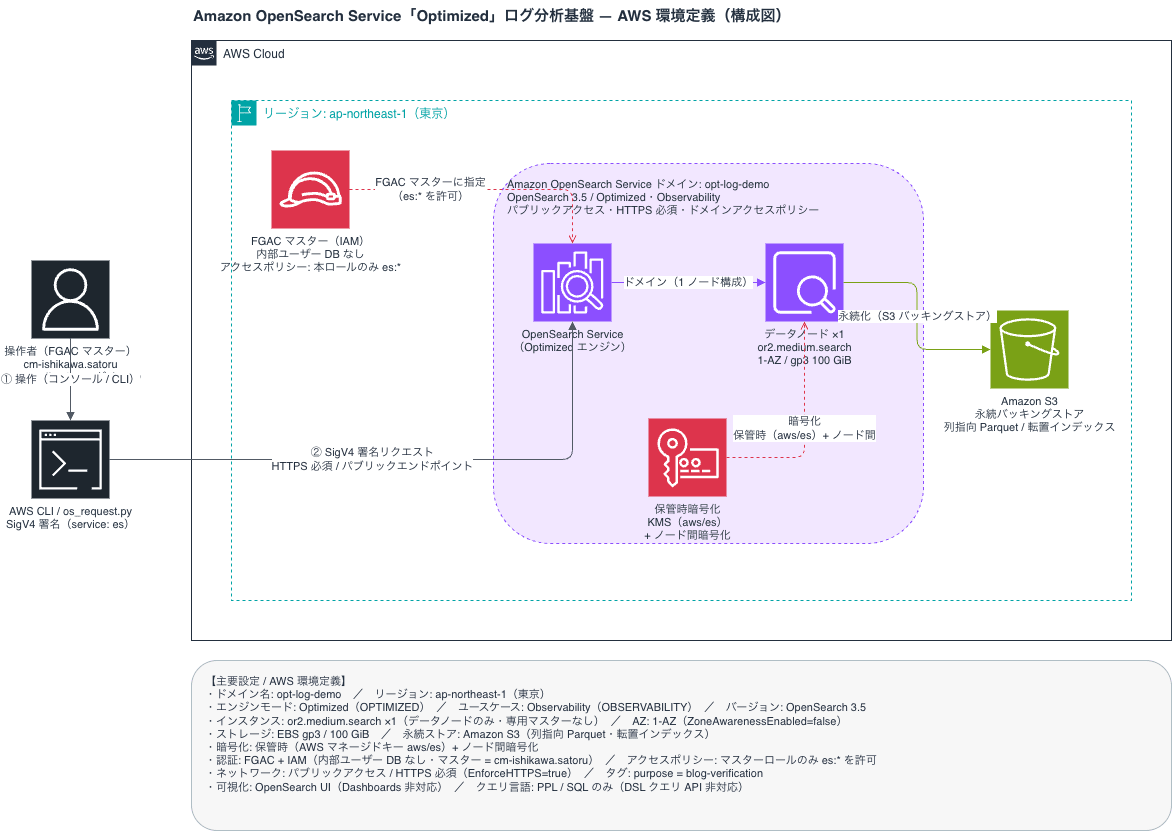
Creating the Domain
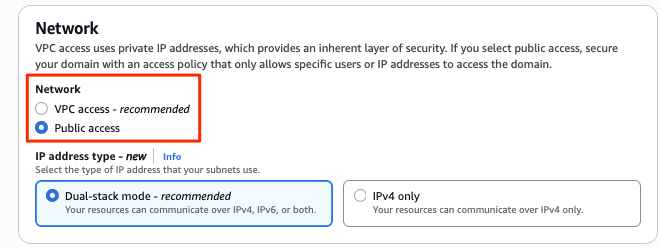
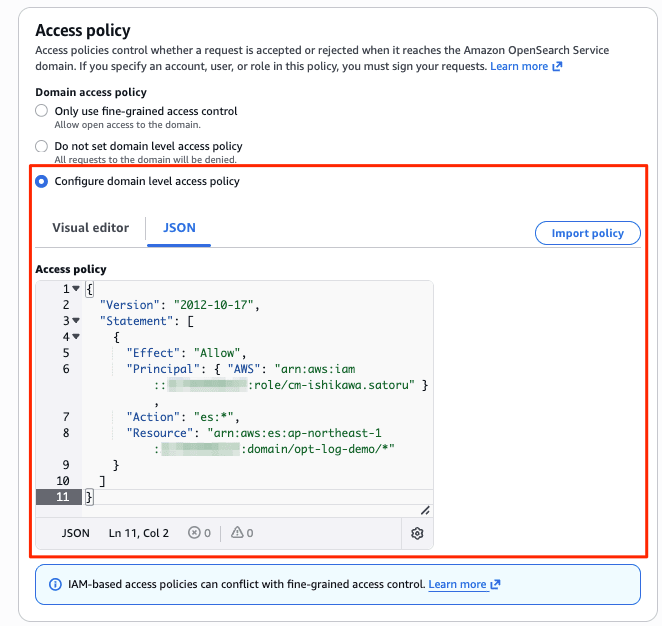
I created a new domain from the management console menu [Create Domain]. I specified the newly added Observability and Optimized to create a domain with the Optimized engine. Since authentication is IAM only, I specified an IAM role as the master user for Fine-Grained Access Control (FGAC). (The domain creation screen is very long, so I will omit the default items.)
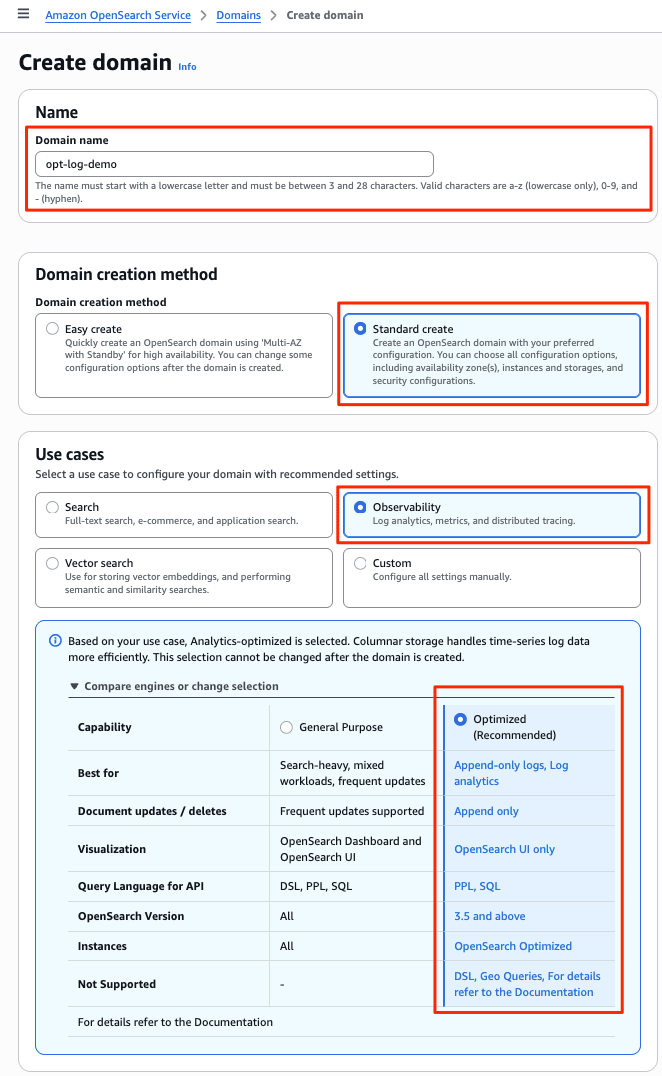
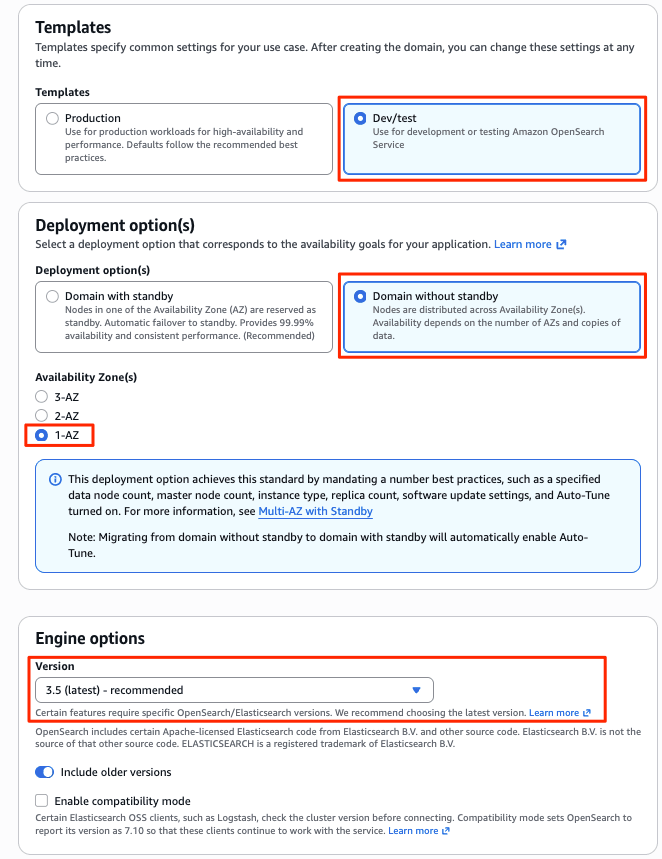
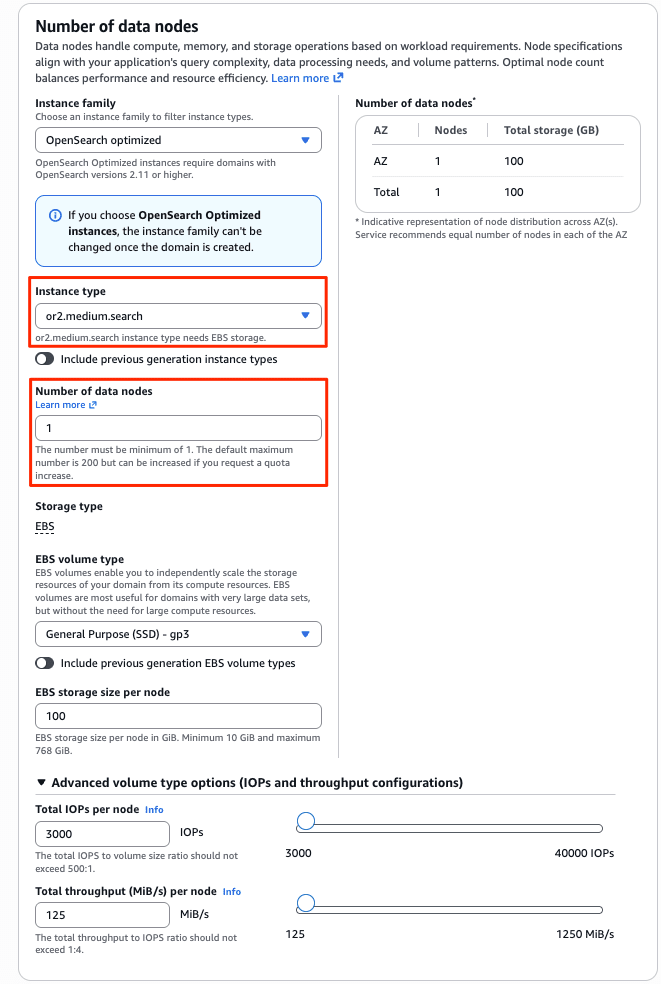
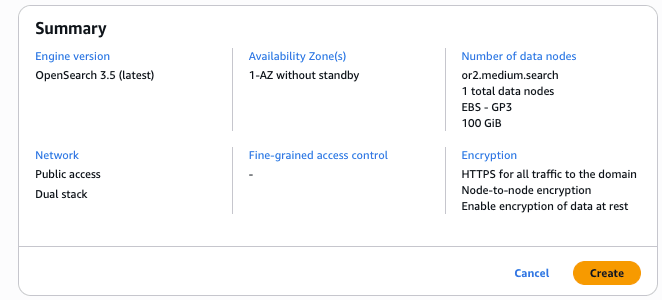
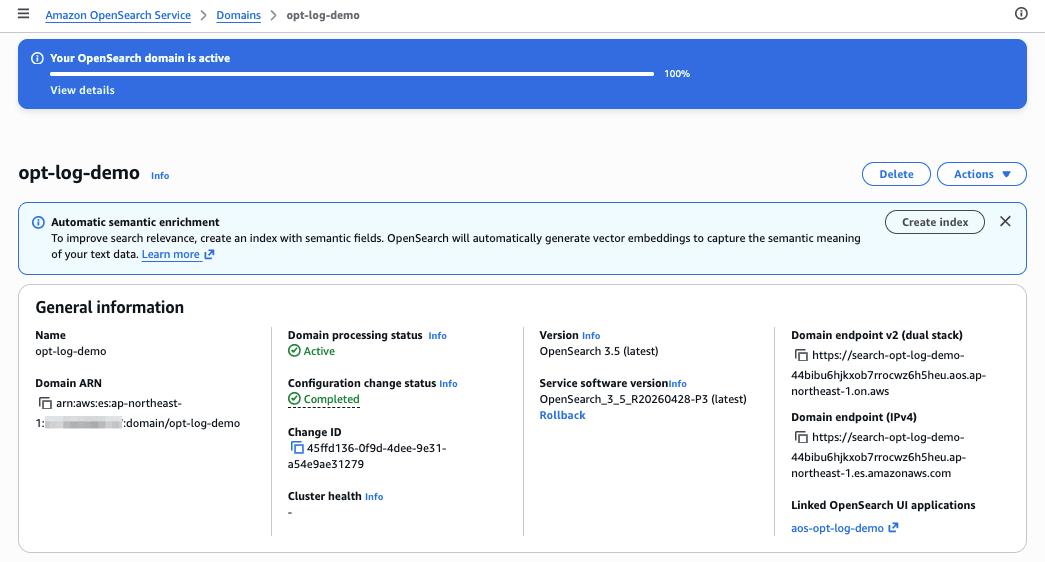
After about 15 minutes, the new Optimized engine domain opt-log-demo and OpenSearch UI (Dashboards) aos-opt-log-demo were deployed.
Helper Command "os_request.py" for Verification
I prepared a helper command os_request.py for the subsequent verification. It is a CLI tool for sending SigV4-signed HTTP requests to Amazon OpenSearch Service domains. It is a small wrapper that lets you call OpenSearch's REST API with AWS authentication in the same way you would use curl.
os_request.py
#!/usr/bin/env python3
"""Send HTTP requests to Amazon OpenSearch Service domain with SigV4 signature.

usage: os_request.py <METHOD> <https://endpoint/path> [--data-file FILE | --data JSON] [--region REGION]
"""
import argparse
import json
import sys

import boto3
from botocore.awsrequest import AWSRequest
from botocore.auth import SigV4Auth
import urllib.request
import urllib.error

def main():
    p = argparse.ArgumentParser()
    p.add_argument("method")
    p.add_argument("url")
    p.add_argument("--data-file")
    p.add_argument("--data")
    p.add_argument("--region", default="ap-northeast-1")
    p.add_argument("--content-type", default="application/json")
    args = p.parse_args()

    body = None
    if args.data_file:
        with open(args.data_file, "rb") as f:
            body = f.read()
    elif args.data:
        body = args.data.encode("utf-8")

    session = boto3.Session()
    creds = session.get_credentials().get_frozen_credentials()
    req = AWSRequest(method=args.method, url=args.url, data=body,
                     headers={"Content-Type": args.content_type})
    SigV4Auth(creds, "es", args.region).add_auth(req)

    http_req = urllib.request.Request(args.url, data=body, method=args.method,
                                      headers=dict(req.headers))
    try:
        with urllib.request.urlopen(http_req, timeout=120) as resp:
            print(f"HTTP {resp.status}", file=sys.stderr)
            out = resp.read().decode("utf-8")
    except urllib.error.HTTPError as e:
        print(f"HTTP {e.code}", file=sys.stderr)
        out = e.read().decode("utf-8")
        print(out)
        sys.exit(1)

    try:
        print(json.dumps(json.loads(out), indent=2, ensure_ascii=False))
    except json.JSONDecodeError:
        print(out)

if __name__ == "__main__":
    main()
Connectivity Check to the Cluster
The cluster name and version information ("number": "3.5.x") are returned, confirming that the signature, access policy, and FGAC are all correctly configured.
% cd verification
% export ENDPOINT="https://search-opt-log-demo-44bibu6hjkxob7rrocwz6h5heu.ap-northeast-1.es.amazonaws.com"
% python os_request.py GET "$ENDPOINT/"
HTTP 200
{
  "name": "4a0bb206066b32cc1b4ebcdc001ca4c6",
  "cluster_name": "123456789012:opt-log-demo",
  "cluster_uuid": "OXTdUVltREy4zfMkcqP8kg",
  "version": {
    "distribution": "opensearch",
    "number": "3.5.0",
    "build_type": "tar",
    "build_hash": "unknown",
    "build_date": "2026-06-26T11:38:38.041493137Z",
    "build_snapshot": false,
    "lucene_version": "10.3.2",
    "minimum_wire_compatibility_version": "2.19.0",
    "minimum_index_compatibility_version": "2.0.0"
  },
  "tagline": "The OpenSearch Project: https://opensearch.org/"
}
Creating an Index
I create an explicit mapping for application logs using the field types supported by the Optimized engine (date / keyword / integer / text, etc.) (using verification/mapping.json as-is).
% python os_request.py PUT "$ENDPOINT/app-logs" --data-file mapping.json
HTTP 200
{
  "acknowledged": true,
  "shards_acknowledged": true,
  "index": "app-logs"
}
mapping.json
{
  "mappings": {
    "properties": {
      "@timestamp": { "type": "date" },
      "level": { "type": "keyword" },
      "service": { "type": "keyword" },
      "host": { "type": "keyword" },
      "status_code": { "type": "integer" },
      "latency_ms": { "type": "integer" },
      "message": { "type": "text" }
    }
  }
}
Ingesting Sample Logs (Bulk API)
I use gen_logs.py to generate sample data and ingest it using the existing Bulk API (_bulk).
gen_logs.py
#!/usr/bin/env python3
"""Generate sample application log-style data in OpenSearch Bulk API format."""
import json
import random
import sys
from datetime import datetime, timedelta, timezone

random.seed(42)

SERVICES = ["checkout-api", "payment-api", "inventory-api", "auth-api", "search-api"]
HOSTS = [f"ip-10-0-{i}-{j}" for i in (1, 2, 3) for j in (11, 12, 13)]
LEVELS = ["INFO"] * 80 + ["WARN"] * 12 + ["ERROR"] * 7 + ["DEBUG"] * 1

INFO_MSG = [
    "request completed successfully",
    "user session refreshed",
    "cache hit for product catalog",
    "healthcheck ok",
    "order accepted and queued",
]
WARN_MSG = [
    "slow query detected on orders table",
    "retrying upstream call after transient failure",
    "connection pool utilization above 80 percent",
    "response latency above threshold",
]
ERROR_MSG = [
    "connection timeout to payment gateway",
    "java.lang.OutOfMemoryError: Java heap space",
    "failed to acquire database connection",
    "upstream service returned 503 Service Unavailable",
    "deadline exceeded while calling inventory service",
]

def main(count: int, index: str):
    now = datetime(2026, 7, 3, 12, 0, 0, tzinfo=timezone.utc)
    lines = []
    for i in range(count):
        level = random.choice(LEVELS)
        if level == "ERROR":
            msg = random.choice(ERROR_MSG)
            status = random.choice([500, 502, 503, 504])
            latency = random.randint(800, 30000)
        elif level == "WARN":
            msg = random.choice(WARN_MSG)
            status = random.choice([200, 200, 429])
            latency = random.randint(300, 5000)
        else:
            msg = random.choice(INFO_MSG)
            status = 200
            latency = random.randint(5, 300)
        ts = now - timedelta(seconds=random.randint(0, 6 * 3600))
        doc = {
            "@timestamp": ts.strftime("%Y-%m-%dT%H:%M:%S.000Z"),
            "level": level,
            "service": random.choice(SERVICES),
            "host": random.choice(HOSTS),
            "status_code": status,
            "latency_ms": latency,
            "message": msg,
        }
        lines.append(json.dumps({"index": {"_index": index}}))
        lines.append(json.dumps(doc, ensure_ascii=False))
    sys.stdout.write("\n".join(lines) + "\n")

if __name__ == "__main__":
    count = int(sys.argv[1]) if len(sys.argv) > 1 else 5000
    index = sys.argv[2] if len(sys.argv) > 2 else "app-logs"
    main(count, index)
# Generate 5,000 sample records
% python gen_logs.py 5000 app-logs > bulk_logs.ndjson

# Bulk ingestion (set Content-Type to x-ndjson for NDJSON)
% python os_request.py POST "$ENDPOINT/_bulk?refresh=true" \
  --data-file bulk_logs.ndjson \
  --content-type application/x-ndjson
{
  [
    {
      "index": {
        "_index": "app-logs",
        "_id": "MmVPMp8BthanSRu9Q92G",
        "_version": 1,
        "result": "created",
        "forced_refresh": true,
        "_shards": {
          "total": 2,
          "successful": 1,
          "failed": 0
        },
        "_seq_no": 980,
        "_primary_term": 1,
        "status": 201
      }
    },
:
:
    {
      "index": {
        "_index": "app-logs",
        "_id": "M2VPMp8BthanSRu9Q92G",
        "_version": 1,
        "result": "created",
        "forced_refresh": true,
        "_shards": {
          "total": 2,
          "successful": 1,
          "failed": 0
        },
        "_seq_no": 981,
        "_primary_term": 1,
        "status": 201
      }
    }
  ]
}
Querying with PPL (Piped Processing Language)
Send PPL to the _plugins/_ppl endpoint.
Record Count Check
First, check the number of records.
% python os_request.py POST "$ENDPOINT/_plugins/_ppl" \
  --data '{"query": "source=app-logs | stats count()"}'

HTTP 200
{
  "schema": [
    {
      "name": "count()",
      "type": "bigint"
    }
  ],
  "datarows": [
    [
      5000
    ]
  ],
  "total": 1,
  "size": 1
}
Aggregation by Log Level
The count per log level can be retrieved.
% python os_request.py POST "$ENDPOINT/_plugins/_ppl" \
  --data '{"query": "source=app-logs | stats count() by level"}'
HTTP 200
{
  "schema": [
    {
      "name": "count()",
      "type": "bigint"
    },
    {
      "name": "level",
      "type": "string"
    }
  ],
  "datarows": [
    [
      597,
      "WARN"
    ],
    [
      3959,
      "INFO"
    ],
    [
      51,
      "DEBUG"
    ],
    [
      393,
      "ERROR"
    ]
  ],
  "total": 4,
  "size": 4
}
Full-Text Search
By combining match() with aggregation, I aggregated logs containing "timeout" in the message by service.
% python os_request.py POST "$ENDPOINT/_plugins/_ppl" \
  --data "{\"query\": \"source=app-logs | where match(message, 'timeout') | stats count() by service\"}"
HTTP 200
{
  "schema": [
    {
      "name": "count()",
      "type": "bigint"
    },
    {
      "name": "service",
      "type": "string"
    }
  ],
  "datarows": [
    [
      12,
      "payment-api"
    ],
    [
      13,
      "auth-api"
    ],
    [
      13,
      "inventory-api"
    ],
    [
      15,
      "search-api"
    ],
    [
      19,
      "checkout-api"
    ]
  ],
  "total": 5,
  "size": 5
}
Querying with SQL
SQL is available at the _plugins/_sql endpoint. I combined the full-text search predicate match() with GROUP BY aggregation in a single query. If the count and maximum latency by status code for status_code >= 500 are returned, the analytical query is working correctly.
% python os_request.py POST "$ENDPOINT/_plugins/_sql" \
  --data '{"query": "SELECT status_code, count(*) AS cnt, max(latency_ms) AS max_latency FROM `app-logs` WHERE status_code >= 500 GROUP BY status_code ORDER BY cnt DESC"}'
HTTP 200
{
  "schema": [
    {
      "name": "status_code",
      "type": "integer"
    },
    {
      "name": "cnt",
      "type": "long"
    },
    {
      "name": "max_latency",
      "type": "integer"
    }
  ],
  "datarows": [
    [
      502,
      105,
      29784
    ],
    [
      504,
      99,
      29639
    ],
    [
      503,
      98,
      29646
    ],
    [
      500,
      91,
      29745
    ]
  ],
  "total": 4,
  "size": 4
}
Supplementary: Also Checking the Behavior of Unsupported APIs
Let's also check what happens with the DSL (Domain Specific Language) _search API. As stated in the documentation, DSL queries are not available.
% python os_request.py POST "$ENDPOINT/app-logs/_search"
HTTP 404
{"message":"This API is not supported with Optimized Engine."}
On the other hand, _cat/indices worked.
% python os_request.py GET "$ENDPOINT/_cat/indices?v"
HTTP 200
health status index                uuid                         pri rep docs.count docs.deleted store.size pri.store.size
yellow open   app-logs             110100rNGWnLdVRIeFNNYByYbhaQ   5   1       5000            0    248.5kb        248.5kb
The NDJSON file before ingestion was approximately 1.1MB, while the store.size was 246KB. Since this is a small-scale dataset of 5,000 records, the conditions differ from the official "up to 70% reduction," but you can see the effect of compression through the columnar format.
Checking the Domain from the Browser via OpenSearch UI
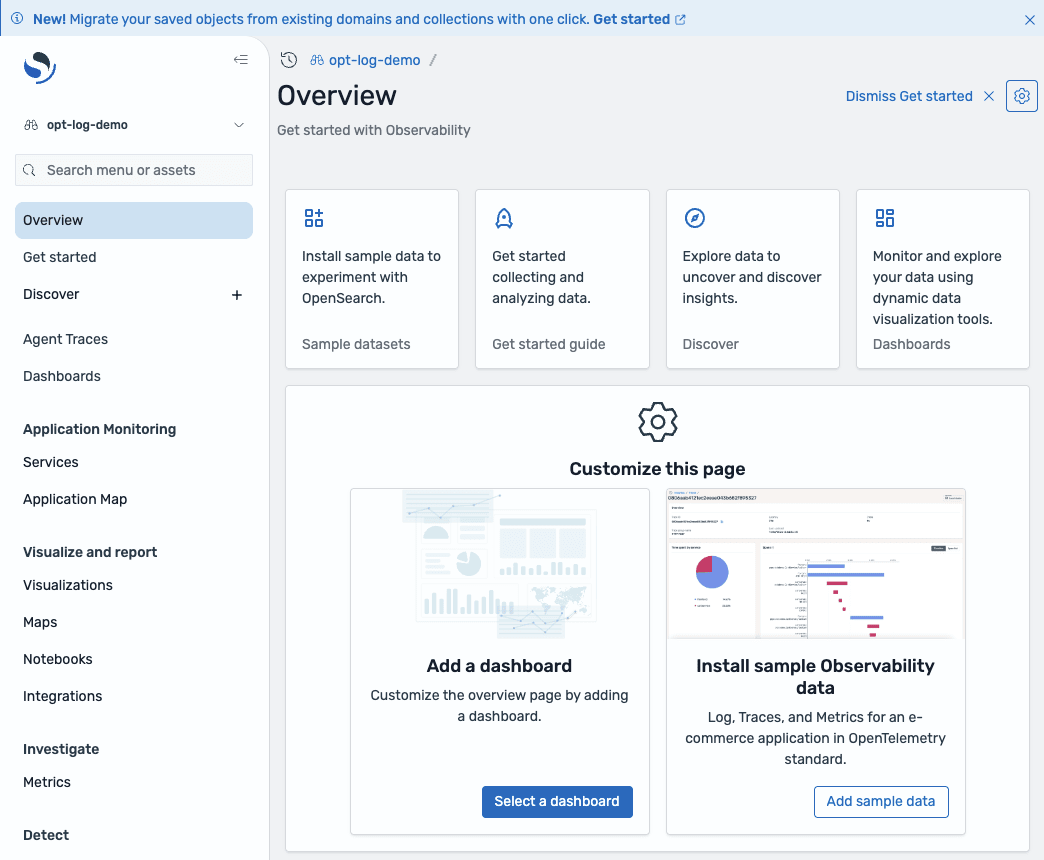
The OpenSearch UI was also created. Visualization for Optimized domains is done in the OpenSearch UI. Note that the conventional OpenSearch Dashboards is not supported. Access it via the Endpoint URL.
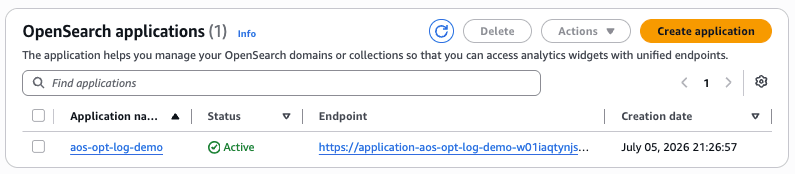
The OpenSearch UI application is authenticated by default with my AWS console login ID (IAM) and can be accessed.
Discussion
Here is a summary of what I was able to confirm by actually trying it, and what I felt required attention.
What Was Confirmed
- Data ingestion worked with the existing Bulk API as-is. No changes to the ingestion pipeline are needed.
- I confirmed that both PPL and SQL can combine full-text search predicates (
match()) with aggregations (GROUP BY, avg(), etc.) in the same query.
Points Requiring Attention
- Not only
_search(DSL), but surrounding APIs such as_countalso return "This API is not supported with Optimized Engine." If existing tools or SDKs depend on these APIs, migration from the General Purpose engine will not work. Whether you can shift query paths to PPL / SQL is likely to be the key decision point for migration. - Full-text search with
match()follows Lucene's tokenization rules. Strings joined with periods, such as "java.lang.OutOfMemoryError," are treated as a single token and will not match partial substrings, so the same care as before is needed when choosing search terms. - The engine mode can only be specified at domain creation time and cannot be changed afterward. Migrating an existing domain requires creating a new domain and switching the ingestion destination.
- Vector search, nested fields, Painless scripts, document deletion, geospatial queries, and manual snapshots are not supported. The General Purpose engine continues to be recommended for workloads that rely on full-text search relevance ranking.
Closing
I went through the full process with Amazon OpenSearch Service's log analytics-optimized engine "Optimized," from domain creation to log ingestion and PPL / SQL queries. I confirmed that it can be used at no additional cost and that aggregation/trend analysis and full-text search can be executed in a single domain while maintaining existing ingestion pipelines.
On the other hand, since queries are PPL / SQL-based and DSL-type APIs are not available, it is important to verify compatibility with existing query assets and tools at the time of adoption. If you are struggling with OpenSearch costs due to growing log volumes, why not start with testing on a new domain?
