![[Update] I tried out the AWS MCP Server's new support for industry-standard OAuth 2.1 (via AWS Sign-In) for connections from AI agents](https://images.ctfassets.net/ct0aopd36mqt/348VnC3440CoUtpS4pd5NS/8a7182ab96a0851a72a88d40328811b3/aws.png?w=3840&fm=webp)
[Update] I tried out the AWS MCP Server's new support for industry-standard OAuth 2.1 (via AWS Sign-In) for connections from AI agents

This page has been translated by machine translation. View original
This is Ishikawa from the Cloud Business Division. AWS MCP Server now supports OAuth 2.1 (via AWS Sign-In) as an industry-standard for connections from AI agents. You can now connect AI agents to AWS using your existing AWS identities, IAM permissions, and governance as-is, without needing to set up any additional authentication proxy software.
What is AWS MCP Server
AWS MCP Server is an official AWS MCP server that supports the Model Context Protocol (MCP), provided as part of the Agent Toolkit for AWS. It serves as a gateway for AI agents (MCP clients) such as Claude Code and Kiro to access AWS.
Previously, connecting agents to AWS MCP Server required additional authentication mechanisms such as a local proxy. With this update, any OAuth-compatible MCP client can connect directly without additional software.
To understand the "benefit" of this update, it helps to first understand how things worked before.
Previous Connection Method
The AWS MCP Server endpoint (https://aws-mcp.us-east-1.api.aws/mcp) is protected by SigV4 signatures. Therefore, in the past, it was necessary to pre-configure AWS credentials capable of SigV4 signing in the agent's environment. Specifically, credentials had to be prepared using aws configure, SSO login, environment variables, etc., and a local proxy (mcp-proxy-for-aws via uvx) was used to sign each MCP request with SigV4 and relay it to the endpoint.
// Example MCP configuration for the previous method (SigV4 proxy approach)
{
  "mcpServers": {
    "aws-mcp": {
      "command": "uvx",
      "args": [
        "mcp-proxy-for-aws==1.6.2",
        "https://aws-mcp.us-east-1.api.aws/mcp",
        "--metadata", "AWS_REGION=us-west-2"
      ]
    }
  }
}
This approach had the following limitations:
- Required pre-distribution and setup of credentials: SigV4-signable AWS credentials had to be prepared in advance in each environment running the agent
- Local proxy (
uvx/mcp-proxy-for-aws) was mandatory: Connections always had to go through a proxy rather than directly from the MCP client - Could not directly use MCP-standard OAuth flow: The "connect via standard OAuth flow" path built into remote MCP (HTTP transport) clients like Claude Code could not be used as-is
Update Details
AWS MCP Server now supports OAuth 2.1 authorization via AWS Sign-In. AWS Sign-In acts as the OAuth authorization server and issues scoped access tokens (bearer tokens). Agents use these tokens to connect to AWS MCP Server.
Before and After Comparison
Comparing the previous method (SigV4 proxy approach) with the new OAuth method, the changes are as follows:
| Aspect | Previous (SigV4 Proxy) | New (OAuth 2.1) |
|---|---|---|
| Connection method | Via local proxy (mcp-proxy-for-aws / uvx) |
Direct connection to endpoint |
| Credential setup | Pre-configure SigV4-signable AWS credentials in each environment | Browser sign-in only (existing sessions can be reused) |
| Additional software | uvx / mcp-proxy-for-aws required |
Not required |
| Client registration | — (no OAuth support) | Auto-registered via DCR (no manual client ID/secret issuance needed) |
| Token | Per-request SigV4 signing (no token) | Short-lived access token (1 hour) + refresh token (up to 12 hours) |
| Headless (non-interactive) | Direct SigV4 signing | Official path to obtain OAuth token using client_credentials grant |
| Governance | IAM policies only | IAM plus OAuth condition keys, token revocation, CloudTrail auditing |
What's Now Possible
The specific benefits of this update are the following 4 points:
-
Direct connection with browser sign-in only
Runclaude mcp add --transport http aws-mcp https://aws-mcp.us-east-1.api.aws/mcp, and on the first access, simply sign in and authorize on the AWS Sign-In page that opens in the browser—the same way you would for the console or CLI—and the connection is complete. There is no longer a need to pre-distribute credentials to each environment, and your existing AWS identities, sign-in methods, IAM permissions, and governance apply as-is. Supports IAM federation, IAM Identity Center, and root/IAM users, as well as federation via Okta or Ping Identity. If you already have an active sign-in session to the console, that session can be reused without re-signing in. -
Automatic setup via DCR (Dynamic Client Registration)
On first connection, the agent retrieves Protected Resource Metadata (RFC 9728) and OAuth Server Metadata (RFC 8414), automatically registers as a client via DCR (RFC 7591), and initiates the authorization code flow. Developers do not need to manually provision OAuth client IDs or secrets. Because this is exactly the standard authorization flow in the MCP specification, the same steps work not just for Claude Code but for all MCP-compatible agents, including Kiro, Codex, Gemini, and GitHub Copilot. -
Headless (non-interactive) authorization
For agents that run without a browser or human intervention, aclient_credentialsgrant is provided viaaws signin create-oauth2-token-with-iamto obtain an OAuth access token from existing AWS credentials (SigV4). This provides an official path for calling AWS MCP Server from CI/CD pipelines or autonomous agents running on servers. -
Governance features for administrators (new)
OAuth condition keys, token Introspection and Revocation APIs, per-session control viaaws:SignInSessionArn, and CloudTrail audit events have been added. Enterprises can now control and audit "who connected, from which agent, and from which session" (details below).
Note that authorizing an agent does not grant it additional AWS permissions. All requests are evaluated against existing IAM policies, SCPs, RCPs, Permission Boundaries, and data perimeters.
Two Authorization Models
Two authorization models are available depending on the use case: interactive and non-interactive.
- Interactive: For cases involving a browser and human input. Uses the OAuth authorization code flow and refresh token flow, with clients automatically registered via Dynamic Client Registration (DCR). Applicable when a developer runs an agent on a local workstation.
- Non-interactive (headless): For agents and applications that operate without a browser or human intervention. Used when AWS credentials are already available, to obtain an OAuth access token from those credentials. AWS Sign-In uses SigV4 authentication (AWS signing) instead of a static client secret and returns a short-lived access token.
Governance Features for Administrators
In addition to familiar IAM policies, administrators can control access using the new OAuth-specific features. OAuth authorization grants are represented as IAM resources in the format arn:aws:signin:*:*:service-principal/aws-mcp.amazonaws.com, and the signin:AuthorizeOAuth2Access / signin:CreateOAuth2Token actions can be controlled with condition keys.
- Condition keys:
signin:OAuthClientId(client ARN),signin:OAuthRedirectUri(restrict redirect destination),signin:OAuthGrantType(restrict allowed flows),signin:OAuthClientAuthentication(restrict client authentication method), etc. Access tokens are tagged with the global condition keyaws:SignInSessionArn, enabling pinpoint denial of only a specific suspicious OAuth session without affecting others. - Token Introspection and Revocation APIs: Check the status of issued tokens (Introspection) or revoke them (Revocation). Individual refresh tokens can be selectively invalidated.
- CloudTrail auditing: Operations such as authorization requests, token issuance, and revocations are recorded as CloudTrail events. AWS API calls made via OAuth tokens include
SignInSessionArncontext, enabling correlation and tracking between the original sign-in session and actual API activity.
For example, to restrict redirect destinations to localhost and prevent tokens from being passed to unintended redirect destinations, use an IAM policy (or SCP) like the following:
{
  "Version": "2012-10-17",
  "Statement": [
    {
      "Effect": "Allow",
      "Action": "signin:AuthorizeOAuth2Access",
      "Resource": "arn:aws:signin:*:*:service-principal/aws-mcp.amazonaws.com",
      "Condition": {
        "StringLike": {
          "signin:OAuthRedirectUri": [
            "http://localhost:*/*",
            "http://127.0.0.1:*/*"
          ]
        }
      }
    },
    {
      "Effect": "Allow",
      "Action": "signin:CreateOAuth2Token",
      "Resource": "arn:aws:signin:*:*:service-principal/aws-mcp.amazonaws.com"
    }
  ]
}
Authorization Flow
The general flow for the interactive (authorization code flow) is as follows:
The biggest difference from before is that the agent can establish a connection solely through browser-based sign-in, metadata discovery, and DCR—without holding any AWS credentials. Pre-configuring credentials and launching a local proxy are no longer necessary, and the MCP-standard OAuth flow runs as-is.
Try It Out
The following walks through the connection steps using Claude Code as an example.
Prerequisites
- AWS MCP Server endpoint: https://aws-mcp.us-east-1.api.aws/mcp (us-east-1)
- Local listener to receive the authorization code (127.0.0.1:3118)
- AWS CLI command (aws-cli/2.35.21)
Grant Permissions to the IAM Role Used by the Agent
Attach the AWS managed policy AWSMCPSignInOAuthAccessPolicy to the IAM role used by the agent.
aws iam attach-role-policy \
  --role-name <MyRole> \
  --policy-arn arn:aws:iam::aws:policy/AWSMCPSignInOAuthAccessPolicy
<MyRole> is the identity you are signed in to AWS with. In this case, you do not need to create a new role—just attach the policy to this existing role.
Click here to see the contents of `AWSMCPSignInOAuthAccessPolicy`
% aws iam get-policy-version \
  --policy-arn arn:aws:iam::aws:policy/AWSMCPSignInOAuthAccessPolicy \
  --version-id v1
{
    "PolicyVersion": {
        "Document": {
            "Version": "2012-10-17",
            "Statement": [
                {
                    "Sid": "AllowOAuthForAWSMCP",
                    "Effect": "Allow",
                    "Action": [
                        "signin:AuthorizeOAuth2Access",
                        "signin:CreateOAuth2Token"
                    ],
                    "Resource": "arn:aws:signin:*:*:service-principal/aws-mcp.amazonaws.com"
                }
            ]
        },
        "VersionId": "v1",
        "IsDefaultVersion": true,
        "CreateDate": "2026-07-09T06:57:15+00:00"
    }
}
Adding the MCP Server to Claude Code
Next, add the AWS MCP Server endpoint to the MCP client.
% claude mcp add --transport http aws-mcp-oauth https://aws-mcp.us-east-1.api.aws/mcp
Added HTTP MCP server aws-mcp with URL: https://aws-mcp.us-east-1.api.aws/mcp to local config
File modified: /Users/ishikawa.satoru/.claude.json [project: /Users/ishikawa.satoru/workspaces/cc/blog/20260711-aws-mcp-server-oauth]
Note: If a server named aws-mcp is already registered in local config from the above claude mcp add command, the error MCP server aws-mcp already exists in local config will be displayed. I deleted the existing aws-mcp entry and registered it under the name aws-mcp-oauth.
Allowing the Connection from the AWS Sign-In Page in the Browser
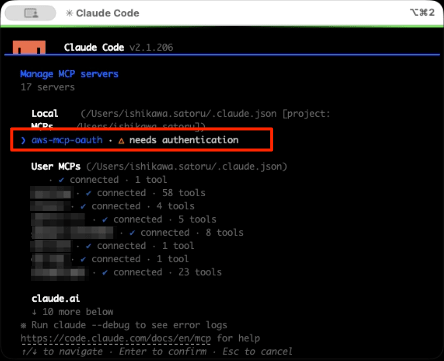
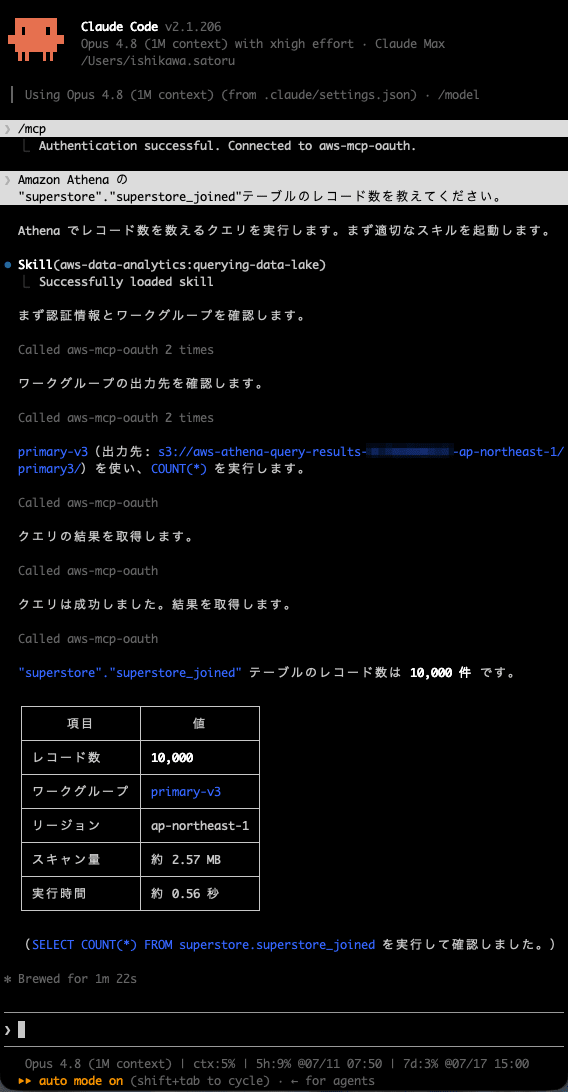
1. Run /mcp, then select aws-mcp-oauth.
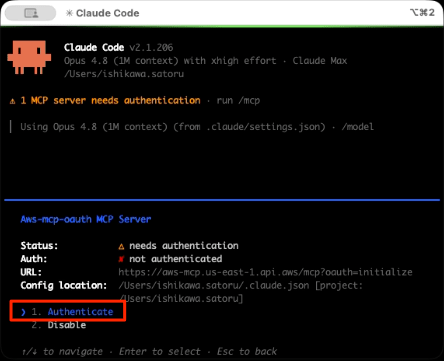
2. Select aws-mcp-oauth, then select Authenticate.
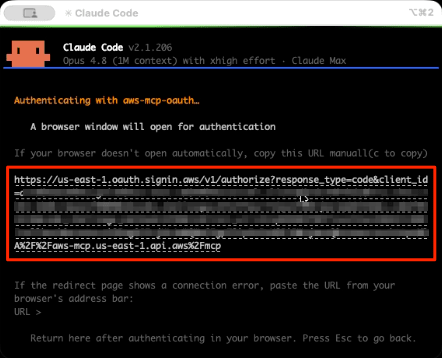
3. AWS Sign-In opens at the following URL in the browser.
4. Authenticate with the active session on the AWS Sign-In page.
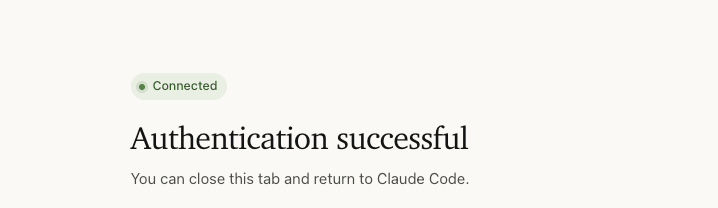
After adding, you will be redirected to the AWS Sign-In page in the browser. Sign in with your existing AWS credentials and allow the connection. Click the upper portion.
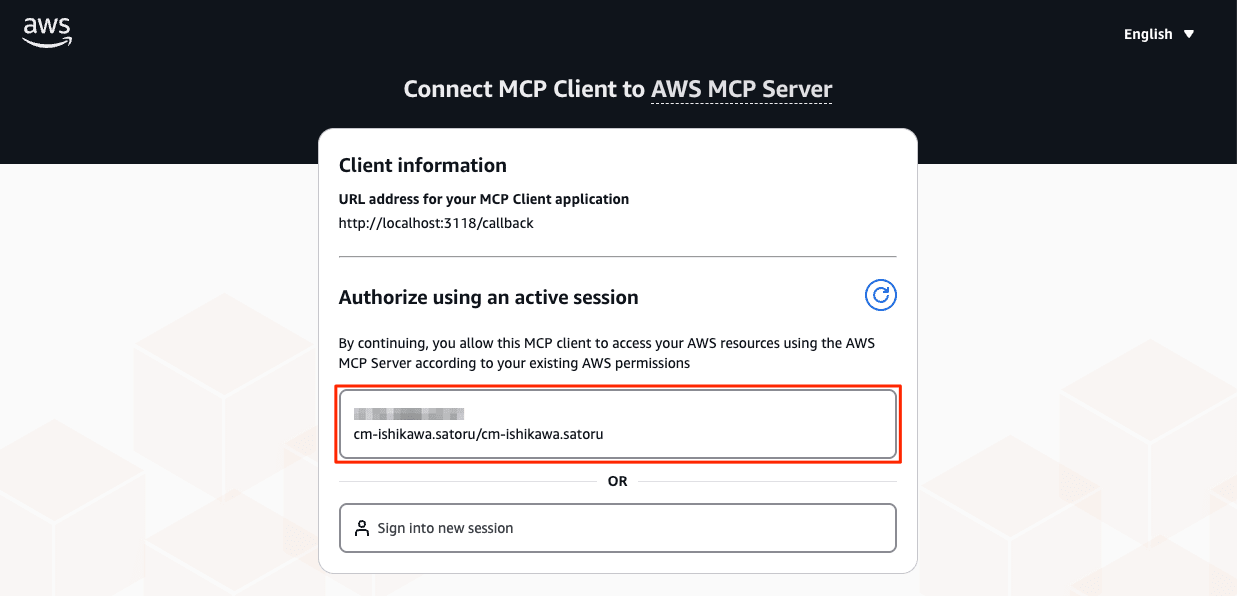
Authentication successful will then be displayed.
5. Call the MCP server (aws-mcp-oauth) from the prompt (query execution).
Obtaining an Access Token for Non-Interactive (Headless) Use
For non-interactive (headless) use, obtain an access token using the AWS CLI as follows:
$ aws signin create-oauth2-token-with-iam \
  --grant-type client_credentials \
  --resource aws-mcp.amazonaws.com \
  --region us-east-1
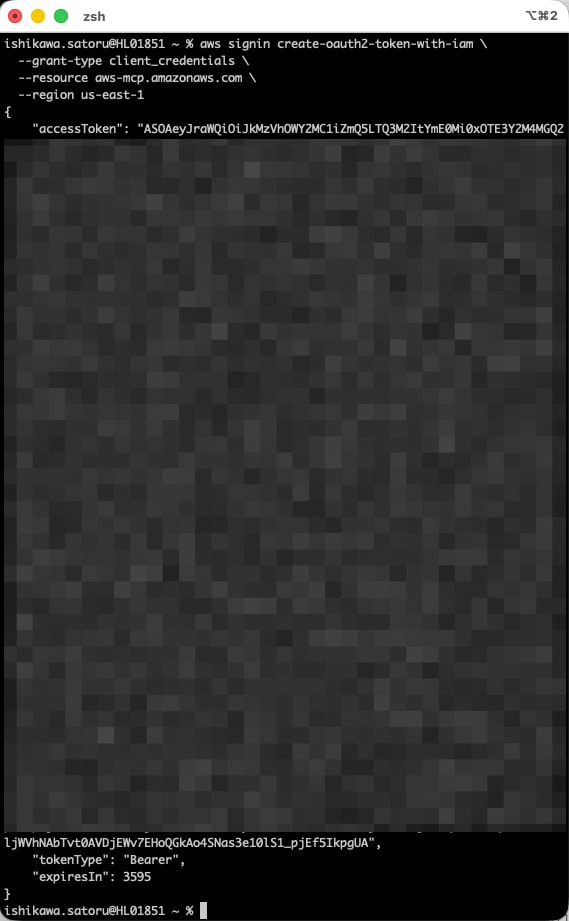
Note that depending on your SDK or AWS CLI version, an update may be required. Please refer to the official documentation for details.
Token Lifecycle
- Interactive (authorization code flow): The access token is valid for 1 hour. It is automatically renewed using a refresh token (valid for up to 12 hours), so re-signing in during the session is not necessary.
- Non-interactive (
client_credentialsflow): The access token is valid for whichever is shorter: the expiration of the caller's session or 1 hour (JWT format). Since no refresh token is issued in this case, obtain a new token by runningcreate-oauth2-token-with-iamagain when it expires.
Prerequisites and Notes
- No additional permissions are granted: Authorization only permits "the agent to access AWS MCP Server on your behalf" and does not grant any additional AWS permissions. The operations that can actually be performed are limited to the scope of existing IAM policies, SCPs, RCPs, Permission Boundaries, and data perimeters.
- Managed policy attachment is required: As a prerequisite,
AWSMCPSignInOAuthAccessPolicy(allowingsignin:AuthorizeOAuth2Accessandsignin:CreateOAuth2Token) must be attached to the IAM principal. - Multi-account (profile switching) is not supported with OAuth: If you need to work across multiple AWS accounts within a single session, profile switching is not supported with OAuth authentication. For that use case, continue using SigV4 authentication via
mcp-proxy-for-awsas before. OAuth and SigV4 are not mutually exclusive and can be used depending on the use case.
Closing
Previously, connecting to AWS MCP Server required pre-configuring SigV4-signable AWS credentials in each environment and routing through a local proxy such as mcp-proxy-for-aws. With this update, AWS MCP Server now supports OAuth 2.1 (via AWS Sign-In), enabling direct connection using only browser sign-in via the MCP-standard OAuth flow—without pre-distributing credentials or setting up a local proxy. In short, this update means "you can now connect via the MCP-standard OAuth flow without pre-distributing credentials, while enterprises can simultaneously control and audit that access using IAM/SCP/CloudTrail."
Both interactive and non-interactive authorization models are supported, and authentication, permissions, and governance can leverage your existing IAM mechanisms as-is. Administrators can control access using condition keys, the token revocation API, and CloudTrail auditing, and can also apply governance patterns such as restricting signin:OAuthRedirectUri to localhost.
If you want to securely operate AWS from AI agents, why not try connecting from an OAuth-compatible client such as Claude Code on a development account first?
