
Claude Code v2.1.217 Major Updates - Added improvements to sub-agent limits and behavior

This page has been translated by machine translation. View original
This is Ishikawa from the Cloud Business Division. Claude Code v2.1.217 (released 2026-07-21) has been released. I feel it's a solid update that improves daily operational efficiency and overall feel. As for new features, I tried out the emoji completion feature when entering prompts.
The previous update article is here.
Update Summary
v2.1.217 includes 20 changes. There are 2 new features — emoji shortcode completion and a maximum concurrent subagent limit — while the rest are centered on subagent execution control improvements and wide-ranging bug fixes including Windows, security, enterprise settings, and accessibility.
Notable Updates
Added maximum concurrent subagent limit (New Feature)
A maximum limit has been added to the number of subagents running simultaneously. The default is 20, and it can be changed via the environment variable CLAUDE_CODE_MAX_CONCURRENT_SUBAGENTS. This prevents a single message from spawning background agents without bound.
Those running heavy tasks that make heavy use of subagents may find it worthwhile to understand the default concurrent limit of 20 and how to adjust it with CLAUDE_CODE_MAX_CONCURRENT_SUBAGENTS.
Subagents no longer spawn nested subagents by default (Breaking Change)
Subagents will no longer spawn nested subagents by default. If deeper nesting is required, set the environment variable CLAUDE_CODE_MAX_SUBAGENT_SPAWN_DEPTH. Since this is a change to the default behavior, a before/after comparison is provided in the "Breaking Changes" section below.
Those who rely on multi-level subagent configurations should note that nesting is now disabled by default, and consider setting CLAUDE_CODE_MAX_SUBAGENT_SPAWN_DEPTH if needed.
Fixed claude.exe disappearing due to failed auto-update on Windows (Bug Fix)
A fix was made for an issue where a failed auto-update on Windows could cause claude.exe to disappear, making it impossible to launch. If an update fails, the saved executable will now be automatically restored.
For those using auto-updates on Windows, this fix reduces the risk of claude.exe disappearing and becoming unable to launch due to a failed update — a subtle but impactful change.
Fixed background session workspace escape (Security)
A fix was made for an issue where background session isolation was not canonicalizing symlinked working directories. This bug could allow sessions to escape outside the workspace folder.
Those running background sessions with working directories containing symlinks may want to confirm that the hole for unintended out-of-scope access has been closed.
Update Details
New Features
- Emoji shortcode completion has been added to prompt input. Typing
:heart:inserts ❤️, and typing a partial string like:heashows candidates. Can be disabled with theemojiCompletionEnabledsetting. See "Trying Out the New Emoji Shortcode Completion Feature" below. - A maximum limit has been added to the number of concurrently running subagents (default 20, adjustable via environment variable
CLAUDE_CODE_MAX_CONCURRENT_SUBAGENTS). This prevents a single message from spawning background agents without bound.
Improvements
- Warnings are now displayed when transcript (conversation log) writes are failing (e.g., disk full) or when session saving is disabled due to inherited environment variables. Previously, transcripts would be silently lost.
- PR badge links in the footer are now clickable hyperlinks even when the terminal's support cannot be detected (e.g., over ssh/tmux). Can be opted out with
FORCE_HYPERLINK=0. - The login expiration warning now appears 3 days before expiration instead of 5 days.
- The display count for suggestion tips in the frontend-design plugin has been limited to 3 times per lifetime, down from unlimited repetitions.
Security
- Fixed an issue where background session isolation was not canonicalizing symlinked working directories. Sessions could escape outside the workspace folder.
Fixes
- Fixed claude.exe disappearing due to failed auto-update on Windows: If an update fails, the saved executable will now be automatically restored.
- Fixed memory leak in truncated MCP tool output: Fixed an issue where the complete result before truncation would remain in memory until the session ended.
- Fixed auto-compact not triggering for Opus 4.8 on Bedrock: Also fixed an issue where
/compactwould fail after exceeding the limit. - Fixed enterprise connection settings being ignored in Claude Desktop: Fixed an issue where mTLS, TLS verification, OAuth scopes, and proxy settings were being ignored.
- Fixed --resume/--continue failing with invalid attachment entries: Fixed an issue where
--resume/--continueand/resumewould fail with a TypeError when transcripts contained invalid attachment file entries. - Fixed background shells becoming unable to stop: Fixed an issue where background shells could become unable to stop after sending a session to the background or when a session ended on a heavily loaded machine (particularly noticeable on Windows).
- Fixed startup OOM from brace expansion in CLAUDE.md/SKILL.md: Fixed OOM and hangs when
pathsfrontmatter contained many brace expansion groups. A budget cap has been placed on brace expansion. - Fixed --max-budget-usd not stopping background subagents: When the limit is reached, new spawns are now rejected and running background agents are also stopped.
- A quietly welcome fix: The issue of the thinking status line being redrawn every few seconds has also been fixed, slightly reducing screen flickering when waiting for long processes.
- Additionally, numerous minor bugs have been fixed including telemetry control in admin settings, viewer display in Remote Control, and transcript preview layout.
Breaking Changes and Deprecations
Subagents have changed their default behavior and will no longer spawn nested subagents. If deeper nesting is required, set the environment variable CLAUDE_CODE_MAX_SUBAGENT_SPAWN_DEPTH. Below is an example configuration to illustrate the behavior (the value represents an example nesting depth).
After Change (v2.1.217 and later)
# Nested subagents are not spawned by default
# Only set the environment variable to allow it if deep nesting is needed (example below)
export CLAUDE_CODE_MAX_SUBAGENT_SPAWN_DEPTH=2
Trying Out the New Emoji Shortcode Completion Feature
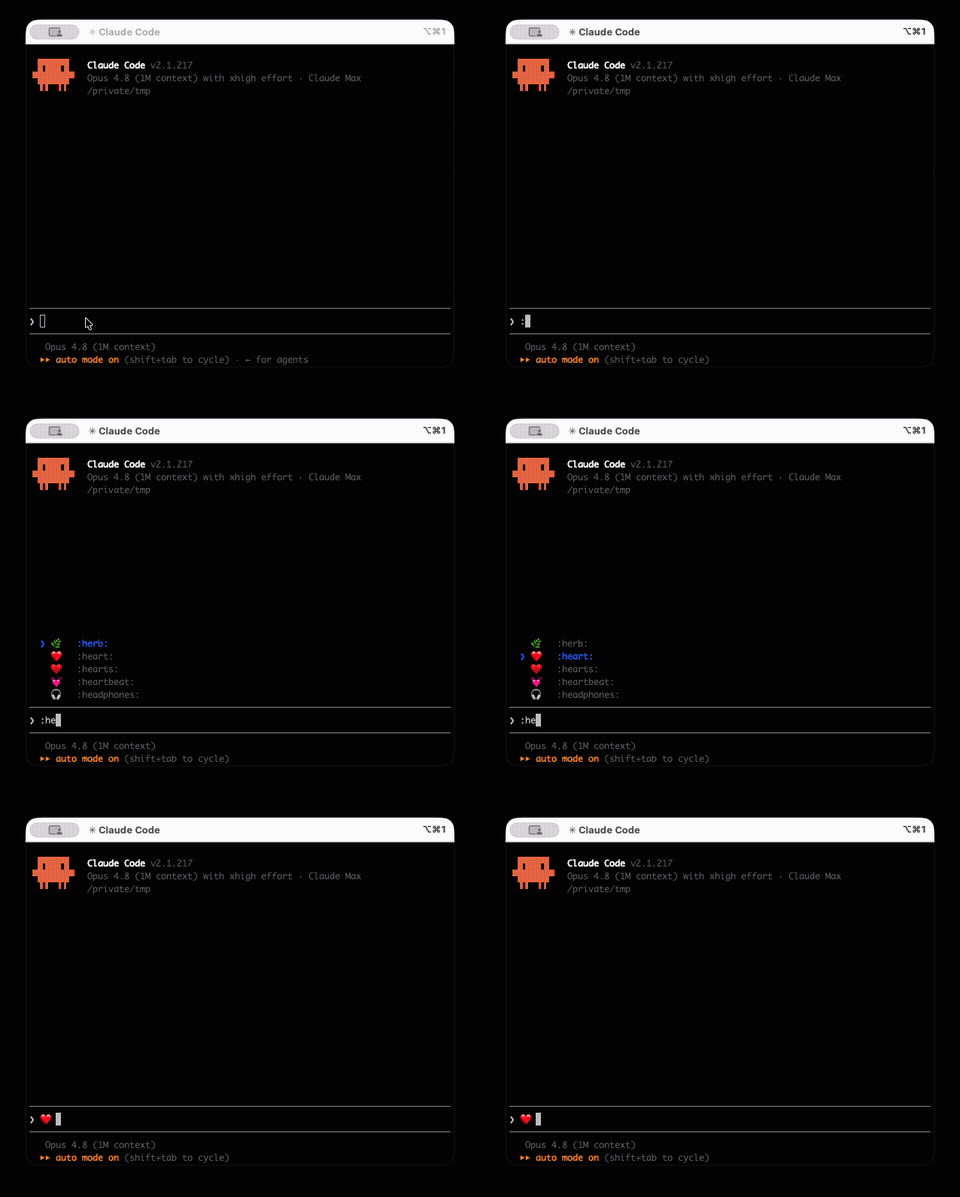
Among the new features in this release, let's take a look at emoji shortcode completion, which is easy to try right away. Typing :heart: in the prompt input inserts ❤️, and typing a partial string like :hea shows candidates. It can be disabled with the emojiCompletionEnabled setting.
Start an interactive session with claude, and type a partial string like :he to see emoji candidates (suggestions) appear.
Closing
While emoji completion stands out as a new feature in v2.1.217, the reality is that it's a solid release where subagent fanout control and various bug fixes take center stage. Those who use subagents in multi-level or parallel configurations in particular will feel more secure knowing the concurrent execution limit and the change to nesting defaults.
If you make heavy use of subagents or operate in Windows or enterprise environments, why not update and give it a try?
References
