![[Update] I tried the newly available one-click access to Amazon SageMaker Unified Studio from the AWS Glue console](https://images.ctfassets.net/ct0aopd36mqt/wp-thumbnail-4e6e510f2f74e1cc7d0ec360f38d138a/c00e9d7f4e47022543b37632bc20bcc0/amazon-sagemaker?w=3840&fm=webp)
[Update] I tried the newly available one-click access to Amazon SageMaker Unified Studio from the AWS Glue console

This page has been translated by machine translation. View original
This is Ishikawa from the Cloud Business Division. A feature has been added that allows you to open Amazon SageMaker Unified Studio with a single click from the AWS Glue console, so I'll give it a try.
Work that previously stopped at browsing the catalog in the AWS Glue console can now be seamlessly continued into query execution, data quality checks, and data pipeline construction.
What is Amazon SageMaker Unified Studio
Amazon SageMaker Unified Studio is an integrated development environment that handles data, analytics, machine learning, and AI workloads in a single governed environment. Starting from data registered in the AWS Glue Data Catalog, you can use the Query Editor for SQL analytics, JupyterLab IDE, visual ETL and workflows, and machine learning features all from the same screen.
Permission management is handled through hierarchical access control (ACL) based on domains and projects as units, with IAM session credentials issued based on project roles.
Background
To start using Amazon SageMaker Unified Studio, administrators previously needed to complete preparatory work such as creating a domain, creating a project, and designing permissions on the AWS Lake Formation side. To incorporate existing AWS Glue Data Catalog and Amazon Redshift resources, it was necessary to individually enable hybrid access mode and grant permissions to the project role ARN, making the initial setup effort far from trivial.
In response, "one-click onboarding for existing datasets" was announced in November 2025. It can be initiated from the Amazon SageMaker, Amazon Athena, Amazon Redshift, and Amazon S3 Tables consoles, and an IAM-based domain and project are automatically created simply by specifying an existing IAM role. Permissions already configured in the AWS Glue Data Catalog, AWS Lake Formation, and Amazon S3 are carried over as-is, and notebooks and serverless compute are pre-configured and ready to use.
This update adds the AWS Glue console as another entry point. With this release, you can now access Amazon SageMaker Unified Studio with a single click from the Amazon S3 Tables, Amazon Athena, Amazon EMR, Amazon Redshift, and AWS Glue consoles.
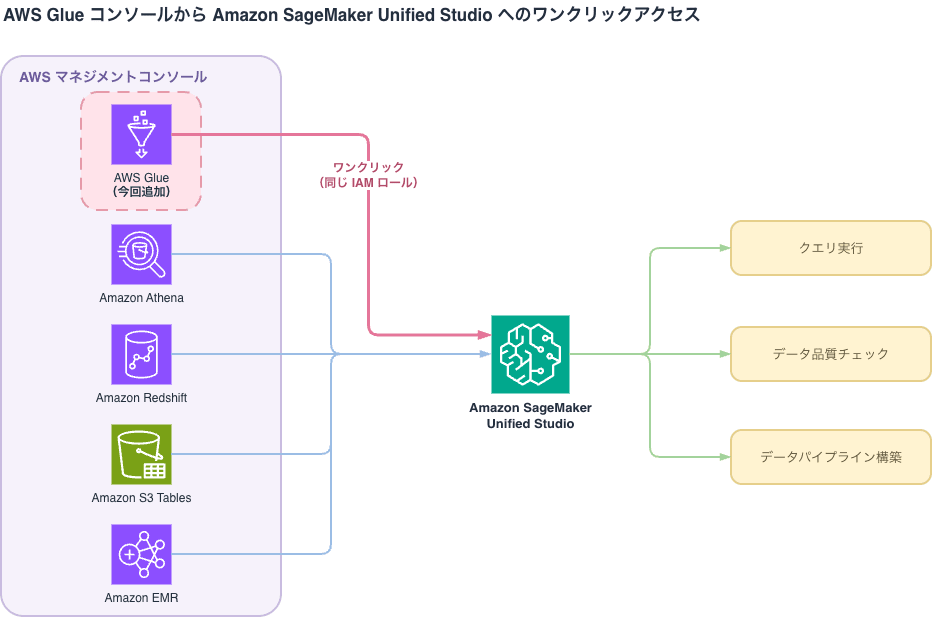
Update Details
The main changes are as follows.
- While browsing catalog tables or building ETL jobs in the AWS Glue console, you can open Amazon SageMaker Unified Studio with a single click
- Using the same IAM role, you can immediately start data operations in the Data Catalog or run queries in SageMaker Notebooks
- If Amazon SageMaker Unified Studio is not yet set up, a new inline permissions panel assists with creating and configuring the required IAM policies within the setup workflow
- There is no longer any need to navigate to the IAM console and switch browser tabs
- You can use an existing IAM role and customize permissions on the spot
The third item, the inline permissions panel, is particularly impactful. The part where people tend to get stuck when adopting Amazon SageMaker Unified Studio is around permissions, and previously this required going back and forth with the IAM console. Being able to create and adjust permissions while maintaining the setup context should significantly reduce the initial setup cost.
Supported Regions
Available in all AWS Regions where Amazon SageMaker Unified Studio is supported. Since Asia Pacific (Tokyo) is included, you can try it right away in domestic environments. Please refer to the official documentation for the latest list of regions.
Pricing Impact
There is no pricing-related information in this announcement. This feature itself is an improvement to the console navigation and setup experience, and the pricing for queries, notebooks, and ETL executed on Amazon SageMaker Unified Studio follows the pricing structure of each respective service (please refer to the official pricing page for details).
Trying It Out
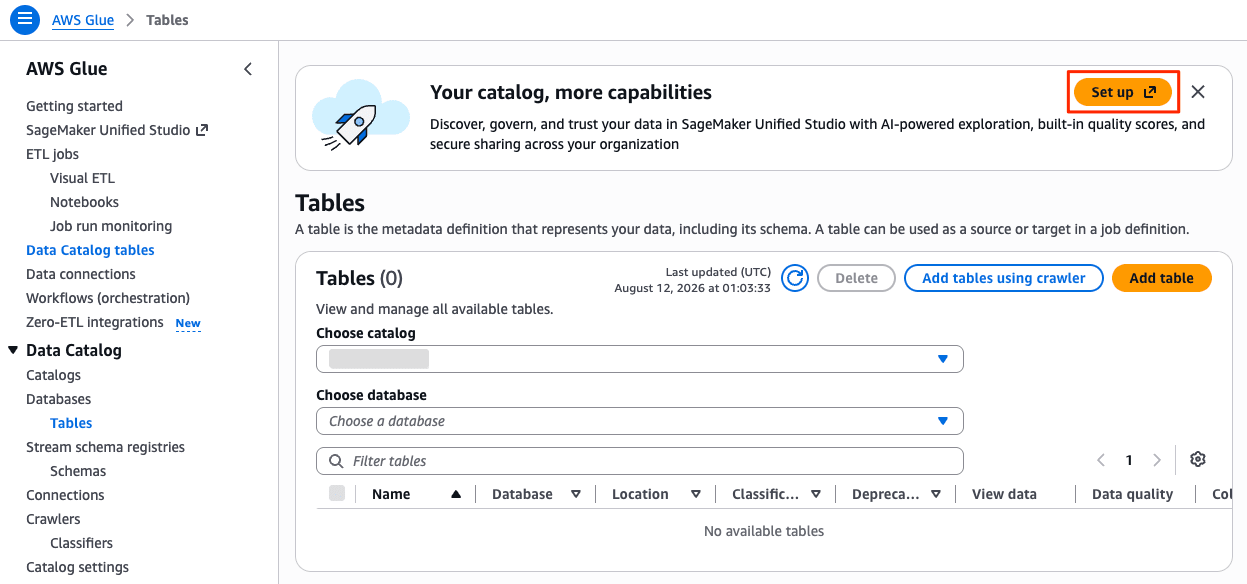
Start by opening the AWS Glue console in the Management Console. This becomes the one-click access path to Amazon SageMaker Unified Studio displayed on the AWS Glue > Data Catalog > Tables screen.
If Amazon SageMaker Unified Studio has not yet been set up, click the [Set up] button under "Your catalog, more capabilities". The inline permissions panel will be displayed within the setup workflow. Select the IAM role to use here, and create and customize the necessary policies on the spot.
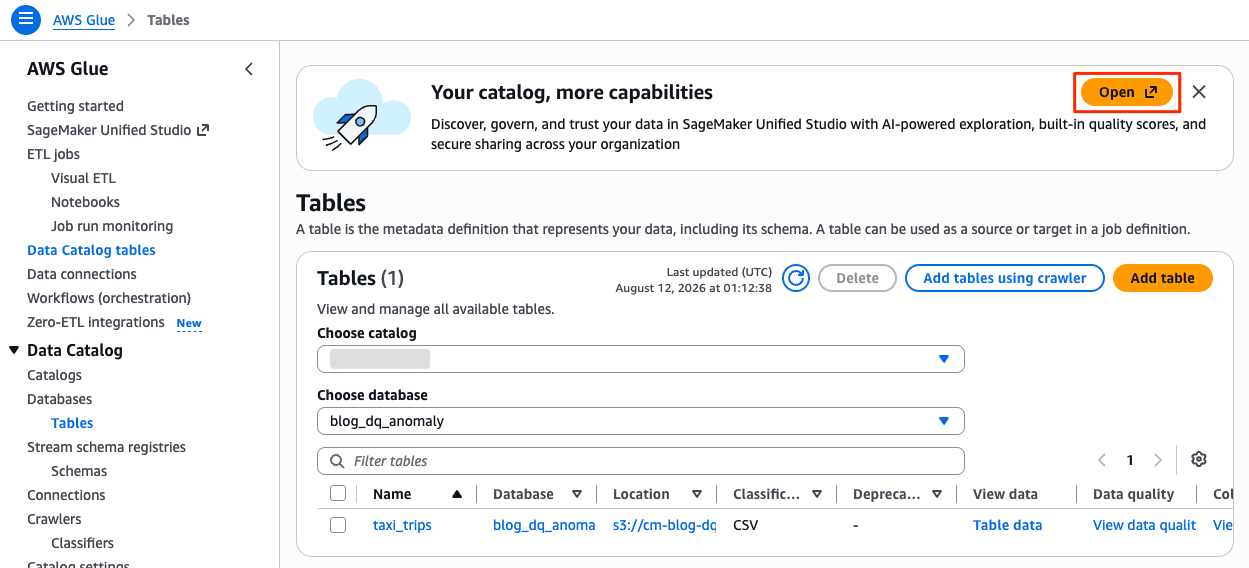
If already set up, click the [Open] button under "Your catalog, more capabilities" to open Amazon SageMaker Unified Studio directly.
You can seamlessly transition to Amazon SageMaker Unified Studio.
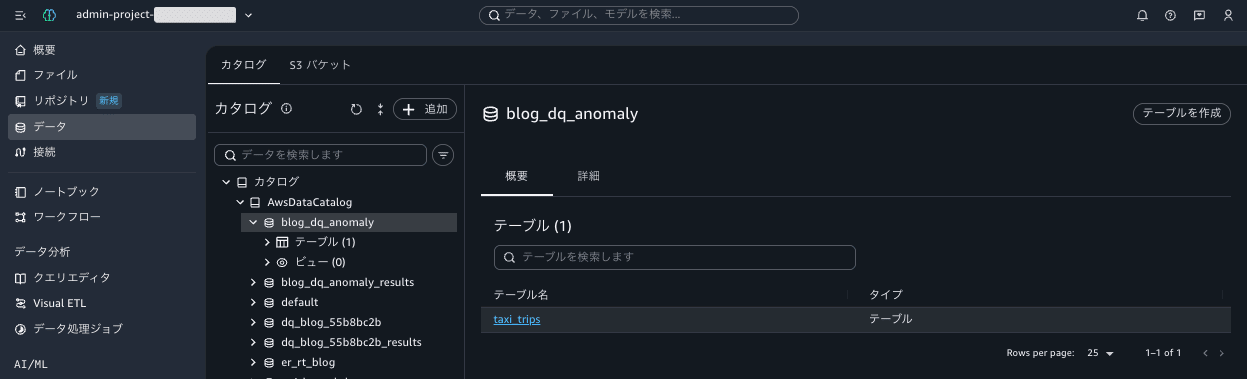
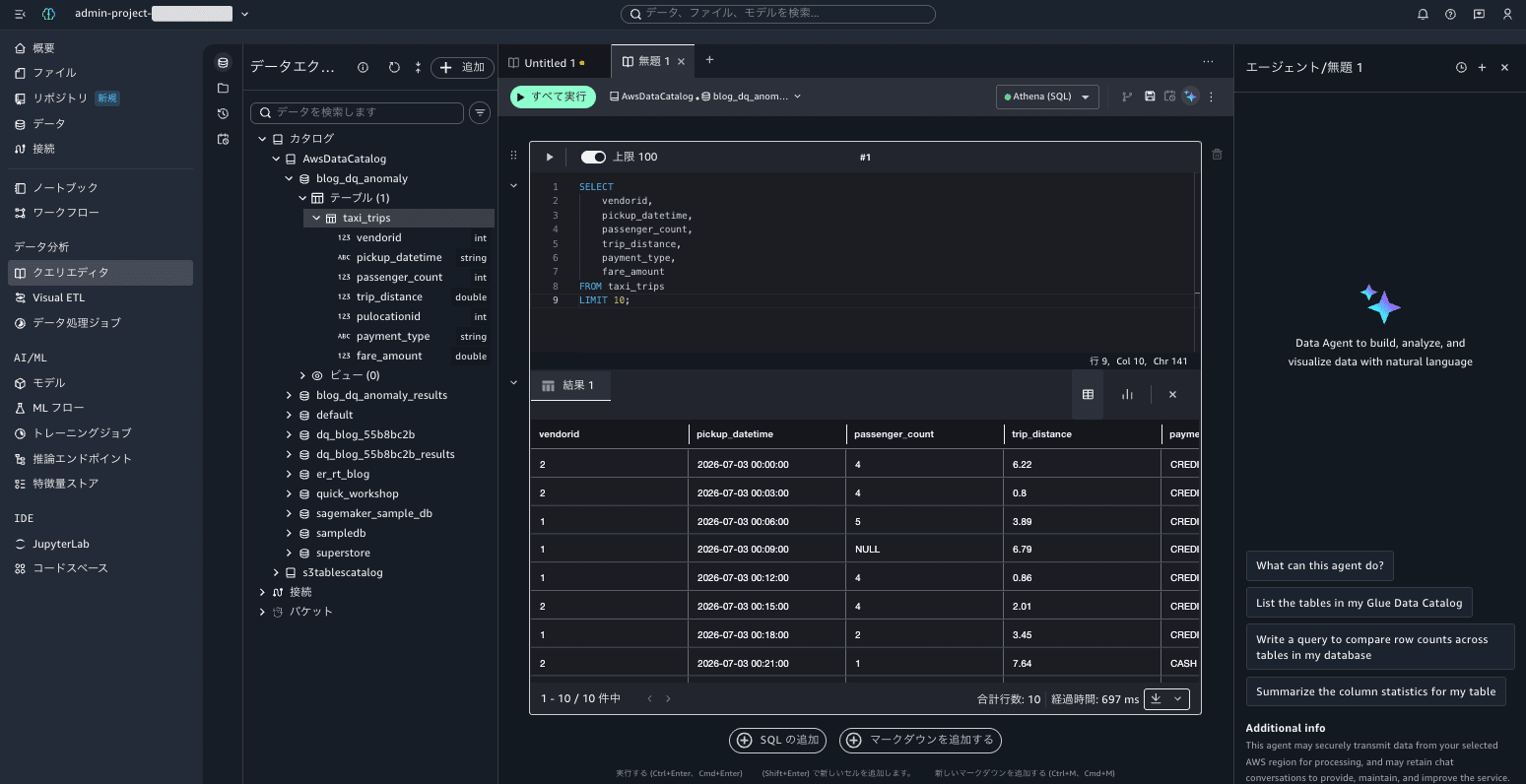
You can operate catalog data and run queries from the SageMaker query editor using the same IAM role.
Notes on Usage
- Since the mechanism reuses existing IAM roles as-is, the scope of permissions granted to that role determines the scope of operations available in Amazon SageMaker Unified Studio. As more access paths become available, it is advisable to review the permissions of the roles you use in advance for peace of mind
- This feature primarily focuses on improving access paths and the setup experience. Since this does not eliminate the need for domain and project design in Amazon SageMaker Unified Studio itself, please also refer to the administrator guide when moving to full production use
Closing
You can now access Amazon SageMaker Unified Studio with a single click from the AWS Glue console. Without interrupting the flow of catalog browsing or ETL job construction, you can proceed to queries, data quality checks, and pipeline construction using the same IAM role.
Even if not yet set up, IAM policy creation and configuration can now be completed on the spot with the inline permissions panel, eliminating the need to go back and forth with the IAM console. This makes Amazon S3 Tables, Amazon Athena, Amazon EMR, Amazon Redshift, and AWS Glue five consoles that serve as entry points to Amazon SageMaker Unified Studio.
If you use the AWS Glue console on a daily basis but haven't yet touched Amazon SageMaker Unified Studio, why not take this opportunity to follow the path and give it a try?
