I tried querying Amazon Bedrock Managed Knowledge Base in Japanese using natural language from Amazon QuickSight

This page has been translated by machine translation. View original
This is Ishikawa from the Cloud Business Division. Amazon Bedrock's Managed Knowledge Base can now be connected as a knowledge source for Amazon Quick, so I tried ingesting Japanese documents and querying them in natural language.
Amazon Bedrock's Managed Knowledge Base is a fully managed RAG infrastructure where Amazon Bedrock handles all vector store selection, provisioning, and scaling. With traditional Knowledge Bases, you had to prepare your own vector database such as OpenSearch Serverless or Aurora, but with Managed Knowledge Base, you no longer need to specify a vector store at creation time.
This Managed Knowledge Base can be connected to Amazon Quick as a "bring-your-own knowledge base." Once connected, it is treated the same as other knowledge bases in Amazon Quick, and when added to a space, it automatically becomes a search target during chat.
Note that the integration feature on the Amazon Quick side has regional restrictions. As of August 2026, the supported regions are four: Northern Virginia (us-east-1), Oregon (us-west-2), Ireland (eu-west-1), and Sydney (ap-southeast-2), and the Tokyo region is not included. The Managed Knowledge Base itself is available in the Tokyo region, but when connecting from Amazon Quick, the knowledge base and the Amazon Quick instance must be in the same region, so I conducted this verification in Northern Virginia.
What is Managed Knowledge Base
Managed Knowledge Base is a knowledge base where Amazon Bedrock manages the storage, index, and search infrastructure. The differences from the traditional self-managed vector store (Customer-Managed) are as follows.
| Item | Bedrock Managed | Customer-Managed |
|---|---|---|
| Data store | Bedrock retains embeddings, text, metadata, and original files with auto-scaling | You select, build, and operate your own vector store / text store |
| Embedding model | Built-in managed model (no additional cost) | None (specify yourself) |
| Reranking | Built-in managed reranker (no additional cost) | None |
| Search method | Agentic search and semantic hybrid search | Choose your own search strategy |
| Connectors | 7 types: S3, SharePoint, Confluence, Web Crawler, Google Drive, OneDrive, and Custom | S3 and Custom |
| Parsing | Built-in parser with multimodal support | Choose from default, foundation model, or Bedrock Data Automation |
| Infrastructure management | Not required | You provision and maintain yourself |
| Amazon Quick integration | Natively connectable | Requires custom implementation |
The source is the Managed Knowledge Base documentation above. The embedding model can be set to the default MANAGED (service-managed) or you can choose your own model (CUSTOM) such as Titan Text Embeddings V2 or Cohere Embed, but note that choosing CUSTOM disables the managed reranker.
Configuration
The configuration verified this time is as follows. Amazon Quick calls Amazon Bedrock using IAM credentials (SigV4) of the Quick service role, using only two actions: bedrock:Retrieve and bedrock:GetDocumentContent.
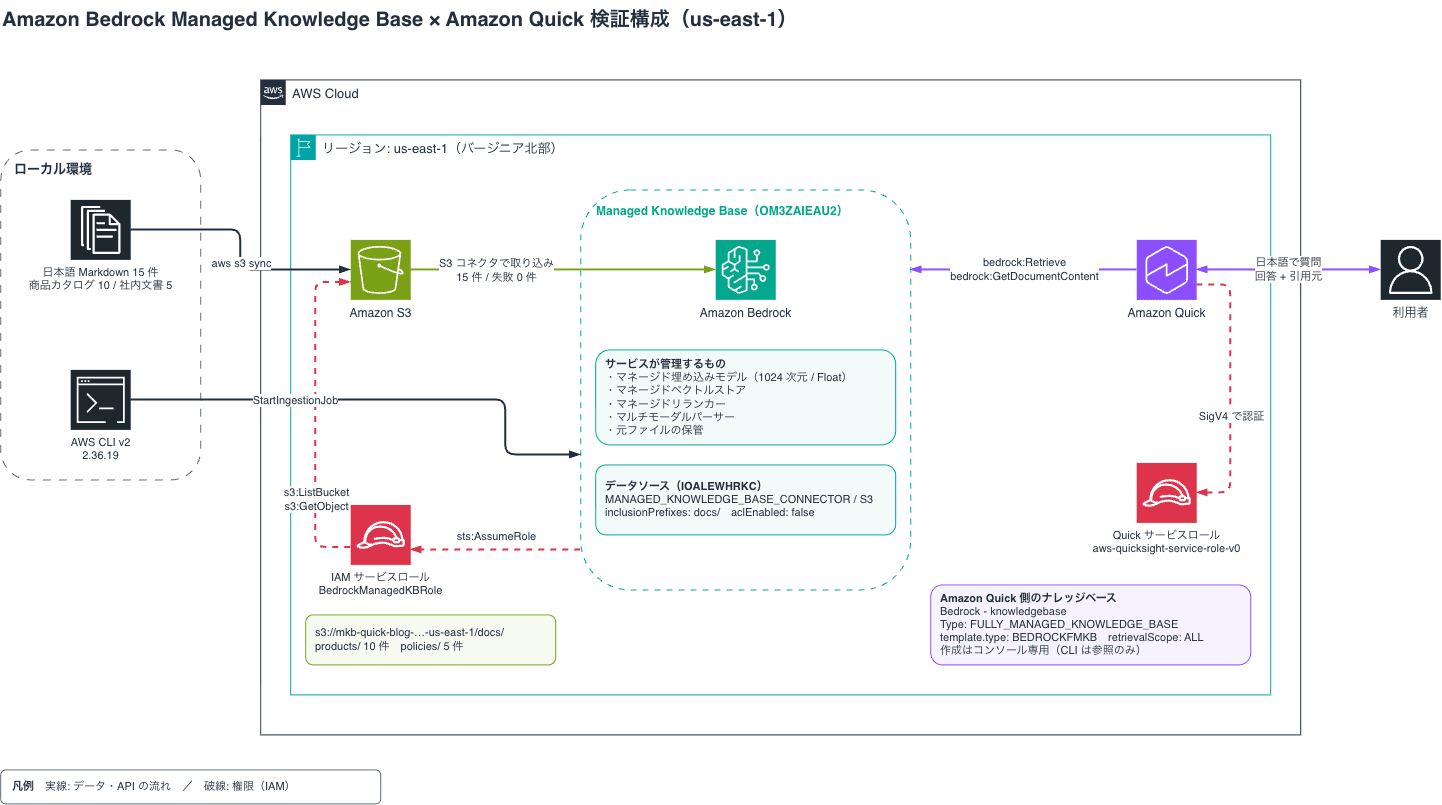
Trying It Out
Prerequisites
- Verification environment: Northern Virginia region (us-east-1)
- An Amazon Quick (Enterprise edition) instance exists in the same account and same region
- AWS CLI v2 (version at time of verification: 2.36.19)
When the knowledge base and Amazon Quick instance are in the same account, a resource policy for the knowledge base is not required. Only when placed in a different account, a resource policy is needed to allow bedrock:Retrieve and bedrock:GetDocumentContent to the Quick service role.
Preparing Verification Data
I prepared 15 Japanese Markdown files: 10 product catalog specification files (docs/products/) and 5 internal documents (docs/policies/) covering warranty terms, return policy, shipping fee schedule, support FAQ, and corporate discount policy. Each file is approximately 2–3KB, with content structured so that meaning is self-contained within each H2 heading.
To enable cross-document queries (e.g., "What is the return deadline for this product?"), I intentionally included references from product specification files to policy documents. File names are in ASCII, with only the body text in Japanese.
I created an S3 bucket and uploaded the files.
% aws s3 ls s3://mkb-quick-blog-123456789012-us-east-1/docs/ --recursive
2026-08-13 17:04:05       2820 docs/policies/corporate-discount.md
2026-08-13 17:04:04       2663 docs/policies/return-policy.md
2026-08-13 17:04:05       3018 docs/policies/shipping-fee.md
2026-08-13 17:04:05       3068 docs/policies/support-faq.md
2026-08-13 17:04:05       3374 docs/policies/warranty-policy.md
2026-08-13 17:04:05       2133 docs/products/4k-monitor-27.md
2026-08-13 17:04:05       2279 docs/products/budget-laptop-15.md
2026-08-13 17:04:05       2269 docs/products/gaming-laptop-x.md
2026-08-13 17:04:05       2001 docs/products/mechanical-keyboard.md
2026-08-13 17:04:05       2138 docs/products/noise-cancel-headphones.md
2026-08-13 17:04:05       2172 docs/products/office-chair-ergo.md
2026-08-13 17:04:05       2037 docs/products/standing-desk.md
2026-08-13 17:04:05       1903 docs/products/tablet-11.md
2026-08-13 17:04:06       2638 docs/products/ultrabook-pro-14.md
2026-08-13 17:04:06       2028 docs/products/wireless-earbuds.md
Creating the IAM Service Role
Create a service role for Amazon Bedrock to operate the knowledge base. The service principal in the trust policy is bedrock.amazonaws.com, and the scope is narrowed with aws:SourceAccount and aws:SourceArn conditions.
% aws iam create-role --role-name BedrockManagedKBRole-mkb-quick-blog \
  --assume-role-policy-document file://trust-policy.json
{
    "Role": {
        "Path": "/",
        "RoleName": "BedrockManagedKBRole-mkb-quick-blog",
        "RoleId": "AROAXXXXXXXXXXXXXXXXX",
        "Arn": "arn:aws:iam::123456789012:role/BedrockManagedKBRole-mkb-quick-blog",
        "CreateDate": "2026-08-13T08:04:16+00:00",
        "AssumeRolePolicyDocument": {
            "Version": "2012-10-17",
            "Statement": [
                {
                    "Effect": "Allow",
                    "Principal": {
                        "Service": "bedrock.amazonaws.com"
                    },
                    "Action": "sts:AssumeRole",
                    "Condition": {
                        "StringEquals": {
                            "aws:SourceAccount": "123456789012"
                        },
                        "ArnLike": {
                            "aws:SourceArn": "arn:aws:bedrock:us-east-1:123456789012:knowledge-base/*"
                        }
                    }
                }
            ]
        }
    }
}

% aws iam put-role-policy --role-name BedrockManagedKBRole-mkb-quick-blog \
  --policy-name S3DataSourceAccess --policy-document file://kb-role-policy.json
The permissions policy consists of only s3:ListBucket and s3:GetObject for the S3 bucket. When using the default managed embedding model, as stated in the prerequisites in the official documentation, Bedrock model access is not required, and the ingestion completed successfully without granting bedrock:InvokeModel. Since the vector store is also managed on the Amazon Bedrock side, no permissions for OpenSearch Serverless are needed either.
trust-policy.json
{
  "Version": "2012-10-17",
  "Statement": [
    {
      "Effect": "Allow",
      "Principal": { "Service": "bedrock.amazonaws.com" },
      "Action": "sts:AssumeRole",
      "Condition": {
        "StringEquals": { "aws:SourceAccount": "123456789012" },
        "ArnLike": { "aws:SourceArn": "arn:aws:bedrock:us-east-1:123456789012:knowledge-base/*" }
      }
    }
  ]
}
kb-role-policy.json
{
  "Version": "2012-10-17",
  "Statement": [
    {
      "Sid": "S3ListBucketStatement",
      "Effect": "Allow",
      "Action": ["s3:ListBucket"],
      "Resource": ["arn:aws:s3:::mkb-quick-blog-123456789012-us-east-1"],
      "Condition": { "StringEquals": { "aws:ResourceAccount": "123456789012" } }
    },
    {
      "Sid": "S3GetObjectStatement",
      "Effect": "Allow",
      "Action": ["s3:GetObject"],
      "Resource": ["arn:aws:s3:::mkb-quick-blog-123456789012-us-east-1/*"],
      "Condition": { "StringEquals": { "aws:ResourceAccount": "123456789012" } }
    }
  ]
}
Note that the IAM role used to create the knowledge base requires iam:PassRole (with iam:PassedToService set to bedrock.amazonaws.com) in order to pass this service role.
Creating the Managed Knowledge Base
Specify type: MANAGED in --knowledge-base-configuration. Setting embeddingModelType to MANAGED eliminates the need to specify an embedding model ARN or number of dimensions.
% aws bedrock-agent create-knowledge-base \
  --name mkb-quick-blog-kb \
  --description "For Japanese RAG verification of product catalog and internal documents (blog)" \
  --role-arn arn:aws:iam::123456789012:role/BedrockManagedKBRole-mkb-quick-blog \
  --knowledge-base-configuration file://kb-config.json \
  --region us-east-1
{
    "knowledgeBase": {
        "knowledgeBaseId": "OM3ZAIEAU2",
        "name": "mkb-quick-blog-kb",
        "knowledgeBaseArn": "arn:aws:bedrock:us-east-1:123456789012:knowledge-base/OM3ZAIEAU2",
        "description": "For Japanese RAG verification of product catalog and internal documents (blog)",
        "roleArn": "arn:aws:iam::123456789012:role/BedrockManagedKBRole-mkb-quick-blog",
        "knowledgeBaseConfiguration": {
            "type": "MANAGED",
            "managedKnowledgeBaseConfiguration": {
                "embeddingModelType": "MANAGED"
            }
        },
        "status": "CREATING",
        "createdAt": "2026-08-13T08:04:26.946907+00:00",
        "updatedAt": "2026-08-13T08:04:26.946907+00:00"
    }
}
kb-config.json
{
  "type": "MANAGED",
  "managedKnowledgeBaseConfiguration": {
    "embeddingModelType": "MANAGED"
  }
}
The key point is that there is no vector store specification whatsoever. It took about 1 minute to go from CREATING to ACTIVE.
% aws bedrock-agent get-knowledge-base --knowledge-base-id OM3ZAIEAU2 \
  --region us-east-1 --query 'knowledgeBase.status' --output text
ACTIVE
The knowledgeBaseArn displayed here is the ARN you will register with Amazon Quick later.
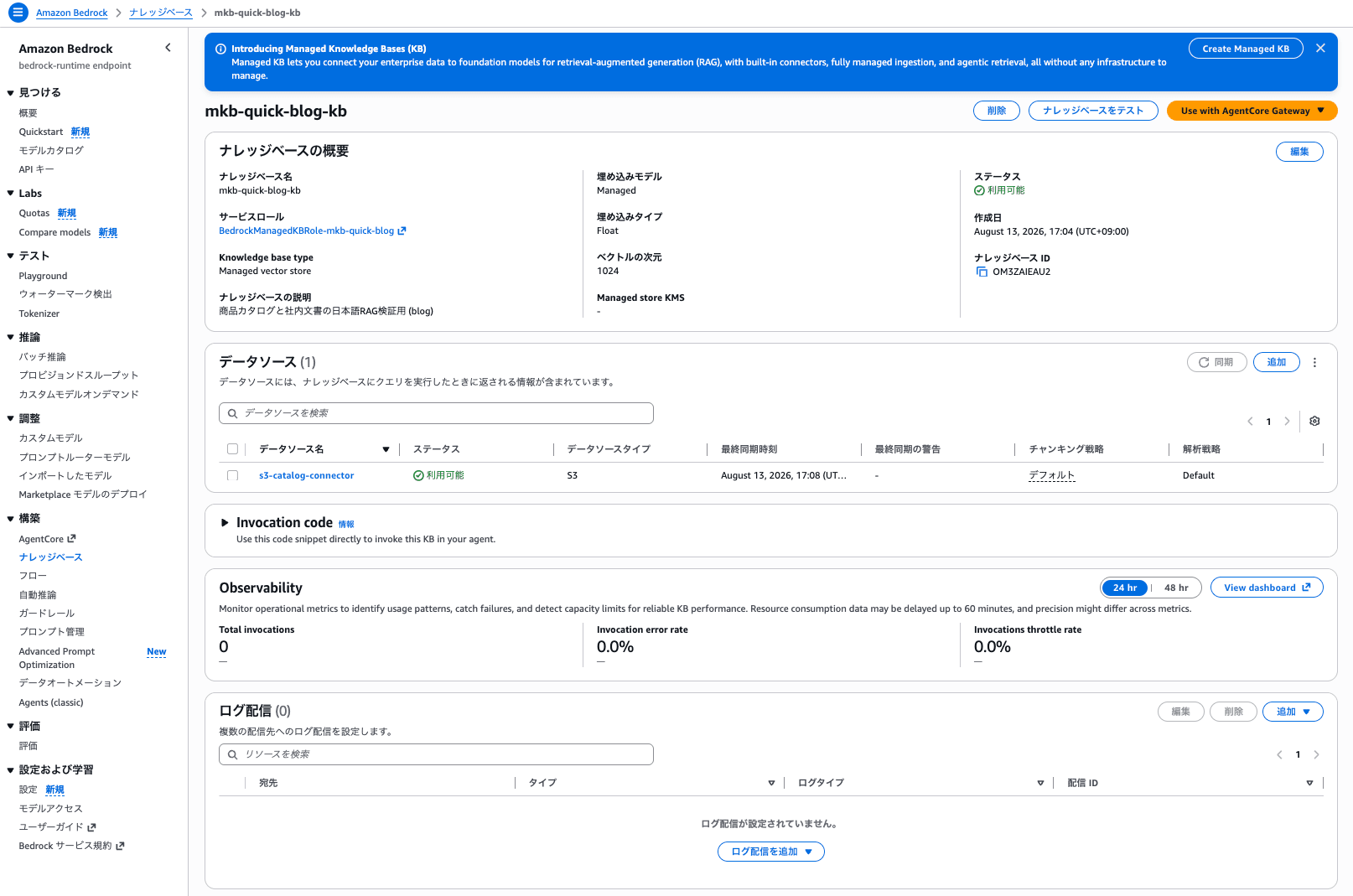
You can also verify the knowledge base configuration in the management console. Knowledge base type shows Managed vector store, the embedding model shows Managed, the embedding type shows Float, and the vector dimensions show 1024—all values determined by the service side.
Creating the S3 Connector Data Source
The data source for Managed Knowledge Base uses the MANAGED_KNOWLEDGE_BASE_CONNECTOR type instead of the traditional S3 type. The connection information is specified collectively in connectorParameters.
% aws bedrock-agent create-data-source \
  --knowledge-base-id OM3ZAIEAU2 \
  --name s3-catalog-connector \
  --description "Japanese Markdown on S3 (product catalog and internal documents)" \
  --data-source-configuration file://s3-connector.json \
  --data-deletion-policy DELETE \
  --region us-east-1
{
    "dataSource": {
        "knowledgeBaseId": "OM3ZAIEAU2",
        "dataSourceId": "IOALEWHRKC",
        "name": "s3-catalog-connector",
        "status": "CREATING",
        "description": "Japanese Markdown on S3 (product catalog and internal documents)",
        "dataSourceConfiguration": {
            "type": "MANAGED_KNOWLEDGE_BASE_CONNECTOR",
            "managedKnowledgeBaseConnectorConfiguration": {
                "mediaExtractionConfiguration": {
                    "imageExtractionConfiguration": {
                        "imageExtractionStatus": "ENABLED"
                    }
                },
                "connectorParameters": "{\"deletionProtectionConfiguration\":{\"enableDeletionProtection\":false},\"type\":\"S3\",\"filterConfiguration\":{\"inclusionPrefixes\":[\"docs/\"],\"maxFileSizeInMegaBytes\":\"500\"},\"connectionConfiguration\":{\"bucketName\":\"mkb-quick-blog-123456789012-us-east-1\",\"bucketOwnerAccountId\":\"123456789012\"},\"aclEnabled\":false,\"version\":\"1\"}"
            }
        },
        "dataDeletionPolicy": "DELETE",
        "createdAt": "2026-08-13T08:05:42.626175+00:00",
        "updatedAt": "2026-08-13T08:05:42.626175+00:00"
    }
}
s3-connector.json
{
  "type": "MANAGED_KNOWLEDGE_BASE_CONNECTOR",
  "managedKnowledgeBaseConnectorConfiguration": {
    "connectorParameters": {
      "type": "S3",
      "version": "1",
      "connectionConfiguration": {
        "bucketName": "mkb-quick-blog-123456789012-us-east-1",
        "bucketOwnerAccountId": "123456789012"
      },
      "filterConfiguration": {
        "inclusionPrefixes": ["docs/"]
      },
      "deletionProtectionConfiguration": {
        "enableDeletionProtection": false
      }
    }
  }
}
Looking at the response, default values have been filled in for items that were not specified. Image extraction (imageExtractionStatus) is ENABLED, the maximum file size is 500MB, and ACL integration (aclEnabled) is false. filterConfiguration.inclusionPrefixes is a free-form document type in the AWS CLI model and is not validated, but it was actually accepted and only the files under the specified prefix were targeted.
The CreateDataSource for Managed Knowledge Base is asynchronous. Since ingestion cannot be started while still in CREATING state, wait until it becomes AVAILABLE.
% aws bedrock-agent get-data-source --knowledge-base-id OM3ZAIEAU2 \
  --data-source-id IOALEWHRKC --region us-east-1 --query 'dataSource.status' --output text
AVAILABLE
Ingestion
Once the data source becomes AVAILABLE, start the ingestion.
% aws bedrock-agent start-ingestion-job \
  --knowledge-base-id OM3ZAIEAU2 --data-source-id IOALEWHRKC \
  --description "Initial ingestion" --region us-east-1
{
    "ingestionJob": {
        "knowledgeBaseId": "OM3ZAIEAU2",
        "dataSourceId": "IOALEWHRKC",
        "ingestionJobId": "CQYUBFDDFT",
        "status": "STARTING",
        ...
    }
}
It completed in about 2 minutes. All 15 Japanese Markdown files were indexed with 0 failures.
% aws bedrock-agent get-ingestion-job --knowledge-base-id OM3ZAIEAU2 \
  --data-source-id IOALEWHRKC --ingestion-job-id CQYUBFDDFT --region us-east-1
{
    "ingestionJob": {
        "knowledgeBaseId": "OM3ZAIEAU2",
        "dataSourceId": "IOALEWHRKC",
        "ingestionJobId": "CQYUBFDDFT",
        "description": "Initial ingestion",
        "status": "COMPLETE",
        "statistics": {
            "numberOfDocumentsScanned": 15,
            "numberOfMetadataDocumentsScanned": 0,
            "numberOfNewDocumentsIndexed": 15,
            "numberOfModifiedDocumentsIndexed": 0,
            "numberOfMetadataDocumentsModified": 0,
            "numberOfDocumentsDeleted": 0,
            "numberOfDocumentsFailed": 0,
            "numberOfDocumentsSkipped": 0
        },
        "startedAt": "2026-08-13T08:06:03.867784+00:00",
        "updatedAt": "2026-08-13T08:08:05.512034+00:00"
    }
}
The ingested documents can be checked individually with list-knowledge-base-documents.
% aws bedrock-agent list-knowledge-base-documents \
  --knowledge-base-id OM3ZAIEAU2 --data-source-id IOALEWHRKC --region us-east-1
{
    "documentDetails": [
        {
            "knowledgeBaseId": "OM3ZAIEAU2",
            "dataSourceId": "IOALEWHRKC",
            "status": "INDEXED",
            "identifier": {
                "dataSourceType": "S3",
                "s3": {
                    "uri": "s3://mkb-quick-blog-123456789012-us-east-1/docs/products/mechanical-keyboard.md"
                }
            },
            "updatedAt": "2026-08-13T08:07:51.576000+00:00"
        },
        ...
    ]
}
Verifying Japanese Queries with the Retrieve API
Before connecting from Amazon Quick, I confirmed that Japanese queries work with Amazon Bedrock alone. Since Amazon Quick uses the two actions bedrock:Retrieve and bedrock:GetDocumentContent, running these two via CLI in advance makes it easier to troubleshoot permission issues later.
% aws bedrock-agent-runtime retrieve --knowledge-base-id OM3ZAIEAU2 \
  --retrieval-query '{"text":"Which laptops are suitable for gaming purposes? Please also tell me about stock availability."}' \
  --region us-east-1
The top 5 results were as follows (excerpted scores and sources).
| Rank | Score | Source |
|---|---|---|
| 1 | 0.6184 | products/gaming-laptop-x.md |
| 2 | 0.5930 | products/gaming-laptop-x.md |
| 3 | 0.5576 | products/gaming-laptop-x.md |
| 4 | 0.5450 | products/ultrabook-pro-14.md |
| 5 | 0.4893 | products/gaming-laptop-x.md (chunk containing out-of-stock description) |
The expression "gaming purposes" caused documents for Gaming Laptop X to dominate the top results, with a chunk describing stock status appearing in 5th place. I also tried cross-document queries.
% aws bedrock-agent-runtime retrieve --knowledge-base-id OM3ZAIEAU2 \
  --retrieval-query '{"text":"Please tell me about products under 100,000 yen with noise canceling features and their return deadlines."}' \
  --region us-east-1
| Rank | Score | Source |
|---|---|---|
| 1 | 0.7319 | products/noise-cancel-headphones.md |
| 2 | 0.6284 | products/noise-cancel-headphones.md |
| 3 | 0.6179 | products/noise-cancel-headphones.md |
| 4 | 0.5474 | products/noise-cancel-headphones.md |
| 5 | 0.4502 | policies/return-policy.md |
In addition to 4 product specification files, the return policy document came in at 5th place. Content from both a product document and a policy document—separate files—was retrieved simultaneously in a single query. The other 3 questions similarly returned the expected documents at the top.
| Question | Top source | Score |
|---|---|---|
| What is the shipping fee and delivery time for Comfy brand furniture shipped to Hokkaido? | policies/shipping-fee.md | 0.8586 |
| What is the warranty period for Vortex products, and what are the conditions for adding an extended warranty? | policies/warranty-policy.md | 0.8568 |
| What is the discount rate when a corporation purchases 20 units of a product with a rating of 4.5 or higher? | policies/corporate-discount.md | 0.8541 |
I also verified GetDocumentContent. This is an API that does not directly return the document body, but instead returns a presigned URL.
% aws bedrock-agent-runtime get-document-content --knowledge-base-id OM3ZAIEAU2 \
  --data-source-id IOALEWHRKC \
  --document-id "s3://mkb-quick-blog-123456789012-us-east-1/docs/policies/return-policy.md" \
  --region us-east-1
{
    "documentContentLength": 2663,
    "mimeType": "text/plain",
    "presignedUrl": "https://fmkb-raw-customer-data-prod-us-east-1.s3.amazonaws.com/i8IOALEWHRKC_..._FMKB123456789012/f6ac6d0b...?<signature parameters omitted>"
}
It is interesting to note that the presigned URL points not to the S3 bucket you created yourself, but to an AWS-managed bucket called fmkb-raw-customer-data-prod-us-east-1. This confirms that the Managed Knowledge Base retains the original files on the service side as well. Specifying EXTRACTED for --output-format allows you to retrieve the parsed text as JSON.
For --document-id, pass the value of identifier.s3.uri returned by list-knowledge-base-documents as-is. Note that it is not a structured parameter like --document-identifier.
Connecting to Amazon Quick
First, sign in to the Amazon Quick console as an administrator, then go to Manage account > AWS Resources > Bedrock and register the ARN of the knowledge base created on the Amazon Bedrock side. This operation grants the Amazon Quick service role access to that ARN.
After that, open Knowledge in the Amazon Quick console and connect from the Set up new knowledge base card list. The Amazon Bedrock Managed Knowledge Base card was listed at the top.
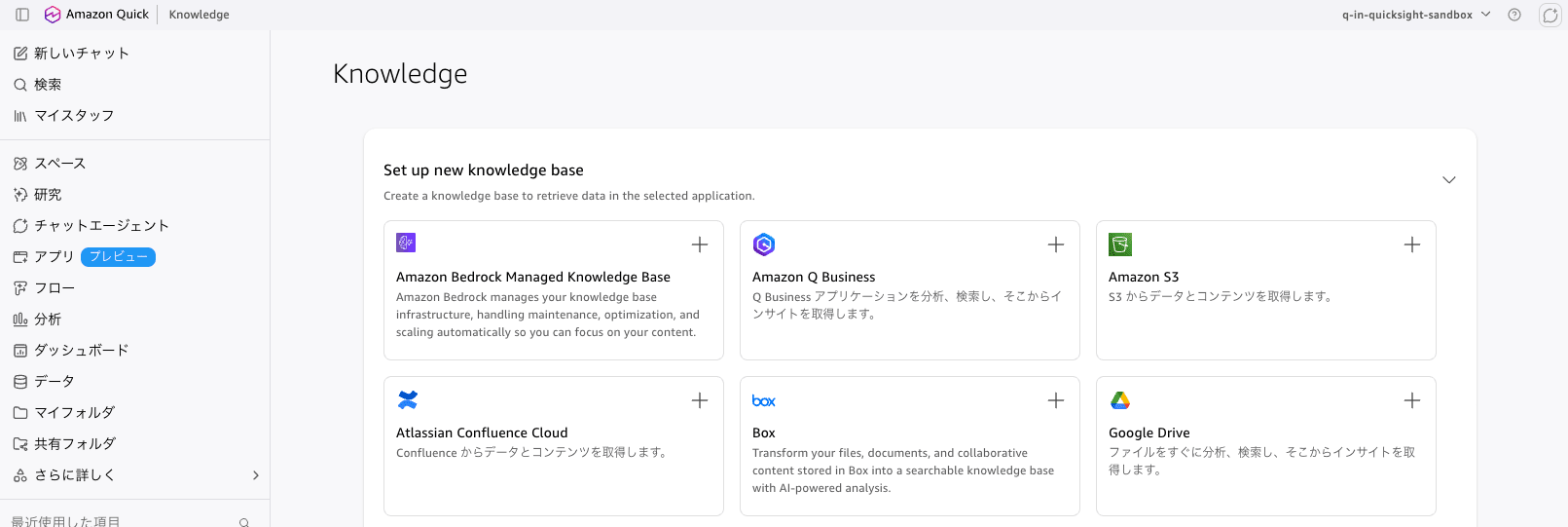
There was a discrepancy in the official documentation here. The Amazon Bedrock documentation states "create a knowledge base in Integrations and select Bedrock knowledge base as the data source type," but the actual screen matched the Amazon Quick documentation description (select Amazon Bedrock managed knowledge base under Knowledge bases > Set up new knowledge base). When following the steps, it is safest to refer to the Amazon Quick documentation.
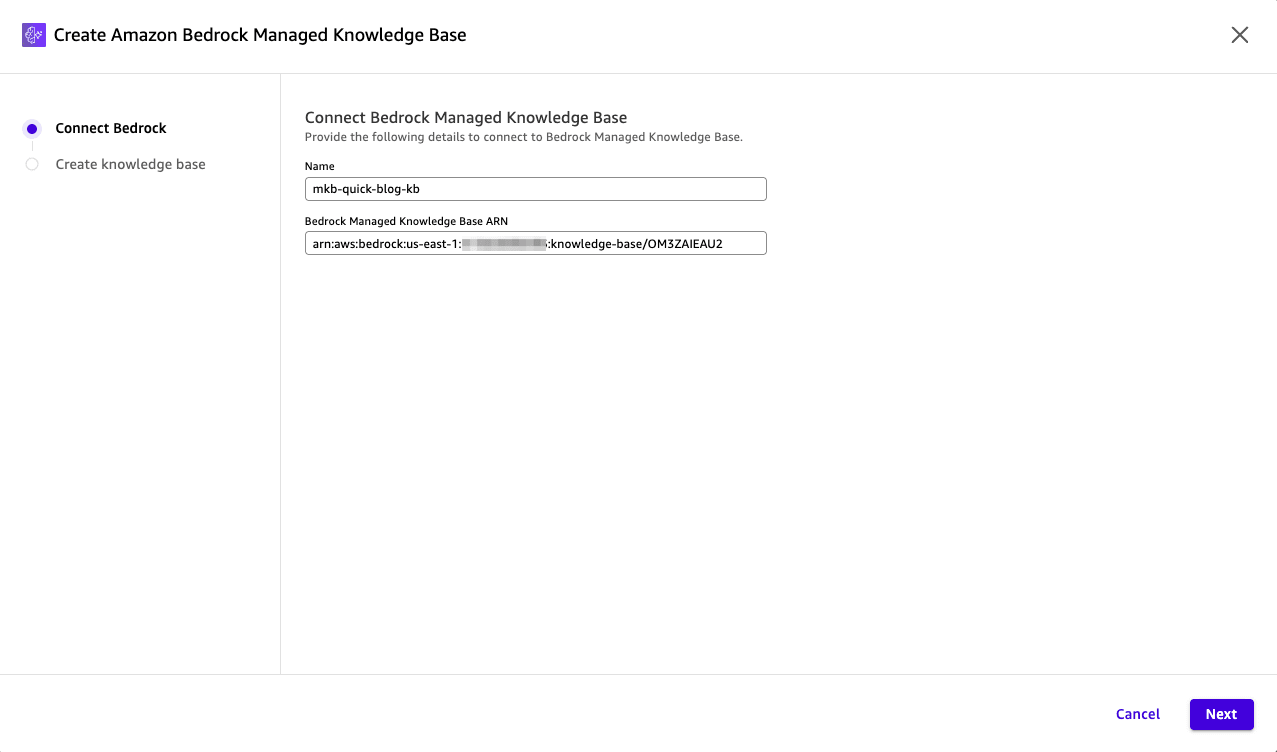
Selecting the card opens a 2-step wizard. In the first step, Connect Bedrock, you enter the connection name and the Bedrock Managed Knowledge Base ARN. For the ARN, paste in the knowledgeBaseArn returned by create-knowledge-base on the Amazon Bedrock side.
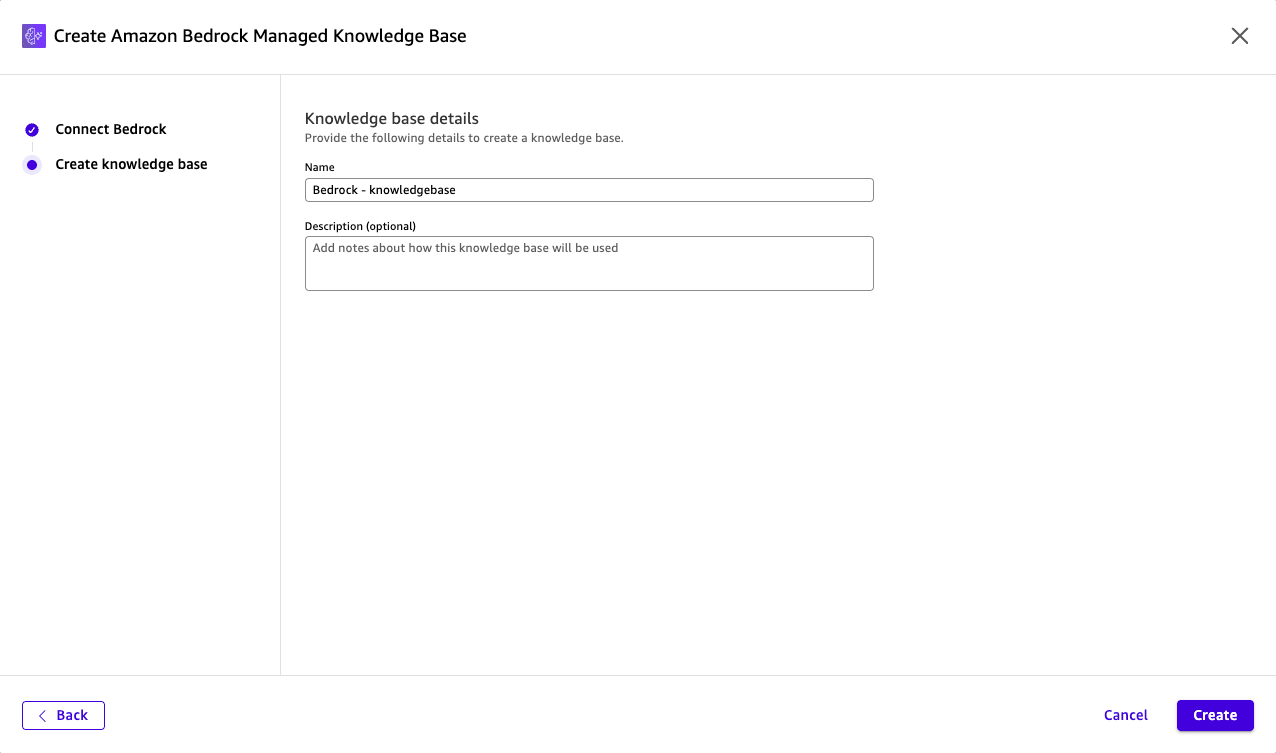
In the second step, Create knowledge base, you enter the knowledge base name and description on the Amazon Quick side.
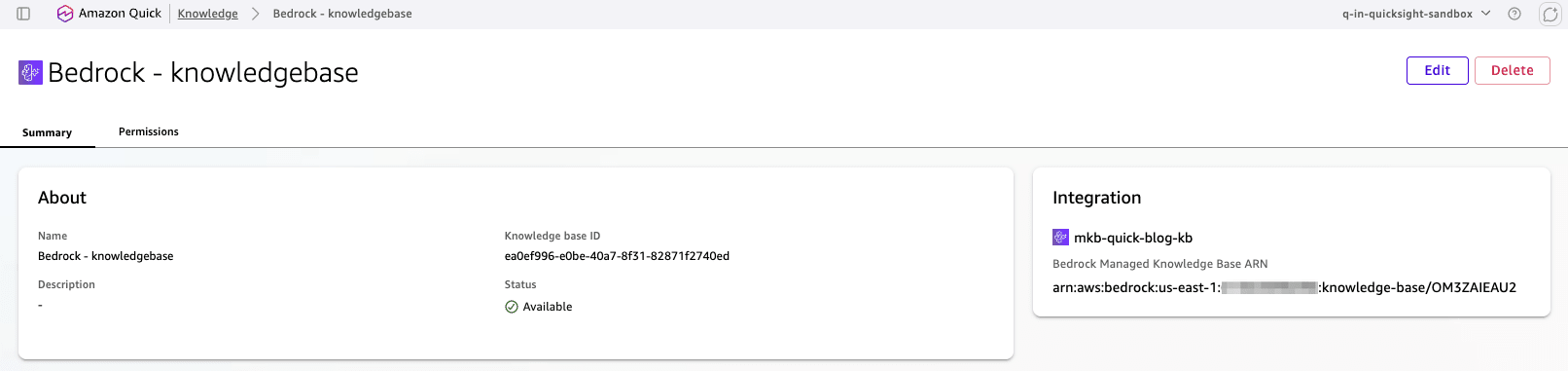
Once created, it appears as Available in the Existing knowledge bases list. A key point is that the sync (Sync status) column shows -, meaning Amazon Quick does not manage synchronization because data sync is handled on the Amazon Bedrock side.

The Integration panel on the detail screen shows the ARN of the connected Bedrock Managed Knowledge Base.
Creation itself is console-only, but the state after creation can be referenced from the AWS CLI.
% aws quicksight describe-knowledge-base --aws-account-id 123456789012 \
  --knowledge-base-id ea0ef996-e0be-40a7-8f31-82871f2740ed --region us-east-1
{
    "Status": 200,
    "KnowledgeBase": {
        "KnowledgeBaseArn": "arn:aws:quicksight:us-east-1:123456789012:knowledge-base/ea0ef996-e0be-40a7-8f31-82871f2740ed",
        "KnowledgeBaseId": "ea0ef996-e0be-40a7-8f31-82871f2740ed",
        "Name": "Bedrock - knowledgebase",
        "Status": "ACTIVE",
        "KnowledgeBaseConfiguration": {
            "templateConfiguration": {
                "template": {
                    "type": "BEDROCKFMKB",
                    "retrievalScope": "ALL",
                    "deletionProtectionConfiguration": {
                        "enableDeletionProtection": "false",
                        "deletionProtectionThreshold": "15"
                    }
                }
            }
        },
        "AccessControlConfiguration": {
            "isACLEnabled": false
        },
        "Type": "FULLY_MANAGED_KNOWLEDGE_BASE",
        "CreatedAt": "2026-08-13T18:08:56+09:00",
        "PrimaryOwnerArn": "arn:aws:quicksight:ap-northeast-1:123456789012:user/default/cm-ishikawa.satoru/cm-ishikawa.satoru"
    }
}
The internal template type name is BEDROCKFMKB, which corresponds to the fmkb in kb-managed-byo-fmkb included in the official documentation URL. The fact that isACLEnabled is false is consistent with the data source's aclEnabled being false on the Amazon Bedrock side.
Also notable is that the region in PrimaryOwnerArn is ap-northeast-1. The Amazon Quick account used this time was created in the Tokyo region, so the user's ARN remains in Tokyo while only the knowledge base entity resides in US East (N. Virginia).
On the data source side, the ARN of the connected Amazon Bedrock knowledge base is stored as-is.
% aws quicksight describe-data-source --aws-account-id 123456789012 \
  --data-source-id db866eb8-a316-4e0f-b6c2-ec8faef7f614 --region us-east-1
{
    "Status": 200,
    "DataSource": {
        "DataSourceId": "db866eb8-a316-4e0f-b6c2-ec8faef7f614",
        "Name": "mkb-quick-blog-kb",
        "Type": "FULLY_MANAGED_KNOWLEDGE_BASE",
        "Status": "CREATION_SUCCESSFUL",
        "DataSourceParameters": {
            "FMKBParameters": {
                "KnowledgeBaseArn": "arn:aws:bedrock:us-east-1:123456789012:knowledge-base/OM3ZAIEAU2"
            }
        }
    }
}
This FULLY_MANAGED_KNOWLEDGE_BASE type is not included in the data source types (S3_KNOWLEDGE_BASE / WEB_CRAWLER / GOOGLE_DRIVE / SHAREPOINT / ONE_DRIVE) supported by aws quicksight create-knowledge-base in AWS CLI 2.36.19. The CLI service model has not caught up with the actual API, resulting in a situation where creation is only possible from the console while referencing is possible from the CLI as well.
Additionally, the Amazon Bedrock documentation states that "Amazon Quick automatically creates the AWSQuickSightBedrockAccess managed policy, scopes it to the entered ARN, and attaches it to the Quick service role." After registering the ARN in AWS Resources and verifying, no AWS managed policy by that name existed, and there was no evidence of any Bedrock-related policy being added to any role in the account.
% aws iam get-policy --policy-arn arn:aws:iam::aws:policy/AWSQuickSightBedrockAccess

An error occurred (NoSuchEntity) when calling the GetPolicy operation:
Policy arn:aws:iam::aws:policy/AWSQuickSightBedrockAccess was not found.
It was not possible to confirm whether the policy name had changed or whether permissions are being passed through a different mechanism. It should also be noted that the Amazon Quick service role aws-quicksight-service-role-v0 used in the verification already had AdministratorAccess attached, meaning bedrock:Retrieve would pass even without additional policies. When configuring with least privilege, it is safer to verify yourself after connecting that bedrock:Retrieve and bedrock:GetDocumentContent are actually granted to the Quick service role. The Amazon Quick troubleshooting guide organizes the steps for isolating permission errors into 5 layers.
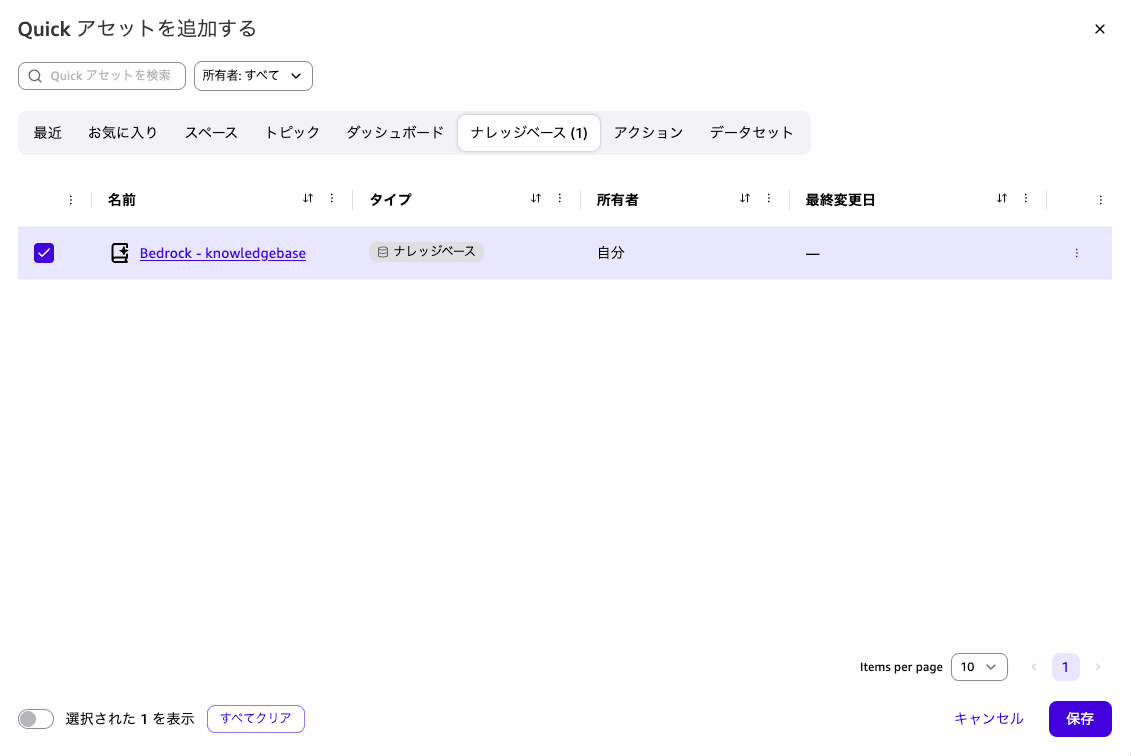
To use it from chat, select the knowledge base by clicking Add Quick assets.
Natural Language Queries in Japanese
Select the knowledge base (Bedrock - knowledgebase) at the bottom of the chat screen and ask questions in Japanese. Five questions were asked in succession.
1. Single Document Reference and Inventory Status
Which laptops are suitable for gaming use? Please also tell me the inventory status.
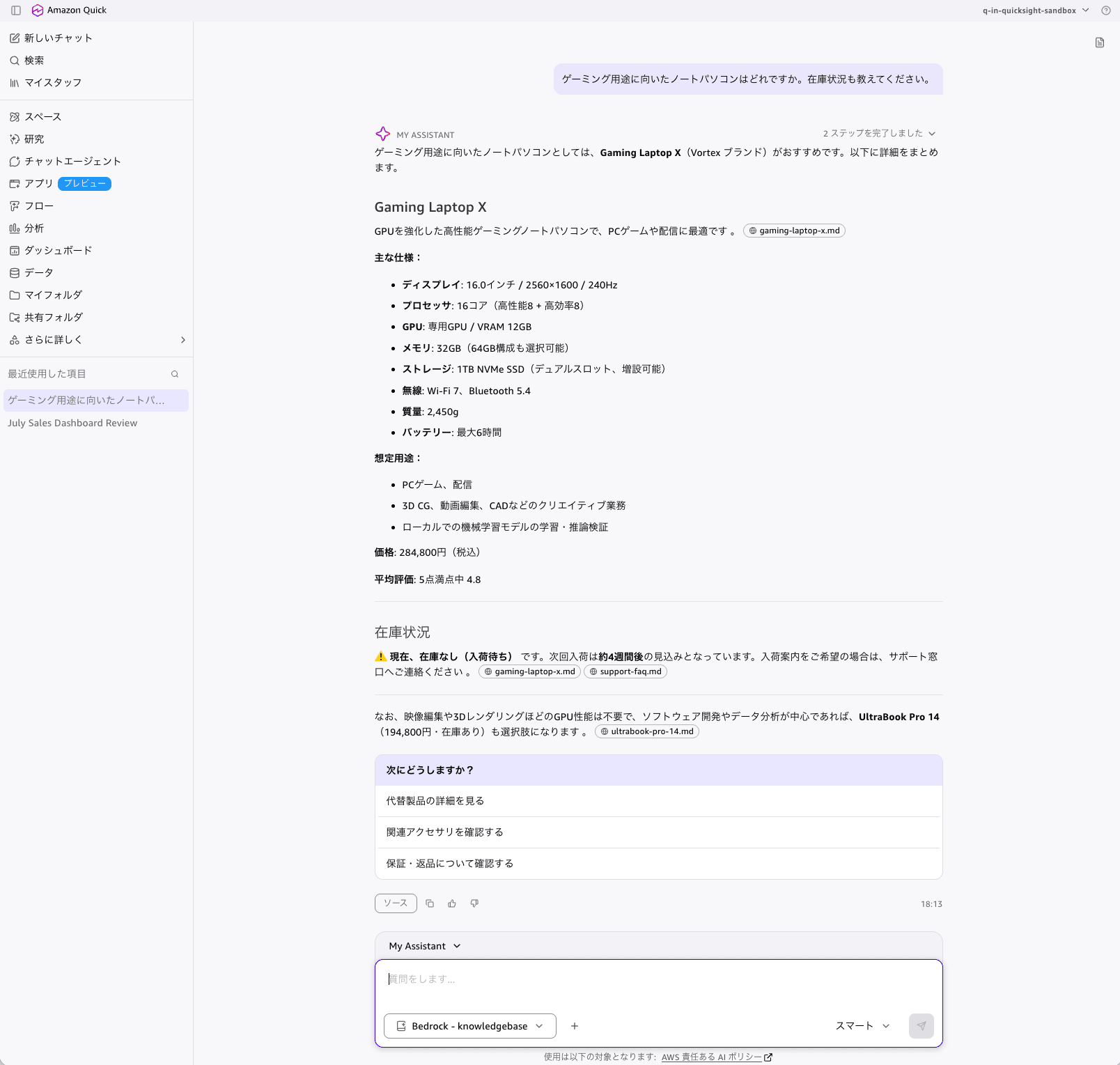
It listed Gaming Laptop X, enumerated the specifications for display, processor, GPU, memory, storage, wireless, weight, and battery, along with the price of 284,800 yen and an average rating of 4.8, and also answered that it was out of stock (backordered) with the next restock expected in approximately 4 weeks. It also added an alternative suggestion: "If GPU performance is not required, UltraBook Pro 14 (194,800 yen, in stock) is also an option."
Chips showing the source file names gaming-laptop-x.md, support-faq.md, and ultrabook-pro-14.md were displayed throughout the response, making it clear which file each statement came from at the paragraph level. The header showed "Completed 2 steps," indicating that multiple searches ran internally.
2. Filtering by Price Condition and Cross-Document Retrieval
Please tell me about products under 100,000 yen with noise-canceling features, and their return deadlines.
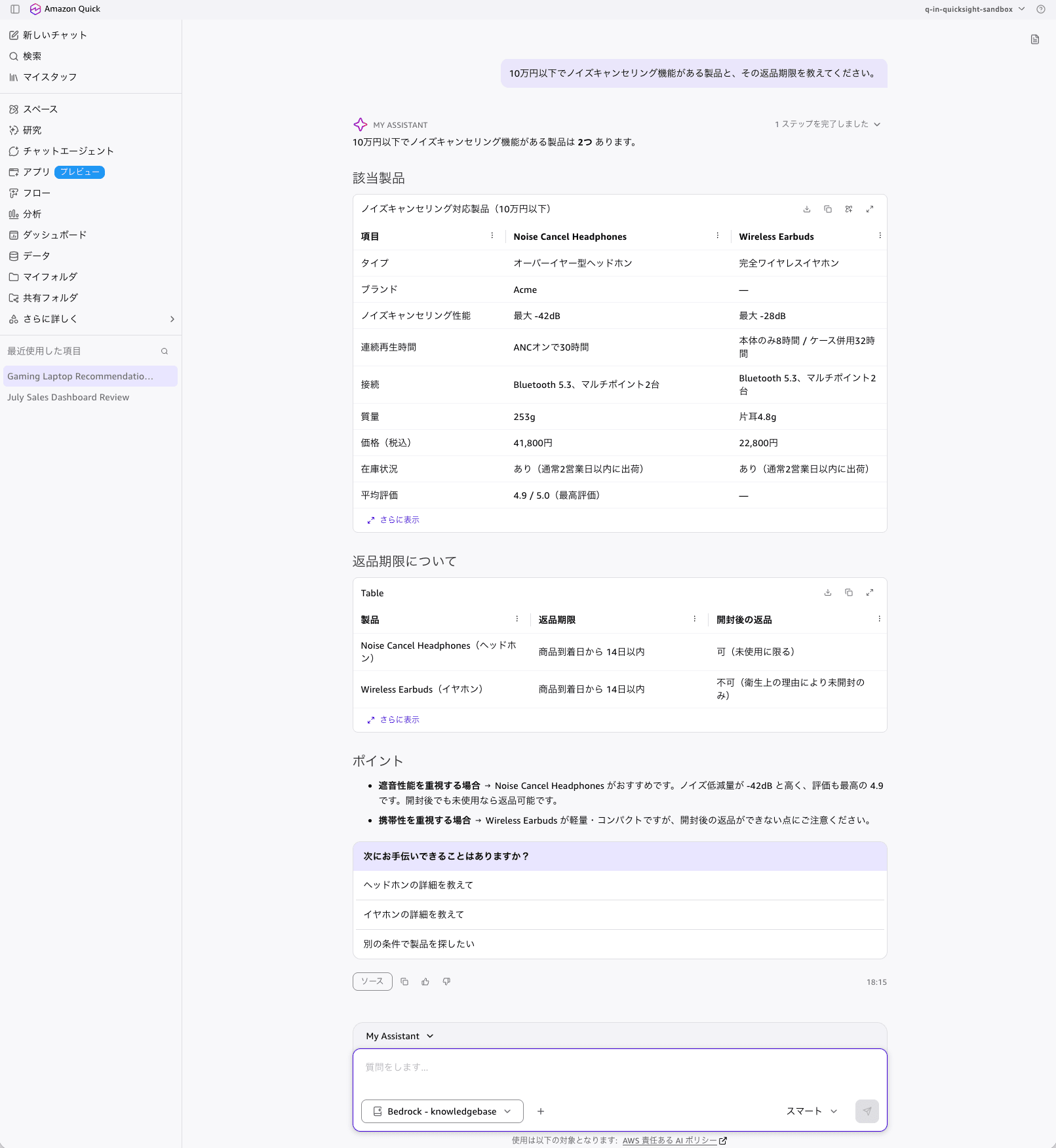
It compiled Noise Cancel Headphones (41,800 yen / up to -42dB) and Wireless Earbuds (22,800 yen / up to -28dB) into a comparison table, and then presented the return deadlines in a separate table. It correctly retrieved conditions that were only written on the return policy side: headphones can be returned even after opening if unused, while earbuds cannot be returned after opening for hygiene reasons.
For this query, the Retrieve API alone returned the top 5 results as 4 items for Noise Cancel Headphones and 1 for return-policy.md, missing Wireless Earbuds. The chat side was able to retrieve both products, supplementing what a single search could not reach.
However, the "Brand" and "Average Rating" cells for Wireless Earbuds in the comparison table showed — (blank). Since the source document lists Acme and 4.3, this represents a transcription omission. While tabular responses are easy to read, missing cells are harder to notice than omissions in body text, so important values should be verified by opening the source document.
3. Table Cell Reference and Combined Conditions
Please tell me the shipping cost and delivery time for Comfy brand furniture shipped to Hokkaido.
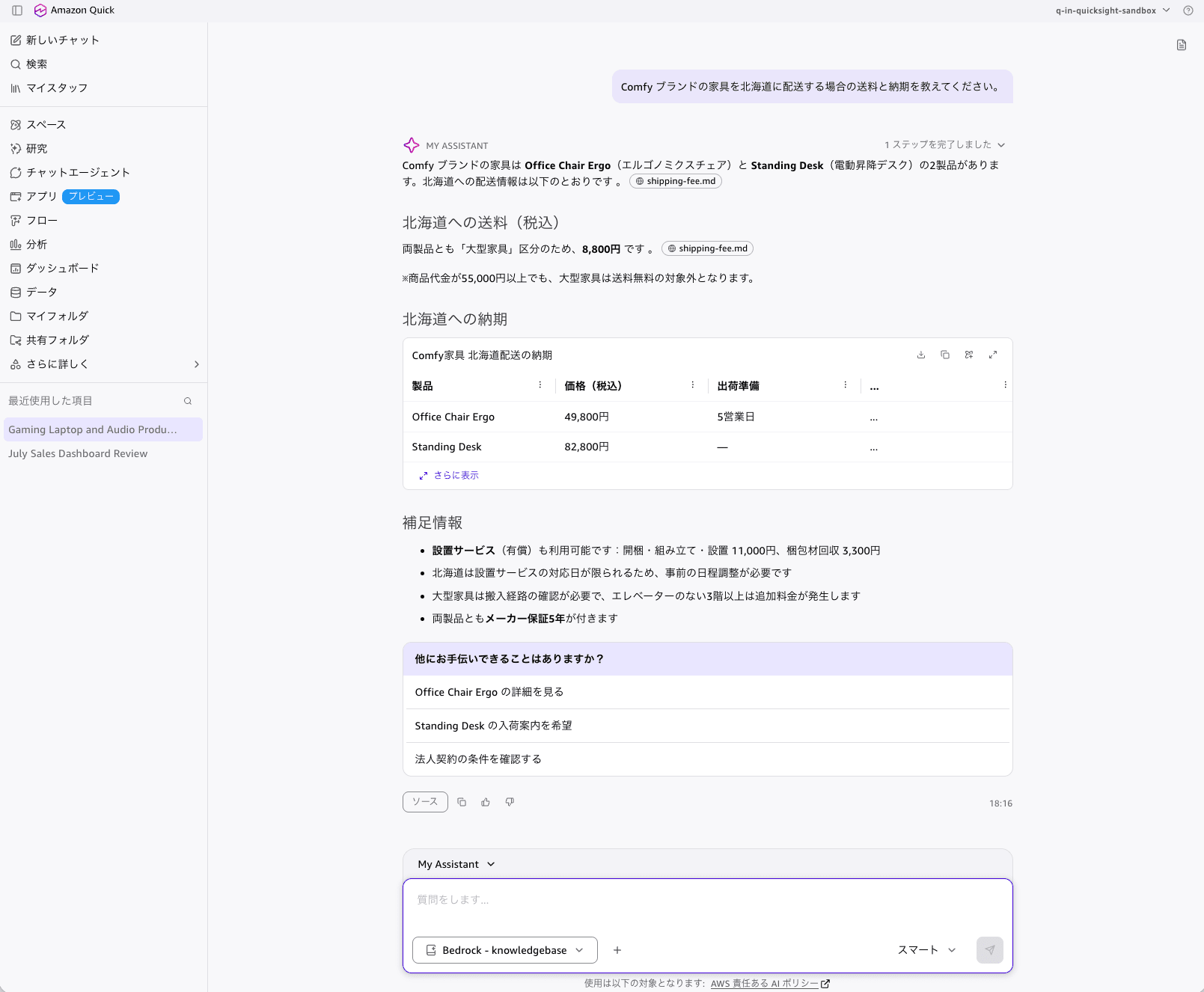
It identified from the product specifications that the Comfy brand furniture consists of two products, Office Chair Ergo and Standing Desk, and retrieved 8,800 yen from the "Hokkaido × large furniture" cell in the shipping rate table. It also picked up the note that "even if the purchase amount exceeds 55,000 yen, large furniture is not eligible for free shipping."
Furthermore, it supplemented with information that was not asked about: the installation service fees (unpacking, assembly, and installation 11,000 yen, packaging removal 3,300 yen), that installation service availability in Hokkaido is limited to certain days, that an additional charge applies for floors above the 3rd floor without an elevator, and that both products come with a 5-year manufacturer's warranty. This was a response spanning three types of documents: the shipping rate table, product specifications, and warranty terms.
4. Cross-Brand and Policy Condition Extraction
Please tell me about the warranty period for Vortex products and the conditions for adding an extended warranty.
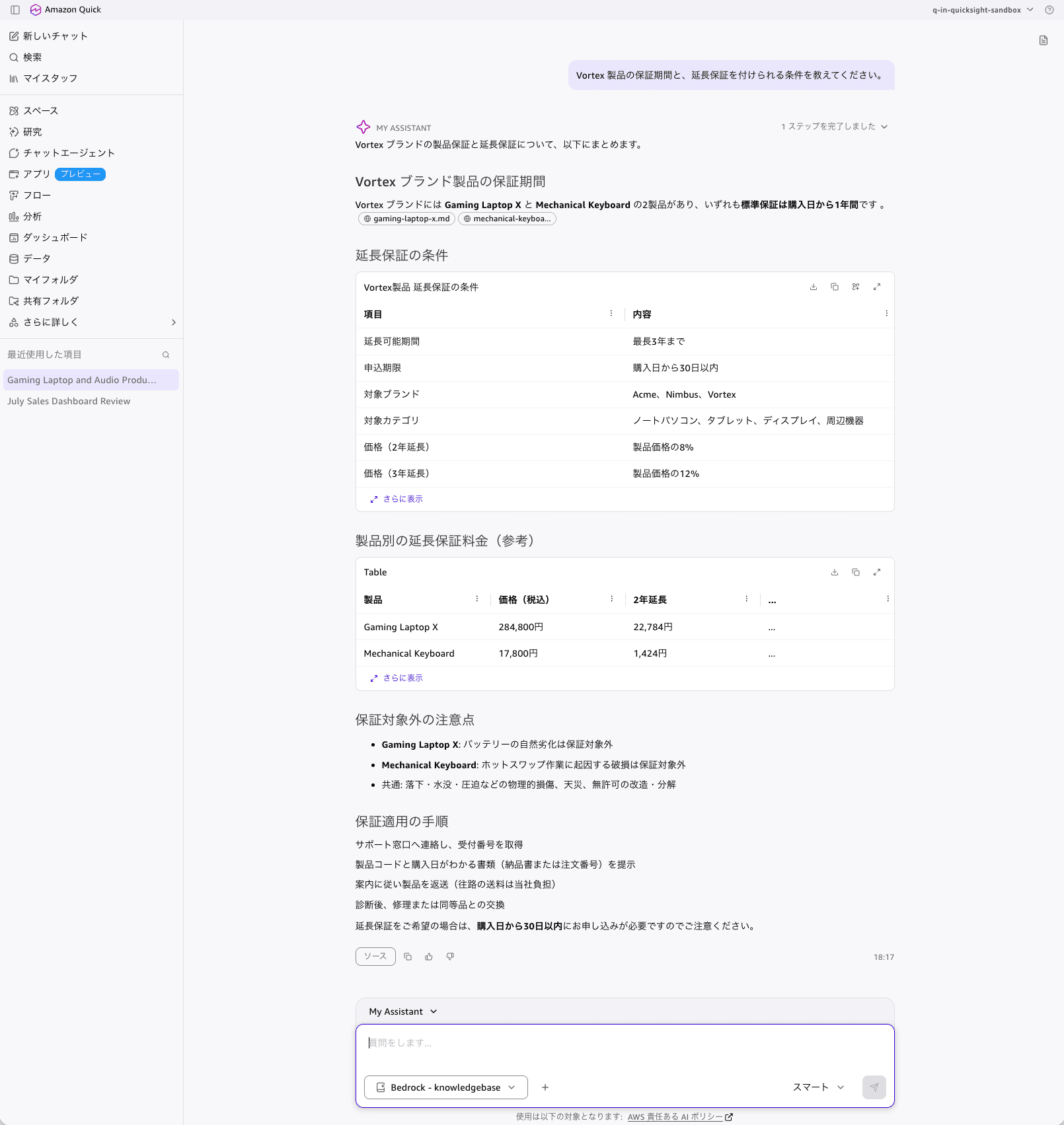
It identified that the Vortex brand products are Gaming Laptop X and Mechanical Keyboard, and compiled into a table: standard warranty of 1 year, extension up to a maximum of 3 years, application deadline within 30 days of purchase, and pricing at 8% of the product price (2-year extension) / 12% (3-year extension).
What is interesting is the "Extended Warranty Cost by Product (Reference)" table, where amounts not written in the source document were calculated and presented. Gaming Laptop X at 284,800 yen × 8% = 22,784 yen, and Mechanical Keyboard at 17,800 yen × 8% = 1,424 yen — both calculations were correct. It also presented the reasons not covered under warranty and the 4-step procedure for applying a warranty claim.
5. Filtering by Numeric Condition and Discount Table
Please tell me about the discount rate for purchasing 20 units of products with a rating of 4.5 or higher as a corporate bulk purchase.
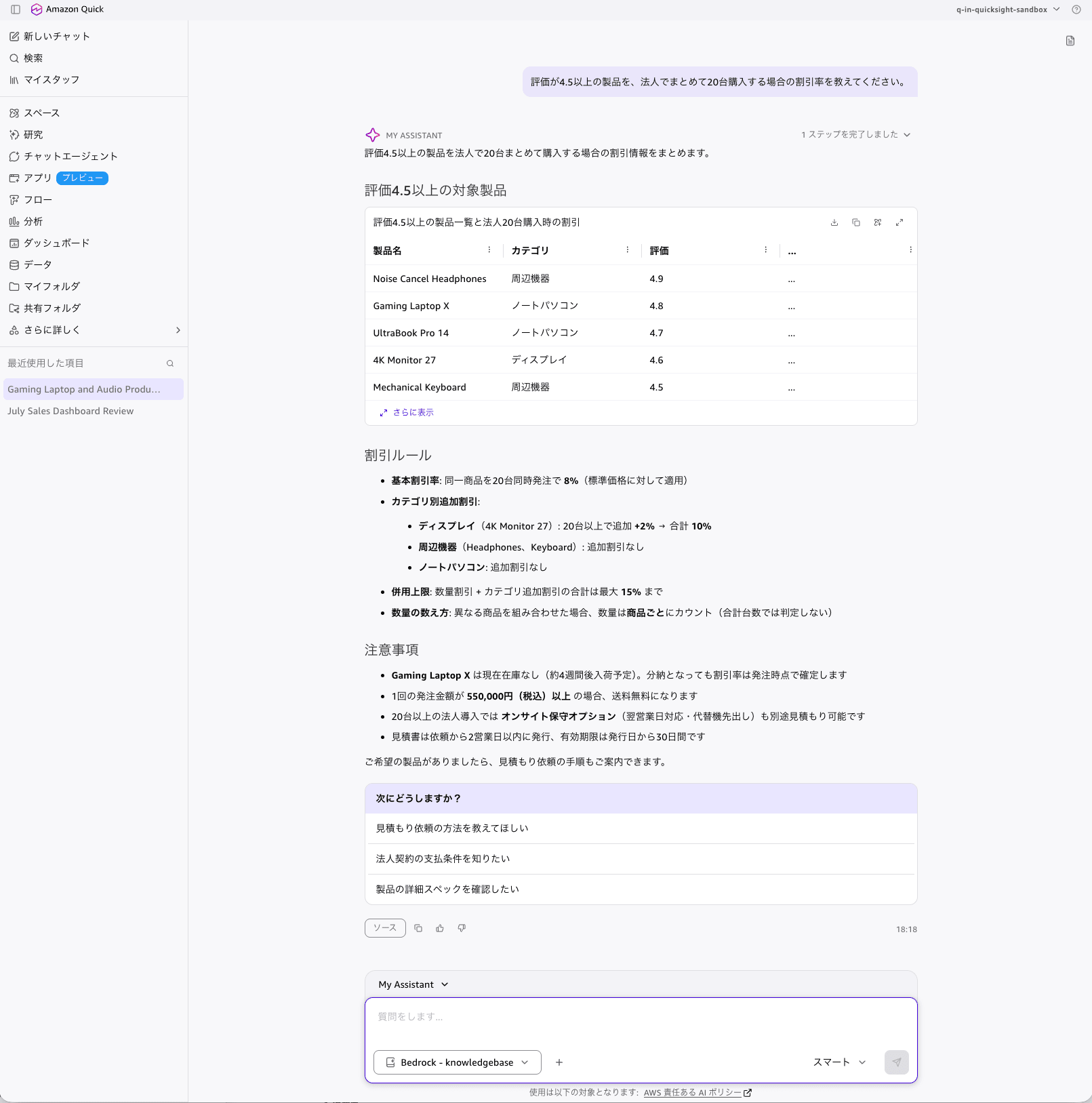
It listed all 5 products with a rating of 4.5 or higher out of 10 products (Noise Cancel Headphones 4.9, Gaming Laptop X 4.8, UltraBook Pro 14 4.7, 4K Monitor 27 4.6, Mechanical Keyboard 4.5) without omission, and presented the 8% volume discount for 20 units. Furthermore, it combined the condition written in a separate section of the discount policy: 4K Monitor 27 is in the display category, so an additional 2% applies for 20 or more units, totaling 10%. It also correctly retrieved the 15% combined discount cap and the point that quantities are counted per product.
As caveats, it supplemented that Gaming Laptop X is out of stock, that orders totaling 550,000 yen or more qualify for free shipping, that on-site maintenance options can be quoted separately for orders of 20 or more units, that quotes are issued within 2 business days and are valid for 30 days.
On the other hand, the category for Noise Cancel Headphones in the target products table was displayed as "Peripherals." The source document lists it as the "Audio" category. Since there is no additional discount provision for the audio category, the conclusion of "no additional discount" is itself correct, but the category name was wrong.
Overall Impressions from the 5 Questions
The response timestamps were 18:13 / 18:15 / 18:16 / 18:17 / 18:18, completing at a pace of just over one minute per question including input time. All 5 questions were asked in Japanese and answered in Japanese, with source file names displayed as chips throughout the responses. Follow-up suggestions labeled "What would you like to do next?" were also presented at the end of each response.
The accuracy results are summarized below.
| Question | What Was Tested | Result |
|---|---|---|
| 1 | Single document reference + inventory status | Correct. Alternative product suggestions were also provided |
| 2 | Filtering by price condition + cross-document retrieval | Correct. Also retrieved the second product that the Retrieve API alone had missed. However, some table cells were blank |
| 3 | Table cell reference + combining multiple documents | Correct. With supplementary information spanning 3 documents |
| 4 | Cross-brand + condition extraction | Correct. Correctly calculated amounts not present in the document |
| 5 | Filtering by numeric condition + discount table | Correct. One error in the displayed category name |
Analysis
You can build RAG without being aware of the vector store at all. The only AWS resources that appeared in this procedure were 4: an S3 bucket, an IAM role, a knowledge base, and a data source. No OpenSearch Serverless collections, data access policies, network policies, or index mapping definitions appeared. The permissions required for the service role were just 2: s3:ListBucket and s3:GetObject, and even bedrock:InvokeModel was unnecessary when using the default managed embedding model.
Japanese documents can be handled as-is. 15 UTF-8 Markdown files were ingested with 0 failures, and no analyzer settings like kuromoji or chunk size adjustments were made. Questions in Japanese received responses in Japanese, and the accuracy of retrieving values at the cell level from Markdown tables was sufficient for practical use.
The region restriction on the Amazon Quick side is the biggest constraint. While Managed Knowledge Base itself is available in the Tokyo region, integration with Amazon Quick is limited to 4 regions: US East (N. Virginia), Oregon, Ireland, and Sydney, and moreover the knowledge base and Amazon Quick instance must be in the same region. For projects with restrictions on handling domestic data, this is a configuration that is currently difficult to adopt.
Connection is console-only. The Bedrock type does not exist in the data source types for aws quicksight create-knowledge-base, making automation via IaC or scripts impossible. On the other hand, since describe-knowledge-base / describe-data-source return FULLY_MANAGED_KNOWLEDGE_BASE, post-creation status checks and inventories are possible from the CLI. There is also a limit of up to 2 Managed Knowledge Bases that can be connected to a single Amazon Quick instance, so if you want to handle multiple data domains, the design would be to attach multiple data sources to a single knowledge base.
There were discrepancies between the documentation and the implementation. The connection path differed between the Amazon Bedrock and Amazon Quick documentation, and the actual screen matched the Amazon Quick documentation. Additionally, the AWSQuickSightBedrockAccess managed policy, which is supposed to be automatically attached, could not be confirmed to exist even after registering the ARN. For newly GA'd features, documentation updates may not have caught up, so it is safer to proceed while verifying the actually attached policies when dealing with permissions.
The response generation portion requires verification. While the conclusions for all 5 questions were correct, there were minor errors such as one blank cell in a comparison table and a misidentified category name. Since the source documents can be traced via chips displayed in the responses, a practical approach is to open the source document to verify values with significant impact such as amounts and conditions.
Points I hope to see improved in the future are as follows.
- Support for Amazon Quick integration in the Tokyo region
- Support for Bedrock managed knowledge base in
aws quicksight create-knowledge-base(IaC support) - Relaxation of the 2-connection limit per instance
- Automatic sync triggered by S3 object updates (currently requires manually invoking
StartIngestionJob)
Note that when using connectors that support ACL (SharePoint, Confluence, Google Drive, OneDrive), Amazon Quick automatically passes the user's ID to Amazon Bedrock at query time, limiting search results to only the documents that the user has viewing permissions for in the original data source. No additional configuration is required on the Amazon Quick side. This behavior was not verified in this case since the S3 connector was used with aclEnabled set to false.
Conclusion
Amazon Bedrock's Managed Knowledge Base is a RAG foundation that takes on the entire burden of selecting, building, and operating a vector store. In this procedure, 15 Japanese product catalogs and internal documents were placed in S3, and with just 4 AWS CLI commands (create role, create knowledge base, create data source, start ingestion), the data became searchable. The only permissions required for the service role were S3 read access, and neither specifying an embedding model nor adjusting chunk sizes was necessary.
Connecting Amazon Quick to it enables Japanese chat queries with just a few clicks in the console. It was able to answer not only single document references, but also queries spanning product specifications and policy documents such as "products under 100,000 yen with noise-canceling features and their return deadlines," and queries that filter by conditions and then combine with separate policies such as "the discount rate for purchasing 20 units of products with a rating of 4.5 or higher." Products that were missed by calling the Retrieve API alone were also retrieved on the chat side.
On the other hand, the fact that Amazon Quick integration does not support the Tokyo region, that connections are console-only and cannot be automated via IaC, and that there is a limit of 2 connections per instance are points that must be understood before making an adoption decision. There were also minor errors in the details of responses (table cells and category names), so it is practical to use this in conjunction with an operation that allows tracing back to the source documents for verification.
This is a strong option when you want to set up a query environment for internal documents without operating a vector database. We recommend trying it in the following order: first ingest a small number of documents in a supported region, verify the search accuracy with the Retrieve API, and then connect to Amazon Quick. We hope this article is helpful to someone.
Related Articles
