
Claude Code v2.1.235 Major Updates - Addition of spellcheck settings and security fixes around permissions

This page has been translated by machine translation. View original
This is Ishikawa from the Cloud Business Division. Claude Code v2.1.235 (released 2026-08-18) has been released. The update includes one new feature addition, with the remainder allocated to fixes and improvements. I verified the Shift+Tab behavior in the permission prompt.
The previous update article is here.
Update Summary
v2.1.235 includes 19 changes. The breakdown is 12 fixes making up the majority, with 1 new feature addition. The remainder consists of improvements to existing features including permissions, terminal UI, and resource usage during background execution.
Also, an official announcement was made on X that Claude Code will extend the 50% increase in weekly limits until August 31.
Notable Updates
Spellcheck Setting for Prompt Input Field
An optional spellcheck setting has been added to the prompt input field that displays underlines on misspelled words while typing. It uses installed aspell / hunspell / ispell for spell checking.
For those who frequently write prompts and commit messages in English, there is the advantage of catching mistakes at the input stage. However, since it uses installed spell checkers, I feel you would first need to check whether something like aspell is installed on your machine.
Fix for Unintended Permission Grants in Permission Prompts
A bug was fixed where pressing Shift+Tab in the comment field of a permission prompt would approve the edit instead of closing the field, and also grant edit permissions for the entire session.
For those who use the comment field in permission prompts, this closes a path that could unintentionally grant edit permissions for the entire session, so I feel it's worth prioritizing.
Alignment of Permission Dialog Display and Permission Scope
The permission dialog has been improved. The display text and "don't ask again" options now always match the actual scope of the permission, and "don't ask again" will no longer be presented when the content cannot be fully displayed.
I feel that the alignment between what is displayed and the actual permission scope matters most for those who use "don't ask again" to narrow down permissions.
Fix for Prompt Cache Invalidation on Language Server Reconnection
A bug was fixed where the entire prompt cache would be invalidated when a language server disconnected and reconnected mid-session.
For those running long sessions in environments with language servers, I expect this will have an impact on both wait times and costs, as the frequency of cache drops decreases.
Improved Memory and CPU Usage During Cloud Session Execution
Memory and CPU usage has been improved while running cloud sessions like /ultrareview and /autofix-pr in the background. The event stream no longer rescans and redraws on every update.
For those who continue working locally while running cloud sessions in the background, I feel this will directly translate to a lighter experience.
Fix for Embedded grep Memory Exhaustion and Context Output
The grep embedded in native builds for macOS / Linux has been improved. Pathological patterns now fail immediately before exhausting memory, and correct context lines are now output when using -m N combined with -A / -C.
This applies to those using native builds on macOS / Linux, and I feel it prevents incidents where searches cause the local environment to become unresponsive.
Update Details
New Features
- An optional
spellchecksetting has been added to the prompt input field that displays underlines on misspelled words while typing. It uses installedaspell/hunspell/ispell. This is a good update for English-speaking users, but unfortunately it does not support Japanese.
Security
- Fixed a bug where pressing Shift+Tab in the comment field of a permission prompt would approve the edit instead of closing the field, granting edit permissions for the entire session.
- The display text and "don't ask again" options in the permission dialog now always match the actual scope of the permission. "Don't ask again" will no longer be presented when the content cannot be fully displayed.
Improvements & Performance
- Memory and CPU usage has been improved while running cloud sessions like
/ultrareviewand/autofix-prin the background. The event stream no longer rescans and redraws on every update. - The context limit error message has been improved to inform users when auto-compact is disabled and to guide them to
/configfor re-enabling it. - In Vim mode, NORMAL mode and cursor position are now preserved when toggling the detailed transcript display (
ctrl+o) or closing a panel. - Remote Control's
claude rcnow applies the same enterprise gateway availability checks as interactive startup.
Fixes
- Fix for entire prompt cache invalidation: Fixed a bug where the entire prompt cache would be invalidated when a language server disconnected and reconnected mid-session.
- Fix for embedded grep memory exhaustion and context output: Fixed issues in native builds for macOS / Linux where pathological patterns would exhaust memory, and where context lines were not output correctly when using
-m Ncombined with-A/-C. - Fix for nested list display misalignment: Fixed a bug in the terminal UI where markdown list items nested at depth 3 or greater would be displayed out of position. Hanging indents have also been added for wrapped list items.
- Fix for prompt input field highlight misalignment: Fixed a bug where highlights in the input field (slash commands, keywords, mentions) would appear offset by one or more characters in some multi-line prompts.
- Fix for Agent tool default agent display: Fixed a bug where the Agent tool would present the general-purpose agent as the default even in sessions where it is not available. In such sessions, omitting
subagent_typewill now return a clear error listing the available agents. - Fix for missing content in notebook approval dialogs: Fixed a bug where the approval dialog for cell deletion or replacement would silently omit existing cell content when a notebook or cell could not be read. The dialog now displays the reason.
- Fix for dialog misselection: When pressing arrow keys and Enter in quick succession, the destination option is now selected instead of the previously highlighted option.
- Fix for SendMessage message discarding:
SendMessagenow proactively rejects messages that are too large for delivery between sessions, rather than silently discarding them. - [VSCode] Fix for Claude tab focus shifting: Fixed a bug where focus would unexpectedly shift between open Claude tabs when restoring or reloading a window with multiple Claude panels open.
- A quietly welcome fix: Fixed a bug where the "Update installed" restart notification would not appear in the prompt footer after an automatic background update. I feel this will reduce instances of users continuing to use an outdated process.
- Additionally, minor bugs have been fixed including character display for slash commands executed during a response, and the display state of task lists when resuming a session.
Verifying the Shift+Tab Behavior in the Permission Prompt
Let's verify the Shift+Tab behavior from the security fixes in this release. I prepared a file containing hello in advance.
% mkdir -p ~/tmp/cc-shift-tab-check && cd ~/tmp/cc-shift-tab-check
% printf 'hello\n' > sample.txt
% ls -la
total 16
drwxr-xr-x@ 4 ishikawa.satoru  staff  128  8月 19 13:56 .
drwxr-xr-x@ 5 ishikawa.satoru  staff  160  8月 19 13:56 ..
-rw-r--r--@ 1 ishikawa.satoru  staff    6  8月 19 14:11 sample.txt
To ensure the permission prompt is reliably displayed, launch claude in manual mode, which prompts for permission every time.
% claude --permission-mode manual
After launching, confirm that a grey ⏸ badge appears in the footer. As stated in the CHANGELOG: Added a grey ⏸ badge to the footer when in manual permission mode, making the active mode always visible, this badge indicates manual mode. In the following steps, the fact that this badge does not change serves as evidence that no permissions have been granted.
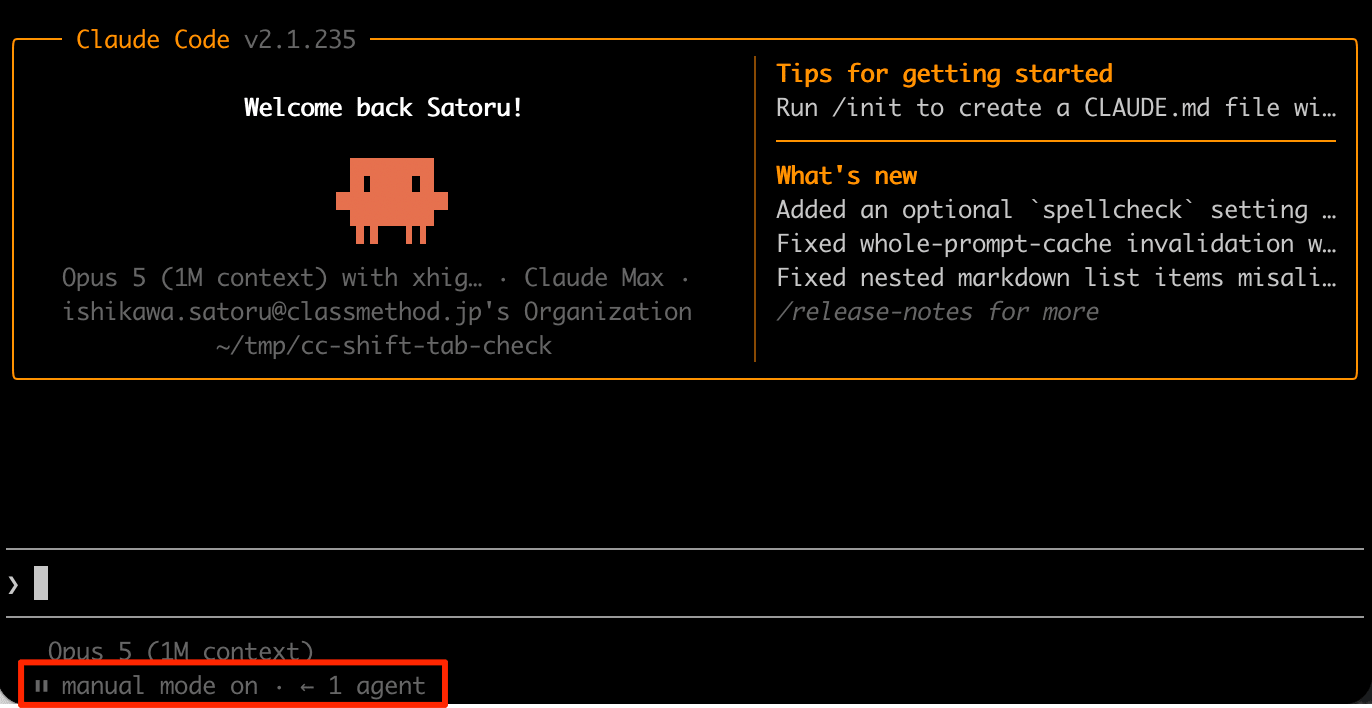
Make the following request in the session.
Please rewrite the contents of sample.txt from hello to hello world
A prompt requesting permission to edit the file will appear. Select No here.
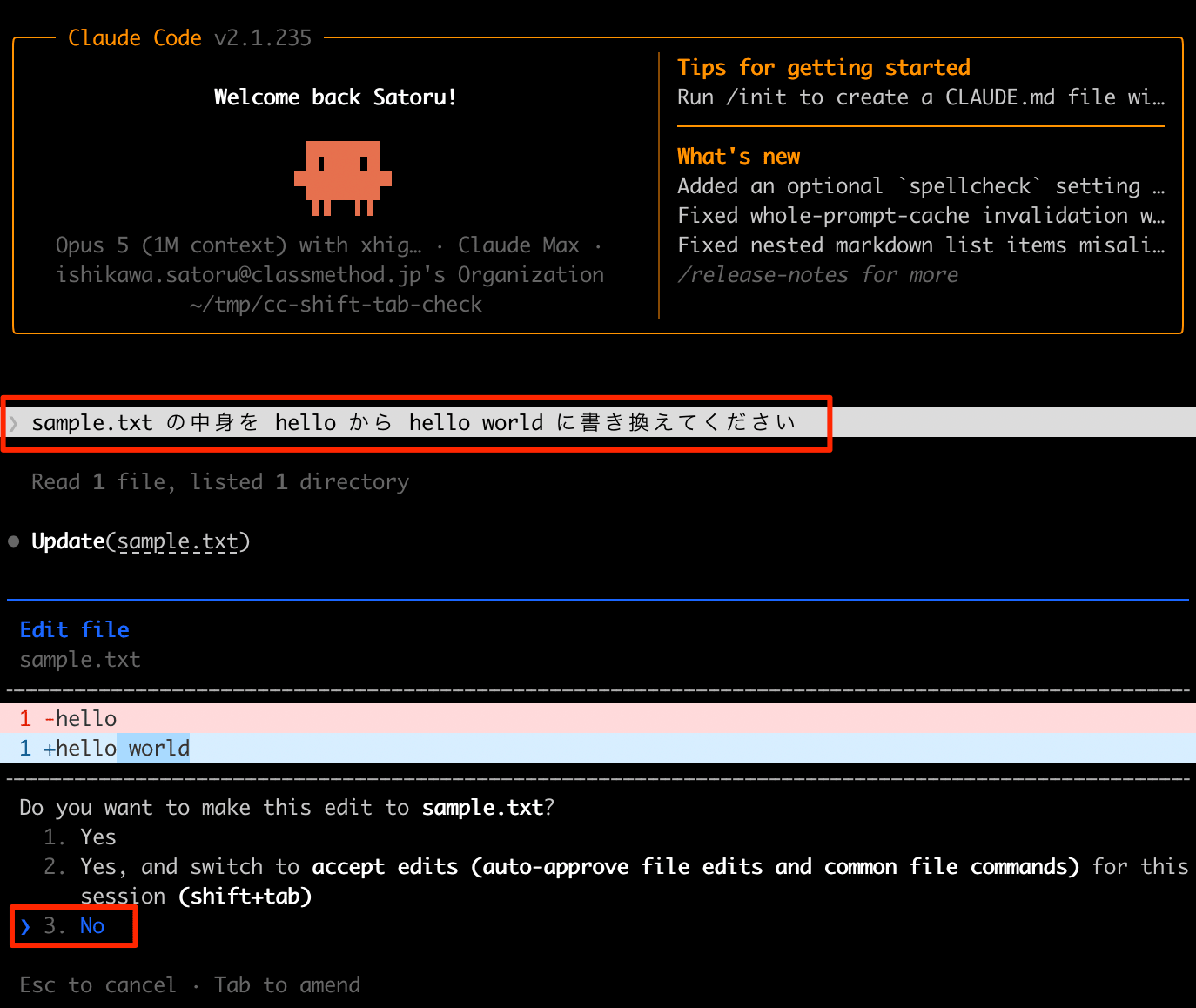
In the above state, pressing Tab allows you to enter text in the permission prompt. Enter Test here.
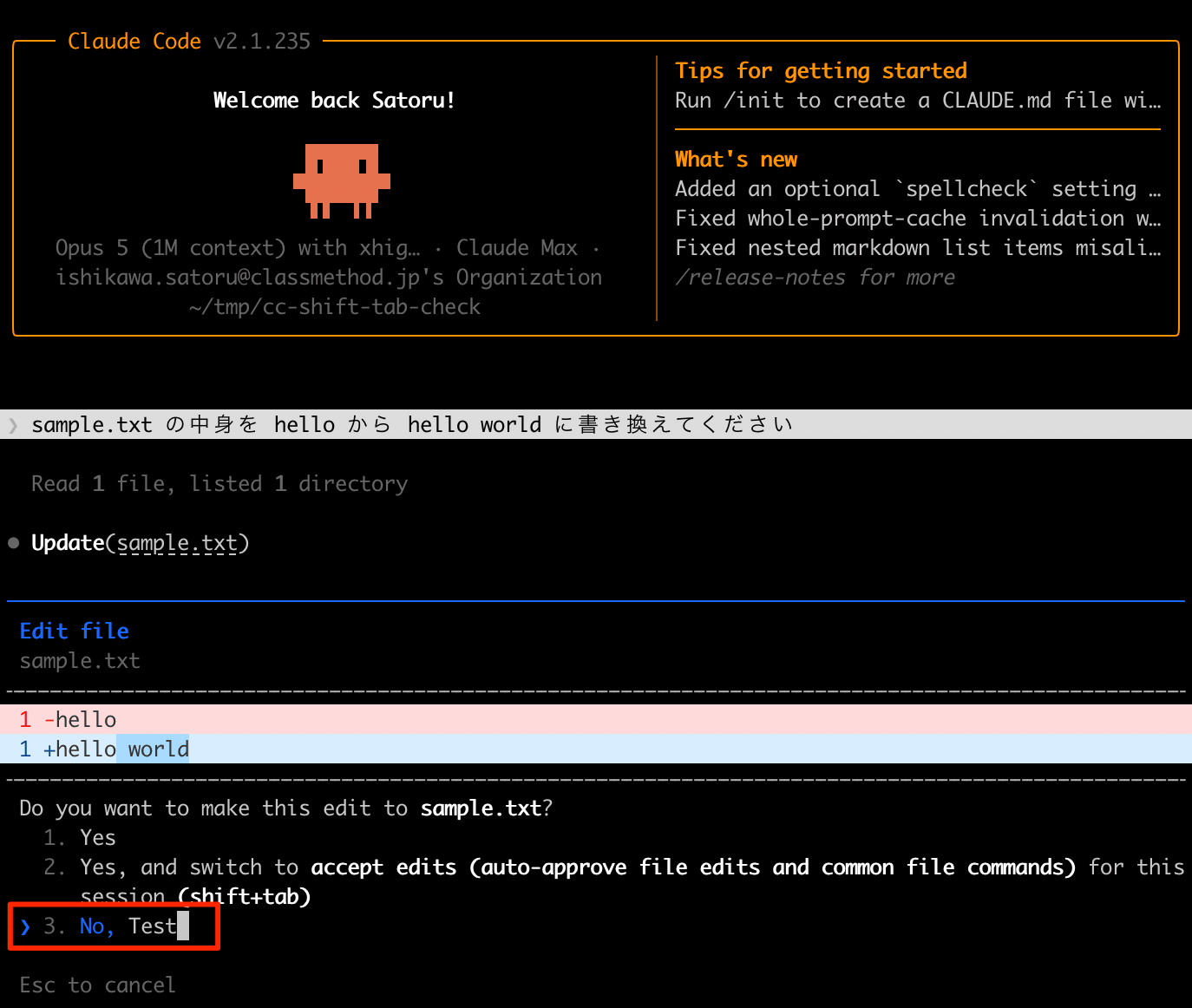
In this state, pressing Shift+Tab returns to the state without comment input (No), and the edit is not approved. Before the fix, it was reportedly closing without closing the field, approving the edit and modifying the file.
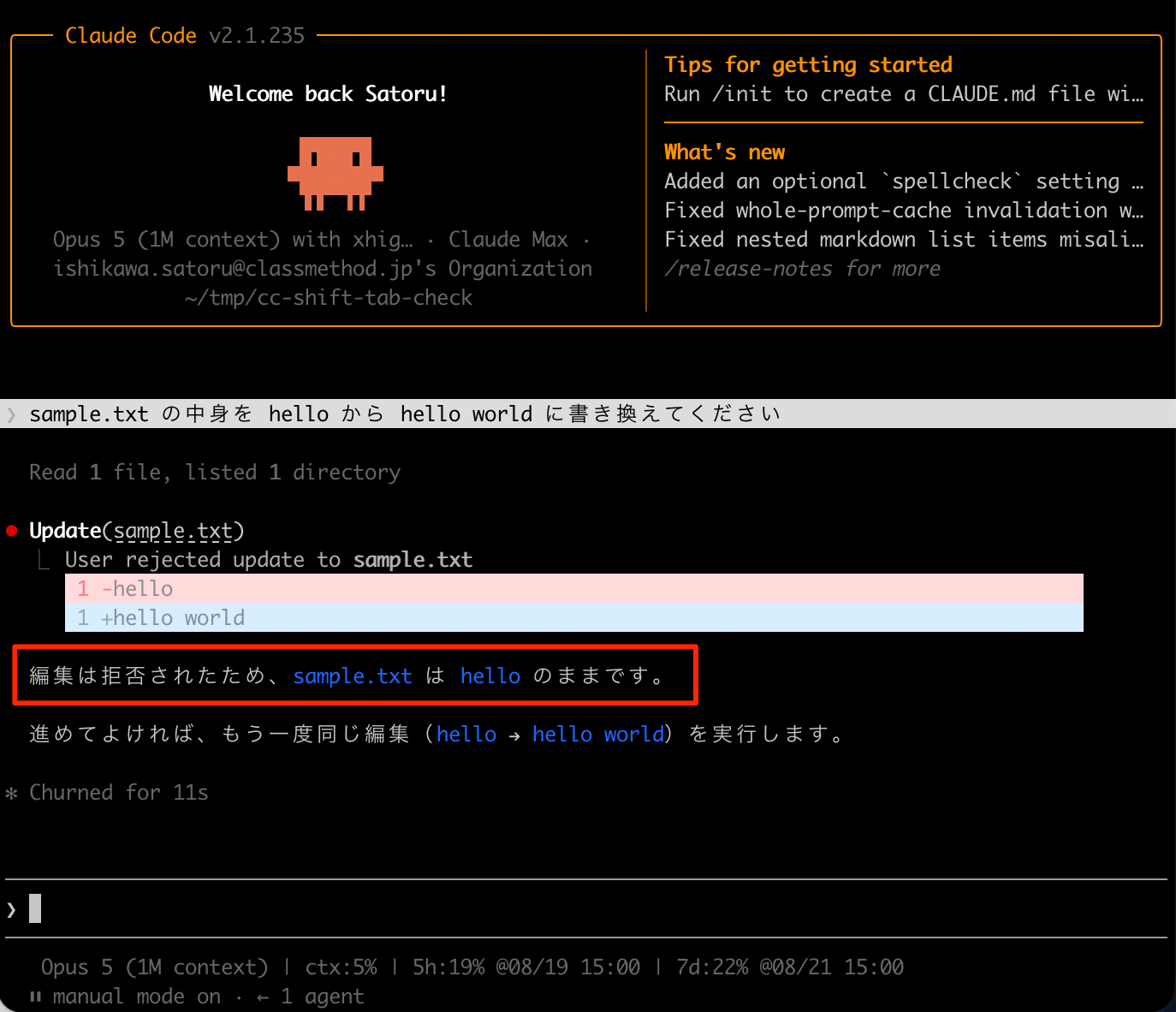
I feel that pressing Shift+Tab in the comment field is the kind of key you might unconsciously press with the intention of exiting the input field. The fact that this was leading to approval and granting permissions for the entire session means there is a possibility that permission scopes were being expanded without the user noticing.
Closing
This release has 12 fixes out of 19 changes, and I feel it is a release that strengthens the foundation rather than highlighting new features. The alignment between what is displayed in the permission dialog and the actual permission scope will directly improve how easily permissions can be understood.
This is relevant not only for those who regularly operate permission prompts, but also for those who make heavy use of search in native builds. Why not update and give it a try?
References
