
Settings That Are Carried Over and Settings That Need to Be Reconfigured When Restoring EC2 with AWS Backup (2026 Edition)

This page has been translated by machine translation. View original
Hello, this is Hayashi.
When you restore an EC2 instance with AWS Backup, are the settings of the original instance carried over as they are?
When I looked into it, I found an article on the same topic from 2020.
However, since that article is six years old, it does not cover settings that appeared later (such as stop protection and gp3 IOPS/throughput). The console's restore screen has also changed since then.
So I checked again for a 2026 edition.
Verification method
I compared the settings of the original instance and the restored instances with the following steps.
- Create an EC2 instance with settings that differ from the defaults, and record its settings
- Take a recovery point with an AWS Backup on-demand backup
- Restore from the same recovery point in two ways: the console and the AWS CLI (
start-restore-job) - Compare the settings of the two restored instances with the original settings recorded in step 1
For the CLI restore, I specified the same private IP as the original. Restoring fails if two instances have the same IP, so I terminated the original instance before the CLI restore.
The settings of the original instance are as follows.
So that I can tell whether a setting was carried over after the restore, I set every item that has a default value to a value different from the default.
Instance
| Item | Value |
|---|---|
| OS | Windows Server 2025 Japanese |
| Instance type | t3.large |
| Key pair / IAM instance profile | Ones created for the verification |
| User data | Set |
| Shutdown behavior | Stop |
| Termination protection | Enabled |
| Stop protection | Enabled |
| Detailed monitoring | Enabled |
| EBS optimization | Enabled |
| Placement group | Placed in a spread group |
| Hibernation behavior | Enabled |
| Capacity reservation | A specific reservation specified |
| Credit specification | standard (the default for t3 is unlimited) |
| Auto recovery | Disabled |
Instance metadata
| Item | Value |
|---|---|
| IMDSv2 | Required |
| Metadata response hop limit | 3 |
| Allow tags in metadata | Enabled |
| Metadata IPv6 endpoint | Enabled |
Network
| Item | Value |
|---|---|
| VPC / subnet / security group | Ones created for the verification |
| Primary private IPv4 address | 10.0.1.54 |
| Secondary private IPv4 address | 10.0.1.55 |
| IPv6 address | One assigned |
| Auto-assign public IP | Enabled |
| Source/destination check | Disabled |
| Hostname type | Resource name |
| Network interface description | Set |
Storage
| Item | Value |
|---|---|
| C drive (/dev/sda1) | 160 GiB / gp3 / 4000 IOPS / 250 MB/s / Encrypted (customer managed key) / Delete on termination = Yes |
| D drive (/dev/sdb) | 100 GiB / gp3 / 3000 IOPS / 125 MB/s / Encrypted (customer managed key) / Delete on termination = No |
Tags
| Item | Value |
|---|---|
| Instance / volume / network interface | Name and System added |
The following items were excluded from the check.
- AMI ID: A new AMI is created with every restore, so it can never be the same as the original
- Spot Instances, Dedicated Hosts, license settings, Elastic Fabric Adapter, Elastic Graphics / Elastic Inference: These are settings for specific use cases and are not used in this configuration
- Nitro Enclaves, network bandwidth weighting: These cannot be used with t3
Verification results
With the CLI, the items carried over were those contained in the recovery point's metadata.
With the console, only the items that have an input field on the restore screen were carried over.
The breakdown by item is as follows. The comparison table for all items is at the end of this article.
Carried over in both
- Instance: instance type, key pair, IAM instance profile, shutdown behavior, termination protection, EBS optimization, tenancy, placement group, CPU options, hibernation behavior
- Instance metadata: IMDSv2 (HttpTokens)
- Network: VPC, subnet, security group
- Storage: everything (size, type, IOPS, throughput, encryption, delete on termination)
Carried over only with the CLI
- Instance: detailed monitoring, credit specification, capacity reservation
- Network: private IPv4 addresses (primary and secondary), IPv6 address, auto-assign public IP, network interface description
Carried over only with the console
- Tags: instance (when "Copy tags from protected resource" is selected)
Not carried over in either
- Instance: stop protection, auto recovery, user data
- Instance metadata: everything other than HttpTokens (hop limit, allow tags, IPv6 endpoint)
- Network: source/destination check, hostname type
- Tags: volumes, network interfaces
All the items that were not carried over had reverted to their default values.
Restore procedure
Console
Open the restore screen from [AWS Backup] → [Backup vaults] → select a recovery point → [Restore].
I restored with all settings left at their defaults.
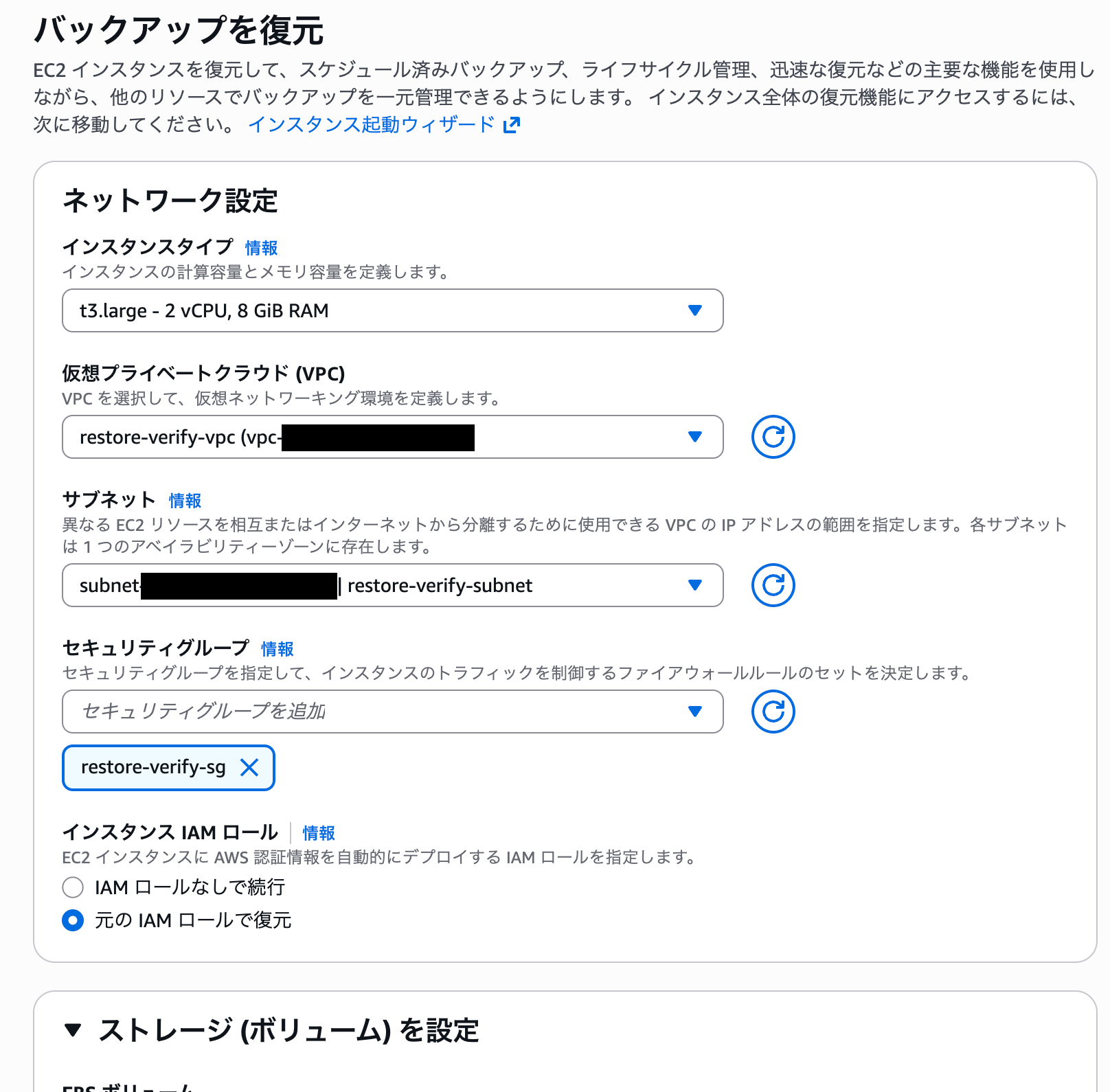
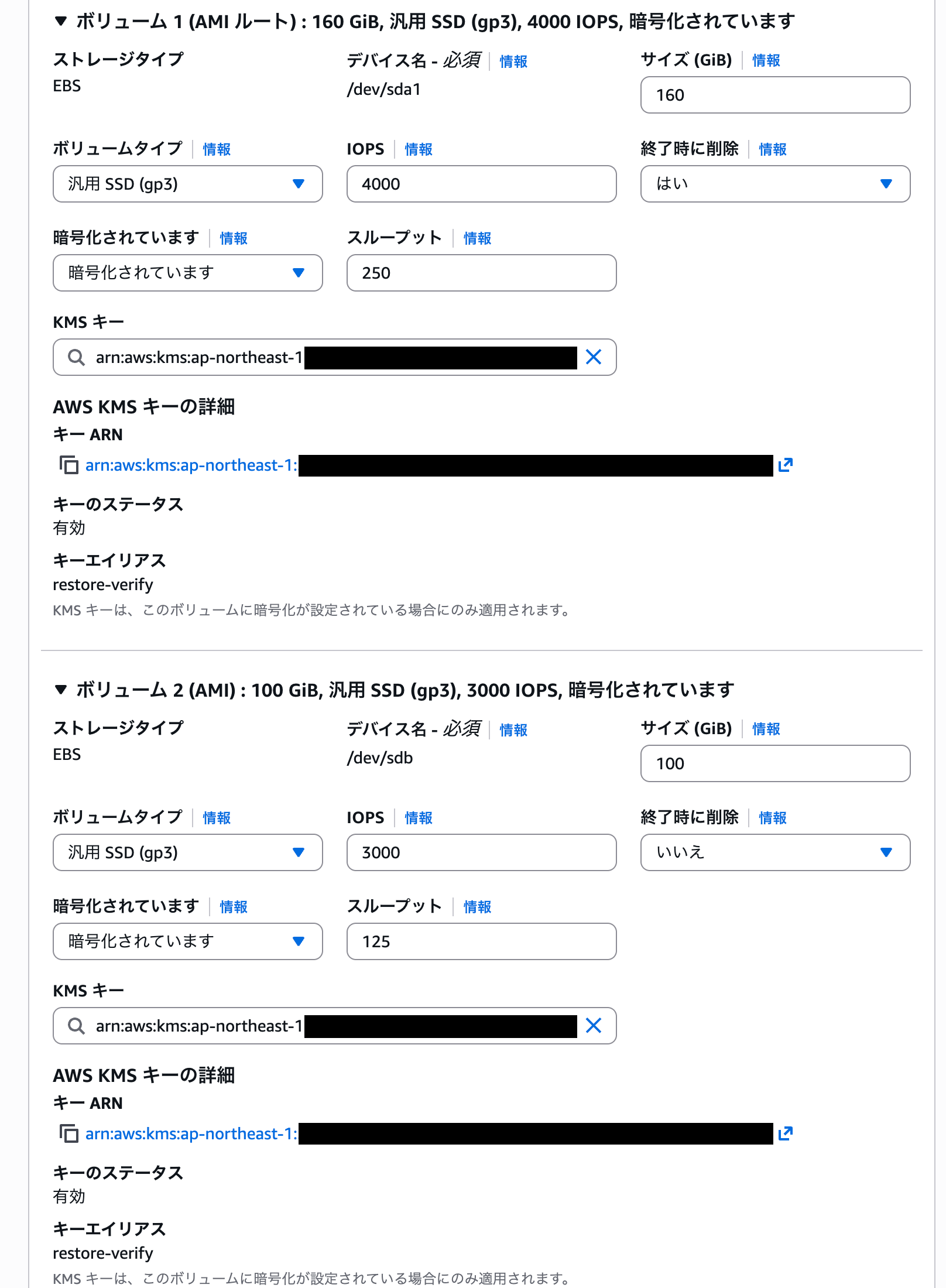
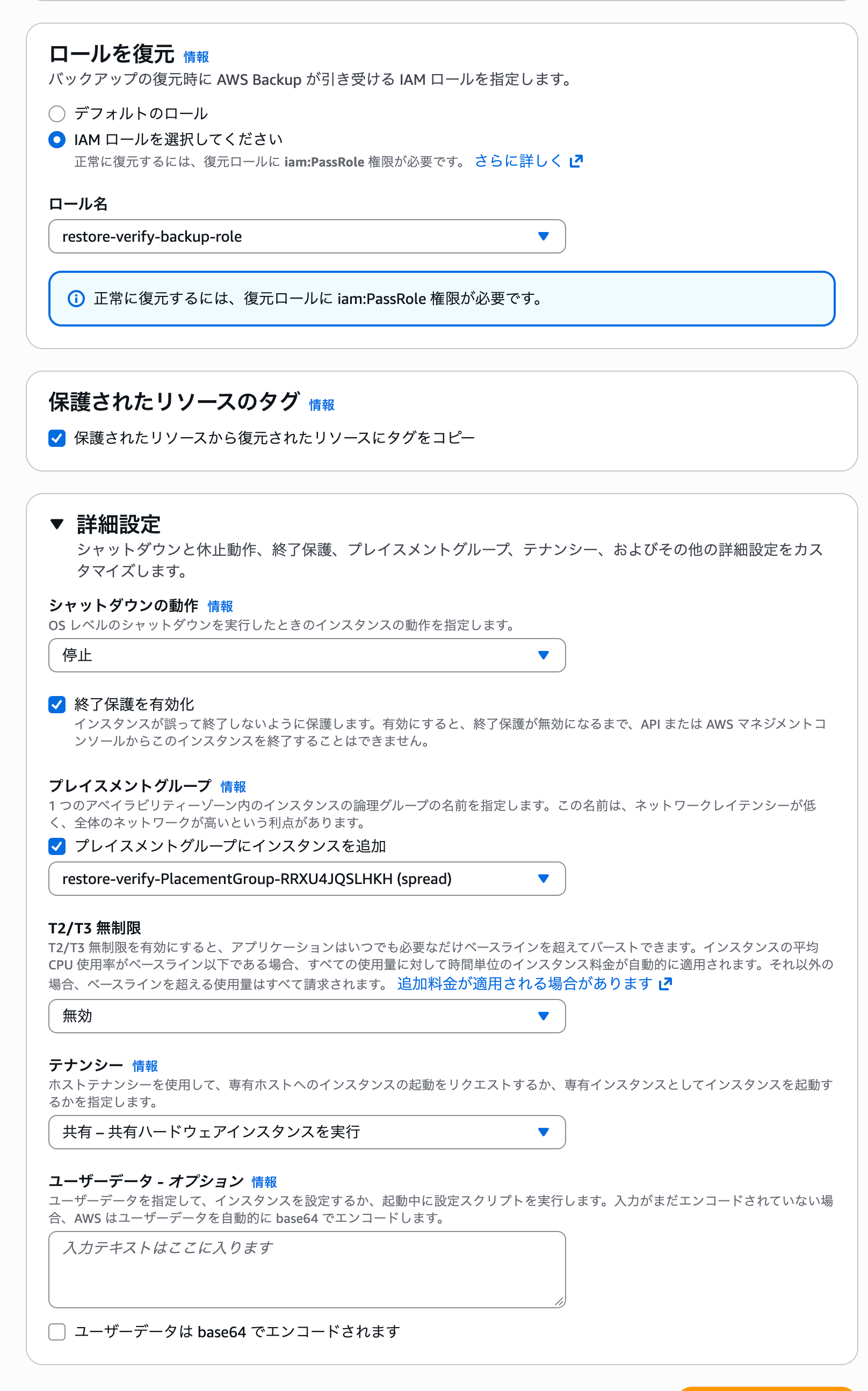
The items that have input fields are as shown in the restore screens above, and they match the items listed under "Carried over in both" and "Carried over only with the console" in the verification results.
The exception is "T2/T3 Unlimited". It was set to "Disabled" on the restore screen, but after the restore it was unlimited.
CLI
To restore with the CLI, you pass the settings of the restored instance as metadata to start-restore-job. You have to prepare yourself what you would enter on the console's restore screen.
The settings are recorded in the recovery point, so you can retrieve them with get-recovery-point-restore-metadata. The list of items you can pass is in the official documentation.
# Retrieve the original instance's settings (metadata) recorded in the recovery point and save them to a file
aws backup get-recovery-point-restore-metadata \
  --backup-vault-name sample-backup-vault \
  --recovery-point-arn <復旧ポイントのARN> \
  | jq '.RestoreMetadata' > restore.json
This is the output of get-recovery-point-restore-metadata.
All values are strings, and nested settings such as Placement and NetworkInterfaces are stored as JSON strings. Some long values are abbreviated.
{
    "RestoreMetadata": {
        "Architecture": "x86_64",
        "BlockDeviceMappings": "[{\"DeviceName\":\"/dev/sda1\",\"Ebs\":{\"DeleteOnTermination\":true,\"Iops\":4000,\"VolumeSize\":160,\"VolumeType\":\"gp3\", ...}}, ...]",
        "CapacityReservationSpecification": "{\"CapacityReservationTarget\":{\"CapacityReservationId\":\"cr-xxxxxxxxxxxxxxxxx\"}}",
        "CpuOptions": "{\"CoreCount\":1,\"ThreadsPerCore\":2}",
        "CreditSpecification": "{\"CpuCredits\":\"standard\"}",
        "DisableApiTermination": "true",
        "EbsOptimized": "true",
        "EnaSupport": "true",
        "HibernationOptions": "{\"Configured\":true}",
        "IamInstanceProfileName": "sample-instance-role",
        "InstanceInitiatedShutdownBehavior": "stop",
        "InstanceType": "t3.large",
        "KeyName": "sample-key",
        "Monitoring": "{\"State\":\"enabled\"}",
        "NetworkInterfaces": "[{\"AssociatePublicIpAddress\":true,\"Description\":\"sample primary ENI\",\"Groups\":[\"sg-xxxxxxxxxxxxxxxxx\"],\"NetworkInterfaceId\":\"eni-xxxxxxxxxxxxxxxxx\",\"PrivateIpAddress\":\"10.0.1.54\",\"SubnetId\":\"subnet-xxxxxxxxxxxxxxxxx\", ...}]",
        "Placement": "{\"AvailabilityZone\":\"ap-northeast-1a\",\"GroupName\":\"sample-placement-group\",\"Tenancy\":\"default\",\"GroupId\":\"pg-xxxxxxxxxxxxxxxxx\"}",
        "Platform": "windows",
        "RequireIMDSv2": "true",
        "RootDeviceType": "ebs",
        "SecurityGroupIds": "[\"sg-xxxxxxxxxxxxxxxxx\"]",
        "SubnetId": "subnet-xxxxxxxxxxxxxxxxx",
        "VirtualizationType": "hvm",
        "VpcId": "vpc-xxxxxxxxxxxxxxxxx",
        "aws:backup:request-id": "xxxxxxxx-xxxx-xxxx-xxxx-xxxxxxxxxxxx"
    }
}
The items I listed under "Not carried over in either" in the verification results are not in the output.
Since there is no value to pass, the defaults get applied.
Passing this output as it is makes the restore job fail, so I removed the following three parts.
GroupIdinPlacement: if bothGroupNameandGroupIdare present, you get an error saying only one of them can be specifiedNetworkInterfaceId,PrivateIpAddress,SecondaryPrivateIpAddressCount, andIpv6AddressCountinNetworkInterfaces: because I restore with the same private IP as the original- Top-level
SubnetIdandSecurityGroupIds: because the same specifications exist insideNetworkInterfaces
For the second and third, I referred to this article.
This is the jq command that removes all three parts at once.
jq 'del(.SubnetId, .SecurityGroupIds)
  | .Placement = (.Placement | fromjson | del(.GroupId) | @json)
  | .NetworkInterfaces = (.NetworkInterfaces | fromjson
      | map(del(.NetworkInterfaceId, .PrivateIpAddress, .SecondaryPrivateIpAddressCount, .Ipv6AddressCount))
      | @json)' \
  restore.json > restore2.json
Pass the processed metadata and start the restore job.
# --iam-role-arn is the IAM role that AWS Backup uses for the restore
aws backup start-restore-job \
  --recovery-point-arn <復旧ポイントのARN> \
  --iam-role-arn arn:aws:iam::123456789012:role/sample-backup-role \
  --metadata file://restore2.json
The restore job ID is in the output of start-restore-job.
Check the status with describe-restore-job, and the restore is complete when Status becomes COMPLETED. CreatedResourceArn is the restored instance.
aws backup describe-restore-job --restore-job-id <復元ジョブID> \
  --query '{Status: Status, CreatedResourceArn: CreatedResourceArn}'
{
    "Status": "COMPLETED",
    "CreatedResourceArn": "arn:aws:ec2:ap-northeast-1:123456789012:instance/i-xxxxxxxxxxxxxxxxx"
}
Commands used for comparison
I ran the following commands against the original instance and the restored instances and compared the outputs. The API parameter names in parentheses in the comparison tables are the item names in this output.
ID=<インスタンスID>

# Instance, instance metadata (MetadataOptions), network, instance tags
aws ec2 describe-instances --instance-ids $ID

# Termination protection, stop protection, shutdown behavior, and user data are not included in describe-instances, so retrieve them attribute by attribute
aws ec2 describe-instance-attribute --instance-id $ID --attribute disableApiTermination
aws ec2 describe-instance-attribute --instance-id $ID --attribute disableApiStop
aws ec2 describe-instance-attribute --instance-id $ID --attribute instanceInitiatedShutdownBehavior
aws ec2 describe-instance-attribute --instance-id $ID --attribute userData

# Credit specification
aws ec2 describe-instance-credit-specifications --instance-ids $ID

# Secondary private IPv4 address, IPv6 address, network interface description and tags
aws ec2 describe-network-interfaces --filters Name=attachment.instance-id,Values=$ID

# Storage (BlockDeviceMappings) and volume tags
aws ec2 describe-volumes --filters Name=attachment.instance-id,Values=$ID
Summary
I checked, with both the console and the CLI, whether the settings of the original instance are carried over when restoring EC2 with AWS Backup.
- With the CLI, the items contained in the recovery point's metadata are carried over
- With the console, only the items that have an input field on the restore screen are carried over
- Stop protection, auto recovery, user data, metadata options other than HttpTokens, source/destination check, hostname type, and tags are not carried over in either
The issues in the 2020 article, "tags disappear" and "detailed monitoring becomes disabled", were still the same in 2026. Your restore procedure also needs steps to reconfigure the items that are not carried over.
I hope this article is helpful to someone. Thank you for reading to the end!
Appendix: Comparison table for all items
○ means the item was carried over, and × means it was not. For ×, the value after the restore is noted alongside.
Instance
| Item (API parameter) | Console | CLI |
|---|---|---|
| Instance type (InstanceType) | ○ | ○ |
| Key pair (KeyName) | ○ | ○ |
| IAM instance profile (IamInstanceProfile) | ○ | ○ |
| User data (UserData) | × (none) | × (none) |
| Shutdown behavior (InstanceInitiatedShutdownBehavior) | ○ | ○ |
| Termination protection (DisableApiTermination) | ○ | ○ |
| Stop protection (DisableApiStop) | × (disabled) | × (disabled) |
| Detailed monitoring (Monitoring) | × (disabled) | ○ |
| EBS optimization (EbsOptimized) | ○ | ○ |
| Tenancy (Placement.Tenancy) | ○ | ○ |
| Placement group (Placement.GroupName) | ○ | ○ |
| Credit specification (CreditSpecification, T-series only) | × (unlimited) | ○ |
| CPU options (CpuOptions) | ○ | ○ |
| Hibernation behavior (HibernationOptions) | ○ | ○ |
| Capacity reservation (CapacityReservationSpecification) | × (open) | ○ |
| Auto recovery (MaintenanceOptions.AutoRecovery) | × (default) | × (default) |
Instance metadata (MetadataOptions)
| Item (API parameter) | Console | CLI |
|---|---|---|
| IMDSv2 (HttpTokens) | ○ | ○ |
| Metadata access (HttpEndpoint) | ○ | ○ |
| Metadata response hop limit (HttpPutResponseHopLimit) | × (2) | × (2) |
| Allow tags in metadata (InstanceMetadataTags) | × (disabled) | × (disabled) |
| Metadata IPv6 endpoint (HttpProtocolIpv6) | × (disabled) | × (disabled) |
The hop limit of 2 is the default for the Windows Server 2025 AMI.
Network
| Item (API parameter) | Console | CLI |
|---|---|---|
| VPC / subnet (SubnetId) | ○ | ○ |
| Security group (SecurityGroupIds) | ○ | ○ |
| Primary private IPv4 address (PrivateIpAddress) | × (a different address) | ○ |
| Secondary private IPv4 address (SecondaryPrivateIpAddresses) | × (none) | ○ |
| Auto-assign public IP (AssociatePublicIpAddress) | × (not assigned) | ○ |
| IPv6 address (Ipv6Addresses) | × (none) | ○ |
| Source/destination check (SourceDestCheck) | × (enabled) | × (enabled) |
| Hostname type / resource-based DNS name (PrivateDnsNameOptions) | × (ip-name) | × (ip-name) |
| Network interface description (Description) | × (empty) | ○ |
Storage (BlockDeviceMappings)
| Item (API parameter) | Console | CLI |
|---|---|---|
| Device name, number of volumes, size (DeviceName / VolumeSize) | ○ | ○ |
| Volume type (VolumeType) | ○ | ○ |
| IOPS / throughput (Iops / Throughput) | ○ | ○ |
| Encryption / KMS key (Encrypted / KmsKeyId) | ○ | ○ |
| Root volume delete on termination (DeleteOnTermination) | ○ | ○ |
| Data volume delete on termination (DeleteOnTermination) | ○ | ○ |
Tags
| Item | Console | CLI |
|---|---|---|
| Instance tags | ○ (when "Copy tags from protected resource" is selected) | × (none) |
| Volume tags | × (the instance's tags are applied) | × (none) |
| Network interface tags | × (none) | × (none) |
References
