
Claude Code v2.1.259 to v2.1.260 Major Updates - Addition of Diff Panel and Security Fix for Permission Rules

This page has been translated by machine translation. View original
This is Ishikawa from the Cloud Business Division. I'd like to summarize the Claude Code updates for v2.1.259 (2026-09-02) and v2.1.260 (2026-09-03). With over 100 changes in 2 days, I feel these are two quite dense releases. Today, I tried out the diff panel (/diff).
Here is the previous update article.
Update Summary
This covers 2 versions (v2.1.259 ~ v2.1.260, 2026-09-02 ~ 2026-09-03), with 103 changes listed in the CHANGELOG. The breakdown was 13 new features, 20 improvements/performance, 58 fixes, 7 security, 4 breaking changes, and 1 documentation. Fixes account for more than half of the total, with items related to permission rules, sandboxes, and admin settings spanning both versions.
Notable Updates
Diff Panel for Reviewing Changes Alongside Conversations (v2.1.260)
In fullscreen mode, a diff panel that opens beside the conversation has been added. Uncommitted changes are displayed as Claude edits, and it can be toggled with /diff. Usage of this diff panel (/diff) is described later.
I feel the more you rely on Claude for larger changes, the greater the value of being able to check the progress of edits on the spot.
--permission-prompts none for Unattended Execution (v2.1.259)
--permission-prompts none has been added for unattended headless environments. Operations that would require prompts are automatically denied, and permission mode decisions (including auto mode) continue to work as before.
For those running Claude Code in environments like CI or scheduled tasks where waiting for input is not an option, I feel it's worth checking the combination with permission modes.
Fix for Permission Rules Not Taking Effect (v2.1.260)
Three fixes were made related to file permission rule handling.
- Fixed an issue where
Edit/Write/Readpermission rules containing parentheses in paths were being discarded as invalid and also ignored by the Bash sandbox. Folders that should have been read-only were writable. - Fixed an issue where having a single file permission rule with an uncompilable pattern (such as an unclosed
[) caused all file edits to fail withInvalid regular expression. Such deny rules now protect the path string as written. - Fixed an issue where the Bash permission check was auto-approving zsh commands that hid command substitutions in assignments to REPORTTIME, REPORTMEMORY, and DIRSTACKSIZE. These will now request approval.
Teams operating with deny rules written in permissions should take this opportunity to review whether any paths containing parentheses or patterns with [ are being used.
Application of Read() Deny Rules to Bash Arguments, and Its Reversion (v2.1.259 → v2.1.260)
In v2.1.259, a fix was made where Bash Read() deny rules did not cover files passed as option values (--ignore-revs-file=.env, -f.env, @file), file arguments to git diff/git grep, and compound commands like cd DIR && cat FILE.
The following day in v2.1.260, this change was reverted. This was because under a rule like Read(./**/build/**), npm run build was being denied in all modes, and cd … && grep was prompting for confirmation even in auto mode.
Those who found that commands like npm run build suddenly started being denied in v2.1.259 should find that upgrading to v2.1.260 resolves the issue.
~/.claude.json Rollback with Multiple Sessions (v2.1.259)
Fixed an issue where running multiple sessions simultaneously caused them to overwrite each other's changes to ~/.claude.json, resetting workspace trust settings and losing MCP/project state.
For those who run Claude Code simultaneously in multiple terminals or IDEs, I feel this is a subtle but very effective fix.
/rewind Reporting Success Without Restoring (v2.1.260)
Fixed an issue where /rewind and --rewind-files reported success even when no checkpoint backup file existed and nothing was actually restored.
For those using checkpoint restoration as a safety net, given that success messages could not be taken at face value, I feel it's best to update promptly.
Bedrock Connection Error in Corporate Root CA Environments (v2.1.260)
Fixed an issue where Bedrock model detection, token counting, and AWS SSO/STS credential retrieval failed with unable to get local issuer certificate when a corporate root CA only existed in the OS certificate store.
Those who tried Claude Code via Amazon Bedrock in an environment with an internal CA and were stopped by certificate errors should find it worth trying again.
Trying Out the Diff Panel (/diff)
I verify that the diff panel added in v2.1.260 displays uncommitted diffs beside the conversation and follows along with Claude's edits.
Step 0: Prepare a Working Repository
You can try this with an existing repository, but since we'll be creating uncommitted changes, it's safer to prepare a practice repository.
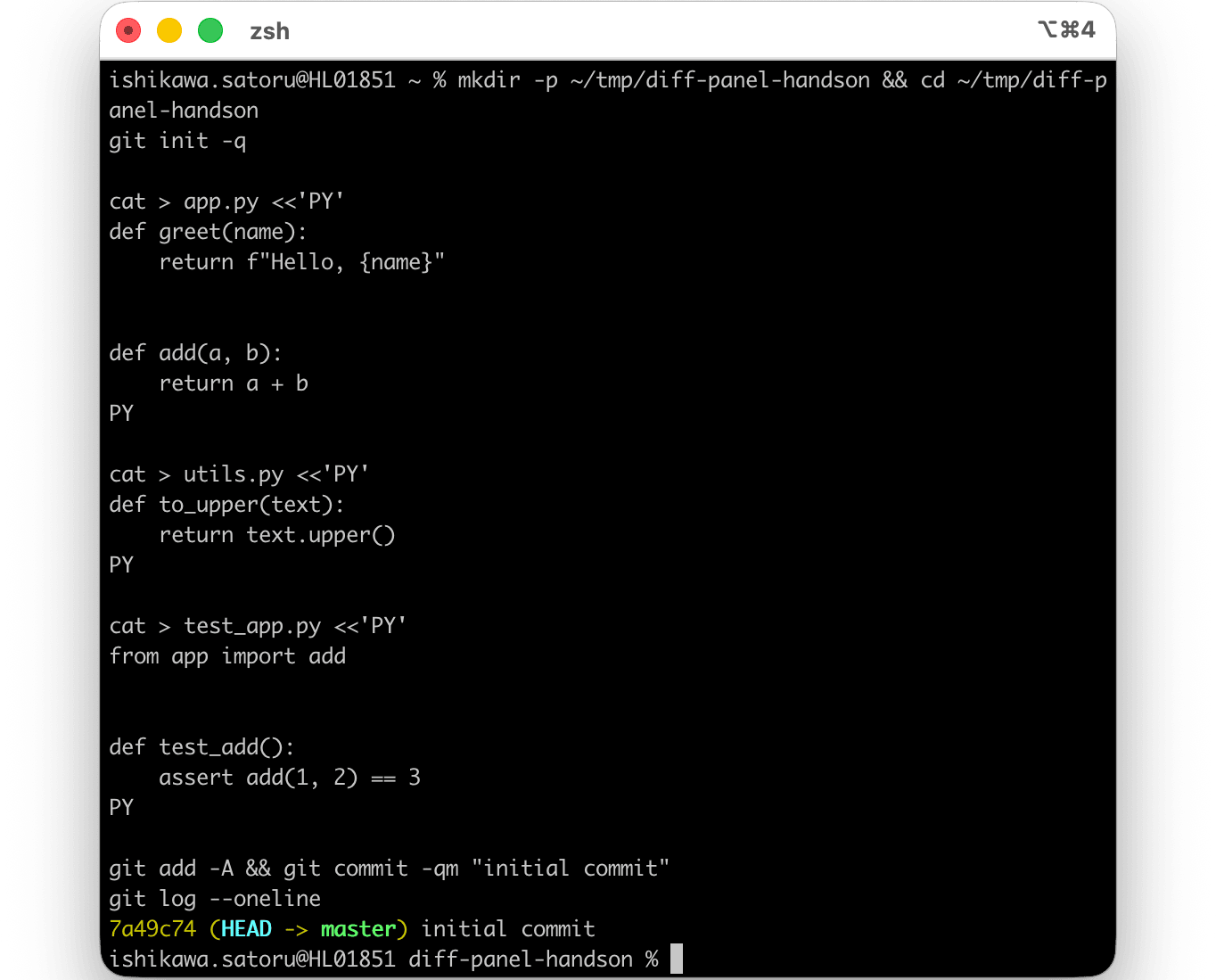
mkdir -p ~/tmp/diff-panel-handson && cd ~/tmp/diff-panel-handson
git init -q

cat > app.py <<'PY'
def greet(name):
    return f"Hello, {name}"

def add(a, b):
    return a + b
PY

cat > utils.py <<'PY'
def to_upper(text):
    return text.upper()
PY

cat > test_app.py <<'PY'
from app import add

def test_add():
    assert add(1, 2) == 3
PY

git add -A && git commit -qm "initial commit"
git log --oneline
By starting from a committed state, the edits we make afterward will appear in the diff panel as "uncommitted changes."
Step 1: Check and Adjust Terminal Width
tput cols
Example output:
80

If tput cols is less than 110, widen your terminal window or reduce the font size. If the terminal is less than 110 columns wide, running /diff will display the following message and the panel will not open.
Resize your terminal to at least 110 columns to show the diff panel
Therefore, please widen the terminal window and run tput cols to ensure it doesn't fall below 110. I set mine to 144 for verification.

Step 2: Launch Claude Code and Switch to Fullscreen Mode
Launch from the directory of the prepared repository.
cd ~/tmp/diff-panel-handson
claude
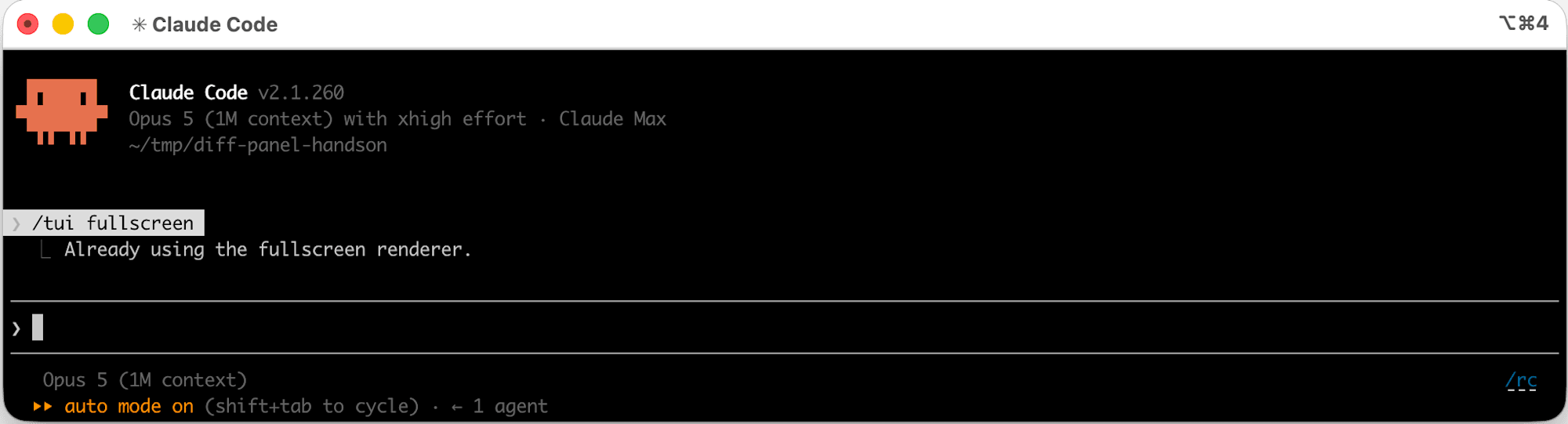
After launching, run the following slash command at the prompt.
/tui fullscreen
/tui is a command that performs "Set the terminal UI renderer (default | fullscreen)", with arguments of either default or fullscreen. Switching to fullscreen restarts and resumes the session.
Step 3: Create Uncommitted Changes
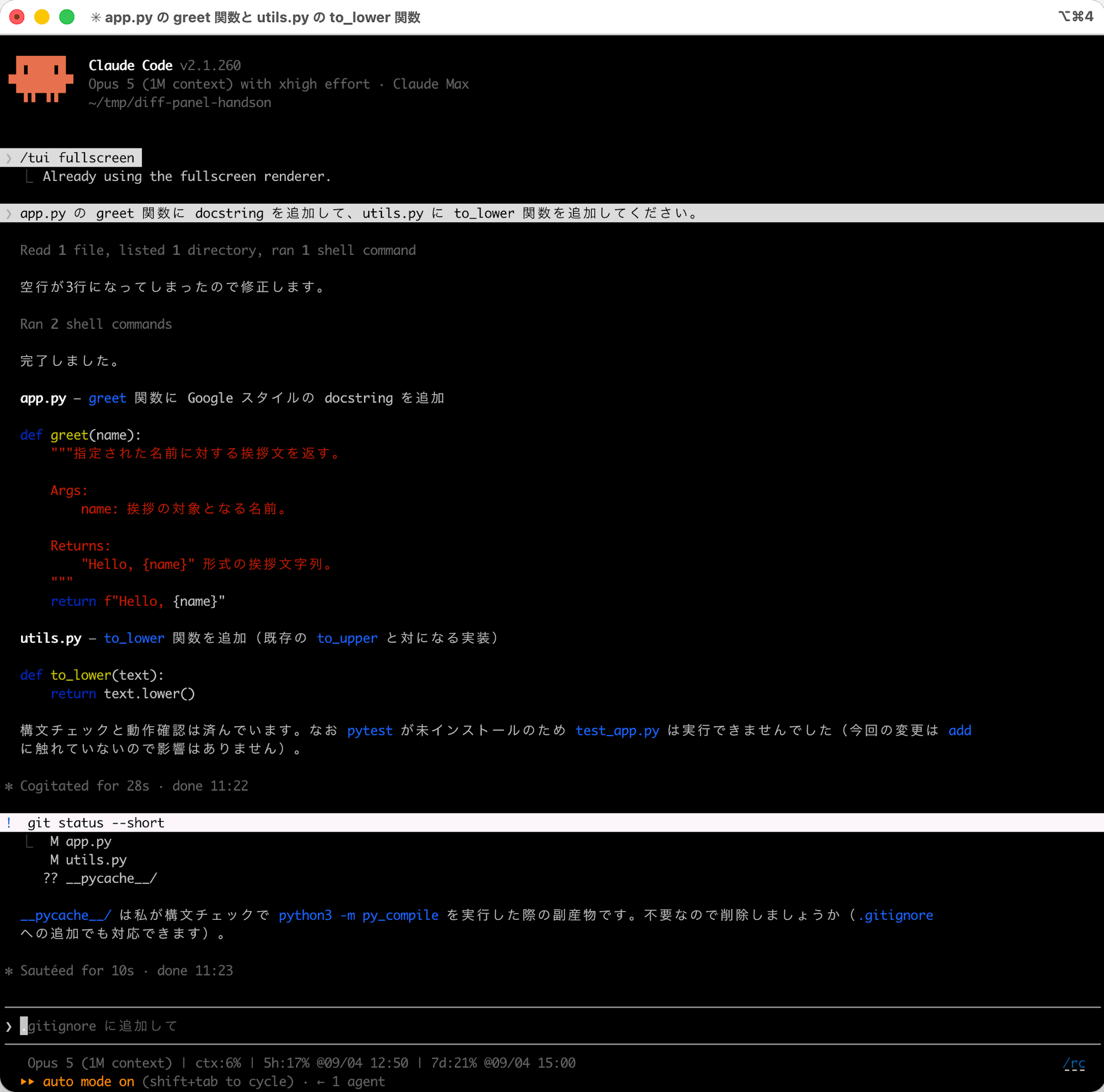
Ask Claude to make edits to create a diff. Enter the following at the prompt.
Please add a docstring to the greet function in app.py, and add a to_lower function to utils.py.
Once the edits are done, confirm that diffs have been created.
! git status --short
Step 4: Open the Diff Panel with /diff
Run it at the prompt.
/diff
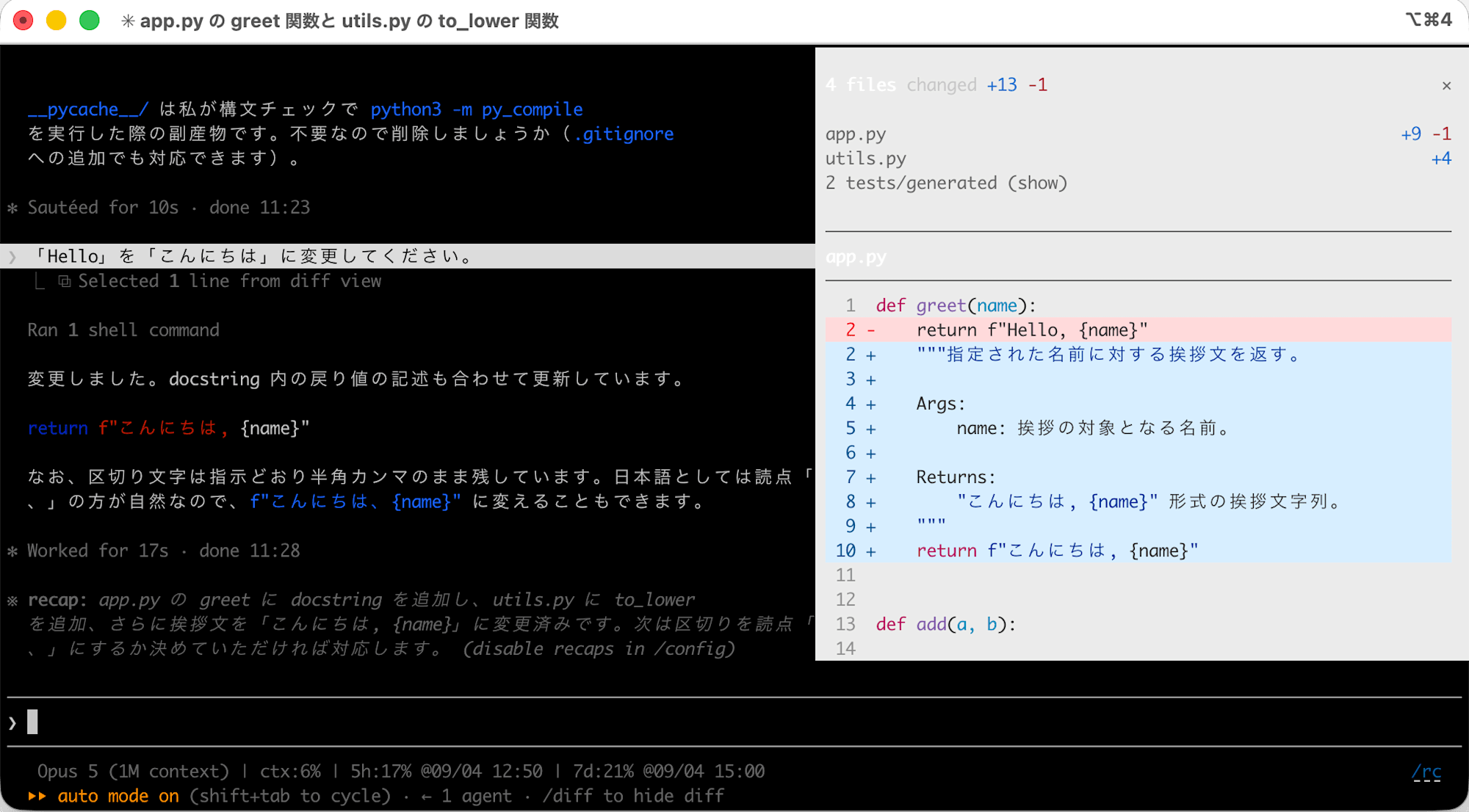
Running /diff in fullscreen mode opens a diff panel beside the conversation, and you can confirm that uncommitted changes are displayed.
- The panel opens on the right side (beside) the conversation
- Changes to
app.pyandutils.pyare displayed - Files that are committed and unchanged (
test_app.py) do not appear in the diff
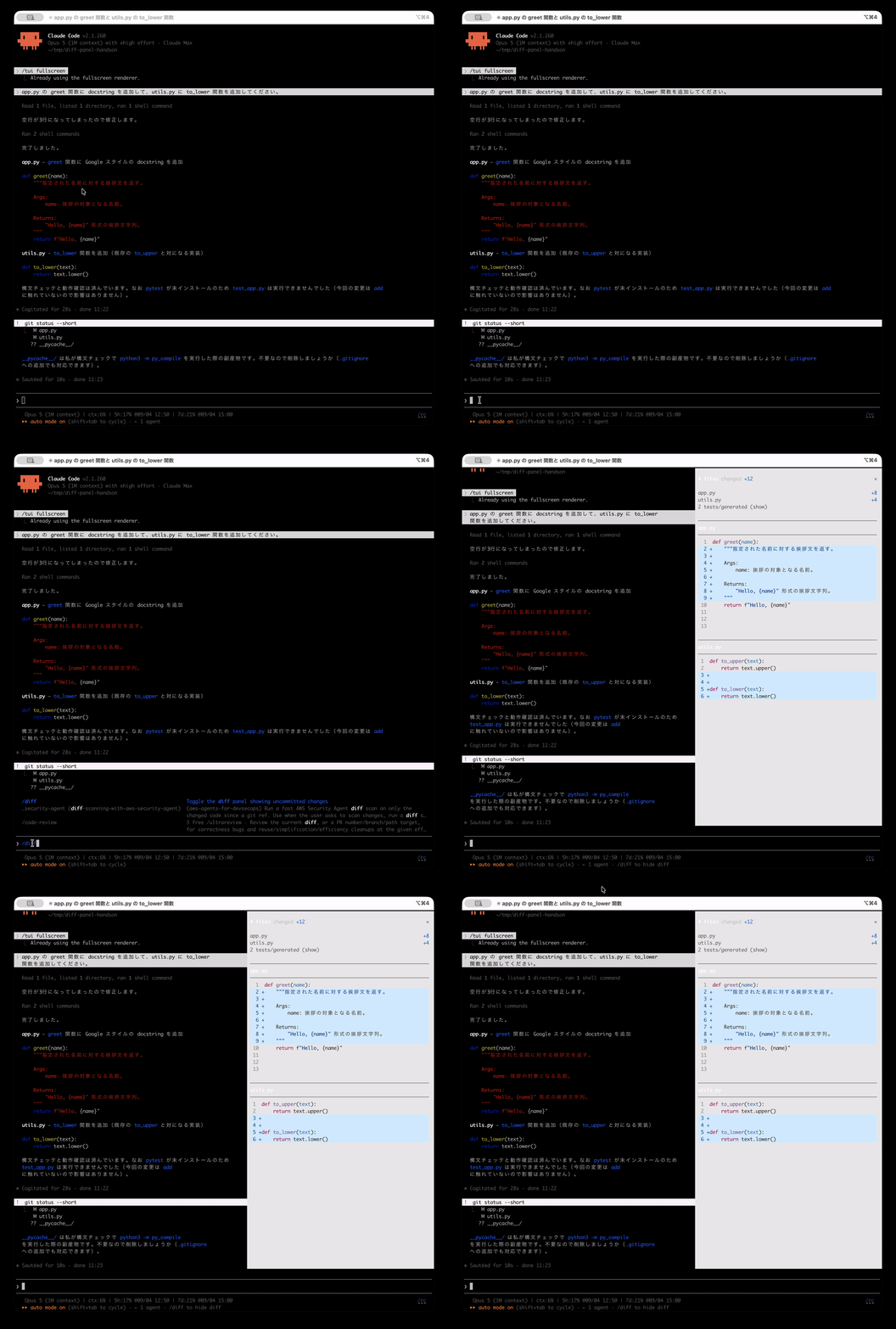
If /diff is run outside of fullscreen mode, it shows the conventional diff view (View uncommitted changes and per-turn diffs) rather than a panel.
Step 5: Confirm That It Follows Edits
With the panel open, continue requesting edits at the prompt.
Please change "Hello" to "こんにちは".
Confirm that the panel display updates as Claude makes edits. This is the key point of today's update.
Step 6: Close the Panel
Run it once more to close it.
/diff
After confirming that it works as a toggle, restore the renderer to its original setting.
/tui default
The longer the work delegated to the agent, the easier it was to lose track of "what changed and where," but having the diff constantly visible on the side feels like it significantly reduces that anxiety.
Target Versions and Period
| Version | Release Date |
|---|---|
| v2.1.259 | 2026-09-02 |
| v2.1.260 | 2026-09-03 |
New Features
- Added a diff panel that opens beside the conversation in fullscreen mode. Uncommitted changes are displayed as Claude edits, and it can be toggled with
/diff(v2.1.260) - Estimated causes of prompt cache misses (such as changes to tool definitions or system prompts, or idle time past TTL) are now shown in the
prompt_cachefield of/costand the status line (v2.1.260) - Added
--permission-prompts nonefor unattended headless environments. Operations that would require prompts are automatically denied, and permission mode decisions (including auto mode) continue to work as before (v2.1.259) - Added admin setting
managedMcpServersallowing organizations to distribute HTTP/SSE MCP servers to all users. The format is the same as.mcp.json, and entries specifying command execution are skipped (v2.1.259) glab mr create/merge/close/reopen/note/updateis now recognized, GitLab merge requests appear asMR !Nin collapsed tool summaries, and the footer MR badge is also updated (v2.1.259)- Added
--jsontoclaude plugin validateto output machine-readable validation reports (v2.1.259) - Added text-based
/advisor(/advisor,/advisor <model>,/advisor off) for desktop app, remote control, and headless (-p/Agent SDK) sessions (v2.1.260) /reload-pluginsis now available in headless sessions and appears in the command list for Claude Code Desktop and SDK (v2.1.260)- Added
oidc.scope_on_refreshto the Claude apps gateway for IdPs that only return an id_token whenopenidis re-requested on refresh (v2.1.260) - The Claude apps gateway now supports new Claude Desktop keys in the
desktoppolicy block (includinguserPluginMarketplacesEnabledanduserPluginUploadsEnabled) (v2.1.260) - [VSCode] Added Active quick filter and status filter menu (Needs input / Working / Completed) to the session list sidebar (v2.1.259)
- [VSCode] The model pill in the footer now shows the selected effort level. Fixed an issue where the effort level remained stale after switching models, and the footer pill has been restored to its previous compact size (v2.1.260)
- [VSCode] Added Open and Closed to the status filter menu in the session list (v2.1.260)
Improvements
- On the Claude apps gateway on Amazon Bedrock, input tokens for interrupted requests are now counted using AWS's free CountTokens API rather than a 1-token request. The
bedrock:CountTokenspermission is required (v2.1.260) - Improved auto-compact for 1M context models. Opus and Fable sessions are now compressed before reaching the 1M token limit, and recovery compression for very large contexts no longer times out after 10 minutes (v2.1.260)
ctrl+l/cmd+kin fullscreen mode now clears the transcript display in the same way as the terminal'sclear. Previous messages can still be accessed by scrolling up (v2.1.260)- The 1-hour runtime limit for background commands started by sub-agents has been removed. Like the main session, they run until they finish or are stopped (v2.1.260)
- Improved idle CPU usage for non-interactive (
-p/SDK) sessions (v2.1.260) - Using
/effortwith Claude Fable 5.1 no longer invalidates the prompt cache when changing effort mid-session (v2.1.260) - Improved performance for terminal resizing and initial rendering during long responses by reusing text measurement results (v2.1.259)
- Results from nested background sub-agents are now saved to the parent sub-agent's transcript, retained in resumed sub-agents, and shown in shared transcripts (v2.1.259)
- Improved structured output. Workflow's
agent({schema})now pre-rejects unsatisfiable JSON Schemas, and retry limit errors include the details of the last validation failure (v2.1.260) - When deleting a background session in a worktree with unpushed commits, the message now shows the branch name and commit count, and deleting again discards the worktree (v2.1.260)
/ultrareviewandclaude ultrareviewnow wait up to 45 minutes (previously 30 minutes) for long-running cloud reviews (v2.1.260)- Of the server-managed settings, managed CLAUDE.md (
claudeMd) no longer shows a security approval dialog. Hooks, shell commands, sandboxes, and unsafeenvsettings still require approval (v2.1.260) - The Claude apps gateway now rejects startup by naming the specific field when a field name is misspelled in a nested object within
managedMcpServersororgPluginSettingsentries (v2.1.260) - The self-hosted runner's
--kill-session-after-minnow releases sessions that are merely waiting for user input (paused and resumable on the next message) rather than terminating them and reporting failure (v2.1.260) - Various minor improvements have also been made, including pretty-printing of
/workflowsJSON output, guidance for GitLab repositories in/install-github-app, startup time for headless/SDK sessions, Claude apps gateway log and configuration error wording, and sample updates for the bundledclaude-apiskill (v2.1.259, v2.1.260)
Fixes (Major Items)
Excerpted from fixes related to stability and usability, excluding those already covered in "Notable Updates."
- Fixed startup rejection when admin settings cannot be parsed: Fixed an issue where Claude Code started with admin settings not applied when any of the admin settings file, dropin, MDM plist, or HKLM values could not be parsed. Claude Code now refuses to start and names the offending source (v2.1.259)
- Fixed prompt cache leak in Claude Fable 5.1: Fixed an issue where context appended after tool results was not being prompt-cached and was being resent as uncached input with each tool call (v2.1.260)
- Fixed non-application of admin setting
skillOverridesand skill deny rules: Fixed an issue whereskillOverrideskeyed by bundled skill aliases (such ascheckupfor/doctor) were not applied, and an issue whereSkill(name)deny rules were not effective for nested skills enumerated in the form<dir>:name(v2.1.260) - Fixed permission check order for Glob/Grep: Fixed an issue where the existence of the search path was being checked on disk before the permission check. As with Read, non-existent paths are now reported after permission has been determined (v2.1.260)
- Fixed session resume failures: Fixed an issue where
--resumefailed and--continueopened an empty conversation when a saved session contained attachment entries without a payload (v2.1.259) - Fixed incorrect MCP server connection status display: Fixed an issue where an MCP server that disconnected during initial tool list retrieval at startup was displayed as connected with 0 tools without reporting an error (v2.1.259)
- Fixed missed SDK-provided MCP servers: Fixed an issue where MCP servers provided by the SDK (such as Desktop connectors) were not recognized on the first turn and would only appear on the next turn (v2.1.260)
- Fixed command rejection in worktree isolated sessions: Fixed an issue where common Bash loops, xargs pipelines, and launcher-invoked commands that could not reach the main checkout were being rejected (v2.1.259)
- Fixed blank display in fullscreen mode: Fixed an issue where the conversation would display blank in fullscreen mode after a long turn with hundreds of tool calls (v2.1.259)
- Fixed display corruption with Ctrl+Z in fullscreen: Fixed an issue where the suspended screen would remain overlaid on the alternate screen (v2.1.260)
- Fixed lingering file read tracking after
/rewind: Fixed an issue where file read tracking from rewound turns persisted, causingFile unchanged since last readstubs or full re-insertion of files after external edits (v2.1.260) - Fixed loss of IDE line selection: Fixed an issue where running skills or slash commands would lose the IDE line selection. The "N lines selected" context is now passed to Claude (v2.1.260)
- Fixed GitLab subgroup repository detection: Fixed an issue where GitLab projects in nested subgroups (such as
gitlab.com/group/subgroup/project) were not being detected (v2.1.260) - Fixed credential display in
/status: Fixed an issue where both a signed-in claude.ai account and a configured API key were displayed as if both were valid. The unused credential now indicates that it is not in use (v2.1.260) - Fixed missing item in
/modelpicker: Fixed an issue where Claude Fable 5.1 did not appear in the/modelpicker even for eligible organizations, and was only accepted when typing/model claude-fable-5-1directly (v2.1.260) - A quietly welcome fix: Fixed an issue where flag emoji, combined emoji, and accented characters were being split across wrapped lines, and where those characters near the last 2 columns of the terminal would leave stale characters on screen (v2.1.260). Since display corruption in output containing emoji or accented characters made it hard to re-read, I feel this is a subtle but appreciated fix
- In addition, numerous minor bugs have been fixed in workflow resumption, Artifact publishing, marketplace URL interpretation, OpenTelemetry attributes, VSCode extension session lists, and more (v2.1.259, v2.1.260)
Breaking Changes and Deprecations
There are no deprecated items in this range, but there are 4 changes that may affect settings or existing operations. The configuration and behavior comparisons shown below are examples for illustration purposes.
allowedMcpServers Now Only Applies to User-Added Servers (v2.1.259)
The scope of allowedMcpServers has been changed to only apply to user-added servers. Servers originating from managed-mcp.json that were previously excluded by this allowlist will be loaded after upgrading, so use deniedMcpServers to keep them disabled.
Before (up to v2.1.258)
// settings.json (example)
{
  "allowedMcpServers": ["my-http-server"]
}
// This allowlist also applied to servers from managed-mcp.json; those not on the list were not loaded
After (v2.1.259 onwards)
// settings.json (example)
{
  "allowedMcpServers": ["my-http-server"],
  "deniedMcpServers": ["managed-server-name"]
}
// allowedMcpServers only applies to user-added servers,
// so use deniedMcpServers to keep managed-mcp.json servers disabled
! Bash Mode Prompts Now Execute Outside the Sandbox (v2.1.260)
Even when strict sandbox mode (sandbox.allowUnsandboxedCommands: false) is enabled, commands entered at the ! bash mode prompt are now executed outside the sandbox, just as if you had typed them directly in your terminal. This applies to commands entered from the ! prompt, not to commands executed by Claude Code in general.
Permission Rules with Text After Closing Parenthesis Now Reported as Invalid Configuration (v2.1.260)
Permission rules with text after a closing parenthesis (such as Bash(ls) x) previously did not match anything, but are now reported as invalid configuration.
Claude in Chrome Now Follows Organization Admin Settings (v2.1.260)
Claude in Chrome now follows the organization's Claude in Chrome admin settings. From v2.1.260 onwards, in accordance with the organization's admin settings, --chrome, /chrome, and browser tools will be unavailable if disabled by an administrator.
Closing Thoughts
Over 100 changes landed across 2 versions, but looking at the breakdown, fixes related to permission rules and sandboxes stand out. There are multiple fixes for cases where deny rules written in settings were not actually taking effect, so I feel the more carefully a team has configured permissions, the greater the value of this update.
Why not update and give it a try? If there are changes that interest you, check them against your own settings.
References
