
Claude Code v2.1.261 Major Updates - Addition of /skill-doctor and Bash-compliant Word Editing Keys

This page has been translated by machine translation. View original
This is Ishikawa from the Cloud Business Division. Claude Code v2.1.261 (released 2026-09-04) has been released. The changes are centered on fixes for daily input and background processing, but the newly added /skill-doctor was useful, so I've summarized the results of actually trying it out in the latter half.
The previous update article is here.
Update Summary
v2.1.261 includes 67 changes. The breakdown is 46 fixes making up the majority, 9 new features, 7 improvements/performance, 3 security, and 2 breaking changes.
Of these, 26 items are related to the VS Code extension, centered on additions and fixes around the session list, tabs, and permission prompts. On the CLI side, the focus is on bug fixes for input processing and background execution.
Notable Updates
/skill-doctor to Identify Unused Skills and Context Consumption
/skill-doctor has been added. It displays which loaded skills are unused and how much context each one consumes, helping you decide how to clean things up.
I feel this is especially useful for those who load many skills and plugins, as a starting point for understanding which ones are occupying context. Note that it's not stated in official information whether reducing unused skills leads to improvements in response quality or speed, so it's best to consider that separately.
Setting a Limit for Receiving Command Output Inline
The bashOutputMaxChars and taskOutputMaxChars settings have been added. They allow you to increase the amount passed inline to Claude before command output and background task output is saved to a file, up to a maximum of 128K characters.
Rather than a feature for everyone, I feel this is a setting for those who make heavy use of commands or background tasks that produce long logs, to raise the limit as needed.
Fix for Character Transposition and Loss During Fast Input
A problem where characters entered or pasted could be transposed or lost during fast typing or key repeat has been fixed.
Since this is a problem that could not only garble the display but also change the actual content of the prompt, I feel this fix will make a difference for those who frequently type long instructions in the terminal.
Resolution of High CPU from Background Agents
A problem where background agents could not be resumed, causing their wake-up to continuously retry in a tight loop and keep CPU usage high, has been fixed.
I feel it's worth updating for those who operate with background agents. Note that this is not about background execution in general becoming faster.
Expanded Detection Range for Dangerous rm
The safety confirmation prompt for dangerous rm now also detects rm -rf on positional parameters and rm -rf inside sh -c scripts enclosed in double quotes.
I feel the accurate understanding is that dangerous deletions are not automatically stopped, but rather the range in which the safety confirmation prompt appears has been expanded.
Handling of Diagram Renderer URLs in Auto Mode
In auto mode, links that embed content into public diagram renderer URLs are now treated as uploads to that site. They will no longer be auto-approved unless requested by the user.
The key point is that they are treated as equivalent to uploading to an external site rather than opening a link, and I feel that those who regularly use auto mode will encounter more approval requests.
Update Details
New Features
/skill-doctorhas been added.bashOutputMaxCharsandtaskOutputMaxCharssettings have been added.--append-subagent-system-prompt-filehas been added, allowing system prompts for subagents that are too large to pass on the command line to be read from a file.- An "Organization policy" line has been added to
/statusandclaude doctor, showing the reason organization policy could not be loaded (e.g., proxy not passing the endpoint). - [VS Code] A server add form and delete action have been added to the MCP server dialog, making it possible to add and remove MCP servers without leaving the IDE.
- [VS Code] A "Build a custom style" walkthrough has been added to the output style menu, allowing you to write out a custom output style file and have it appear in the list on the spot.
- [VS Code] Collapse buttons have been added to permission prompts and question prompts, allowing you to read the conversation behind a prompt without closing it. You can also scroll through the conversation in the margin beside the prompt.
- [VS Code] Sessions open in a terminal, another VS Code window, or Claude Desktop now display an outlined ring in the session list.
- [VS Code] "Archive session" has been added to the right-click menu of the session list, and Unarchive now has a dedicated icon.
Improvements
- The
/modelpicker and VS Code model pill now display the model name instead of the raw Bedrock, Vertex AI, or LLM gateway ID for models recognized by Claude Code. - In Google Vertex AI environments where
GOOGLE_APPLICATION_CREDENTIALSis set, Google Cloud project detection is no longer redone and additionalgcloudprocesses are no longer launched when creating the API client. - Already-rendered blocks are no longer re-checked in layout on every update, improving streaming performance.
- When the API returns no response headers, retries now wait up to
API_TIMEOUT_MS(default 10 minutes) rather than an additional 3 minutes, and the message now indicates what to change. - The token count aggregation in
/contextnow uses local estimation instead of an additional request to a smaller model when the token count API is unavailable. - When the Claude apps gateway returns 403 while loading managed settings at startup or after
/login, the message now indicates that Claude Code may not be enabled in the organization, rather than prompting to sign in again. - [VS Code] The model picker has changed to a single flat list of all models, with legacy model notation rows grouped at the end.
Security
- The detection range of the safety confirmation prompt for dangerous
rmhas been expanded. - In auto mode, links that embed content into public diagram renderer URLs are now treated as uploads.
- Fixed client IP determination in the Claude apps gateway when a trusted proxy appends a port to
X-Forwarded-For. When an access list is configured, unreadable entries will result in a 403.
Fixes
- Fixed character transposition and loss during fast input: A problem where entered or pasted characters could be transposed or lost has been resolved.
- Fixed high CPU from background agent resume failure: A problem where the wake-up of agents that could not be resumed kept retrying in a tight loop has been resolved.
- Fixed context loss on session resume: A problem where hook output and other context was lost around parallel tool calls, changing the content of requests after resuming, has been resolved.
- Fixed Stop being ignored in SDK and cloud sessions: A problem where Stop or interruptions sent immediately after the first prompt, before a turn began, were ignored has been resolved, and turns now stop without running to completion.
- Fixed permission mode display mismatch in Remote Control: A problem where the old permission mode was displayed when a smartphone, browser, or claude.ai app connected to a terminal session, or after changing the mode on the terminal side, has been resolved.
- Fixed prompt cache not being used in agent teams: A problem where in-process teammates resent tool and skill announcements from the first turn on the second turn, changing the request prefix and bypassing the prompt cache, has been resolved.
- Fixed Bedrock setup wizard hanging: It now times out and returns a clear error when AWS or AWS credential helpers are unresponsive, and a problem where model checks failed under a proxy performing TLS inspection has also been resolved.
- Fixed feature flag version cross-contamination: A problem where flags targeted at newer versions were sometimes applied to older versions of Claude Code running on the same machine has been resolved.
- A small but welcome fix: A problem where the character immediately before an inline
[Image #N]chip in the prompt input field could not be deleted has been fixed. This occasionally caused friction when trying to retype something immediately after pasting an image, so while minor, I feel it will make a difference in daily input. - In addition, numerous minor bugs have been fixed in Remote Control connection handling, Google authentication and claude.ai connector startup processing,
/usageusage display, terminal progress indicators, VS Code session list, tabs, permission prompts, and more.
Breaking Changes and Deprecations
There are 2 breaking changes. Both affect existing settings and operations.
Word Editing Keys Now Follow Bash
The word editing keys for prompts have been changed to align with Bash. Ctrl+W deletes up to whitespace, Alt+F and Alt+D stop at the end of a word, and symbols are treated as word delimiters. Additionally, keybindingFlavor no longer has any effect.
Previously, specifying "keybindingFlavor": "emacs" in settings.json would cause the behavior of Ctrl+W / Alt+F / Alt+D to follow the keybindingFlavor setting. Going forward, regardless of the setting, Ctrl+W will delete up to whitespace, Alt+F / Alt+D will stop at the end of a word, and symbols will be treated as word delimiters.
Login Method Locked When forceLoginMethod: "gateway" Is Set
On machines where managed settings fix forceLoginMethod: "gateway", /login is now required while ignoring any remaining API keys or claude.ai logins. Bedrock, Vertex AI, and Foundry sessions are not affected. Note that there are no items explicitly marked as Deprecated this time.
Trying Out /skill-doctor
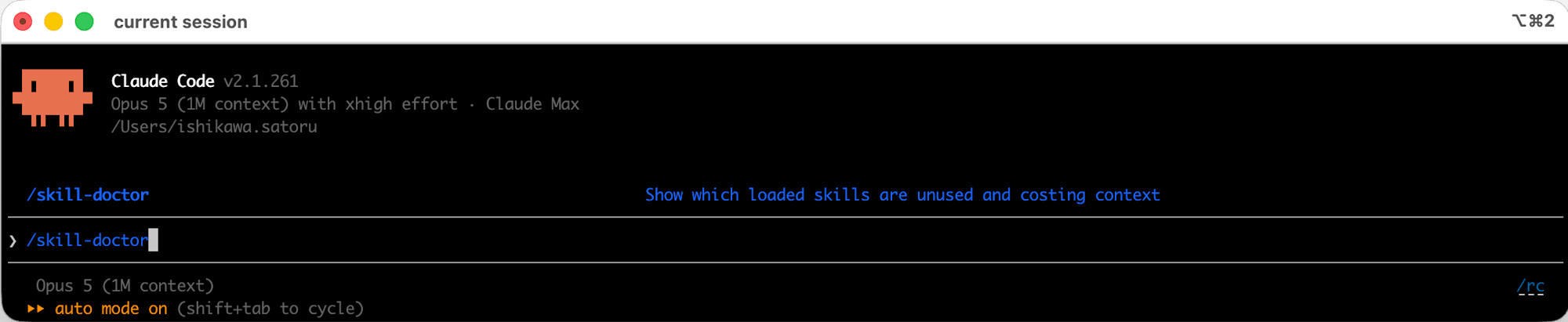
This checks which of the loaded skills are unused and consuming context. Since /skill-doctor is a slash command (interactive UI), only the procedure is shown here.
The more skills and plugins you add, the more context is quietly being consumed, so being able to see at a glance which skills are paying what cost is useful as a starting point for periodic reviews.
Below I'll walk through what I actually found in my own environment.
Running /skill-doctor
Run the following at the prompt.
/skill-doctor
How to Read the Output
The output is a table with 6 columns. Here is an excerpt of the first few entries from the actual output.
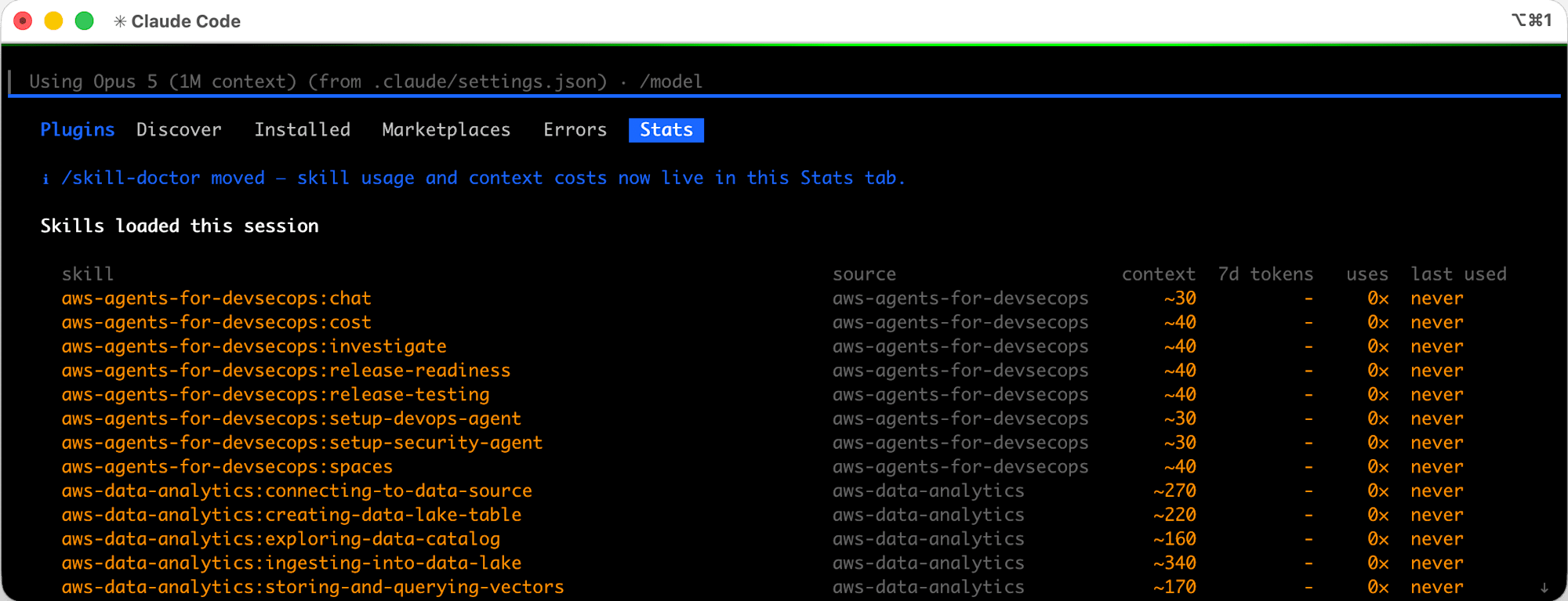
Organized in English, it is as follows.
| Column | Meaning |
|---|---|
skill |
Skill name. Those derived from plugins are in the format plugin-name:skill-name |
source |
Provider. userSettings (~/.claude/skills/) or plugin name |
context |
The cost of one line in the system prompt. Always included every turn. - means it is not on the current list and has zero cost |
7d tokens |
The amount of tokens attributed to that skill in sessions on this machine over the past 7 days |
uses |
Number of times called |
last used |
Last used (never / N days / today) |
context is the cost of "one line of skill description," and the SKILL.md body is only loaded at execution time. In other words, even unused skills are billed every turn simply by being on the list. The context column is what to target for cleanup.
The sort order is by last used, with unused (never) at the top and recently used at the bottom. The skills you are currently using most will be grouped at the bottom of the screen.
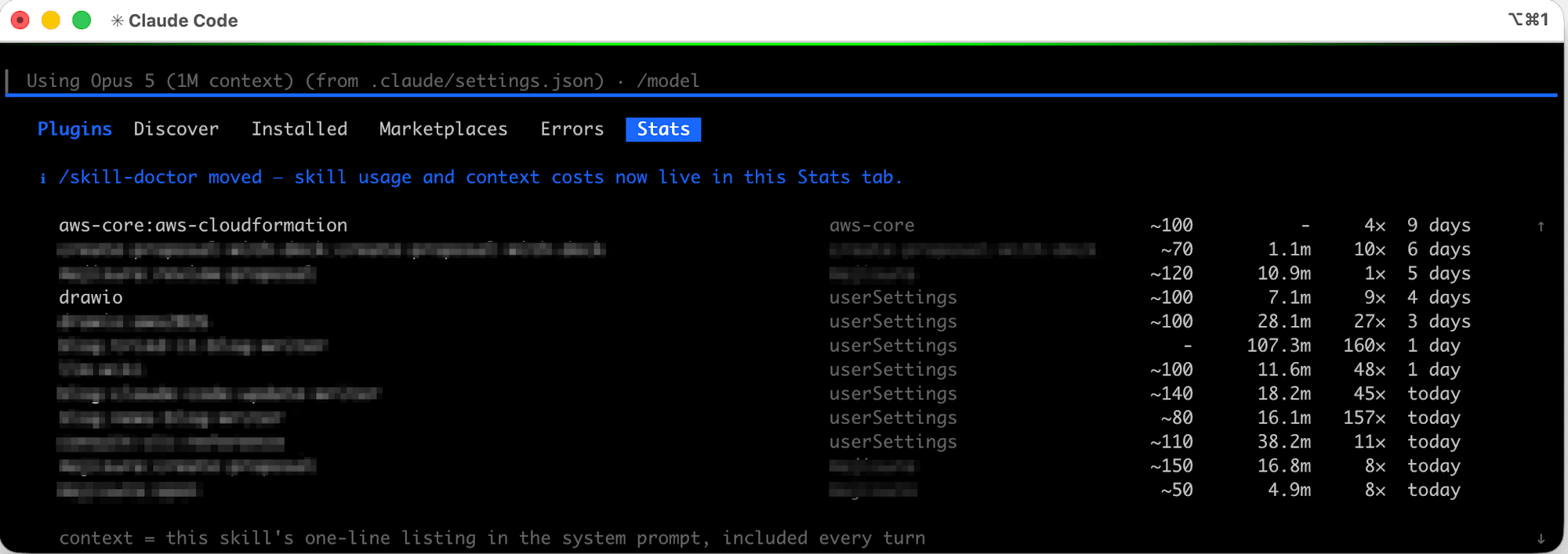
Even if 7d tokens is large, if uses is also high, that is a skill paying for itself. Items where context is high but uses is 0× are candidates for removal.
Identifying Unused Skills
Count the rows where last used is never. The results in the execution environment were as follows.
| Metric | Value |
|---|---|
| Loaded skills | 124 rows |
Total context |
Approx. 13,800 tokens (every turn) |
Of which unused (never) |
84 items · approx. 8,230 tokens |
By calculation, unused skills alone are consuming approximately 8,000 tokens every turn.
Check point: Write out rows where never and context is ~100 or more. Sorted in order of greatest impact, the top entries in this environment were as follows.
  aws-core:aws-compute            aws-core     ~350   0×  never
  aws-core:aws-iam                aws-core     ~350   0×  never
  aws-data-analytics:ingesting-into-data-lake   aws-data-analytics   ~340   0×  never
  aws-core:aws-observability      aws-core     ~340   0×  never
  aws-data-analytics:connecting-to-data-source  aws-data-analytics   ~270   0×  never
  aws-core:aws-deployment         aws-core     ~270   0×  never
Note:
nevermeans "not called even once according to the records on this machine." Skills that were just installed or skills only used for specific tasks will also show asnever. At the time they are displayed, they are removal candidates, not confirmed as unnecessary.
Finding Duplicate Loads
Looking carefully at the output, you may notice the same skill name appearing on 2 rows.
  aws-data-analytics:querying-data-lake   aws-data-analytics   ~160   -   11×  56 days
  aws-data-analytics:querying-data-lake   aws-data-analytics   ~160   -   11×  56 days
In the execution environment, 37 skills were duplicated, and the duplicates alone accounted for approximately 5,600 tokens (41% of the total context).
The cause was the enabledPlugins configuration. The same-named plugin had been enabled from two different marketplaces.
// ~/.claude/settings.json
{
  "enabledPlugins": {
    "aws-core@claude-plugins-official": true,   // ← same-named plugin
    "aws-core@agent-toolkit-for-aws": true,     // ← enabled from 2 marketplaces
    "aws-data-analytics@claude-plugins-official": true,
    "aws-data-analytics@agent-toolkit-for-aws": true,
    "aws-agents@claude-plugins-official": true,
    "aws-agents@agent-toolkit-for-aws": true
  }
}
Check point: Dropping the output to a file and counting duplicates programmatically is reliable.
claude -p "/skill-doctor" --max-turns 1 > skilldoctor.txt
awk 'NF>3 {print $1}' skilldoctor.txt | sort | uniq -d
Execution result (excerpt; 37 items matched in the execution environment):
aws-agents-for-devsecops:setup
aws-agents-for-devsecops:setup-devops-agent
aws-agents-for-devsecops:setup-security-agent
aws-agents:agents-build
aws-agents:agents-connect
aws-agents:agents-debug
aws-agents:agents-deploy
:
:
If duplicate skill names are listed, suspect double-enabling of same-named plugins.
In Closing
v2.1.261 is large in scale at 67 changes, the majority of which are fixes. The resolution of input character loss and high CPU usage from background agents are areas that directly affect day-to-day feel. Additionally, when I ran /skill-doctor, I found that in my environment the skill list alone was consuming approximately 13,800 tokens every turn, much of it from unused skills and duplicate loads of same-named plugins. When you can see the numbers as a per-turn cost, the priority to clean things up rises.
There are also items that change existing behavior, such as word editing keys being aligned to Bash, so it would be a good idea to check your local state once after updating. For those who load many skills and plugins, why not start by running /skill-doctor?
References
