
Claude Code v2.1.275 to v2.1.276 Major Updates - claude.ai Skills/Plugin Sync and 400 Error Fix via Proxy

This page has been translated by machine translation. View original
This is Ishikawa from the Cloud Business Division. I'll introduce a summary of the Claude Code v2.1.275 ~ v2.1.276 (September 17 ~ 18, 2026) updates. With releases on two consecutive days, changes were made broadly across not just the CLI itself, but also the VS Code extension and Slack integration. Today, I tried out ctrl+enter, which lets you send messages without waiting for a tool (prompt) to complete.
Here is the previous update article.
Update Summary
This covers 2 versions (v2.1.275 ~ v2.1.276, September 17 ~ 18, 2026), with 97 entries in the CHANGELOG. The breakdown is 13 new features, 21 improvements/changes, 62 fixes, and 1 breaking change, with fixes accounting for about 60% of the total. Breaking it down by area of change: 53 in the CLI itself, 27 in the VS Code extension, 5 in Claude Code on the web, 9 in Claude Tag (Slack integration), and 2 in Code Review. v2.1.276 is a release consisting of just 1 of these entries.
Also, Projects has begun rolling out as a beta feature in the desktop and web versions of Claude Code.
Highlighted Updates
Send queued messages all at once with ctrl+enter (v2.1.275)
A send key has been added that interrupts the current turn and sends all queued messages at once. The key is ctrl+enter, or ctrl+x ctrl+s. Sent messages and queued messages are displayed in gray until the model receives them.
For those who write up the next instruction while waiting for a response, being able to decide the timing of sending yourself should reduce rework.
Skills and plugins from your claude.ai account now sync to the terminal as well (v2.1.275)
Skills and plugins enabled on your claude.ai account are now synced to terminal sessions signed in with the same account. You can opt out with syncClaudeAiSkills: false / syncClaudeAiPlugins: false.
For those using terminals across multiple machines, carrying settings around becomes easier, while on shared terminals or test environments there may be situations where you want to avoid unintended syncing. It seems worth checking the opt-out settings in advance.
Fixed an issue where all requests through a proxy returned 400 (v2.1.276)
An issue where all requests would fail with 400 … Input tag 'advisor_20260301' when ANTHROPIC_BASE_URL points to a proxy or gateway has been fixed. This was a regression introduced in v2.1.275, and v2.1.276 is a release consisting of just this one fix.
For those pointing ANTHROPIC_BASE_URL at an internal gateway or proxy, there is a possibility of being affected when upgrading to v2.1.275, so upgrading all the way to v2.1.276 seems like the safe bet.
Fixed an issue where /rewind in forked/background sessions would corrupt files (v2.1.275)
An issue where /rewind in forked sessions or background sessions would restore zero-padded or truncated files when it could not fully copy the session's file history backup has been fixed.
For those who have been using /rewind in forked or background sessions, it seems worth checking whether restored files have been corrupted.
Fixed an issue where tokens appeared in plugin-related output (v2.1.275)
An issue where passwords and tokens contained in git, ssh, and marketplace URLs were being displayed in plugin and marketplace messages/logs and in the output of claude plugin marketplace list has been fixed.
For those running private marketplaces with credential-bearing URLs, one avenue for leakage through logs or screen sharing has been closed. In environments where output has already been logged, it also seems worth considering reviewing those logs.
Install scripts no longer run for plugins from npm sources (v2.1.275)
Plugins installed from npm sources are now fetched with npm pack --ignore-scripts and have their integrity verified. As a result, package install scripts will not be executed.
For those distributing plugins from npm sources, it seems necessary to check whether any initialization processing that relies on install scripts remains.
Target Versions and Period
| Version | Release Date |
|---|---|
| v2.1.275 | 2026-09-17 |
| v2.1.276 | 2026-09-18 |
New Features
CLI
- A send key (ctrl+enter, or ctrl+x ctrl+s) has been added that interrupts the current turn and sends all queued messages at once. Sent and queued messages are displayed in gray until the model receives them (v2.1.275)
- Skills and plugins enabled on your claude.ai account are now synced to terminal sessions signed in with the same account. You can opt out with
syncClaudeAiSkills: false/syncClaudeAiPlugins: false(v2.1.275) - A startup warning is now shown when execution of the configured
otelHeadersHelperfails, making it possible to notice sessions where no telemetry is being output (v2.1.275) /plugin install <plugin> --marketplace <source>has been added, allowing you to install a plugin while proposing the addition of a marketplace (v2.1.275)- When signing in via the Claude apps gateway, if the gateway presents an account name, you can now confirm that account before saving credentials. The account you are signed in with is also displayed in
/status(v2.1.275)
VS Code Extension
- It is now possible to view, edit, and delete saved memories within the Memory dialog (v2.1.275)
- Accept/reject buttons are now displayed for each change in the diff tab of change proposals, allowing you to review edits one at a time (v2.1.275)
- It is now possible to send an attached image without entering any text (v2.1.275)
- A Retry link is now displayed in the MCP server dialog when fetching the server list fails (v2.1.275)
Claude Code on the web
- A "New routine" button has been added alongside a link to the routines list on the page displayed when a routine link can no longer be resolved (v2.1.275)
Claude Tag
- Attach conditions can now be specified for access bundles in Claude Tag settings, allowing Owners to apply bundles not only to member-only channels but also to channels with guests and Slack Connect channels (v2.1.275)
- Presets for Amazon CloudWatch, CloudWatch Logs, Amazon SNS, Google Cloud Monitoring, and Cloud Logging have been added to the Credentials tab of access bundles in admin settings (v2.1.275)
- Presets for Datadog US3, AP1, AP2, and US1-FED sites have been added. New Datadog connections are limited to Datadog read and query API routes (v2.1.275)
Improvements
CLI
- For
--system-promptcontaining__SYSTEM_PROMPT_DYNAMIC_BOUNDARY__lines, text above that line is now globally cached in the same way as the SDK's array format (v2.1.275) - Responsiveness when the terminal is slow or paused has been improved, eliminating further output delays while waiting for the terminal to catch up (v2.1.275)
- For reading plan usage, editor windows and non-interactive sessions on the same machine now share results read within the last 1 minute (v2.1.275)
- Pasted and attached images are now saved in a location where Claude can open them as files without a permission prompt (including Desktop and VS Code) (v2.1.275)
- Results of Write/Edit operations on files in synced account skills folders now indicate that those changes will not be saved to the account and show how to save them (v2.1.275)
- For sign-in via the Claude apps gateway,
/logoutnow also terminates the gateway-side session on gateways that support token revocation (v2.1.275) - Claude in Chrome in auto mode now skips the extension's per-site check for classifier-approved calls, just like bypass mode, resolving an issue where
browser_batchwould return "Permission denied" after redirects (v2.1.275) - Scheduled and "Run now" routine executions now save data and republish pages without confirmation for Artifacts where you have edit permissions. Public Artifacts, first-time publishing, and deletion still require confirmation as before (v2.1.275)
- In hosted sessions, unanswered permission prompts after a container restart are now kept displayed rather than being asked again (v2.1.275)
- The error message for
/desktopwhen Claude Desktop won't open now indicates the reason and what action to take next (v2.1.275) - The description of the
ListPluginstool has been improved to clarify that it lists plugins enabled on the claude.ai account, not plugins installed locally via/plugin(v2.1.275) - Results of Artifact tool publish and read operations now indicate who can open the page and what the owner can do from the Share menu (v2.1.275)
- Artifact publish results now show the submitted tab icon, warn when the page contains NUL bytes, and retry when a post-stale-publish page fetch for merging fails (v2.1.275)
- Artifact tool guidance has been improved for shared Artifacts where you have been granted edit permissions, directing Claude to update them in place rather than publishing a separate copy (v2.1.275)
- The Artifact tool now requests a one-word tab icon name on first publish rather than an emoji favicon (v2.1.275)
- The startup notification informing you that a one-time scheduled routine ran since the last session has been removed (v2.1.275)
VS Code Extension
- The agent map has been improved: pills now show the number of running agents and turn red on failure, the main agent stays visible while scrolling the map, and agents are sorted by status then end time (v2.1.275)
- New session in Claude's editor tab now opens in the sidebar when Preferred Location is set to Sidebar, rather than always opening a new tab (v2.1.275)
- Messages sent while Claude is working now wait at the bottom of the conversation until Claude begins processing them (v2.1.275)
Claude Code on the web
- Claude's explanation when asked to edit, delete, or run a routine you did not create has been improved, with a link to the routine's page so you can perform the action yourself (v2.1.275)
Claude Tag
- Claude's notifications in Enterprise Grid channels shared across multiple workspaces have been improved, now indicating when there are workspaces that have not yet been set up or why only the organization's defaults are being applied (v2.1.275)
Fixes (Major)
Focusing on fixes related to stability, data integrity, and credential handling.
- Fixed an issue where all requests through a proxy returned 400: Fixed an issue where all requests would fail with
400 … Input tag 'advisor_20260301'whenANTHROPIC_BASE_URLpoints to a proxy or gateway (v2.1.276) - Fixed an issue where 400 errors occurred every turn under a gateway: Fixed an issue where
API Error: 400would occur every turn when operating behind a network gateway that rewrites API error responses when beta request headers are rejected (v2.1.275) - Fixed an issue where
/rewindrestored corrupted files: Fixed an issue where/rewindin forked sessions or background sessions would restore zero-padded or truncated files when it could not fully copy the file history backup (v2.1.275) - Fixed incorrect exit codes in sandbox: Fixed an issue where failed Bash command exit codes were reported as 0 on Linux sandbox environments when the shell is zsh (v2.1.275)
- Fixed session resume failures and crashes with corrupted transcripts: Fixed issues where
--resume, the resume picker preview, resumed background agents, and transcript display would fail in sessions containing invalid task-reminder entries or @ file attachment entries; crashes when resuming conversations with invalid message entries and fullscreen crashes; and resume/start failures due to invalid message content blocks (v2.1.275) - Fixed a startup crash caused by invalid values in config files: Fixed an issue where an invalid value for
mcpNeedsAuthNoticedin~/.claude.jsonwould cause a crash at startup (v2.1.275) - Fixed hangs with large searches and large files: Fixed an issue where Grep, Glob, and @ file candidates would hang or run out of memory for searches exceeding the 20MB output limit, and an issue where the Read tool would hang without returning an error when unable to decode part of a large file due to insufficient memory (v2.1.275)
- Fixed an issue where credentials appeared in plugin-related output: Fixed an issue where passwords and tokens contained in URLs were being displayed in plugin and marketplace messages, logs, and
claude plugin marketplace listoutput. The same fix has been applied to the Manage plugins dialog in VS Code (v2.1.275) - Fixed an issue where selected text from files outside git management was sent: Fixed an issue where text selected in gitignored files could be sent to Claude after the VS Code extension became unresponsive for a few seconds (v2.1.275)
- Fixed an issue where the local copy of a marketplace was deleted: Fixed an issue where running
claude plugin marketplace updatecould delete the local copy of a GitHub marketplace when the fetch failed and the marketplace name was the same as the repository name (v2.1.275) - Fixed prompt cache misses: Fixed an issue where the elapsed time annotation on restored memory files would change with each compaction or resume, causing prompt cache misses (v2.1.275)
- Fixed S3 upload failures via AWS connections: Fixed an issue where S3 uploads from recent versions of the AWS CLI/SDK would fail with a 502 error via AWS connections in Claude Tag (v2.1.275)
- A quietly satisfying fix: Fixed an issue where closing tags such as
</ccmemory>could appear in responses (v2.1.275). For those who had been seeing this without knowing the cause, this is a quietly satisfying fix - In addition, numerous minor bugs have been fixed in the VS Code extension's conversation display, scrolling, and agent map; the fullscreen UI; plugin management; Claude Code on the web routine notifications; Claude Tag thread behavior; and more.
Breaking Changes / Deprecations
There are no deprecation announcements, but there is 1 breaking change.
- Plugins installed from npm sources are now fetched with
npm pack --ignore-scriptsand have their integrity verified, meaning package install scripts will no longer be executed (v2.1.275)
There is no specific example in the CHANGELOG, so the following is an example to illustrate the difference in behavior.
Before (up to v2.1.274):
Fetching plugin from npm source
  → Package install scripts are executed
After (v2.1.275 onwards):
Fetching plugin from npm source
  → Fetched with npm pack --ignore-scripts, integrity is verified
  → Package install scripts are not executed
Trying out ctrl+enter, which lets you send without waiting for a tool (prompt) to complete
Since this feature involves key operations and TUI display, its behavior cannot be observed with read-only, non-interactive commands. I verified it manually using the following steps.
Launch interactive mode and submit a request containing a long tool call
Messages placed in the queue are passed to Claude within the current turn once the running tool call completes. If the process is short, it gets passed right away and the gray display is barely visible. Use a request that involves a long-running command.
% mkdir -p ctrl-enter-eval && cd ctrl-enter-eval
% git clone https://github.com/aws/context-ontology-accelerator
Cloning into 'context-ontology-accelerator'...
remote: Enumerating objects: 5053, done.
remote: Counting objects: 100% (1190/1190), done.
remote: Compressing objects: 100% (734/734), done.
remote: Total 5053 (delta 556), reused 456 (delta 456), pack-reused 3863 (from 2)
Receiving objects: 100% (5053/5053), 7.63 MiB | 16.00 MiB/s, done.
Resolving deltas: 100% (2287/2287), done.

$ claude
Once launched, send a request like the following.
Run sleep 60, then examine the structure under this directory and list the roles of the main files in a table.
Send additional messages while waiting for a response and let them queue up
While Claude is responding, type additional instructions and press Enter for each one. Pressing Enter places it in the queue, and the items line up above the input field.
Please format the output as a table.
If you keep typing without pressing Enter, the text in the input field just grows and nothing goes into the queue. If the queue remains empty, the appearance won't change in the next step, so be sure to confirm that items are lined up above the input field here.
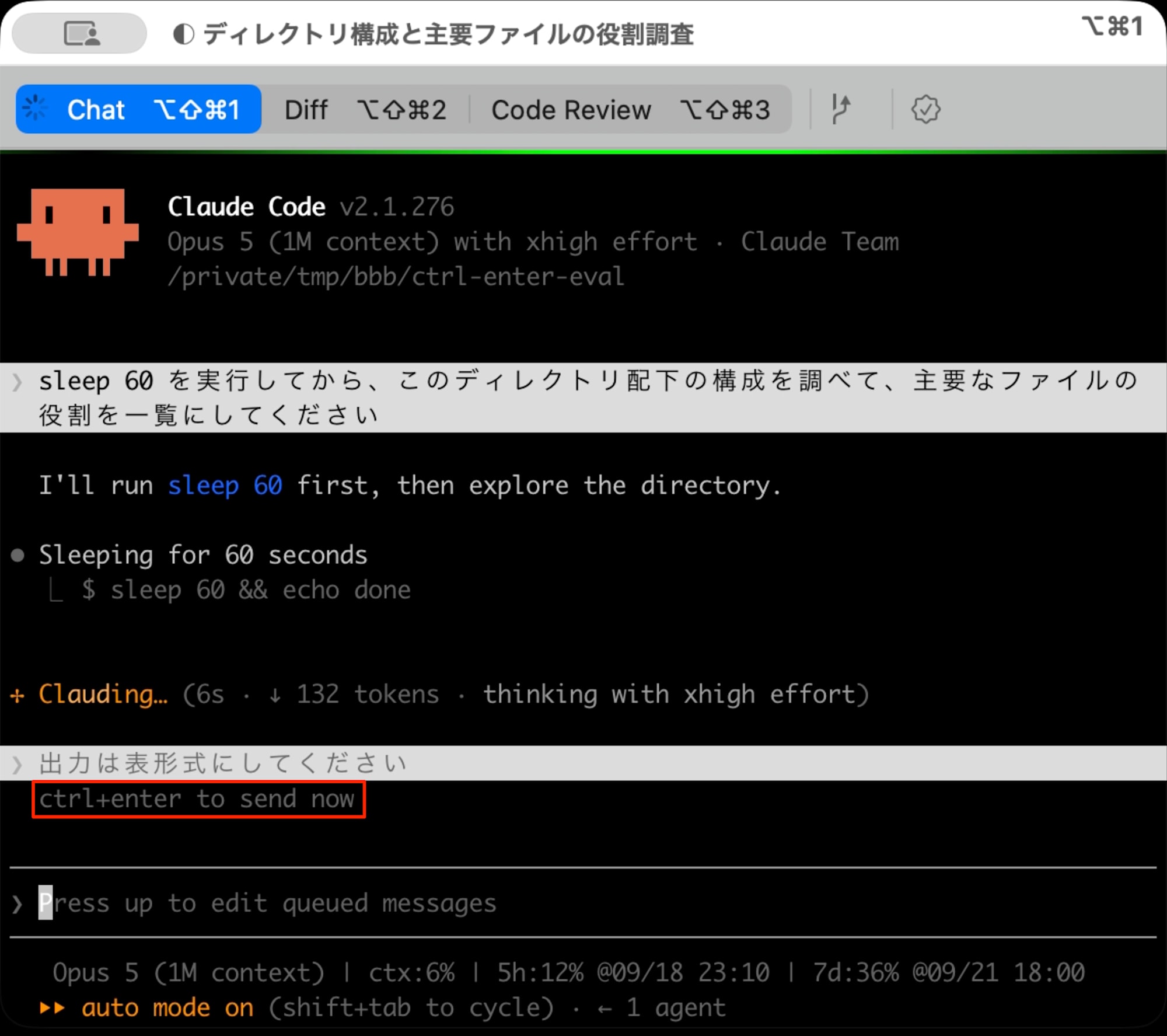
Press the send key
After confirming that the queued message (ctrl+enter to send now) is displayed in gray, press ctrl+enter. The current turn is interrupted without waiting for sleep 60 to complete, and all queued messages are sent at once. If it waits for sleep 60 to complete without interrupting, the send key is not reaching the terminal.
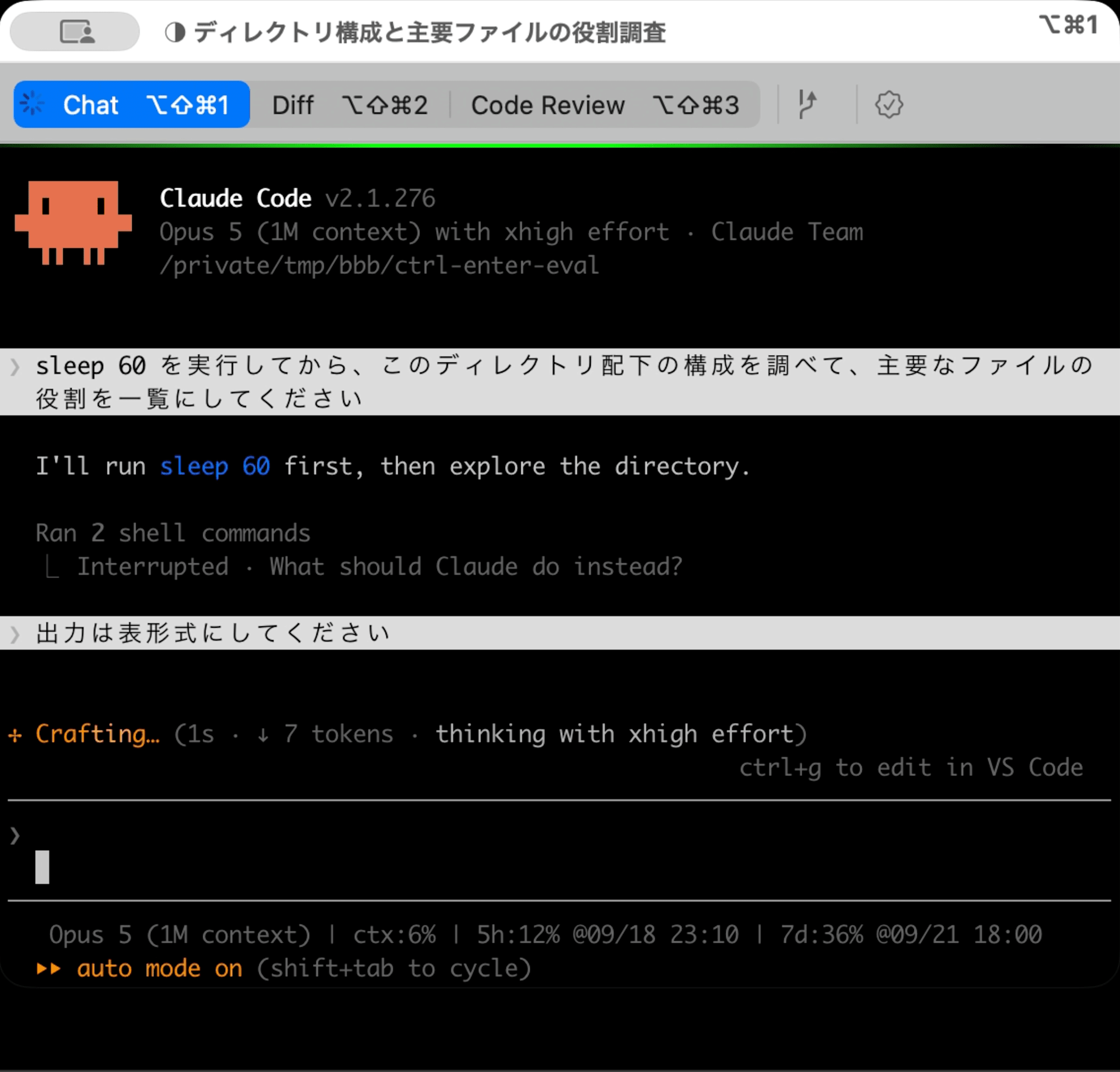
I also frequently add prompts later, and there are many situations where I end up waiting for a response to complete just to pass along queued messages, so being able to decide the timing myself is very welcome.
Notes
On terminals where ctrl+enter does not arrive as expected, try the other assignment, ctrl+x ctrl+s. If only ctrl+x ctrl+s works, it means the terminal cannot distinguish and report the combination of ctrl and Enter. The same applies when running inside tmux or screen.
In Closing
Quite apart from the sheer volume of 96 entries, the fact that skills and plugins enabled on the claude.ai side now also flow down to the terminal feels like a change that broadens the scope of how it can be used. In particular, since v2.1.276 was released as a single-fix release addressing a regression where all requests through a proxy returned 400, those who have already installed v2.1.275 would be well advised to upgrade as soon as possible.
Why not update and give it a try? If there are any changes that catch your interest, please check them out in your own environment.
References
