![[Hands-on] A 15-minute hands-on to quickly experience dbt v2 (dbt-oss) + DuckDB build, test, and lineage with AWS CloudShell!](https://images.ctfassets.net/ct0aopd36mqt/wp-thumbnail-f846b6052d1f7b983172226c6b1ed44b/6b4729aabfb5b7a3359acc27dc6b5453/dbt-1200x630-1.jpg?w=3840&fm=webp)
[Hands-on] A 15-minute hands-on to quickly experience dbt v2 (dbt-oss) + DuckDB build, test, and lineage with AWS CloudShell!

This page has been translated by machine translation. View original
I am Ishikawa from the Cloud Business Division. The official DuckDB blog introduced that the latest dbt v2 now comes with the DuckDB adapter built in as standard. So, I created a hands-on tutorial that you can experience in about 15 minutes by installing the open-source version dbt-oss on AWS CloudShell. Just launch CloudShell and keep copying & pasting the "Command:" sections, and you should be able to run through to the end!
With dbt v1, you needed to separately install the Python package dbt-duckdb to use DuckDB. dbt v2 runs on the Rust-based Fusion engine, and the DuckDB adapter is built directly into the core. The DuckDB driver is automatically downloaded and cached on first run, so there is nothing additional to install after installing dbt.
There are no execution environment dependencies, and CloudShell has become even more convenient, so this hands-on tutorial should proceed smoothly!
The Long-Awaited dbt v2 (Fusion Engine) Official Release
dbt 2.0.0, released on September 14, 2026, renamed the CLI to dbt (proprietary) and dbt-oss (open source). Both run on the same engine, and local installation is free.
In this article, we use dbt-oss under the Apache 2.0 license to go through "CSV ingestion → model build → test → metadata query → lineage check" on AWS CloudShell. All files used in the hands-on can be created by copy & paste.
Differences Between dbt and dbt-oss
dbt v2 is distributed in two forms. dbt-oss does not include features such as a static analysis engine for parsing SQL.
| Item | dbt | dbt-oss |
|---|---|---|
| Installation method | pip / Homebrew / curl / winget, etc. | pip (pip install dbt-oss) |
| License | dbt product license | Apache 2.0 |
| Standard commands (run, build, test, compile, parse, etc.) | ○ | ○ |
| SQL comprehension and static analysis | ○ | × |
| LSP features (completion, hover info, inline errors) | ○ | × |
dbt lint and error diagnostics |
○ | × |
| Integration with dbt VS Code extension | ○ | × |
Column-level lineage is generated by static analysis (--static-analysis strict), so what you can check with dbt-oss is lineage at the model level only.
Overview of the Hands-On
In this hands-on, we create 2 staging views and 1 marts table from 2 CSVs (seeds), and run 8 data tests.
In the final lineage check, we zip the web page created in CloudShell (a set of HTML files and others that let you view lineage and more in a browser), download it, and open it in a browser on your local PC.
Hands-On
Prerequisites
- Your local PC has Python 3 and a web browser, and can connect to the internet (used in step 9 for lineage verification; confirmed on macOS in this article)
- Verification environment
- Tokyo region (ap-northeast-1)
- AWS CloudShell (Amazon Linux 2023, x86_64, Python 3.13.15)
- dbt-oss 2.0.5 (published on PyPI on September 18, 2026)
- DuckDB v1.5.4 (driver automatically downloaded by dbt)
AWS CloudShell provides 1GB of persistent storage per region in the home directory ($HOME) at no additional charge. Locations other than $HOME are recycled after the shell session ends.
0. Launch CloudShell
Type "cloudshell" in the "Search" bar at the top of the Management Console, and select "CloudShell" from the services to launch it. After waiting a moment, it will start up and you will be able to enter commands at the prompt.
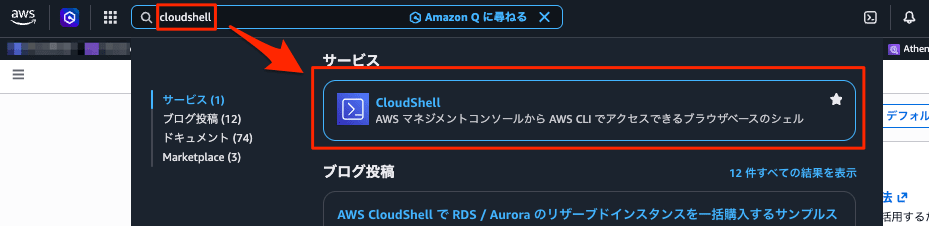
1. Check the Python Version in CloudShell
Launch CloudShell in the AWS Management Console and check the Python version. dbt-oss 2.0.5 requires Python 3.11 or higher.
Command:
python3 --version
Output:
Python 3.13.15
CloudShell's python3 pointed to /usr/local/python3.13/bin/python3 (the RPM package python3.13). /usr/bin/python3 remains at 3.9.25, but the python3 prioritized in PATH is 3.13. If a version below 3.11 is displayed, follow the dnf procedure described in the "Discussion" section instead of step 2.
2. Install dbt-oss
Create a venv and install dbt-oss. The version is pinned to the latest version at the time of writing, 2.0.5.
Command:
python3 -m venv ~/dbt-venv
source ~/dbt-venv/bin/activate
pip install dbt-oss==2.0.5
dbt --version
Output:
Collecting dbt-oss==2.0.5
  Downloading dbt_oss-2.0.5.tar.gz (5.1 kB)
  Installing build dependencies ... done
  Getting requirements to build wheel ... done
  Preparing metadata (pyproject.toml) ... done
...
Building wheels for collected packages: dbt-oss
  Building wheel for dbt-oss (pyproject.toml) ... done
  Created wheel for dbt-oss: filename=dbt_oss-2.0.5-cp311-abi3-manylinux_2_28_x86_64.whl size=69112585 sha256=6b4670ead375faf470e7a84841ae796c7bd2a0d2ef6b8c5e4315c34b56affd3a
...
Successfully built dbt-oss
Installing collected packages: typing_extensions, msgpack, mashumaro, dbt-oss
Successfully installed dbt-oss-2.0.5 mashumaro-3.22 msgpack-1.2.2 typing_extensions-4.16.0
dbt-oss 2.0.5
The dbt-oss package on PyPI is a source distribution (sdist) of about 5KB; during the build it downloads a platform-appropriate wheel (in this case, approximately 69MB for x86_64) from GitHub Releases and verifies the sha256. Installation completed in about 4.6 seconds.
3. Create the Project Files
In the home directory, copy and paste all of the following at once. This creates the dbt project configuration (dbt_project.yml), connection configuration (profiles.yml), seed CSVs, model SQL files, and the test definition (schema.yml).
Command:
cd ~

mkdir -p duckdb_handson/seeds duckdb_handson/models/staging duckdb_handson/models/marts

cat > duckdb_handson/dbt_project.yml <<'DUCKDBTV2'
name: duckdb_handson
version: "1.0.0"
profile: duckdb_handson

seed-paths: ["seeds"]
model-paths: ["models"]

models:
  duckdb_handson:
    staging:
      +materialized: view
    marts:
      +materialized: table
DUCKDBTV2

cat > duckdb_handson/profiles.yml <<'DUCKDBTV2'
duckdb_handson:
  target: dev
  outputs:
    dev:
      type: duckdb
      path: ./warehouse.duckdb
      schema: main
      threads: 4
DUCKDBTV2

cat > duckdb_handson/seeds/raw_customers.csv <<'DUCKDBTV2'
customer_id,customer_name,prefecture
1,佐藤,東京都
2,鈴木,大阪府
3,高橋,福岡県
4,田中,北海道
DUCKDBTV2

cat > duckdb_handson/seeds/raw_orders.csv <<'DUCKDBTV2'
order_id,customer_id,order_date,status,amount
101,1,2026-09-01,completed,1200
102,1,2026-09-03,completed,800
103,2,2026-09-05,returned,1500
104,3,2026-09-10,completed,3000
105,3,2026-09-12,placed,450
106,1,2026-09-15,completed,2200
DUCKDBTV2

cat > duckdb_handson/models/staging/stg_customers.sql <<'DUCKDBTV2'
select
    customer_id,
    customer_name,
    prefecture
from {{ ref('raw_customers') }}
DUCKDBTV2

cat > duckdb_handson/models/staging/stg_orders.sql <<'DUCKDBTV2'
select
    order_id,
    customer_id,
    cast(order_date as date) as order_date,
    status,
    amount
from {{ ref('raw_orders') }}
DUCKDBTV2

cat > duckdb_handson/models/marts/customer_summary.sql <<'DUCKDBTV2'
with completed_orders as (
    select *
    from {{ ref('stg_orders') }}
    where status = 'completed'
)

select
    c.customer_id,
    c.customer_name,
    c.prefecture,
    count(o.order_id)          as order_count,
    coalesce(sum(o.amount), 0) as total_amount,
    max(o.order_date)          as last_order_date
from {{ ref('stg_customers') }} as c
left join completed_orders as o
    on c.customer_id = o.customer_id
group by all
DUCKDBTV2

cat > duckdb_handson/models/schema.yml <<'DUCKDBTV2'
models:
  - name: stg_customers
    columns:
      - name: customer_id
        data_tests:
          - unique
          - not_null

  - name: stg_orders
    columns:
      - name: order_id
        data_tests:
          - unique
          - not_null
      - name: customer_id
        data_tests:
          - relationships:
              arguments:
                to: ref('stg_customers')
                field: customer_id
      - name: status
        data_tests:
          - accepted_values:
              arguments:
                values: ['placed', 'completed', 'returned']

  - name: customer_summary
    columns:
      - name: customer_id
        data_tests:
          - unique
          - not_null
DUCKDBTV2
If the prompt remains on the line after the final DUCKDBTV2 without a line break, press the Enter key. Verify the created files.
Command:
find duckdb_handson -type f | sort
Output:
duckdb_handson/dbt_project.yml
duckdb_handson/models/marts/customer_summary.sql
duckdb_handson/models/schema.yml
duckdb_handson/models/staging/stg_customers.sql
duckdb_handson/models/staging/stg_orders.sql
duckdb_handson/profiles.yml
duckdb_handson/seeds/raw_customers.csv
duckdb_handson/seeds/raw_orders.csv
The type: duckdb in profiles.yml specifies the DuckDB adapter, and tables and views will be created in the file specified by path (warehouse.duckdb). In this case, we placed profiles.yml directly under the project rather than in ~/.dbt/, and confirmed it is read by the next dbt debug.
4. Check the Connection (dbt debug)
Move to the project directory and verify the connection. From step 4 onwards, run commands from ~/duckdb_handson with the venv activated. (If you reopen CloudShell midway, run source ~/dbt-venv/bin/activate first, then cd ~/duckdb_handson.)
dbt debug is a command that checks all configuration and connection issues before running dbt commands. According to the official documentation, it checks the database connection, project configuration such as dbt_project.yml, OS and dbt versions, dependent tools such as git, and adapter information.
In this hands-on, we run it to confirm the following two points:
- That dbt can read the
dbt_project.ymlandprofiles.ymlcreated in step 3 - That we can connect to DuckDB without separately installing an adapter
Checking here in advance makes it easier to identify whether a failure in the dbt build in step 5 is due to configuration/connection issues or to model SQL.
Command:
cd ~/duckdb_handson
dbt debug
Output:
   dbt-oss 2.0.5
   Loading profiles.yml
 Debugging profile: dev
 Debugging dbt version: 2.0.5
 Debugging platform: linux x86_64 (unix)
 Debugging adapter type: duckdb (remote)
 Debugging dependencies:
  git: OK
 Debugging connection:
  "path": "./warehouse.duckdb",
  "schema": "main"
 Debugging connection test: OK (1.2s)
  Debugged All checks passed!

==================== Execution Summary =====================
Finished 'debug' successfully for target 'dev' [1.3s]
The meanings of the main output lines are as follows:
| Output | Meaning |
|---|---|
Loading profiles.yml |
Loaded profiles.yml from directly under the project |
Debugging profile: dev |
Using the target: dev settings in profiles.yml |
Debugging dbt version / Debugging platform |
dbt version (2.0.5) and execution environment (Linux x86_64) |
Debugging adapter type: duckdb |
Using the type: duckdb adapter in profiles.yml |
git: OK |
The dependent tool git is available (used by dbt deps to fetch packages) |
Debugging connection |
Connection destination path (./warehouse.duckdb) and schema (main) |
Debugging connection test: OK |
Connection test to DuckDB succeeded |
All checks passed! |
All check items succeeded |
If All checks passed! is displayed at the end, you can proceed to the next step. If an error is displayed, check whether the current directory is ~/duckdb_handson, and review the contents of the profiles.yml and dbt_project.yml created in step 3.
We did not install any additional adapter, but the connection test succeeded with adapter type: duckdb. After the hands-on, I confirmed that the DuckDB ADBC driver libadbc_driver_duckdb-1.5.4.so (approximately 70MB) was saved in ~/.cache/com.getdbt/adbc/. The file timestamp was 08:09 (UTC), when dbt debug and the first dbt build were run.
5. Build (dbt build)
Run seed ingestion, model creation, and tests all at once.
dbt build is a command that runs seed ingestion (dbt seed), model creation (dbt run), data tests (dbt test), and more, all together in the order of inter-model dependencies (DAG). If a test for an upstream model fails, downstream models that depend on that model are not executed and are skipped.
In this hands-on, we run it to do the following three things:
- Ingest the 2 CSVs created in step 3 as DuckDB tables (seed)
- Create 2 staging views and 1 marts table (model)
- Run the 8 data tests defined in
schema.yml(test)
The skip behavior when a test fails will be checked in step 7.
Command:
dbt build
Output:
   dbt-oss 2.0.5
   Loading profiles.yml
 Succeeded seed  main.raw_customers (table) [2 of 13 in 0.05s]
 Succeeded seed  main.raw_orders (table) [1 of 13 in 0.06s]
 Succeeded model main.stg_customers (view) [3 of 13 in 0.03s]
 Succeeded model main.stg_orders (view) [4 of 13 in 0.03s]
    Passed test  not_null_stg_customers_customer_id [5 of 13 in 0.01s]
    Passed test  unique_stg_customers_customer_id [6 of 13 in 0.02s]
    Passed test  not_null_stg_orders_order_id [9 of 13 in 0.05s]
    Passed test  relationships_stg_orders_customer_id__customer_id__ref_stg_customers_ [11 of 13 in 0.05s]
    Passed test  unique_stg_orders_order_id [8 of 13 in 0.05s]
    Passed test  accepted_values_stg_orders_status__placed__completed__returned [7 of 13 in 0.05s]
 Succeeded model main.customer_summary (table) [10 of 13 in 0.03s]
    Passed test  not_null_customer_summary_customer_id [12 of 13 in 0.01s]
    Passed test  unique_customer_summary_customer_id [13 of 13 in 0.01s]

==================== Execution Summary =====================
Finished 'build' successfully for target 'dev' [1.1s]
Processed: 3 models | 8 tests | 2 seeds
Summary: 13 total | 13 success
The meanings of the main output lines are as follows:
| Output | Meaning |
|---|---|
Succeeded seed main.raw_customers (table) |
Ingested the CSV as the raw_customers table in the main schema |
Succeeded model main.stg_customers (view) |
Created the staging model as a view (+materialized: view in dbt_project.yml) |
Passed test not_null_stg_customers_customer_id |
Data test passed. The test name includes the test type (not_null), model name, and column name |
Succeeded model main.customer_summary (table) |
Created the marts model as a table (+materialized: table) |
Processed: 3 models | 8 tests | 2 seeds |
Number of models, tests, and seeds processed |
Summary: 13 total | 13 success |
All 13 items succeeded |
Looking at the output, the creation of customer_summary occurs after all 6 tests for stg_customers and stg_orders have succeeded. You can see that it executes in DAG order, creating downstream models after confirming the results of upstream tests.
2 seeds, 3 models, and 8 tests — all 13 items succeeded. Because they are executed in parallel with threads: 4, the display order and the [N of 13] numbers do not match.
6. Check the Results (dbt show)
Use dbt show to display the contents of the marts customer_summary. To fix the sort order, an order by is specified with --inline.
Command:
dbt show --inline "select * from {{ ref('customer_summary') }} order by customer_id"
Output:
   dbt-oss 2.0.5
   Loading profiles.yml
Query show_sql_operation_inline
┌─────────────┬───────────────┬────────────┬─────────────┬──────────────┬─────────────────┐
│ customer_id ┆ customer_name ┆ prefecture ┆ order_count ┆ total_amount ┆ last_order_date │
╞═════════════╪═══════════════╪════════════╪═════════════╪══════════════╪═════════════════╡
│ 1           ┆ 佐藤          ┆ 東京都     ┆ 3           ┆ 4200         ┆ 2026-09-15      │
│ 2           ┆ 鈴木          ┆ 大阪府     ┆ 0           ┆ 0            ┆                 │
│ 3           ┆ 高橋          ┆ 福岡県     ┆ 1           ┆ 3000         ┆ 2026-09-10      │
│ 4           ┆ 田中          ┆ 北海道     ┆ 0           ┆ 0            ┆                 │
└─────────────┴───────────────┴────────────┴─────────────┴──────────────┴─────────────────┘
4 rows.
 Succeeded model main.inline (ephemeral) [1 of 1 in 0.03s]

==================== Execution Summary =====================
Finished 'show' successfully for target 'dev' [496ms]
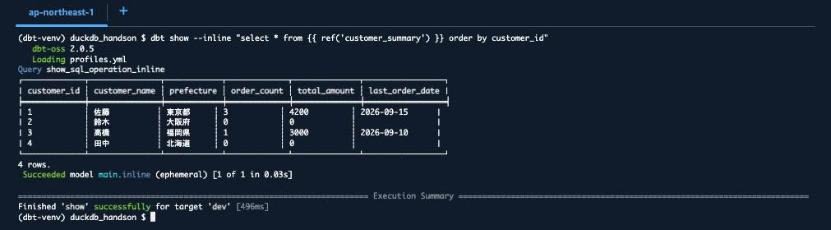
Because only status = 'completed' orders are aggregated, Suzuki (whose only order was returned) and Tanaka (who has no orders) show 0, while Takahashi shows 1, excluding the placed order.
7. Intentionally Fail a Test
Check the behavior when a data test fails. Add one row with a non-existent customer ID (9) and a disallowed status (shipped).
Command:
cat >> seeds/raw_orders.csv <<'DUCKDBTV2'
107,9,2026-09-20,shipped,999
DUCKDBTV2

dbt build
Output:
   dbt-oss 2.0.5
   Loading profiles.yml
 Succeeded seed  main.raw_customers (table) [2 of 13 in 0.06s]
 Succeeded seed  main.raw_orders (table) [1 of 13 in 0.06s]
 Succeeded model main.stg_customers (view) [3 of 13 in 0.04s]
 Succeeded model main.stg_orders (view) [4 of 13 in 0.04s]
    Failed test  accepted_values_stg_orders_status__placed__completed__returned (models/schema.yml:23:13) [9 of 13 in 0.03s]
    Passed test  unique_stg_customers_customer_id [5 of 13 in 0.04s]
    Passed test  not_null_stg_customers_customer_id [6 of 13 in 0.04s]
    Passed test  not_null_stg_orders_order_id [10 of 13 in 0.04s]
    Passed test  unique_stg_orders_order_id [7 of 13 in 0.04s]
    Failed test  relationships_stg_orders_customer_id__customer_id__ref_stg_customers_ (models/schema.yml:17:13) [8 of 13 in 0.04s]
   Skipped model main.customer_summary (table) [11 of 13]
   Skipped test 'not_null_customer_summary_customer_id', 'unique_customer_summary_customer_id'

==================== Test Failures =====================
Test failed (1 failed row(s)): accepted_values_stg_orders_status__placed__completed__returned
Test failed (1 failed row(s)): relationships_stg_orders_customer_id__customer_id__ref_stg_customers_

==================== Execution Summary =====================
Finished 'build' with 2 errors for target 'dev' [946ms]
Processed: 3 models | 8 tests | 2 seeds
Summary: 13 total | 8 success | 2 error | 3 skipped
2 tests failed — accepted_values (status value check) and relationships (customer ID referential integrity check) — and the location of the failed test definitions in the file (such as models/schema.yml:23:13) was displayed. Because dbt build does not execute downstream models of a model whose test failed, customer_summary and its 2 tests were skipped. The invalid row entered the raw_orders seed and the stg_orders view, but customer_summary was not recreated and remains as the table created in step 5.
Once confirmed, revert the CSV to its original content. At this point, since only the CSV has been reverted, the invalid row still remains in raw_orders on DuckDB. The dbt build in the next step 8 will reflect the reverted CSV content.
Command:
cat > seeds/raw_orders.csv <<'DUCKDBTV2'
order_id,customer_id,order_date,status,amount
101,1,2026-09-01,completed,1200
102,1,2026-09-03,completed,800
103,2,2026-09-05,returned,1500
104,3,2026-09-10,completed,3000
105,3,2026-09-12,placed,450
106,1,2026-09-15,completed,2200
DUCKDBTV2
8. Output Metadata as Parquet and Query It
dbt v2 can output project metadata as Parquet files. dbt calls this the Information Schema. Run dbt build with --generate-info-schema.
Command:
dbt build --generate-info-schema
Output:
   dbt-oss 2.0.5
   Loading profiles.yml
 Succeeded seed  main.raw_orders (table) [1 of 13 in 0.08s]
...
    Passed test  unique_customer_summary_customer_id [12 of 13 in 0.01s]

==================== Execution Summary =====================
Finished 'build' successfully for target 'dev' [1.3s]
Processed: 3 models | 8 tests | 2 seeds
Summary: 13 total | 13 success
Since we restored the CSV, all 13 succeeded. Let's check the files output to target/info_schema/v1/.
Command:
ls target/info_schema/v1/ | wc -l
ls target/info_schema/v1/ | grep -E 'models|edges|run_results|views'
Output:
39

dbt.edges.parquet
dbt.models.parquet
dbt_rt.run_results.parquet
dbt.semantic_models.parquet
views.sql
38 Parquet files and views.sql were output. According to the official documentation, parse adds basic metadata, compile adds column types and column-level lineage (requires --static-analysis strict), and run or build adds execution results.
You can query directly from dbt show --inline using DuckDB's read_parquet(). First, retrieve the list of models and their materialization types.
Command:
dbt show --inline "select name, materialized, schema_name from read_parquet('target/info_schema/v1/dbt.models.parquet') order by name"
Output:
   dbt-oss 2.0.5
   Loading profiles.yml
Query show_sql_operation_inline
┌──────────────────┬──────────────┬─────────────┐
│ name             ┆ materialized ┆ schema_name │
╞══════════════════╪══════════════╪═════════════╡
│ customer_summary ┆ table        ┆ main        │
│ stg_customers    ┆ view         ┆ main        │
│ stg_orders       ┆ view         ┆ main        │
└──────────────────┴──────────────┴─────────────┘
3 rows.
 Succeeded model main.inline (ephemeral) [1 of 1 in 0.03s]

==================== Execution Summary =====================
Finished 'show' successfully for target 'dev' [583ms]
Next, retrieve the dependencies between models from dbt.edges.parquet. We exclude rows for macros and tests, filtering to rows where the child is a model.
Command:
dbt show --inline "select parent_unique_id, child_unique_id from read_parquet('target/info_schema/v1/dbt.edges.parquet') where parent_unique_id not like 'macro.%' and child_unique_id like 'model.%' order by all"
Output:
   dbt-oss 2.0.5
   Loading profiles.yml
Query show_sql_operation_inline
┌────────────────────────────────────┬───────────────────────────────────────┐
│ parent_unique_id                   ┆ child_unique_id                       │
╞════════════════════════════════════╪═══════════════════════════════════════╡
│ model.duckdb_handson.stg_customers ┆ model.duckdb_handson.customer_summary │
│ model.duckdb_handson.stg_orders    ┆ model.duckdb_handson.customer_summary │
│ seed.duckdb_handson.raw_customers  ┆ model.duckdb_handson.stg_customers    │
│ seed.duckdb_handson.raw_orders     ┆ model.duckdb_handson.stg_orders       │
└────────────────────────────────────┴───────────────────────────────────────┘
4 rows.
 Succeeded model main.inline (ephemeral) [1 of 1 in 0.03s]

==================== Execution Summary =====================
Finished 'show' successfully for target 'dev' [609ms]
We retrieved the same dependencies as shown in the "overview" diagram.
Finally, retrieve nodes that failed or were skipped from dbt_rt.run_results.parquet.
Command:
dbt show --inline "select split_part(unique_id, '.', 3) as node_name, status, failures from read_parquet('target/info_schema/v1/dbt_rt.run_results.parquet') where status in ('fail', 'skipped') order by node_name"
Output:
   dbt-oss 2.0.5
   Loading profiles.yml
Query show_sql_operation_inline
┌───────────────────────────────────────────────────────────────────────┬─────────┬──────────┐
│ node_name                                                             ┆ status  ┆ failures │
╞═══════════════════════════════════════════════════════════════════════╪═════════╪══════════╡
│ accepted_values_stg_orders_status__placed__completed__returned        ┆ fail    ┆ 1        │
│ customer_summary                                                      ┆ skipped ┆          │
│ not_null_customer_summary_customer_id                                 ┆ skipped ┆          │
│ relationships_stg_orders_customer_id__customer_id__ref_stg_customers_ ┆ fail    ┆ 1        │
│ unique_customer_summary_customer_id                                   ┆ skipped ┆          │
└───────────────────────────────────────────────────────────────────────┴─────────┴──────────┘
5 rows.
 Succeeded model main.inline (ephemeral) [1 of 1 in 0.03s]

==================== Execution Summary =====================
Finished 'show' successfully for target 'dev' [588ms]
The most recent dbt build succeeded entirely, but the results from the failed run in step 7 are included. When we counted the rows in this file, there were 39 rows (13 nodes × 3 dbt build runs), and the results from steps 5 and 7, which were run without --generate-info-schema, were also included.
Note that the same results could also be retrieved using the {{ info_schema() }} macro introduced in the official documentation. This macro runs without loading the profiles.
Command:
dbt show --inline "select name, materialized, schema_name from {{ info_schema('models') }} order by name"
Output:
   dbt-oss 2.0.5
Query info_schema_inline
┌──────────────────┬──────────────┬─────────────┐
│ name             ┆ materialized ┆ schema_name │
╞══════════════════╪══════════════╪═════════════╡
│ customer_summary ┆ table        ┆ main        │
│ stg_customers    ┆ view         ┆ main        │
│ stg_orders       ┆ view         ┆ main        │
└──────────────────┴──────────────┴─────────────┘
3 rows.

==================== Execution Summary =====================
Finished 'show' successfully [501ms]
9. Generate Lineage, Download It, and View It on Your Local PC
dbt docs generate is a command that creates a web page (a set of files including HTML) that lets you view model descriptions, column information, and inter-model dependencies (lineage) of a dbt project in a browser. In dbt v2, metadata in Parquet format is output alongside the web page files, and that Parquet is loaded by DuckDB-Wasm in the browser for display. No server program is needed for viewing, and the official documentation explains that the files can be published by placing them on S3, GitHub Pages, or similar services.
In this hands-on, we run this command to view the inter-model dependencies we confirmed using SQL in step 8 as a diagram. We specify the output directory (docs_site) with --output-dir and bundle it into a zip so it can be downloaded to the local PC.
Command:
dbt docs generate --output-dir docs_site
zip -rq docs_site.zip docs_site
ls -lh docs_site.zip
Output:
Running compile; pass `--no-compile` to export the existing index instead.
   dbt-oss 2.0.5
 Succeeded seed  main.raw_orders (table) [11 of 13 in 0.00s]
...
 Generated docs_site (39 artifacts copied) — no column lineage; rerun with `--static-analysis strict` to include it
Host the contents of docs_site on any static file server.

==================== Execution Summary =====================
Finished 'docs' successfully [2.2s]
-rw-r--r--. 1 cloudshell-user cloudshell-user 2.6M Sep 25 08:12 docs_site.zip
The meaning of the key lines in the output is as follows.
| Output | Meaning |
|---|---|
Running compile; pass --no-compile ... |
compile was run before creating the web page (adding --no-compile creates it from existing results) |
Lines such as Succeeded seed ... |
Nodes that were targeted by compile |
Generated docs_site (39 artifacts copied) |
The web page was output to the docs_site directory, and 39 files including Parquet files were copied |
no column lineage; ... |
Column-level lineage is not included |
Host the contents of docs_site on any static file server. |
Instructions to serve the contents of docs_site from a web server |
-rw-r--r--. ... docs_site.zip |
The zip size is 2.6MB |
docs_site contains index.html, assets/ with JavaScript and other files, and info_schema/v1/ with Parquet files.
As stated in the message, column-level lineage is not included. The message suggests rerunning with --static-analysis strict, but since dbt-oss does not run static analysis, column-level lineage is not generated (see "Discussion"). Also, instructions are given to serve the contents of docs_site from a web server.
From "Actions" in the top right of the CloudShell screen, select "Download file", enter the following path, and click "Download".
/home/cloudshell-user/duckdb_handson/docs_site.zip
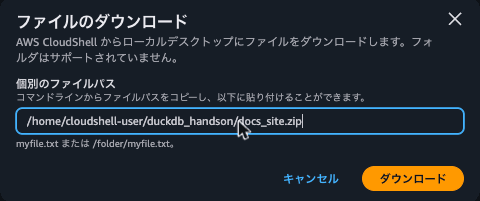
As the dialog states "Folders are not supported", folders cannot be downloaded as-is, which is why we bundled it into a zip.
Extract the zip in a terminal on your local PC and serve it with Python's HTTP server. The following steps were verified on macOS.
Command:
cd ~/Downloads
unzip -q docs_site.zip
python3 -m http.server 8000 --directory docs_site
Open http://localhost:8000/ in a browser to see the dbt docs v2 top screen. 3 models, 8 tests, and 2 seeds are displayed.
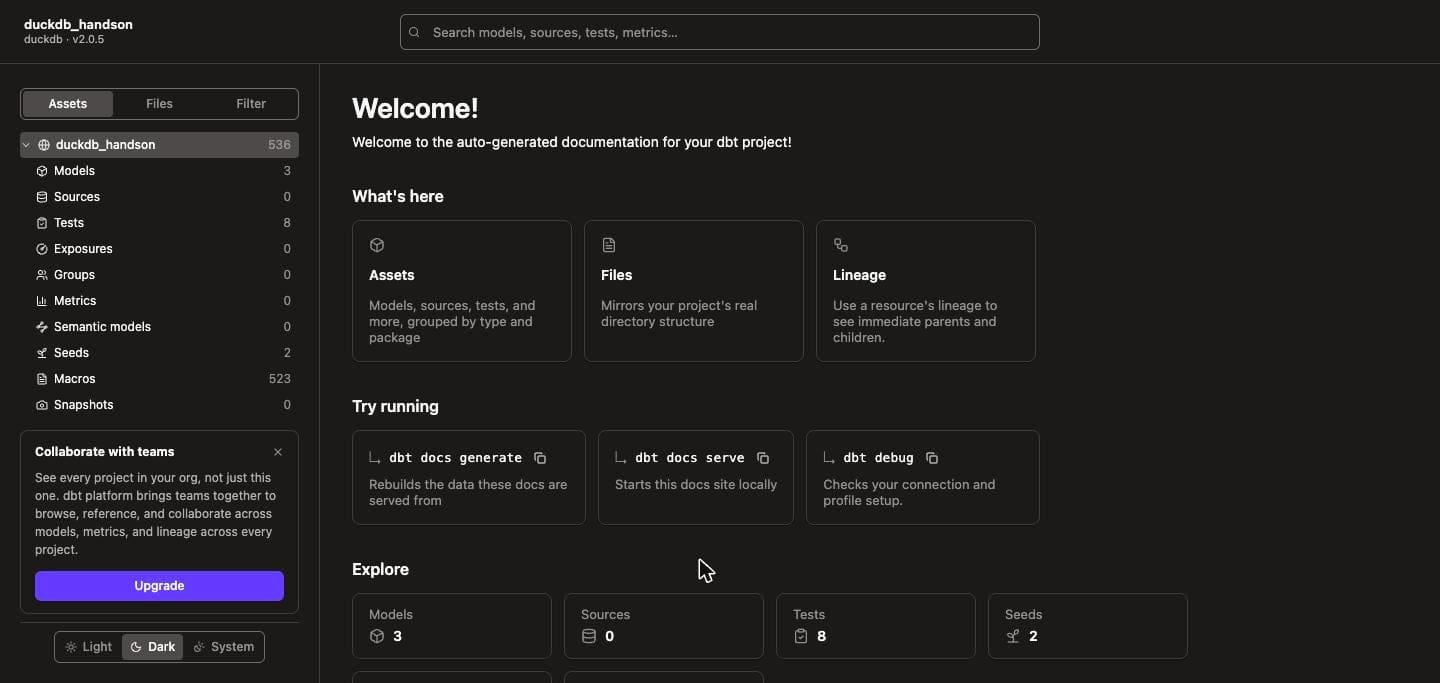
Select customer_summary from "Models" in the left menu, then click "Expand" under "Lineage". Changing the upstream depth (default 1+) to max+ displays the lineage from seeds through marts to tests.
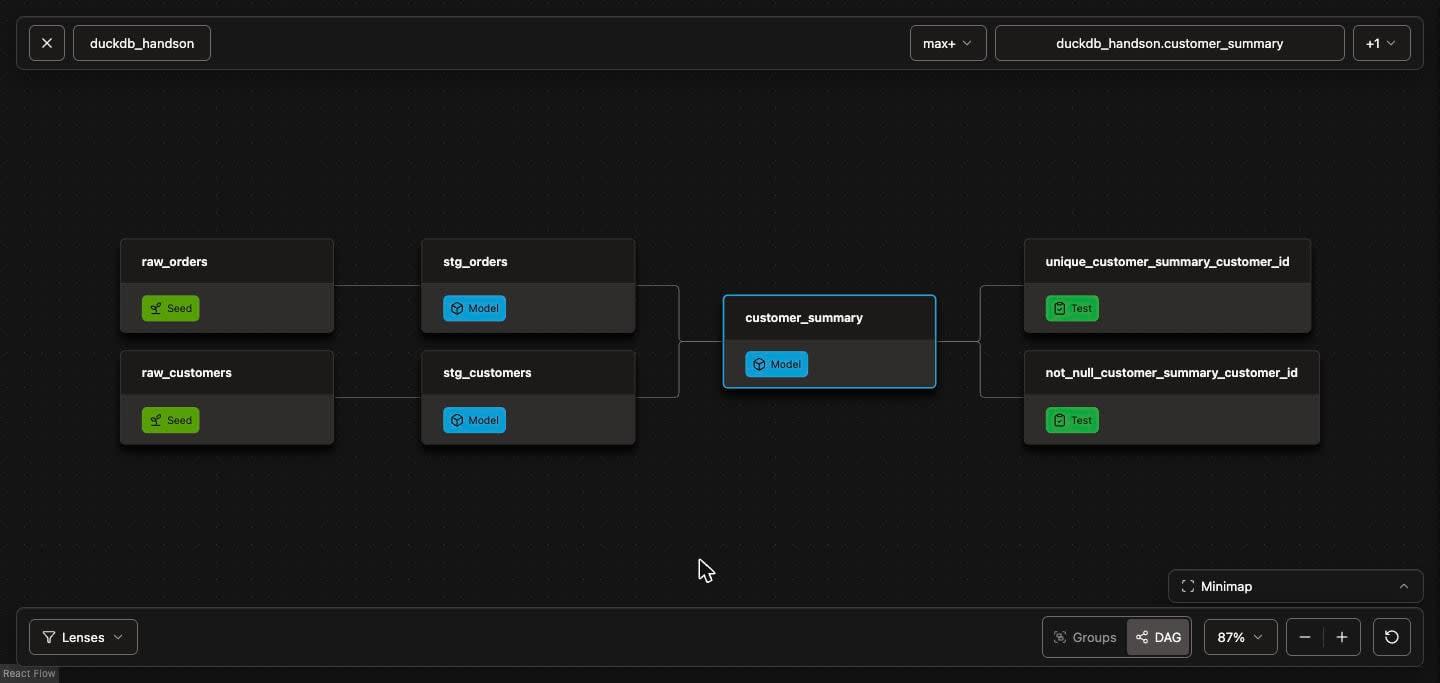
This web page loads and displays the Parquet files in info_schema/v1/. index.html specifies jsDelivr (duckdb_cdn_base) as the distribution source for DuckDB-Wasm, and dbt docs generate --help also explains that Wasm is not included in the web page files. Therefore, an internet connection is also required on the local PC. Once you're done, press Ctrl+C in the terminal to stop the HTTP server.
10. Clean Up the CloudShell Environment
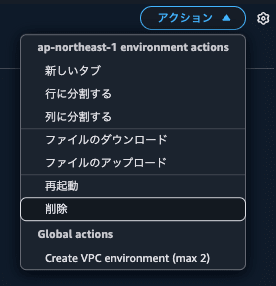
From "Actions" in the top right of the CloudShell screen, select "Delete", enter "delete" in the "Delete ap-northeast-1 CloudShell environment" dialog, and click "Delete".
Discussion
CloudShell's Python Was Already 3.11 or Later
dbt-oss 2.0.5 requires Python 3.11 or later (Requires-Python: >=3.11 on PyPI). The AWS documentation's Amazon Linux 2023 migration page states that CloudShell's Python is 3.9, so we had considered countermeasures in advance, but at the time of verification, CloudShell's python3 was 3.13.15, and we were able to create a venv directly.
If python3 --version is below 3.11, install the package from Amazon Linux 2023 via dnf and create a venv with that version. These steps have been verified to work up to installing dbt-oss 2.0.5 in an Amazon Linux 2023 container (root user).
Command:
sudo dnf install -y python3.11 python3.11-pip
python3.11 -m venv ~/dbt-venv
source ~/dbt-venv/bin/activate
pip install dbt-oss==2.0.5
dbt --version
However, packages installed via dnf are placed outside $HOME, so they disappear after the shell session ends. In that case, even if ~/dbt-venv remains, it cannot be used, so you will need to redo the installation from dnf.
Home Directory Capacity
At the time of completing the hands-on, the home directory usage was 466MB out of 974MB (52%).
| Path | Size | Contents |
|---|---|---|
~/dbt-venv |
224MB | venv with dbt-oss installed |
~/.cache/com.getdbt |
156MB | DuckDB ADBC driver (2 files) |
~/.cache/pip |
68MB | pip's wheel cache for the built dbt-oss |
~/duckdb_handson |
19MB | Project (including target/, docs_site/, and zip) |
In ~/.cache/com.getdbt/adbc/, in addition to libadbc_driver_duckdb-1.5.4.so (approximately 70MB, 08:09), libadbc_driver_duckdb_extended-0.21.0.dev+dbt0.0.31.so (approximately 92MB, 08:12) was also saved. Since CloudShell's persistent storage is 1GB, be mindful of remaining capacity if you use it for other purposes.
Limitations of File Downloads in CloudShell
The method of bundling multiple files into a zip for download is also described in AWS documentation. Note that file downloads are not available in CloudShell within a VPC environment or in CloudShell launched from the console toolbar. In those cases, you will need a different method to view the lineage in step 9.
The Bundled DuckDB Driver Cannot Load Extensions
According to the official documentation, the DuckDB driver bundled with dbt v2 does not support loading DuckDB extensions such as httpfs, parquet, and spatial. To use extensions, install the DuckDB driver via dbc. dbt v2 looks for a system-installed driver first, and uses the bundled driver if none is found.
The local file reading via read_parquet() in this hands-on worked with the bundled driver. On the other hand, if you want to read files on S3 directly from CloudShell using DuckDB, the httpfs extension will be required, so additional steps would be needed.
dbt-oss Can Only Confirm Model-Level Lineage
Since dbt-oss does not include a static analysis engine, the web page created by dbt docs generate did not include column-level lineage. When we ran dbt compile --generate-info-schema --static-analysis strict in an Amazon Linux 2023 container in advance, a warning was issued stating that "dbt OSS does not include a static analysis engine," and static analysis was not executed. To try the column-level lineage (dbt.column_lineage) introduced in the DuckDB blog, use dbt (pip install dbt) instead of dbt-oss.
Conclusion
We installed dbt-oss from dbt v2 on AWS CloudShell and confirmed seeds, models, tests, Parquet-format metadata, and lineage without installing an additional DuckDB adapter. The only steps required were creating a venv and running pip install dbt-oss, and the profiles.yml format was the same as dbt-duckdb v1. The time spent running commands on CloudShell from the Python check to zip creation was approximately 10 minutes. Allow about 15 minutes if you read through the file contents as you go.
Parquet-format metadata can be queried by writing SQL with dbt show --inline and read_parquet(). We were able to confirm model materialization types and test failure history via SQL. The DuckDB blog mentions using this for CI checks and audit scripts.
Using CloudShell, you can try dbt v2 without installing dbt on your local PC (we did use local Python to display the lineage). Please use this as a reference when trying the combination of dbt v2 and DuckDB.
Reference Links
