I Tried Out Container Association in AWS Network Firewall

This page has been translated by machine translation. View original
Hello, this is Hayashi.
In June 2026, Container Association was added to AWS Network Firewall.
It is a feature that lets you select EKS Pods by namespace or label and reference the list of their IP addresses from Network Firewall rules.
To see what kind of feature it is, I configured rules that restrict the destination domains for each EKS application and tried them out.
What is Container Association?
Network Firewall stateful rules specify the source and destination by IP address, such as "allow traffic from this IP address to this destination."
In EKS, applications run in units called Pods. Each Pod is assigned one VPC IP address, but every time a Pod is recreated, it gets a different IP address.
Because of this, it was not possible to define a rule like "allow only traffic from this application" using IP addresses.
Container Association is a resource where Network Firewall automatically maintains the list of IP addresses of Pods that match a condition, so that it can be referenced as the source or destination of a rule. You create it by specifying an EKS or ECS cluster.
There is no additional charge; it is included in the Network Firewall usage fee.
Selecting Pods
Pod conditions use namespaces and labels.
As an example, take an environment where, in the apps namespace, a generative AI app with the label app: ai-agent and a web app with the label app: web-app are running.
# Pod for the generative AI app
apiVersion: v1
kind: Pod
metadata:
  name: ai-agent
  namespace: apps      # namespace used for the condition
  labels:
    app: ai-agent      # label used for the condition (key: app, value: ai-agent)
---
# Pod for the web app
apiVersion: v1
kind: Pod
metadata:
  name: web-app
  namespace: apps      # same namespace
  labels:
    app: web-app       # only the label value differs
If you set the Container Association condition to "namespace is apps and label is app=ai-agent," only the generative AI app's Pod is included in the list.
If you set the condition to only "namespace is apps," both Pods are included in the list.
If you want to change the allowed destinations for each application, create a Container Association for each application.
How to use it in rules
In Network Firewall, you define rules that allow or deny traffic by grouping them into rule groups.
In addition to specifying IP addresses directly as the source or destination of a rule, you can use a feature called IP set references to reference a collection of IP addresses, such as a prefix list, by variable name.
Container Association can now be specified as a target of this IP set reference.
If you register the list of ai-agent Pods under the variable name AI_AGENT, you can define a rule that specifies @AI_AGENT as the source.
This is a rule that allows TLS traffic from the ai-agent Pods to api.openai.com.
pass tls @AI_AGENT any -> any 443 (tls.sni; content:"api.openai.com"; startswith; endswith; nocase; flow:to_server; sid:1;)
The destination domain is determined by SNI. SNI is the destination hostname that the client sends when it starts a TLS connection.
Updating the list of Pod IP addresses
Network Firewall automatically updates the list of Pod IP addresses.
When a Pod is recreated and its IP address changes, the new IP address is added to the list and the old IP address is removed from it. The same applies when the number of Pods increases.
The only things the user configures are the cluster and the condition specified when creating the Container Association.
There is no additional configuration needed on the cluster side, and you don't need to modify the rules every time a Pod's IP address changes.
Traffic subject to control
Only traffic that passes through Network Firewall can be controlled.
You configure route tables so that traffic from Pods to external destinations goes through the Firewall endpoint. Traffic that stays within the VPC, such as Pod-to-Pod traffic, is out of scope.
Also, the source of traffic reaching the Firewall must be the Pod's IP address. The official documentation's network requirements contain the following note.
Disable SNAT (Amazon EKS) – For Amazon EKS pods, disable source NAT (SNAT) so that the firewall sees the pod's original IP address. If SNAT is enabled, traffic arrives at the firewall with the node IP, not the pod IP, and rules referencing the container association do not match.
The VPC CNI, which assigns IP addresses to Pods in EKS, by default translates the source of traffic going outside the VPC to the node's IP address. You disable this translation so that traffic reaches the Firewall with the Pod's IP address unchanged.
Verification setup
What to verify
In the apps namespace, I place ai-agent, a generative AI app, and web-app, a web app.
I define rules so that ai-agent can connect only to api.openai.com and web-app can connect only to api.github.com.
From each Pod, I connect to both APIs with curl and confirm that it can connect only to the allowed API.
| Pod | Label | api.openai.com | api.github.com |
|---|---|---|---|
| ai-agent | app=ai-agent | Can connect | Cannot connect |
| web-app | app=web-app | Cannot connect | Can connect |
Environment
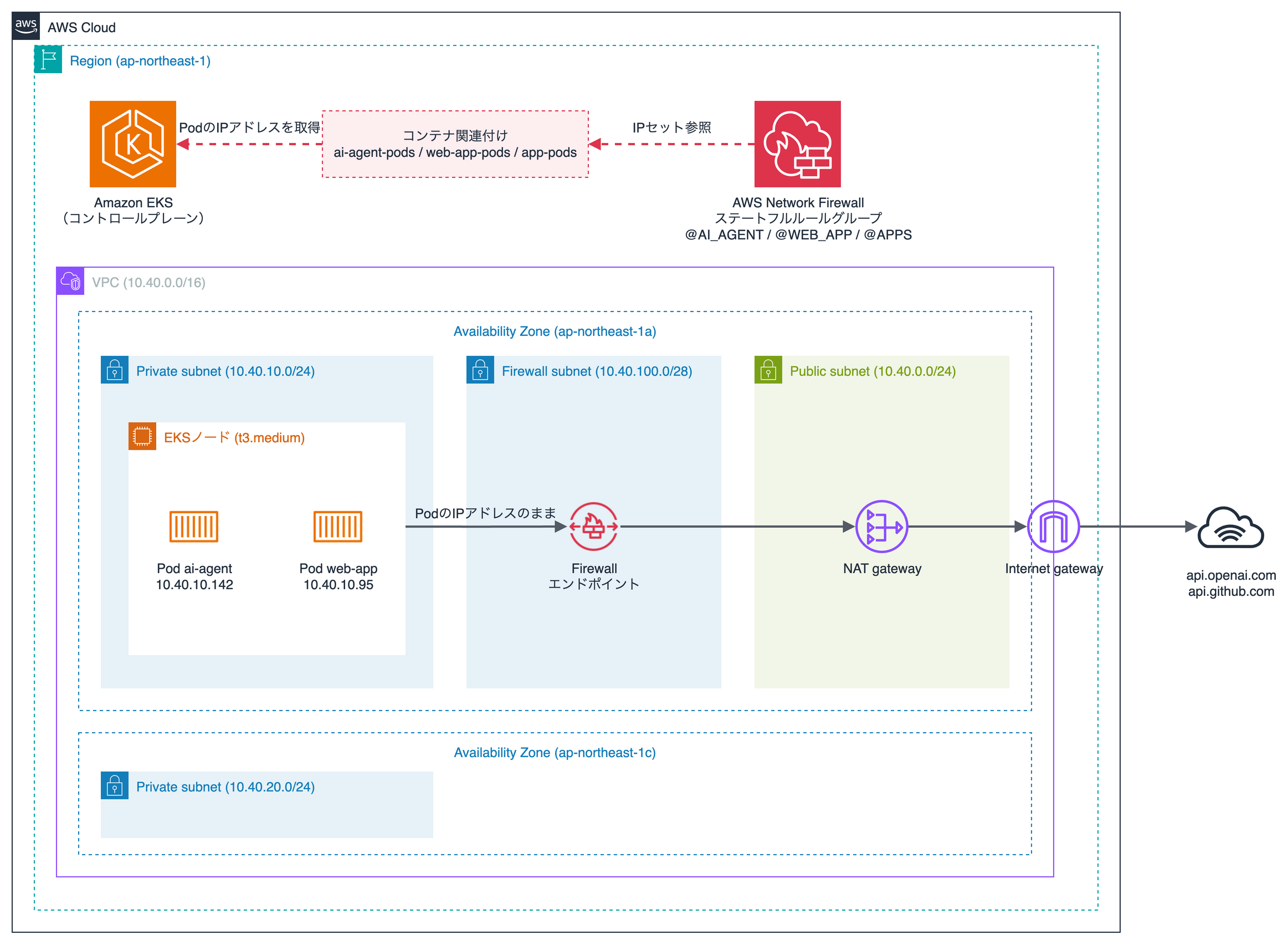
There is one EKS node in a private subnet, and both Pods run on this node.
Traffic from the Pods to external destinations passes through the Firewall endpoint, the NAT gateway, and the internet gateway, in that order.
| Item | Details |
|---|---|
| Kubernetes version | 1.37 |
| Node | Managed node group, t3.medium, AL2023, 1 node |
| VPC CNI add-on | v1.22.4-eksbuild.8 |
| Container image | public.ecr.aws/amazonlinux/amazonlinux:2023 |
| Region | Tokyo (ap-northeast-1) |
Steps
1. Create Container Associations
I create two Container Associations for the individual applications and one for the whole apps namespace.
| Name | Attribute filter | Pods included in the list |
|---|---|---|
| ai-agent-pods | namespace=apps, app=ai-agent | ai-agent |
| web-app-pods | namespace=apps, app=web-app | web-app |
| app-pods | namespace=apps | ai-agent, web-app |
At the time of writing (2026/10/30), CloudFormation's AWS::NetworkFirewall::ContainerAssociation was available in N. Virginia and Oregon, but not in Tokyo.
Therefore, create them from the console or the AWS CLI. This time I created them with the AWS CLI.
aws network-firewall create-container-association \
  --container-association-name ai-agent-pods \
  --type EKS \
  --container-monitoring-configurations '[{
    "ClusterArn": "arn:aws:eks:ap-northeast-1:123456789012:cluster/sample-cluster",
    "AttributeFilters": [
      {"Key": "namespace", "Value": "apps"},
      {"Key": "app", "Value": "ai-agent"}
    ]
  }]'
After creation, Status becomes ACTIVE within a few seconds.
ResolvedCidrCount in describe-container-association is the number of IP addresses included in the list.
About 20 seconds after creating the Pods, it was 1 for ai-agent-pods and web-app-pods, and 2 for app-pods.
{
    "ContainerAssociationName": "ai-agent-pods",
    "Type": "EKS",
    "Status": "ACTIVE",
    "ResolvedCidrCount": 1
}
2. Reference the Container Associations in the rule group
If you register the ARN of a Container Association under a variable name in the rule group's IPSetReferences, you can specify it as the rule source with @variable-name. I used the variable names AI_AGENT, WEB_APP, and APPS.
This is what I set in the rule group.
{
  "RulesSource": {
    "RulesString": "pass tls @AI_AGENT any -> any 443 (msg:\"ai-agent: allow api.openai.com\"; tls.sni; content:\"api.openai.com\"; startswith; endswith; nocase; flow:to_server; sid:1; rev:1;)\npass tls @WEB_APP any -> any 443 (msg:\"web-app: allow api.github.com\"; tls.sni; content:\"api.github.com\"; startswith; endswith; nocase; flow:to_server; sid:2; rev:1;)\ndrop tcp @APPS any -> any 443 (msg:\"apps: drop TLS to other domains\"; flow:established,to_server; sid:3; rev:1;)\ndrop tcp @APPS any -> any !443 (msg:\"apps: drop non-443 TCP\"; sid:4; rev:1;)\ndrop udp @APPS any -> any any (msg:\"apps: drop UDP\"; sid:5; rev:1;)\npass ip any any -> any any (msg:\"others: pass established\"; flow:established,to_server; sid:6; rev:1;)"
  },
  "ReferenceSets": {
    "IPSetReferences": {
      "AI_AGENT": { "ReferenceArn": "arn:aws:network-firewall:ap-northeast-1:123456789012:container-association/ai-agent-pods" },
      "WEB_APP": { "ReferenceArn": "arn:aws:network-firewall:ap-northeast-1:123456789012:container-association/web-app-pods" },
      "APPS": { "ReferenceArn": "arn:aws:network-firewall:ap-northeast-1:123456789012:container-association/app-pods" }
    }
  },
  "StatefulRuleOptions": { "RuleOrder": "STRICT_ORDER" }
}
These are the rules written in RulesString.
| sid | Source | Traffic | Action |
|---|---|---|---|
| 1 | @AI_AGENT (ai-agent) | TLS with SNI api.openai.com |
Allow |
| 2 | @WEB_APP (web-app) | TLS with SNI api.github.com |
Allow |
| 3 | @APPS (all Pods in the apps namespace) |
TCP to port 443 | Deny |
| 4 | @APPS | TCP to ports other than 443 | Deny |
| 5 | @APPS | UDP | Deny |
| 6 | Any (nodes, Pods outside apps) |
Any | Allow |
The evaluation order is STRICT_ORDER, which evaluates rules from top to bottom and applies the first rule that matches.
Traffic from ai-agent to api.openai.com is allowed by sid 1, while traffic to api.github.com matches neither sid 1 nor 2 and is denied by sid 3.
Get the update token with describe-rule-group, and apply rulegroup.json with update-rule-group.
In the console, you can make the same setting under "IP set references" on the rule group edit screen.
aws network-firewall describe-rule-group \
  --rule-group-arn arn:aws:network-firewall:ap-northeast-1:123456789012:stateful-rulegroup/pod-egress \
  --query UpdateToken --output text
aws network-firewall update-rule-group \
  --rule-group-arn arn:aws:network-firewall:ap-northeast-1:123456789012:stateful-rulegroup/pod-egress \
  --update-token 0a1b2c3d-4e5f-6789-abcd-ef0123456789 \
  --rule-group file://rulegroup.json
3. Create the firewall policy
Associate the rule group from step 2 with the firewall policy.
I set the default actions for stateful rules to aws:drop_established and aws:alert_established. Traffic that matches no rule is denied and logged after the TCP connection is established. Since SNI is sent after the TCP connection is established, denying before establishment would prevent sid 1 and 2 from making their determination.
{
  "StatelessDefaultActions": ["aws:forward_to_sfe"],
  "StatelessFragmentDefaultActions": ["aws:forward_to_sfe"],
  "StatefulEngineOptions": { "RuleOrder": "STRICT_ORDER" },
  "StatefulDefaultActions": ["aws:drop_established", "aws:alert_established"],
  "StatefulRuleGroupReferences": [
    { "ResourceArn": "arn:aws:network-firewall:ap-northeast-1:123456789012:stateful-rulegroup/pod-egress", "Priority": 10 }
  ]
}
4. Enable external SNAT in the VPC CNI
I set the VPC CNI's AWS_VPC_K8S_CNI_EXTERNALSNAT to true. The node does not translate the source and sends traffic to the NAT gateway with the Pod's IP address unchanged.
The setting is specified in the add-on's configuration values.
aws eks update-addon --cluster-name sample-cluster --addon-name vpc-cni \
  --resolve-conflicts OVERWRITE \
  --configuration-values '{"env":{"AWS_VPC_K8S_CNI_EXTERNALSNAT":"true"}}'
5. Create the Pods
Using the manifest from "Selecting Pods," I created ai-agent and web-app in the apps namespace.
kubectl apply -f pods.yaml
Results
From each Pod, I connected to https://api.openai.com/v1/models and https://api.github.com/ with curl. The timeout is 10 seconds.
kubectl exec -n apps ai-agent -- curl -sS -m 10 -o /dev/null -w '%{http_code}' https://api.openai.com/v1/models
| Pod | api.openai.com | api.github.com |
|---|---|---|
| ai-agent | 401 | Timeout |
| web-app | Timeout | 200 |
ai-agent and web-app could each connect only to the API they were allowed to.
The 401 from api.openai.com is the response when connecting without an API key; the TLS connection was established and reached the API server.
Denied traffic is recorded in the alert log.
From the log of the denied connection from web-app to api.openai.com, I extracted the source, destination, matched rule, and SNI fields.
{
  "event": {
    "src_ip": "10.40.10.95",
    "dest_ip": "162.159.140.245",
    "dest_port": 443,
    "alert": {
      "signature_id": 3,
      "signature": "apps: drop TLS to other domains",
      "action": "blocked",
      "metadata": {
        "container_association": ["APPS"]
      }
    },
    "tls": {
      "sni": "api.openai.com",
      "version": "TLS 1.3"
    },
    "verdict": { "action": "drop" }
  }
}
The variable name of the matched rule is recorded in alert.metadata.container_association.
You can tell which Container Association's traffic was denied without looking up the Pod from the source IP address.
tls.sni is the destination domain.
When external SNAT is returned to the default
I set AWS_VPC_K8S_CNI_EXTERNALSNAT back to false and tried the same connections.
| Pod | api.openai.com | api.github.com |
|---|---|---|
| ai-agent | 401 | 200 |
| web-app | 401 | 200 |
Both Pods could connect to both APIs. Nothing was recorded in the alert log.
Using the Firewall flow logs, I checked the source IP addresses of traffic that reached the Firewall.
| External SNAT | Source IP address |
|---|---|
| Enabled (true) | 10.40.10.142 (ai-agent), 10.40.10.95 (web-app), 10.40.10.195 (node) |
| Default (false) | 10.40.10.195 (node) |
By default, the source is the node's IP address, which matches no Container Association.
All traffic was allowed by sid 6.
Notes
It took a few minutes after updating the rule group for the change to be reflected in the Firewall. If you connect before it is reflected, the traffic is evaluated with the pre-update rules. You can check whether it has been reflected by seeing if ConfigurationSyncStateSummary in describe-firewall is IN_SYNC.
There are also some constraints on referencing Container Associations.
- Within the same rule group, references to Container Associations and IP set references such as prefix lists cannot be mixed
- A single rule group can reference up to 30 Container Associations
Summary
I tried out Network Firewall Container Association.
- The list of IP addresses of Pods selected by namespace and label can be referenced from rules with
@variable-name - The list is updated automatically as Pods are added or removed, so no rule modifications are needed
- The variable name of the matched rule is recorded in the alert log
- You need to enable external SNAT in the VPC CNI so that traffic reaches the Firewall with the Pod's IP address unchanged
I hope this article is helpful to someone. Thank you for reading to the end!
References
