
[New Service] AWS Emulator Announced! Comparing It to Real AWS, I Had Claude Code Repeatedly Test and Fix Things Locally

This page has been translated by machine translation. View original
I'm Ishikawa from the Cloud Business Division. On November 11, 2026, AWS Emulator, a local emulator for AWS APIs, became generally available. I ran AWS Emulator on macOS and compared it with real AWS to check the claims about AWS Emulator in the contribution by Swami Sivasubramanian that was published on All Things Distributed the same day.
Werner Vogels's blog All Things Distributed published a contribution by Swami Sivasubramanian, "AWS Emulator and the engineer's job when agents write the code". Its claims can be summarized in three points.
- Claim 1: A coding agent repeats a cycle: write code, run it, read the result, and decide the next change. If the services it calls behave like the real ones, the agent can verify its work as it writes, and the share of code that is correct the first time goes up. AWS Emulator provides that verification target on your own machine
- Claim 2: For AWS Emulator, agents fixed fidelity tests built from the public API models until they passed against real AWS, and then implemented the emulator until it passed those tests. One example given is that in Amazon SQS, a received message stays invisible to other consumers until the visibility timeout
- Claim 3: When agents write the code, the engineer's job is to let the agent work autonomously, and for that the engineer designs specifications, tests, and merge gates
In this article I check claims 1 and 2 by asking "does it return the same results and errors as real AWS?", and claims 1 and 3 by asking "if you prepare the spec and tests first, can you repeat write, run, and read the result locally?".
What is AWS Emulator
AWS Emulator is a program that serves AWS APIs on a local HTTPS endpoint. If you switch the request destination of the AWS CLI or AWS SDK to this endpoint with an environment variable, requests are not sent to AWS but are processed against resources in the emulator's memory. No AWS account is required and there is no additional service charge. The source code is published on GitHub under CC0 1.0 Universal.
The position of AWS Emulator as seen from the AWS CLI or AWS SDK is as follows.
As a test target, the differences from real AWS are as follows.
| Real AWS | AWS Emulator | |
|---|---|---|
| AWS account | Required | Not required |
| Cost | Charged for created resources | No additional service charge |
| Where resources are stored | AWS | Emulator memory (lost when stopped) |
| IAM policy evaluation | Evaluated | Not evaluated the way AWS does |
| Production workloads | Usable | Not usable (for building and testing) |
The main specifications are as follows.
- On Linux, install it with an RPM or Debian package. On macOS and Windows, build an image from the Dockerfile in the documentation and run it in a container (no prebuilt image is published)
- By default it serves HTTPS on
127.0.0.1:9297. At every startup it generates credentials, a config file, and a certificate under~/.aws/emulator/<port>/, and requires requests to be SigV4-signed with that key - One emulator acts as one account (
000000000000) and keeps resources only in memory. Resources disappear when it stops - Each service is generated from the same public API models as the AWS SDK. Supported operations return the same results and errors as AWS, and unsupported operations return
501 Not Implemented - The degree of agreement with AWS (fidelity) is published with each release, using the number of passed fidelity tests as the fidelity score
- It does not evaluate IAM policies the way AWS does. It cannot be used for security testing or production workloads
- Sending anonymous usage data (telemetry) is enabled by default. You can disable it with
--telemetry off
Trying it out
Prerequisites
- macOS 26.7.3 (arm64)
- Podman 5.6.0 (client) / 5.6.2 (Podman machine side, linux/arm64).
- In my environment: [Tips] How to use Docker commands with Podman, the
dockercommand is actually Podman.
- In my environment: [Tips] How to use Docker commands with Podman, the
- AWS CLI 2.40.1 (latest at the time of writing)
- AWS Emulator 1.0.322 (Release date 2026.11.10)
- Real AWS used for comparison: ap-northeast-1
- Agent verification loop: Claude Code, uv, boto3 1.43.126, pytest 9.2.0
The verification environment is configured as follows. I separated the shell for the emulator from the shell for real AWS, and in the emulator shell I unset the real AWS credentials before running the AWS CLI.
Building the image
I started the Podman machine on my PC and built the image with the Dockerfile from the documentation. Since this is an Apple silicon Mac, I changed the package name to aws-emulator-aarch64.rpm as the documentation instructs.
% podman machine start
Starting machine "podman-machine-default"
API forwarding listening on: /var/run/docker.sock
Docker API clients default to this address. You do not need to set DOCKER_HOST.

Machine "podman-machine-default" started successfully
FROM public.ecr.aws/amazonlinux/amazonlinux:2023-minimal
ADD https://downloads.aws.com/aws-emulator/packages/aws-emulator/LTS/latest/aws-emulator-aarch64.rpm /tmp/aws-emulator.rpm
RUN rpm -i /tmp/aws-emulator.rpm && rm /tmp/aws-emulator.rpm \
    && mkdir -p /home/emulator && chown 1000 /home/emulator
USER 1000
ENV HOME=/home/emulator
EXPOSE 9297
ENTRYPOINT ["aws-emulator", "-b", "0.0.0.0"]
% time docker build -t aws-emulator .
STEP 1/7: FROM public.ecr.aws/amazonlinux/amazonlinux:2023-minimal
...
STEP 2/7: ADD https://downloads.aws.com/aws-emulator/packages/aws-emulator/LTS/latest/aws-emulator-aarch64.rpm /tmp/aws-emulator.rpm
--> 8805988b0a0c
STEP 3/7: RUN rpm -i /tmp/aws-emulator.rpm && rm /tmp/aws-emulator.rpm     && mkdir -p /home/emulator && chown 1000 /home/emulator
warning: /tmp/aws-emulator.rpm: Header V4 RSA/SHA512 Signature, key ID d940f624: NOKEY
--> 608eeecaa5be
...
STEP 7/7: ENTRYPOINT ["aws-emulator", "-b", "0.0.0.0"]
COMMIT aws-emulator
--> fceb8e9812bb
Successfully tagged localhost/aws-emulator:latest
fceb8e9812bbe0681b42c3b1803f583a1eafeea2268ea2a6fbe1964068da1e3b
docker build -t aws-emulator .  0.01s user 0.01s system 0% cpu 26.930 total
The NOKEY warning appears because the RPM signing key is not registered in the image, but the key ID d940f624 matches the tail (D940 F624) of the public key fingerprint listed in the documentation.
% docker run --rm aws-emulator -v
Version: 1.0.322
Release date: 2026.11.10
Commit: 7753983c6e495ec3612695b1336bf4936fc7b7fd
% docker images localhost/aws-emulator
REPOSITORY              TAG         IMAGE ID      CREATED         SIZE
localhost/aws-emulator  latest      fceb8e9812bb  17 seconds ago  1.16 GB
Starting the container
I started it using the docker run from step 2 (Start the container) of the documentation, with the following options added.
| Added option | Purpose |
|---|---|
-d, --name aws-emulator-$PORT |
Run in the background and use a name to check logs and stop it |
--user "$(id -u):$(id -g)" |
Let the container write to the mounted ~/.aws/emulator in a Podman environment (see the note at the end of this section) |
--telemetry off |
Disable telemetry |
--idle-timeout 3600 |
Stop automatically if there are no API calls for 1 hour |
The specification of each option is in the command reference.
% mkdir -p ~/.aws/emulator
% PORT=9297
% docker run -d --rm --name aws-emulator-$PORT \
  --user "$(id -u):$(id -g)" \
  --memory=2g --memory-swap=2g \
  -p 127.0.0.1:$PORT:$PORT \
  -e HOME="$HOME" -v "$HOME/.aws/emulator:$HOME/.aws/emulator" \
  aws-emulator -p $PORT --telemetry off --idle-timeout 3600
5e95e140a6ade96698a5db7a048e0d9c5179bdd85a0d64c275346fb8293e442d
% docker ps --filter name=aws-emulator --format "{{.Names}}  {{.Status}}  {{.Ports}}"
aws-emulator-9297  Up 5 seconds  127.0.0.1:9297->9297/tcp
% docker logs aws-emulator-9297
{"timestamp":"2026-11-11T23:49:07.133428Z","level":"INFO","fields":{"message":"aws-emulator emulator starting"},"target":"aws_emulator"}
{"timestamp":"2026-11-11T23:49:07.160958Z","level":"INFO","fields":{"message":"request authentication enabled","credentials_file":"/Users/classmethod/.aws/emulator/9297/emulator_credentials"},"target":"aws_emulator_server"}
{"timestamp":"2026-11-11T23:49:07.164124Z","level":"INFO","fields":{"message":"emulator server information","endpoint_url":"https://127.0.0.1:9297","health_check_url":"https://127.0.0.1:9297/__admin/health","config_file":"/Users/classmethod/.aws/emulator/9297/config","ca_file":"/Users/classmethod/.aws/emulator/9297/ca.pem","java_truststore_file":"/Users/classmethod/.aws/emulator/9297/truststore.p12"},"target":"aws_emulator_server"}
{"timestamp":"2026-11-11T23:49:07.164139Z","level":"WARN","fields":{"message":"the emulator listens on 0.0.0.0, not loopback: other machines that can reach port 9297 can call it; bind 127.0.0.1 (-b 127.0.0.1) unless that is intended","bind_address":"0.0.0.0"},"target":"aws_emulator_server"}
This emulator collects usage and error telemetry: disabled (via the embedding configuration) — to turn it back on, remove every opt-out setting and restart
% ls -l ~/.aws/emulator/9297
total 32
-rw-------@ 1 ishikawa.satoru  staff  566 Nov 12 08:49 ca.pem
-rw-------@ 1 ishikawa.satoru  staff  160 Nov 12 08:49 config
-rw-------@ 1 ishikawa.satoru  staff  116 Nov 12 08:49 emulator_credentials
-rw-------@ 1 ishikawa.satoru  staff  551 Nov 12 08:49 truststore.p12
The emulator server information line in the startup log shows the endpoint, the health check URL, and the paths of the config file and certificate. The WARN appears because the container listens on -b 0.0.0.0, but on the host side the port is published only to my own machine with -p 127.0.0.1:9297:9297.
Note: With the documented command as is (without
--user), the container printedemulator serve failed: server I/O error: Permission denied (os error 13)and exited immediately. The container process runs asUSER 1000from the Dockerfile, but inside the Podman machine the mount target appears to be owned by the macOS user (UID 501, GID 20), so it could not write.--userns=keep-iddid not fix it, but running with the same UID and GID as the macOS user via--user "$(id -u):$(id -g)"started it. The documentation presents--useras a setting for Linux hosts. I only checked Podman 5.6 on macOS.
Connecting to the emulator
I put the environment variables that switch the destination into ~/.aws/emulator/9297.env with the following content. The last line unsets the environment variables that pass real AWS credentials.
export AWS_ENDPOINT_URL=https://127.0.0.1:9297
export AWS_SHARED_CREDENTIALS_FILE=$HOME/.aws/emulator/9297/emulator_credentials
export AWS_CONFIG_FILE=$HOME/.aws/emulator/9297/config
export AWS_CA_BUNDLE=$HOME/.aws/emulator/9297/ca.pem
export AWS_EC2_METADATA_DISABLED=true
export AWS_DISABLE_HOST_PREFIX_INJECTION=true
export AWS_REGION=us-east-1
export AWS_DEFAULT_REGION=us-east-1
unset AWS_ACCESS_KEY_ID AWS_SECRET_ACCESS_KEY AWS_SESSION_TOKEN AWS_PROFILE
The emulator commands below were all run in a shell with this file's variables set (source ~/.aws/emulator/9297.env). First I checked the health check and the account I was connected to.
% curl --cacert ~/.aws/emulator/9297/ca.pem https://127.0.0.1:9297/__admin/health
ok
% aws sts get-caller-identity
{
    "UserId": "AIDAH5I7GEMO7ADXNFAZU",
    "Account": "000000000000",
    "Arn": "arn:aws:iam::000000000000:user/emulator"
}
% aws configure list
NAME       : VALUE                    : TYPE             : LOCATION
profile    : <not set>                : None             : None
access_key : ****************9D85     : shared-credentials-file :
secret_key : ****************A66C     : shared-credentials-file :
region     : us-east-1                : env              : ['AWS_REGION', 'AWS_DEFAULT_REGION']
Because Account is 000000000000, the request reached the emulator. The credentials are read from the file generated by the emulator (shared-credentials-file).
Claims 1 and 2: does it return the same results and errors as real AWS?
Putting an object in Amazon S3
First I operated Amazon S3, as in the documentation's example.
% echo "hello from the emulator" > hello.txt
% aws s3 mb s3://emu-demo-4dc2bf03
make_bucket: emu-demo-4dc2bf03
% aws s3 cp hello.txt s3://emu-demo-4dc2bf03/
upload: ./hello.txt to s3://emu-demo-4dc2bf03/hello.txt
% aws s3 ls s3://emu-demo-4dc2bf03/
2026-11-12 08:49:42         24 hello.txt
% aws s3api list-buckets --query "Buckets[].Name" --output text
emu-demo-4dc2bf03
With the usual commands, I could create a bucket, upload, and list.
Comparing an Amazon DynamoDB validation error with real AWS
An Amazon DynamoDB table name must be at least 3 characters long. I ran create-table with the 2-character table name ab.
% aws dynamodb create-table --table-name ab \
    --attribute-definitions AttributeName=id,AttributeType=S \
    --key-schema AttributeName=id,KeyType=HASH \
    --billing-mode PAY_PER_REQUEST

aws: [ERROR]: An error occurred (ValidationException) when calling the CreateTable operation: 1 validation error detected: Value 'ab' at 'tableName' failed to satisfy constraint: Member must have length greater than or equal to 3
The format An error occurred (ValidationException) when calling the CreateTable operation shows that this error was returned by the emulator, not by the AWS CLI's input check.
I ran the same command in ap-northeast-1 from the shell for real AWS. I added tags so that I could find the table for cleanup in case it was created.
% aws sts get-caller-identity --query "[Account,Arn]" --output text
111122223333	arn:aws:sts::111122223333:assumed-role/<ロール名>/<セッション名>
% echo "region: $AWS_REGION / endpoint override: ${AWS_ENDPOINT_URL:-(none)}"
region: ap-northeast-1 / endpoint override: (none)
% aws dynamodb create-table --table-name ab \
    --attribute-definitions AttributeName=id,AttributeType=S \
    --key-schema AttributeName=id,KeyType=HASH \
    --billing-mode PAY_PER_REQUEST \
    --tags Key=run_id,Value=emu-20261112-4dc2bf03 Key=owner,Value=tried-it Key=purpose,Value=blog-verification Key=ttl,Value=20261112T0150Z

aws: [ERROR]: An error occurred (ValidationException) when calling the CreateTable operation: 1 validation error detected: Value 'ab' at 'tableName' failed to satisfy constraint: Member must have length greater than or equal to 3
I saved the error output from the emulator and real AWS to files and compared them with diff; there was no difference.
Next I created a normal table and read and wrote an item.
% aws dynamodb create-table --table-name emu-demo-orders \
    --attribute-definitions AttributeName=id,AttributeType=S \
    --key-schema AttributeName=id,KeyType=HASH \
    --billing-mode PAY_PER_REQUEST \
    --query "TableDescription.[TableName,TableStatus]" --output text
emu-demo-orders	CREATING
% aws dynamodb wait table-exists --table-name emu-demo-orders
% aws dynamodb put-item --table-name emu-demo-orders \
    --item '{"id": {"S": "order-1"}, "status": {"S": "NEW"}}'
% aws dynamodb get-item --table-name emu-demo-orders --key '{"id": {"S": "order-1"}}'
{
    "Item": {
        "id": {
            "S": "order-1"
        },
        "status": {
            "S": "NEW"
        }
    }
}
Right after create-table, TableStatus was CREATING. In the emulator too, table creation proceeds asynchronously.
I also tried writing to a table that is still being created.
% aws dynamodb create-table --table-name emu-not-yet-active \
    --attribute-definitions AttributeName=id,AttributeType=S \
    --key-schema AttributeName=id,KeyType=HASH \
    --billing-mode PAY_PER_REQUEST \
    --query "TableDescription.TableStatus" --output text
CREATING
% aws dynamodb put-item --table-name emu-not-yet-active --item '{"id": {"S": "1"}}'

aws: [ERROR]: An error occurred (ResourceNotFoundException) when calling the PutItem operation: Requested resource not found
% echo "exit=$?"
exit=254
% aws dynamodb describe-table --table-name emu-not-yet-active --query "Table.TableStatus" --output text
ACTIVE
A PutItem while CREATING was rejected with ResourceNotFoundException, and afterwards the table became ACTIVE.
Comparing the Amazon SQS visibility timeout with real AWS
I tried the Amazon SQS visibility timeout, the example given in the contribution. The following script sends one message, receives it with a 5-second visibility timeout, and then receives again immediately and after 6 seconds.
#!/bin/zsh
# Check that a received message stays invisible to other consumers until the visibility timeout
# usage: sqs_visibility.sh <queue-name> [tags]
set -u
QUEUE_NAME=$1
TAGS=${2:-}

if [[ -n $TAGS ]]; then
  QURL=$(aws sqs create-queue --queue-name "$QUEUE_NAME" --tags "$TAGS" --query QueueUrl --output text)
else
  QURL=$(aws sqs create-queue --queue-name "$QUEUE_NAME" --query QueueUrl --output text)
fi
echo "QueueUrl: $QURL"

aws sqs send-message --queue-url "$QURL" --message-body "job-1" --query MessageId --output text

T0=$(date +%s)
elapsed() { echo "t=+$(( $(date +%s) - T0 ))s"; }

receive() {
  aws sqs receive-message --queue-url "$QURL" \
    --visibility-timeout 5 --wait-time-seconds 0 \
    --message-system-attribute-names ApproximateReceiveCount \
    --query 'Messages[].[Body,Attributes.ApproximateReceiveCount]' --output text
}

echo "[1回目の受信] $(elapsed)"; receive
echo "[直後に再受信] $(elapsed)"; R=$(receive); echo "${R:-(メッセージなし)}"
sleep 6
echo "[6秒後に再受信] $(elapsed)"; receive
Here are the results on the emulator.
% ./scripts/sqs_visibility.sh emu-visibility-4dc2bf03
QueueUrl: https://sqs.us-east-1.amazonaws.com/000000000000/emu-visibility-4dc2bf03
b69d4d89-51ba-4f83-bc20-b169ea2bb467
[1回目の受信] t=+0s
job-1	1
[直後に再受信] t=+0s
None
[6秒後に再受信] t=+7s
job-1	2
On the first receive, ApproximateReceiveCount was 1; the immediate re-receive returned no message (--output text displays None); and the re-receive after 6 seconds returned the same message with ApproximateReceiveCount 2. The returned QueueUrl had the same format as AWS, https://sqs.us-east-1.amazonaws.com/000000000000/....
On real AWS (ap-northeast-1), I created the queue with tags and ran it.
% ./scripts/sqs_visibility.sh emu-visibility-4dc2bf03 run_id=emu-20261112-4dc2bf03,owner=tried-it,purpose=blog-verification,ttl=20261112T0150Z
QueueUrl: https://sqs.ap-northeast-1.amazonaws.com/111122223333/emu-visibility-4dc2bf03
308f9c73-152c-48b1-9815-79a2f8cf753b
[1回目の受信] t=+0s
job-1	1
[直後に再受信] t=+0s
None
[6秒後に再受信] t=+7s
job-1	2
I compared the two outputs with diff, excluding the QueueUrl and MessageId lines; there was no difference.
Confirming in the console that no resources were created in the real account
I checked the real account side in the Management Console.
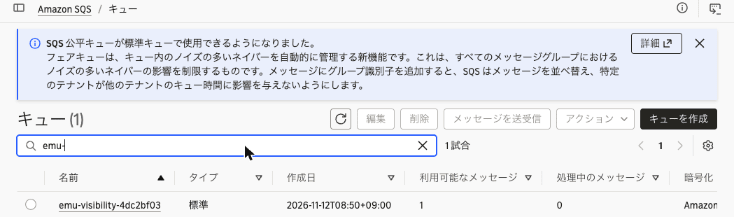
Searching for emu-demo in the Amazon S3 bucket list (all AWS Regions) found no matching bucket. The bucket emu-demo-4dc2bf03 created on the emulator does not exist in the real account.

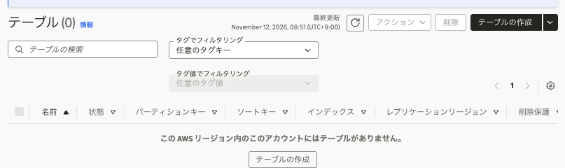
The emulator was running as us-east-1, but the real account had no DynamoDB tables in us-east-1. There were also no tables named ab or emu-demo-orders in ap-northeast-1.
Claims 1 and 3: prepare the spec and tests first, then run the verification loop locally
Following claim 3 of the contribution, "the engineer designs specifications, tests, and merge gates", I had Claude Code write the spec and the acceptance criteria (tests) first, and then implement. The subject is a worker that receives jobs from an SQS queue and writes results to a DynamoDB table.
In this section, Claude Code repeated the cycle from claim 1, "write code, run it, read the result, and decide the next change", against the emulator. The correspondence between each step and the subheadings of this section is as follows.
| Step | What Claude Code did | Subheading |
|---|---|---|
| Write | Wrote the spec (SPEC.md) and tests, then implemented worker.py |
Prepare the spec and acceptance criteria first; Implement and run the tests |
| Run | Ran pytest against the emulator |
Run the tests while unimplemented; Implement and run the tests |
| Read the result | Read the failures and test durations, and measured the time per API | Read the results and investigate what takes time |
| Decide the next change | Removed the table wait to confirm the failure, then restored it and reran | Removing the table wait makes the tests fail |
This time the tests passed with the first implementation. I went through failure-to-fix twice: when implementing from the unimplemented state, and in the experiment that removed the wait.
Prepare the spec and acceptance criteria first
The spec (SPEC.md) that Claude Code wrote first is as follows.
# ジョブワーカーの仕様

`worker.process_one(sqs, dynamodb, queue_url, table_name)` は、Amazon SQS のキューからメッセージを 1 件受け取り、Amazon DynamoDB のテーブルに結果を書き込む。

## 入力

- メッセージ本文は JSON: `{"job_id": "<文字列>", "amount": <整数>}`
- テーブルのパーティションキーは `job_id`(文字列)

## 振る舞い

1. キューが空なら `None` を返す
2. 本文が正しければ、テーブルに `{"job_id": ..., "amount": ..., "status": "DONE"}` を書き込み、メッセージを削除して `True` を返す
3. 同じ `job_id` のメッセージが再び届いても、テーブルの項目は 1 件のまま(既存の項目を上書きしない)。このメッセージも削除して `True` を返す
4. 本文が JSON として読めない、または `job_id` がない場合は、メッセージを削除せずに `False` を返す。メッセージは可視性タイムアウトの後に再び受信できる

## 合格条件

`tests/test_worker.py` のテストがすべて AWS Emulator 上で成功すること。
The test fixtures (tests/conftest.py) create a queue (visibility timeout 2 seconds) and a table for each test. I also added a check that refuses to start the tests unless the destination is the emulator.
tests/conftest.py:
@pytest.fixture(scope="session", autouse=True)
def only_against_the_emulator():
    """AWS Emulator 以外(実 AWS)に接続していたらテストを始めない。"""
    endpoint = os.environ.get("AWS_ENDPOINT_URL", "")
    if not re.fullmatch(r"https://127\.0\.0\.1:\d+", endpoint):
        pytest.exit(f"AWS_ENDPOINT_URL がループバックではありません: {endpoint!r}", returncode=3)
    account = boto3.client("sts").get_caller_identity()["Account"]
    if account != "000000000000":
        pytest.exit(f"エミュレーターではないアカウントです: {account}", returncode=3)
...
@pytest.fixture
def table_name(dynamodb):
    name = f"job-results-{uuid.uuid4().hex[:8]}"
    dynamodb.create_table(
        TableName=name,
        AttributeDefinitions=[{"AttributeName": "job_id", "AttributeType": "S"}],
        KeySchema=[{"AttributeName": "job_id", "KeyType": "HASH"}],
        BillingMode="PAY_PER_REQUEST",
    )
    dynamodb.get_waiter("table_exists").wait(TableName=name)
    yield name
    dynamodb.delete_table(TableName=name)
The tests (tests/test_worker.py) are four, corresponding to behaviors 1 to 4 in the "Behavior" section of SPEC.md. For example, the test for behavior 4 checks that the message is invisible during the visibility timeout and can be received again afterwards with ApproximateReceiveCount of 2.
tests/test_worker.py:
def test_invalid_message_is_kept_for_retry(sqs, dynamodb, queue_url, table_name):
    send(sqs, queue_url, "not-json")

    assert process_one(sqs, dynamodb, queue_url, table_name) is False

    assert items(dynamodb, table_name) == []
    assert receive_all(sqs, queue_url) == []  # Invisible during the visibility timeout
    time.sleep(3)
    again = receive_all(sqs, queue_url)
    assert [m["Body"] for m in again] == ["not-json"]
    assert again[0]["Attributes"]["ApproximateReceiveCount"] == "2"
Run the tests while unimplemented
Claude Code first ran the tests with process_one only raising NotImplementedError.
% uv run pytest -q
...
FAILED tests/test_worker.py::test_empty_queue_returns_none - NotImplementedError
FAILED tests/test_worker.py::test_processes_message_and_deletes_it - NotImple...
FAILED tests/test_worker.py::test_duplicate_job_is_written_once - NotImplemen...
FAILED tests/test_worker.py::test_invalid_message_is_kept_for_retry - NotImpl...
4 failed in 12.27s
All four failed.
Implement and run the tests
This is worker.py as Claude Code implemented it following the spec. To avoid overwriting the same job_id, it specifies attribute_not_exists(job_id) in ConditionExpression.
import json

from botocore.exceptions import ClientError

def process_one(sqs, dynamodb, queue_url, table_name):
    """SQS から 1 件受け取り、DynamoDB に書き込む。仕様は SPEC.md を参照。"""
    messages = sqs.receive_message(
        QueueUrl=queue_url, MaxNumberOfMessages=1, WaitTimeSeconds=0
    ).get("Messages", [])
    if not messages:
        return None
    message = messages[0]

    try:
        job = json.loads(message["Body"])
        job_id = job["job_id"]
    except (json.JSONDecodeError, KeyError):
        return False  # Do not delete: it is redelivered after the visibility timeout

    try:
        dynamodb.put_item(
            TableName=table_name,
            Item={
                "job_id": {"S": job_id},
                "amount": {"N": str(job["amount"])},
                "status": {"S": "DONE"},
            },
            ConditionExpression="attribute_not_exists(job_id)",
        )
    except ClientError as e:
        if e.response["Error"]["Code"] != "ConditionalCheckFailedException":
            raise
        # The same job_id was already processed. Delete only the message without overwriting

    sqs.delete_message(QueueUrl=queue_url, ReceiptHandle=message["ReceiptHandle"])
    return True
% uv run pytest -q --durations=0
....                                                                     [100%]
============================== slowest durations ===============================
3.09s setup    tests/test_worker.py::test_empty_queue_returns_none
3.04s setup    tests/test_worker.py::test_duplicate_job_is_written_once
3.04s call     tests/test_worker.py::test_duplicate_job_is_written_once
3.04s call     tests/test_worker.py::test_processes_message_and_deletes_it
3.04s call     tests/test_worker.py::test_invalid_message_is_kept_for_retry
3.02s setup    tests/test_worker.py::test_invalid_message_is_kept_for_retry
3.02s setup    tests/test_worker.py::test_processes_message_and_deletes_it
0.01s teardown tests/test_worker.py::test_invalid_message_is_kept_for_retry
0.01s teardown tests/test_worker.py::test_duplicate_job_is_written_once
0.01s teardown tests/test_worker.py::test_processes_message_and_deletes_it

(2 durations < 0.005s hidden.  Use -vv to show these durations.)
4 passed in 21.33s
All four passed with the first implementation.
Read the results and investigate what takes time
Claude Code next read the test durations. About 3 seconds of each call is from time.sleep(3) in the test. Setup, however, also took about 3 seconds each time. So it wrote and ran a script measure_latency.py that measures the time per API.
% uv run python measure_latency.py
sts.get_caller_identity                           6.4 ms
sqs.create_queue                                  2.0 ms
sqs.send_message                                  1.1 ms
sqs.receive_message                               0.9 ms
dynamodb.create_table                             2.3 ms
  -> TableStatus                             CREATING
dynamodb: CREATING -> ACTIVE (polling 0.1s)    3003.9 ms
dynamodb.put_item                                 5.3 ms
dynamodb.get_item                                 4.2 ms
dynamodb.get_waiter('table_exists').wait          50.8 ms
Each API call returned in 0.9 to 6.4 milliseconds. The roughly 3 seconds in setup is the time for the table to go from CREATING to ACTIVE.
Removing the table wait makes the tests fail
To cut those 3 seconds from setup, Claude Code then tried removing the table_exists wait (a synchronous step) from the fixture.
@@ -46,6 +46,5 @@
         KeySchema=[{"AttributeName": "job_id", "KeyType": "HASH"}],
         BillingMode="PAY_PER_REQUEST",
     )
-    dynamodb.get_waiter("table_exists").wait(TableName=name)
     yield name
     dynamodb.delete_table(TableName=name)
% uv run pytest -q --tb=line
...
E   botocore.errorfactory.ResourceInUseException: An error occurred (ResourceInUseException) when calling the DeleteTable operation: Attempt to change a resource which is still in use: Table is being ...
E   botocore.errorfactory.ResourceNotFoundException: An error occurred (ResourceNotFoundException) when calling the PutItem operation: Requested resource not found
E   botocore.errorfactory.ResourceNotFoundException: An error occurred (ResourceNotFoundException) when calling the Scan operation: Requested resource not found
FAILED tests/test_worker.py::test_processes_message_and_deletes_it - botocore...
FAILED tests/test_worker.py::test_duplicate_job_is_written_once - botocore.er...
FAILED tests/test_worker.py::test_invalid_message_is_kept_for_retry - botocor...
ERROR tests/test_worker.py::test_empty_queue_returns_none - botocore.errorfac...
ERROR tests/test_worker.py::test_processes_message_and_deletes_it - botocore....
ERROR tests/test_worker.py::test_duplicate_job_is_written_once - botocore.err...
ERROR tests/test_worker.py::test_invalid_message_is_kept_for_retry - botocore...
3 failed, 1 passed, 4 errors in 0.14s
PutItem and Scan on the table being created failed with ResourceNotFoundException, and DeleteTable in teardown also failed with ResourceInUseException. When Claude Code restored the wait and reran, all four passed again.
% uv run pytest -q
....                                                                     [100%]
4 passed in 21.34s
State is lost on restart
I compared the number of resources and the access key before and after a restart.
% aws s3 ls
2026-11-12 08:49:41 emu-demo-4dc2bf03
% aws dynamodb list-tables --query "length(TableNames)"
10
% aws sqs list-queues --query "length(QueueUrls)"
1
% aws configure list | grep access_key
access_key : ****************9D85     : shared-credentials-file :
% docker stop aws-emulator-9297
aws-emulator-9297
:
:
:
% docker run -d --rm --name aws-emulator-$PORT --user "$(id -u):$(id -g)" --memory=2g --memory-swap=2g \
  -p 127.0.0.1:$PORT:$PORT -e HOME="$HOME" -v "$HOME/.aws/emulator:$HOME/.aws/emulator" \
  aws-emulator -p $PORT --telemetry off --idle-timeout 3600 >/dev/null
% for i in $(seq 30); do
  curl -sf --cacert ~/.aws/emulator/9297/ca.pem https://127.0.0.1:9297/__admin/health && break
  sleep 1
done; echo
ok
% aws s3 ls
% aws dynamodb list-tables --query "length(TableNames)"
0
% aws sqs list-queues
% aws configure list | grep access_key
access_key : ****************2AC6     : shared-credentials-file :
After the restart, the bucket, tables, and queue were all gone, and the access key had changed to a new one. There were 10 tables because tables that could not be deleted in teardown during the run without the wait had been left behind.
Cleanup
I deleted the queue on real AWS.
% QURL=$(aws sqs get-queue-url --queue-name emu-visibility-4dc2bf03 --query QueueUrl --output text)
% aws sqs list-queue-tags --queue-url "$QURL" --output table
--------------------------------------------------------------------------------
|                                 ListQueueTags                                |
+------------------------------------------------------------------------------+
||                                    Tags                                    ||
|+----------+---------------------+-------------------------+-----------------+|
||   owner  |       purpose       |         run_id          |       ttl       ||
|+----------+---------------------+-------------------------+-----------------+|
||  tried-it|  blog-verification  |  emu-20261112-4dc2bf03  |  20261112T0150Z ||
|+----------+---------------------+-------------------------+-----------------+|
% aws sqs delete-queue --queue-url "$QURL" && echo "deleted: $QURL"
deleted: https://sqs.ap-northeast-1.amazonaws.com/111122223333/emu-visibility-4dc2bf03
Using tags and names, I confirmed that no resources remained in the real account.
% aws resourcegroupstaggingapi get-resources --tag-filters Key=run_id,Values=emu-20261112-4dc2bf03 --query "ResourceTagMappingList[].ResourceARN"
[]
% aws sqs list-queues --queue-name-prefix emu- --query "QueueUrls" --output text
None
% aws dynamodb list-tables --query "TableNames[?starts_with(@, 'emu-') || @ == 'ab']"
[]
I also confirmed in the console that no queues starting with emu- remained.
Finally, I stopped the emulator, deleted the files I created, and stopped the Podman machine. The stopped emulator had deleted the files it wrote under ~/.aws/emulator/9297/.
% docker stop aws-emulator-9297
aws-emulator-9297
% find ~/.aws/emulator -maxdepth 2 | sort
/Users/classmethod/.aws/emulator
/Users/classmethod/.aws/emulator/9297
/Users/classmethod/.aws/emulator/9297.env
% rm ~/.aws/emulator/9297.env && rmdir ~/.aws/emulator/9297 ~/.aws/emulator && echo "removed ~/.aws/emulator"
removed ~/.aws/emulator
% podman machine stop
Machine "podman-machine-default" stopped successfully
Discussion
The contribution's claims and these results
Claims 1 and 2 (does it behave like the real thing?)
For the two behaviors I tried, the emulator returned the same results as real AWS. The DynamoDB table name validation error matched down to the wording of the message, and for the SQS visibility timeout even the progression of the receive count matched. It also reproduced that table creation proceeds asynchronously and that writes to a table being created are rejected. The DynamoDB documentation explains that a table right after CreateTable is CREATING and only an ACTIVE table can be read and written.
However, I compared only two behaviors. Agreement across a whole service is judged by the fidelity score published with each release. The v1.0.322 release I used had scores.json.gz attached. I tallied the test results in this file, limited to those whose kind is behavioral and whose services contains exactly one service, as follows (the tallying method is mine and is not necessarily the same as the official score calculation).
| Service | Pass | Fail | Total |
|---|---|---|---|
| Amazon DynamoDB | 656 | 145 | 801 |
| Amazon SQS | 286 | 18 | 304 |
| Amazon S3 | 763 | 161 | 924 |
| AWS STS | 83 | 64 | 149 |
Each test result in scores.json.gz has a name called unitId. The test bodies are in the aws-emulator-evaluation-suite repository, and the unitId with its first "." replaced by "/" corresponds to the key in the repository's manifest.jsonl. In manifest.jsonl you can find, for each key, the test file location and the operations the test calls. Three tests seem relevant to the behaviors I tried (the test file locations were checked in manifest.jsonl on the main branch as of November 12, 2026, and may not be the same version used to score v1.0.322).
| unitId | Result in v1.0.322 | Test file |
|---|---|---|
sqs.visibility-timeout-natural-expiry |
Pass | behavioral/sqs/check_visibility_timeout_natural_expiry.py |
dynamodb.table-name-charset-and-length-validated-before-existence-rejected |
Pass | behavioral/dynamodb/check_table_name_charset_and_length_validated_before_existence_rejected.py |
dynamodb.ddbctl-table-refuses-changes-while-creating-and-deleting |
Fail | behavioral/dynamodb/check_ddbctl_table_refuses_changes_while_creating_and_deleting.py |
Of these, sqs.visibility-timeout-natural-expiry and dynamodb.table-name-charset-and-length-validated-before-existence-rejected, which by their names correspond to the behaviors I tried, passed. On the other hand, dynamodb.ddbctl-table-refuses-changes-while-creating-and-deleting, which checks that changes to tables being created or deleted are rejected, failed. In addition to DeleteTable, this test also calls UpdateTable, CreateBackup, DeleteBackup, and UpdateContinuousBackups. What I confirmed was only that DeleteTable on a table being created is rejected. The score file does not include reasons for failures, so I could not tell which operation differed from AWS. Whether the operations you use are covered by fidelity tests must be checked per operation.
The v1.0.322 release notes also included fixes named dynamodb-asynchronous-resource-states-never-settle-to-their and dynamodb-validationexception-messages-diverge-from-the-wording-aws. Judging from the names, fixes related to the DynamoDB asynchronous state transitions and validation error wording that I tried were included in the release I used.
Claims 1 and 3 (can the verification loop run locally?)
API calls returned in a few milliseconds each, and I could repeat running and fixing tests without deployment or an AWS account. The 21 seconds for the whole test run is the sum of time.sleep in the tests and the table creation waits.
The tests failed when I removed the table wait because the emulator reproduces the CREATING state. The product page explains that a mock returns the values you specify, while the emulator executes the API, including validation, errors, and state retained across calls.
Whether tests passed was decided by the results of running against the emulator. The scope of using real AWS (which account and Region, what to create and delete) was decided and approved by a person.
Limitations and caveats
- Starting under Podman: When using Podman as a Docker-compatible command, the documentation's
docker runas is did not start, failing withPermission denied (os error 13). Adding--user "$(id -u):$(id -g)"made it start. The documentation presents this option for Linux hosts - Real AWS credentials: In the emulator shell, unset the environment variables for real AWS credentials. Credentials in environment variables take precedence over the credentials file, so if they remain, requests signed with the real keys are sent to the emulator (the emulator rejects them)
- In a shell where
AWS_ENDPOINT_URLwas forgotten, the code calls real AWS. This time I made the test fixture check the destination and account before starting - IAM policies: The emulator does not evaluate IAM policies the way AWS does. Test security settings on real AWS
- Regions and accounts: One emulator acts as one account and does not separate resources by Region or account. To try multiple Regions, start one on a separate port per Region
- Fidelity verification Region: AWS verifies fidelity tests in us-west-2 (us-east-1 for global services). My comparison was done in ap-northeast-1
- Telemetry: Enabled by default. I disabled it with
--telemetry offthis time
Conclusion
I ran AWS Emulator on Podman on macOS and compared DynamoDB and SQS behavior with real AWS; within the range I tried, even the error messages and receive counts matched. With the spec and tests prepared first, I could repeat running tests and fixing in a local environment where APIs return in a few milliseconds. As the failure when I removed the table creation wait showed, asynchronous state transitions can also be verified by tests.
On the other hand, fidelity differs by service and operation, and IAM policies are not evaluated. If you have coding agents write code that calls AWS, check the fidelity scores for the operations you use, and then consider trying AWS Emulator as a test environment for the agent to use while it works.
