[新サービス] AWS Emulator 発表!実 AWS と比べ、Claude Code にローカルでテストと修正を繰り返させてみた

クラウド事業統括本部の石川です。2026 年 11 月 11 日に、AWS API のローカルエミュレーターである AWS Emulator が一般提供されました。同じ日に All Things Distributed に掲載された Swami Sivasubramanian 氏の寄稿が AWS Emulator について述べている主張を、macOS 上で AWS Emulator を動かし、実 AWS と比べながら確かめてみました。
Werner Vogels 氏のブログ All Things Distributed に、Swami Sivasubramanian 氏の寄稿「AWS Emulator and the engineer's job when agents write the code」が掲載されました。寄稿の主張は次の 3 点にまとめられます。
- 主張 1: コーディングエージェントはコードを書き、実行し、結果を読んで次の変更を決める、という手順を繰り返す。呼び出し先のサービスが実物と同じように振る舞えば、エージェントは書きながら自分の成果を検証でき、最初から正しいコードを書く割合が上がる。AWS Emulator はその検証先を手元のマシンに用意する
- 主張 2: AWS Emulator では、公開 API モデルから作った忠実度テスト(fidelity test)をエージェントが実 AWS に対して合格するまで直し、そのテストにエミュレーターが合格するまで実装した。例として、Amazon SQS で受信済みのメッセージが可視性タイムアウトまで他の受信者から見えないことが挙げられている
- 主張 3: エージェントがコードを書くときのエンジニアの仕事は、エージェントが自律的に作業できるようにすることであり、そのために仕様、テスト、マージゲートを設計する
本記事では主張 1 と 2 について「実 AWS と同じ結果とエラーを返すか」を、主張 1 と 3 について「仕様とテストを先に用意すれば、ローカルで書く・実行する・結果を読むを繰り返せるか」を確かめます。
AWS Emulator とは
AWS Emulator は AWS API をローカルの HTTPS エンドポイントで提供するプログラムです。AWS CLI や AWS SDK のリクエスト先を環境変数でこのエンドポイントに切り替えると、リクエストは AWS に送られず、エミュレーターのメモリ上のリソースに対して処理されます。AWS アカウントは不要で、追加のサービス料金もかかりません。ソースコードは CC0 1.0 Universal で GitHub に公開されています。
AWS CLI や AWS SDK から見た AWS Emulator の位置づけは次のとおりです。
テストの接続先として実 AWS と比べると、違いは次のとおりです。
| 実 AWS | AWS Emulator | |
|---|---|---|
| AWS アカウント | 必要 | 不要 |
| 料金 | 作成したリソースの料金がかかる | 追加のサービス料金はない |
| リソースの保存先 | AWS | エミュレーターのメモリ(停止すると消える) |
| IAM ポリシーの評価 | 評価される | AWS と同じようには評価しない |
| 本番ワークロード | 使える | 使えない(構築とテスト用) |
主な仕様は次のとおりです。
- Linux では RPM パッケージまたは Debian パッケージで導入します。macOS と Windows ではドキュメントに掲載された Dockerfile からイメージをビルドし、コンテナで動かします(ビルド済みのイメージは公開されていません)
- 既定では
127.0.0.1:9297で HTTPS を提供します。起動のたびに認証情報、設定ファイル、証明書を~/.aws/emulator/<ポート>/に生成し、リクエストにはそのキーによる SigV4 署名を求めます - 1 つのエミュレーターは 1 つのアカウント(
000000000000)として動作し、リソースはメモリにだけ保持します。停止するとリソースは消えます - 各サービスは AWS SDK と同じ公開 API モデルから生成されています。サポート済みのオペレーションは AWS と同じ結果とエラーを返し、未サポートのオペレーションは
501 Not Implementedを返します - AWS との一致度(忠実度)は、忠実度テストの合格数を忠実度スコアとして、リリースごとに公開しています
- IAM ポリシーを AWS と同じようには評価しません。セキュリティのテストや本番ワークロードには使えません
- 匿名の利用状況データ(テレメトリ)の送信が既定で有効です。
--telemetry offで無効にできます
やってみた
前提条件
- macOS 26.7.3(arm64)
- Podman 5.6.0(クライアント)/ 5.6.2(Podman machine 側、linux/arm64)。
- 私の環境: [Tips] PodmanでDockerのコマンドを使う方法では
dockerコマンドの実体が Podman です。
- 私の環境: [Tips] PodmanでDockerのコマンドを使う方法では
- AWS CLI 2.40.1(執筆時点の最新)
- AWS Emulator 1.0.322(Release date 2026.11.10)
- 比較に使う実 AWS: ap-northeast-1
- エージェントの検証ループ: Claude Code、uv、boto3 1.43.126、pytest 9.2.0
検証環境の構成は次のとおりです。エミュレーター用のシェルと実 AWS 用のシェルを分け、エミュレーター用のシェルでは実 AWS の認証情報を unset してから AWS CLI を実行しました。
イメージをビルドする
PC上で Podman machine を起動し、ドキュメントの Dockerfile でイメージをビルドしました。Apple シリコンの Mac なので、ドキュメントの指示に従ってパッケージ名を aws-emulator-aarch64.rpm に変えています。
% podman machine start
Starting machine "podman-machine-default"
API forwarding listening on: /var/run/docker.sock
Docker API clients default to this address. You do not need to set DOCKER_HOST.

Machine "podman-machine-default" started successfully
FROM public.ecr.aws/amazonlinux/amazonlinux:2023-minimal
ADD https://downloads.aws.com/aws-emulator/packages/aws-emulator/LTS/latest/aws-emulator-aarch64.rpm /tmp/aws-emulator.rpm
RUN rpm -i /tmp/aws-emulator.rpm && rm /tmp/aws-emulator.rpm \
    && mkdir -p /home/emulator && chown 1000 /home/emulator
USER 1000
ENV HOME=/home/emulator
EXPOSE 9297
ENTRYPOINT ["aws-emulator", "-b", "0.0.0.0"]
% time docker build -t aws-emulator .
STEP 1/7: FROM public.ecr.aws/amazonlinux/amazonlinux:2023-minimal
...
STEP 2/7: ADD https://downloads.aws.com/aws-emulator/packages/aws-emulator/LTS/latest/aws-emulator-aarch64.rpm /tmp/aws-emulator.rpm
--> 8805988b0a0c
STEP 3/7: RUN rpm -i /tmp/aws-emulator.rpm && rm /tmp/aws-emulator.rpm     && mkdir -p /home/emulator && chown 1000 /home/emulator
warning: /tmp/aws-emulator.rpm: Header V4 RSA/SHA512 Signature, key ID d940f624: NOKEY
--> 608eeecaa5be
...
STEP 7/7: ENTRYPOINT ["aws-emulator", "-b", "0.0.0.0"]
COMMIT aws-emulator
--> fceb8e9812bb
Successfully tagged localhost/aws-emulator:latest
fceb8e9812bbe0681b42c3b1803f583a1eafeea2268ea2a6fbe1964068da1e3b
docker build -t aws-emulator .  0.01s user 0.01s system 0% cpu 26.930 total
RPM の署名鍵がイメージに登録されていないため NOKEY の警告が出ていますが、鍵 ID d940f624 はドキュメントに掲載されている公開鍵のフィンガープリントの末尾(D940 F624)と一致しています。
% docker run --rm aws-emulator -v
Version: 1.0.322
Release date: 2026.11.10
Commit: 7753983c6e495ec3612695b1336bf4936fc7b7fd
% docker images localhost/aws-emulator
REPOSITORY              TAG         IMAGE ID      CREATED         SIZE
localhost/aws-emulator  latest      fceb8e9812bb  17 seconds ago  1.16 GB
コンテナを起動する
ドキュメントの手順2(Start the container)の docker run に、次のオプションを加えて起動しました。
| 加えたオプション | 目的 |
|---|---|
-d、--name aws-emulator-$PORT |
バックグラウンドで起動し、名前を指定してログの確認や停止をするため |
--user "$(id -u):$(id -g)" |
Podman 環境で、マウント先の ~/.aws/emulator に書き込めるようにするため(この節の最後の補足を参照) |
--telemetry off |
テレメトリを無効にするため |
--idle-timeout 3600 |
API の呼び出しが 1 時間なければ自動で停止させるため |
各オプションの仕様はコマンドリファレンスに記載されています。
% mkdir -p ~/.aws/emulator
% PORT=9297
% docker run -d --rm --name aws-emulator-$PORT \
  --user "$(id -u):$(id -g)" \
  --memory=2g --memory-swap=2g \
  -p 127.0.0.1:$PORT:$PORT \
  -e HOME="$HOME" -v "$HOME/.aws/emulator:$HOME/.aws/emulator" \
  aws-emulator -p $PORT --telemetry off --idle-timeout 3600
5e95e140a6ade96698a5db7a048e0d9c5179bdd85a0d64c275346fb8293e442d
% docker ps --filter name=aws-emulator --format "{{.Names}}  {{.Status}}  {{.Ports}}"
aws-emulator-9297  Up 5 seconds  127.0.0.1:9297->9297/tcp
% docker logs aws-emulator-9297
{"timestamp":"2026-11-11T23:49:07.133428Z","level":"INFO","fields":{"message":"aws-emulator emulator starting"},"target":"aws_emulator"}
{"timestamp":"2026-11-11T23:49:07.160958Z","level":"INFO","fields":{"message":"request authentication enabled","credentials_file":"/Users/classmethod/.aws/emulator/9297/emulator_credentials"},"target":"aws_emulator_server"}
{"timestamp":"2026-11-11T23:49:07.164124Z","level":"INFO","fields":{"message":"emulator server information","endpoint_url":"https://127.0.0.1:9297","health_check_url":"https://127.0.0.1:9297/__admin/health","config_file":"/Users/classmethod/.aws/emulator/9297/config","ca_file":"/Users/classmethod/.aws/emulator/9297/ca.pem","java_truststore_file":"/Users/classmethod/.aws/emulator/9297/truststore.p12"},"target":"aws_emulator_server"}
{"timestamp":"2026-11-11T23:49:07.164139Z","level":"WARN","fields":{"message":"the emulator listens on 0.0.0.0, not loopback: other machines that can reach port 9297 can call it; bind 127.0.0.1 (-b 127.0.0.1) unless that is intended","bind_address":"0.0.0.0"},"target":"aws_emulator_server"}
This emulator collects usage and error telemetry: disabled (via the embedding configuration) — to turn it back on, remove every opt-out setting and restart
% ls -l ~/.aws/emulator/9297
total 32
-rw-------@ 1 ishikawa.satoru  staff  566 Nov 12 08:49 ca.pem
-rw-------@ 1 ishikawa.satoru  staff  160 Nov 12 08:49 config
-rw-------@ 1 ishikawa.satoru  staff  116 Nov 12 08:49 emulator_credentials
-rw-------@ 1 ishikawa.satoru  staff  551 Nov 12 08:49 truststore.p12
起動ログの emulator server information の行に、エンドポイント、ヘルスチェックの URL、設定ファイルと証明書のパスが出力されています。コンテナ内では -b 0.0.0.0 で待ち受けるため WARN が出ますが、ホスト側は -p 127.0.0.1:9297:9297 で自分のマシンにだけ公開しています。
補足: ドキュメントのコマンドのまま(
--userなし)では、コンテナはemulator serve failed: server I/O error: Permission denied (os error 13)を出力してすぐに終了しました。コンテナのプロセスは Dockerfile のUSER 1000で動きますが、Podman machine の中では、マウント先が macOS のユーザー(UID 501、GID 20)の所有として見えるため、書き込めませんでした。--userns=keep-idでは解決せず、--user "$(id -u):$(id -g)"で macOS のユーザーと同じ UID・GID で動かすと起動しました。ドキュメントでは、--userは Linux ホスト向けの指定として案内されています。今回確認したのは macOS の Podman 5.6 だけです。
エミュレーターに接続する
接続先を切り替える環境変数を、次の内容で ~/.aws/emulator/9297.env にまとめました。最後の行で、実 AWS の認証情報を渡す環境変数を解除しています。
export AWS_ENDPOINT_URL=https://127.0.0.1:9297
export AWS_SHARED_CREDENTIALS_FILE=$HOME/.aws/emulator/9297/emulator_credentials
export AWS_CONFIG_FILE=$HOME/.aws/emulator/9297/config
export AWS_CA_BUNDLE=$HOME/.aws/emulator/9297/ca.pem
export AWS_EC2_METADATA_DISABLED=true
export AWS_DISABLE_HOST_PREFIX_INJECTION=true
export AWS_REGION=us-east-1
export AWS_DEFAULT_REGION=us-east-1
unset AWS_ACCESS_KEY_ID AWS_SECRET_ACCESS_KEY AWS_SESSION_TOKEN AWS_PROFILE
以降のエミュレーター向けのコマンドは、このファイルの変数を設定したシェル(source ~/.aws/emulator/9297.env)で実行しています。まず、ヘルスチェックと接続先のアカウントを確認しました。
% curl --cacert ~/.aws/emulator/9297/ca.pem https://127.0.0.1:9297/__admin/health
ok
% aws sts get-caller-identity
{
    "UserId": "AIDAH5I7GEMO7ADXNFAZU",
    "Account": "000000000000",
    "Arn": "arn:aws:iam::000000000000:user/emulator"
}
% aws configure list
NAME       : VALUE                    : TYPE             : LOCATION
profile    : <not set>                : None             : None
access_key : ****************9D85     : shared-credentials-file :
secret_key : ****************A66C     : shared-credentials-file :
region     : us-east-1                : env              : ['AWS_REGION', 'AWS_DEFAULT_REGION']
Account が 000000000000 なので、リクエストはエミュレーターに届いています。認証情報はエミュレーターが生成したファイル(shared-credentials-file)から読まれています。
主張 1・2: 実 AWS と同じ結果とエラーを返すか
Amazon S3 にオブジェクトを置く
まず、ドキュメントの例と同じように Amazon S3 を操作しました。
% echo "hello from the emulator" > hello.txt
% aws s3 mb s3://emu-demo-4dc2bf03
make_bucket: emu-demo-4dc2bf03
% aws s3 cp hello.txt s3://emu-demo-4dc2bf03/
upload: ./hello.txt to s3://emu-demo-4dc2bf03/hello.txt
% aws s3 ls s3://emu-demo-4dc2bf03/
2026-11-12 08:49:42         24 hello.txt
% aws s3api list-buckets --query "Buckets[].Name" --output text
emu-demo-4dc2bf03
普段と同じコマンドで、バケットの作成、アップロード、一覧の取得ができました。
Amazon DynamoDB のバリデーションエラーを実 AWS と比べる
Amazon DynamoDB のテーブル名は 3 文字以上である必要があります。2 文字のテーブル名 ab で create-table を実行しました。
% aws dynamodb create-table --table-name ab \
    --attribute-definitions AttributeName=id,AttributeType=S \
    --key-schema AttributeName=id,KeyType=HASH \
    --billing-mode PAY_PER_REQUEST

aws: [ERROR]: An error occurred (ValidationException) when calling the CreateTable operation: 1 validation error detected: Value 'ab' at 'tableName' failed to satisfy constraint: Member must have length greater than or equal to 3
An error occurred (ValidationException) when calling the CreateTable operation という形式なので、AWS CLI の入力チェックではなくエミュレーターが返したエラーです。
同じコマンドを実 AWS 用のシェルから ap-northeast-1 で実行しました。万一テーブルが作られた場合に後片付けで見つけられるよう、タグを付けています。
% aws sts get-caller-identity --query "[Account,Arn]" --output text
111122223333	arn:aws:sts::111122223333:assumed-role/<ロール名>/<セッション名>
% echo "region: $AWS_REGION / endpoint override: ${AWS_ENDPOINT_URL:-(none)}"
region: ap-northeast-1 / endpoint override: (none)
% aws dynamodb create-table --table-name ab \
    --attribute-definitions AttributeName=id,AttributeType=S \
    --key-schema AttributeName=id,KeyType=HASH \
    --billing-mode PAY_PER_REQUEST \
    --tags Key=run_id,Value=emu-20261112-4dc2bf03 Key=owner,Value=tried-it Key=purpose,Value=blog-verification Key=ttl,Value=20261112T0150Z

aws: [ERROR]: An error occurred (ValidationException) when calling the CreateTable operation: 1 validation error detected: Value 'ab' at 'tableName' failed to satisfy constraint: Member must have length greater than or equal to 3
エミュレーターと実 AWS のエラー出力をそれぞれファイルに保存し、diff で比べたところ、差分はありませんでした。
続いて、正常なテーブルを作成して項目を読み書きしました。
% aws dynamodb create-table --table-name emu-demo-orders \
    --attribute-definitions AttributeName=id,AttributeType=S \
    --key-schema AttributeName=id,KeyType=HASH \
    --billing-mode PAY_PER_REQUEST \
    --query "TableDescription.[TableName,TableStatus]" --output text
emu-demo-orders	CREATING
% aws dynamodb wait table-exists --table-name emu-demo-orders
% aws dynamodb put-item --table-name emu-demo-orders \
    --item '{"id": {"S": "order-1"}, "status": {"S": "NEW"}}'
% aws dynamodb get-item --table-name emu-demo-orders --key '{"id": {"S": "order-1"}}'
{
    "Item": {
        "id": {
            "S": "order-1"
        },
        "status": {
            "S": "NEW"
        }
    }
}
create-table の直後の TableStatus は CREATING でした。エミュレーターでも、テーブルの作成は非同期に進みます。
作成中のテーブルに書き込むとどうなるかも試してみました。
% aws dynamodb create-table --table-name emu-not-yet-active \
    --attribute-definitions AttributeName=id,AttributeType=S \
    --key-schema AttributeName=id,KeyType=HASH \
    --billing-mode PAY_PER_REQUEST \
    --query "TableDescription.TableStatus" --output text
CREATING
% aws dynamodb put-item --table-name emu-not-yet-active --item '{"id": {"S": "1"}}'

aws: [ERROR]: An error occurred (ResourceNotFoundException) when calling the PutItem operation: Requested resource not found
% echo "exit=$?"
exit=254
% aws dynamodb describe-table --table-name emu-not-yet-active --query "Table.TableStatus" --output text
ACTIVE
CREATING の間の PutItem は ResourceNotFoundException で拒否され、その後 ACTIVE になりました。
Amazon SQS の可視性タイムアウトを実 AWS と比べる
寄稿で例に挙げられている Amazon SQS の可視性タイムアウトを試しました。次のスクリプトで、メッセージを 1 件送信し、可視性タイムアウト 5 秒で受信したあと、直後と 6 秒後に再び受信します。
#!/bin/zsh
# 受信したメッセージが可視性タイムアウトまで他の受信者から見えないことを確かめる
# usage: sqs_visibility.sh <queue-name> [tags]
set -u
QUEUE_NAME=$1
TAGS=${2:-}

if [[ -n $TAGS ]]; then
  QURL=$(aws sqs create-queue --queue-name "$QUEUE_NAME" --tags "$TAGS" --query QueueUrl --output text)
else
  QURL=$(aws sqs create-queue --queue-name "$QUEUE_NAME" --query QueueUrl --output text)
fi
echo "QueueUrl: $QURL"

aws sqs send-message --queue-url "$QURL" --message-body "job-1" --query MessageId --output text

T0=$(date +%s)
elapsed() { echo "t=+$(( $(date +%s) - T0 ))s"; }

receive() {
  aws sqs receive-message --queue-url "$QURL" \
    --visibility-timeout 5 --wait-time-seconds 0 \
    --message-system-attribute-names ApproximateReceiveCount \
    --query 'Messages[].[Body,Attributes.ApproximateReceiveCount]' --output text
}

echo "[1回目の受信] $(elapsed)"; receive
echo "[直後に再受信] $(elapsed)"; R=$(receive); echo "${R:-(メッセージなし)}"
sleep 6
echo "[6秒後に再受信] $(elapsed)"; receive
エミュレーターでの結果です。
% ./scripts/sqs_visibility.sh emu-visibility-4dc2bf03
QueueUrl: https://sqs.us-east-1.amazonaws.com/000000000000/emu-visibility-4dc2bf03
b69d4d89-51ba-4f83-bc20-b169ea2bb467
[1回目の受信] t=+0s
job-1	1
[直後に再受信] t=+0s
None
[6秒後に再受信] t=+7s
job-1	2
1 回目の受信では ApproximateReceiveCount が 1、直後の再受信ではメッセージが返らず(--output text では None と表示されます)、6 秒後の再受信で同じメッセージが ApproximateReceiveCount 2 で返りました。返ってきた QueueUrl は AWS と同じ形式の https://sqs.us-east-1.amazonaws.com/000000000000/... でした。
実 AWS(ap-northeast-1)ではタグを付けてキューを作成して実行しました。
% ./scripts/sqs_visibility.sh emu-visibility-4dc2bf03 run_id=emu-20261112-4dc2bf03,owner=tried-it,purpose=blog-verification,ttl=20261112T0150Z
QueueUrl: https://sqs.ap-northeast-1.amazonaws.com/111122223333/emu-visibility-4dc2bf03
308f9c73-152c-48b1-9815-79a2f8cf753b
[1回目の受信] t=+0s
job-1	1
[直後に再受信] t=+0s
None
[6秒後に再受信] t=+7s
job-1	2
2 つの出力を、QueueUrl と MessageId の行を除いて diff で比べたところ、差分はありませんでした。
実アカウントにリソースが作られていないことをコンソールで確認する
マネジメントコンソールで実アカウント側を確認しました。
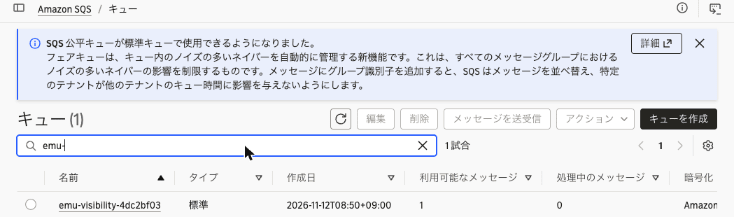
Amazon S3 のバケット一覧(すべての AWS リージョン)で emu-demo を検索しても、一致するバケットはありませんでした。エミュレーターで作ったバケット emu-demo-4dc2bf03 は実アカウントには存在しません。

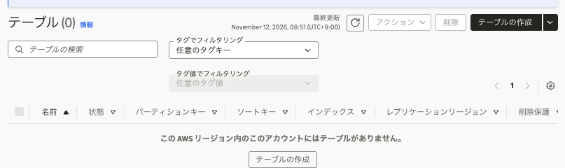
エミュレーターは us-east-1 として動いていましたが、実アカウントの us-east-1 には DynamoDB テーブルが 1 つもありませんでした。ap-northeast-1 にも ab や emu-demo-orders というテーブルはありませんでした。
主張 1・3: 仕様とテストを先に用意して、ローカルで検証ループを回す
寄稿の主張 3『エンジニアは仕様、テスト、マージゲートを設計する』に沿って、Claude Code に仕様と合格条件(テスト)を先に作成させてから実装させました。題材は SQS のキューからジョブを受け取り、DynamoDB のテーブルに結果を書き込むワーカーです。
この節では、寄稿の主張 1 にある「コードを書き、実行し、結果を読んで次の変更を決める」という手順を、Claude Code がエミュレーターを相手に繰り返しました。各手順と、この節の小見出しの対応は次のとおりです。
| 手順 | Claude Code がしたこと | 小見出し |
|---|---|---|
| 書く | 仕様(SPEC.md)とテストを書き、そのあと worker.py を実装する |
仕様と合格条件を先に用意する、実装してテストを実行する |
| 実行する | エミュレーターに対して pytest を実行する |
未実装のままテストを実行する、実装してテストを実行する |
| 結果を読む | 失敗の内容とテストの所要時間を読み、API ごとの所要時間を測る | 結果を読んで時間がかかっている箇所を調べる |
| 次の変更を決める | テーブルの待機を外して失敗を確かめ、元に戻して再実行する | テーブルの待機を外すとテストが失敗する |
今回は実装の 1 回目でテストに合格しました。失敗から修正までを回したのは、未実装の状態から実装したときと、待機を外した実験の 2 回です。
仕様と合格条件を先に用意する
Claude Code が最初に書いた仕様(SPEC.md)は次のとおりです。
# ジョブワーカーの仕様

`worker.process_one(sqs, dynamodb, queue_url, table_name)` は、Amazon SQS のキューからメッセージを 1 件受け取り、Amazon DynamoDB のテーブルに結果を書き込む。

## 入力

- メッセージ本文は JSON: `{"job_id": "<文字列>", "amount": <整数>}`
- テーブルのパーティションキーは `job_id`(文字列)

## 振る舞い

1. キューが空なら `None` を返す
2. 本文が正しければ、テーブルに `{"job_id": ..., "amount": ..., "status": "DONE"}` を書き込み、メッセージを削除して `True` を返す
3. 同じ `job_id` のメッセージが再び届いても、テーブルの項目は 1 件のまま(既存の項目を上書きしない)。このメッセージも削除して `True` を返す
4. 本文が JSON として読めない、または `job_id` がない場合は、メッセージを削除せずに `False` を返す。メッセージは可視性タイムアウトの後に再び受信できる

## 合格条件

`tests/test_worker.py` のテストがすべて AWS Emulator 上で成功すること。
テストの fixture(tests/conftest.py)ではテストごとにキュー(可視性タイムアウト 2 秒)とテーブルを作成します。あわせて、接続先がエミュレーターでなければテストを始めない確認を入れました。
tests/conftest.py:
@pytest.fixture(scope="session", autouse=True)
def only_against_the_emulator():
    """AWS Emulator 以外(実 AWS)に接続していたらテストを始めない。"""
    endpoint = os.environ.get("AWS_ENDPOINT_URL", "")
    if not re.fullmatch(r"https://127\.0\.0\.1:\d+", endpoint):
        pytest.exit(f"AWS_ENDPOINT_URL がループバックではありません: {endpoint!r}", returncode=3)
    account = boto3.client("sts").get_caller_identity()["Account"]
    if account != "000000000000":
        pytest.exit(f"エミュレーターではないアカウントです: {account}", returncode=3)
...
@pytest.fixture
def table_name(dynamodb):
    name = f"job-results-{uuid.uuid4().hex[:8]}"
    dynamodb.create_table(
        TableName=name,
        AttributeDefinitions=[{"AttributeName": "job_id", "AttributeType": "S"}],
        KeySchema=[{"AttributeName": "job_id", "KeyType": "HASH"}],
        BillingMode="PAY_PER_REQUEST",
    )
    dynamodb.get_waiter("table_exists").wait(TableName=name)
    yield name
    dynamodb.delete_table(TableName=name)
テスト(tests/test_worker.py)は SPEC.md の「振る舞い」の 1〜4 に対応する 4 件です。たとえば振る舞い 4 のテストでは、可視性タイムアウト中はメッセージが見えず、経過後に ApproximateReceiveCount が 2 で再び受信できることを確かめます。
tests/test_worker.py:
def test_invalid_message_is_kept_for_retry(sqs, dynamodb, queue_url, table_name):
    send(sqs, queue_url, "not-json")

    assert process_one(sqs, dynamodb, queue_url, table_name) is False

    assert items(dynamodb, table_name) == []
    assert receive_all(sqs, queue_url) == []  # 可視性タイムアウト中は見えない
    time.sleep(3)
    again = receive_all(sqs, queue_url)
    assert [m["Body"] for m in again] == ["not-json"]
    assert again[0]["Attributes"]["ApproximateReceiveCount"] == "2"
未実装のままテストを実行する
Claude Code はまず、process_one が NotImplementedError を送出するだけの状態でテストを実行しました。
% uv run pytest -q
...
FAILED tests/test_worker.py::test_empty_queue_returns_none - NotImplementedError
FAILED tests/test_worker.py::test_processes_message_and_deletes_it - NotImple...
FAILED tests/test_worker.py::test_duplicate_job_is_written_once - NotImplemen...
FAILED tests/test_worker.py::test_invalid_message_is_kept_for_retry - NotImpl...
4 failed in 12.27s
4 件とも失敗しました。
実装してテストを実行する
Claude Code が仕様に沿って実装した worker.py です。同じ job_id を上書きしないよう、ConditionExpression に attribute_not_exists(job_id) を指定しています。
import json

from botocore.exceptions import ClientError

def process_one(sqs, dynamodb, queue_url, table_name):
    """SQS から 1 件受け取り、DynamoDB に書き込む。仕様は SPEC.md を参照。"""
    messages = sqs.receive_message(
        QueueUrl=queue_url, MaxNumberOfMessages=1, WaitTimeSeconds=0
    ).get("Messages", [])
    if not messages:
        return None
    message = messages[0]

    try:
        job = json.loads(message["Body"])
        job_id = job["job_id"]
    except (json.JSONDecodeError, KeyError):
        return False  # 削除しない: 可視性タイムアウト後に再配信される

    try:
        dynamodb.put_item(
            TableName=table_name,
            Item={
                "job_id": {"S": job_id},
                "amount": {"N": str(job["amount"])},
                "status": {"S": "DONE"},
            },
            ConditionExpression="attribute_not_exists(job_id)",
        )
    except ClientError as e:
        if e.response["Error"]["Code"] != "ConditionalCheckFailedException":
            raise
        # 同じ job_id は処理済み。上書きせずにメッセージだけ削除する

    sqs.delete_message(QueueUrl=queue_url, ReceiptHandle=message["ReceiptHandle"])
    return True
% uv run pytest -q --durations=0
....                                                                     [100%]
============================== slowest durations ===============================
3.09s setup    tests/test_worker.py::test_empty_queue_returns_none
3.04s setup    tests/test_worker.py::test_duplicate_job_is_written_once
3.04s call     tests/test_worker.py::test_duplicate_job_is_written_once
3.04s call     tests/test_worker.py::test_processes_message_and_deletes_it
3.04s call     tests/test_worker.py::test_invalid_message_is_kept_for_retry
3.02s setup    tests/test_worker.py::test_invalid_message_is_kept_for_retry
3.02s setup    tests/test_worker.py::test_processes_message_and_deletes_it
0.01s teardown tests/test_worker.py::test_invalid_message_is_kept_for_retry
0.01s teardown tests/test_worker.py::test_duplicate_job_is_written_once
0.01s teardown tests/test_worker.py::test_processes_message_and_deletes_it

(2 durations < 0.005s hidden.  Use -vv to show these durations.)
4 passed in 21.33s
今回は最初の実装で 4 件とも成功しました。
結果を読んで時間がかかっている箇所を調べる
Claude Code は次に、テストの所要時間を読みました。call の約 3 秒はテスト内の time.sleep(3) によるものです。一方、setup にも毎回約 3 秒かかっていました。そこで、API ごとの所要時間を測るスクリプト measure_latency.py を書いて実行しました。
% uv run python measure_latency.py
sts.get_caller_identity                           6.4 ms
sqs.create_queue                                  2.0 ms
sqs.send_message                                  1.1 ms
sqs.receive_message                               0.9 ms
dynamodb.create_table                             2.3 ms
  -> TableStatus                             CREATING
dynamodb: CREATING -> ACTIVE (polling 0.1s)    3003.9 ms
dynamodb.put_item                                 5.3 ms
dynamodb.get_item                                 4.2 ms
dynamodb.get_waiter('table_exists').wait          50.8 ms
API の呼び出しはそれぞれ 0.9〜6.4 ミリ秒で返りました。setup の約 3 秒は、テーブルが CREATING から ACTIVE になるまでの時間です。
テーブルの待機を外すとテストが失敗する
続いて Claude Code は setup の 3 秒を削るために、fixture から table_exists の待機(同期的処理)を外すとどうなるかを試しました。
@@ -46,6 +46,5 @@
         KeySchema=[{"AttributeName": "job_id", "KeyType": "HASH"}],
         BillingMode="PAY_PER_REQUEST",
     )
-    dynamodb.get_waiter("table_exists").wait(TableName=name)
     yield name
     dynamodb.delete_table(TableName=name)
% uv run pytest -q --tb=line
...
E   botocore.errorfactory.ResourceInUseException: An error occurred (ResourceInUseException) when calling the DeleteTable operation: Attempt to change a resource which is still in use: Table is being ...
E   botocore.errorfactory.ResourceNotFoundException: An error occurred (ResourceNotFoundException) when calling the PutItem operation: Requested resource not found
E   botocore.errorfactory.ResourceNotFoundException: An error occurred (ResourceNotFoundException) when calling the Scan operation: Requested resource not found
FAILED tests/test_worker.py::test_processes_message_and_deletes_it - botocore...
FAILED tests/test_worker.py::test_duplicate_job_is_written_once - botocore.er...
FAILED tests/test_worker.py::test_invalid_message_is_kept_for_retry - botocor...
ERROR tests/test_worker.py::test_empty_queue_returns_none - botocore.errorfac...
ERROR tests/test_worker.py::test_processes_message_and_deletes_it - botocore....
ERROR tests/test_worker.py::test_duplicate_job_is_written_once - botocore.err...
ERROR tests/test_worker.py::test_invalid_message_is_kept_for_retry - botocore...
3 failed, 1 passed, 4 errors in 0.14s
作成中のテーブルへの PutItem と Scan が ResourceNotFoundException で失敗し、teardown の DeleteTable も ResourceInUseException で失敗しました。Claude Code が待機を元に戻して再実行すると、再び 4 件とも成功しました。
% uv run pytest -q
....                                                                     [100%]
4 passed in 21.34s
再起動すると状態は消える
再起動の前後で、リソースの数とアクセスキーを比べました。
% aws s3 ls
2026-11-12 08:49:41 emu-demo-4dc2bf03
% aws dynamodb list-tables --query "length(TableNames)"
10
% aws sqs list-queues --query "length(QueueUrls)"
1
% aws configure list | grep access_key
access_key : ****************9D85     : shared-credentials-file :
% docker stop aws-emulator-9297
aws-emulator-9297
:
:
:
% docker run -d --rm --name aws-emulator-$PORT --user "$(id -u):$(id -g)" --memory=2g --memory-swap=2g \
  -p 127.0.0.1:$PORT:$PORT -e HOME="$HOME" -v "$HOME/.aws/emulator:$HOME/.aws/emulator" \
  aws-emulator -p $PORT --telemetry off --idle-timeout 3600 >/dev/null
% for i in $(seq 30); do
  curl -sf --cacert ~/.aws/emulator/9297/ca.pem https://127.0.0.1:9297/__admin/health && break
  sleep 1
done; echo
ok
% aws s3 ls
% aws dynamodb list-tables --query "length(TableNames)"
0
% aws sqs list-queues
% aws configure list | grep access_key
access_key : ****************2AC6     : shared-credentials-file :
再起動後はバケット、テーブル、キューがすべてなくなり、アクセスキーも新しいものに変わりました。テーブルが 10 個あったのは、待機を外した実行の teardown で削除できなかったテーブルが残っていたためです。
後片付け
実 AWS のキューを削除しました。
% QURL=$(aws sqs get-queue-url --queue-name emu-visibility-4dc2bf03 --query QueueUrl --output text)
% aws sqs list-queue-tags --queue-url "$QURL" --output table
--------------------------------------------------------------------------------
|                                 ListQueueTags                                |
+------------------------------------------------------------------------------+
||                                    Tags                                    ||
|+----------+---------------------+-------------------------+-----------------+|
||   owner  |       purpose       |         run_id          |       ttl       ||
|+----------+---------------------+-------------------------+-----------------+|
||  tried-it|  blog-verification  |  emu-20261112-4dc2bf03  |  20261112T0150Z ||
|+----------+---------------------+-------------------------+-----------------+|
% aws sqs delete-queue --queue-url "$QURL" && echo "deleted: $QURL"
deleted: https://sqs.ap-northeast-1.amazonaws.com/111122223333/emu-visibility-4dc2bf03
タグと名前で、実アカウントに残っているリソースがないことを確かめました。
% aws resourcegroupstaggingapi get-resources --tag-filters Key=run_id,Values=emu-20261112-4dc2bf03 --query "ResourceTagMappingList[].ResourceARN"
[]
% aws sqs list-queues --queue-name-prefix emu- --query "QueueUrls" --output text
None
% aws dynamodb list-tables --query "TableNames[?starts_with(@, 'emu-') || @ == 'ab']"
[]
コンソールでも emu- で始まるキューがなくなったことを確認しました。
最後に、エミュレーターを停止して、作成したファイルを削除し、Podman machine を停止しました。停止したエミュレーターは ~/.aws/emulator/9297/ に書き込んだファイルを削除していました。
% docker stop aws-emulator-9297
aws-emulator-9297
% find ~/.aws/emulator -maxdepth 2 | sort
/Users/classmethod/.aws/emulator
/Users/classmethod/.aws/emulator/9297
/Users/classmethod/.aws/emulator/9297.env
% rm ~/.aws/emulator/9297.env && rmdir ~/.aws/emulator/9297 ~/.aws/emulator && echo "removed ~/.aws/emulator"
removed ~/.aws/emulator
% podman machine stop
Machine "podman-machine-default" stopped successfully
考察
寄稿の主張と今回の結果
主張 1・2(実物と同じように振る舞うか)
今回試した 2 つの挙動では、エミュレーターは実 AWS と同じ結果を返しました。DynamoDB のテーブル名のバリデーションエラーはメッセージの文言まで一致し、SQS の可視性タイムアウトでは受信回数の推移まで一致しました。テーブル作成が非同期に進むことや、作成中のテーブルへの書き込みが拒否されることも再現されていました。DynamoDB のドキュメントでは、CreateTable の直後のテーブルは CREATING で、読み書きできるのは ACTIVE のテーブルだけと説明されています。
ただし、比べたのは 2 つの挙動だけです。サービス全体の一致度はリリースごとに公開される忠実度スコアで判断します。今回使った v1.0.322 のリリースには scores.json.gz が添付されていました。このファイルのテスト結果のうち、kind が behavioral で、services に含まれるサービスが 1 つのものに絞って集計した結果は次のとおりです(集計方法は筆者によるもので、公式のスコアの算出方法と同じとは限りません)。
| サービス | 合格 | 不合格 | 合計 |
|---|---|---|---|
| Amazon DynamoDB | 656 | 145 | 801 |
| Amazon SQS | 286 | 18 | 304 |
| Amazon S3 | 763 | 161 | 924 |
| AWS STS | 83 | 64 | 149 |
scores.json.gz のテスト結果には、テストごとに unitId という名前が付いています。テストの本体は aws-emulator-evaluation-suite リポジトリにあり、unitId の最初の「.」を「/」に置き換えた値が、リポジトリの manifest.jsonl の key に当たります。manifest.jsonl では、key ごとにテストファイルの場所と、テストが呼び出す操作を確認できます。今回試した挙動に関係すると読めるテストは次の 3 つです(テストファイルの場所は 2026 年 11 月 12 日時点の main ブランチの manifest.jsonl で確認したもので、v1.0.322 の採点に使った版と同じとは限りません)。
| unitId | v1.0.322 の結果 | テストファイル |
|---|---|---|
sqs.visibility-timeout-natural-expiry |
合格 | behavioral/sqs/check_visibility_timeout_natural_expiry.py |
dynamodb.table-name-charset-and-length-validated-before-existence-rejected |
合格 | behavioral/dynamodb/check_table_name_charset_and_length_validated_before_existence_rejected.py |
dynamodb.ddbctl-table-refuses-changes-while-creating-and-deleting |
不合格 | behavioral/dynamodb/check_ddbctl_table_refuses_changes_while_creating_and_deleting.py |
このうち、テスト名から今回試した挙動に対応すると読める sqs.visibility-timeout-natural-expiry と dynamodb.table-name-charset-and-length-validated-before-existence-rejected は合格していました。一方、作成中・削除中のテーブルへの変更が拒否されることを確かめる dynamodb.ddbctl-table-refuses-changes-while-creating-and-deleting は不合格でした。このテストは DeleteTable のほかに、UpdateTable、CreateBackup、DeleteBackup、UpdateContinuousBackups も呼び出しています。今回確かめたのは、作成中のテーブルの DeleteTable が拒否されることだけです。スコアファイルには不合格の理由が含まれておらず、どの操作で AWS と違う結果になったのかはわかりませんでした。利用する操作が忠実度テストで確かめられているかは、操作ごとに確認する必要があります。
また、v1.0.322 のリリースノートには dynamodb-asynchronous-resource-states-never-settle-to-their や dynamodb-validationexception-messages-diverge-from-the-wording-aws という修正が含まれていました。修正の名前を見る限り、今回試した DynamoDB の非同期の状態遷移とバリデーションエラーの文言に関係する修正が、今回使ったリリースに入っていました。
主張 1・3(ローカルで検証ループを回せるか)
API の呼び出しは 1 回あたり数ミリ秒で返り、デプロイも AWS アカウントも使わずに、テストの実行と修正を繰り返せました。テスト全体の 21 秒はテスト内の time.sleep とテーブル作成の待機の合計です。
テーブルの待機を外したときにテストが失敗したのは、エミュレーターが CREATING 状態を再現しているためです。製品ページでは、モックは指定したとおりの値を返すのに対し、エミュレーターは検証、エラー、呼び出しをまたいで保持される状態を含めて API を実行する、と説明されています。
テストの合否はエミュレーターに対する実行結果で決まりました。一方、実 AWS を使う範囲(どのアカウントとリージョンで、何を作って何を削除するか)は、人が判断して承認しました。
制限事項と注意点
- Podman での起動: Docker 互換のコマンドとして Podman を使う場合、ドキュメントの
docker runのままではPermission denied (os error 13)で起動しませんでした。--user "$(id -u):$(id -g)"を付けると起動しました。ドキュメントでは、この指定は Linux ホスト向けに案内されています - 実 AWS の認証情報: エミュレーター用のシェルでは実 AWS の認証情報の環境変数を unset してください。環境変数の認証情報は認証情報ファイルより優先されるため、残っていると実際のキーで署名したリクエストがエミュレーターに送られます(エミュレーターはこのリクエストを拒否します)
AWS_ENDPOINT_URLを設定し忘れたシェルでは、コードは実 AWS を呼び出します。今回はテストの fixture で、接続先とアカウントを確かめてから始めるようにしました- IAM ポリシー: エミュレーターは IAM ポリシーを AWS と同じようには評価しません。セキュリティ設定のテストは実 AWS で行います
- リージョンとアカウント: 1 つのエミュレーターは 1 つのアカウントとして動作し、リージョンやアカウントでリソースを分けません。複数のリージョンを試す場合は、リージョンごとに別のポートで起動します
- 忠実度の検証リージョン: AWS は忠実度テストを us-west-2(グローバルサービスは us-east-1)で検証しています。今回の比較は ap-northeast-1 で行いました
- テレメトリ: 既定で有効です。今回は
--telemetry offで無効にしました
最後に
AWS Emulator を macOS の Podman で動かし、DynamoDB と SQS の挙動を実 AWS と比べたところ、試した範囲ではエラーメッセージと受信回数まで一致しました。仕様とテストを先に用意しておくと、API が数ミリ秒で返るローカル環境で、テストの実行と修正を繰り返せました。テーブル作成の待機を外したときに失敗したように、非同期の状態遷移もテストで確かめられます。
一方で、忠実度はサービスと操作によって異なり、IAM ポリシーは評価されません。コーディングエージェントに AWS を呼び出すコードを書かせている方は、利用する操作の忠実度スコアを確認したうえで、エージェントが作業中に使うテスト環境として AWS Emulator を試してみてはいかがでしょうか。