[Update] Amazon S3 Tables Replicas Can Now Be Promoted to Writable Tables, So I Tried It Out

This page has been translated by machine translation. View original
I'm Ishikawa from the Cloud Business Division. You can now promote a read-only replica created by Amazon S3 Tables replication into a writable table in place. I replicated a table in the Tokyo Region to the Osaka Region, detached the Osaka replica from the management console, and tried it out until writes became possible.
S3 Tables replication is a feature that creates read-only replicas of Apache Iceberg tables in a different table bucket, a different Region, or a different account, and keeps them in sync with the source table. Until now, replicas could not be written to, so if you wanted to write to the replica's data, you had to copy the replica to a new table.
With this update, a single API call can detach a replica from replication and turn it into a writable standalone table. The detached table keeps its namespace and table name, so you can keep using your query and pipeline code as is by simply switching the application's connection target. The detached table can also be handled just like an S3 table you created yourself, and can even be used as the source of a new replica.
This feature is available in all AWS Regions that support S3 Tables replication, and can be operated from the Management Console, AWS CLI, AWS SDK, and S3 Tables API.
For verification of S3 Tables replication itself, please see the following article.
What Is Detaching a Replica Table?
Replica tables managed by S3 Tables replication are read-only. To write to a replica, you detach it from replication (the API is DisassociateTableReplication). The detached table becomes a standalone table just like a table created with CreateTable, and it keeps its table bucket, namespace, table name, and replicated data as they are.
The documentation gives examples such as continuing writes in another Region during a Region failure, and handing a writable copy of a production table to another team or account.
What Changes When You Detach
The documentation states that the following changes occur when you detach.
- Replication from the source table stops permanently. Subsequent updates are not copied, including updates that have not yet been committed. You cannot associate the table with the original source table again.
GetTableReplicationStatuson the source table returnsFAILEDfor the detached destination, along with the messageThe destination table has been detached from replication and is no longer accepting replicated data.managedByServiceandmanagedTableInformationdisappear from theGetTableresponse, andmanagedByServicedisappears from theListTablesresponse.- It can take a few minutes until writes become possible, and writes during that time may fail with 403 (Access Denied). In that case, retry.
- Compaction is not supported while the table is a replica, but after detaching you can enable compaction with
PutTableMaintenanceConfiguration.
What to Check Before Detaching
- The only tables you can detach are replica tables that S3 Tables replication created in the destination table bucket. Specifying a source table, a table you created yourself, or an already detached table results in a
BadRequestException. - Run
GetTableReplicationStatuson the source table and check the last replicated update in the destination'slastSuccessfulReplicatedUpdate. If you want to include all updates from the source, stop writes to the source and detach after the destination's status becomesCOMPLETED. - A single request can detach only one replica table. If you are replicating to multiple destinations, the other replicas continue replicating. Even when you use bucket-level replication settings, you detach each replica table you want to write to one by one.
Detaching requires the s3tables:DisassociateTableReplication permission on the replica table, and the prior status check requires the s3tables:GetTableReplicationStatus permission on the source table.
In the AWS CLI, you specify the ARN of the replica table as shown below (this command was added in AWS CLI 2.41.2). Nothing is output on success. In this verification I detached from the console, so I did not run this command.
% aws s3tables disassociate-table-replication \
    --table-arn arn:aws:s3tables:<region>:<account-id>:bucket/<destination-table-bucket>/table/<replica-table-id>
Trying It Out
I replicated a source table in the Tokyo Region to the Osaka Region, detached the Osaka replica, and wrote to it, all through the Management Console. I used the CLI to check JSON that the console does not display.
The flow of the verification is as follows.
Prerequisites
- Source: Tokyo Region (ap-northeast-1)
- Destination: Osaka Region (ap-northeast-3)
- AWS CLI: 2.41.2 (the latest at the time of writing)
- Query engine: Amazon Athena (engine version 3)
- In both Regions, the integration of S3 Tables with AWS analytics services (
s3tablescatalogin the Glue Data Catalog) is enabled with Lake Formation access control - In Athena in the Osaka Region, I created and used a workgroup
promote-demo-wgthat uses managed query results - Account IDs in command output have been replaced with
123456789012
% aws --version
aws-cli/2.41.2 Python/3.14.10 Darwin/25.6.0 exe/arm64
Creating Table Buckets
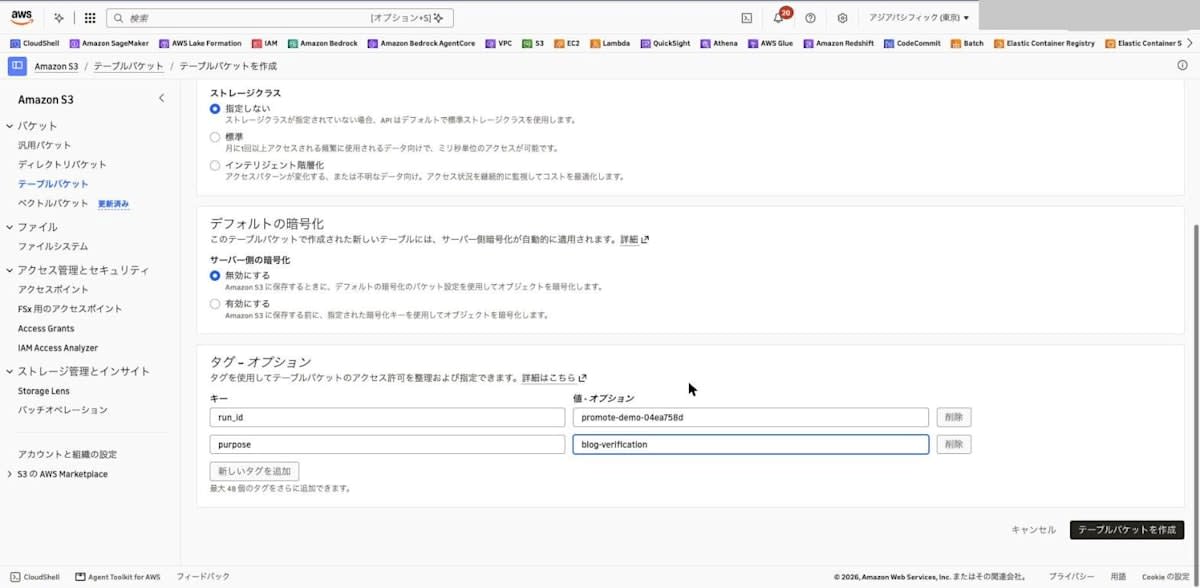
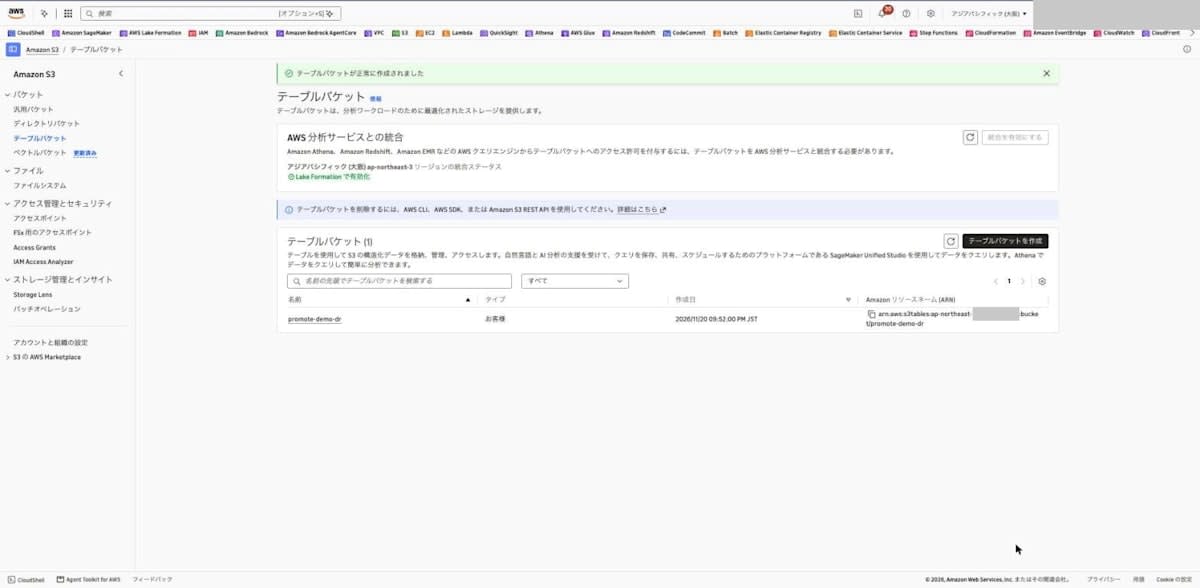
From "Table buckets" in the S3 console, I created promote-demo-source in the Tokyo Region and promote-demo-dr in the Osaka Region. The only settings were the table bucket name and tags; everything else was left at the defaults.
Creating the Source Table and Loading Data
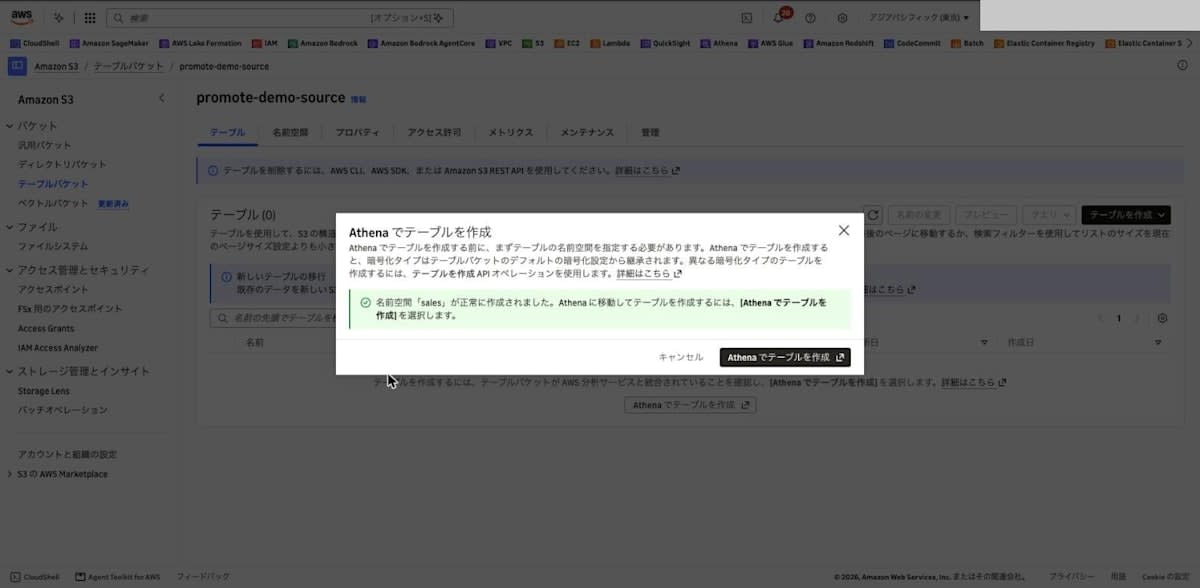
In Tokyo's promote-demo-source, I selected "Create table with Athena" and created the namespace sales. Then I selected "Create table with Athena" again, and the Athena query editor opened with the catalog s3tablescatalog/promote-demo-source and the database sales selected.
I created the table with the following SQL. The written_region column is used to distinguish which Region a row was written in.
CREATE TABLE `sales`.orders (order_id int, item string, amount int, written_region string) TBLPROPERTIES ('table_type' = 'iceberg')
The first run failed with the following error.
Iceberg cannot access the requested resource: Forbidden: Insufficient Lake Formation permission(s): Required Create Table on sales
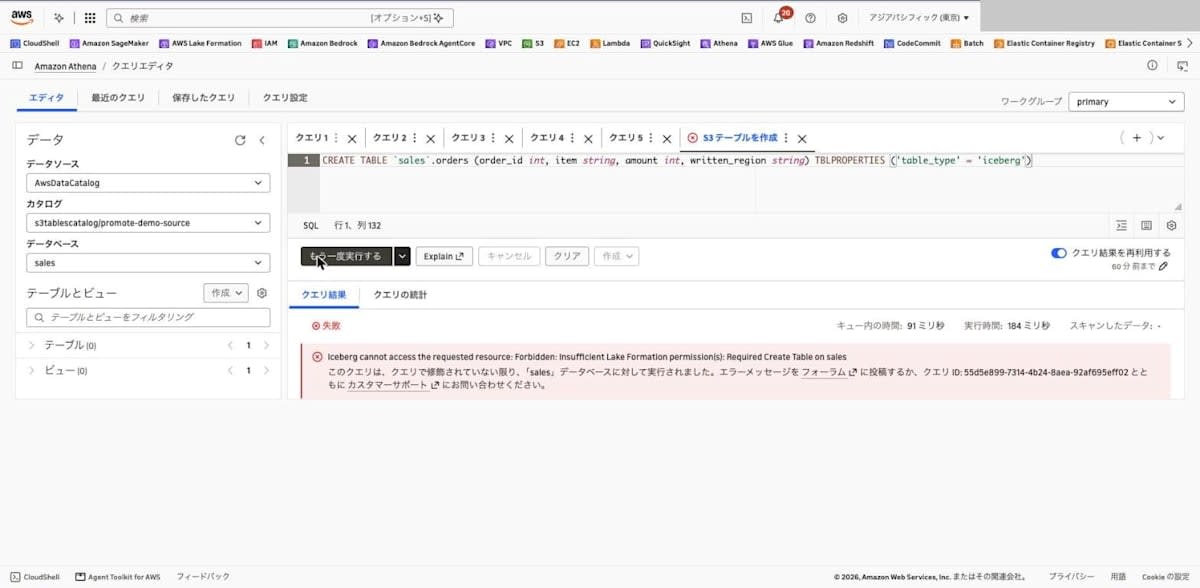
Because s3tablescatalog is integrated with Lake Formation access control in this environment, Lake Formation permissions were required. From "Data permissions" in the Lake Formation console, I granted my IAM role "Create table" and "Describe" on the database sales in the catalog s3tablescatalog/promote-demo-source, and CREATE TABLE then succeeded. The subsequent INSERT and SELECT ran without any additional permission grants.
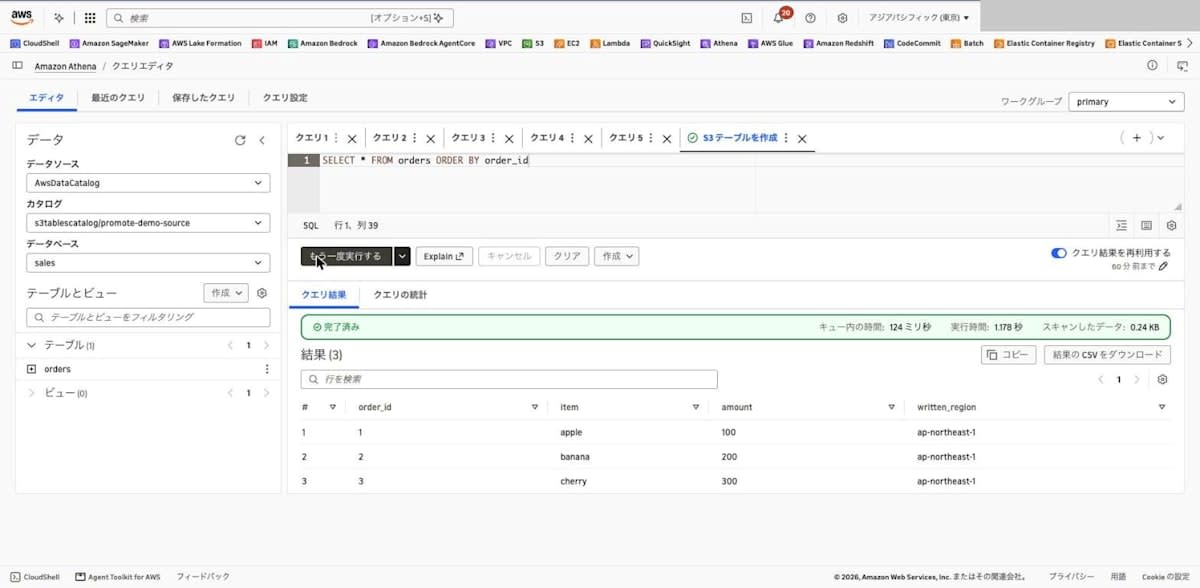
INSERT INTO orders VALUES (1, 'apple', 100, 'ap-northeast-1'), (2, 'banana', 200, 'ap-northeast-1'), (3, 'cherry', 300, 'ap-northeast-1')
SELECT * FROM orders ORDER BY order_id
| order_id | item | amount | written_region |
|---|---|---|---|
| 1 | apple | 100 | ap-northeast-1 |
| 2 | banana | 200 | ap-northeast-1 |
| 3 | cherry | 300 | ap-northeast-1 |
Configuring Replication
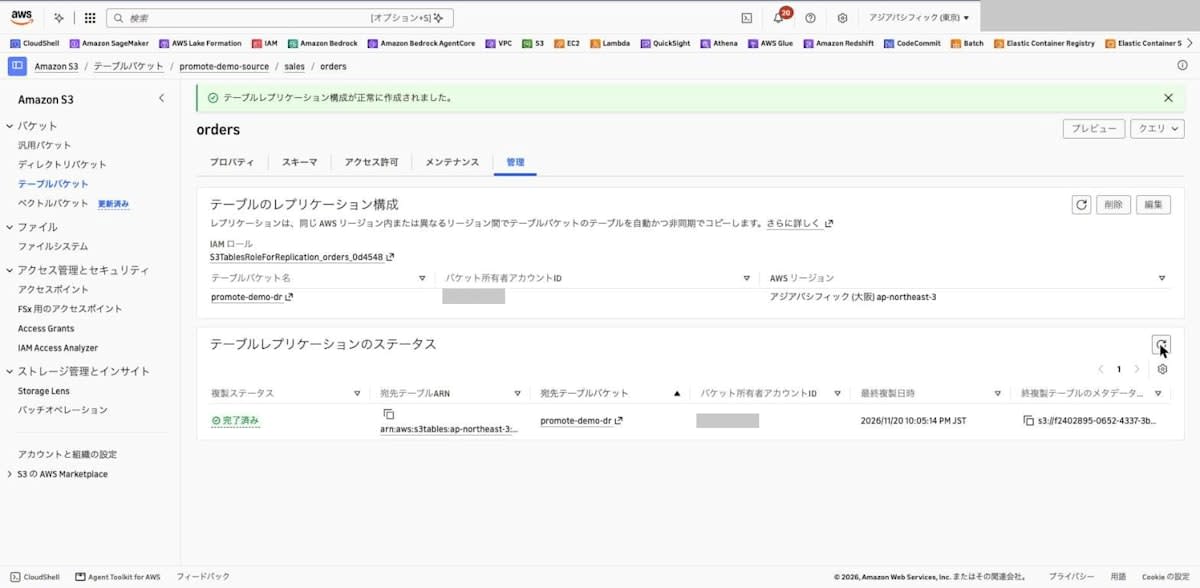
In the "Management" tab of the orders table in Tokyo, I selected "Create table replication configuration" and specified the ARN of the Osaka table bucket as the destination. For the IAM role, I selected "Create new IAM role".
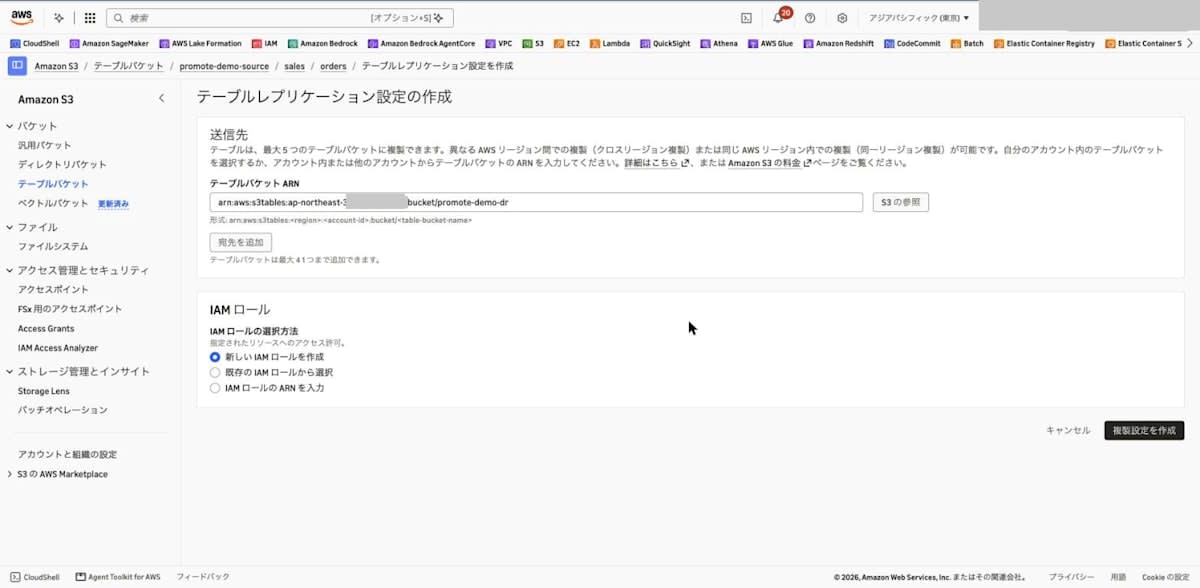
Once created, an IAM role named S3TablesRoleForReplication_orders_0d4548 was created and used for the configuration.
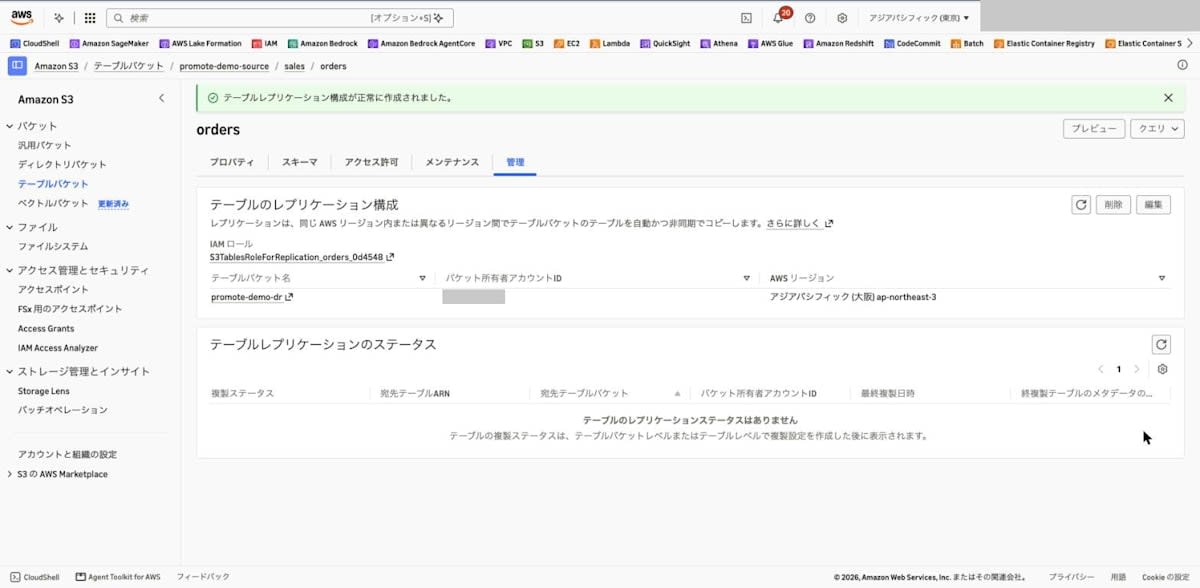
I checked the configuration with the CLI.
% aws s3tables get-table-replication --table-arn arn:aws:s3tables:ap-northeast-1:123456789012:bucket/promote-demo-source/table/f2402895-0652-4337-97ca-12d0eca262b8 --region ap-northeast-1
{
    "versionToken": "1a96bc319208dc575600",
    "configuration": {
        "role": "arn:aws:iam::123456789012:role/service-role/S3TablesRoleForReplication_orders_0d4548",
        "rules": [
            {
                "destinations": [
                    {
                        "destinationTableBucketARN": "arn:aws:s3tables:ap-northeast-3:123456789012:bucket/promote-demo-dr"
                    }
                ]
            }
        ]
    }
}
The IAM role created by the console had a customer managed policy named service-role/S3TablesReplication_orders_a14bd0 attached. It includes read permissions on the source table (GetTable, GetTableMetadataLocation, GetTableData, GetTableMaintenanceConfiguration), CreateNamespace and CreateTable on the destination table bucket, write permissions on the destination table (PutTableData, UpdateTableMetadataLocation, and so on), and KMS permissions.
Confirming Replication Completion
I ran get-table-replication-status with the CLI every 30 seconds and watched the status change. The status went through pending and then became completed. The replica table's creation time (createdAt) was 21:59:07 and the lastSuccessfulReplicatedUpdate time was 22:05:14, so the backfill completed about 7 minutes after configuration.
% aws s3tables get-table-replication-status --table-arn arn:aws:s3tables:ap-northeast-1:123456789012:bucket/promote-demo-source/table/f2402895-0652-4337-97ca-12d0eca262b8 --region ap-northeast-1
{
    "sourceTableArn": "arn:aws:s3tables:ap-northeast-1:123456789012:bucket/promote-demo-source/table/f2402895-0652-4337-97ca-12d0eca262b8",
    "destinations": [
        {
            "replicationStatus": "completed",
            "destinationTableBucketArn": "arn:aws:s3tables:ap-northeast-3:123456789012:bucket/promote-demo-dr",
            "destinationTableArn": "arn:aws:s3tables:ap-northeast-3:123456789012:bucket/promote-demo-dr/table/1deb39c9-941b-42ce-9edc-40eafcad5aca",
            "lastSuccessfulReplicatedUpdate": {
                "metadataLocation": "s3://f2402895-0652-4337-3byihjc8eqw589e3xdreakkdi538yapn1b--table-s3/metadata/00001-15e3c9ed-07f4-41ea-b42d-91df15ba961d.metadata.json",
                "timestamp": "2026-11-20T13:05:14.705139+00:00"
            }
        }
    ]
}
The documentation writes the status values in uppercase as COMPLETED, PENDING, and FAILED, but the API responses this time were in lowercase, such as completed.
In the console as well, the "Management" tab of the source table showed "Completed".
Checking the Replica Table
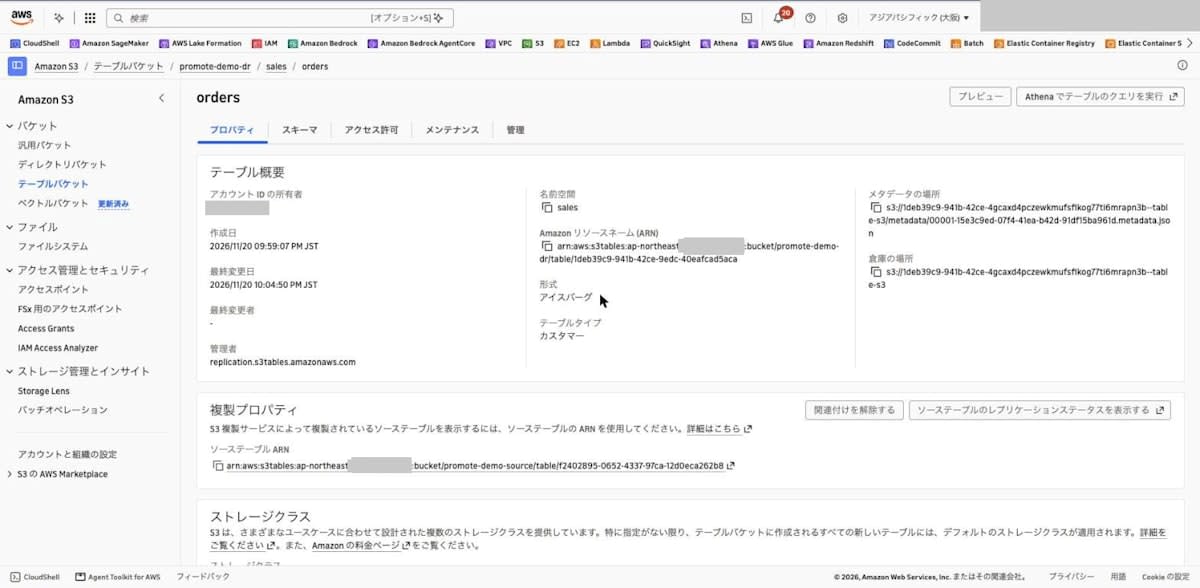
In Osaka's promote-demo-dr, the replica sales.orders had been created with the same namespace and table name as the source. In the Properties tab, the "Managed by" value is replication.s3tables.amazonaws.com, and the "Replication properties" section has the source table's ARN and a "Disassociate" button.
With the CLI's get-table, managedByService and managedTableInformation were returned.
% aws s3tables get-table --table-bucket-arn arn:aws:s3tables:ap-northeast-3:123456789012:bucket/promote-demo-dr --namespace sales --name orders --region ap-northeast-3
{
    "name": "orders",
    "type": "customer",
    "tableARN": "arn:aws:s3tables:ap-northeast-3:123456789012:bucket/promote-demo-dr/table/1deb39c9-941b-42ce-9edc-40eafcad5aca",
    "namespace": [
        "sales"
    ],
    "namespaceId": "164ba2c8-8055-48ae-9d50-a2d466ce534d",
    "versionToken": "d137390fb82e54886331",
    "metadataLocation": "s3://1deb39c9-941b-42ce-4gcaxd4pczewkmufsfikog77ti6mrapn3b--table-s3/metadata/00001-15e3c9ed-07f4-41ea-b42d-91df15ba961d.metadata.json",
    "warehouseLocation": "s3://1deb39c9-941b-42ce-4gcaxd4pczewkmufsfikog77ti6mrapn3b--table-s3",
    "createdAt": "2026-11-20T12:59:07.872640+00:00",
    "createdBy": "123456789012",
    "managedByService": "replication.s3tables.amazonaws.com",
    "modifiedAt": "2026-11-20T13:04:50.921490+00:00",
    "ownerAccountId": "123456789012",
    "format": "ICEBERG",
    "tableBucketId": "ebb8d34e-5b07-4f44-ac30-19c8df36aa03",
    "managedTableInformation": {
        "replicationInformation": {
            "sourceTableARN": "arn:aws:s3tables:ap-northeast-1:123456789012:bucket/promote-demo-source/table/f2402895-0652-4337-97ca-12d0eca262b8"
        }
    }
}
To read and write from Athena in Osaka, I granted Lake Formation permissions (SELECT, INSERT, DESCRIBE) on the replica table. By granting INSERT as well, I can tell that the INSERT failure later is not caused by Lake Formation permissions. In Osaka, s3tablescatalog/promote-demo-dr did not appear in the catalog list in the Lake Formation console, so I granted them with the CLI.
% aws lakeformation grant-permissions --region ap-northeast-3 --principal DataLakePrincipalIdentifier=arn:aws:iam::123456789012:role/<自分の IAM ロール> --resource '{"Table":{"CatalogId":"123456789012:s3tablescatalog/promote-demo-dr","DatabaseName":"sales","Name":"orders"}}' --permissions SELECT INSERT DESCRIBE
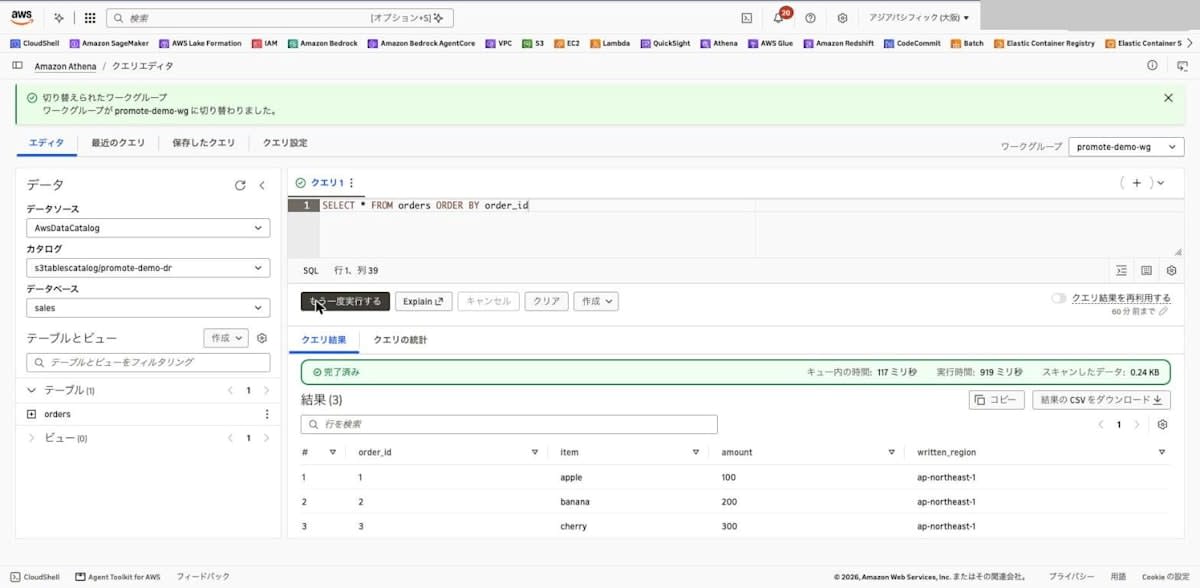
I opened Athena in Osaka from the replica's "Query table with Athena", switched the workgroup to promote-demo-wg, and ran SELECT, which returned the same 3 rows as the source.
SELECT * FROM orders ORDER BY order_id
| order_id | item | amount | written_region |
|---|---|---|---|
| 1 | apple | 100 | ap-northeast-1 |
| 2 | banana | 200 | ap-northeast-1 |
| 3 | cherry | 300 | ap-northeast-1 |
Confirming That Writes to the Replica Fail
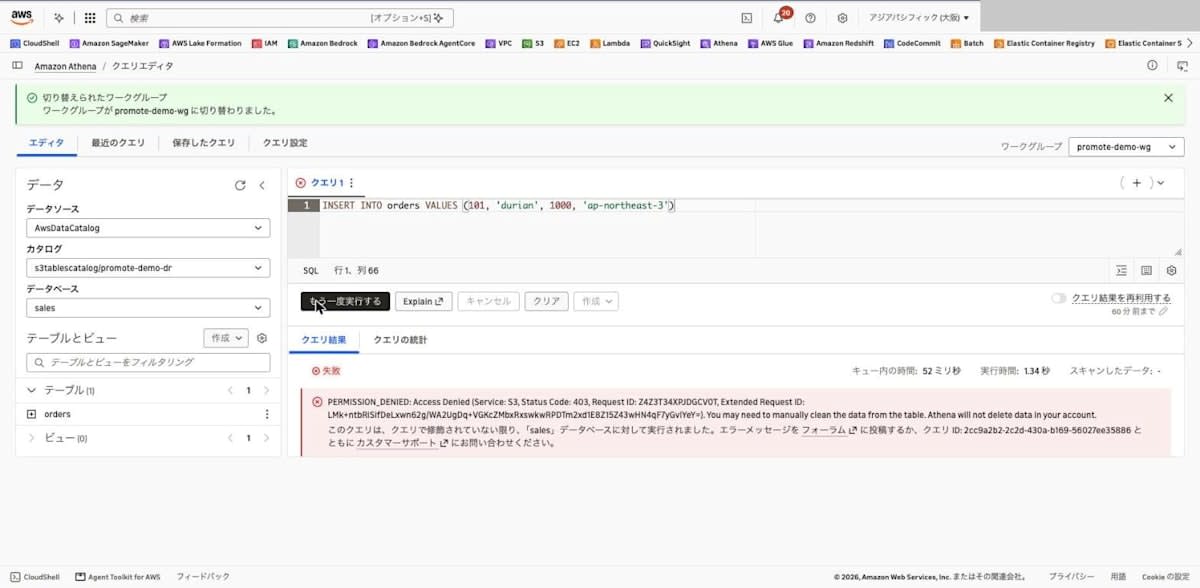
Before detaching, I tried an INSERT into the replica.
INSERT INTO orders VALUES (101, 'durian', 1000, 'ap-northeast-3')
It failed with the following error. The Lake Formation INSERT permission had already been granted, and the message differs from the earlier Lake Formation permission error. The error is a 403 (Access Denied) from S3.
PERMISSION_DENIED: Access Denied (Service: S3, Status Code: 403, Request ID: Z4Z3T34XPJDGCV0T, Extended Request ID: LMk+ntbRiSifDeLxwn62g/WA2UgDq+VGKcZMbxRxswkwRPDTm2xd1E8Z15Z43wHN4qF7yGvIYeY=). You may need to manually clean the data from the table. Athena will not delete data in your account.
Detaching the Replica Table
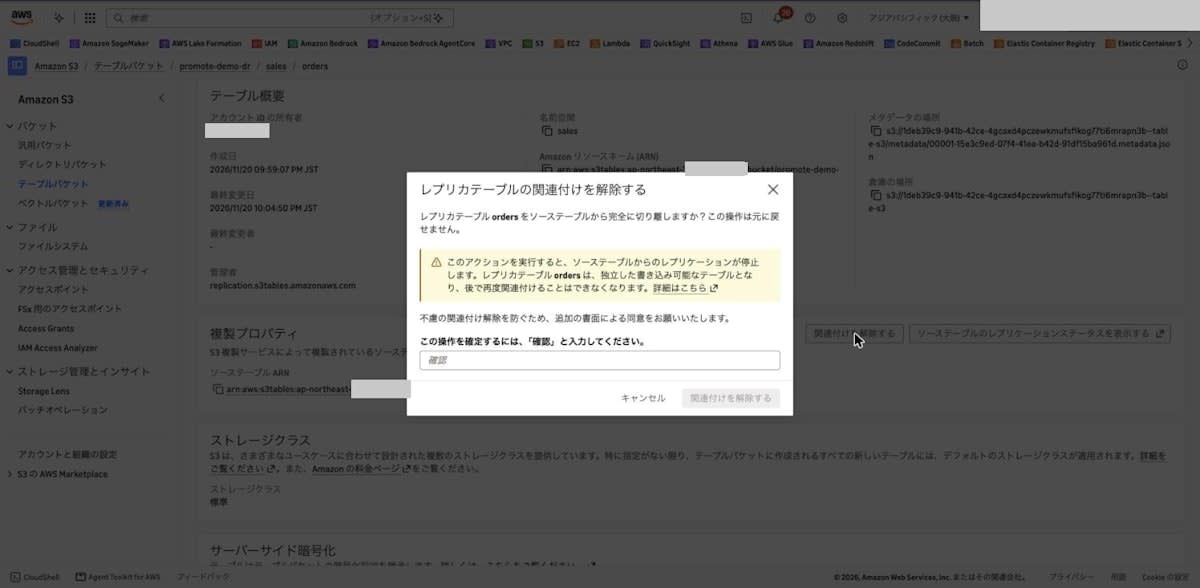
In the Properties tab of the Osaka replica, I selected "Disassociate" under "Replication properties". The confirmation dialog states that the operation cannot be undone, and that replication will stop and the table cannot be associated again.
In the Japanese console, you enter "確認" in the confirmation field instead of confirm (the documentation writes confirm to match the English console).
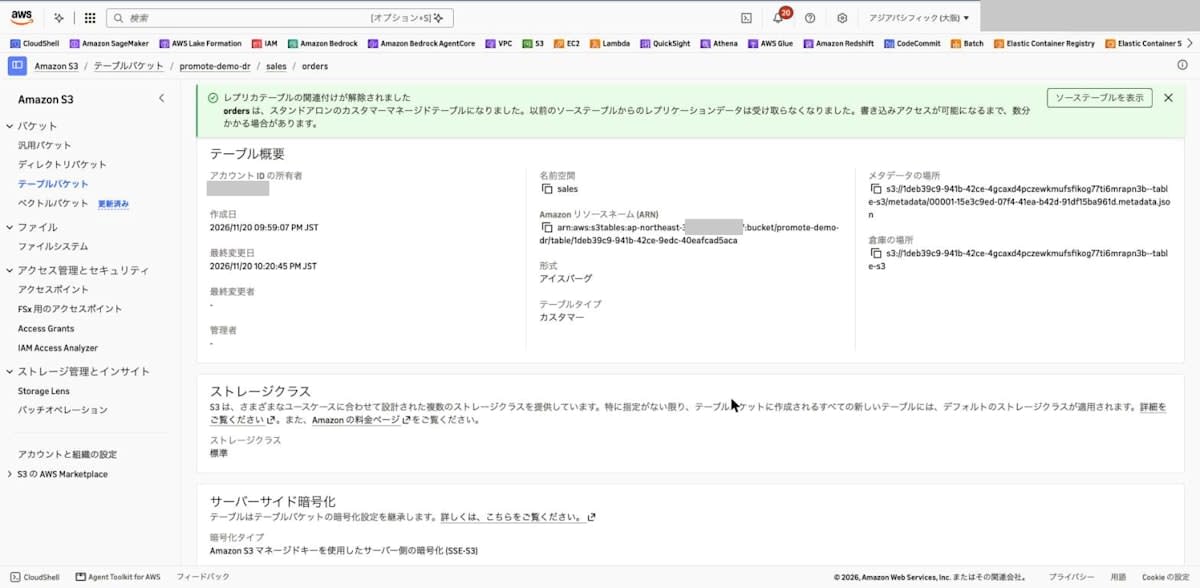
When I selected "Disassociate", the message "orders is now a standalone customer-managed table" was displayed. The message also says it may take a few minutes until writes become possible. The "Managed by" property became "-", and the "Replication properties" section disappeared. The ARN is the same as before detaching.
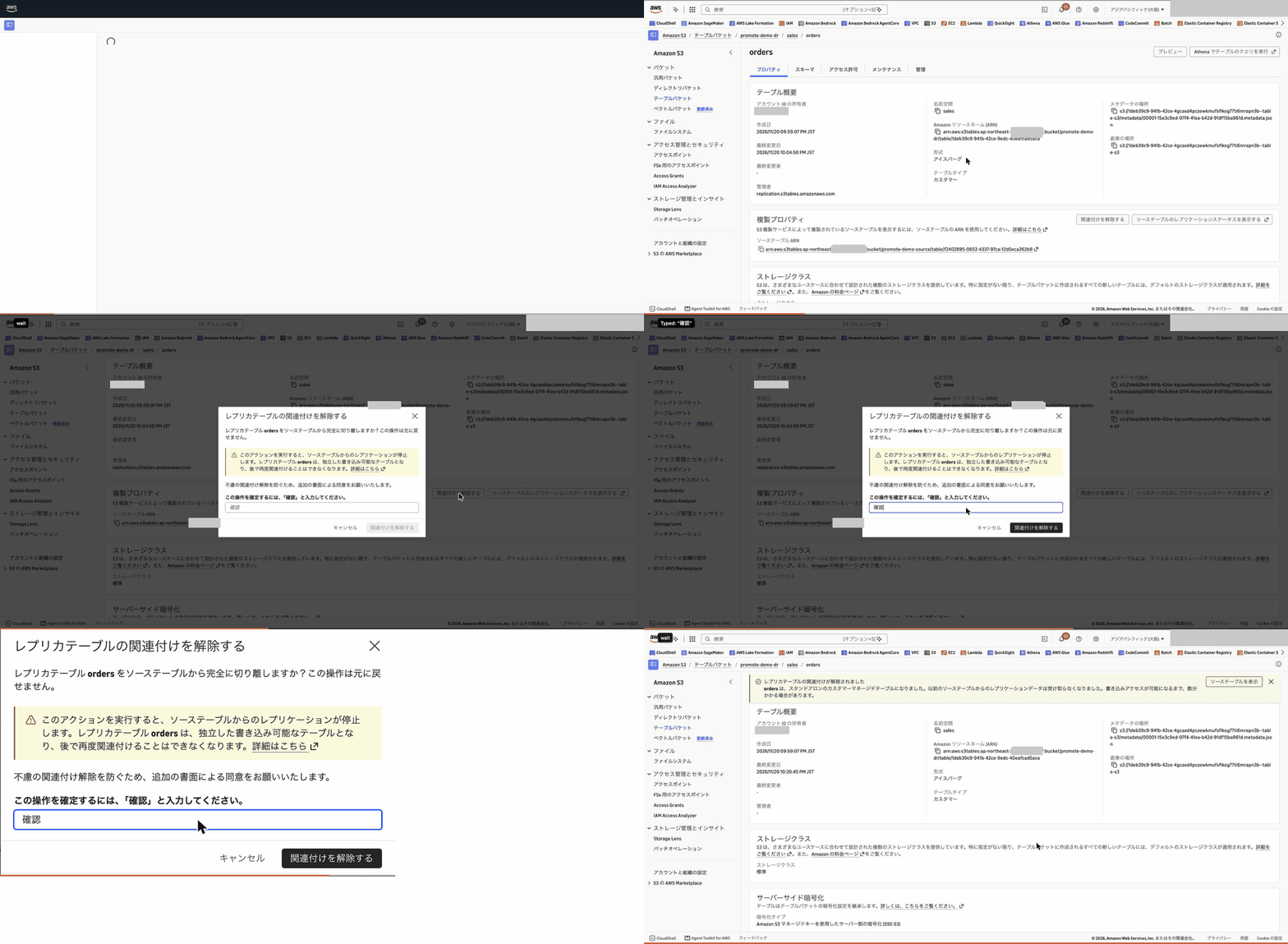
The flow of the operation is as follows.
Checking the Table Information After Detaching
When I ran get-table with the CLI, managedByService and managedTableInformation were gone. tableARN, namespace, name, and createdAt are the same as before detaching (metadataLocation and modifiedAt are the values after being updated by the INSERT in the next step).
% aws s3tables get-table --table-bucket-arn arn:aws:s3tables:ap-northeast-3:123456789012:bucket/promote-demo-dr --namespace sales --name orders --region ap-northeast-3
{
    "name": "orders",
    "type": "customer",
    "tableARN": "arn:aws:s3tables:ap-northeast-3:123456789012:bucket/promote-demo-dr/table/1deb39c9-941b-42ce-9edc-40eafcad5aca",
    "namespace": [
        "sales"
    ],
    "namespaceId": "164ba2c8-8055-48ae-9d50-a2d466ce534d",
    "versionToken": "4a29fc17808fc66197c5",
    "metadataLocation": "s3://1deb39c9-941b-42ce-4gcaxd4pczewkmufsfikog77ti6mrapn3b--table-s3/metadata/00002-f03ac825-2657-4d8e-a6dd-a2454ef8471c.metadata.json",
    "warehouseLocation": "s3://1deb39c9-941b-42ce-4gcaxd4pczewkmufsfikog77ti6mrapn3b--table-s3",
    "createdAt": "2026-11-20T12:59:07.872640+00:00",
    "createdBy": "123456789012",
    "modifiedAt": "2026-11-20T13:21:04.889233+00:00",
    "ownerAccountId": "123456789012",
    "format": "ICEBERG",
    "tableBucketId": "ebb8d34e-5b07-4f44-ac30-19c8df36aa03"
}
managedByService is also gone from the list-tables result.
% aws s3tables list-tables --table-bucket-arn arn:aws:s3tables:ap-northeast-3:123456789012:bucket/promote-demo-dr --region ap-northeast-3
{
    "tables": [
        {
            "namespace": [
                "sales"
            ],
            "name": "orders",
            "type": "customer",
            "tableARN": "arn:aws:s3tables:ap-northeast-3:123456789012:bucket/promote-demo-dr/table/1deb39c9-941b-42ce-9edc-40eafcad5aca",
            "createdAt": "2026-11-20T12:59:07.872640+00:00",
            "modifiedAt": "2026-11-20T13:21:04.889233+00:00"
        }
    ]
}
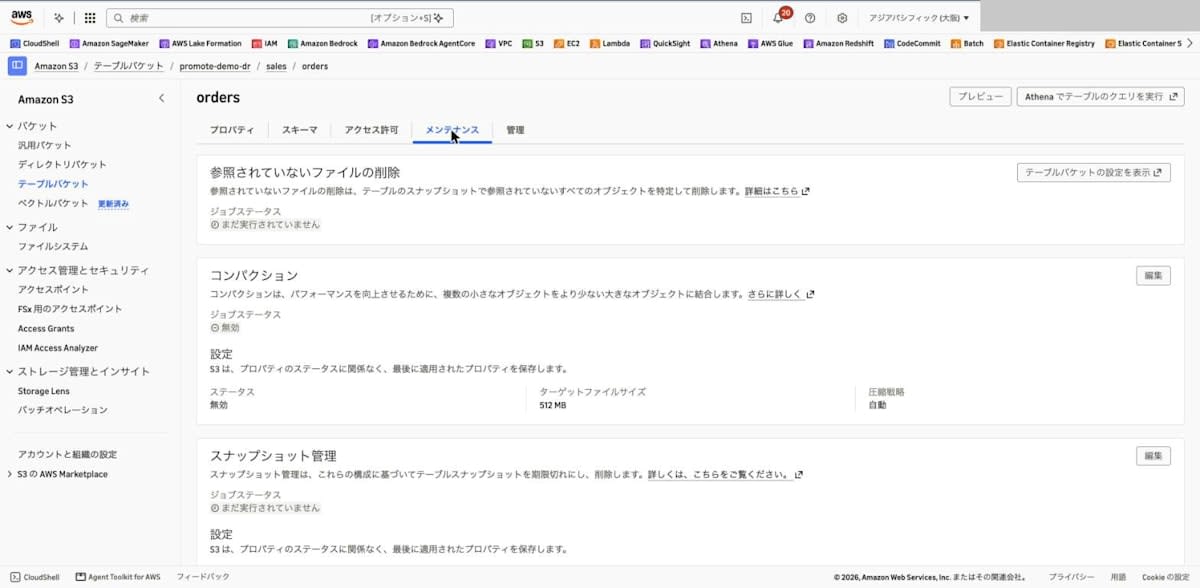
In the Maintenance tab, the compaction status was shown as "Disabled", and the settings could be changed with the "Edit" button. I did not change the compaction settings this time.
Writing to the Promoted Table
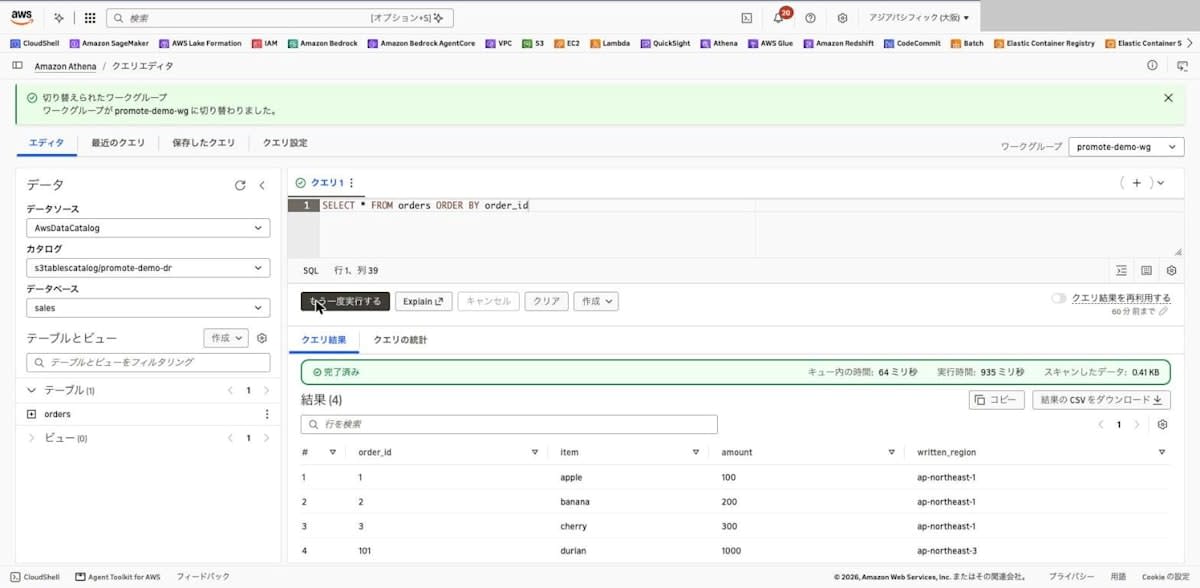
About 17 seconds after detaching (the table's last modified time was 22:20:45 and the Athena query submission time was 22:21:02), I ran the INSERT that had failed earlier again, and it succeeded on the first attempt. The documentation says writes may fail with 403 for a few minutes after detaching, but that did not happen this time.
INSERT INTO orders VALUES (101, 'durian', 1000, 'ap-northeast-3')
SELECT returned the 3 replicated rows and the 1 row added in Osaka. The Lake Formation permissions granted before detaching continued to work as is after detaching.
SELECT * FROM orders ORDER BY order_id
| order_id | item | amount | written_region |
|---|---|---|---|
| 1 | apple | 100 | ap-northeast-1 |
| 2 | banana | 200 | ap-northeast-1 |
| 3 | cherry | 300 | ap-northeast-1 |
| 101 | durian | 1000 | ap-northeast-3 |
Checking Changes on the Source Table Side
When I ran get-table-replication-status on the source table right after detaching, the status was still completed. So I added one row to the source table in Tokyo.
INSERT INTO orders VALUES (4, 'elderberry', 400, 'ap-northeast-1')
After the INSERT (22:21:46), I checked the status every 30 seconds: it was pending at 22:22:00 and failed at 22:22:31. The failureMessage is the same as the message in the documentation. lastSuccessfulReplicatedUpdate remains the value from before detaching.
% aws s3tables get-table-replication-status --table-arn arn:aws:s3tables:ap-northeast-1:123456789012:bucket/promote-demo-source/table/f2402895-0652-4337-97ca-12d0eca262b8 --region ap-northeast-1
{
    "sourceTableArn": "arn:aws:s3tables:ap-northeast-1:123456789012:bucket/promote-demo-source/table/f2402895-0652-4337-97ca-12d0eca262b8",
    "destinations": [
        {
            "replicationStatus": "failed",
            "destinationTableBucketArn": "arn:aws:s3tables:ap-northeast-3:123456789012:bucket/promote-demo-dr",
            "destinationTableArn": "arn:aws:s3tables:ap-northeast-3:123456789012:bucket/promote-demo-dr/table/1deb39c9-941b-42ce-9edc-40eafcad5aca",
            "lastSuccessfulReplicatedUpdate": {
                "metadataLocation": "s3://f2402895-0652-4337-3byihjc8eqw589e3xdreakkdi538yapn1b--table-s3/metadata/00001-15e3c9ed-07f4-41ea-b42d-91df15ba961d.metadata.json",
                "timestamp": "2026-11-20T13:05:14.705139+00:00"
            },
            "failureMessage": "The destination table has been detached from replication and is no longer accepting replicated data."
        }
    ]
}
The console's "Table replication status" also changed to "Failed".
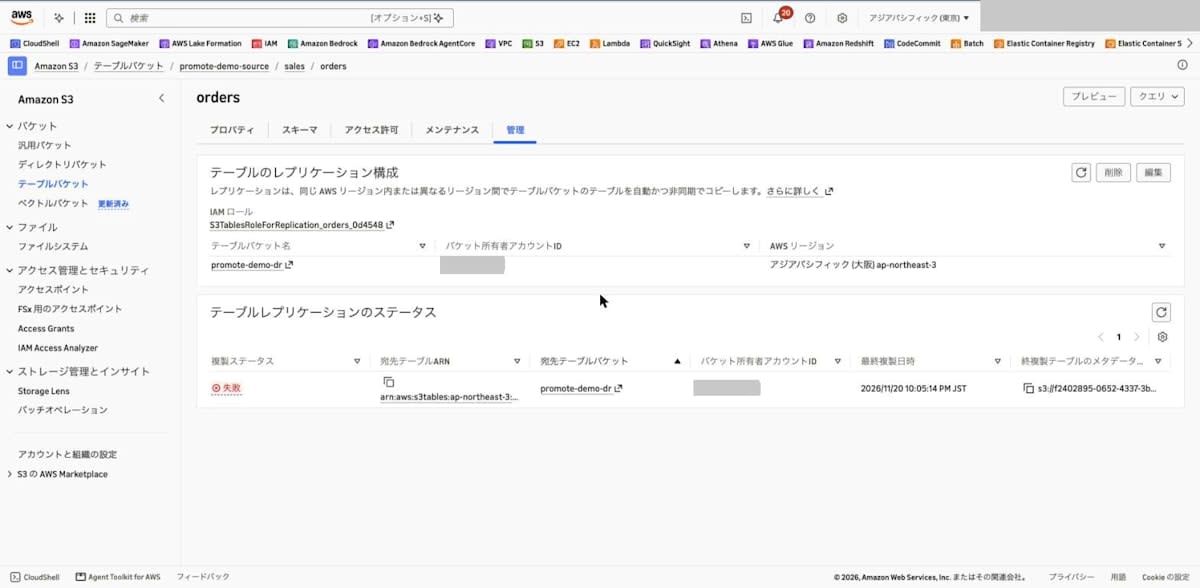
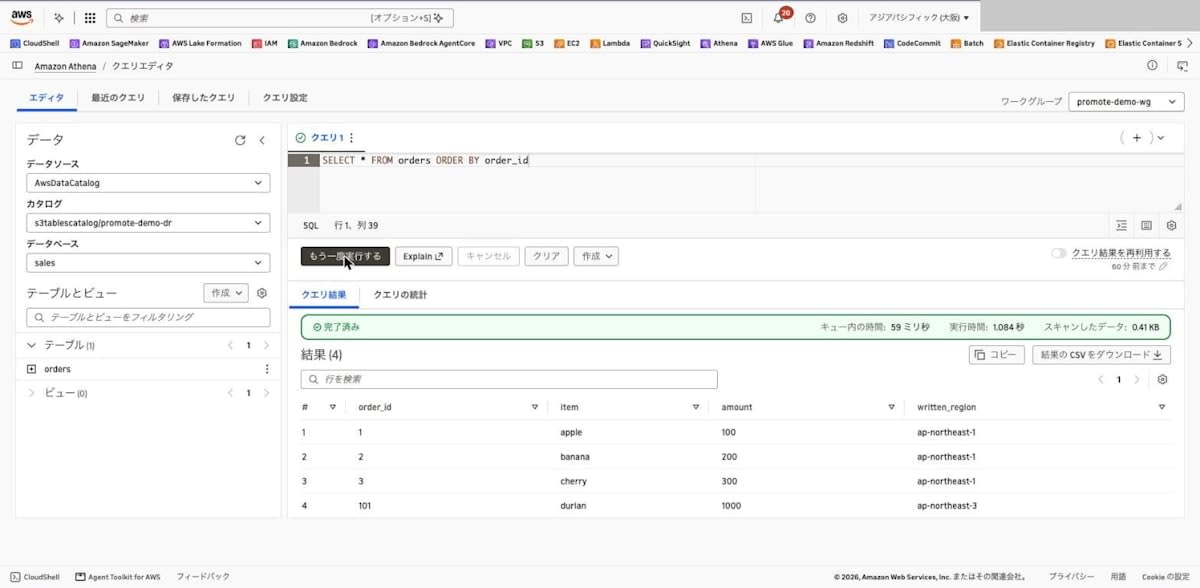
Even when I ran SELECT on the Osaka table at 22:28, more than 6 minutes after the INSERT, the order_id = 4 row added in Tokyo was not there (query result reuse is disabled).
| order_id | item | amount | written_region |
|---|---|---|---|
| 1 | apple | 100 | ap-northeast-1 |
| 2 | banana | 200 | ap-northeast-1 |
| 3 | cherry | 300 | ap-northeast-1 |
| 101 | durian | 1000 | ap-northeast-3 |
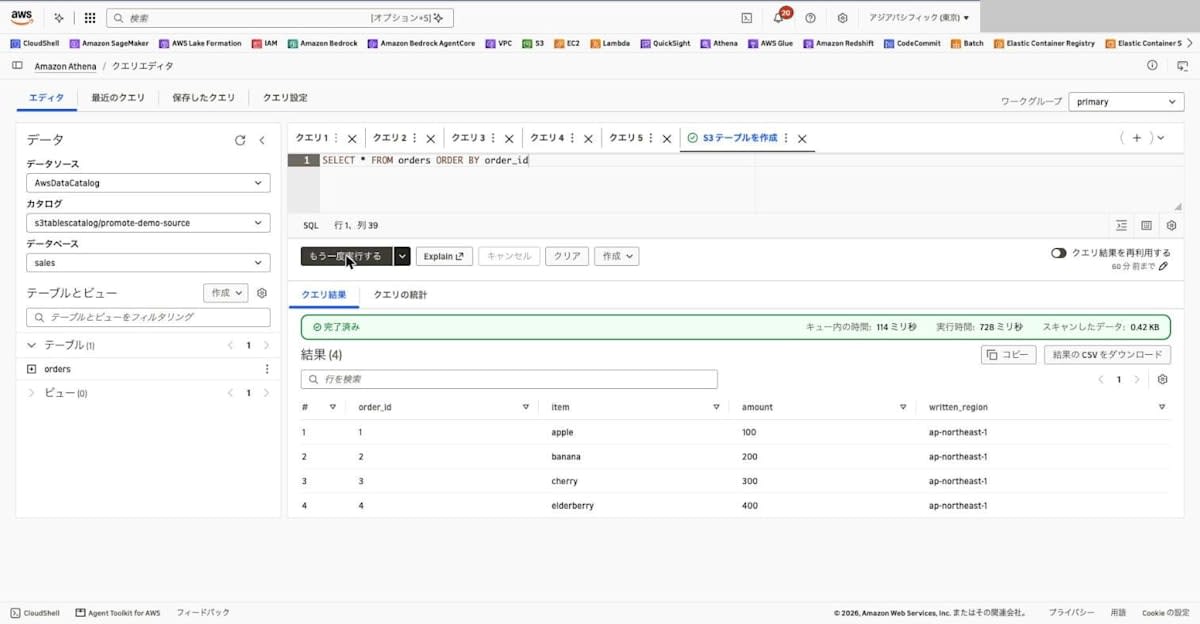
The source table in Tokyo has order_id = 4 added and does not have order_id = 101. The two tables are being updated independently of each other.
| order_id | item | amount | written_region |
|---|---|---|---|
| 1 | apple | 100 | ap-northeast-1 |
| 2 | banana | 200 | ap-northeast-1 |
| 3 | cherry | 300 | ap-northeast-1 |
| 4 | elderberry | 400 | ap-northeast-1 |
Discussion
Procedure for Switching Regions
Based on the verification results and the documentation, the procedure for moving writes to another Region is as follows.
- Stop writes to the source table
- With the source table's
get-table-replication-status, confirm that the destination status iscompletedand that themetadataLocationinlastSuccessfulReplicatedUpdatematches the source's current metadata - Detach the replica table
- Change the connection target of the application or query engine to the destination Region and table bucket
Because the namespace and table name do not change, the Athena queries in this verification ran without changing the SQL, just by changing the Region and catalog to connect to.
Detaching Cannot Be Undone
Detaching is a one-way operation, and you cannot associate the table with the original source again. If different rows are added to both tables after detaching, as in this verification, the contents of the two tables no longer match. The user needs to decide which data is authoritative.
To return writes to the original Region, you create a new replication configuration that uses the detached table as the source. The documentation states that if the destination table bucket has a table with the same namespace and name (such as the original source table), you should first delete or rename that table. I did not verify reverse-direction replication this time.
How the Status Appears on the Source Side
Right after detaching, the source-side status remained completed, and it became failed after the source was updated. If you are monitoring the replication status, a destination you intentionally detached also appears as failed. You can distinguish it from failures due to other causes by the failureMessage, The destination table has been detached from replication....
Also, the status values returned by the API were in lowercase. If you evaluate the status in a script, comparing case-insensitively prevents misjudgments caused by the difference from the documentation's notation.
403 Right After Detaching
This time, the INSERT about 17 seconds after detaching succeeded on the first attempt, but the documentation says writes may fail with 403 for a few minutes. If you automate the switchover procedure, you need to build in write retries.
Lake Formation Permissions
In an environment where s3tablescatalog is integrated with Lake Formation access control, to read and write replicas and detached tables from Athena, you also need to grant permissions in Lake Formation in the destination Region. This time, the permissions granted before detaching continued to work as is after detaching. If you are preparing for a Region failure, granting permissions in the destination Region in advance can reduce the work at switchover time.
In addition, in the Osaka Region this time, the IAM role registered with Lake Formation at the time of S3 Tables integration (the role Lake Formation uses for data access) had been deleted, so the tables could not be referenced from Athena. If aws glue get-catalogs --parent-catalog-id s3tablescatalog fails with Unable to assume role, check with aws lakeformation list-resources whether the registered role exists. This time, I recovered by recreating a role of the same name with the trust policy and permissions policy from the documentation.
Compaction
Because compaction is not supported while the table is a replica, compaction was shown as disabled for the detached table. If you continue writing to the detached table, consider enabling compaction with PutTableMaintenanceConfiguration (or "Edit" in the Maintenance tab), as described in the documentation.
Conclusion
I promoted an S3 Tables replica to a writable table using the console's "Disassociate". The promoted table became writable while keeping its ARN, namespace, table name, and replicated data, and updates from the source table were no longer reflected. Until now you had to copy the replica to a new table, but now the detach operation alone is enough.
If you use this to switch writes during a Region failure, I recommend preparing the procedure in advance, bearing in mind that detaching cannot be undone, that writes may return 403 right after detaching, and that query engine permissions must be set up in the destination Region.
