ACM's ACME Certificate Issuance Now Supports PrivateLink, So I Tried It in a VPC with No IGW or NAT Gateway

This page has been translated by machine translation. View original
Introduction
On October 6, 2026, it became possible to issue ACME certificates from ACM via a VPC interface endpoint.
This time, I set up an EC2 instance in a VPC with no internet gateway (IGW) and no NAT Gateway. The hostname of the directory URL stays the same, and private DNS resolves it to the private IP of the interface endpoint. From this EC2 instance, I issued a certificate with certbot via PrivateLink and tested whether it could be used for HTTPS on Nginx.
In addition, I set up a separate VPC to simulate an on-premises environment and also checked reachability from it (name resolution, directory retrieval, and account registration).
The procedure for using ACM's ACME with a public endpoint was already introduced in July, so I omit it in this article.
Test Configuration
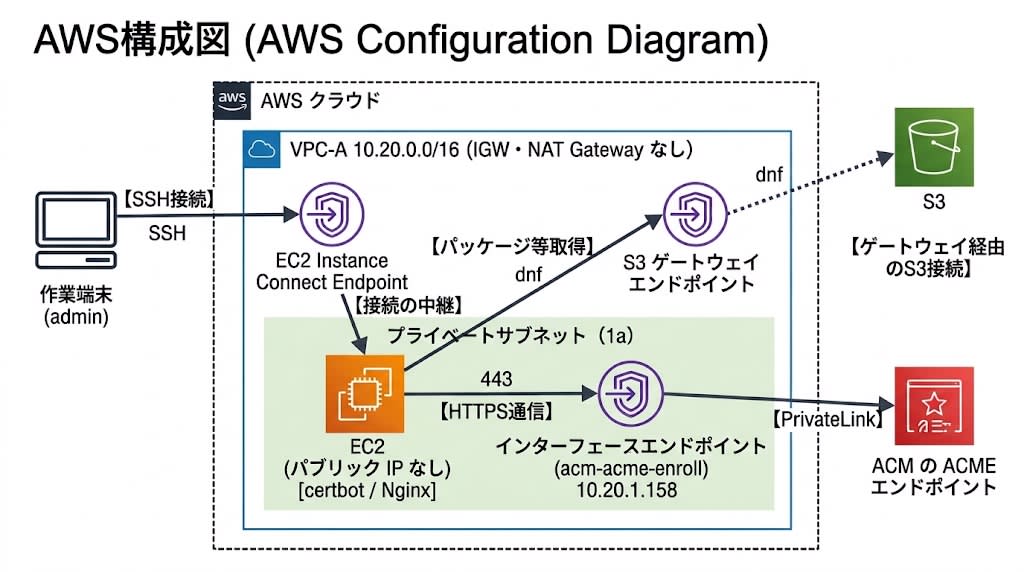
I created a VPC (10.20.0.0/16, hereafter VPC-A) and one private subnet in the Tokyo region. The configuration is as follows.
Checking the routes of VPC-A and the IGW/NAT Gateway
aws ec2 describe-route-tables --filters Name=vpc-id,Values=<vpc-id> \
  --query 'RouteTables[].Routes[].{Dest:DestinationCidrBlock,Target:GatewayId,Prefix:DestinationPrefixListId}'
[
    {
        "Dest": "10.20.0.0/16",
        "Target": "local",
        "Prefix": null
    },
    {
        "Dest": null,
        "Target": "<s3-gateway-endpoint-id>",
        "Prefix": "pl-61a54008"
    }
]
aws ec2 describe-internet-gateways --filters Name=attachment.vpc-id,Values=<vpc-id> --query 'InternetGateways'
[]
aws ec2 describe-nat-gateways --filter Name=vpc-id,Values=<vpc-id> --query 'NatGateways'
[]
The only routes are local and the one for the S3 gateway endpoint; there is no IGW or NAT Gateway.
The EC2 instance is an Amazon Linux 2023 t3.micro with no public IP attached. SSH goes through an EC2 Instance Connect Endpoint. certbot 2.6.0 and nginx 1.30.5 were installed with dnf install via the S3 gateway endpoint. In a closed network, you have to prepare the package retrieval path and the SSH path yourself.
To use private DNS, I enabled DNS support and DNS hostnames on the VPC created with create-vpc.
aws ec2 modify-vpc-attribute --vpc-id <vpc-id> --enable-dns-support '{"Value":true}'
aws ec2 modify-vpc-attribute --vpc-id <vpc-id> --enable-dns-hostnames '{"Value":true}'
The ACME endpoint, domain validation, and EAB were prepared outside the VPC using the same procedure as in the previous article. The ACME endpoint was created with --authorization-behavior PRE_APPROVED. ACM's ACME uses domains pre-approved by an administrator, which differs from typical public ACME services where the client proves ownership of the domain each time.
The validity period of certificates issued via ACME is 45 days, and renewal is performed by the client. They cannot be associated with ELB, CloudFront, or API Gateway.
Issuance Is Not Possible Without the Endpoint
In the same VPC, before creating the interface endpoint, I accessed the directory URL. The hostname resolved to a public IP.
$ getent ahostsv4 acm-acme-enroll.ap-northeast-1.api.aws
203.0.113.10    STREAM acm-acme-enroll.ap-northeast-1.api.aws
203.0.113.20    STREAM
203.0.113.30    STREAM

$ curl -sS -m 15 https://acm-acme-enroll.ap-northeast-1.api.aws/<directory-id>/directory
curl: (28) Connection timed out after 15000 milliseconds
When I ran certbot in this state, it failed with exit code 1 after about 2 minutes 16 seconds. I passed dummy values for the EAB, but the error was not related to the EAB or domain validation; it said the ACME endpoint could not be reached.
An unexpected error occurred:
ValueError: Requesting acm-acme-enroll.ap-northeast-1.api.aws/<directory-id>: Network is unreachable
Creating the Interface Endpoint
The endpoint services for PrivateLink are two independent ones: acm-acme for management operations and acm-acme-enroll for the protocol. What I created in the VPC this time was a single interface endpoint for acm-acme-enroll; I did not create an acm-acme endpoint. The user guide states that enabling the private DNS hostname is required, that the endpoint must be created in the same Region as the ACME endpoint, and that some AZs are not supported.
I created the endpoint with private DNS enabled, and allowed TCP 443 from the VPC CIDR in the security group.
aws ec2 create-vpc-endpoint \
  --vpc-id <vpc-id> \
  --service-name com.amazonaws.ap-northeast-1.acm-acme-enroll \
  --vpc-endpoint-type Interface \
  --subnet-ids <subnet-id> \
  --security-group-ids <endpoint-sg-id> \
  --private-dns-enabled

aws ec2 authorize-security-group-ingress \
  --group-id <endpoint-sg-id> \
  --protocol tcp --port 443 --cidr 10.20.0.0/16
The supported AZs in the Tokyo region are, by AZ ID, apne1-az4, apne1-az1, and apne1-az2. In this account, these correspond to ap-northeast-1a, 1c, and 1d. Because the mapping between AZ names and AZ IDs differs per account, check the subnet's AZ by AZ ID. The supported AZs can be checked in AvailabilityZoneIds of describe-vpc-endpoint-services.
The endpoint became available within 1 minute of the creation request. However, immediately afterward (about 40 seconds after the creation request), the hostname still resolved to the public IP, and curl timed out after 15 seconds. About 2 minutes after the creation request it resolved to the private IP, and about 3 minutes after, the directory URL returned HTTP 200.
$ getent ahostsv4 acm-acme-enroll.ap-northeast-1.api.aws | head -1
10.20.1.158     STREAM acm-acme-enroll.ap-northeast-1.api.aws
Immediately after the endpoint becomes available, the hostname still resolves to the public IP, so confirm that the hostname resolves to the private IP before running certbot.
Issuing a Certificate and Using It with Nginx
The directory URL kept the same hostname as when there was no endpoint, and I ran certbot with only the EAB replaced by actual values. Issuance succeeded on the first attempt.
sudo certbot certonly --standalone --non-interactive --agree-tos \
  --register-unsafely-without-email \
  --server https://acm-acme-enroll.ap-northeast-1.api.aws/<directory-id>/directory \
  --eab-kid <eab-kid> --eab-hmac-key <eab-hmac-key> \
  --issuance-timeout 120 \
  -d acme-pl.cm.suama.net
Saving debug log to /var/log/letsencrypt/letsencrypt.log
Account registered.
Requesting a certificate for acme-pl.cm.suama.net

Successfully received certificate.
Certificate is saved at: /etc/letsencrypt/live/acme-pl.cm.suama.net/fullchain.pem
Key is saved at:         /etc/letsencrypt/live/acme-pl.cm.suama.net/privkey.pem
This certificate expires on 2026-11-21.
These files will be updated when the certificate renews.
Certbot has set up a scheduled task to automatically renew this certificate in the background.
The subject of the issued certificate is empty, and the specified FQDN is in the SAN.
subject=
issuer=C=US, O=Amazon, CN=Amazon ECDSA 256 S10
notBefore=Oct  7 06:57:18 2026 GMT
notAfter=Nov 21 07:57:18 2026 GMT
X509v3 Subject Alternative Name: critical
    DNS:acme-pl.cm.suama.net
I placed the Nginx configuration at /etc/nginx/conf.d/ssl.conf.
sudo cp /tmp/ssl.conf /etc/nginx/conf.d/ssl.conf
sudo nginx -t
sudo systemctl enable --now nginx
ssl.conf
server {
    listen 443 ssl;
    server_name acme-pl.cm.suama.net;

    ssl_certificate     /etc/letsencrypt/live/acme-pl.cm.suama.net/fullchain.pem;
    ssl_certificate_key /etc/letsencrypt/live/acme-pl.cm.suama.net/privkey.pem;

    location / {
        return 200 "hello from closed network via ACM ACME\n";
        add_header Content-Type text/plain;
    }
}
From the EC2 instance itself, I accessed it over HTTPS without the -k option, which skips certificate verification.
$ curl -sS --resolve acme-pl.cm.suama.net:443:127.0.0.1 -v https://acme-pl.cm.suama.net/
* SSL connection using TLSv1.3 / TLS_AES_256_GCM_SHA384 / x25519 / id-ecPublicKey
*   subject:
*   expire date: Nov 21 07:57:18 2026 GMT
*   issuer: C=US; O=Amazon; CN=Amazon ECDSA 256 S10
< HTTP/1.1 200 OK
hello from closed network via ACM ACME
Checking on the ACM Side
Using describe-certificate with the certificate ARN, I could confirm it as an ACME certificate. The relevant fields in the response are as follows.
"DomainName": "acme-pl.cm.suama.net",
"Status": "ISSUED",
"Type": "AMAZON_ISSUED",
"CertificateKeyPairOrigin": "ACME",
"AcmeEndpointArn": "arn:aws:acm:ap-northeast-1:111122223333:acme-endpoint/<acme-endpoint-id>",
"AcmeAccountId": "<acme-account-id>"
Issuance succeeded, but the list-certificates --certificate-key-pair-origins ACME command introduced in the previous article returned an empty list ("CertificateSummaryList": []) in this environment both about 1 minute and about 6 minutes after issuance.
Reaching It from a Separate VPC
Instead of an on-premises connection, I created VPC-B (10.30.0.0/16, no IGW or NAT Gateway) and connected it to VPC-A via peering. In VPC-B as well, I enabled DNS support and DNS hostnames, and I added TCP 443 from the VPC-B CIDR to the security group of the VPC-A endpoint.
The configuration is as follows.
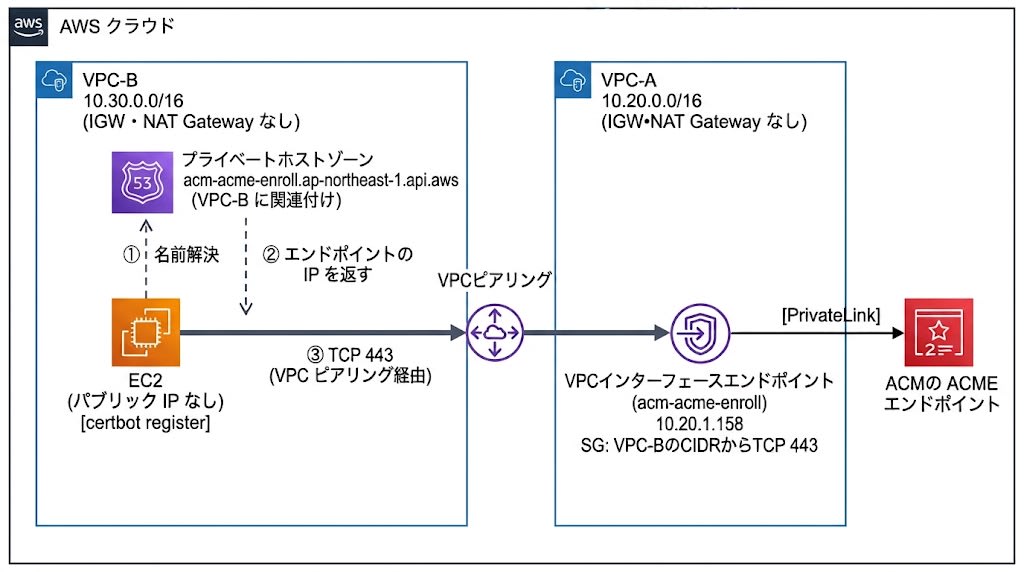
I did not create an endpoint in VPC-B; instead, I pointed the name to the VPC-A endpoint using a private hosted zone (PHZ). The zone name is acm-acme-enroll.ap-northeast-1.api.aws, the same as the hostname of the directory URL, and I was able to create a hosted zone even with a name under api.aws. At the zone apex, I placed an alias record pointing to the VPC-A endpoint.
aws route53 create-hosted-zone \
  --name acm-acme-enroll.ap-northeast-1.api.aws \
  --caller-reference <unique-string> \
  --vpc VPCRegion=ap-northeast-1,VPCId=<vpc-b-id> \
  --hosted-zone-config PrivateZone=true

aws route53 change-resource-record-sets \
  --hosted-zone-id <hosted-zone-id> \
  --change-batch file://phz-alias-record.json
phz-alias-record.json
{
  "Changes": [{
    "Action": "CREATE",
    "ResourceRecordSet": {
      "Name": "acm-acme-enroll.ap-northeast-1.api.aws.",
      "Type": "A",
      "AliasTarget": {
        "HostedZoneId": "Z2E726K9Y6RL4W",
        "DNSName": "<vpce-id>-<suffix>.acm-acme-enroll.ap-northeast-1.vpce.amazonaws.com",
        "EvaluateTargetHealth": false
      }
    }
  }]
}
The HostedZoneId of AliasTarget is the hosted zone ID shown in the endpoint's DNS entry. For DNSName, enter the DNS name of the VPC-A endpoint.
On the EC2 instance in VPC-B, the hostname resolved to the private IP of the VPC-A endpoint, and the directory URL returned HTTP 200. certbot register with a newly created EAB also succeeded.
$ getent ahostsv4 acm-acme-enroll.ap-northeast-1.api.aws | head -1
10.20.1.158     STREAM acm-acme-enroll.ap-northeast-1.api.aws

$ certbot register --non-interactive --agree-tos --register-unsafely-without-email \
    --server https://acm-acme-enroll.ap-northeast-1.api.aws/<directory-id>/directory \
    --eab-kid <eab-kid> --eab-hmac-key <eab-hmac-key>
Account registered.
Pricing
The prices are values checked on October 8, 2026, and the endpoint and PHZ prices are unit prices for the Tokyo region.
ACME Pricing Itself
ACME certificates cost $1.00 per FQDN (first 1,000 per month), charged at issuance and at each automatic renewal.
Related Costs
PrivateLink interface endpoints are charged for the time they are provisioned, per AZ in which they are placed. Partial hours are counted as a full hour. The hourly rate in Tokyo is $0.014, and data processing is $0.01/GB up to the first 1 PB.
Calculating only the hourly charges, assuming 720 hours per month, gives the following.
| Number of AZs deployed | Per hour | Per month (720 hours) |
|---|---|---|
| 1 | $0.014 | $10.08 |
| 2 | $0.028 | $20.16 |
| 3 | $0.042 | $30.24 |
With multi-AZ, hourly charges accrue for each AZ, so with 2 AZs the cost doubles. The endpoint cost continues to accrue as long as it is deployed, regardless of the number of issuances.
A private hosted zone (PHZ) for use from a separate VPC costs $0.50 per month each (for the first 25; $0.10 from the 26th onward). There is no daily proration, and it is charged at creation and on the 1st of each following month. Queries to private hosted zones are free. Hosted zones deleted within 12 hours of creation are not charged. When using it from an actual on-premises environment, associating the PHZ alone does not enable name resolution; a separate mechanism to receive queries from the on-premises side (such as a Route 53 VPC Resolver inbound endpoint) is needed, and its cost is added as well.
Summary
It became possible to issue ACM ACME certificates via a VPC interface endpoint, and I was able to issue a certificate from an EC2 instance in a VPC with neither an IGW nor a NAT Gateway.
The ACME-related costs for this test came to a little over $1 when calculated. If you continue using this configuration, in addition to the certificate charge incurred at each automatic renewal, hourly charges apply while the endpoint is deployed (about $10 per month for 1 AZ, increasing per AZ). When using it from on-premises, the cost of the name resolution mechanism is also needed separately.
ACME can now be used via PrivateLink even in environments that cannot have an external connection path, but if you are considering adopting it, I recommend evaluating not only network feasibility but also the running costs in advance.
