
I measured how much the output volume and time required change with Vercel Labs' agent-browser

This page has been translated by machine translation. View original
Introduction
If you just want to verify that a page is displaying as intended, a human can simply look at it. The trouble comes when you try to delegate that verification to an AI agent. Since agents cannot see the screen, they need to receive the page content as text. When I tried passing HTML directly, even a small test page came out to 11,498 tokens. At that rate, having the agent read just a few pages would exhaust the amount it can handle at once.
Vercel Labs' agent-browser is a browser automation CLI designed to reduce this transfer size. Instead of returning page content as HTML, it returns it in the form of an accessibility tree.
I wanted to know just how small it could get, so I used the task of comparing pages before and after a migration as my subject, and measured the same determination using 6 different approaches. Output volume varied by a factor of 160 depending on the approach, and elapsed time varied by a factor of 3 depending on how wait conditions were specified.
What is Vercel Labs
Vercel Labs is a place where Vercel publishes developer tools and experimental projects. The tools and projects are kept separate from Vercel itself. Vercel Labs operates with the policy of observing how tools are being used and focusing effort on those that seem useful. In addition to agent-browser, projects such as skills, portless, just-bash, and json-render are also published there.
Target Audience
- Those who want to delegate page display verification to an AI agent
- Those who want to reduce the amount read when having an agent operate a browser
- Those who are unsure whether to use agent-browser or Playwright
Verification Environment
| Item | Value |
|---|---|
| agent-browser | 0.38.1 |
| Chrome for Testing (agent-browser) | 153.0.8010.47 |
| Playwright | 1.59.1 |
| Chrome Headless Shell (Playwright) | 153.0.8010.12 |
| Next.js (target under test) | 16.3.5 |
| Node.js | v24.15.0 |
| OS | macOS (Darwin 25.6.0, arm64) |
| Tokenizer | tiktoken's o200k_base |
References
Verification Method
As the subject of verification, I prepared a console screen with a user list in Next.js. The same server's /before and /after return displays corresponding to before and after migration. (※ The code is included in the appendix.)
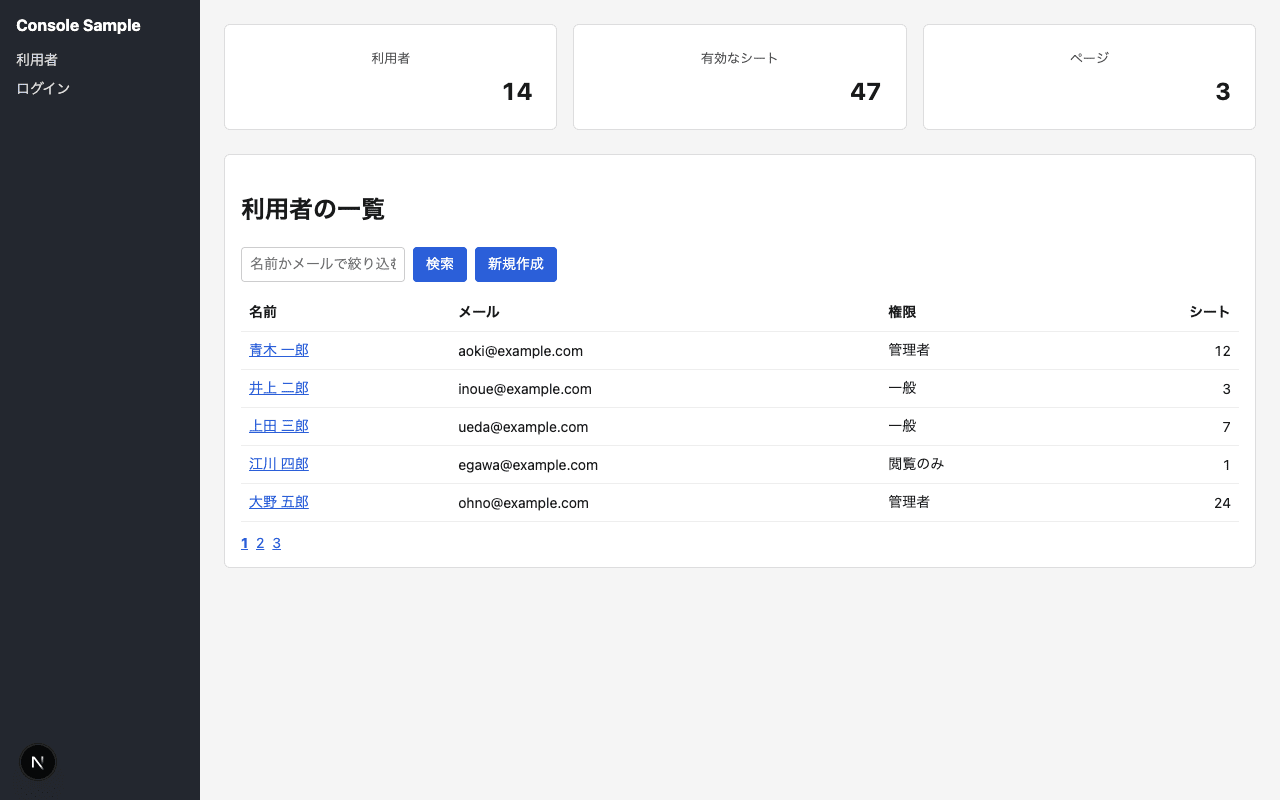
/before page
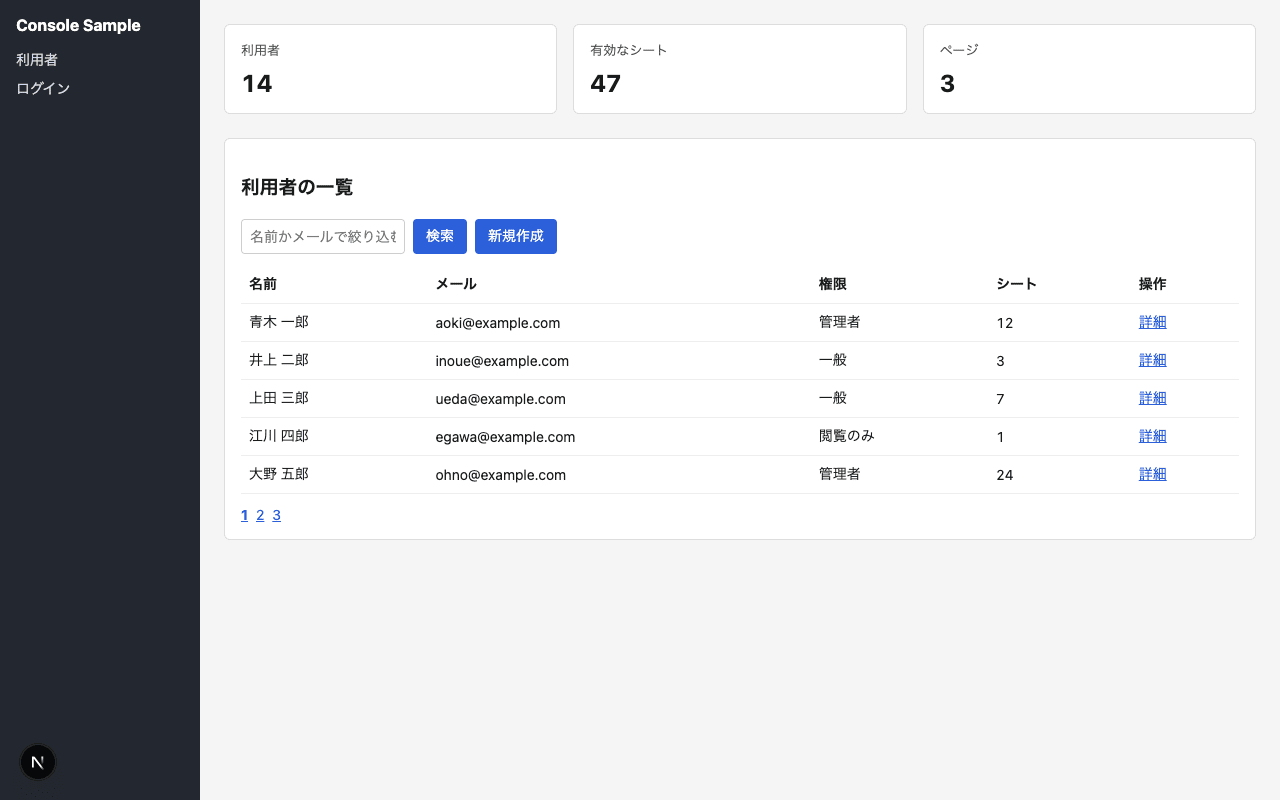
/after page
The following differences were introduced between the two displays.
| Difference | /before | /after |
|---|---|---|
| Heading level of the list | 2 | 3 |
| Link inside the name cell | Present | Absent |
| "Actions" column | Absent | Present |
Card padding |
24px | 16px |
text-align of numeric column |
right | left |
text-align of card heading |
center | left |
The card heading has class="card-title text-center" both before and after migration. Reading the class name alone cannot determine text-align; the rendered value must be measured.
The expected differences and success criteria were written out to JSON and fixed before measurements began. (If criteria are decided after seeing results, conclusions can be skewed in a convenient direction.)
The following is an excerpt about the card heading's text-align.
{
  "grading": {
    "detected": "All expected differences detected with expected values",
    "partial": "Only some of the expected differences were detected. Cases where values differ are also included here",
    "failed": "None of the expected differences could be detected. Cases where execution was impossible due to method constraints are also included here, with the reason recorded"
  },
  "tasks": {
    "T2": {
      "name": "Visual measurement",
      "expected": [
        {
          "id": "title-align",
          "selector": ".card-title",
          "property": "textAlign",
          "before": "center",
          "after": "left"
        }
      ]
    }
  }
}
The following 6 approaches were measured.
| Symbol | Approach |
|---|---|
| ab-html | Read agent-browser's get html body directly. Measured as a baseline |
| ab-snapshot | Read agent-browser's snapshot -s .panel directly |
| ab-styles | Read agent-browser's get styles directly |
| ab-eval | Receive only the determination result via agent-browser's eval |
| pw | Receive only the determination result via Playwright (waitUntil is networkidle) |
| pw-load | Same as above but with waitUntil set to load |
waitUntil is a Playwright option that specifies how far to wait for page loading before proceeding to the next process. networkidle waits until network activity settles, while load waits until page loading is complete.
Elapsed time is the median of 5 trials. The execution order was alternated per round.
Verification Results
For ab-eval and pw, all 6 fixed items matched the expected values.
| Approach | Elapsed Time | Tokens | Characters |
|---|---|---|---|
| ab-html | 0.282 sec | 11,498 | 32,444 |
| ab-snapshot | 0.304 sec | 1,806 | 4,193 |
| ab-styles | 0.359 sec | 13,568 | 46,567 |
| ab-eval | 0.316 sec | 85 | 328 |
| pw | 1.506 sec | 85 | 328 |
| pw-load | 0.507 sec | 85 | 328 |
The cold start of ab-eval, meaning the first run immediately after agent-browser close --all, took 1.904 seconds.
The following are the results of measuring each Playwright process separately.
| Process | waitUntil is networkidle | waitUntil is load |
|---|---|---|
| Browser launch | 0.296 sec | 0.296 sec |
page.goto |
0.556 sec | 0.047 sec |
page.evaluate |
0.002 sec | 0.008 sec |
For the same processes in agent-browser, open --wait-until networkidle took 0.10 to 0.13 seconds, and eval took 0.03 to 0.04 seconds.
Heading level, presence of links, and column additions/removals can be read from both ab-html and ab-snapshot. The snapshot output is arranged as follows.
- heading "利用者の一覧" [level=2, ref=e1]
- row
  - cell "青木 一郎" [ref=e12]
    - link "青木 一郎" [ref=e36]
padding and text-align do not appear in either HTML or snapshot, because they are the result of applying CSS. They are included in ab-styles, but amount to 664 lines per element.
Findings
Output volume varied by a factor of 160 for the same determination depending on the approach. Elapsed time varied by a factor of 3 depending on how far to wait for page loading, and the remaining difference after aligning the wait method came down to whether the browser was relaunched. With approaches that receive only the values needed for determination, both agent-browser and Playwright arrived at the same result with the same 85 tokens.
Discussion
I think agent-browser's snapshot is well-suited for stages where what needs to be verified has not yet been decided. This is because it allows the agent to read the page structure with a small token count. On the other hand, if the items to verify are already determined, it would be better to choose Playwright, which has a well-equipped mechanism for waiting for transitions to complete.
Summary
When measuring the same determination with agent-browser using 6 different approaches, output volume varied by a factor of 160 and elapsed time varied by a factor of 3. What produced the differences was not the tool itself, but rather what was being read and how far to wait. When having an agent verify a page, I believe the greatest effect comes from first revisiting the approach. I hope this article serves as a reference when choosing a method for having agents verify pages.
Appendix
Code used for verification
This is the determination code that runs inside the browser.
(() => {
  const heading = document.querySelector('.panel h2, .panel h3');
  const card = document.querySelector('.card');
  const num = document.querySelector('td.num');
  const title = document.querySelector('.card-title');
  return JSON.stringify({
    headingLevel: heading ? Number(heading.tagName.slice(1)) : null,
    nameLink: !!document.querySelector('tbody tr td:first-child a'),
    actionColumn: [...document.querySelectorAll('thead th')].some((th) => th.textContent === '操作'),
    cardPadding: getComputedStyle(card).padding,
    numAlign: getComputedStyle(num).textAlign,
    titleAlign: getComputedStyle(title).textAlign,
    titleClass: title.className,
  });
})()
This is the CSS that creates the differences between before and after migration.
.v-before .card { padding: 24px; }
.v-after  .card { padding: 16px; }
.v-before .num  { text-align: right; }
.v-after  .num  { text-align: left; }
.text-center { text-align: center; }
.v-after .card-title.text-center { text-align: left; }
The screen was built with Next.js App Router, and app/[variant]/layout.tsx applies className={shell v-${variant}}.
The heading level and how links are applied are switched by checking variant on the list page.
