I tried out the Agent Target of AgentCore Gateway

This page has been translated by machine translation. View original
Introduction
Hello, I'm Jinno from the Consulting Department, and I'm interested in drum-type washing machines.
In the last two articles, I introduced new features of AgentCore Gateway.
The first article covered Inference Target, which places LLM providers behind the Gateway, and the second covered Guardrails using Cedar policies. In those articles, I teased Agent Target, which I'll dive deep into this time!
Using Agent Target, you can place the agents themselves on AgentCore Runtime behind the Gateway. Here's an image of what that looks like.
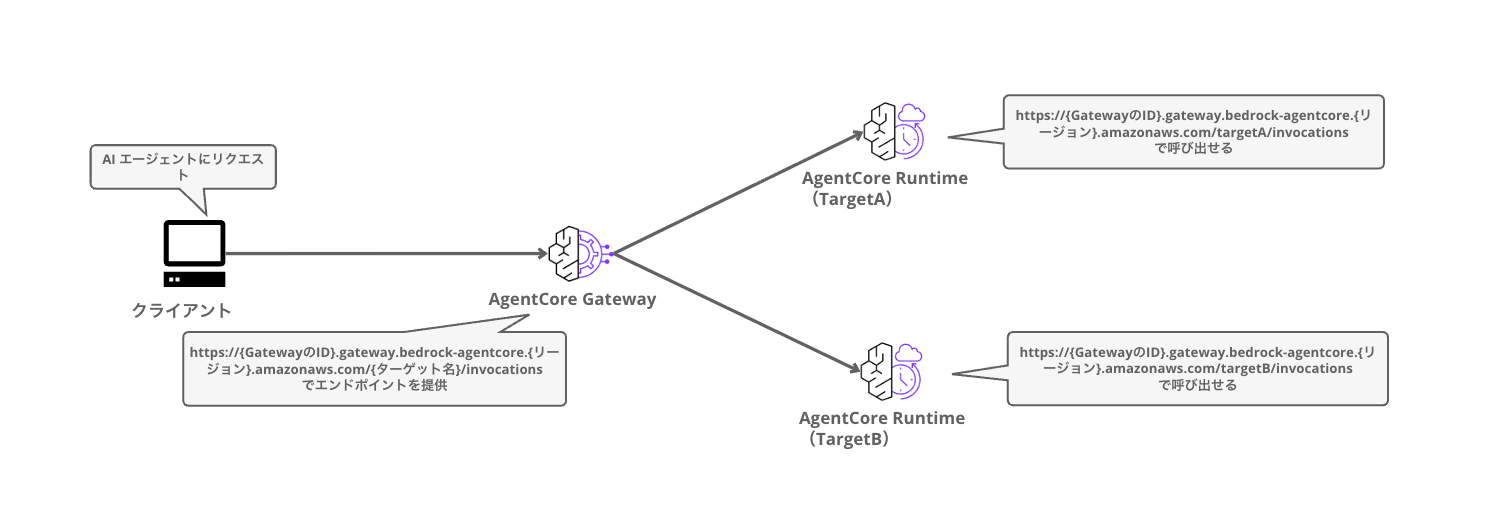
This time, I'll take the opportunity to build a multi-agent configuration by associating two A2A protocol agents with a single Gateway, where a local agent delegates inquiries to two remote specialist agents via the Gateway and integrates the results.
Agent Target Behavior
First, let me organize what position Agent Target occupies.
The current Gateway targets are classified into three categories.
| Category | Operation Mode | Target Examples |
|---|---|---|
| MCP Target | Aggregation mode. Integrates all target tools into one virtual MCP server | Lambda, OpenAPI, Smithy, MCP server, etc. |
| HTTP Target | Direct forwarding mode. Proxies as-is without aggregation or protocol translation | AgentCore Runtime agents, A2A services, etc. |
| Inference Target | Model-based routing. Routes by provider based on model value | Bedrock, OpenAI, Anthropic, custom providers, etc |
Note that in the console's target addition screen, it appears as 4 choices: MCP / Inference / Agent / Custom, but both Agent and Custom are HTTP targets at the API level (agentcoreRuntime type and passthrough type respectively).
Agent Target belongs to this HTTP target. The official documentation states the following.
The gateway sends traffic directly to the runtime agent without aggregation or protocol translation.
In other words, the Gateway behaves as a proxy without transformation. Unlike MCP targets, it doesn't aggregate tools/list, and clients call each target individually using path-based routing.
https://{GatewayID}.gateway.bedrock-agentcore.{region}.amazonaws.com/{targetName}/invocations
It's a simple structure that just points to the Runtime ARN, and the Gateway internally resolves the Runtime's endpoint.
{
  "http": {
    "agentcoreRuntime": {
      "arn": "arn:aws:bedrock-agentcore:us-east-1:<accountID>:runtime/RUNTIME_ID",
      "qualifier": "DEFAULT"
    }
  }
}
The protocol on the Runtime side doesn't matter. Runtime supports protocols like HTTP / A2A, but there are no A2A-specific settings for Agent Target, and A2A JSON-RPC passes through as-is. It's also explicitly stated that for Runtimes using MCP or A2A protocols, the policy engine schema used in the previous Guardrails article is automatically applied with a default schema.
For runtime agents that use MCP or A2A protocols, a default schema is applied automatically and you don't need to provide one.
Conversely, when using Guardrails with an HTTP protocol Runtime, schema specification is required. However, there were parts around this schema that didn't work as documented when I actually tried it. I'll dig deeper in Supplement 2.
As for what's beneficial about placing agents behind the Gateway, the official documentation lists the following:
- Access to multiple Runtime agents can be consolidated into a single Gateway endpoint
- Gateway authentication, observability, and policies (the Guardrails from last time!) can be applied outside the agents
- Multiple agents can be called individually using path-based routing
- Can be used for A/B testing and agent optimization using traffic through the Gateway
It serves as a Gateway for agents.
As fine-grained characteristics, it's good to know that it supports SSE streaming, and that interceptor Lambdas that process requests and responses only support buffer mode (not supported for streaming).
Configuration to Build This Time
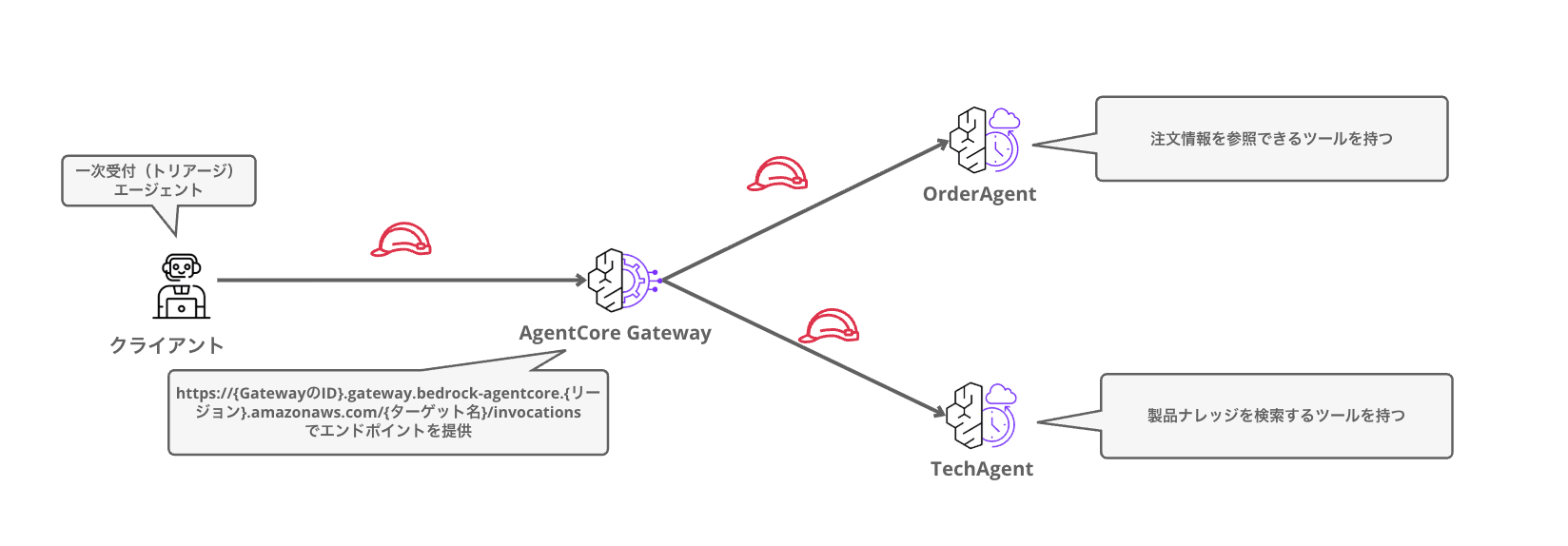
Using an EC site customer support scenario, I'll build the following configuration.
- Local: First-response (triage) agent. Decomposes inquiries and delegates to specialist agents, integrating results to provide answers
- Remote 1: OrderAgent (in charge of orders and shipping). Has a tool to query the order DB
- Remote 2: TechAgent (in charge of technical support). Has a tool to search the product knowledge base
The two remote agents are deployed to Runtime using the A2A protocol and hung under a single Gateway as Agent Targets. The local agent only communicates with remote agents via the Gateway.
It handles complex inquiries like "The vacuum cleaner I ordered still hasn't arrived. Also, I want to use it right away when it arrives, so please tell me how to set up Wi-Fi," by delegating to two specialist agents.
Prerequisites
- AWS account with configured AWS CLI (using the us-east-1 region)
- CDK bootstrapped environment (us-east-1)
- AgentCore CLI (using 1.0.0-preview.16 this time)
- uv
AgentCore CLI can be installed with the following:
npm install -g @aws/agentcore
agentcore --version
Setup
Create a Project
First, create an empty project. Since we'll add two agents later, we're adding --no-agent.
agentcore create --name AgentTargetDemo --no-agent
cd AgentTargetDemo
Add Two A2A Agents
Add the two specialist agents. The key point is --protocol A2A.
agentcore add agent --name OrderAgent --language Python --framework Strands \
  --model-provider Bedrock --memory none --protocol A2A

agentcore add agent --name TechAgent --language Python --framework Strands \
  --model-provider Bedrock --memory none --protocol A2A
Looking at the generated template, for the A2A protocol, the Strands agent is wrapped with StrandsA2AExecutor and started as an A2A server with serve_a2a. The Runtime's A2A protocol expects an A2A server running on port 9000 at the root path, and serve_a2a takes care of that.
Here is the implementation of OrderAgent. I replaced the template's tools and system prompt to make an agent that queries a mock order DB.
from strands import Agent, tool
from strands.multiagent.a2a.executor import StrandsA2AExecutor
from bedrock_agentcore.runtime import serve_a2a
from model.load import load_model

# Mock order DB
ORDERS = {
    "ORD-1001": {"item": "Smart Speaker Echo Mini", "status": "Delivered", "delivered_at": "2026-07-01"},
    "ORD-1002": {"item": "Robot Vacuum CleanBot X", "status": "In Transit", "estimated_delivery": "2026-07-09", "carrier": "Kurameso Express", "tracking_id": "CM-4471-8829"},
    "ORD-1003": {"item": "Wireless Earphones AirSound Pro", "status": "Delivery Delayed", "delay_reason": "Congestion at distribution center", "estimated_delivery": "2026-07-12"},
}

@tool
def lookup_order(order_id: str) -> str:
    """Look up order information (product name, shipping status, estimated delivery date, etc.) from an order ID."""
    order = ORDERS.get(order_id.upper())
    if not order:
        return f"Order {order_id} not found. Please check the order ID."
    return str(order)

SYSTEM_PROMPT = """
You are an order and shipping agent for an EC site.
For inquiries about order status and shipping, use the lookup_order tool to query the order DB and respond concisely.
Do not answer questions outside your scope (such as product usage), and return a message indicating they are outside your scope.
"""

agent = Agent(
    name="OrderAgent",
    description="EC site order and shipping agent. Queries shipping status and estimated delivery dates based on order IDs.",
    model=load_model(),
    system_prompt=SYSTEM_PROMPT,
    tools=[lookup_order],
)

if __name__ == "__main__":
    serve_a2a(StrandsA2AExecutor(agent))
The Agent's name and description are included directly in the Agent Card (described later), which is the agent discovery mechanism for A2A, so it's a good idea to write content that other agents can read to make delegation decisions.
TechAgent has the same structure, with a tool to search a mock product knowledge base.
app/TechAgent/main.py (full code)
from strands import Agent, tool
from strands.multiagent.a2a.executor import StrandsA2AExecutor
from bedrock_agentcore.runtime import serve_a2a
from model.load import load_model

# Mock product knowledge base
KNOWLEDGE_BASE = {
    "CleanBot X": [
        "Initial setup: 1) Place unit on charging dock 2) Install CleanBot Home smartphone app 3) Connect to 2.4GHz Wi-Fi following app instructions (5GHz band not supported)",
        "Error E03: Foreign object entangled in wheels. Turn off power and clean around the wheels.",
        "If suction is weak: Clean the dustbox and filter. Filter replacement recommended every 3 months.",
    ],
    "AirSound Pro": [
        "Pairing: Hold the case button for 3 seconds to enter pairing mode.",
        "If only one ear has sound: Return both to the case, wait 10 seconds, then reconnect.",
    ],
    "Echo Mini": [
        "Setup: Select 'Add Device' from the Alexa app.",
    ],
}

@tool
def search_product_knowledge(product_name: str) -> str:
    """Search knowledge for troubleshooting and setup procedures by product name."""
    for name, articles in KNOWLEDGE_BASE.items():
        if name.lower() in product_name.lower() or product_name.lower() in name.lower():
            return "\n".join(articles)
    return f"No knowledge found for product {product_name}. Supported products: {', '.join(KNOWLEDGE_BASE.keys())}"

SYSTEM_PROMPT = """
You are a technical support agent for an EC site.
For inquiries about product setup and troubleshooting, use the search_product_knowledge tool to search the knowledge base and respond concisely.
Do not answer questions outside your scope (such as order status and shipping), and return a message indicating they are outside your scope.
"""

agent = Agent(
    name="TechAgent",
    description="EC site technical support agent. Resolves product initial setup and troubleshooting through knowledge searches.",
    model=load_model(),
    system_prompt=SYSTEM_PROMPT,
    tools=[search_product_knowledge],
)

if __name__ == "__main__":
    serve_a2a(StrandsA2AExecutor(agent))
Add a Gateway and Agent Targets
Create a Gateway and add Agent Targets pointing to the two Runtimes. The target type in the CLI is http-runtime.
agentcore add gateway --name AgentGateway --protocol-type None --authorizer-type AWS_IAM

agentcore add gateway-target --name order-support --gateway AgentGateway \
  --type http-runtime --runtime OrderAgent

agentcore add gateway-target --name tech-support --gateway AgentGateway \
  --type http-runtime --runtime TechAgent
There is one important note here. Agent Targets cannot be added to a Gateway with protocol-type MCP. Make sure to create it with None specified. The target names (order-support / tech-support) become the routing paths directly.
Deploy
agentcore deploy -y
✓ Deployed to 'default' (stack: AgentCore-AgentTargetDemo-default)
Outputs:
  GatewayAgentGatewayUrlOutput: https://agenttargetdemo-agentgateway-xxxx.gateway.bedrock-agentcore.us-east-1.amazonaws.com
  GatewayTargetOrderSupportIdOutput: V2RNRURGGW
  GatewayTargetTechSupportIdOutput: 35A8UJKZCK
  ApplicationAgentOrderAgentRuntimeArnOutput: arn:aws:bedrock-agentcore:us-east-1:<accountID>:runtime/AgentTargetDemo_OrderAgent-xxxx
  ApplicationAgentTechAgentRuntimeArnOutput: arn:aws:bedrock-agentcore:us-east-1:<accountID>:runtime/AgentTargetDemo_TechAgent-xxxx
Two Runtimes, a Gateway, and two targets are deployed all at once via CDK. In my environment, it completed in about 5 minutes.
Verification
Retrieve the Agent Card (and a Permission Error)
A2A has Agent Cards as an agent discovery mechanism. It's a JSON file containing the agent's name, description, skills, and endpoint URL, published at /.well-known/agent-card.json on the A2A server.
Via the Gateway, it can be retrieved at the following URL under the target's path.
uvx awscurl --service bedrock-agentcore --region us-east-1 \
  "https://<GatewayID>.gateway.bedrock-agentcore.us-east-1.amazonaws.com/order-support/invocations/.well-known/agent-card.json"
However, an error was returned immediately.
{"message":"User: arn:aws:sts::<accountID>:assumed-role/AgentCore-AgentTargetDemo-McpGatewayAgentGatewayRol-xxxx/gateway-session-xxxx is not authorized to perform: bedrock-agentcore:GetAgentCard on resource: arn:aws:bedrock-agentcore:us-east-1:<accountID>:runtime/AgentTargetDemo_OrderAgent-xxxx because no identity-based policy allows the bedrock-agentcore:GetAgentCard action"}
The subject of the error is the Gateway's execution role. The Gateway calls the Runtime using its own execution role, but the automatically generated execution role by the CLI only has InvokeAgentRuntime permissions and lacks the bedrock-agentcore:GetAgentCard permission needed to retrieve the Agent Card. This is the same pattern as with Bedrock Mantle in the first article... Since the auto-generated role is a minimal configuration, you need to add permissions as you use features.
Add the following inline policy to the Gateway execution role. Note that it's needed not just for the Runtime itself but also for the endpoint (runtime-endpoint) ARN. When I first only allowed the Runtime body ARN, I got the same error for runtime/xxx/runtime-endpoint/DEFAULT.
{
  "Version": "2012-10-17",
  "Statement": [{
    "Effect": "Allow",
    "Action": "bedrock-agentcore:GetAgentCard",
    "Resource": [
      "arn:aws:bedrock-agentcore:us-east-1:<accountID>:runtime/AgentTargetDemo_OrderAgent-xxxx",
      "arn:aws:bedrock-agentcore:us-east-1:<accountID>:runtime/AgentTargetDemo_OrderAgent-xxxx/runtime-endpoint/*",
      "arn:aws:bedrock-agentcore:us-east-1:<accountID>:runtime/AgentTargetDemo_TechAgent-xxxx",
      "arn:aws:bedrock-agentcore:us-east-1:<accountID>:runtime/AgentTargetDemo_TechAgent-xxxx/runtime-endpoint/*"
    ]
  }]
}
After adding it and running again, the Agent Card was returned successfully!
{
  "capabilities": {"streaming": true},
  "defaultInputModes": ["text"],
  "defaultOutputModes": ["text"],
  "description": "EC site order and shipping agent. Queries shipping status and estimated delivery dates based on order IDs.",
  "name": "OrderAgent",
  "preferredTransport": "JSONRPC",
  "protocolVersion": "0.3.0",
  "skills": [{"description": "EC site order and shipping agent. Queries shipping status and estimated delivery dates based on order IDs.", "id": "main", "name": "OrderAgent", "tags": ["main"]}],
  "url": "https://bedrock-agentcore.us-east-1.amazonaws.com/runtimes/arn%3Aaws%3A.../invocations",
  "version": "0.1.0"
}
The name and description written in the code are included as-is. However, this url field... it points to the Runtime itself's URL, not the Gateway. This actually becomes a trap later, but let's set that aside for now and move on.
Send an A2A Message via the Gateway
Since A2A communicates via JSON-RPC, let's try POSTing the message/send method to the target's path.
uvx awscurl --service bedrock-agentcore --region us-east-1 -X POST \
  "https://<GatewayID>.gateway.bedrock-agentcore.us-east-1.amazonaws.com/order-support/invocations" \
  -H "Content-Type: application/json" \
  -d '{
    "jsonrpc": "2.0",
    "id": "req-001",
    "method": "message/send",
    "params": {
      "message": {
        "role": "user",
        "parts": [{"kind": "text", "text": "When will order ORD-1002 arrive?"}],
        "messageId": "11111111-1111-1111-1111-111111111111"
      }
    }
  }'
{
  "id": "req-001",
  "jsonrpc": "2.0",
  "result": {
    "artifacts": [{
      "name": "agent_response",
      "parts": [{"kind": "text", "text": "Order ORD-1002 (Robot Vacuum CleanBot X) is currently in transit.\n\nEstimated delivery date: July 9, 2026\nCarrier: Kurameso Express\nTracking number: CM-4471-8829\n..."}]
    }],
    "kind": "task",
    "status": {"state": "completed"}
  }
}
OrderAgent queried the order DB using its tool via the Gateway and responded! We confirmed that the A2A JSON-RPC is being returned as-is.
Orchestrating from the Local Agent
Now for the main event. The local first-response (triage) agent delegates to the two remote agents via the Gateway.
Strands provides an A2AAgent class as a remote A2A agent client wrapper, which handles everything from Agent Card resolution to JSON-RPC assembly. Since you can pass an httpx client via client_config, you can plug in SigV4HTTPXAuth from mcp-proxy-for-aws (same as in the first article) to execute IAM authentication for the Gateway.
I wrap this A2AAgent in tools and give them to the triage agent. I also add a logging hook so we can see which URL requests are sent to. Note that reusing an A2AAgent instance caused the second delegation to the same agent to fail with Event loop is closed, so I recreate it for each tool call.
"""Triage (first-response) agent running locally.

Delegates inquiries to two remote specialist agents (OrderAgent / TechAgent)
via the Gateway using the A2A protocol.
"""

import boto3
import httpx
from a2a.client import ClientConfig
from mcp_proxy_for_aws.sigv4_helper import SigV4HTTPXAuth
from strands import Agent, tool
from strands.agent.a2a_agent import A2AAgent

GATEWAY_URL = "https://<GatewayID>.gateway.bedrock-agentcore.us-east-1.amazonaws.com"

auth = SigV4HTTPXAuth(
    credentials=boto3.Session().get_credentials(),
    service="bedrock-agentcore",
    region="us-east-1",
)

async def log_request(request):
    print(f"  [HTTP] {request.method} {request.url}")

def make_client() -> httpx.AsyncClient:
    return httpx.AsyncClient(
        auth=auth, timeout=300, event_hooks={"request": [log_request]}
    )

def make_agent(target: str) -> A2AAgent:
    # A2AAgent creates a new event loop for each call, so reusing an instance
    # causes the second call to fail with Event loop is closed.
    # Recreate along with the httpx client for each tool call.
    return A2AAgent(
        endpoint=f"{GATEWAY_URL}/{target}/invocations",
        client_config=ClientConfig(httpx_client=make_client(), streaming=False),
    )

@tool
def ask_order_agent(question: str) -> str:
    """Ask the order agent a question about orders or shipping. Include the order ID if available."""
    result = make_agent("order-support")(question)
    return str(result.message["content"][0]["text"])

@tool
def ask_tech_agent(question: str) -> str:
    """Ask the technical support agent about product setup or troubleshooting. Include the product name."""
    result = make_agent("tech-support")(question)
    return str(result.message["content"][0]["text"])

orchestrator = Agent(
    system_prompt=(
        "You are a first-response customer support agent for an EC site. "
        "Decompose inquiries, delegate order/shipping questions to ask_order_agent, "
        "and product usage/trouble to ask_tech_agent, then integrate and respond."
    ),
    tools=[ask_order_agent, ask_tech_agent],
)

orchestrator(
    "The robot vacuum I ordered with ORD-1002 still hasn't arrived. When will it arrive? "
    "Also, I want to use it right away when it arrives, so please tell me how to connect it to Wi-Fi."
)
Let's run it.
uv run --with 'strands-agents[a2a]' --with mcp-proxy-for-aws --with boto3 local_orchestrator.py
Tool #1: ask_order_agent
Tool #2: ask_tech_agent
  [HTTP] GET https://<GatewayID>.gateway.bedrock-agentcore.us-east-1.amazonaws.com/order-support/invocations/.well-known/agent-card.json
  [HTTP] GET https://<GatewayID>.gateway.bedrock-agentcore.us-east-1.amazonaws.com/tech-support/invocations/.well-known/agent-card.json
  [HTTP] POST https://bedrock-agentcore.us-east-1.amazonaws.com/runtimes/arn%3Aaws%3A...OrderAgent-xxxx/invocations
  [HTTP] POST https://bedrock-agentcore.us-east-1.amazonaws.com/runtimes/arn%3Aaws%3A...TechAgent-xxxx/invocations
The triage agent decomposes the inquiry and delegates to the two agents in parallel as expected... but look closely at the HTTP log. The Agent Card retrieval (GET) goes through the Gateway, but the actual message sending (POST) goes to bedrock-agentcore.us-east-1.amazonaws.com, which is the Runtime's own URL...!
The Gateway Is Bypassed
The cause is the url field in the Agent Card we saw earlier. Following A2A protocol specifications, the A2A client determines the communication destination after card retrieval from the url in the card. And since serve_a2a on the Runtime writes the environment variable AGENTCORE_RUNTIME_URL (the Runtime's own URL) injected by the platform directly into the card's url, even if you specify the Gateway as the A2AAgent endpoint, only the message sending bypasses the Gateway and goes directly to the Runtime.
The fix is simple: override the Runtime-side environment variable so the card's url points to the Gateway. Since serve_a2a uses the value of AGENTCORE_RUNTIME_URL directly for the card, add envVars to the runtimes in agentcore.json and set the Gateway URL for each target.
"runtimes": [
  {
    "name": "OrderAgent",
    "protocol": "A2A",
    "envVars": [
      {
        "name": "AGENTCORE_RUNTIME_URL",
        "value": "https://<GatewayID>.gateway.bedrock-agentcore.us-east-1.amazonaws.com/order-support/invocations"
      }
    ]
  },
  {
    "name": "TechAgent",
    "protocol": "A2A",
    "envVars": [
      {
        "name": "AGENTCORE_RUNTIME_URL",
        "value": "https://<GatewayID>.gateway.bedrock-agentcore.us-east-1.amazonaws.com/tech-support/invocations"
      }
    ]
  }
]
After redeploying and checking the Agent Card, the url now points to the Gateway.
agentcore deploy -y
https://<GatewayID>.gateway.bedrock-agentcore.us-east-1.amazonaws.com/order-support/invocations
Run Again
Let's run the orchestrator again.
Tool #1: ask_order_agent
Tool #2: ask_tech_agent
  [HTTP] GET https://<GatewayID>.gateway.bedrock-agentcore.us-east-1.amazonaws.com/order-support/invocations/.well-known/agent-card.json
  [HTTP] GET https://<GatewayID>.gateway.bedrock-agentcore.us-east-1.amazonaws.com/tech-support/invocations/.well-known/agent-card.json
  [HTTP] POST https://<GatewayID>.gateway.bedrock-agentcore.us-east-1.amazonaws.com/tech-support/invocations
  [HTTP] POST https://<GatewayID>.gateway.bedrock-agentcore.us-east-1.amazonaws.com/order-support/invocations
I now have both pieces of information! Let me summarize them for you.

## Shipping Status (Order ORD-1002)

Your ordered robot vacuum (CleanBot X) is currently in transit.

| Item | Details |
|------|------|
| Estimated Delivery Date | July 9, 2026 |
| Carrier | Kurameso Express |
| Tracking Number | CM-4471-8829 |

## Wi-Fi Connection Setup (CleanBot X)

1. Place the unit on the charging dock
2. Install the "CleanBot Home" app on your smartphone
3. Launch the app and follow the on-screen instructions to complete setup
4. Select a 2.4GHz network when connecting to Wi-Fi
   - Please note that 5GHz band is not supported

It's almost there! Please feel free to ask if you have any questions.
This time, all requests are going through the Gateway!
Allow Only Gateway Requests
Simply fixing the Agent Card URL only ensures well-behaved clients come through the Gateway — the route for directly calling the Runtime still exists. If you want to enforce control through Gateway policies and Guardrails, you may also want to block direct access.
The official documentation provides a pattern for this: attach a resource-based policy to the Runtime that explicitly Denies Invoke from anyone other than the Gateway execution role.
For this verification, we'll apply it only to the OrderAgent Runtime and confirm the behavior. For production use where only the Gateway should be able to connect, apply the same resource-based policy to all Runtimes associated with the Gateway (in this configuration, TechAgent as well).
Note that this approach is for Runtimes using IAM (SigV4) authentication. For Runtimes using OAuth (JWT) authentication, a method is provided to allow only the Gateway's workload using allowedWorkloadConfiguration in customJWTAuthorizer.
aws bedrock-agentcore-control put-resource-policy --region us-east-1 \
  --resource-arn "arn:aws:bedrock-agentcore:us-east-1:<AccountID>:runtime/AgentTargetDemo_OrderAgent-xxxx" \
  --policy '{
    "Version": "2012-10-17",
    "Statement": [
      {
        "Sid": "AllowOnlyGatewayRole",
        "Effect": "Allow",
        "Principal": {"AWS": "arn:aws:iam::<AccountID>:role/<Gateway execution role name>"},
        "Action": "bedrock-agentcore:InvokeAgentRuntime",
        "Resource": "arn:aws:bedrock-agentcore:us-east-1:<AccountID>:runtime/AgentTargetDemo_OrderAgent-xxxx"
      },
      {
        "Sid": "DenyOtherPrincipals",
        "Effect": "Deny",
        "Principal": {"AWS": "*"},
        "Action": "bedrock-agentcore:InvokeAgentRuntime",
        "Resource": "arn:aws:bedrock-agentcore:us-east-1:<AccountID>:runtime/AgentTargetDemo_OrderAgent-xxxx",
        "Condition": {
          "ArnNotEquals": {
            "aws:PrincipalArn": "arn:aws:iam::<AccountID>:role/<Gateway execution role name>"
          }
        }
      }
    ]
  }'
Let's try it out.
Direct Runtime call → 403 explicit deny in a resource-based policy
Via Gateway        → HTTP 200 (normal response)
{"message":"User: arn:aws:sts::<AccountID>:assumed-role/<your role>/xxx is not authorized to perform: bedrock-agentcore:InvokeAgentRuntime on resource: arn:aws:bedrock-agentcore:us-east-1:<AccountID>:runtime/AgentTargetDemo_OrderAgent-xxxx with an explicit deny in a resource-based policy"}
Access is now only possible through the Gateway. This pattern looks useful when you want only the Gateway to access the targets.
Cleanup
Once verification is complete, you can delete the resources with the commands below. Since the resource-based policy was attached outside the stack, delete it first.
aws bedrock-agentcore-control delete-resource-policy --region us-east-1 \
  --resource-arn "arn:aws:bedrock-agentcore:us-east-1:<AccountID>:runtime/AgentTargetDemo_OrderAgent-xxxx"

agentcore remove all --json
agentcore deploy -y
The GetAgentCard inline policy manually added to the Gateway execution role will also be deleted along with the role when the stack is removed.
Closing Thoughts
Together with Inference Targets and Cedar Guardrails, we've explored the updated Gateway features across three articles!
With tools, LLMs, and agents all placeable behind the Gateway, I imagined a future where the Gateway becomes the central starting point as agents continue to multiply.
I hope this article has been helpful in some way. Thank you for reading to the end!
Supplement 1: Using It as an Agent Registry
The fact that multiple agents can hang off a single Gateway and be called by path means it could also be used as an in-house agent portal — displaying a list of agents on a front-end screen and connecting to the agent the user selects. Let me sketch out an image of how this might be implemented.
Building the list is a two-step process.
- Use the ListGatewayTargets API to enumerate the targets (= agents) attached to the Gateway
- Retrieve the Agent Card for each target via the Gateway and flesh out the list with the agent's name and description
cp = boto3.client("bedrock-agentcore-control", region_name="us-east-1")
targets = cp.list_gateway_targets(gatewayIdentifier=GATEWAY_ID)["items"]

with httpx.Client(auth=auth, timeout=30) as client:  # auth is SigV4HTTPXAuth
    for t in targets:
        if t["status"] != "READY":
            continue
        card = client.get(
            f"{GATEWAY_URL}/{t['name']}/invocations/.well-known/agent-card.json"
        ).json()
        agent_list.append({
            "id": t["name"],
            "displayName": card["name"],
            "description": card["description"],
            "connectUrl": card["url"],
        })
[
  {
    "id": "tech-support",
    "displayName": "TechAgent",
    "description": "Technical support agent for an e-commerce site. Resolves product setup and troubleshooting issues via knowledge search.",
    "connectUrl": "https://<GatewayID>.gateway.bedrock-agentcore.us-east-1.amazonaws.com/tech-support/invocations"
  },
  {
    "id": "order-support",
    "displayName": "OrderAgent",
    "description": "Order and shipping agent for an e-commerce site. Looks up shipping status and estimated delivery dates based on order IDs.",
    "connectUrl": "https://<GatewayID>.gateway.bedrock-agentcore.us-east-1.amazonaws.com/order-support/invocations"
  }
]
Since the display name, description, and connection URL for each agent are all available, placing this JSON directly on a screen would let you build a UI where users select an agent from a list and connect to it.
Note that ListGatewayTargets used for listing is a control plane API, so rather than calling it directly from the browser, the assumption is to run it on the backend side and cache the results. There doesn't appear to be a data plane endpoint that can list all agents at once, like tools/list for MCP targets.
Supplement 2: Explicitly Specifying a Schema for A2A Targets Enables Per-Target Policies
This is about per-target differentiation — preventing a specific IAM role from calling only the order-support target. For the action, specify a per-target action name in the format {target name}___POST:/invocations.
forbid (
  principal == AgentCore::IamEntity::"arn:aws:sts::<AccountID>:assumed-role/<role name>",
  action == AgentCore::Action::"order-support___POST:/invocations",
  resource == AgentCore::Gateway::"<Gateway ARN>"
);
However, for A2A protocol targets, this fails validation with the following error.
unrecognized action `AgentCore::Action::"order-support___POST:/invocations"`
did you mean `AgentCore::Action::"arn:aws:bedrock-agentcore:us-east-1:<AccountID>:gateway/agenttargetdemo-agentga...
It says it doesn't recognize that action name. The same action name is generated by the agentcore CLI's form-based generation, so that also fails. The same format works fine for HTTP protocol Runtime targets, so it appears the schema is simply not being linked for A2A targets.
I suspect the schema field in the target configuration is the culprit. The documentation states that a default schema is automatically applied for A2A protocol, but it seems actions cannot be resolved from this default schema — so let's try overriding it with a custom OpenAPI schema.
cp.update_gateway_target(
    gatewayIdentifier="<Gateway ID>",
    targetId="<Target ID>",
    name="order-support",
    targetConfiguration={"http": {"agentcoreRuntime": {
        "arn": "<OrderAgent Runtime ARN>",
        "qualifier": "DEFAULT",
        # Explicitly specify OpenAPI indicating A2A JSON-RPC comes to POST /invocations
        "schema": {"source": {"inlinePayload": json.dumps(openapi_schema)}},
    }}},
    credentialProviderConfigurations=[{"credentialProviderType": "GATEWAY_IAM_ROLE"}],
)
Full OpenAPI schema configured
{
  "openapi": "3.0.0",
  "info": {"title": "OrderAgent A2A", "version": "1.0.0"},
  "paths": {
    "/invocations": {
      "post": {
        "operationId": "invoke",
        "requestBody": {
          "required": true,
          "content": {"application/json": {"schema": {
            "type": "object",
            "properties": {
              "jsonrpc": {"type": "string"},
              "id": {"type": "string"},
              "method": {"type": "string"},
              "params": {"type": "object", "properties": {
                "message": {"type": "object", "properties": {
                  "role": {"type": "string"},
                  "parts": {"type": "array", "items": {"type": "object", "properties": {
                    "kind": {"type": "string"}, "text": {"type": "string"}}}},
                  "messageId": {"type": "string"}
                }}
              }}
            },
            "required": ["jsonrpc", "method"]
          }}}
        },
        "responses": {"200": {"description": "A2A JSON-RPC response",
          "content": {"application/json": {"schema": {"type": "object"}}}}}
      }
    }
  }
}
After setting the schema, recreating the policy from the beginning (created under the name DenyOrderForMyRoleV5) this time resulted in ACTIVE! Let's also verify the runtime behavior.
order-support → HTTP 403 Request Denied [Policy evaluation denied due to DenyOrderForMyRoleV5]
tech-support  → HTTP 200 (normal response)
Per-target differentiation works even for A2A targets!
When you want to apply per-target Cedar policies to A2A targets, it seems you need to explicitly specify an OpenAPI for POST /invocations in the target's schema rather than relying on the default schema...
Pointing the path to context.input.params.message.parts allows applying Guardrails (ContentFilter) to agent input messages using the same when guardrails syntax from the second article, and we confirmed that violent messages get blocked with a 403. Output suppression via suppressOutput also works with message/send (buffering). However, the compatibility issue between suppressOutput and streaming mentioned in the second article applies equally to A2A targets — it couldn't be combined with message/stream. (This is purely within the scope of my own verification, though...)
Incidentally, the documentation states the opposite: it's HTTP protocol Runtimes that require schema specification to use Guardrails. However, in practice, we were able to create Guardrail policies for HTTP protocol targets without a schema, and runtime blocking also worked (both in the second article's configuration and in re-verification for this article). The requirements around schema necessity appear to be inconsistent between the documentation and actual behavior in both directions, but since this was just released, I expect these inconsistencies will be resolved going forward!