I Bundled Tools into AgentCore Gateway and Tried Using Them from Managed Harness

This page has been translated by machine translation. View original
Introduction
Hello, I'm Kanno from the Consulting Department, and I also love reality dating shows.
AgentCore's Managed Harness is incredibly convenient, isn't it? You can quickly build agents without writing any code. Are you all using it?
I tried it out too, but you have to prepare the tools side yourself. Especially for things like RAG, I felt that building it from scratch every time is a hassle... These days I find myself wishing it could be as easy as Bedrock Agents.
So this time, to make it easy for Harness users to use things like RAG, I built a toolkit with the following concept: bundle three tools into AgentCore Gateway — knowledge base search, web page retrieval, and AWS documentation search — and deploy it with CDK, so that anyone can connect to it from Managed Harness and use it.
Just connecting a single Gateway makes all three tools available, so the effort on the user side is greatly reduced.
The code for this project is published in the repository below. In the article I excerpt and explain the key points, but please refer to the repository for the full picture.
AgentCore Gateway
Before getting to the main topic, let me briefly go over the role of Gateway.
Gateway is a hub that bundles existing APIs, Lambda functions, MCP Servers, and so on, so that agents can call them in a unified way.
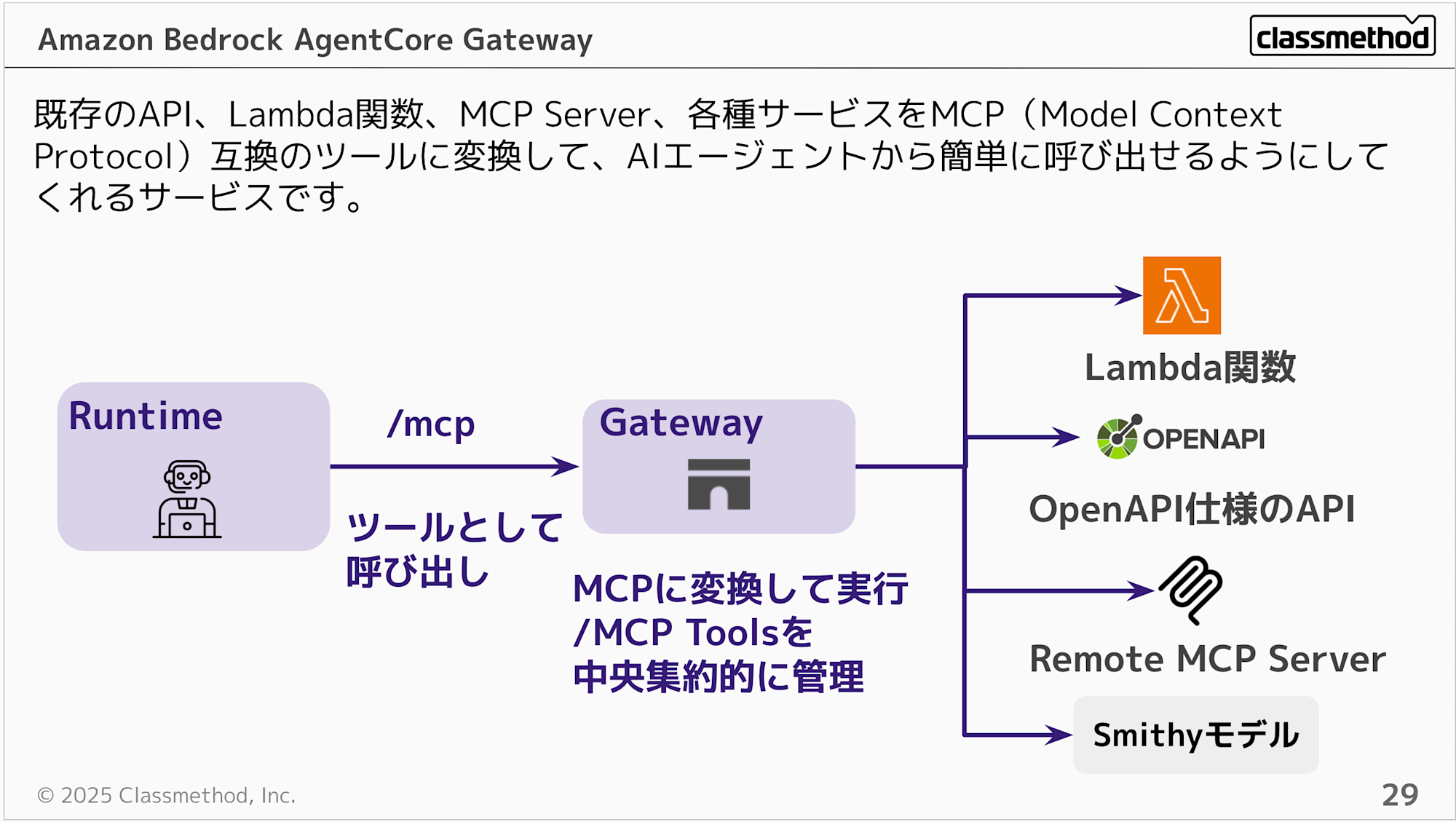
Even without Gateway, you can call Lambda or MCP Servers directly from Runtime. However, if your organization has many Lambda functions and MCP Servers, linking each of them individually to agents becomes hard to manage.
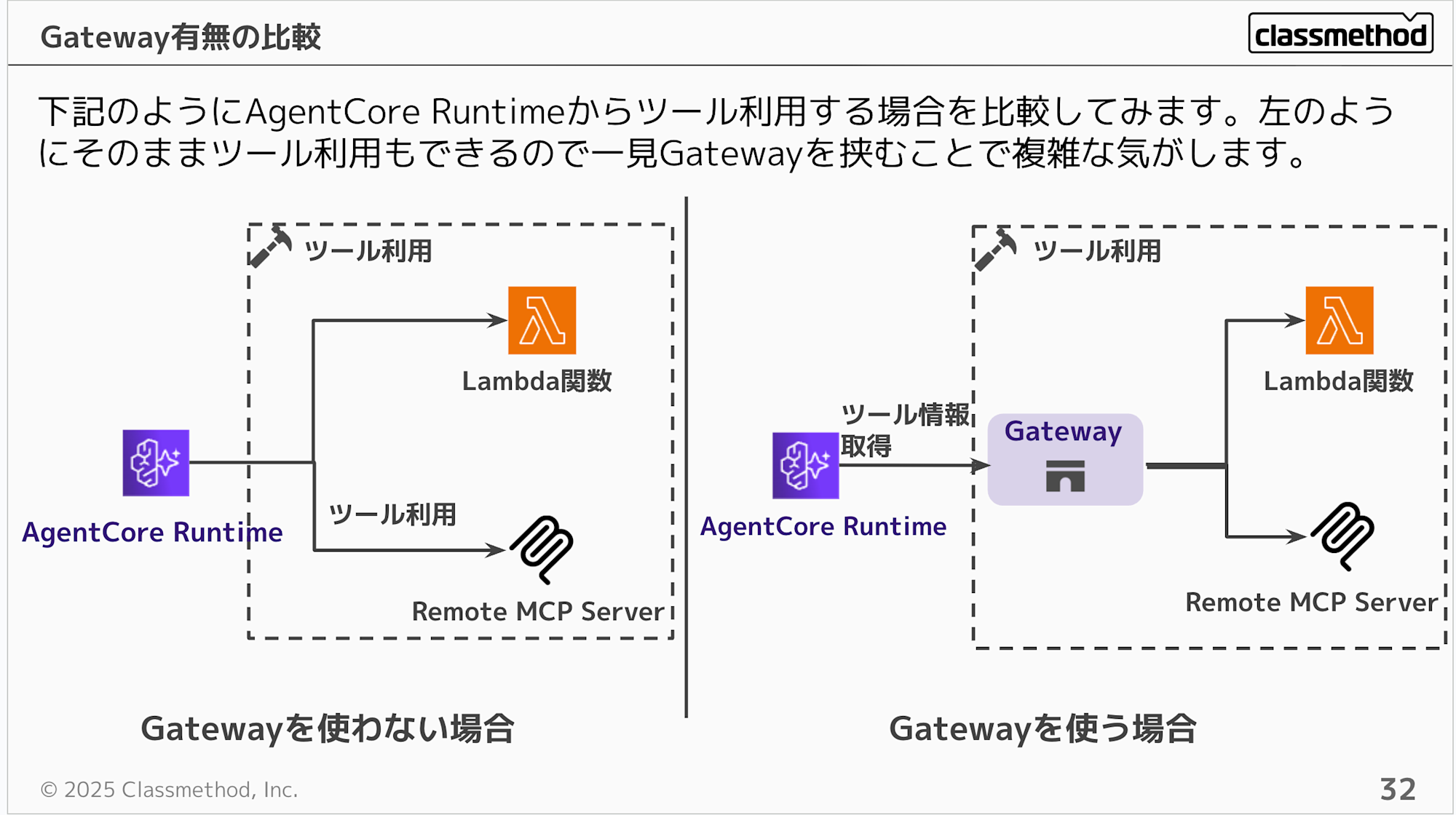
If you consolidate them in Gateway, the agent side only needs to connect to one Gateway to access all the tools behind it. Another benefit is that you don't need to change the agent's code even when tools are added or changed.
As in this case, if the infrastructure provider deploys the Gateway with CDK, users just add the Gateway from the Managed Harness console. The key point is that they don't need to be aware of what's inside the tools.
For details on Gateway and tips for production operation, please see the article below!
Architecture
Here is the overall picture.
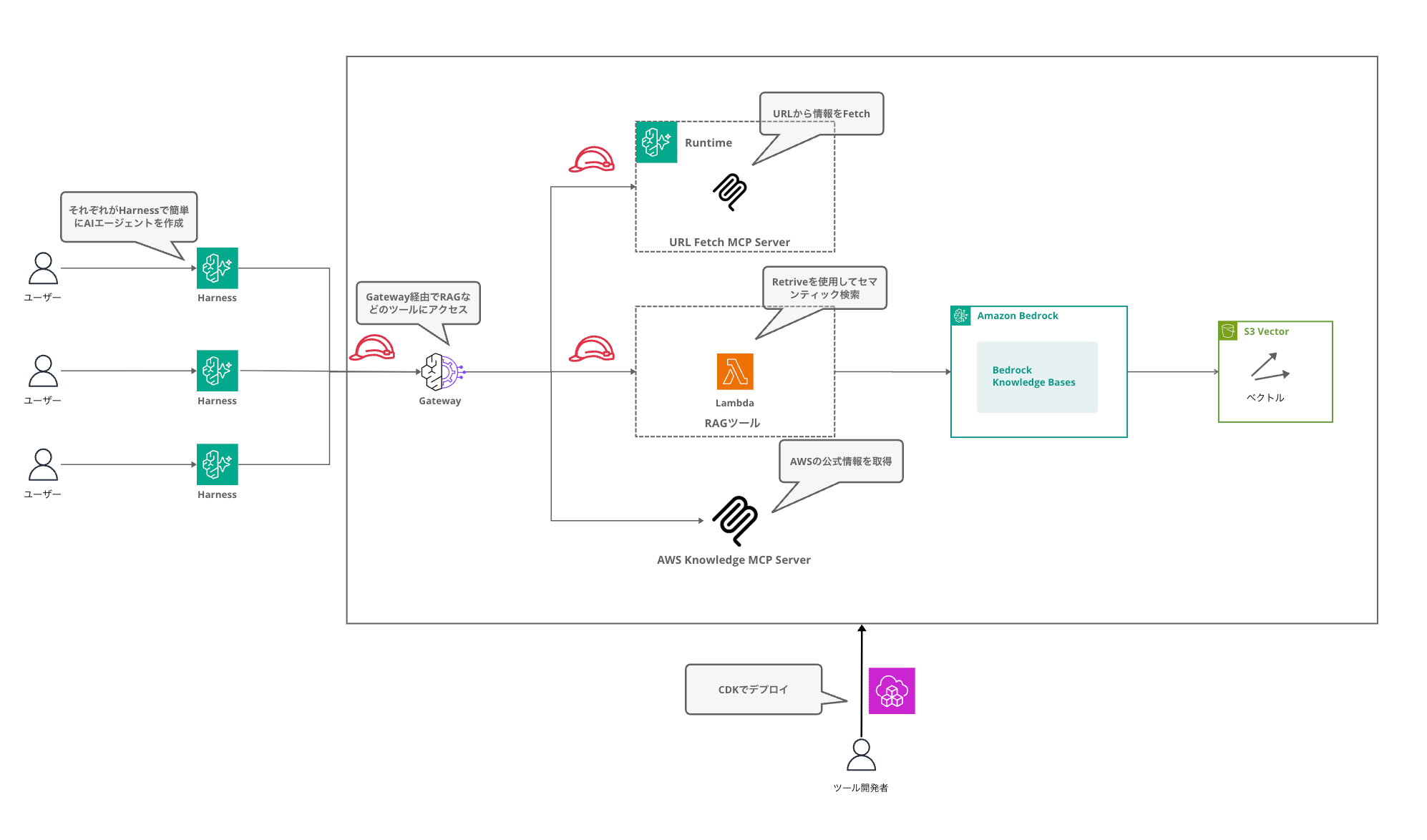
In this setup, multiple users each create their own AI agents with Managed Harness and access tools such as RAG via the Gateway. Tool developers only need to deploy once with CDK, and users can use the tools just by connecting the Gateway.
Three Targets are registered in the Gateway.
| Target | Tool name | Description | Implementation |
|---|---|---|---|
| kb-retrieve | retrieve_documents | Search documents from the knowledge base | Lambda |
| web-tools | fetch_webpage | Retrieve text from web pages | FastMCP on AgentCore Runtime |
| aws-knowledge | search_documentation and others | Search official AWS documentation | AWS-hosted MCP Server |
I deliberately used three kinds of Target implementations. The reason is that I wanted to try out how to write each of them in CDK: Lambda target / MCP Server on Runtime / external MCP Server.
Prerequisites
- AWS CDK v2.254.0
@aws-cdk/aws-bedrock-agentcore-alphav2.254.0-alpha.0- Node.js 22+ (verified with v25.9.0)
- Docker (required for building the Runtime container)
- Deployment region: us-east-1
Project structure
agentcore-gateway-kit/
├── bin/
│   └── app.ts                     # CDK entry point
├── lib/
│   ├── knowledge-base-stack.ts    # Stack 1: KB + S3 Vectors
│   └── rag-gateway-stack.ts       # Stack 2: Gateway + Lambda + Runtime
├── lambda/
│   └── kb-retrieve/
│       └── index.py               # KB Retrieve Lambda
├── mcp-server/
│   ├── server.py                  # FastMCP Web Tools
│   ├── requirements.txt
│   └── Dockerfile
├── sample-data/
│   └── sample.txt
├── cdk.json
├── package.json
└── tsconfig.json
I've made it a two-stack setup. By separating the Knowledge Base and the Gateway, you can operate in ways such as keeping the Knowledge Base while replacing only the Gateway side.
Implementation points
For the full code, please refer to the repository; here I'll focus on the points for building the Gateway and each Target with CDK.
Knowledge Base stack
I'm using S3 Vectors as the vector store. Unlike OpenSearch Serverless, it needs no additional infrastructure, and for verification purposes it's cheap and easy to handle.
S3 Vectors is defined with CDK L1 constructs (CfnVectorBucket / CfnIndex).
const vectorBucket = new s3vectors.CfnVectorBucket(this, 'VectorBucket', {
  vectorBucketName,
});

const vectorIndex = new s3vectors.CfnIndex(this, 'VectorIndex', {
  vectorBucketName,
  indexName: 'rag-gateway-index',
  dimension: VECTOR_DIMENSION,
  distanceMetric: 'cosine',
  dataType: 'float32',
});
vectorIndex.addDependency(vectorBucket);
You link it by specifying S3_VECTORS in the Knowledge Base's storageConfiguration.
const knowledgeBase = new bedrock.CfnKnowledgeBase(this, 'KnowledgeBase', {
  name: 'RagGatewayKnowledgeBase',
  roleArn: kbRole.roleArn,
  knowledgeBaseConfiguration: {
    type: 'VECTOR',
    vectorKnowledgeBaseConfiguration: {
      embeddingModelArn: `arn:aws:bedrock:${cdk.Aws.REGION}::foundation-model/${EMBEDDING_MODEL_ID}`,
    },
  },
  storageConfiguration: {
    type: 'S3_VECTORS',
    s3VectorsConfiguration: {
      vectorBucketArn: vectorBucket.attrVectorBucketArn,
      indexName: vectorIndex.indexName!,
    },
  },
});
For the embedding model, I'm using Amazon Titan Embed Text V2 (1024 dimensions).
Creating the Gateway
const gateway = new agentcore.Gateway(this, 'RagGateway', {
  gatewayName: 'rag-gateway-kit',
  description: 'RAG Gateway Kit: KB Retrieve + Web Fetch + AWS Knowledge',
  authorizerConfiguration: agentcore.GatewayAuthorizer.usingAwsIam(),
});
I'm using the L2 construct from @aws-cdk/aws-bedrock-agentcore-alpha. The L2 default is Cognito authentication, but Managed Harness connects with IAM, so Cognito would cause an error. I explicitly specify IAM with GatewayAuthorizer.usingAwsIam().
Lambda target (Knowledge Base Retrieve)
A Lambda target can be added with the L2 addLambdaTarget.
gateway.addLambdaTarget('KBRetrieveTarget', {
  gatewayTargetName: 'kb-retrieve',
  lambdaFunction: kbRetrieveFn,
  toolSchema: agentcore.ToolSchema.fromInline([
    {
      name: 'retrieve_documents',
      description: 'ナレッジベースからドキュメントを検索します。',
      inputSchema: {
        type: agentcore.SchemaDefinitionType.OBJECT,
        properties: {
          query: { type: agentcore.SchemaDefinitionType.STRING, description: '検索クエリ' },
          maxResults: { type: agentcore.SchemaDefinitionType.INTEGER, description: '最大取得件数' },
        },
        required: ['query'],
      },
    },
  ]),
});
The tool's input schema is defined with ToolSchema.fromInline. Note that you need to use the SchemaDefinitionType enum to specify types; using string literals (such as "object") results in a compile error.
Here's what the Lambda side does.
def handler(event, context):
    query = event.get('query', '')
    kb_id = event.get('knowledgeBaseId', KNOWLEDGE_BASE_ID)
    max_results = min(event.get('maxResults', 5), 100)

    response = client.retrieve(
        knowledgeBaseId=kb_id,
        retrievalQuery={'text': query},
        retrievalConfiguration={
            'vectorSearchConfiguration': { 'numberOfResults': max_results }
        },
    )

    results = []
    for r in response.get('retrievalResults', []):
        results.append({
            'content': r['content'].get('text', ''),
            'score': r.get('score'),
            'location': r.get('location', {}),
        })

    return { 'results': results, 'count': len(results) }
It's a simple implementation that just calls Bedrock's Retrieve API and returns the search results. The reason for using Retrieve rather than RetrieveAndGenerate is to have the Managed Harness-side model generate the answer.
MCP Server on Runtime (web page retrieval)
We register a FastMCP server running on AgentCore Runtime as a Gateway Target.
Here is the MCP Server code.
mcp = FastMCP("web-tools", host="0.0.0.0", stateless_http=True)

@mcp.tool()
def fetch_webpage(url: str, max_length: int = 5000) -> str:
    """Fetch a web page and return its text content."""
    response = httpx.get(url, follow_redirects=True, timeout=30, headers={
        'User-Agent': 'AgentCore-WebTools/1.0',
    })
    response.raise_for_status()

    html = response.text
    text = re.sub(r'<script[^>]*>.*?</script>', '', html, flags=re.DOTALL)
    text = re.sub(r'<style[^>]*>.*?</style>', '', text, flags=re.DOTALL)
    text = re.sub(r'<[^>]+>', ' ', text)
    text = re.sub(r'\s+', ' ', text).strip()

    return text[:max_length]
The tool is defined with a FastMCP decorator. It's simple processing that strips HTML tags and returns only the text.
On the CDK side, the L2 AgentRuntimeArtifact.fromAsset automatically handles everything from building the Dockerfile to pushing to ECR.
const runtimeEndpointUrl = cdk.Fn.sub(
  'https://bedrock-agentcore.${AWS::Region}.amazonaws.com/runtimes/arn%3Aaws%3Abedrock-agentcore%3A${AWS::Region}%3A${AWS::AccountId}%3Aruntime%2F${RuntimeId}/invocations',
  { RuntimeId: webToolsRuntime.agentRuntimeId },
);

const webToolsTarget = new bedrockagentcore.CfnGatewayTarget(this, 'WebToolsTarget', {
  gatewayIdentifier: gateway.gatewayId,
  name: 'web-tools',
  targetConfiguration: {
    mcp: {
      mcpServer: { endpoint: runtimeEndpointUrl },
    },
  },
  credentialProviderConfigurations: [{
    credentialProviderType: 'GATEWAY_IAM_ROLE',
    credentialProvider: {
      iamCredentialProvider: { service: 'bedrock-agentcore' },
    },
  }],
});
The endpoint URL is in a format that embeds the URL-encoded Runtime ARN.
For MCP Server targets, you need to specify the sub-property (service) of iamCredentialProvider in credentialProviderConfigurations. The L2 GatewayCredentialProvider.fromIamRole() doesn't output this sub-property, so for MCP Server targets I use L1 (CfnGatewayTarget). For Lambda targets, L2 is fine.
Another important point is dependencies.
webToolsTarget.addDependency(
  webToolsRuntime.node.defaultChild as cdk.CfnResource,
);
const gatewayDefaultPolicy = gateway.role.node.findChild('DefaultPolicy').node.defaultChild as cdk.CfnResource;
webToolsTarget.addDependency(gatewayDefaultPolicy);
When creating a Gateway Target, the Gateway connects to the endpoint and tries to fetch the tool list. At this point, it fails if the Runtime is not in the READY state, and it cannot even connect if the Gateway role lacks the InvokeAgentRuntime permission. I've explicitly added both dependencies.
AWS Knowledge MCP Server
This is an MCP Server hosted officially by AWS. You can use it just by specifying the endpoint URL.
new bedrockagentcore.CfnGatewayTarget(this, 'AWSKnowledgeTarget', {
  gatewayIdentifier: gateway.gatewayId,
  name: 'aws-knowledge',
  targetConfiguration: {
    mcp: {
      mcpServer: { endpoint: 'https://knowledge-mcp.global.api.aws' },
    },
  },
});
Since it's a public endpoint requiring no authentication, I've omitted credentialProviderConfigurations. Six tools — search_documentation / read_documentation / recommend / list_regions / get_regional_availability / retrieve_skill — are automatically registered in the Gateway.
How to add tools to the Gateway
The nice thing about Gateway is that you can add new tools just by adding targets. Here are examples of adding a Lambda target and an MCP Server target.
Adding a Lambda tool
You can add it with the L2 addLambdaTarget.
gateway.addLambdaTarget('MyNewTarget', {
  gatewayTargetName: 'my-tool',
  lambdaFunction: myFunction,
  toolSchema: agentcore.ToolSchema.fromInline([{
    name: 'my_tool',
    description: 'ツールの説明',
    inputSchema: {
      type: agentcore.SchemaDefinitionType.OBJECT,
      properties: { /* ... */ },
    },
  }]),
});
Lambda targets are simple since they can be completed with L2 alone.
Adding an MCP Server target
As mentioned earlier, MCP Server targets use L1 (CfnGatewayTarget).
new bedrockagentcore.CfnGatewayTarget(this, 'MyMcpTarget', {
  gatewayIdentifier: gateway.gatewayId,
  name: 'my-mcp-server',
  targetConfiguration: {
    mcp: {
      mcpServer: {
        endpoint: 'https://your-mcp-server.example.com',
      },
    },
  },
  credentialProviderConfigurations: [{
    credentialProviderType: 'GATEWAY_IAM_ROLE',
    credentialProvider: {
      iamCredentialProvider: {
        service: 'bedrock-agentcore',
      },
    },
  }],
});
The value of service varies depending on the connection destination. For an MCP Server on AgentCore Runtime, specify bedrock-agentcore.
Just by adding a Target and running cdk deploy, the new tool becomes immediately available from existing Managed Harnesses. Not having to touch the agent side is great from an operations standpoint.
This time I've written everything directly in the stack for simplicity, but creating helper functions or Constructs for each Target type would probably make it easier to manage as the number of tools grows.
Deployment
npm install
npx cdk deploy --all
When you deploy, the sample documents about AgentCore under sample-data are automatically uploaded to the S3 bucket. However, simply placing files in S3 doesn't reflect them in the Knowledge Base. You need to run a sync from the console or CLI.
In the console, select the DataSource from the Knowledge Base screen and press the "Sync" button.
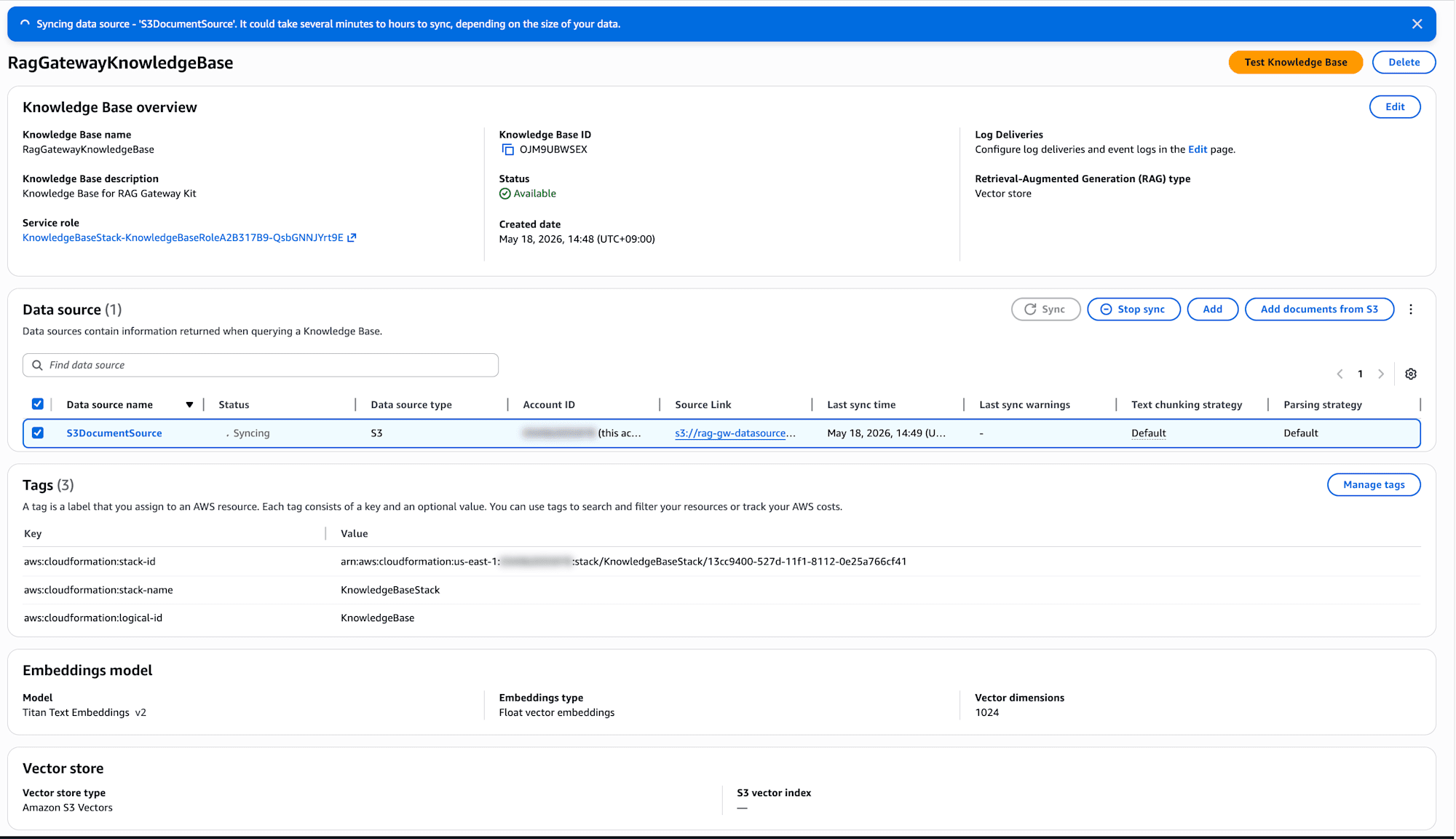
For the CLI, use the command below. KnowledgeBaseId and DataSourceId can be obtained from the CDK Output.
aws bedrock-agent start-ingestion-job \
  --knowledge-base-id <KnowledgeBaseId> \
  --data-source-id <DataSourceId>
If you want to make your own documents searchable, either add documents under sample-data and run cdk deploy, or upload them to the S3 bucket and then run the sync.
aws s3 cp my-document.txt s3://<DataSourceBucketName>/

aws bedrock-agent start-ingestion-job \
  --knowledge-base-id <KnowledgeBaseId> \
  --data-source-id <DataSourceId>
Verification
Once deployment is complete, let's create a Managed Harness from the console and check that it works!
Creating a Managed Harness
Open AWS Console → Bedrock → AgentCore → Managed Harness.
Create a new one from Advanced create harness.
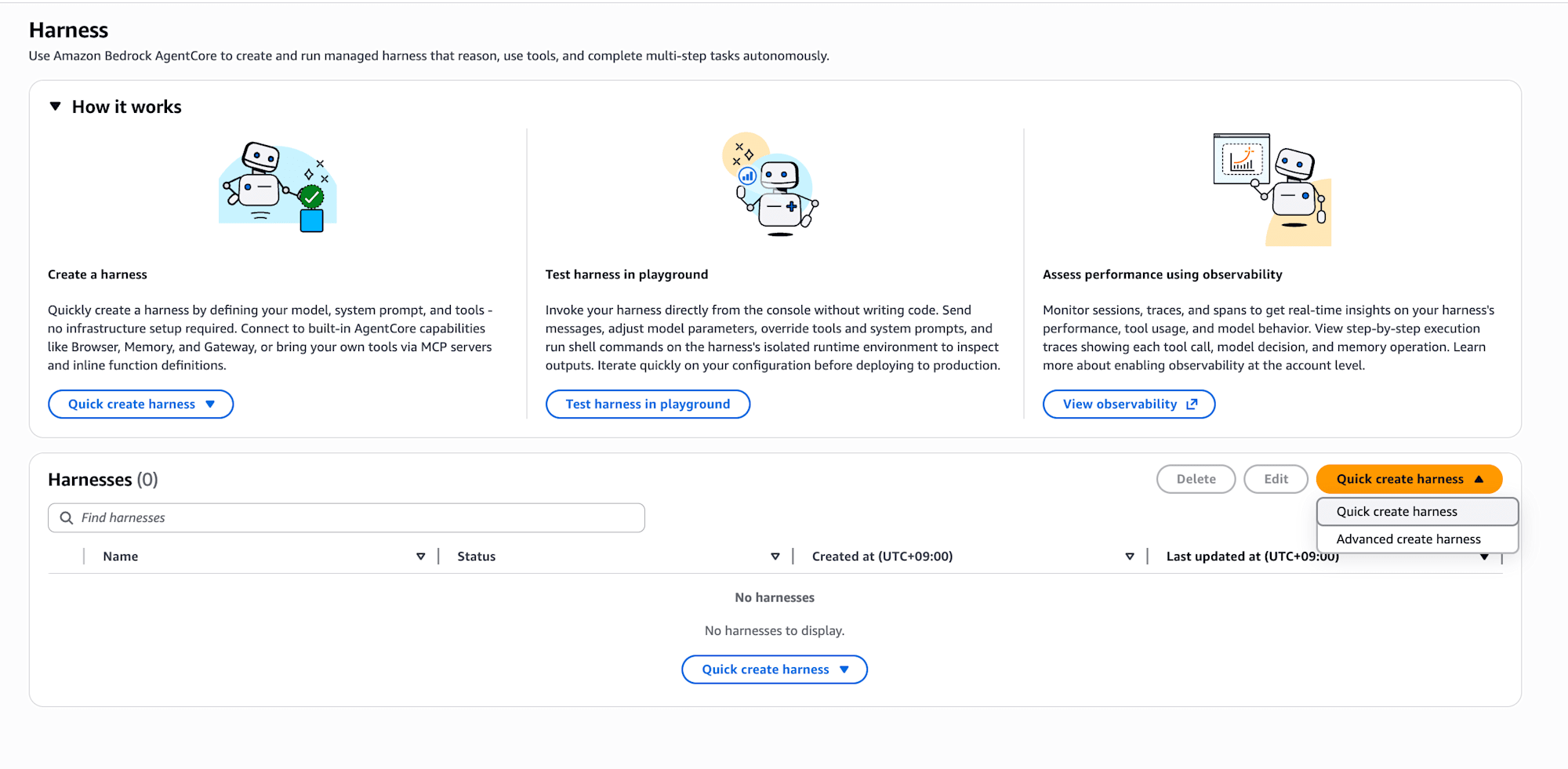
Enable Gateway in the Tools section and select the deployed rag-gateway-kit. Just by adding one Gateway, all the tools included in the three Targets become available.
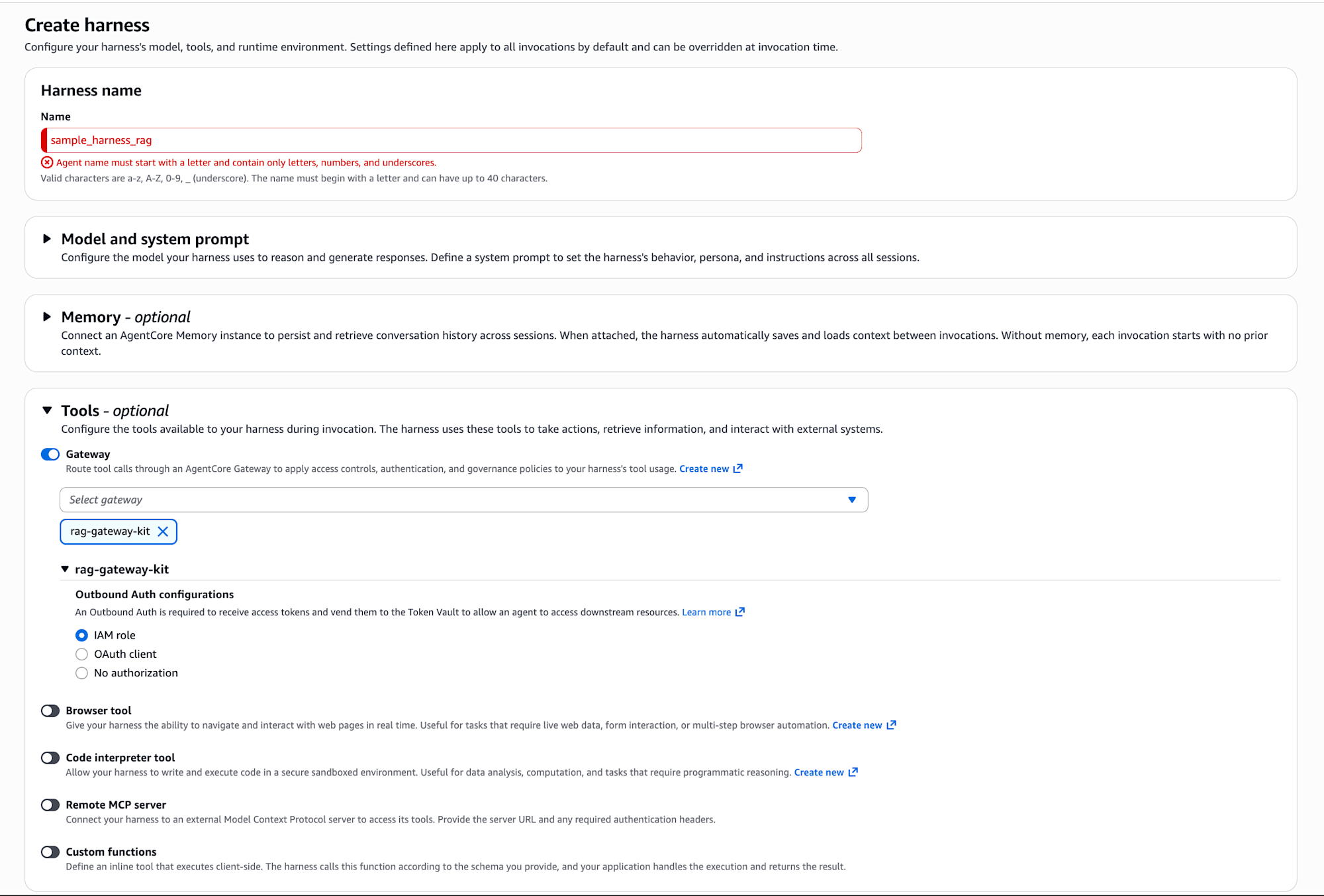
That was easy to create.
Once creation is complete, the Status becomes Ready. Let's verify operation from "Test harness".
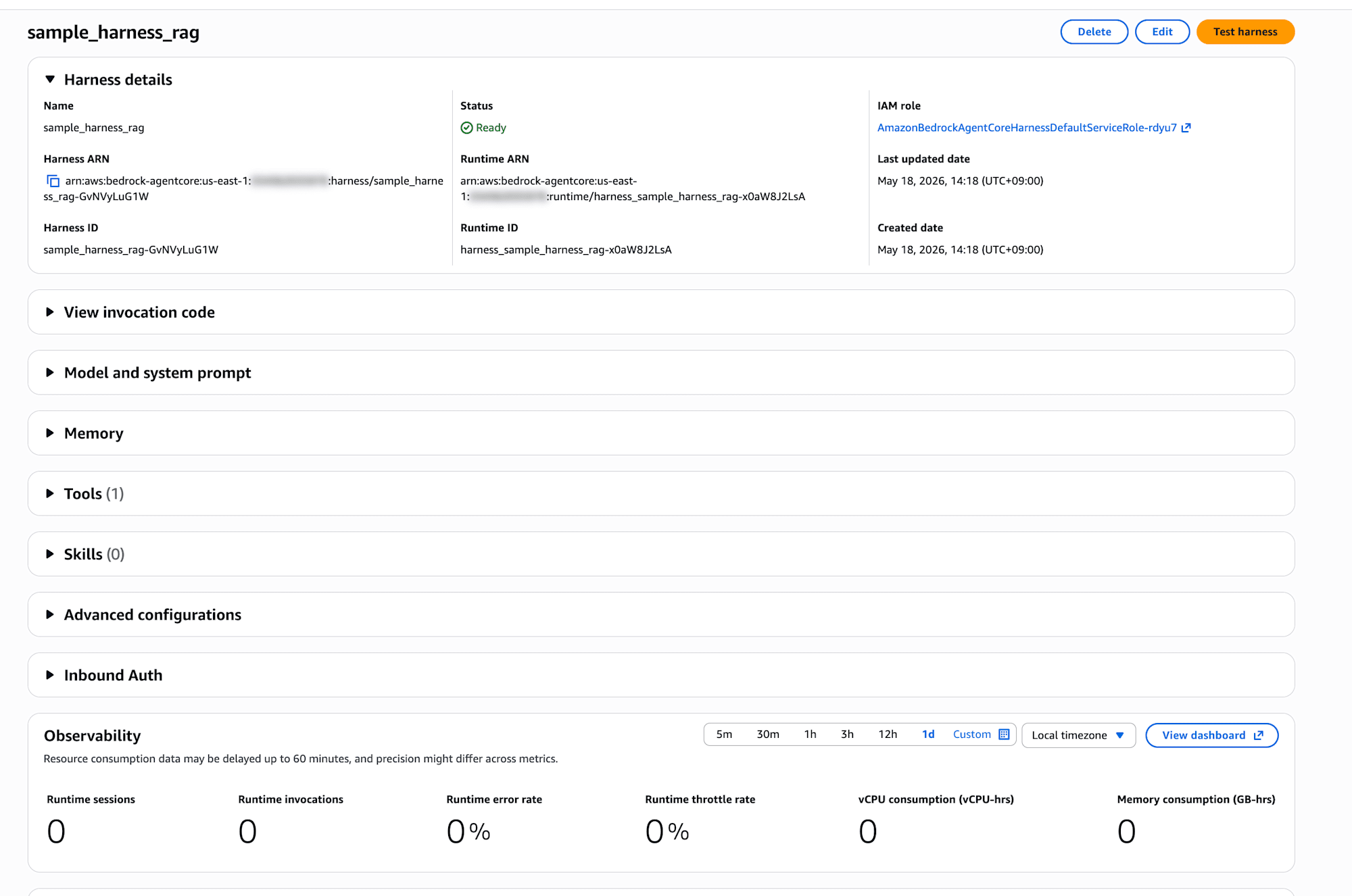
Checking Knowledge Base search (retrieve_documents)
First, let's try searching the knowledge base. I sent "Search for information about AgentCore using RAG."
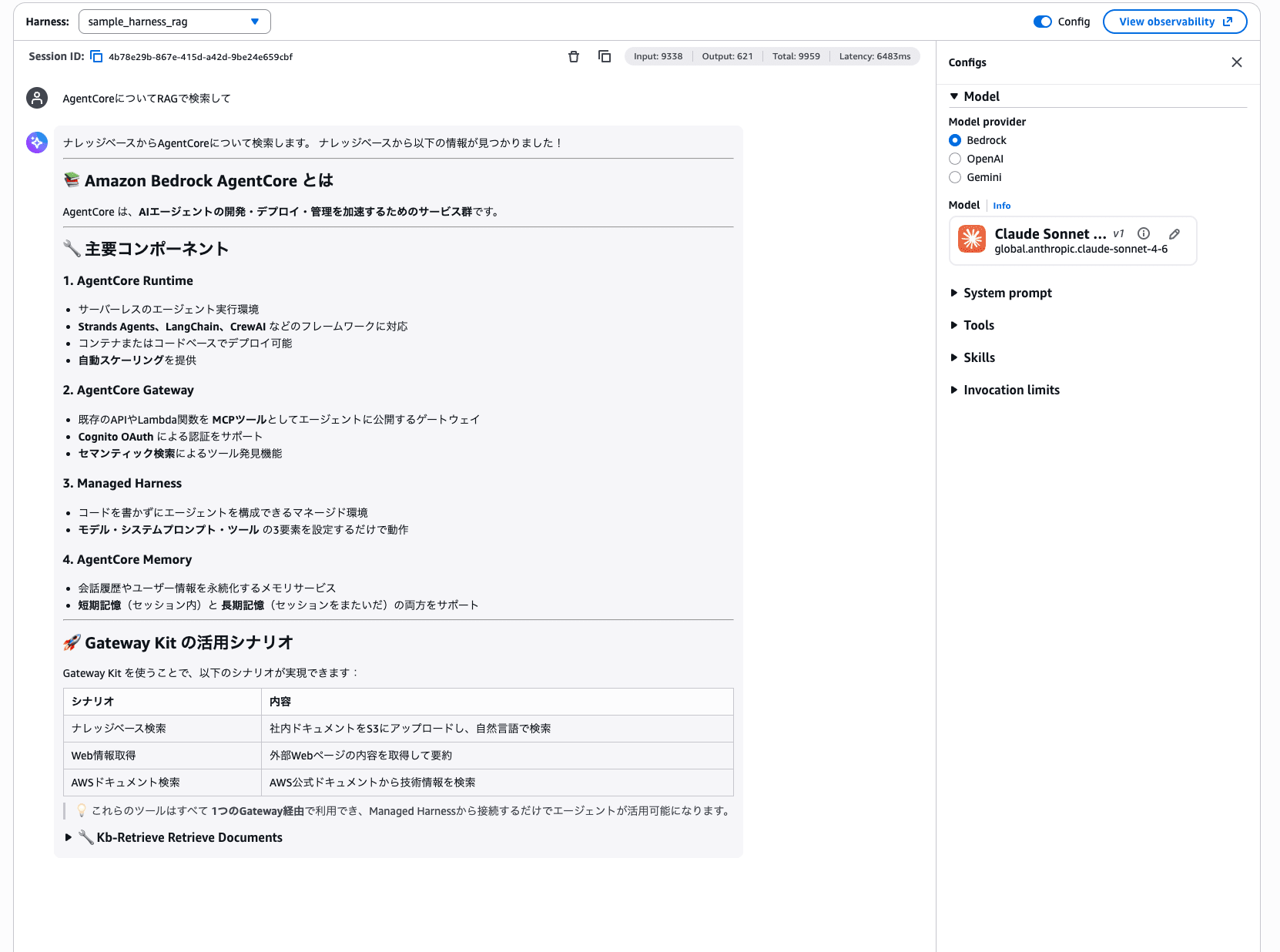
It retrieved information from the knowledge base and generated an answer! It even summarized use-case scenarios for Gateway Kit in a table.
Checking web page retrieval (fetch_webpage)
Next is web page retrieval. I'll pass in a DevelopersIO article URL and ask about its content.
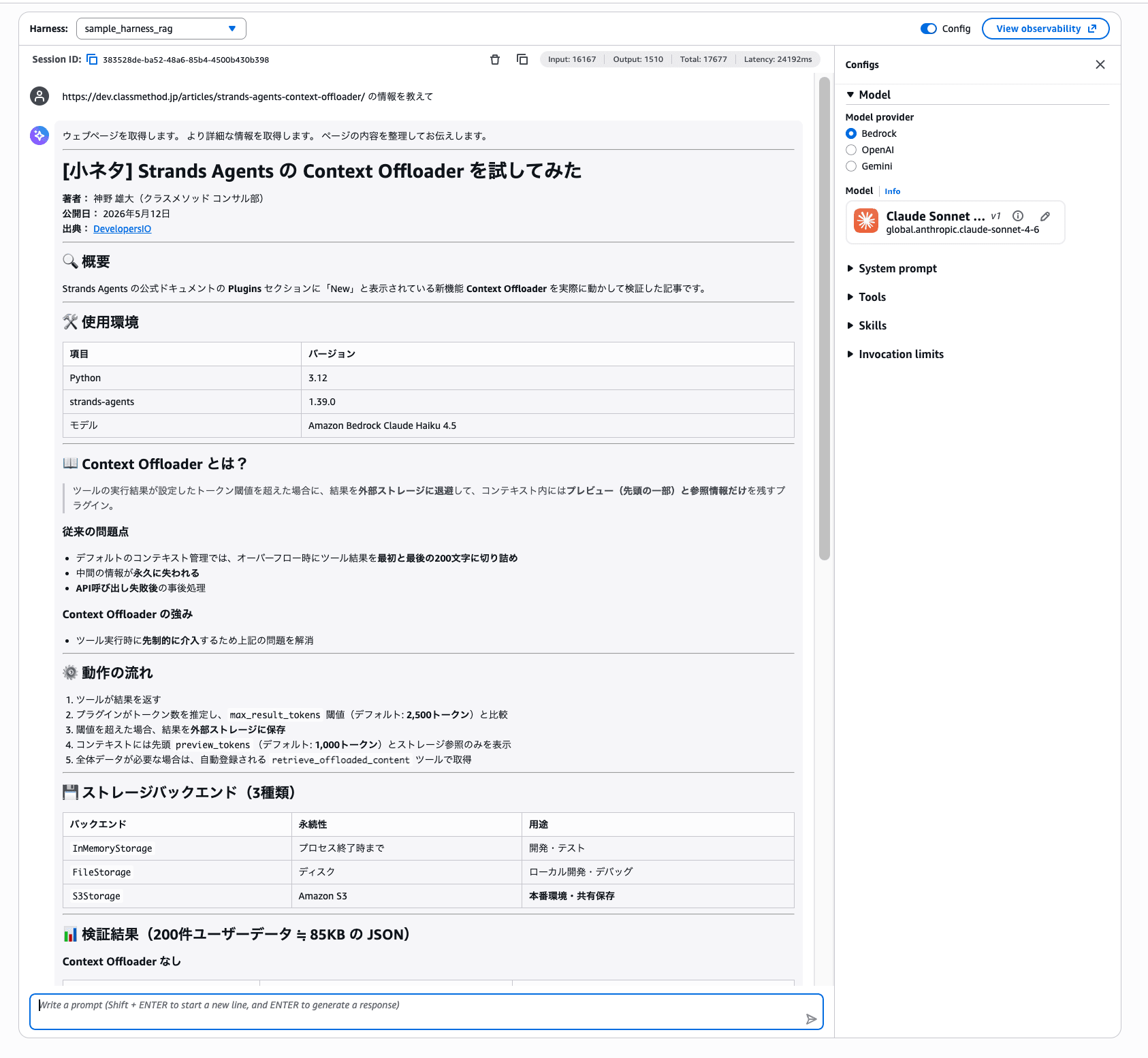
It retrieved the content of the URL and returned a structured response including the article overview, environment used, and verification results!
Checking AWS documentation search (search_documentation and others)
Finally, searching the official AWS documentation. I'll send "Tell me about S3."
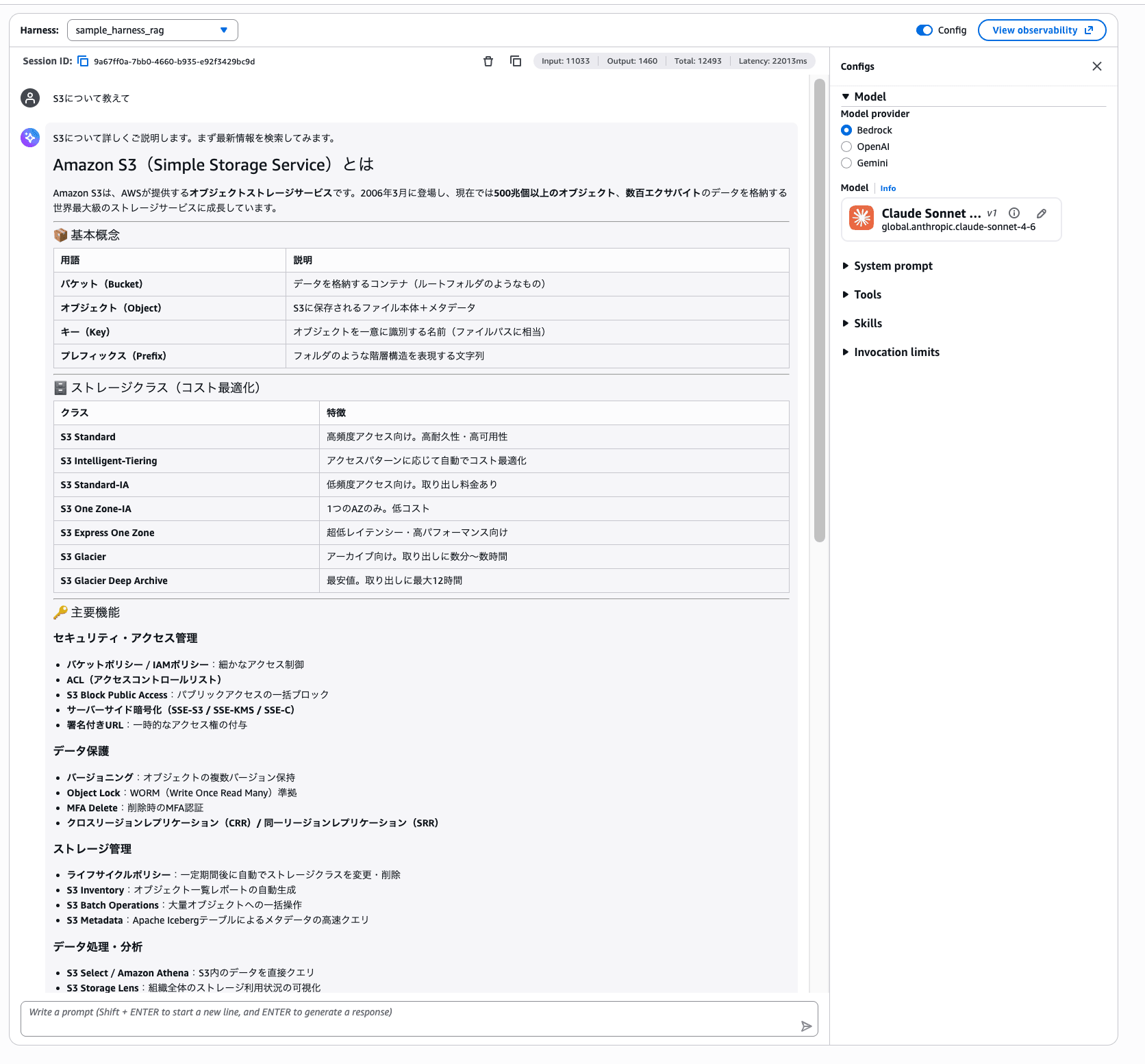
Via the AWS Knowledge MCP Server, it retrieved information from the official documentation and summarized everything from the basic concepts of S3 to storage classes and the latest updates. If you open the tool call details, you can confirm that search_documentation was executed.
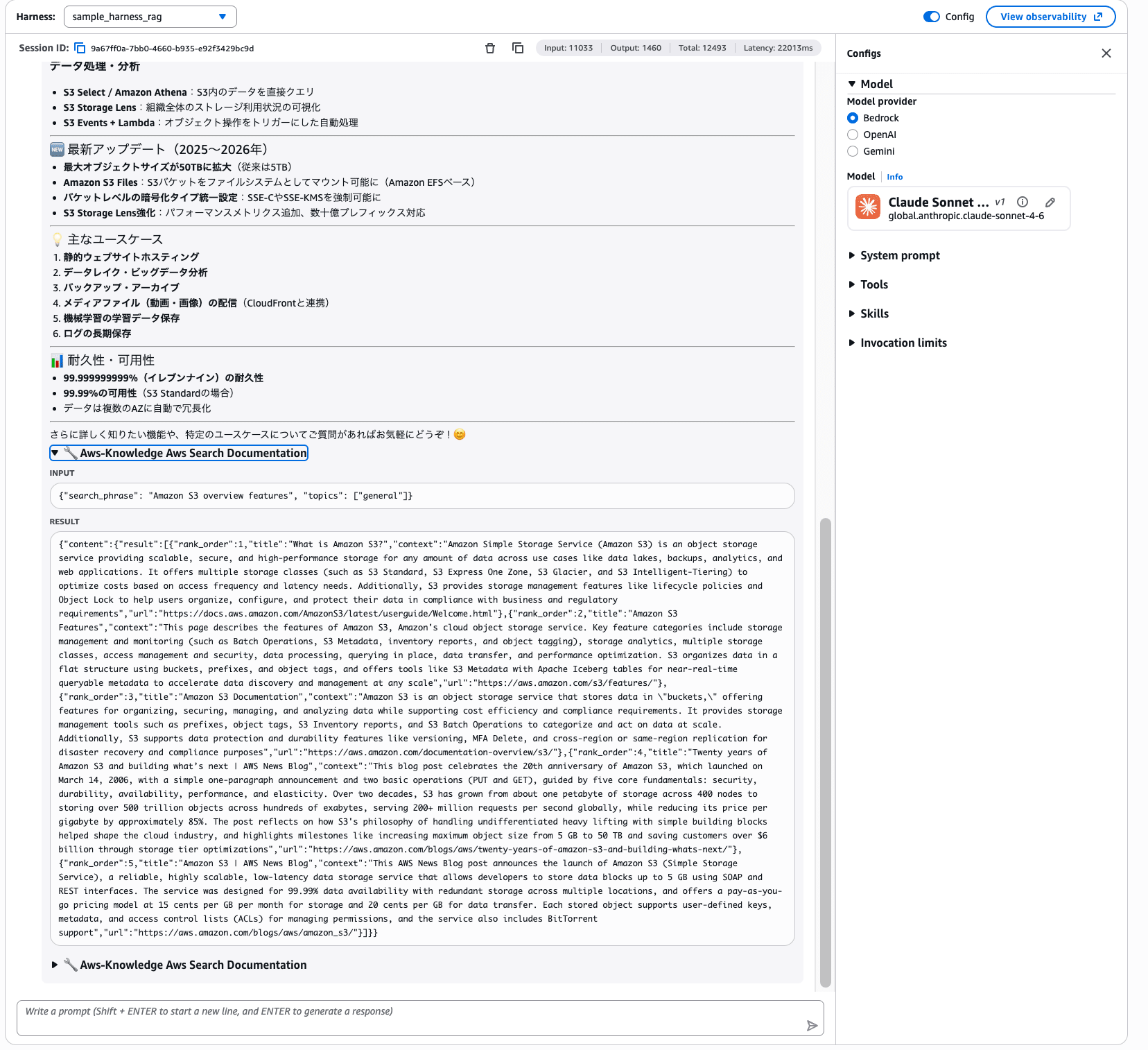
We confirmed that all three tools work without problems via the Gateway!
Conclusion
I built, with CDK, a setup that bundles multiple tools in a Gateway so they can be used from Managed Harness. Consolidating three patterns — Lambda target / MCP Server on Runtime / external MCP Server — into a single Gateway so that many Harnesses can use them easily is great.
Being able to add new tools just by adding a Target to the Gateway is also a nice point. It might be possible to add features that Harness users frequently request to the Gateway! (For example, a web search feature using Brave.)
I hope this article was of some help. Thank you for reading to the end!
