![[Quick Tip] Cross-Account Access to Amazon Bedrock AgentCore Gateway with IAM Authentication](https://images.ctfassets.net/ct0aopd36mqt/7M0d5bjsd0K4Et30cVFvB6/5b2095750cc8bf73f04f63ed0d4b3546/AgentCore2.png?w=3840&fm=webp)
[Quick Tip] Cross-Account Access to Amazon Bedrock AgentCore Gateway with IAM Authentication

This page has been translated by machine translation. View original
Introduction
Hello, I'm Kamino from the Consulting Department, and I love supermarkets.
Are you using Amazon Bedrock AgentCore Gateway?
It's a service that allows you to integrate Lambda functions, REST APIs, Remote MCP servers, and more as MCP endpoints.
Given Gateway's nature of being able to integrate multiple tools, don't you ever want to centrally place a Gateway in a specific account and call it from AgentCore Runtimes in other accounts? I certainly do. This kind of arrangement is desirable when providing a common set of tools in a multi-account environment.
When I tried to connect to a Gateway created with IAM authentication (SigV4) from a different account, I got a 403 Forbidden error. Hmm, maybe it doesn't support cross-account... Do I have to use JWT...? I thought, but reading the official documentation resolved it immediately.
Conclusion Up Front
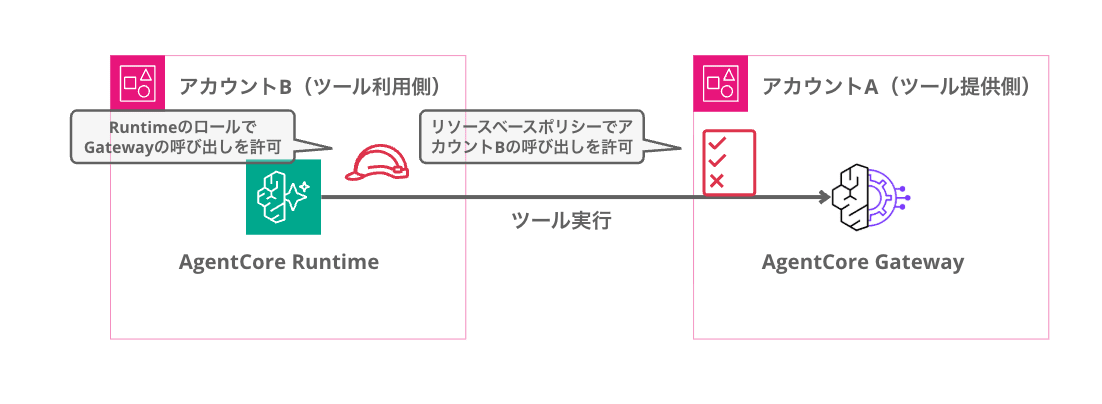
To access a Gateway with IAM authentication from a cross-account setup, configure a resource-based policy on the Gateway side. The official documentation also states the following, confirming that cross-account connections are supported.
Resource-based policies in Amazon Bedrock AgentCore allow you to control which principals (AWS accounts, IAM users, or IAM roles) can invoke and manage your Amazon Bedrock AgentCore resources (currently supported for Runtime, Gateway and Memory).
You might be wondering what kind of policy to write here, but the policy to set on the Gateway looks like the following.
{
  "Version": "2012-10-17",
  "Statement": [
    {
      "Effect": "Allow",
      "Principal": { "AWS": "arn:aws:iam::<caller-account-id>:root" },
      "Action": "bedrock-agentcore:InvokeGateway",
      "Resource": "arn:aws:bedrock-agentcore:<region>:<gateway-owner-account-id>:gateway/<gateway-id>"
    }
  ]
}
For Principal, specify the ARN of the calling account; for Action, specify bedrock-agentcore:InvokeGateway; and for Resource, specify the exact ARN of the Gateway. Since arn:aws:iam::<account-id>:root specifies the entire target AWS account as the Principal rather than just the root user, from a least-privilege perspective, it's better to specify a specific IAM Role ARN.
Of course, the calling IAM Role also needs permission for bedrock-agentcore:InvokeGateway.
In the following sections, I'll actually try out the setup and verification steps!
Prerequisites
Account Configuration
This time I'll verify with the following two-account configuration. In an actual environment, the image would look like the following.
| Account | AWS Account ID | Role |
|---|---|---|
| Account A (tool provider) | 111122223333 | Hosts the Gateway |
| Account B (tool consumer) | 444455556666 | Calls the Gateway from a different account |
Please substitute the account IDs with the values you actually use.
Environment
- Python 3.13
- AWS CLI v2 (authenticated to both accounts)
- boto3 1.43.17
- mcp 1.27.1
- mcp-proxy-for-aws 1.5.0
- Region: us-east-1
Required Packages
uv init cross-account-gateway-test
cd cross-account-gateway-test
uv add boto3 mcp mcp-proxy-for-aws
To connect from an MCP client to a Gateway with IAM authentication, use mcp-proxy-for-aws, which automatically attaches SigV4 signatures.
Setting Up the Verification Environment
First, create a Gateway with IAM authentication in Account A (tool provider).
If you already have a Gateway on hand, you can skip this section and start reading from "Trying Cross-Account Invocation".
Full setup script (setup_gateway.py)
"""Create a Gateway with IAM authentication and Lambda target in Account A (tool provider)"""

import json
import time
import io
import zipfile

import boto3

# === Configuration ===
REGION = "us-east-1"
PROFILE = "account-a"  # Change to your Account A (tool provider) profile name
GATEWAY_NAME = "cross-account-test"

session = boto3.Session(profile_name=PROFILE, region_name=REGION)
iam = session.client("iam")
lambda_client = session.client("lambda", region_name=REGION)
agentcore = session.client("bedrock-agentcore-control", region_name=REGION)
account_id = session.client("sts").get_caller_identity()["Account"]

def create_gateway_service_role():
    """Create a service role for Gateway"""
    role_name = "AgentCoreGatewayServiceRole"
    trust_policy = {
        "Version": "2012-10-17",
        "Statement": [
            {
                "Effect": "Allow",
                "Principal": {"Service": "bedrock-agentcore.amazonaws.com"},
                "Action": "sts:AssumeRole",
            }
        ],
    }

    try:
        role = iam.create_role(
            RoleName=role_name,
            AssumeRolePolicyDocument=json.dumps(trust_policy),
        )
        print(f"Created role: {role['Role']['Arn']}")
    except iam.exceptions.EntityAlreadyExistsException:
        role = iam.get_role(RoleName=role_name)
        print(f"Role already exists: {role['Role']['Arn']}")

    return role["Role"]["Arn"]

def create_test_lambda():
    """Create a test Lambda function"""
    function_name = "cross-account-gateway-test"
    role_name = "CrossAccountTestLambdaRole"

    # Lambda execution role
    trust_policy = {
        "Version": "2012-10-17",
        "Statement": [
            {
                "Effect": "Allow",
                "Principal": {"Service": "lambda.amazonaws.com"},
                "Action": "sts:AssumeRole",
            }
        ],
    }

    try:
        role = iam.create_role(
            RoleName=role_name,
            AssumeRolePolicyDocument=json.dumps(trust_policy),
        )
        iam.attach_role_policy(
            RoleName=role_name,
            PolicyArn="arn:aws:iam::aws:policy/service-role/AWSLambdaBasicExecutionRole",
        )
        print(f"Created Lambda role: {role['Role']['Arn']}")
        print("Waiting for IAM propagation...")
        time.sleep(10)
    except iam.exceptions.EntityAlreadyExistsException:
        role = iam.get_role(RoleName=role_name)

    # Lambda function code
    code = '''
import json

def handler(event, context):
    return {
        "statusCode": 200,
        "body": json.dumps({"message": f"Hello from Gateway! Input: {event}"})
    }
'''
    zip_buffer = io.BytesIO()
    with zipfile.ZipFile(zip_buffer, "w", zipfile.ZIP_DEFLATED) as zf:
        zf.writestr("lambda_function.py", code)
    zip_buffer.seek(0)

    try:
        response = lambda_client.create_function(
            FunctionName=function_name,
            Runtime="python3.12",
            Handler="lambda_function.handler",
            Role=role["Role"]["Arn"],
            Code={"ZipFile": zip_buffer.read()},
        )
        print(f"Created Lambda: {response['FunctionArn']}")
    except lambda_client.exceptions.ResourceConflictException:
        response = lambda_client.get_function(FunctionName=function_name)
        response = response["Configuration"]
        print(f"Lambda already exists: {response['FunctionArn']}")

    return response["FunctionArn"]

def setup():
    print("=" * 60)
    print("Step 1: Creating Gateway service role")
    print("=" * 60)
    gateway_role_arn = create_gateway_service_role()

    print(f"\n{'=' * 60}")
    print("Step 2: Creating test Lambda function")
    print("=" * 60)
    lambda_arn = create_test_lambda()

    # Grant Lambda Invoke permission to Gateway role
    iam.put_role_policy(
        RoleName="AgentCoreGatewayServiceRole",
        PolicyName="LambdaInvoke",
        PolicyDocument=json.dumps({
            "Version": "2012-10-17",
            "Statement": [
                {
                    "Effect": "Allow",
                    "Action": "lambda:InvokeFunction",
                    "Resource": lambda_arn,
                }
            ],
        }),
    )
    print("Attached Lambda invoke policy to Gateway role")

    print(f"\n{'=' * 60}")
    print("Step 3: Creating Gateway (IAM authentication)")
    print("=" * 60)
    gateway = agentcore.create_gateway(
        name=GATEWAY_NAME,
        description="Cross-account access test gateway",
        protocolType="MCP",
        authorizerType="AWS_IAM",
        roleArn=gateway_role_arn,
    )
    gateway_id = gateway["gatewayId"]
    gateway_url = gateway["gatewayUrl"]
    gateway_arn = gateway["gatewayArn"]
    print(f"Gateway ID:  {gateway_id}")
    print(f"Gateway URL: {gateway_url}")
    print(f"Gateway ARN: {gateway_arn}")

    # Wait until READY
    print("Waiting for Gateway to become READY...")
    while True:
        status = agentcore.get_gateway(gatewayIdentifier=gateway_id)["status"]
        if status == "READY":
            break
        time.sleep(3)
    print("Gateway is READY!")

    print(f"\n{'=' * 60}")
    print("Step 4: Adding Lambda target")
    print("=" * 60)
    target = agentcore.create_gateway_target(
        gatewayIdentifier=gateway_id,
        name="echo-tools",
        targetConfiguration={
            "mcp": {
                "lambda": {
                    "lambdaArn": lambda_arn,
                    "toolSchema": {
                        "inlinePayload": [
                            {
                                "name": "echo_message",
                                "description": "Echo back a message for testing",
                                "inputSchema": {
                                    "type": "object",
                                    "properties": {
                                        "message": {
                                            "type": "string",
                                            "description": "The message to echo",
                                        }
                                    },
                                    "required": ["message"],
                                },
                            }
                        ]
                    },
                }
            }
        },
        credentialProviderConfigurations=[
            {"credentialProviderType": "GATEWAY_IAM_ROLE"}
        ],
    )
    target_id = target["targetId"]
    print(f"Target ID: {target_id}")

    # Wait until READY
    print("Waiting for Target to become READY...")
    while True:
        status = agentcore.get_gateway_target(
            gatewayIdentifier=gateway_id, targetId=target_id
        )["status"]
        if status == "READY":
            break
        time.sleep(3)
    print("Target is READY!")

    # Save configuration
    config = {
        "gateway_id": gateway_id,
        "gateway_url": gateway_url,
        "gateway_arn": gateway_arn,
        "target_id": target_id,
        "lambda_arn": lambda_arn,
        "account_id": account_id,
        "region": REGION,
    }
    with open("gateway_config.json", "w") as f:
        json.dump(config, f, indent=2)

    print(f"\n{'=' * 60}")
    print("Setup complete!")
    print(f"Configuration saved to: gateway_config.json")
    print(f"Gateway URL: {gateway_url}")
    print("=" * 60)

if __name__ == "__main__":
    setup()
Running this creates a Gateway + Lambda target in Account A (tool provider).
uv run setup_gateway.py
Once the setup is complete, the connection information is saved in gateway_config.json.
Trying Cross-Account Invocation
To connect to the Gateway, use aws_iam_streamablehttp_client from mcp-proxy-for-aws. Since it automatically attaches SigV4 signatures, you can connect as an MCP client simply by passing the Gateway URL and region.
To make verification easier, it's designed to accept a profile name as an argument for switching.
import asyncio
import os
import sys

import boto3
from mcp import ClientSession
from mcp_proxy_for_aws.client import aws_iam_streamablehttp_client

GATEWAY_URL = "https://<your-gateway-id>.gateway.bedrock-agentcore.us-east-1.amazonaws.com/mcp"
AWS_REGION = "us-east-1"

async def invoke_gateway(profile_name: str):
    session = boto3.Session(profile_name=profile_name, region_name=AWS_REGION)
    caller = session.client("sts").get_caller_identity()
    print(f"Profile:  {profile_name}")
    print(f"Account:  {caller['Account']}")
    print(f"Caller:   {caller['Arn']}")
    print("-" * 60)

    os.environ["AWS_PROFILE"] = profile_name
    os.environ["AWS_DEFAULT_REGION"] = AWS_REGION

    try:
        async with aws_iam_streamablehttp_client(
            endpoint=GATEWAY_URL,
            aws_region=AWS_REGION,
            aws_service="bedrock-agentcore",
        ) as (read, write, _):
            async with ClientSession(read, write) as mcp_session:
                await mcp_session.initialize()
                tools = await mcp_session.list_tools()
                print("SUCCESS! tools/list returned:")
                for tool in tools.tools:
                    print(f"  - {tool.name}: {tool.description}")
    except ExceptionGroup as eg:
        for e in eg.exceptions:
            print(f"FAILED: {type(e).__name__}: {e}")
    except Exception as e:
        print(f"FAILED: {type(e).__name__}: {e}")

if __name__ == "__main__":
    profile = sys.argv[1] if len(sys.argv) > 1 else "account-a"
    asyncio.run(invoke_gateway(profile))
First, call from the same Account A (tool provider) to confirm that the Gateway is working correctly.
Specify Account A's profile name (account-a) as the argument.
uv run test_gateway_invoke.py account-a
Profile:  account-a
Account:  111122223333
Caller:   arn:aws:sts::111122223333:assumed-role/AdminRole/session
------------------------------------------------------------
SUCCESS! tools/list returned:
  - echo-tools___echo_message: Echo back a message for testing
It's working without issues. Now let's try calling from Account B (tool consumer).
This time, specify Account B's profile name (account-b) as the argument.
uv run test_gateway_invoke.py account-b
Profile:  account-b
Account:  444455556666
Caller:   arn:aws:sts::444455556666:assumed-role/AdminRole/session
------------------------------------------------------------
FAILED: HTTPStatusError: Client error '403 Forbidden' for url 'https://xxxxxxxxxx.gateway.bedrock-agentcore.us-east-1.amazonaws.com/mcp'
Oh, it's a 403 Forbidden...
You can't directly access a Gateway with IAM authentication using credentials from a different account. Just like when doing cross-account access with other services, you need to configure the Gateway side to allow access from Account B (tool consumer).
Configuring the Resource-Based Policy
As introduced in the conclusion at the beginning, by configuring a resource-based policy on the Gateway side and IAM permissions on the caller side, cross-account access becomes possible. Let's configure a policy that allows Account B (tool consumer) to call InvokeGateway.
Creating and Attaching the Policy
import json
import boto3

GATEWAY_ARN = "arn:aws:bedrock-agentcore:us-east-1:111122223333:gateway/<your-gateway-id>"
REGION = "us-east-1"
CROSS_ACCOUNT_PRINCIPAL = "arn:aws:iam::444455556666:root"

session = boto3.Session(profile_name="account-a", region_name=REGION)  # Account A (tool provider)
client = session.client("bedrock-agentcore-control", region_name=REGION)

policy = {
    "Version": "2012-10-17",
    "Statement": [
        {
            "Sid": "AllowCrossAccountInvoke",
            "Effect": "Allow",
            "Principal": {"AWS": CROSS_ACCOUNT_PRINCIPAL},
            "Action": "bedrock-agentcore:InvokeGateway",
            "Resource": GATEWAY_ARN,
        }
    ],
}

client.put_resource_policy(
    resourceArn=GATEWAY_ARN,
    policy=json.dumps(policy),
)
print("Resource policy attached!")
uv run setup_resource_policy.py
"*" cannot be used for Resource; you must specify the exact ARN of the Gateway. Also, for Principal, you can narrow it down to a specific IAM Role ARN rather than the entire account.
{
  "Principal": {
    "AWS": "arn:aws:iam::444455556666:role/AgentRole"
  }
}
You can also configure this from the Management Console. There's a Resource-based policy section on the Gateway detail screen, where you can enter the policy JSON via the "Add" button.

Trying Cross-Account Invocation Again
With the resource-based policy configured, let's try calling the Gateway from Account B (tool consumer) again.
uv run test_gateway_invoke.py account-b
Profile:  account-b
Account:  444455556666
Caller:   arn:aws:sts::444455556666:assumed-role/AdminRole/session
------------------------------------------------------------
SUCCESS! tools/list returned:
  - echo-tools___echo_message: Echo back a message for testing
We successfully called the Gateway cross-account!!
By configuring the resource-based policy, we were able to connect to the Gateway with IAM authentication from a different account.
{
  "Version": "2012-10-17",
  "Statement": [
    {
      "Effect": "Allow",
      "Action": "bedrock-agentcore:InvokeGateway",
      "Resource": "arn:aws:bedrock-agentcore:us-east-1:111122223333:gateway/<your-gateway-id>"
    }
  ]
}
Cleanup
Let's delete the resources when the verification is complete.
Cleanup script (cleanup.py)
"""Delete the created resources"""

import json
import boto3

REGION = "us-east-1"
PROFILE = "account-a"  # Account A (tool provider)

session = boto3.Session(profile_name=PROFILE, region_name=REGION)
agentcore = session.client("bedrock-agentcore-control", region_name=REGION)
lambda_client = session.client("lambda", region_name=REGION)
iam = session.client("iam")

with open("gateway_config.json") as f:
    config = json.load(f)

gateway_id = config["gateway_id"]
target_id = config["target_id"]
lambda_arn = config["lambda_arn"]

# Delete resource-based policy
try:
    agentcore.delete_resource_policy(resourceArn=config["gateway_arn"])
    print("Deleted resource policy")
except Exception:
    pass

# Delete target
agentcore.delete_gateway_target(
    gatewayIdentifier=gateway_id, targetId=target_id
)
print(f"Deleted target: {target_id}")

# Delete Gateway
agentcore.delete_gateway(gatewayIdentifier=gateway_id)
print(f"Deleted gateway: {gateway_id}")

# Delete Lambda function
lambda_client.delete_function(FunctionName="cross-account-gateway-test")
print("Deleted Lambda function")

# Delete IAM roles
for role_name in ["CrossAccountTestLambdaRole", "AgentCoreGatewayServiceRole"]:
    try:
        # Delete inline policies
        policies = iam.list_role_policies(RoleName=role_name)
        for policy_name in policies["PolicyNames"]:
            iam.delete_role_policy(RoleName=role_name, PolicyName=policy_name)
        # Detach managed policies
        attached = iam.list_attached_role_policies(RoleName=role_name)
        for policy in attached["AttachedPolicies"]:
            iam.detach_role_policy(
                RoleName=role_name, PolicyArn=policy["PolicyArn"]
            )
        iam.delete_role(RoleName=role_name)
        print(f"Deleted role: {role_name}")
    except Exception as e:
        print(f"Error deleting {role_name}: {e}")

print("\nCleanup complete!")
uv run cleanup.py
Conclusion
Since Gateway is a service that can bundle multiple APIs, Lambdas, and MCP servers to provide them as a unified MCP endpoint, there are likely many cases where you'd want to centralize it in a specific account and call it from other accounts.
Even in such cases, with IAM authentication, you can access it cross-account without issues by configuring a resource-based policy!
I hope this article was helpful in some way. Thank you for reading to the end!