![[小ネタ] Amazon Bedrock AgentCore GatewayにIAM認証でクロスアカウントアクセスする](https://images.ctfassets.net/ct0aopd36mqt/7M0d5bjsd0K4Et30cVFvB6/5b2095750cc8bf73f04f63ed0d4b3546/AgentCore2.png?w=3840&fm=webp)
[小ネタ] Amazon Bedrock AgentCore GatewayにIAM認証でクロスアカウントアクセスする

はじめに
こんにちは、スーパーマーケットが大好きなコンサル部の神野です。
皆さんAmazon Bedrock AgentCore Gatewayは使っていますか?
Lambda関数やREST API、Remote MCPサーバーなどをMCPエンドポイントとして統合できるサービスです。
Gatewayは複数のツールを統合できる性質上、中央集約的にとあるアカウントにGatewayを配置して、各アカウントのAgentCore Runtimeから呼び出す構成を取りたくなるケースなどありませんか?私はあります。マルチアカウント環境で共通のツール群を提供する場合などこのような配置にしたくなります。
IAM認証(SigV4)で作成したGatewayに別アカウントから接続しようとしたところ、403 Forbidden になりました。あれ、もしかしてクロスアカウントに対応していない・・・?JWTにしないといけない・・・?と思ったのですが公式ドキュメントを読んですぐに解決しました。
早速結論
IAM認証のGatewayにクロスアカウントでアクセスするには、Gateway側にリソースベースポリシーを設定します。公式ドキュメントにも以下の記載がありクロスアカウントでの接続も前提にされていますね。
Resource-based policies in Amazon Bedrock AgentCore allow you to control which principals (AWS accounts, IAM users, or IAM roles) can invoke and manage your Amazon Bedrock AgentCore resources (currently supported for Runtime, Gateway and Memory).
ここでどのようなポリシーを書けばよいのか気になるところですが、Gatewayに設定するポリシーは下記のような形です。
{
  "Version": "2012-10-17",
  "Statement": [
    {
      "Effect": "Allow",
      "Principal": { "AWS": "arn:aws:iam::<呼び出し側アカウントID>:root" },
      "Action": "bedrock-agentcore:InvokeGateway",
      "Resource": "arn:aws:bedrock-agentcore:<region>:<Gateway所有アカウントID>:gateway/<gateway-id>"
    }
  ]
}
Principal には呼び出し側アカウントのARNを、Action には bedrock-agentcore:InvokeGateway を、Resource にはGatewayの正確なARNを指定します。arn:aws:iam::<アカウントID>:root はrootユーザーだけではなく対象AWSアカウント全体をPrincipalとして指定する形なので、最小権限の観点では特定のIAM Role ARNを指定するのが良いですね。
もちろん、呼び出し元のIAM Roleにも bedrock-agentcore:InvokeGateway の許可が必要です。
次のセクションから、セットアップや検証の手順を実際に試してみます!
前提
アカウント構成
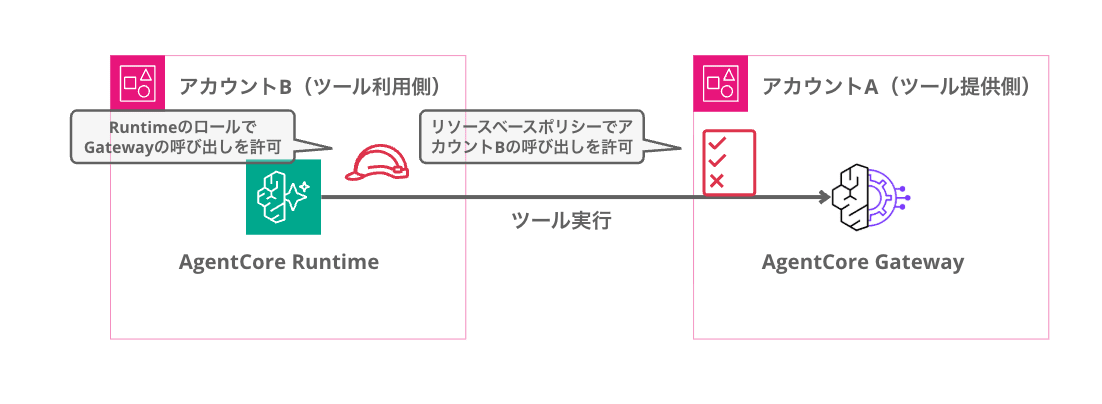
今回は以下の2アカウント構成で検証します。実際の環境では下記のようなイメージになります。
| アカウント | AWSアカウントID | 役割 |
|---|---|---|
| アカウントA(ツール提供側) | 111122223333 | Gatewayをホストする |
| アカウントB(ツール利用側) | 444455556666 | 別アカウントからGatewayを呼び出す |
アカウントIDは適宜自分が使う値に読み替えて使ってください。
環境
- Python 3.13
- AWS CLI v2(両アカウントに認証済み)
- boto3 1.43.17
- mcp 1.27.1
- mcp-proxy-for-aws 1.5.0
- リージョン: us-east-1
必要なパッケージ
uv init cross-account-gateway-test
cd cross-account-gateway-test
uv add boto3 mcp mcp-proxy-for-aws
IAM認証のGatewayに対してMCPクライアントから接続するには、SigV4署名を自動で付与してくれる mcp-proxy-for-aws を使います。
検証環境のセットアップ
まずはアカウントA(ツール提供側)にIAM認証のGatewayを作成します。
既にGatewayが手元にある方はこのセクションを飛ばして、「クロスアカウントで呼び出してみる」から読んでいただければOKです。
セットアップスクリプト全体(setup_gateway.py)
"""アカウントA(ツール提供側)にIAM認証のGatewayとLambdaターゲットを作成する"""

import json
import time
import io
import zipfile

import boto3

# === 設定 ===
REGION = "us-east-1"
PROFILE = "account-a"  # アカウントA(ツール提供側)のプロファイル名に変更してください
GATEWAY_NAME = "cross-account-test"

session = boto3.Session(profile_name=PROFILE, region_name=REGION)
iam = session.client("iam")
lambda_client = session.client("lambda", region_name=REGION)
agentcore = session.client("bedrock-agentcore-control", region_name=REGION)
account_id = session.client("sts").get_caller_identity()["Account"]

def create_gateway_service_role():
    """Gateway用のサービスロールを作成"""
    role_name = "AgentCoreGatewayServiceRole"
    trust_policy = {
        "Version": "2012-10-17",
        "Statement": [
            {
                "Effect": "Allow",
                "Principal": {"Service": "bedrock-agentcore.amazonaws.com"},
                "Action": "sts:AssumeRole",
            }
        ],
    }

    try:
        role = iam.create_role(
            RoleName=role_name,
            AssumeRolePolicyDocument=json.dumps(trust_policy),
        )
        print(f"Created role: {role['Role']['Arn']}")
    except iam.exceptions.EntityAlreadyExistsException:
        role = iam.get_role(RoleName=role_name)
        print(f"Role already exists: {role['Role']['Arn']}")

    return role["Role"]["Arn"]

def create_test_lambda():
    """テスト用のLambda関数を作成"""
    function_name = "cross-account-gateway-test"
    role_name = "CrossAccountTestLambdaRole"

    # Lambda実行ロール
    trust_policy = {
        "Version": "2012-10-17",
        "Statement": [
            {
                "Effect": "Allow",
                "Principal": {"Service": "lambda.amazonaws.com"},
                "Action": "sts:AssumeRole",
            }
        ],
    }

    try:
        role = iam.create_role(
            RoleName=role_name,
            AssumeRolePolicyDocument=json.dumps(trust_policy),
        )
        iam.attach_role_policy(
            RoleName=role_name,
            PolicyArn="arn:aws:iam::aws:policy/service-role/AWSLambdaBasicExecutionRole",
        )
        print(f"Created Lambda role: {role['Role']['Arn']}")
        print("Waiting for IAM propagation...")
        time.sleep(10)
    except iam.exceptions.EntityAlreadyExistsException:
        role = iam.get_role(RoleName=role_name)

    # Lambda関数コード
    code = '''
import json

def handler(event, context):
    return {
        "statusCode": 200,
        "body": json.dumps({"message": f"Hello from Gateway! Input: {event}"})
    }
'''
    zip_buffer = io.BytesIO()
    with zipfile.ZipFile(zip_buffer, "w", zipfile.ZIP_DEFLATED) as zf:
        zf.writestr("lambda_function.py", code)
    zip_buffer.seek(0)

    try:
        response = lambda_client.create_function(
            FunctionName=function_name,
            Runtime="python3.12",
            Handler="lambda_function.handler",
            Role=role["Role"]["Arn"],
            Code={"ZipFile": zip_buffer.read()},
        )
        print(f"Created Lambda: {response['FunctionArn']}")
    except lambda_client.exceptions.ResourceConflictException:
        response = lambda_client.get_function(FunctionName=function_name)
        response = response["Configuration"]
        print(f"Lambda already exists: {response['FunctionArn']}")

    return response["FunctionArn"]

def setup():
    print("=" * 60)
    print("Step 1: Gatewayサービスロールの作成")
    print("=" * 60)
    gateway_role_arn = create_gateway_service_role()

    print(f"\n{'=' * 60}")
    print("Step 2: テスト用Lambda関数の作成")
    print("=" * 60)
    lambda_arn = create_test_lambda()

    # GatewayロールにLambda Invoke権限を付与
    iam.put_role_policy(
        RoleName="AgentCoreGatewayServiceRole",
        PolicyName="LambdaInvoke",
        PolicyDocument=json.dumps({
            "Version": "2012-10-17",
            "Statement": [
                {
                    "Effect": "Allow",
                    "Action": "lambda:InvokeFunction",
                    "Resource": lambda_arn,
                }
            ],
        }),
    )
    print("Attached Lambda invoke policy to Gateway role")

    print(f"\n{'=' * 60}")
    print("Step 3: Gatewayの作成(IAM認証)")
    print("=" * 60)
    gateway = agentcore.create_gateway(
        name=GATEWAY_NAME,
        description="Cross-account access test gateway",
        protocolType="MCP",
        authorizerType="AWS_IAM",
        roleArn=gateway_role_arn,
    )
    gateway_id = gateway["gatewayId"]
    gateway_url = gateway["gatewayUrl"]
    gateway_arn = gateway["gatewayArn"]
    print(f"Gateway ID:  {gateway_id}")
    print(f"Gateway URL: {gateway_url}")
    print(f"Gateway ARN: {gateway_arn}")

    # READYになるまで待機
    print("Waiting for Gateway to become READY...")
    while True:
        status = agentcore.get_gateway(gatewayIdentifier=gateway_id)["status"]
        if status == "READY":
            break
        time.sleep(3)
    print("Gateway is READY!")

    print(f"\n{'=' * 60}")
    print("Step 4: Lambdaターゲットの追加")
    print("=" * 60)
    target = agentcore.create_gateway_target(
        gatewayIdentifier=gateway_id,
        name="echo-tools",
        targetConfiguration={
            "mcp": {
                "lambda": {
                    "lambdaArn": lambda_arn,
                    "toolSchema": {
                        "inlinePayload": [
                            {
                                "name": "echo_message",
                                "description": "Echo back a message for testing",
                                "inputSchema": {
                                    "type": "object",
                                    "properties": {
                                        "message": {
                                            "type": "string",
                                            "description": "The message to echo",
                                        }
                                    },
                                    "required": ["message"],
                                },
                            }
                        ]
                    },
                }
            }
        },
        credentialProviderConfigurations=[
            {"credentialProviderType": "GATEWAY_IAM_ROLE"}
        ],
    )
    target_id = target["targetId"]
    print(f"Target ID: {target_id}")

    # READYになるまで待機
    print("Waiting for Target to become READY...")
    while True:
        status = agentcore.get_gateway_target(
            gatewayIdentifier=gateway_id, targetId=target_id
        )["status"]
        if status == "READY":
            break
        time.sleep(3)
    print("Target is READY!")

    # 設定を保存
    config = {
        "gateway_id": gateway_id,
        "gateway_url": gateway_url,
        "gateway_arn": gateway_arn,
        "target_id": target_id,
        "lambda_arn": lambda_arn,
        "account_id": account_id,
        "region": REGION,
    }
    with open("gateway_config.json", "w") as f:
        json.dump(config, f, indent=2)

    print(f"\n{'=' * 60}")
    print("Setup complete!")
    print(f"Configuration saved to: gateway_config.json")
    print(f"Gateway URL: {gateway_url}")
    print("=" * 60)

if __name__ == "__main__":
    setup()
実行するとアカウントA(ツール提供側)にGateway + Lambdaターゲットが作成されます。
uv run setup_gateway.py
セットアップが完了すると gateway_config.json に接続情報が保存されます。
クロスアカウントで呼び出してみる
Gatewayへの接続には mcp-proxy-for-aws の aws_iam_streamablehttp_client を使います。SigV4署名を自動で付与してくれるので、Gateway URLとリージョンを渡すだけでMCPクライアントとして接続できます。
検証しやすいようにプロファイル名を引数に受け取って切り替えられるようにしています。
import asyncio
import os
import sys

import boto3
from mcp import ClientSession
from mcp_proxy_for_aws.client import aws_iam_streamablehttp_client

GATEWAY_URL = "https://<your-gateway-id>.gateway.bedrock-agentcore.us-east-1.amazonaws.com/mcp"
AWS_REGION = "us-east-1"

async def invoke_gateway(profile_name: str):
    session = boto3.Session(profile_name=profile_name, region_name=AWS_REGION)
    caller = session.client("sts").get_caller_identity()
    print(f"Profile:  {profile_name}")
    print(f"Account:  {caller['Account']}")
    print(f"Caller:   {caller['Arn']}")
    print("-" * 60)

    os.environ["AWS_PROFILE"] = profile_name
    os.environ["AWS_DEFAULT_REGION"] = AWS_REGION

    try:
        async with aws_iam_streamablehttp_client(
            endpoint=GATEWAY_URL,
            aws_region=AWS_REGION,
            aws_service="bedrock-agentcore",
        ) as (read, write, _):
            async with ClientSession(read, write) as mcp_session:
                await mcp_session.initialize()
                tools = await mcp_session.list_tools()
                print("SUCCESS! tools/list returned:")
                for tool in tools.tools:
                    print(f"  - {tool.name}: {tool.description}")
    except ExceptionGroup as eg:
        for e in eg.exceptions:
            print(f"FAILED: {type(e).__name__}: {e}")
    except Exception as e:
        print(f"FAILED: {type(e).__name__}: {e}")

if __name__ == "__main__":
    profile = sys.argv[1] if len(sys.argv) > 1 else "account-a"
    asyncio.run(invoke_gateway(profile))
まず同一アカウントA(ツール提供側)から呼び出して、Gatewayが正常に動作していることを確認します。
引数にアカウントAのプロファイル名(account-a)を指定します。
uv run test_gateway_invoke.py account-a
Profile:  account-a
Account:  111122223333
Caller:   arn:aws:sts::111122223333:assumed-role/AdminRole/session
------------------------------------------------------------
SUCCESS! tools/list returned:
  - echo-tools___echo_message: Echo back a message for testing
問題なく動いていますね。ではアカウントB(ツール利用側)から呼び出してみます。
今度はアカウントBのプロファイル名(account-b)を引数に指定します。
uv run test_gateway_invoke.py account-b
Profile:  account-b
Account:  444455556666
Caller:   arn:aws:sts::444455556666:assumed-role/AdminRole/session
------------------------------------------------------------
FAILED: HTTPStatusError: Client error '403 Forbidden' for url 'https://xxxxxxxxxx.gateway.bedrock-agentcore.us-east-1.amazonaws.com/mcp'
おお、403 Forbidden ですね・・・
IAM認証のGatewayに対して、別アカウントの認証情報ではそのままアクセスできません。他のサービスでクロスアカウントアクセスする時と同じで、Gateway側にアカウントB(ツール利用側)からのアクセスを許可する設定が必要です。
リソースベースポリシーを設定する
冒頭の結論で紹介したとおり、Gateway側のリソースベースポリシーと呼び出し元側のIAM権限を設定すれば、クロスアカウントアクセスが可能になります。アカウントB(ツール利用側)から InvokeGateway を許可するポリシーを設定していきます。
ポリシーの作成とアタッチ
import json
import boto3

GATEWAY_ARN = "arn:aws:bedrock-agentcore:us-east-1:111122223333:gateway/<your-gateway-id>"
REGION = "us-east-1"
CROSS_ACCOUNT_PRINCIPAL = "arn:aws:iam::444455556666:root"

session = boto3.Session(profile_name="account-a", region_name=REGION)  # アカウントA(ツール提供側)
client = session.client("bedrock-agentcore-control", region_name=REGION)

policy = {
    "Version": "2012-10-17",
    "Statement": [
        {
            "Sid": "AllowCrossAccountInvoke",
            "Effect": "Allow",
            "Principal": {"AWS": CROSS_ACCOUNT_PRINCIPAL},
            "Action": "bedrock-agentcore:InvokeGateway",
            "Resource": GATEWAY_ARN,
        }
    ],
}

client.put_resource_policy(
    resourceArn=GATEWAY_ARN,
    policy=json.dumps(policy),
)
print("Resource policy attached!")
uv run setup_resource_policy.py
Resource には "*" は使えずGatewayの正確なARNを指定します。また Principal はアカウント全体ではなく、特定のIAM Role ARNに絞ることもできます。
{
  "Principal": {
    "AWS": "arn:aws:iam::444455556666:role/AgentRole"
  }
}
マネジメントコンソールからも設定できます。Gatewayの詳細画面に Resource-based policy セクションがあるので、「追加」ボタンからポリシーJSONを入力してください。

再度クロスアカウントで呼び出す
リソースベースポリシーを設定した状態で、アカウントB(ツール利用側)から再度Gatewayを呼び出してみます。
uv run test_gateway_invoke.py account-b
Profile:  account-b
Account:  444455556666
Caller:   arn:aws:sts::444455556666:assumed-role/AdminRole/session
------------------------------------------------------------
SUCCESS! tools/list returned:
  - echo-tools___echo_message: Echo back a message for testing
無事クロスアカウントでGatewayを呼び出せました!!
リソースベースポリシーを設定して、別アカウントからIAM認証でGatewayに接続できるようになりましたね。
{
  "Version": "2012-10-17",
  "Statement": [
    {
      "Effect": "Allow",
      "Action": "bedrock-agentcore:InvokeGateway",
      "Resource": "arn:aws:bedrock-agentcore:us-east-1:111122223333:gateway/<your-gateway-id>"
    }
  ]
}
クリーンアップ
検証が終わったらリソースを削除しておきましょう。
クリーンアップスクリプト(cleanup.py)
"""作成したリソースを削除する"""

import json
import boto3

REGION = "us-east-1"
PROFILE = "account-a"  # アカウントA(ツール提供側)

session = boto3.Session(profile_name=PROFILE, region_name=REGION)
agentcore = session.client("bedrock-agentcore-control", region_name=REGION)
lambda_client = session.client("lambda", region_name=REGION)
iam = session.client("iam")

with open("gateway_config.json") as f:
    config = json.load(f)

gateway_id = config["gateway_id"]
target_id = config["target_id"]
lambda_arn = config["lambda_arn"]

# リソースベースポリシーの削除
try:
    agentcore.delete_resource_policy(resourceArn=config["gateway_arn"])
    print("Deleted resource policy")
except Exception:
    pass

# ターゲットの削除
agentcore.delete_gateway_target(
    gatewayIdentifier=gateway_id, targetId=target_id
)
print(f"Deleted target: {target_id}")

# Gatewayの削除
agentcore.delete_gateway(gatewayIdentifier=gateway_id)
print(f"Deleted gateway: {gateway_id}")

# Lambda関数の削除
lambda_client.delete_function(FunctionName="cross-account-gateway-test")
print("Deleted Lambda function")

# IAMロールの削除
for role_name in ["CrossAccountTestLambdaRole", "AgentCoreGatewayServiceRole"]:
    try:
        # インラインポリシーの削除
        policies = iam.list_role_policies(RoleName=role_name)
        for policy_name in policies["PolicyNames"]:
            iam.delete_role_policy(RoleName=role_name, PolicyName=policy_name)
        # マネージドポリシーのデタッチ
        attached = iam.list_attached_role_policies(RoleName=role_name)
        for policy in attached["AttachedPolicies"]:
            iam.detach_role_policy(
                RoleName=role_name, PolicyArn=policy["PolicyArn"]
            )
        iam.delete_role(RoleName=role_name)
        print(f"Deleted role: {role_name}")
    except Exception as e:
        print(f"Error deleting {role_name}: {e}")

print("\nCleanup complete!")
uv run cleanup.py
おわりに
Gatewayは複数のAPI・Lambda・MCPサーバーを束ねて統一的なMCPエンドポイントとして提供できるサービスなので、中央集約的に特定アカウントに寄せて別のアカウントから呼び出す構成はよくありそうですね。
そういった際でも、IAM認証の場合はリソースベースポリシーを設定することで問題なくクロスアカウントでアクセスできました!
本記事が少しでも参考になりましたら幸いです。最後までご覧いただきありがとうございました!