![[Update] I tried cross-account access for Amazon Bedrock AgentCore Memory with a 2-account configuration](https://images.ctfassets.net/ct0aopd36mqt/7M0d5bjsd0K4Et30cVFvB6/5b2095750cc8bf73f04f63ed0d4b3546/AgentCore2.png?w=3840&fm=webp)
[Update] I tried cross-account access for Amazon Bedrock AgentCore Memory with a 2-account configuration

This page has been translated by machine translation. View original
Introduction
Hello, I'm Jinno from the Consulting Department, currently practicing driving.
Cross-account access support has been added to Amazon Bedrock AgentCore Memory (announced on June 23, 2026, so this is a quite delayed update introduction...).
AgentCore Memory is a fully managed service that gives agents "memory," capable of managing short-term memory (conversation history) and long-term memory (user preferences, factual information, session summaries, etc.). With this update, resource-based policies can now be used to allow principals from other accounts to access memory resources.
Since I actually tried this with a 2-account configuration, I'll introduce the setup steps, use cases, and integration with the Strands Agents SDK.
When Is This Useful?
First, let me think about when cross-account access would actually be beneficial...
Sharing Agent Memory Between Teams
Even in cases where different teams are developing agents in separate accounts, I thought there could be scenarios where giving them access to a common customer long-term memory enables consistent responses to the same customer.
This would be useful when you want to leverage memory assets accumulated by other teams.
Cross-Account Delivery Destinations
Memory resources also support payload delivery to S3 buckets, SNS topics, and Kinesis Data Streams in other accounts. If your conversation data analysis infrastructure is in a separate account, being able to deliver memory events directly to it might be convenient.
Note that the delivery destination configuration is a separate mechanism from the API access we're testing here, and requires separate setup of the memory execution role and destination resource-side policies. What we're testing in this article is cross-account access to the data plane API, and we won't cover cross-account configuration for delivery destinations.
I tried thinking about this on my own, but it's hard to picture concretely... That said, I think it's great that this is now possible, so let's try it out!
Configuration We're Testing
We'll test memory access with a 2-account configuration. Account A is the memory provider, and Account B is the memory consumer.
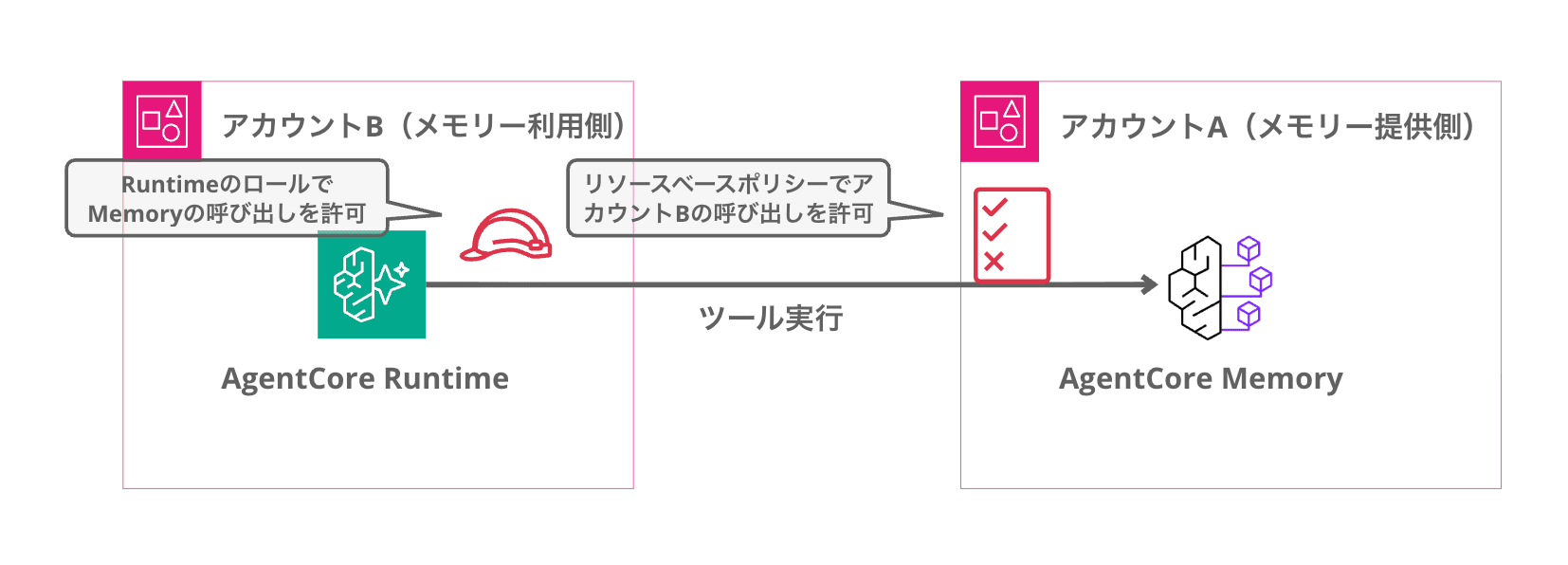
Overall Flow
Here's a flow diagram of what we'll do this time.
Prerequisites
Here are the prerequisites for this walkthrough!
- Two AWS accounts (Account A: memory provider / Account B: memory consumer)
- AWS CLI 2.34.44
- Python 3.13
- uv 0.9.26
- Libraries used: boto3 / bedrock-agentcore / strands-agents
We'll use uv for package management. Create a project and add the dependent libraries.
uv init memory-cross-account -p 3.13
cd memory-cross-account
uv add boto3 bedrock-agentcore strands-agents
Implementation
Creating the Memory Resource (Memory Provider Side)
First, we create a memory resource in Account A, the memory provider.
For long-term memory strategies, we'll use semanticMemoryStrategy for storing facts and userPreferenceMemoryStrategy for storing user preferences.
import boto3

control_client = boto3.client("bedrock-agentcore-control", region_name="us-east-1")

response = control_client.create_memory(
    name="CrossAccountDemoMemory",
    description="Demo memory for cross-account access",
    eventExpiryDuration=30,
    memoryStrategies=[
        {
            "semanticMemoryStrategy": {
                "name": "UserFacts",
                "description": "Extract factual information about the user",
            }
        },
        {
            "userPreferenceMemoryStrategy": {
                "name": "UserPreferences",
                "description": "Learn user preferences",
            }
        },
    ],
)

memory_id = response["memory"]["id"]
memory_arn = response["memory"]["arn"]

print(f"Memory ID: {memory_id}")
print(f"Memory ARN: {memory_arn}")
uv run setup_memory.py
Memory ID: CrossAccountDemoMemory-NCd6eP6wJq
Memory ARN: arn:aws:bedrock-agentcore:us-east-1:111111111111:memory/CrossAccountDemoMemory-NCd6eP6wJq
When the memory resource is created, the ID and ARN are returned. For cross-account access, you'll use this ARN to reference the memory.
Configuring the Resource-Based Policy (Memory Provider Side)
We attach a resource-based policy so that the role from Account B, the memory consumer, can access the memory resource.
{
    "Version": "2012-10-17",
    "Statement": [
        {
            "Sid": "AllowCrossAccountMemoryAccess",
            "Effect": "Allow",
            "Principal": {
                "AWS": "arn:aws:iam::222222222222:role/ConsumerRole"
            },
            "Action": [
                "bedrock-agentcore:CreateEvent",
                "bedrock-agentcore:GetEvent",
                "bedrock-agentcore:ListEvents",
                "bedrock-agentcore:ListActors",
                "bedrock-agentcore:ListSessions",
                "bedrock-agentcore:GetMemoryRecord",
                "bedrock-agentcore:ListMemoryRecords",
                "bedrock-agentcore:RetrieveMemoryRecords"
            ],
            "Resource": "arn:aws:bedrock-agentcore:us-east-1:111111111111:memory/CrossAccountDemoMemory-NCd6eP6wJq"
        }
    ]
}
The Principal specifies the IAM role ARN to be used in Account B. The Action lists the operations needed by the memory consumer. This allows event creation (writing to short-term memory) and retrieval/search of memory records (accessing long-term memory). The Resource specifies the ARN of the memory we just created.
Note that for access to be granted, not only the resource-based policy but also the identity-based policy on the calling principal's side must allow bedrock-agentcore operations. Since we're using a role with administrator-equivalent permissions on Account B's side this time, the following steps will work with just the resource-based policy configuration.
Attach the policy using the CLI.
aws bedrock-agentcore-control put-resource-policy \
    --resource-arn arn:aws:bedrock-agentcore:us-east-1:111111111111:memory/CrossAccountDemoMemory-NCd6eP6wJq \
    --policy file://memory-cross-account-policy.json \
    --region us-east-1
Writing Events from the Memory Consumer Side
Let's write events to Account A's memory from Account B, the memory consumer. The key point is to specify the ARN rather than the short ID in memoryId.
import boto3
from datetime import datetime, timezone

client = boto3.client("bedrock-agentcore", region_name="us-east-1")

MEMORY_ARN = "arn:aws:bedrock-agentcore:us-east-1:111111111111:memory/CrossAccountDemoMemory-NCd6eP6wJq"

response = client.create_event(
    memoryId=MEMORY_ARN,
    actorId="user-001",
    sessionId="cross-account-session-001",
    eventTimestamp=datetime.now(timezone.utc),
    payload=[
        {
            "conversational": {
                "content": {"text": "Hello! I'd like help planning a trip."},
                "role": "USER",
            }
        },
        {
            "conversational": {
                "content": {"text": "Of course! Where are you thinking of traveling to?"},
                "role": "ASSISTANT",
            }
        },
        {
            "conversational": {
                "content": {
                    "text": "I'd like to go to Kyoto next month for 3 nights and 4 days. I'd rather focus on Japanese sweets and cafes than temples and shrines. I also love matcha sweets."
                },
                "role": "USER",
            }
        },
        {
            "conversational": {
                "content": {
                    "text": "A trip centered around Japanese sweets and cafes in Kyoto! Since you love matcha sweets, let me put together some recommended plans for you."
                },
                "role": "ASSISTANT",
            }
        },
    ],
)

print(f"Event created: {response['event']['eventId']}")
uv run write_cross_account.py
Event created: 0000001783165130534#3f3e979a
Compared to using it within the same account, the main change in the application code is passing the ARN to memoryId. Please note that the calling role's side also needs an identity-based policy that allows bedrock-agentcore operations.
You can verify that the event was written correctly using ListEvents.
import boto3

client = boto3.client("bedrock-agentcore", region_name="us-east-1")

MEMORY_ARN = "arn:aws:bedrock-agentcore:us-east-1:111111111111:memory/CrossAccountDemoMemory-NCd6eP6wJq"

response = client.list_events(
    memoryId=MEMORY_ARN,
    actorId="user-001",
    sessionId="cross-account-session-001",
)

for event in response["events"]:
    print(f"Event ID: {event['eventId']}")
uv run list_events.py
Event ID: 0000001783165130534#3f3e979a
We confirmed that the event was written successfully!
Checking Long-Term Memory
After writing the event, the built-in strategies automatically analyze the conversation content and extract factual information and user preferences as long-term memory.
Let's check from the memory provider side (Account A).
import boto3

client = boto3.client("bedrock-agentcore", region_name="us-east-1")

MEMORY_ID = "CrossAccountDemoMemory-NCd6eP6wJq"

response = client.list_memory_records(
    memoryId=MEMORY_ID,
    namespacePath="/",
)

for record in response["memoryRecordSummaries"]:
    text = record["content"]["text"]
    strategy = record["memoryStrategyId"]
    print(f"[{strategy}] {text}")
uv run check_long_term_memory.py
[UserFacts-Vu0glFBLrC] The user loves matcha sweets.
[UserPreferences-nnBhOa5Pbm] {"context":"The user explicitly stated that they love matcha sweets.","preference":"Loves matcha sweets","categories":["Food","Sweets","Cuisine"]}
[UserPreferences-nnBhOa5Pbm] {"context":"The user explicitly stated that for their Kyoto trip, they want to focus on Japanese sweets and cafes rather than temples and shrines.","preference":"Prefers Japanese sweets and cafes over temples and shrines when traveling","categories":["Travel","Food","Sweets","Cafe"]}
[UserFacts-Vu0glFBLrC] The user is planning a 3-night, 4-day trip to Kyoto in August 2026.
The user's factual information (Facts) and preferences (Preferences) have been automatically extracted from the conversation!
You can also access the same long-term memory via semantic search from the memory consumer side (Account B).
import boto3

client = boto3.client("bedrock-agentcore", region_name="us-east-1")

MEMORY_ARN = "arn:aws:bedrock-agentcore:us-east-1:111111111111:memory/CrossAccountDemoMemory-NCd6eP6wJq"

response = client.retrieve_memory_records(
    memoryId=MEMORY_ARN,
    namespacePath="/",
    searchCriteria={
        "searchQuery": "What are this user's food preferences?",
        "topK": 5,
    },
)

for record in response["memoryRecordSummaries"]:
    text = record["content"]["text"]
    score = record.get("score", "N/A")
    print(f"Score={score}: {text}")
uv run search_from_consumer.py
Score=0.4189935: {"context":"The user explicitly stated that they love matcha sweets.","preference":"Loves matcha sweets","categories":["Food","Sweets","Cuisine"]}
Score=0.41755167: The user loves matcha sweets.
Score=0.4072743: The user wants to focus on Japanese sweets and cafes rather than temples and shrines during their Kyoto trip.
Score=0.40258944: {"context":"The user explicitly stated that for their Kyoto trip, they want to focus on Japanese sweets and cafes rather than temples and shrines.","preference":"Prefers Japanese sweets and cafes over temples and shrines when traveling","categories":["Travel","Food","Sweets","Cafe"]}
Score=0.3739571: The user is planning a 3-night, 4-day trip to Kyoto in August 2026.
Even from a different account, we were able to retrieve long-term memory with relevance scores via semantic search!
Confirming That Unauthorized Roles Are Denied
Let's also verify what happens when accessing from a role that is not included in the Principal of the resource-based policy. We'll create a test role CrossAccountDenyTestRole in Account B, fully allow bedrock-agentcore operations in the identity-based policy, assume that role, and then try calling ListEvents.
aws bedrock-agentcore list-events \
    --region us-east-1 \
    --memory-id arn:aws:bedrock-agentcore:us-east-1:111111111111:memory/CrossAccountDemoMemory-NCd6eP6wJq \
    --actor-id user-001 \
    --session-id cross-account-session-001
An error occurred (AccessDeniedException) when calling the ListEvents operation: User: arn:aws:sts::222222222222:assumed-role/CrossAccountDenyTestRole/deny-test is not authorized to perform: bedrock-agentcore:ListEvents on resource: arn:aws:bedrock-agentcore:us-east-1:111111111111:memory/CrossAccountDemoMemory-NCd6eP6wJq because no resource-based policy allows the bedrock-agentcore:ListEvents action
Even though the calling side's identity-based policy fully allows access, roles not included in the resource-based policy's Principal are denied. It's great that the error message explicitly states the reason for denial as no resource-based policy allows the bedrock-agentcore:ListEvents action!
Cross-Account Usage with Strands AgentCoreMemorySessionManager
From here, let's look at cross-account usage with the AgentCoreMemorySessionManager from the Strands Agents SDK.
What Is AgentCoreMemorySessionManager?
The Strands Agents SDK provides a session manager called AgentCoreMemorySessionManager. It's a convenient feature that automatically handles saving and referencing conversation history just by passing it as an argument to the Agent.
Since it's frequently used, you might naturally wonder whether AgentCoreMemorySessionManager also works with cross-account access.
Does It Work Cross-Account?
The short answer: yes, it works by specifying the ARN in memory_id of AgentCoreMemoryConfig. Let's try it out.
from strands import Agent
from bedrock_agentcore.memory.integrations.strands.config import (
    AgentCoreMemoryConfig,
    RetrievalConfig,
)
from bedrock_agentcore.memory.integrations.strands.session_manager import (
    AgentCoreMemorySessionManager,
)

MEMORY_ARN = "arn:aws:bedrock-agentcore:us-east-1:111111111111:memory/CrossAccountDemoMemory-NCd6eP6wJq"

config = AgentCoreMemoryConfig(
    memory_id=MEMORY_ARN,
    session_id="strands-cross-account-session-001",
    actor_id="user-001",
    retrieval_config={
        "/strategies/UserFacts-Vu0glFBLrC/actors/user-001/": RetrievalConfig(
            top_k=5,
            relevance_score=0.3,
        ),
    },
)

with AgentCoreMemorySessionManager(
    agentcore_memory_config=config,
    region_name="us-east-1",
) as session_manager:
    agent = Agent(
        model="us.anthropic.claude-haiku-4-5-20251001-v1:0",
        system_prompt="You are a travel planner. Please suggest travel plans tailored to the user's preferences.",
        session_manager=session_manager,
    )

    response = agent("What are some recommended places in Kyoto?")
    print(response)
uv run strands_cross_account.py
# Kyoto Japanese Sweets & Cafe Tour: 3 Nights, 4 Days 🍵

Here's a Kyoto travel plan perfect for a matcha sweets lover like you!

## 📅 Day 1: Enjoy Authentic Matcha in the Uji Area

### Morning
- **Nakamura Tokichi Honten** (Uji)
  - Famous for their nama-cha jelly and matcha parfait
  - A long-established shop founded in the Edo period

(omitted)

## 🎁 Recommended Souvenirs

1. Malebranche "Cha no Ka"
2. Nakamura Tokichi "Nama-cha Jelly"
3. Ito Kyuemon "Matcha Chocolate"
4. Zen Kashoin "Hana Rusk"
5. Oimatsu "Natsukanto" (note limited shelf life)

How does this plan sound? We can customize it based on your preferences! Please let us know if there are any areas you'd particularly like to visit or any places you'd like to avoid 😊
The response reflects the long-term memory written earlier — that they love matcha sweets and prefer Japanese sweets and cafes over temples and shrines!
Internally, AgentCoreMemorySessionManager calls the API, so passing the ARN to memory_id allows it to access memory from a different account seamlessly. As long as the resource-based policy is correctly configured, it works with the same code as within the same account.
Also Checking Short-Term Memory
Let's also verify that short-term memory (conversation history) works cross-account. Using the exact same configuration and session_id as before, we run a script as a separate process with only the question changed, and ask "Do you remember our earlier conversation?"
from strands import Agent
from bedrock_agentcore.memory.integrations.strands.config import (
    AgentCoreMemoryConfig,
    RetrievalConfig,
)
from bedrock_agentcore.memory.integrations.strands.session_manager import (
    AgentCoreMemorySessionManager,
)

MEMORY_ARN = "arn:aws:bedrock-agentcore:us-east-1:111111111111:memory/CrossAccountDemoMemory-NCd6eP6wJq"

config = AgentCoreMemoryConfig(
    memory_id=MEMORY_ARN,
    session_id="strands-cross-account-session-001",
    actor_id="user-001",
    retrieval_config={
        "/strategies/UserFacts-Vu0glFBLrC/actors/user-001/": RetrievalConfig(
            top_k=5,
            relevance_score=0.3,
        ),
    },
)

with AgentCoreMemorySessionManager(
    agentcore_memory_config=config,
    region_name="us-east-1",
) as session_manager:
    agent = Agent(
        model="us.anthropic.claude-haiku-4-5-20251001-v1:0",
        system_prompt="You are a travel planner. Please suggest travel plans tailored to the user's preferences.",
        session_manager=session_manager,
    )

    response = agent("Do you remember our earlier conversation?")
    print(response)
uv run strands_short_term.py
Yes, of course I remember!

We were discussing the **Kyoto Japanese Sweets & Cafe Tour: 3 Nights, 4 Days** plan I suggested earlier.

- August 2026, 3 nights and 4 days
- Focused on Japanese sweets and cafes rather than temples and shrines
- You love matcha sweets

Based on those conditions, I put together a matcha sweets-centered plan covering Uji, Gion, Arashiyama, and more.

Is there anything you'd like to change, or is there something else you'd like to know? For example:

- Details about specific shops
- Transportation and estimated travel times
- Estimated budget
- More off-the-beaten-path cafe recommendations

Feel free to ask anything! 😊
Even from a separate process, a response was returned that reflected the previous conversation! Since AgentCoreMemorySessionManager loads and restores the conversation history from the same session in Account A's memory, short-term memory works cross-account without any issues!
Conclusion
Since Strands' AgentCoreMemorySessionManager also works just by passing the ARN to memory_id, it seems you can adopt a cross-account configuration with almost no changes to existing code!
There are parts where I personally can't fully picture the use cases yet, but if I come across actual examples, I'd like to write about them in another blog post. Scenarios like consolidating long-term memory into one account for use across multiple accounts do seem plausible.
I hope this article was helpful in some way. Thank you for reading to the end!