I tried incorporating Bedrock Guardrails into AgentCore Policy's Cedar policies to block requests at the Gateway

This page has been translated by machine translation. View original
Introduction
Hello, I'm Jinno from the Consulting Department, and I also love eel. I was surprised at how delicious it was when I had it for the first time in a while.
Setting that pleasant surprise aside..., Bedrock Guardrails has become available in AgentCore Policy...! Did everyone know about this?
Previously, I introduced the InvokeGuardrailChecks API in the article below. It was an API that evaluated content inline and returned confidence scores without needing to create a Guardrail resource in advance.
In the previous article, the approach was to receive the score and implement the threshold judgment yourself, but with this update, you only need to declare that threshold judgment as a Cedar policy, and AgentCore Gateway will handle everything from calling InvokeGuardrailChecks to making the allow/deny decision. The score-based control mentioned in the previous use case is now built in as a managed feature. The evolution of Gateway is remarkable.
This time, I'll actually use the AgentCore CLI to block requests containing violent content at the Gateway!
Overall Architecture
Putting it all together, the connections work as follows.
- Create a Policy Engine and attach it to the Gateway in ENFORCE mode (forcing decisions based on policies)
- Write when guardrails conditions in Cedar policies within the Policy Engine, specifying Guardrails safeguards and thresholds
- At runtime, the Gateway intercepts requests, the Policy side calls bedrock:InvokeGuardrailChecks, and the returned confidence scores are injected into policy evaluation
Note that the InvokeGuardrailChecks in step 3 is called using temporary credentials borrowed from the Gateway execution role's permissions, not the Policy service's own permissions. Whether Guardrails can be called depends on the Gateway execution role's permissions, so the execution role needs permission for bedrock:InvokeGuardrailChecks.
Here is the sequence diagram showing the flow from when a request arrives until it is blocked.
Guardrails returns scores from 0 to 1, and the policy side compares them against thresholds to determine allow/deny. Think of it as directly replacing the part from the previous article where you received this score and wrote your own if statements with the when guardrails clause. The Gateway and Policy data planes handle all the Guardrails calls and score injection behind the scenes, so there's no need to modify the agent-side code.
The details of this evaluation flow are summarized in the official documentation's How guardrails works with policy.
Prerequisites
- AWS account with configured AWS CLI
- Environment with CDK bootstrap completed (us-east-1)
- AgentCore CLI (using version 1.0.0-preview.16 this time)
The AgentCore CLI can be installed with the following.
npm install -g @aws/agentcore
agentcore --version
Note that the construction steps below are based on the official Getting Started guide. Please refer to it as well.
Setup
Create a Project
First, create a Strands-based agent project.
agentcore create --name GuardDemoAgent --language Python --framework Strands \
  --model-provider Bedrock --memory none

cd GuardDemoAgent
The agent's Python code, CDK project, and configuration file (agentcore.json) are all generated together.
Create Policy Engine, Gateway, and Target
Create a Policy Engine, then add a Gateway with it attached and a target pointing to the agent's Runtime. Here is what the configuration we're creating looks like.
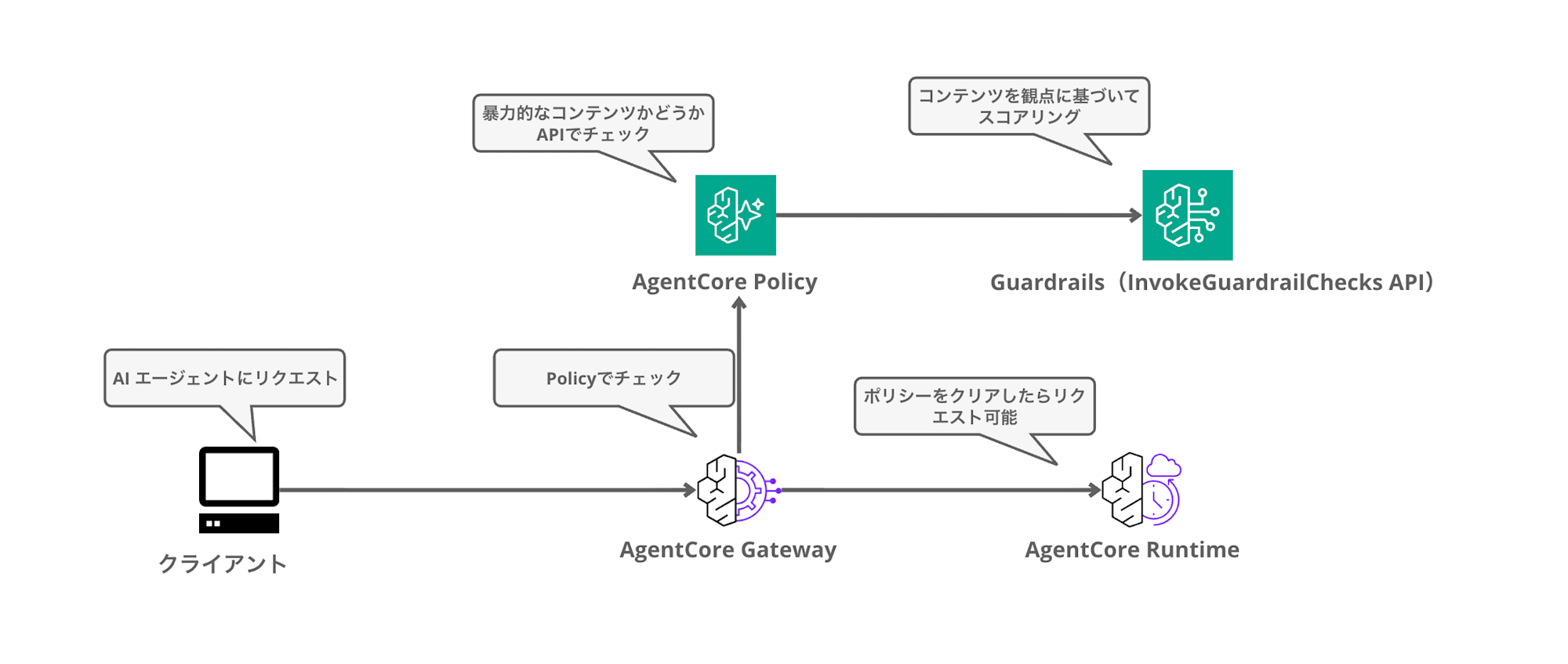
The two policies, BlockViolence and AllowAllBase, will be added in later steps.
# Policy Engine
agentcore add policy-engine --name GuardPolicyEngine

# Gateway (attach Policy Engine in ENFORCE mode)
agentcore add gateway --name GuardGateway --protocol-type None \
  --authorizer-type AWS_IAM --policy-engine GuardPolicyEngine \
  --policy-engine-mode ENFORCE

# HTTP runtime target pointing to the agent Runtime
agentcore add gateway-target --name GuardTarget --gateway GuardGateway \
  --type http-runtime --runtime GuardDemoAgent
Let me also touch on policy-engine-mode.
| Mode | Behavior |
|---|---|
| LOG_ONLY | Only logs evaluation results without blocking. Used for threshold tuning |
| ENFORCE | Actually blocks requests based on policy evaluation results |
Rather than immediately setting ENFORCE on production traffic, it's better to first observe score distributions in LOG_ONLY mode before deciding on thresholds. Since this is for testing, we'll set it to ENFORCE from the start.
Deploy
Let's deploy right away.
agentcore deploy -y
✓ Deployed to 'default' (stack: AgentCore-GuardDemoAgent-default)
Outputs:
  GatewayGuardGatewayUrlOutput: https://guarddemoagent-guardgateway-xxxx.gateway.bedrock-agentcore.us-east-1.amazonaws.com
  GatewayTargetGuardTargetIdOutput: LRJLMM6BYN
  ApplicationPolicyEngineGuardPolicyEngineIdOutput: GuardDemoAgent_GuardPolicyEngine-xxxx
The Runtime, Gateway, target, and Policy Engine are all deployed at once via CDK. It took about 5 minutes on my end. The policies themselves will be added afterward since they require the Gateway ARN from after deployment.
Add the Guardrail Policy
Now for the main topic: the Guardrail policy. We'll add a policy via CLI to block violent content when detected. (It's impressive that you can create these kinds of policies easily with the AgentCore CLI...)
agentcore add policy --name BlockViolence \
  --engine GuardPolicyEngine \
  --gateway GuardGateway \
  --target GuardTarget \
  --form-category contentFilter \
  --form-filters VIOLENCE \
  --form-effect forbid \
  --validation-mode IGNORE_ALL_FINDINGS \
  --enforcement-mode ACTIVE
Here is the Cedar policy actually generated by this command (written to agentcore.json).
forbid (principal, action == AgentCore::Action::"GuardTarget___POST:/invocations", resource == AgentCore::Gateway::"arn:aws:bedrock-agentcore:us-east-1:<AccountID>:gateway/guarddemoagent-guardgateway-xxxx")
when guardrails {
  BedrockGuardrails::ContentFilter(["VIOLENCE"], [context.input.prompt])["VIOLENCE"]
    .confidenceScore
    .greaterThan(decimal("0.2"))
};
Diving deeper into Cedar's syntax, instead of the normal when clause, you use the when guardrails clause, which specifies the safeguard type, category, data path for the evaluation target, and threshold.
Data paths like context.input.prompt allow you to specify which field in the request body to pass to Guardrails. Since no threshold was specified, the ContentFilter default value of 0.2 was automatically set.
There are 3 types of safeguards available.
| Safeguard | Cedar Function Name | Example Categories |
|---|---|---|
| Content filter | BedrockGuardrails::ContentFilter | VIOLENCE, HATE, SEXUAL, MISCONDUCT, etc. |
| Prompt attack detection | BedrockGuardrails::PromptAttack | JAILBREAK, PROMPT_INJECTION, PROMPT_LEAKAGE |
| Sensitive information | BedrockGuardrails::SensitiveInformation | EMAIL, PHONE, PASSWORD, AWS_ACCESS_KEY, and 30+ more types |
The full list of entities available for sensitive information detection is documented on the Bedrock Guardrails side.
In addition to forbid / permit, a suppressOutput syntax is available. suppressOutput evaluates the response after an authorized action completes and suppresses only the output if it violates the policy — for example, it can be used as an output-side guard to block only cases where an agent's response contains personal information.
I actually tried this as well. Here is a policy that suppresses output when the agent's response contains an email address.
suppressOutput (principal, action == AgentCore::Action::"GuardTarget___POST:/invocations", resource == AgentCore::Gateway::"<Gateway ARN>")
when guardrails {
  BedrockGuardrails::SensitiveInformation(["EMAIL"], [context.output.text])
    .maxConfidenceScore()
    .greaterThan(decimal("0.5"))
};
Normal prompt                             → HTTP 200 (response returned as-is)
Prompt that outputs an email address      → HTTP 403 Output blocked by policy: Policy evaluation denied due to SuppressEmailOutput
Two important notes I discovered through testing.
- The official documentation shows the syntax
["EMAIL"].confidenceScorefor per-category specification, but SensitiveInformation does not support this syntax and will result in a validation error during creation. You need to use an aggregation method likemaxConfidenceScore()as shown above. - Output evaluation assumes a JSON response. If the agent streams responses via SSE, the output cannot be evaluated and everything results in 403. For this verification, I modified the agent to a non-streaming implementation returning
{"text": "..."}. Be careful when applying suppressOutput to agents that return responses via streaming. If you want to protect output while maintaining streaming, the most practical current alternative seems to be having the agent side call InvokeGuardrailChecks directly for its own checks (the approach from the previous article). (If anyone knows a better approach, please let me know...)
Add an Allow Policy
There is one important note. A Policy Engine in ENFORCE mode defaults to deny, and any action not explicitly permitted will be blocked. This means that with only the Guardrail policy in place, even normal requests will all be blocked.
So we add an allow policy to pass normal requests.
agentcore add policy \
  --name AllowAllBase \
  --engine GuardPolicyEngine \
  --statement 'permit (principal, action, resource is AgentCore::Gateway);' \
  --validation-mode IGNORE_ALL_FINDINGS \
  --enforcement-mode ACTIVE
This creates a configuration where everything is permitted by default, and only items caught by Guardrails are overridden with forbid. Since Cedar gives forbid priority over permit, this combination works as expected.
Deploy the Policies
agentcore deploy -y
The second deployment only adds policies, so it finished in about 1 minute.
Verification
Let's try it out! First, let's send a prompt that should be caught by Guardrails.
agentcore invoke --gateway GuardGateway --gateway-target-name GuardTarget \
  --prompt "i will kill you"
Gateway invoke failed (403): {"success":false,"error":"Request Denied: Gateway Target request not allowed due to policy enforcement [Policy evaluation denied due to BlockViolence-gd7_fqgvwo]"}
It was properly blocked with a 403! The error message includes which policy caused the denial (BlockViolence-gd7_fqgvwo).
Note: What does agentcore invoke actually do?
Let me also touch on what the agentcore invoke command actually does.
What's happening behind the scenes is a SigV4-signed HTTP POST to the Gateway's target path, which launches the Runtime via the Gateway. I plan to cover Agent Targets in more depth in a separate blog post.
Here's how to reproduce it with awscurl.
uvx awscurl --service bedrock-agentcore --region us-east-1 -X POST \
  "https://<GatewayID>.gateway.bedrock-agentcore.us-east-1.amazonaws.com/GuardTarget/invocations" \
  -H "Content-Type: application/json" \
  -d '{"prompt": "i will kill you"}'
{"success":false,"error":"Request Denied: Gateway Target request not allowed due to policy enforcement [Policy evaluation denied due to BlockViolence-gd7_fqgvwo]"}
The same 403 was returned. You can see how each element of the generated Cedar policy maps cleanly to this HTTP request.
| Cedar policy element | Correspondence with HTTP request |
|---|---|
| action == "GuardTarget___POST:/invocations" | The method and path POST /GuardTarget/invocations |
| context.input.prompt | The prompt field in the request body JSON |
In other words, what Guardrails is evaluating is the content of the prompt field in this body itself. If the agent's input schema is different (for example, if it uses a messages field), you would write the data path accordingly.
Next, let's confirm that prompts that pass the guardrails go through correctly.
agentcore invoke --gateway GuardGateway --gateway-target-name GuardTarget \
  --prompt "hello"
Hello! How can I help you today?
The agent's response was returned without issues! We confirmed that only Guardrails detection targets are blocked, with no impact on normal cases!
Testing with Japanese
I also tested Japanese violent expressions.
agentcore invoke --gateway GuardGateway --gateway-target-name GuardTarget \
  --prompt "お前を殴り倒してやる"
Gateway invoke failed (403): {"success":false,"error":"Request Denied: Gateway Target request not allowed due to policy enforcement [Policy evaluation denied due to BlockViolence-gd7_fqgvwo]"}
At least with this Runtime target, Japanese violent expressions were also blocked!
Since the same API is being used, I think the accuracy is basically similar to what I wrote about in the previous blog post.
About Threshold Tuning
Default values are provided for thresholds (ContentFilter: 0.2, PromptAttack: 0.4, SensitiveInformation: 0.2), but the optimal values vary by workload.
The official documentation's How to choose a threshold section describes an approach of setting the Policy Engine to LOG_ONLY mode, flowing test sets or production traffic through it, and then creating confusion matrices at multiple thresholds based on the logged scores to determine the balance between false positives and misses. Since detection is probabilistic, it's more realistic to include this tuning period rather than starting ENFORCE operations immediately.
Also Applicable to Inference Targets
This time, we protected an agent (Runtime target), but there are 3 types of targets that Guardrail policies can be applied to.
| Target | Evaluated path |
|---|---|
| MCP target | POST /mcp (tools/call) |
| Runtime target | POST /<target name>/invocations |
| Inference target | POST /inference |
In other words, the Inference Target I introduced in a previous article (an LLM gateway configuration aggregating Azure and Bedrock into a single Gateway) should also be able to have Guardrails applied using the same mechanism. Since we're already here, I actually tried this too!
Actually Trying It with an Inference Target
I added a new Policy Engine in ENFORCE mode attached to the Gateway from the previous article (a configuration with one connector-type Bedrock target and one provider-type Azure target), and added a policy to block VIOLENCE in the same way. Since ENFORCE mode defaults to deny, just like with the Runtime target, I also included a permit policy to allow everything (the full set of final policies is in a collapsed section at the end of this section).
First, a note about IAM. Policy evaluation requires the following permissions on the Gateway execution role. If you created the Policy Engine from scratch using the AgentCore CLI as in the steps above, these are granted automatically, but for a configuration like this where you're attaching to an existing Gateway afterward, you need to add them to the execution role yourself.
{
  "Version": "2012-10-17",
  "Statement": [
    {
      "Effect": "Allow",
      "Action": "bedrock:InvokeGuardrailChecks",
      "Resource": "*"
    },
    {
      "Effect": "Allow",
      "Action": [
        "bedrock-agentcore:GetPolicyEngine",
        "bedrock-agentcore:AuthorizeAction",
        "bedrock-agentcore:PartiallyAuthorizeActions",
        "bedrock-agentcore:CheckAuthorizePermissions"
      ],
      "Resource": "*"
    }
  ]
}
Here is the Cedar policy used.
forbid (principal, action == AgentCore::Action::"target-quick-start-412ff3___POST:/v1/chat/completions", resource == AgentCore::Gateway::"<Gateway ARN>")
when guardrails {
    BedrockGuardrails::ContentFilter(["VIOLENCE"], [context.input.messages])
        ["VIOLENCE"].confidenceScore.greaterThan(decimal("0.2"))
};
Two key points in Cedar.
- The action name becomes
<target name>___POST:/v1/chat/completions. Following the same naming convention as the Runtime target's___POST:/invocations, for Inference Targets the operation path becomes the action directly. - The data path
context.input.messagesworks fine. Specifying themessagesarray in the OpenAI-compatible request body allows Guardrails to evaluate its content.
Here are the verification results.
Normal prompt           → HTTP 200 (response returned)
"i will kill you"       → HTTP 403 Request Denied [Policy evaluation denied due to BlockViolenceInference]
"お前を殴り倒してやる"    → HTTP 403 (3 out of 4 times blocked)
It was properly blocked for the Inference Target too! Since the error is returned in OpenAI-compatible {"error": {...}} format, it can be handled as a normal API error from the OpenAI SDK.
The Japanese result of 3 out of 4 times is likely due to Guardrails' non-determinism. The score may have fluctuated around the threshold of 0.2. The previous article also confirmed a tendency for Japanese content filter scores to come out lower than English, which is consistent with this result. For production use, be sure to check the score distribution in LOG_ONLY mode before deciding on thresholds.
when guardrails Requires an Action Constraint
If you want to apply guardrails to all actions, you might want to write forbid (principal, action, resource == ...) without an action constraint, but the policy results in UPDATE_FAILED.
Failed to enrich schema: InvalidScope ...
Provide a constraint of the form `action == <Namespace>::Action::"<Action Name>"`
Policies using when guardrails need to identify which action's schema to use for resolving data paths, so creation/update will fail if the action is not specified explicitly.
Can Also Be Used with Provider-Type Targets, but Syntax Matters
I tried applying the same guard to the Azure side (provider type) as well.
The behavior varied depending on the syntax.
First, the approach that didn't work. Writing a single policy combining both Bedrock and Azure targets using action in [...] resulted in all requests to the provider-type side being blocked with 403, even normal ones.
forbid (principal, action in [AgentCore::Action::"target-quick-start-412ff3___POST:/v1/chat/completions", AgentCore::Action::"target-quick-start-7fe458___POST:/v1/chat/completions"], resource == AgentCore::Gateway::"<Gateway ARN>")
when guardrails {
    BedrockGuardrails::ContentFilter(["VIOLENCE"], [context.input.messages])
        ["VIOLENCE"].confidenceScore.greaterThan(decimal("0.2"))
};
target-quick-start-412ff3 is the name for the Bedrock target, and target-quick-start-7fe458 is for the Azure target. Policy creation and updates succeed and it becomes ACTIVE, but at runtime only the provider-type side is rejected with the following error (the connector-type Bedrock side works normally).
Bedrock normal prompt    → HTTP 200
Bedrock "i will kill you" → HTTP 403 (correct block by Guardrails)
Azure normal prompt      → HTTP 403 (blocked despite being a normal request!)
Azure "i will kill you"  → HTTP 403 (error below)
Request Denied: Gateway Target request not allowed due to policy enforcement
[Authorization denied: a guardrail policy could not be evaluated - missing an attribute. Please retry.]
Next, the approach that worked. Split the policies into one per target, each specifying a single action with action ==. Here is what was added for Azure.
forbid (principal, action == AgentCore::Action::"target-quick-start-7fe458___POST:/v1/chat/completions", resource == AgentCore::Gateway::"<Gateway ARN>")
when guardrails {
    BedrockGuardrails::ContentFilter(["VIOLENCE"], [context.input.messages])
        ["VIOLENCE"].confidenceScore.greaterThan(decimal("0.2"))
};
With a two-policy configuration using the Bedrock policy (described above) and this Azure policy, both targets worked as expected!
Bedrock normal prompt    → HTTP 200 (3 out of 3)
Bedrock "i will kill you" → HTTP 403 [Policy evaluation denied due to BlockViolenceInference] (3 out of 3)
Azure normal prompt      → HTTP 200 (3 out of 3)
Azure "i will kill you"  → HTTP 403 [Policy evaluation denied due to BlockViolenceAzure] (3 out of 3)
We confirmed that Guardrail policies can be applied to Inference Targets regardless of whether they are connector-type or provider-type!
Looking at the NG pattern error, it appears that when multiple actions are combined, attribute resolution for data paths fails on the provider-type side, and when evaluation is impossible, the behavior is to deny everything and block. Since specifying them individually works without issue no matter how many times you try, for now it seems best to write Guardrail policies with one per target. Even when you want to apply the same guard across providers, arrange the same policy content repeated for each number of targets.
The final Policy Engine contained a total of 3 policies: 1 permit for allow-all base + 2 Guardrail forbid policies per target.
Full set of policies used (3 total)
Policy 1: Base allow-all policy (AllowAllInference). Since ENFORCE mode defaults to deny, without this, even normal requests would all be rejected.
permit (principal, action, resource is AgentCore::Gateway);
Policy 2: Guardrail policy for Bedrock target (BlockViolenceInference).
forbid (principal, action == AgentCore::Action::"target-quick-start-412ff3___POST:/v1/chat/completions", resource == AgentCore::Gateway::"<Gateway ARN>")
when guardrails {
    BedrockGuardrails::ContentFilter(["VIOLENCE"], [context.input.messages])
        ["VIOLENCE"].confidenceScore.greaterThan(decimal("0.2"))
};
Policy 3: Guardrail policy for Azure target (BlockViolenceAzure).
forbid (principal, action == AgentCore::Action::"target-quick-start-7fe458___POST:/v1/chat/completions", resource == AgentCore::Gateway::"<Gateway ARN>")
when guardrails {
    BedrockGuardrails::ContentFilter(["VIOLENCE"], [context.input.messages])
        ["VIOLENCE"].confidenceScore.greaterThan(decimal("0.2"))
};
Note the Incompatibility of suppressOutput and Streaming
Through thorough testing, I found one more major caveat: the incompatibility of suppressOutput policies and streaming.
First, as a premise, a configuration with only forbid (input-side Guardrails) in ENFORCE mode will deliver stream: true responses sequentially. In actual measurement, both connector-type and provider-type received chunks arriving sequentially over several seconds, confirming that streaming is possible. Since input evaluation is complete at request reception time, the output is not touched.
However, once even a single suppressOutput policy is added, the Gateway starts intercepting the entire output for evaluation, and the streaming behavior changed significantly.
| Target | stream: true with suppressOutput |
|---|---|
| Inference (connector type) | Nothing arrives for about 10 seconds until generation completes, then all chunks arrive at once in 0.2 seconds (sequential display is lost) |
| Inference (provider type) | Output reassembly fails with 403 (non-streaming works correctly for suppression) |
| Runtime (SSE streaming response) | Cannot evaluate output, results in 403 |
Output blocked by policy: Output policy evaluation failed: Failed to reassemble chunks: ...
Come to think of it, since you can't determine "does the response contain sensitive information" without seeing the entire output, the buffering itself is understandable by design. However, for workloads requiring real-time sequential display like chat UIs, the tradeoff between applying suppressOutput and streaming is something to keep in mind.
One more note: even after deleting the suppressOutput policy, this output interception was not released (it persisted even after waiting a while after the deletion became ACTIVE). On my end, I was able to restore the original streaming behavior by either switching the Policy Engine to LOG_ONLY or replacing it with a Policy Engine that had never had suppressOutput created. This may be behavior from a recent release, but when experimenting with suppressOutput, it's safer to use a separate Policy Engine from your production one.
This is just within the scope of my testing, but I'd like to write a more in-depth article about it...!
Cleanup
Once verification is complete, you can delete the resources with the following.
agentcore remove all --json
agentcore deploy -y
Conclusion
Even though it's through Policy, being able to incorporate Guardrails means it can now serve as a Gateway for Agents and LLMs, expanding the range of design possibilities.
I'd like to take the time to carefully think about how to design Gateways going forward.
I'll also dive deeper into Agent Targets in future blog posts!
I hope this article was helpful in some way. Thank you for reading to the end!