Trying Out ALB's New Feature: Logging Integrated with CloudWatch Logs

This page has been translated by machine translation. View original
Introduction
On July 23, 2026, ALB access logs, connection logs, and health check logs, which previously could only be delivered to S3 buckets, became deliverable directly to CloudWatch Logs log groups via the Vended Logs API.
| Item | S3 Legacy | CloudWatch Logs (Vended Logs) |
|---|---|---|
| Destination | S3 bucket | CloudWatch Logs log group |
| Configuration location | Attributes tab / modify-load-balancer-attributes | Integrations tab / Vended Logs API |
| Format | Fixed space-delimited | JSON / plain (tab / space / comma) |
| Field selection | Not possible (all fields fixed) | Not possible (all fields fixed) |
| Delivery delay | 5 minutes/file | Best effort |
| Delivery charge | Free | Vended Logs pricing ($0.50/GB to $0.05/GB)* |
| Storage charge | S3 storage cost | CWL storage cost |
*Tokyo region, pricing as of July 2026
Verification Details
Verification Environment
| Item | Value |
|---|---|
| Region | ap-northeast-1 (Tokyo) |
| ALB | alb-cwlogs-test (internet-facing) |
| Listener | HTTP 80 → fixed-response 200 |
| AWS CLI | 2.36.7 |
Delivery Configuration
Delivery configuration consists of the following three steps.
put-delivery-source— Register the ALB as the log delivery sourceput-delivery-destination— Register a CloudWatch Logs log group as the delivery destinationcreate-delivery— Link the delivery source and destination, specify the format, and create the delivery
There are three supported log types.
ALB_ACCESS_LOGSALB_CONNECTION_LOGSALB_HEALTH_CHECK_LOGS
The output format and delimiter options are summarized in the table.
| Format | Delimiter | Notes |
|---|---|---|
| json | - | JSON format |
| plain | \t (tab) |
Plain text |
| plain | (space) |
Legacy compatible |
| plain | , (comma) |
CSV |
You cannot pick and choose fields; all 34 fields for Access Logs, 15 for Connection Logs, and 10 for Health Check Logs are output.
Access Logs field list (34 fields)
- type
- time
- elb
- client_port
- target_port
- request_processing_time
- target_processing_time
- response_processing_time
- elb_status_code
- target_status_code
- received_bytes
- sent_bytes
- request_line
- user_agent
- ssl_cipher
- ssl_protocol
- target_group_arn
- trace_id
- domain_name
- chosen_cert_arn
- matched_rule_priority
- request_creation_time
- actions_executed
- redirect_url
- error_reason
- target_port_list
- target_status_code_list
- classification
- classification_reason
- conn_trace_id
- transformed_host
- transformed_uri
- request_transform_status
- ip_address
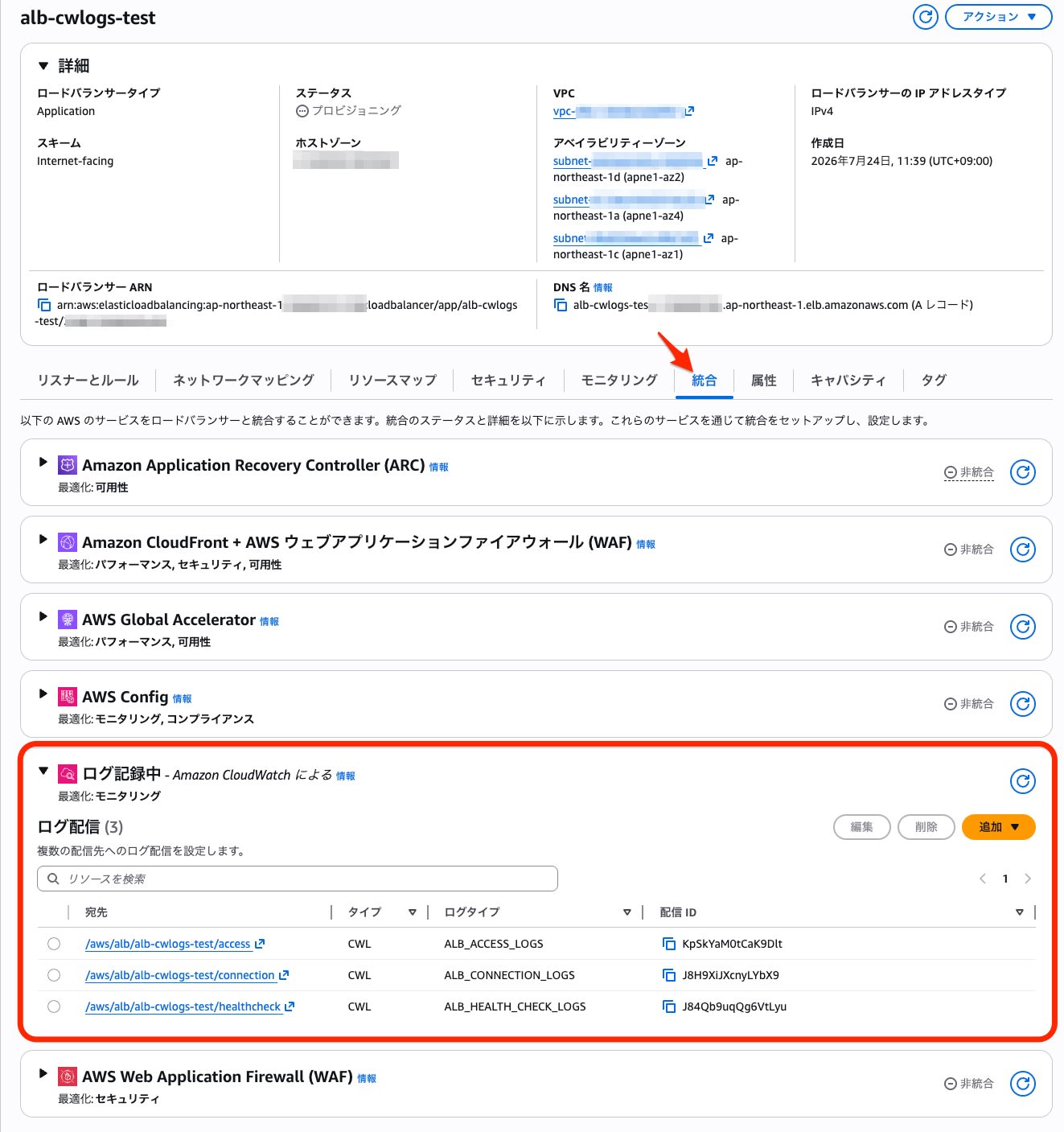
In the console, the new feature is configured from the Integrations tab.
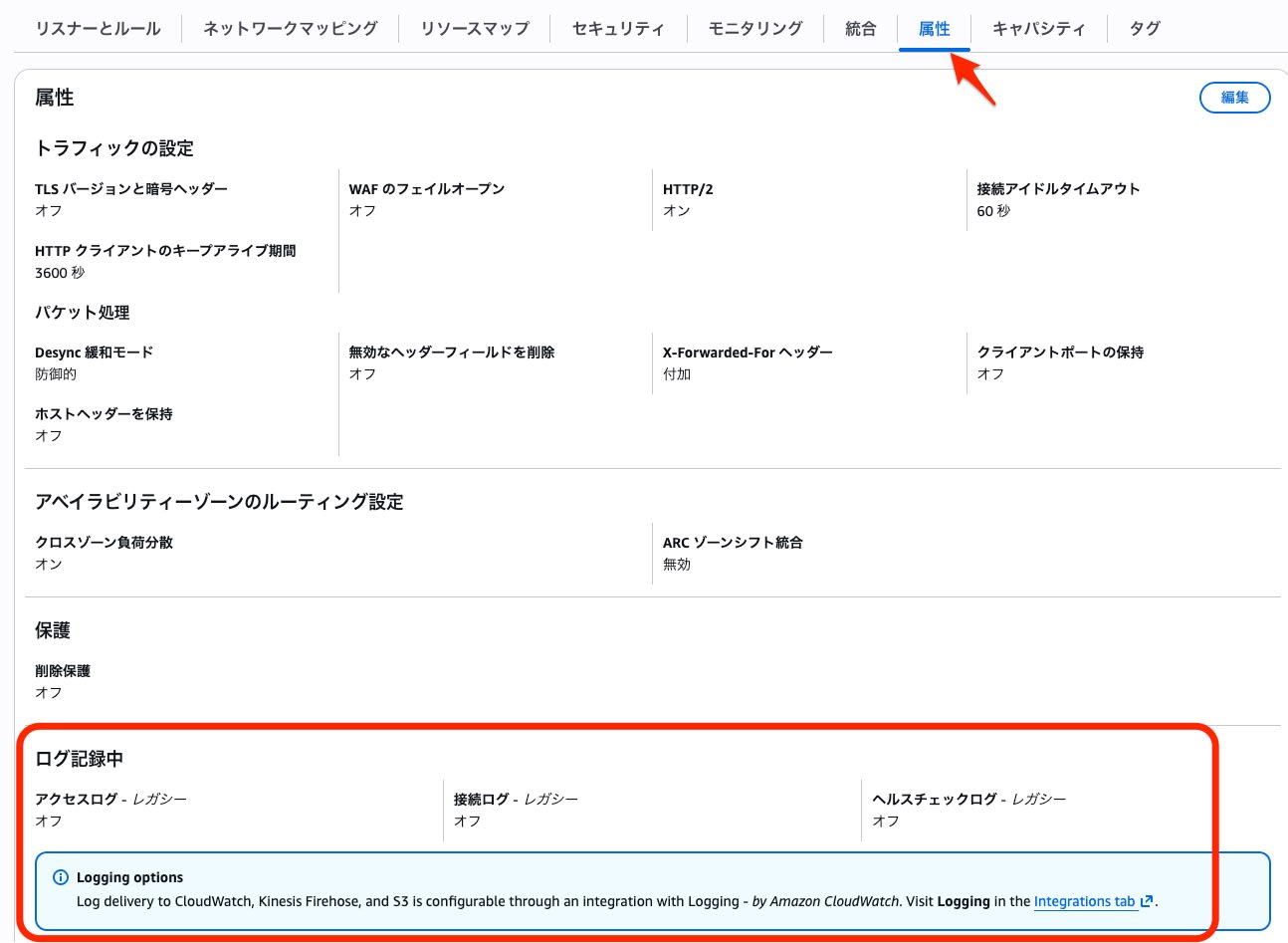
The conventional S3 delivery (legacy) can be configured from the Attributes tab and remains available.
From the same delivery source, you can create multiple deliveries in parallel with different formats and different log groups. This time, I confirmed that the following three deliveries run simultaneously.
| # | Log group | Format | delimiter |
|---|---|---|---|
| 1 | /aws/alb/alb-cwlogs-test/access | JSON | - |
| 2 | /aws/alb/alb-cwlogs-test/access-csv | plain | , (CSV) |
| 3 | /aws/alb/alb-cwlogs-test/access-legacy | plain | (space) |
Checking the Logs
I queried the access logs delivered in JSON format with CloudWatch Logs Insights.
fields @timestamp, type, elb_status_code, client_port, request_line, user_agent, actions_executed, conn_trace_id, ip_address
| sort @timestamp desc
| limit 10
I confirmed that all 6 requests sent during verification were delivered. With the JSON format, CloudWatch Logs Insights automatically parses the fields, so you can directly reference fields such as type and elb_status_code.
Example of JSON-format access log output
{
  "type": "http",
  "time": "2026-07-24T02:43:09.548878Z",
  "elb": "app/alb-cwlogs-test/xxxxxxxxxxxxxxxx",
  "client_port": "203.0.113.1:4979",
  "target_port": "-",
  "request_processing_time": "-1",
  "target_processing_time": "-1",
  "response_processing_time": "-1",
  "elb_status_code": "200",
  "target_status_code": "-",
  "received_bytes": "128",
  "sent_bytes": "197",
  "request_line": "GET http://alb-cwlogs-test-xxxxxxxxxx.ap-northeast-1.elb.amazonaws.com:80/path5 HTTP/1.1",
  "user_agent": "curl/8.18.0",
  "ssl_cipher": "-",
  "ssl_protocol": "-",
  "target_group_arn": "-",
  "trace_id": "Root=1-6a62d13d-447a49680bbf5e3336d518b3",
  "domain_name": "-",
  "chosen_cert_arn": "-",
  "matched_rule_priority": "0",
  "request_creation_time": "2026-07-24T02:43:09.548000Z",
  "actions_executed": "fixed-response",
  "redirect_url": "-",
  "error_reason": "-",
  "target_port_list": "-",
  "target_status_code_list": "-",
  "classification": "-",
  "classification_reason": "-",
  "conn_trace_id": "TID_ea38a7ed01f3f64b9375d9926c5f7020",
  "transformed_host": "-",
  "transformed_uri": "-",
  "request_transform_status": "-",
  "ip_address": "203.0.113.2"
}
Format Comparison
I output the same requests in three formats and compared their sizes. Note that with the plain format, fields are not automatically parsed, and Logs Insights treats each as a one-line text in @message. Manual parsing is possible with the parse command.
Here is an example of CSV format (comma-delimited) output.
http,2026-07-24T02:48:03.663959Z,app/alb-cwlogs-test/xxxxxxxxxxxxxxxx,203.0.113.1:4985,-,-1,-1,-1,200,-,132,197,"GET http://alb-cwlogs-test-xxxxxxxxxx.ap-northeast-1.elb.amazonaws.com:80/csv-test5 HTTP/1.1","curl/8.18.0",-,-,-,"Root=1-6a62d263-2f7e4aff1e45ff8f0ecb663e","-","-",0,2026-07-24T02:48:03.663000Z,"fixed-response","-","-","-","-","-","-",TID_7e837b9425ba30419301a6a9ba62062f,"-","-","-",203.0.113.3
Here is an example of legacy-compatible format (space-delimited) output.
http 2026-07-24T02:48:03.663959Z app/alb-cwlogs-test/xxxxxxxxxxxxxxxx 203.0.113.1:4985 - -1 -1 -1 200 - 132 197 "GET http://alb-cwlogs-test-xxxxxxxxxx.ap-northeast-1.elb.amazonaws.com:80/csv-test5 HTTP/1.1" "curl/8.18.0" - - - "Root=1-6a62d263-2f7e4aff1e45ff8f0ecb663e" "-" "-" 0 2026-07-24T02:48:03.663000Z "fixed-response" "-" "-" "-" "-" "-" "-" TID_7e837b9425ba30419301a6a9ba62062f "-" "-" "-" 203.0.113.3
Here is a size comparison for 5 records of the same requests.
| Format | Total bytes | Average bytes/record | Ratio to JSON |
|---|---|---|---|
| JSON | 5,203 bytes | 1,041 bytes | 100% |
| CSV (plain, comma) | 2,058 bytes | 412 bytes | 39.6% |
| Legacy (plain, space) | 2,058 bytes | 412 bytes | 39.6% |
CSV and legacy-compatible formats are the same size because both use a one-character delimiter. Due to the overhead of key names, JSON is about 2.53 times the size of plain format. On the other hand, JSON format is superior in query convenience because fields are automatically parsed in Logs Insights.
Delivery Time Lag
To see how long delivery actually takes, I looked at the difference between @timestamp and @ingestionTime. The delivery delay was about 2 to 3 minutes, which was slightly faster than the 5 minutes/file of S3 legacy.
@timestampis automatically mapped from thetimefield in the JSON, and@ingestionTimeis the time of ingestion into CloudWatch Logs
| Request time (time) | Ingestion time (@ingestionTime) | Lag |
|---|---|---|
| 02:43:09 | 02:45:06 | About 2 min |
| 02:48:03 | 02:50:05 | About 2 min |
| 02:51:51 | 02:55:06 | About 3 min |
| 02:53:00 | 02:55:06 | About 2 min |
About Pricing
Delivery charges follow the Vended Logs pricing structure. The unit prices for the Tokyo region as of July 2026 are as follows.
| Tier | Price |
|---|---|
| First 10TB/month | $0.50/GB |
| Next 20TB/month | $0.25/GB |
| Next 20TB/month | $0.10/GB |
| Over 50TB/month | $0.05/GB |
On the other hand, conventional S3 legacy logs are free to deliver, and only S3 storage costs are incurred.
Since plain format requires only about 40% of the data volume of JSON, plain format is advantageous if you want to keep Vended Logs charges down.
A comparison of actual costs, including combination with S3 Parquet conversion and long-term retention, is planned for a follow-up article.
Summary
ALB access logs, connection logs, and health check logs can now be delivered directly to CloudWatch Logs. Because the Vended Logs API starts delivery just by specifying the ALB's ARN, it is also easy to add logging to managed ALBs, such as those created by Amazon ECS Express Mode or Elastic Beanstalk environments. In the follow-up article, I plan to dig deeper into comparisons with the legacy setup, including costs involving S3 Parquet conversion.
Reference Links
