I confirmed the behavior of ENIs when running Amazon Bedrock AgentCore Runtime in VPC mode

This page has been translated by machine translation. View original
Introduction
Hello, this is Jinno from the consulting department who loves supermarkets.
While working with Amazon Bedrock AgentCore in VPC mode, I was personally curious about why ENIs seemed to increase each time I added an agent.
However, when reading the AgentCore official documentation, there was a clear answer to this concern.
ENIs are shared resources across agents that use the same subnet and security group configuration.
It states that ENIs are shared between agents if they use the same subnet and security group. I see!
Still, I want to try it out and observe the behavior for myself, so I'll verify this in this blog post!
What happens when AgentCore Runtime is set to VPC mode
I'll be using AgentCore Runtime in VPC mode, so let's first review the specifications of AgentCore Runtime's VPC mode.
AgentCore Runtime operates in PUBLIC mode by default, in which case the agent runs on the AWS-managed network, so no resources are created in our VPC.
On the other hand, when switching to VPC mode, a new ENI (Elastic Network Interface) is created on the specified subnet in our VPC, and through this ENI, the agent can access private resources within the VPC, such as RDS or internal APIs. The image below illustrates this concept.
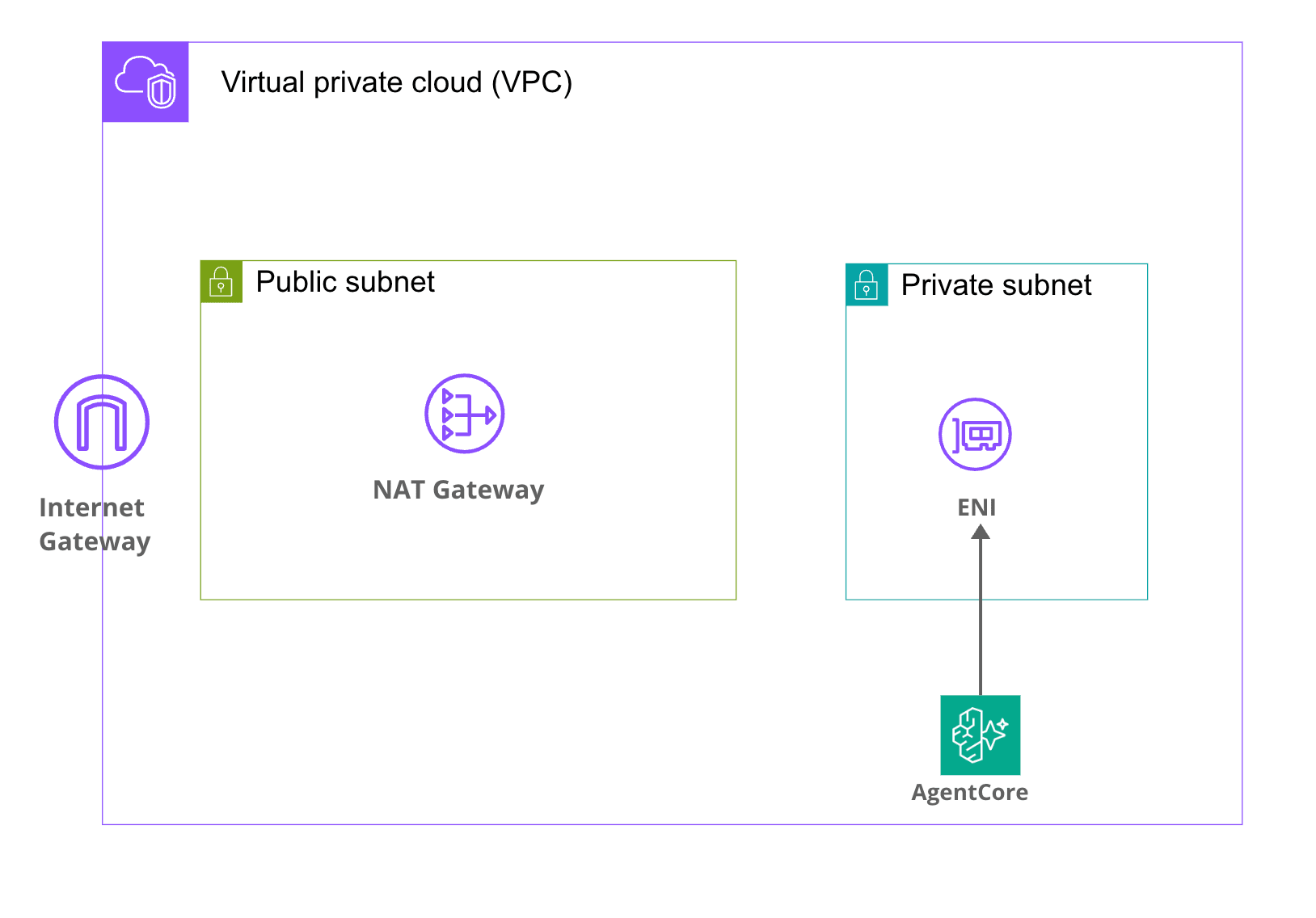
It's conceptually similar to VPC Lambda.
Prerequisites
Here are the details of the verification environment:
| Item | Version/Value |
|---|---|
| Region | ap-northeast-1 (Tokyo) |
| AWS CDK CLI | 2.1118.2 |
| aws-cdk-lib | 2.248.0 |
@aws-cdk/aws-bedrock-agentcore-alpha |
2.250.0-alpha.0 |
| Node.js | v25.9.0 |
| npm | 11.12.1 |
| Python (AgentCore + load scripts) | 3.12 |
| Number of AgentCore Runtimes | 10 (same VPC & same SG) |
I'll be using the L2 construct provided in the alpha package @aws-cdk/aws-bedrock-agentcore-alpha for AgentCore Runtime.
Checking the official documentation
Looking back at the VPC connectivity section in the official documentation, here's what it says about ENI creation:
When you configure VPC connectivity for Amazon Bedrock AgentCore Runtime and tools:
- Amazon Bedrock creates elastic network interfaces (ENIs) in your VPC using the service-linked role
AWSServiceRoleForBedrockAgentCoreNetwork- These ENIs enable your Amazon Bedrock AgentCore Runtime and tools to securely communicate with resources in your VPC
- Each ENI is assigned a private IP address from the subnets you specify
- Security groups attached to the ENIs control which resources your runtime and tools can communicate with
The service-linked role AWSServiceRoleForBedrockAgentCoreNetwork is used to create ENIs, so we don't need to prepare an IAM role for this.
Regarding ENI deletion, it also states:
When you delete an agent, the associated ENI may persist in your VPC for up to 8 hours before it is automatically removed.
In exchange for ENIs being shared, when an agent is deleted, the ENI remains for up to 8 hours. We need to keep this time lag in mind during verification.
Implementing the CDK template for verification
Now let's implement the stack to actually verify this!
CDK project used for verification
The CDK code, Dockerfile, and load testing scripts used for verification are available in the following GitHub repository:
Stack configuration
Here are the resources we'll create for verification:
- VPC (2 private subnets / 2 public subnets / 1 NAT Gateway)
- 1 security group (shared by AgentCore Runtime)
- Dummy agent Docker image (automatically built & pushed to ECR using
AgentRuntimeArtifact.fromAsset) - 10 AgentCore Runtime L2 instances (
agentcore.Runtime) (IAM execution roles are automatically generated by L2)
Dummy Agent
AgentCore Runtime requires a minimal container image, so I've prepared a FastAPI app that only responds to /ping and /invocations.
from fastapi import FastAPI

app = FastAPI()

@app.get("/ping")
def ping() -> dict[str, str]:
    return {"status": "ok"}

@app.post("/invocations")
def invocations(payload: dict) -> dict:
    return {"echo": payload}
FROM public.ecr.aws/docker/library/python:3.12-slim

WORKDIR /app

COPY requirements.txt ./
RUN pip install --no-cache-dir -r requirements.txt

COPY app.py ./

EXPOSE 8080

CMD ["uvicorn", "app:app", "--host", "0.0.0.0", "--port", "8080"]
AgentCore Runtime listens for HTTP on port 8080. Having /ping and /invocations endpoints allows it to respond to health checks and invocations.
CDK Stack
Let's define the VPC, security group, Docker image, IAM role, and 10 Runtime instances all at once with CDK.
import * as path from 'path';
import * as cdk from 'aws-cdk-lib';
import * as ec2 from 'aws-cdk-lib/aws-ec2';
import * as ecrAssets from 'aws-cdk-lib/aws-ecr-assets';
import * as agentcore from '@aws-cdk/aws-bedrock-agentcore-alpha';
import { Construct } from 'constructs';

export interface AgentcoreEniTestStackProps extends cdk.StackProps {
  readonly runtimeCount: number;
}

export class AgentcoreEniTestStack extends cdk.Stack {
  constructor(scope: Construct, id: string, props: AgentcoreEniTestStackProps) {
    super(scope, id, props);

    const vpc = new ec2.Vpc(this, 'AgentCoreVpc', {
      maxAzs: 2,
      natGateways: 1,
      subnetConfiguration: [
        { name: 'public', subnetType: ec2.SubnetType.PUBLIC, cidrMask: 24 },
        { name: 'private', subnetType: ec2.SubnetType.PRIVATE_WITH_EGRESS, cidrMask: 24 },
      ],
    });

    const agentSg = new ec2.SecurityGroup(this, 'AgentCoreSg', {
      vpc,
      description: 'Shared SG for AgentCore Runtime ENI test',
      allowAllOutbound: true,
    });

    const artifact = agentcore.AgentRuntimeArtifact.fromAsset(
      path.join(__dirname, '..', 'agent'),
      { platform: ecrAssets.Platform.LINUX_ARM64 },
    );

    for (let i = 0; i < props.runtimeCount; i++) {
      new agentcore.Runtime(this, `AgentRuntime${i}`, {
        runtimeName: `eni_test_runtime_${i}`,
        agentRuntimeArtifact: artifact,
        networkConfiguration: agentcore.RuntimeNetworkConfiguration.usingVpc(this, {
          vpc,
          vpcSubnets: { subnetType: ec2.SubnetType.PRIVATE_WITH_EGRESS },
          securityGroups: [agentSg],
        }),
      });
    }
  }
}
I'm creating 10 AgentCore Runtimes in a for loop. The key point is that all runtimes reference the same VPC, same subnets, and same security group, which triggers ENI sharing.
When VPC connectivity is enabled, AgentCore automatically creates ENIs using AWSServiceRoleForBedrockAgentCoreNetwork. We don't need to explicitly create ENIs on the CDK side.
Deployment and verification
Now let's actually deploy and check the number of ENIs!
Deployment
npx cdk deploy --profile private --context runtimeCount=10 --require-approval never
It took about 10 minutes to complete the deployment of 10 Runtimes. The process runs everything from Docker build to CloudFormation deployment.
After deployment was complete, the stack Outputs returned the following values:
Outputs:
AgentcoreEniTestV2.VpcId = vpc-xxxxxxxxxxxxxxxxx
AgentcoreEniTestV2.SecurityGroupId = sg-xxxxxxxxxxxxxxxxx
AgentcoreEniTestV2.ImageUri = <ACCOUNT_ID>.dkr.ecr.ap-northeast-1.amazonaws.com/cdk-hnb659fds-container-assets-<ACCOUNT_ID>-ap-northeast-1:xxxxxxxx...
Checking Runtime status
First, let's verify that all 10 Runtimes were created successfully.
aws bedrock-agentcore-control list-agent-runtimes --profile private --region ap-northeast-1 \
  --query 'agentRuntimes[?starts_with(agentRuntimeName, `eni_test_runtime_`)].{Name:agentRuntimeName,Status:status}' \
  --output table
---------------------------------------
|         ListAgentRuntimes           |
+----------------------+--------------+
|         Name         |   Status     |
+----------------------+--------------+
|  eni_test_runtime_9  |   READY      |
|  eni_test_runtime_8  |   READY      |
|  eni_test_runtime_7  |   READY      |
|  eni_test_runtime_6  |   READY      |
|  eni_test_runtime_5  |   READY      |
|  eni_test_runtime_4  |   READY      |
|  eni_test_runtime_3  |   READY      |
|  eni_test_runtime_2  |   READY      |
|  eni_test_runtime_1  |   READY      |
|  eni_test_runtime_0  |   READY      |
+----------------------+--------------+
All 10 are in the READY state! They were created successfully.
Checking the number of ENIs
Now let's check the main focus of this article - the ENIs.
aws ec2 describe-network-interfaces --profile private --region ap-northeast-1 \
  --filters "Name=group-id,Values=sg-xxxxxxxxxxxxxxxxx" \
  --query 'NetworkInterfaces[].{Id:NetworkInterfaceId,Subnet:SubnetId,Ip:PrivateIpAddress,AZ:AvailabilityZone,InterfaceType:InterfaceType,Status:Status}' \
  --output table
Here are the results:
-----------------------------------------------------------------------------------------------------------------------
|                                                DescribeNetworkInterfaces                                            |
+------------------+------------------------+----------------+-------------+----------+----------------------------+
|       AZ         |          Id            | InterfaceType  |     Ip      | Status   |          Subnet            |
+------------------+------------------------+----------------+-------------+----------+----------------------------+
|  ap-northeast-1c |  eni-aaaaaaaaaaaaaaaaa |  agentic_ai    |  10.0.3.160 |  in-use  |  subnet-xxxxxxxxxxxxxxxxx  |
|  ap-northeast-1a |  eni-bbbbbbbbbbbbbbbbb |  agentic_ai    |  10.0.2.185 |  in-use  |  subnet-yyyyyyyyyyyyyyyyy  |
+------------------+------------------------+----------------+-------------+----------+----------------------------+
Oh, only 2 ENIs were created!
Although we deployed 10 AgentCore Runtimes, only 2 ENIs were created - 1 per private subnet, for a total of 2. This confirms what the official documentation says: ENIs are shared among agents that use the same subnet and security group!
Will ENIs increase under load?
So far, we've just created 10 agents without any activity. I'm curious if ENIs would increase when AgentCore internally scales up microVMs under invocation load.
So let's monitor the ENIs while invoking them in parallel.
Load testing script
I've prepared a script that calls invoke_agent_runtime in parallel using boto3's bedrock-agentcore data plane while recording ENI listings every 5 seconds in a separate thread.
import concurrent.futures
import json
import time
import uuid
from threading import Event, Thread

import boto3

REGION = "ap-northeast-1"
PROFILE = "private"
SG_ID = "sg-xxxxxxxxxxxxxxxxx"
RUNTIME_NAME_PREFIX = "eni_test_runtime_"
CONCURRENCY = 50
DURATION_SEC = 120

session = boto3.Session(profile_name=PROFILE, region_name=REGION)
agentcore_ctl = session.client("bedrock-agentcore-control")
agentcore = session.client("bedrock-agentcore")
ec2 = session.client("ec2")

arns = [
    r["agentRuntimeArn"]
    for r in agentcore_ctl.list_agent_runtimes()["agentRuntimes"]
    if r["agentRuntimeName"].startswith(RUNTIME_NAME_PREFIX)
]

def describe_eni():
    return ec2.describe_network_interfaces(
        Filters=[{"Name": "group-id", "Values": [SG_ID]}]
    )["NetworkInterfaces"]

def invoke_once(idx):
    arn = arns[idx % len(arns)]
    session_id = f"load-{uuid.uuid4().hex}-{idx:08d}"
    resp = agentcore.invoke_agent_runtime(
        agentRuntimeArn=arn,
        runtimeSessionId=session_id,
        payload=json.dumps({"prompt": f"load {idx}"}).encode("utf-8"),
        contentType="application/json",
    )
    resp["response"].read()
This script sends 50 parallel invocations for 120 seconds. The runtimeSessionId is set to a unique UUID for each request, so each is treated as a completely separate session by AgentCore. The article omits some details, but a watcher thread records the number of ENIs and IP list every 5 seconds by calling describe_eni().
Running the load test
uv run --with boto3 python scripts/load_test.py
Here are the results:
Target runtimes: 10

=== Before load ===
ENI count: 2
  eni-aaaaaaaaaaaaaaaaa / 10.0.3.160 / ap-northeast-1c / agentic_ai / in-use
  eni-bbbbbbbbbbbbbbbbb / 10.0.2.185 / ap-northeast-1a / agentic_ai / in-use

=== Load result ===
Duration: 130.8s
Total: 2148, succ=768, fail=1380
Error samples:
  - ServiceQuotaExceededException: maxVms limit exceeded for account ...

=== ENI count over time ===
  +   0.1s: ENI=2 IPs=['10.0.3.160', '10.0.2.185']
  +   5.2s: ENI=2 IPs=['10.0.3.160', '10.0.2.185']
  +  10.3s: ENI=2 IPs=['10.0.3.160', '10.0.2.185']
  ...
  + 122.9s: ENI=2 IPs=['10.0.3.160', '10.0.2.185']
  + 128.0s: ENI=2 IPs=['10.0.3.160', '10.0.2.185']

Max ENI observed during load: 2
Post-load ENI count: 2
Over 130 seconds, a total of 2,148 invocations were executed, of which 768 succeeded. The remaining 1,380 failed with the ServiceQuotaExceededException error, which I'll explain later.
Throughout the test - before, during, and after the load - the ENI count remained constant at 2, and the private IPs remained unchanged at 10.0.3.160 and 10.0.2.185.
At least in this environment, I can confirm that ENIs do not increase even under load!
About the failed invoke errors
All 1,380 failures in the load test were due to the same ServiceQuotaExceededException error:
ServiceQuotaExceededException: maxVms limit exceeded for account XXXXXXXXXXXX.
Please contact AWS Support for more information.
The AgentCore Runtime quota is documented in the official documentation as Active session workloads per account, with a default of 500 in regions other than us-east-1 / us-west-2, such as ap-northeast-1. Since each runtimeSessionId provisions a dedicated microVM, this quota effectively limits the number of parallel sessions. The errors occurred because we hit this quota.
Will ENIs be separate if security groups are different?
So far, we've seen that with all Runtimes using the same SG, the ENI count remained at 2. Finally, let's check what happens if we change just the SG part of the "same subnet and security group" condition mentioned in the documentation.
I'll redeploy with Runtime 0 using a different SG from the other 9 Runtimes. In the CDK, I'll add a second SG and assign it only when i === 0:
const agentSg = new ec2.SecurityGroup(this, 'AgentCoreSg', { vpc, allowAllOutbound: true });
const agentSgSecondary = new ec2.SecurityGroup(this, 'AgentCoreSgSecondary', { vpc, allowAllOutbound: true });

for (let i = 0; i < props.runtimeCount; i++) {
  const sg = i < (props.secondarySgRuntimeCount ?? 0) ? agentSgSecondary : agentSg;
  new agentcore.Runtime(this, `AgentRuntime${i}`, {
    runtimeName: `${prefix}${i}`,
    agentRuntimeArtifact: artifact,
    networkConfiguration: agentcore.RuntimeNetworkConfiguration.usingVpc(this, {
      vpc,
      vpcSubnets: { subnetType: ec2.SubnetType.PRIVATE_WITH_EGRESS },
      securityGroups: [sg],
    }),
  });
}
Deploying with secondarySgRuntimeCount=1 means Runtime 0 will be attached to the Secondary SG, while Runtimes 1-9 will share the Primary SG.
After deployment, let's check the ENIs associated with each SG:
aws ec2 describe-network-interfaces --profile private --region ap-northeast-1 \
  --filters "Name=group-id,Values=<Primary SG ID>" \
  --query 'NetworkInterfaces[].{Id:NetworkInterfaceId,Ip:PrivateIpAddress,AZ:AvailabilityZone}' \
  --output table

aws ec2 describe-network-interfaces --profile private --region ap-northeast-1 \
  --filters "Name=group-id,Values=<Secondary SG ID>" \
  --query 'NetworkInterfaces[].{Id:NetworkInterfaceId,Ip:PrivateIpAddress,AZ:AvailabilityZone}' \
  --output table
=== Primary SG (Runtime 1-9 shared by 9 instances) ===
+------------------+------------------------+-------------+
|       AZ         |          Id            |     Ip      |
+------------------+------------------------+-------------+
|  ap-northeast-1a |  eni-ccccccccccccccccc |  10.0.2.254 |
|  ap-northeast-1c |  eni-ddddddddddddddddd |  10.0.3.36  |
+------------------+------------------------+-------------+

=== Secondary SG (Runtime 0 only) ===
+------------------+------------------------+-------------+
|       AZ         |          Id            |     Ip      |
+------------------+------------------------+-------------+
|  ap-northeast-1a |  eni-eeeeeeeeeeeeeeeee |  10.0.2.233 |
|  ap-northeast-1c |  eni-fffffffffffffffff |  10.0.3.185 |
+------------------+------------------------+-------------+
Two ENIs were also properly created on the Secondary SG side!
In this verification, with a configuration of 2 subnets × 2 SGs, we ended up with a total of 4 ENIs. At least in this setup, we confirmed that the number of ENIs reflects the combination of subnets and SG configurations, which matches the behavior described in the documentation.
Conclusion
As documented, ENIs do not increase with the number of agents as long as they use the same subnet and security group! It's interesting to verify in practice what's written in the documentation.
I hope this article was helpful. Thank you for reading to the end!