![[Update] I tried out the newly added API for checking document access permissions in Amazon Bedrock Managed Knowledge Base](https://images.ctfassets.net/ct0aopd36mqt/wp-thumbnail-e3065182082062711612153bbdcf1d96/c04359de689df2f56eb066576ab63fb5/amazon-bedrock?w=3840&fm=webp)
[Update] I tried out the newly added API for checking document access permissions in Amazon Bedrock Managed Knowledge Base

This page has been translated by machine translation. View original
Introduction
Hello, I'm Kamino from the Consulting Department, and I love supermarkets.
On September 9, 2026, an API was added to Amazon Bedrock Managed Knowledge Base that allows you to check document access permissions!
The feature to separate documents searchable by each user using ACL (Access Control List) in Managed Knowledge Base was covered in a previous article, and this time there was an update around this ACL functionality.
Let me introduce the newly added APIs and try them out in practice!
Two APIs Added in the Update
The newly added APIs (CheckIngestedDocumentAcl, GetIngestedDocumentAcl) are useful for troubleshooting permission-related issues in environments where document viewing restrictions are applied using ACL.
| API | What you can check |
|---|---|
| CheckIngestedDocumentAcl | Whether a specified user can access a document. A boolean value is returned in hasAccess |
| GetIngestedDocumentAcl | The ACL ingested for that document. Returns users included in allow/deny lists, etc. |
As a use case for these APIs, consider a scenario where internal VPN procedures and various application rules are made searchable via Managed Knowledge Base, with viewable documents separated per user.
For example, suppose you receive an inquiry from Sato saying, "I'm searching the same way as Tanaka, but the VPN procedure doesn't show up for me."
Whether the document itself hasn't been ingested, whether it's due to search query variation, or whether it's Sato's viewing permissions that's the issue — just seeing zero search results makes it hard for administrators to quickly determine the cause.
The APIs introduced this time are specifically for pinpointing this kind of "access permission configuration" issue. By specifying the target document ID and Sato's information, you can directly check whether viewing is permitted and what allow/deny rules have been ingested.
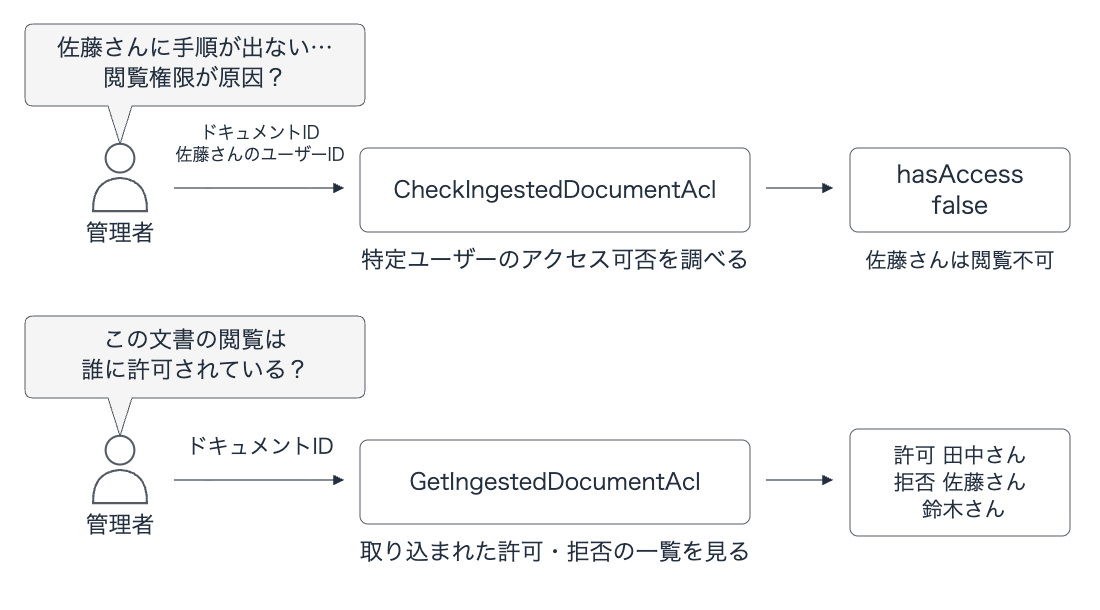
When to Use These APIs
The official documentation introduces them for administrator access investigation and audit purposes.
You could build them into an internal operations tool where entering a document ID and target user calls these two APIs to display access determination and ACL in a list, or you could check directly from the console to handle inquiries.
It feels like a somewhat niche update, but I think it will be effective in specific situations.
Let's Try It Out
I'll create a Managed Knowledge Base for this verification in US East (N. Virginia) (us-east-1).
I'll set the document ID to vpn-guide and ingest the following text as a fictitious internal VPN procedure.
VPN connection procedure for Hanamizuki Corporation. If VPN error HANA-042 occurs, please contact the internal IT help desk at extension 8420. Reception hours are weekdays from 9:00 to 17:00.
For this document, I'll configure the following ACL for each user.
| User | User ID used in verification | ACL set for the document |
|---|---|---|
| Tanaka | tanaka@example.com |
ALLOW |
| Sato | sato@example.com |
DENY |
| Suzuki | suzuki@example.com |
Both ALLOW and DENY |
| Takahashi | takahashi@example.com |
Not registered |
In addition to the standard ALLOW / DENY, I'll also check the behavior when both are set simultaneously and for unregistered users.
On the custom data source side, set aclEnabled to true, and specify metadata.accessControlList when ingesting the document. The relevant parameter specifications are as follows.
# connectorParameters for the data source
{
    "type": "CUSTOM",
    "version": "1",
    "aclEnabled": True,
}

# metadata.accessControlList for the document to ingest
[
    {"name": "tanaka@example.com", "type": "USER", "access": "ALLOW"},
    {"name": "sato@example.com", "type": "USER", "access": "DENY"},
    {"name": "suzuki@example.com", "type": "USER", "access": "ALLOW"},
    {"name": "suzuki@example.com", "type": "USER", "access": "DENY"},
]
For details on the configuration parameters, please also refer to the official documentation.
Setting Up the Verification Environment
The versions used in this verification are Python 3.14.6 and Boto3 / Botocore 1.43.91.
First, create and set up a project directory.
mkdir kb-acl-debug
cd kb-acl-debug
uv init --bare --no-workspace --python 3.14
uv add boto3==1.43.91
Next, save the following code as demo.py. It is organized as subcommands covering everything from resource creation and document ingestion to ACL and search result verification, and cleanup.
Full content of demo.py
import json
import sys
import time
from pathlib import Path
import boto3

REGION = "us-east-1"
STATE = Path("state.json")
agent = boto3.client("bedrock-agent", region_name=REGION)
runtime = boto3.client("bedrock-agent-runtime", region_name=REGION)
iam = boto3.client("iam", region_name=REGION)

def save(name, data):
    Path("evidence").mkdir(exist_ok=True)
    Path("evidence", name + ".json").write_text(
        json.dumps(data, ensure_ascii=False, indent=2, default=str)
    )

def setup():
    if STATE.exists():
        raise RuntimeError("state.json already exists")
    account = boto3.client("sts").get_caller_identity()["Account"]
    name = "kb-acl-debug-" + str(int(time.time()))
    trust = {
        "Version": "2012-10-17",
        "Statement": [
            {
                "Effect": "Allow",
                "Principal": {"Service": "bedrock.amazonaws.com"},
                "Action": "sts:AssumeRole",
                "Condition": {
                    "StringEquals": {"aws:SourceAccount": account},
                    "ArnLike": {
                        "aws:SourceArn": f"arn:aws:bedrock:{REGION}:{account}:knowledge-base/*"
                    },
                },
            }
        ],
    }
    role = iam.create_role(RoleName=name, AssumeRolePolicyDocument=json.dumps(trust))[
        "Role"
    ]
    state = {"roleName": name}
    STATE.write_text(json.dumps(state))
    time.sleep(15)
    kb = agent.create_knowledge_base(
        name=name,
        roleArn=role["Arn"],
        knowledgeBaseConfiguration={
            "type": "MANAGED",
            "managedKnowledgeBaseConfiguration": {"embeddingModelType": "MANAGED"},
        },
    )["knowledgeBase"]
    state["knowledgeBaseId"] = kb["knowledgeBaseId"]
    STATE.write_text(json.dumps(state))
    save("created-kb", kb)
    while (
        agent.get_knowledge_base(knowledgeBaseId=state["knowledgeBaseId"])[
            "knowledgeBase"
        ]["status"]
        != "ACTIVE"
    ):
        time.sleep(10)
    ds = agent.create_data_source(
        knowledgeBaseId=state["knowledgeBaseId"],
        name="custom-acl",
        dataSourceConfiguration={
            "type": "MANAGED_KNOWLEDGE_BASE_CONNECTOR",
            "managedKnowledgeBaseConnectorConfiguration": {
                "connectorParameters": {
                    "type": "CUSTOM",
                    "version": "1",
                    "aclEnabled": True,
                }
            },
        },
    )["dataSource"]
    state["dataSourceId"] = ds["dataSourceId"]
    STATE.write_text(json.dumps(state))
    save("created-ds", ds)
    print(json.dumps(state))

def ingest():
    state = json.loads(STATE.read_text())
    acl = [
        {"name": u + "@example.com", "type": "USER", "access": a}
        for u, a in [
            ("tanaka", "ALLOW"),
            ("sato", "DENY"),
            ("suzuki", "ALLOW"),
            ("suzuki", "DENY"),
        ]
    ]
    document = {
        "content": {
            "dataSourceType": "CUSTOM",
            "custom": {
                "customDocumentIdentifier": {"id": "vpn-guide"},
                "sourceType": "IN_LINE",
                "inlineContent": {
                    "type": "TEXT",
                    "textContent": {
                        "data": "VPN connection procedure for Hanamizuki Corporation. If VPN error HANA-042 occurs, please contact the internal IT help desk at extension 8420. Reception hours are weekdays from 9:00 to 17:00."
                    },
                },
            },
        },
        "metadata": {
            "type": "IN_LINE_ATTRIBUTE",
            "inlineAttributes": [
                {"key": "department", "value": {"type": "STRING", "stringValue": "IT"}}
            ],
            "accessControlList": acl,
        },
    }
    params = {k: state[k] for k in ["knowledgeBaseId", "dataSourceId"]}
    save("ingest-input", document)
    result = agent.ingest_knowledge_base_documents(**params, documents=[document])
    save("ingest", result)
    print(json.dumps(result, default=str))

def check():
    state = json.loads(STATE.read_text())
    params = {k: state[k] for k in ["knowledgeBaseId", "dataSourceId"]}
    for _ in range(60):
        status = agent.get_knowledge_base_documents(
            **params,
            documentIdentifiers=[
                {"dataSourceType": "CUSTOM", "custom": {"id": "vpn-guide"}}
            ],
        )
        save("document-status", status)
        current = status["documentDetails"][0]["status"]
        print("status", current, flush=True)
        if current == "INDEXED":
            break
        if current in (
            "FAILED",
            "IGNORED",
            "PARTIALLY_INDEXED",
            "METADATA_UPDATE_FAILED",
        ):
            raise RuntimeError(status["documentDetails"])
        time.sleep(10)
    else:
        raise RuntimeError("Document indexing timed out")
    params["documentId"] = "vpn-guide"
    acl = runtime.get_ingested_document_acl(**params)
    save("acl", acl)
    print("acl", json.dumps(acl["documentAcl"]))
    for user in ["tanaka", "sato", "suzuki", "takahashi"]:
        context = {"userId": user + "@example.com"}
        result = runtime.check_ingested_document_acl(**params, userContext=context)
        save("check-" + user, result)
        retrieval = runtime.retrieve(
            knowledgeBaseId=state["knowledgeBaseId"],
            retrievalQuery={"text": "Where do I contact about VPN error HANA-042?"},
            userContext=context,
        )
        save("retrieve-" + user, retrieval)
        print(
            user,
            "hasAccess=",
            result["hasAccess"],
            "results=",
            len(retrieval["retrievalResults"]),
        )

def cleanup():
    state = json.loads(STATE.read_text())
    if "knowledgeBaseId" in state:
        agent.delete_knowledge_base(knowledgeBaseId=state["knowledgeBaseId"])
        for _ in range(180):
            try:
                agent.get_knowledge_base(knowledgeBaseId=state["knowledgeBaseId"])
            except agent.exceptions.ResourceNotFoundException:
                break
            time.sleep(5)
        else:
            raise RuntimeError("Knowledge Base deletion timed out")
    iam.delete_role(RoleName=state["roleName"])
    save("cleanup", {"knowledgeBaseDeleted": True, "roleDeleted": True})
    STATE.unlink()
    print("Knowledge Base and IAM role deleted")

if __name__ == "__main__":
    {"setup": setup, "ingest": ingest, "check": check, "cleanup": cleanup}[
        sys.argv[1]
    ]()
Use the script to create the verification resources and ingest the document.
uv run demo.py setup
uv run demo.py ingest
Once that's done, running the next command will wait for the document status to become INDEXED and then proceed to check the ACL and search results.
uv run demo.py check
Execution result of uv run demo.py check
The responses saved during verification are redisplayed in the script's output format.
status INDEXED
acl {"allowList": {"conditions": [{"conditionOperator": "OR", "users": [{"id": "tanaka@example.com", "type": "KNOWLEDGE_BASE"}]}], "memberRelation": "AND"}, "denyList": {"conditions": [{"conditionOperator": "OR", "users": [{"id": "sato@example.com", "type": "KNOWLEDGE_BASE"}, {"id": "suzuki@example.com", "type": "KNOWLEDGE_BASE"}]}], "memberRelation": "AND"}}
tanaka hasAccess= True results= 1
sato hasAccess= False results= 0
suzuki hasAccess= False results= 0
takahashi hasAccess= False results= 0
Let's dig deeper into these results!
Investigating Why the Document Doesn't Appear for Sato
Using the script above, I verified whether each of the four users has access to the same document and what search results they get.
The search query used is "Where do I contact about VPN error HANA-042?"
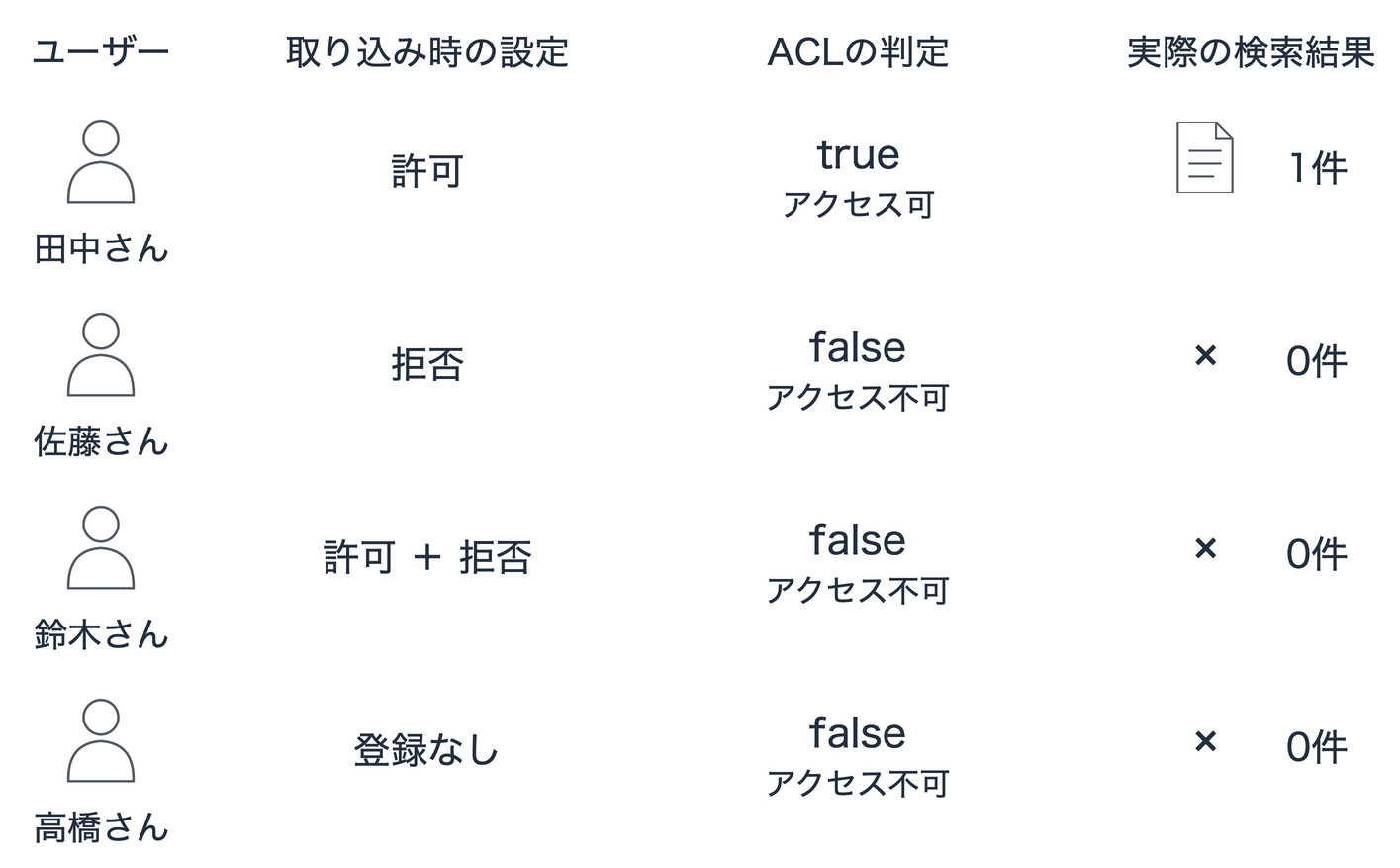
Tanaka gets one VPN procedure result back, and the document content is retrieved properly!
On the other hand, Sato gets no documents returned even with the same query.
Here, let's directly check whether Sato has access to that document. We call the CheckIngestedDocumentAcl API with the document ID and Sato's email address.
result = runtime.check_ingested_document_acl(
    knowledgeBaseId=state['knowledgeBaseId'],
    dataSourceId=state['dataSourceId'],
    documentId='vpn-guide',
    userContext={'userId': 'sato@example.com'},
)
print(result['hasAccess'])
False
Sato's determination result is clearly False. You can confirm that Sato's access is being blocked in accordance with the ACL configured during ingestion.
Checking the Deny Settings in the Ingested ACL
Next, let's verify the actual content to understand why access was denied. By passing the Knowledge Base ID, data source ID, and document ID to GetIngestedDocumentAcl, you can retrieve the entire ACL ingested for that document.
acl = runtime.get_ingested_document_acl(
    knowledgeBaseId=state['knowledgeBaseId'],
    dataSourceId=state['dataSourceId'],
    documentId='vpn-guide',
)
print(json.dumps(acl['documentAcl'], indent=2))
Here is an excerpt of the documentAcl portion from the returned response.
{
  "allowList": {
    "conditions": [
      {
        "conditionOperator": "OR",
        "users": [
          {
            "id": "tanaka@example.com",
            "type": "KNOWLEDGE_BASE"
          }
        ]
      }
    ],
    "memberRelation": "AND"
  },
  "denyList": {
    "conditions": [
      {
        "conditionOperator": "OR",
        "users": [
          {
            "id": "sato@example.com",
            "type": "KNOWLEDGE_BASE"
          },
          {
            "id": "suzuki@example.com",
            "type": "KNOWLEDGE_BASE"
          }
        ]
      }
    ],
    "memberRelation": "AND"
  }
}
Sato is clearly included in the denyList deny conditions! You can see that the configuration denying Sato's access has been properly ingested on the document side.
In production operations as well, this should come in handy for investigating the cause of inquiries about documents not being found, or for quickly verifying that access control is reflected as intended right after registration.
Checking from the Console
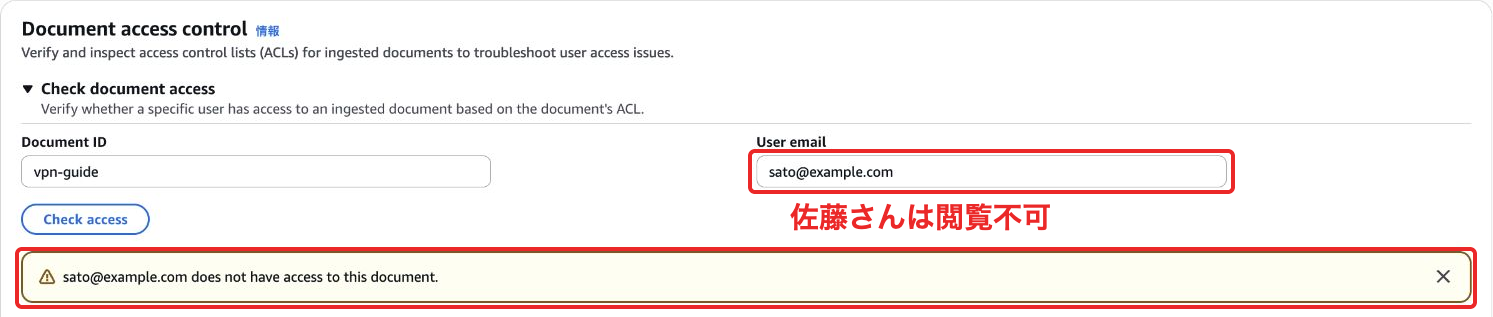
The content covered so far can also be verified from the Management Console. When you open the data source detail screen of the Knowledge Base, you'll find a section called "Document access control."
First, let's try "Check document access." Enter vpn-guide in the Document ID field and Sato's verification ID in the User email field, then click "Check access" — it displays that there is no access permission.
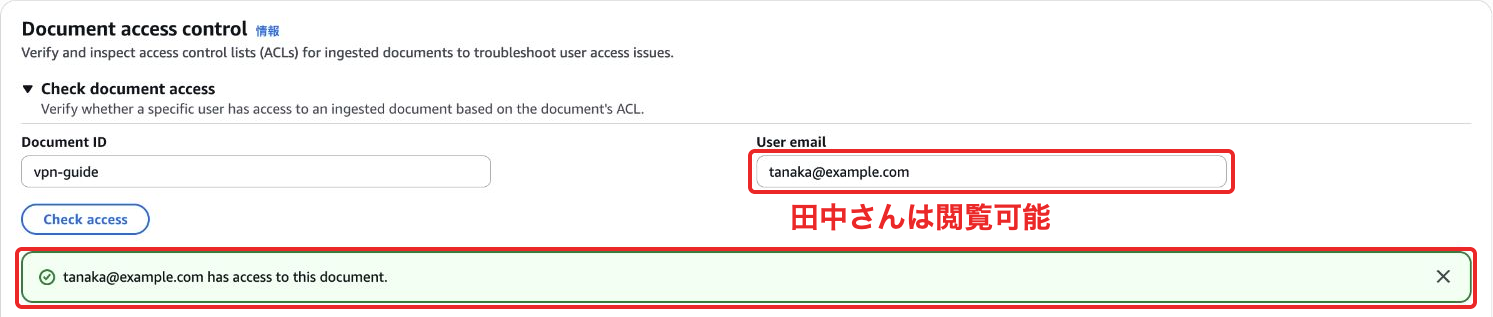
Switching to Tanaka's verification ID and running it again shows that access is permitted. This matches the results we confirmed via API earlier.
Also, opening "Get document access list," entering the Document ID, and clicking "Get access list" retrieves the list of ACLs. Looking at the results, Tanaka is Allow, while Sato and Suzuki are Deny.
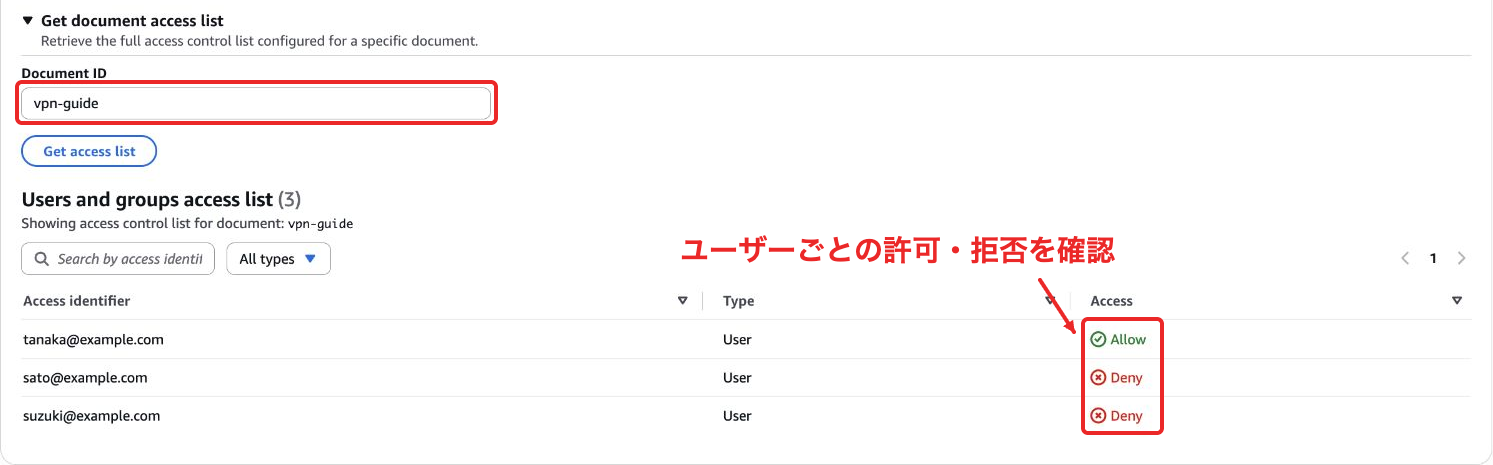
It's convenient to be able to easily check each user's allow/deny from the console without having to write investigation code!
What to Do with the Investigation Results?
Based on the determination results obtained from the investigation, let's think about deciding on next actions by cross-referencing with the document sharing policy.
| What was found | What to do next |
|---|---|
| No access, and the permission settings are as intended | Explain to the user that it's a document they are not supposed to view. If access is needed, consult the document administrator about changing permissions |
| No access, but the user should be able to view it | Check the user ID specification, missing entries in the allow list, and unintended denials, then fix the incorrect settings |
| Access permitted based on the ingested ACL | Check whether the same user information is being passed to the actual search, and investigate the search conditions |
In this verification, I intentionally denied Sato's access, but if in actual operations you discover that "a document Sato should actually be able to see had been mistakenly denied," you would fix the ACL passed to the custom data source and re-ingest with the same document ID. Once the data is reflected, the idea is to re-check both the access determination and the search.
Cleanup
Finally, don't forget to delete the Knowledge Base and IAM role used for this verification!
uv run demo.py cleanup
Conclusion
This was an update that lets you quickly narrow down the cause before trying various search queries, as long as you know the document ID and the target user's ID! It's a bit niche, but I think it can be useful in cases where you want to strictly manage permissions or do pre-checks...!
I hope this article was helpful to you! Thank you for reading to the end!
