
I tried organizing the "Add security for your communications widget" settings for Amazon Connect Chat's communication widget

This page has been translated by machine translation. View original
Introduction
Amazon Connect's communication widget allows you to embed contact channels such as chat, tasks, email, and web calling into websites or internal portals.
When configuring the communication widget, you specify the domain where the widget will be placed, and then select Yes or No for Add security for your communications widget (shown as "コミュニケーションウィジェットのためにセキュリティを追加する" on Japanese screens).
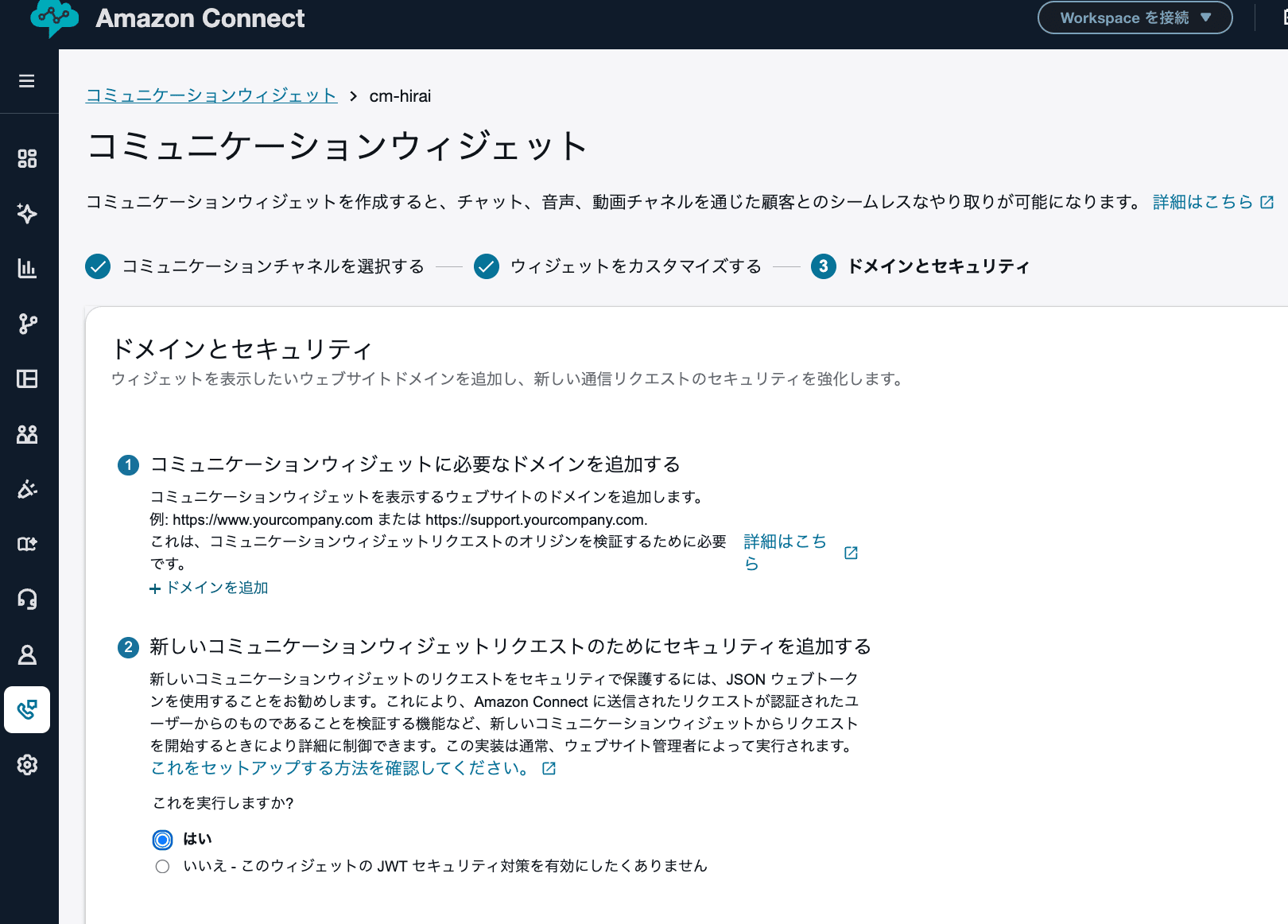
The official documentation recommends Yes. However, when embedding the widget in an SSO-enabled portal on an internal intranet where users are already authenticated on the portal side, there were situations where it was unclear whether an additional JWT issuance mechanism was truly necessary.
This article therefore organizes the following, under the premise of placing an Amazon Connect communication widget on an SSO-enabled portal on an internal intranet.
- The difference between Yes and No
- Risks that remain when choosing No
- Considerations when there are no login-free pages on the same domain
- Considerations when not using
contactAttributes - Things to verify when proceeding with No
- Conditions under which Yes should be strongly considered
Note that the official documentation recommends Yes. This article, keeping that premise in mind, organizes the residual risks of choosing No for specific internal portal requirements.
Prerequisites
The prerequisites for this article are as follows.
- The communication widget is placed on a portal on an internal intranet
- The portal itself is SSO-enabled
- Users are internal employees only
- It is not an externally published site
- The intended use is general internal inquiries
- Inquiries requiring identity verification are not anticipated
- Routing branching by department or location is not required
contactAttributeswill not be used- Additional backend implementation should be avoided as much as possible
Under these premises, we consider whether it is acceptable to select Add security for your communications widget = No.
When Yes Is Selected
The official documentation recommends selecting Yes for Add security for your communications widget and configuring the web server to issue JWTs for new chat requests.
We recommend that you select [Yes] for [Add security for your communications widget] and work with your website administrator to configure your web server to issue a JSON Web Token (JWT) for new chat requests. This allows you to perform more detailed control when starting a new chat, such as ensuring that chat requests sent to Amazon Connect are from authenticated users.
The JWT mentioned here is, simply put, a signed ticket issued by your own web server that is valid for only a short period of time.
When Yes is selected, rather than sending a request directly to Amazon Connect when starting a chat, the process first checks with your own web server whether "this user is allowed to start a chat."
Your web server verifies the SSO session and, if there are no issues, issues a JWT. Amazon Connect can then verify that JWT to confirm whether "this chat start request was authorized by your own web server."
In other words, the main purpose of selecting Yes is to interpose your own web server as a checkpoint before chat starts, enabling more granular control over requests.
For example, the following types of control become possible.
- Verify authentication status on the web server side when chat starts
- Confirm that the request originates from an authenticated user
- Allow only requests authorized by your own web server
- Ensure the integrity of attributes included in the JWT
The documentation describes the behavior when Yes is selected as follows.
When you select [Yes], the following occurs.
Amazon Connect provides a 44-character security key that can be used to create a JSON Web Token (JWT) on the next page.
Amazon Connect adds a callback function to the communication widget's embedded script that checks the JSON Web Token (JWT) when a chat starts.
When Yes is selected, the processing flow is as follows.
- The user starts a chat on the internal portal
- The communication widget requests a JWT from your web server
- Your web server verifies the SSO session and so on
- If there are no issues, your web server issues a JWT
- The communication widget passes the JWT to Amazon Connect
- Amazon Connect verifies the JWT
- If verification succeeds, the chat starts
For an SSO-enabled portal, you can configure the JWT-issuing API to verify the SSO session and return a JWT only to authenticated users.
Therefore, choosing Yes requires backend implementation to issue JWTs. For example, this means preparing an API such as /token on your web server side that verifies the SSO session and then returns a JWT.
The JWT specification is also described in the official documentation.
Algorithm: HS256
Claims:
sub: widgetId
iat: Issued at time.
exp: Expiration time (maximum 10 minutes).
Also, when including contact attributes in the JWT, they are passed as the attributes claim in the JWT. Passing contact attributes using a JWT makes it easier to ensure data integrity, as long as the shared secret is properly protected.
However, JWT is not encryption. Contact attributes included in a JWT are only encoded, and can be read by decoding.
Therefore, even when including attributes in a JWT, care should be taken not to include more sensitive information than necessary.
Contact attributes are only encoded in the JWT, not encrypted, so the attributes can be decoded and read.
https://docs.aws.amazon.com/ja_jp/connect/latest/adminguide/pass-contact-attributes-chat.html
When No Is Selected
Selecting No means no additional JWT-based verification is performed when a chat starts.
With Yes, your web server issues a JWT before the chat starts, and Amazon Connect verifies that JWT.
With No, this ticket verification flow does not exist, so there is no need to prepare a JWT-issuing API on the web server side. Widget deployment becomes simpler.
However, the following controls available with Yes are not used.
- Re-verifying the SSO session on the server side immediately before chat starts
- Amazon Connect verifying that the JWT was issued by your web server
- Confirming whether the request was authorized by your web server
- Ensuring the integrity of attributes included in the JWT
In other words, No is a configuration that primarily relies on "the widget being loaded on an allowed domain" as its main premise. Implementation is simpler than Yes, but it is important to understand that this is not a configuration where chat start requests are authenticated and authorized by your own web server before being passed to Amazon Connect.
With a Yes configuration, since the web server issues a JWT when chat starts, SSO session verification and usage authorization controls can be incorporated at that point.
What Can Be Controlled by the Domain Allow List
The communication widget requires you to specify the domain where the widget will be placed.
The documentation states the following.
Enter the domain of the website where you want to place the communication widget. Chat will only load on the websites selected in this step.
Therefore, the domain allow list allows you to restrict which domains can load the widget.
However, there are caveats to the domain allow list.
Subdomains Are Automatically Included
The documentation states the following regarding subdomains.
Subdomains are automatically included. For example, if you allow example.com, all of its subdomains (such as sub.example.com) are also allowed.
Therefore, allowing a top-level domain such as example.com may result in a broader allowed scope than intended.
If the widget is only used on the internal portal, it seems best to allow only the domain dedicated to the internal portal.
Example
https://portal.example.com
Protocol Must Match Exactly
The documentation states the following regarding protocols.
The protocol http:// or https:// must match the configuration exactly. Please specify the exact protocol when configuring the allowed domain.
http:// and https:// are treated as different. If the internal portal uses HTTPS, it must be allowed with https://.
Control Cannot Be Applied at the URL Path Level
The documentation states the following regarding URL paths.
All URL paths are automatically allowed. For example, if example.com is allowed, all pages under it (such as example.com/cart and example.com/checkout) become accessible. Specific subdirectories cannot be allowed or blocked.
In other words, it is not possible to allow or deny at the path level as shown below.
Want to allow
https://portal.example.com/support

Do not want to allow
https://portal.example.com/public
https://portal.example.com/test
Once a domain is allowed, all URL paths under it become subject to the allowance.
Risks When Choosing No
There are two main risks to be aware of when choosing No.
Risk 1: Amazon Connect Cannot Verify Whether the Chat Start Request Originates from the Legitimate Portal Screen
The domain allow list is simply a mechanism to control "on which domains the widget is loaded."
Therefore, with No, Amazon Connect does not use a JWT to verify the following.
- Whether the request is from an SSO-authenticated user
- Whether the request was sent from the legitimate portal screen
- Whether the request was authorized by your web server
Strictly speaking, being able to access an SSO-enabled portal and having a chat start request actually sent from the legitimate portal screen are not the same thing.
In particular, if there are login-free pages under the allowed domain or its subdomains, there is potential for the widget to operate from unintended pages.
Also, with a No configuration, your web server does not verify "whether this user is allowed to start a chat" before chat starts. This means the configuration must be understood as one where any user who can load the widget on the allowed domain can start a chat without additional server-side verification.
With a Yes configuration, since the web server issues a JWT when chat starts, SSO session verification and usage authorization controls can be incorporated there.
Does the Absence of Login-Free Pages on the Same Domain Eliminate the Problem?
If there are no login-free pages on the same domain, the risk of the widget being used from unintended pages can be reduced.
However, that alone does not mean a No configuration is safe.
With a No configuration, since the web server does not issue a JWT when chat starts, Amazon Connect cannot confirm "this request has been authenticated and authorized by your web server."
Therefore, the absence of login-free pages should be considered as one risk-reducing factor. Ultimately, it comes down to an internal judgment of whether the residual risk of not performing additional JWT-based verification is acceptable.
Risk 2: If contactAttributes Are Used, Attributes Can Be Tampered With
The current premise does not use contactAttributes, but caution is needed if contactAttributes are used with a No configuration.
The contactAttributes referred to here primarily means attributes passed directly from the snippet code using amazon_connect('contactAttributes', ...). With a Yes configuration, when passing attributes, they are handled as the attributes claim in the JWT.
When passing contactAttributes directly from the snippet code in a No configuration, those values are handled on the browser side. Therefore, there is a possibility that users could change the values using browser developer tools or similar means.
The official documentation also notes that while contact attributes can be passed directly from the snippet code without enabling widget security, those attributes are mutable on the client side, and that the JWT configuration should be used when PII or immutable data is required.
The following example shows how to pass contact attributes directly from the snippet code without enabling widget security.
https://docs.aws.amazon.com/ja_jp/connect/latest/adminguide/pass-contact-attributes-chat.html
These attributes are scoped with the HostedWidget- prefix, but are still mutable on the client side. If your flow requires PII or immutable data, use the JWT configuration.
https://docs.aws.amazon.com/ja_jp/connect/latest/adminguide/pass-contact-attributes-chat.html
Therefore, in a No configuration, passing employee numbers, names, email addresses, department names, and so on via contactAttributes and treating them as trusted values should be avoided.
Since the current premise does not use contactAttributes, the risk of contact attribute tampering can be excluded from the main operational discussion.
However, if in the future employee numbers, names, email addresses, departments, routing conditions, and so on are to be passed as contactAttributes and treated as trusted values, they should not be treated as trusted in a No configuration. In that case, a Yes configuration should be reconsidered.
Judgment Under the Current Prerequisites
Under the current prerequisites, there is room to select No.
The reason is that the widget is used on an SSO-enabled portal on an internal intranet, it is not an externally published site, and the intended use is limited to general internal inquiries. Additionally, identity verification is not strongly required, routing branching by department or location is not needed, and contactAttributes will not be used.
Furthermore, choosing Yes requires an API on the web server side to issue JWTs, and security key management, JWT expiration management, and post-implementation operations also need to be considered. When backend modifications are to be avoided as much as possible, this implementation cost is a factor in the decision.
However, this does not mean that No is recommended as an AWS best practice, or that No is explicitly stated as acceptable.
The official documentation recommends Yes. No should not be chosen because "it is safe," but rather understood as choosing No with the judgment that "the additional controls provided by Yes are not mandatory for the current requirements, with a clear understanding of the remaining risks."
Things to Verify When Proceeding with No
When proceeding with No, it is advisable to verify at least the following.
1. Minimize the Allowed Domains
Limit the allowed domains to the dedicated internal portal domain as much as possible.
https://portal.example.com
Allowing a top-level domain such as example.com may result in a broader allowed scope including subdomains.
2. Verify That There Are No Login-Free Pages Under the Allowed Domain
Check whether the following types of pages exist.
- Pages accessible without login
- Separate applications used only by some users
- Test pages
- Old static pages
- Paths excluded from SSO coverage
3. Also Verify Subdomains Included in the Allowed Scope
Check whether subdomains included in the allowed scope contain any pages outside SSO coverage or separate applications.
4. Be Careful with Uses Involving contactAttributes or Identity Verification
Under the current policy, No configuration is premised on not using contactAttributes.
If in the future employee numbers, names, email addresses, department names, routing conditions, and so on need to be treated as trusted values, reconsider a Yes configuration where they are passed as the attributes claim in the JWT issued by the web server, rather than as contactAttributes passed directly from the browser side.
Also, even when not using contactAttributes, if the scope expands to inquiries where identity verification is important—such as HR, labor, account-related, or authorization requests—it is necessary to reconsider whether simply being able to access the internal portal is sufficient.
Conditions Under Which Yes Should Be Strongly Considered
While there is room to select No under the current prerequisites, Yes should be strongly considered in the following cases.
- You want to verify the SSO session and usage eligibility on your web server side when chat starts
- You want to treat employee numbers, names, departments, routing conditions, and so on as trusted attributes
- You want to control whether chat can be started or how inquiries are handled based on identity or permissions
- Pages outside SSO coverage or separate applications exist on the same allowed domain or its subdomains
- Security policy requires prioritizing the officially recommended configuration
Comparison of Yes and No
Summarizing the discussion in a table, it looks as follows.
| Aspect | Yes | No |
|---|---|---|
| Position in official documentation | Recommended | Not explicitly stated as recommended |
| Additional JWT-based verification | Present | Absent |
| Backend implementation | Required | Not required |
| Control at chat start | Easy to control on the web server side | Primary control is loading on the allowed domain |
| Attribute trustworthiness | Easier to ensure by passing as attributes in the JWT |
contactAttributes in the snippet are mutable on the client side |
| Suitable use cases | Use cases requiring identity verification or attribute trustworthiness | General inquiries where additional implementation is to be avoided |
Summary
For Add security for your communications widget, the official documentation recommends Yes.
In cases like the current one—where the widget is used for general internal inquiries on an SSO-enabled portal on an internal intranet and contactAttributes are not used—there is room to select No.
However, with a No configuration, chat start requests are not additionally verified by JWT. It is necessary to verify the scope of allowed domains and intended use cases, and then make an internal judgment on whether the residual risks are acceptable.
