
Amazon Connect Customer now allows you to automatically extract arbitrary information from conversations using generative AI, making it available for review during ACW (After Contact Work).

This page has been translated by machine translation. View original
Introduction
Amazon Connect Customer now allows you to extract arbitrary information from customer conversations using generative AI.
The official documentation has been updated with steps to configure information extraction for voice and chat.
Additionally, "After contact work analysis available," which allows information extraction to run during ACW (After Contact Work), is now available as an event source for conversation analysis rules.
The information extraction feature mainly involves configuring the following two items:
- Create an information extraction definition to define what to extract from conversations
- Create a conversation analysis rule to define which contacts to run extraction on
This time, I configured the extraction of customer cancellation reasons from voice calls and confirmed that the following result is displayed during ACW.
Cancellation Reason: Because the monthly fee increased
I also confirmed that the extraction results are included in the Contact Lens S3 analysis results file.
This article covers the configuration method for the information extraction feature, the display during ACW, combining it with Step-by-Step Guides, and the contents of the S3 analysis results file.
What You Can Now Do
Previously, you could review an overall summary of conversations using Contact Lens's generative AI post-contact summary.
With the new information extraction feature, you can retrieve operationally necessary information in key-value format, separately from the summary.
For example, in a cancellation handling workflow, the following items might be relevant:
Cancellation Reason: Monthly fee increase
Target Service: Standard Plan
Retention Result: Proposal rejected
Competing Service: Another company's service
Follow-up: Not required
The summary and information extraction serve different purposes.
| Feature | Primary Use |
|---|---|
| Post-contact summary | Review the overall flow and outcome of a conversation in text |
| Information extraction | Retrieve specified business items in key-value format |
The official documentation introduces examples of extracting information as stated in the conversation, such as the customer's name, invoice number, and reservation ID.
It also introduces the following as examples of extracting information inferred from the conversation:
- Reason for inquiry
- Actions taken by the agent
- Next actions communicated to the customer
Extraction results can also be inserted as variables into the following actions added to the same rule:
- Send email
- Create task
- Create case
- Send notification
For example, it is possible to configure a setup that sets the extracted inquiry reason into a field in Amazon Connect Customer Cases.
Verification Environment
The verification environment used this time is as follows:
| Item | Details |
|---|---|
| Region | Tokyo Region (ap-northeast-1) |
| Channel | Voice |
| Conversation analysis | Contact Lens real-time voice analysis |
| Extraction target | Customer's cancellation reason |
| Extraction definition name | cancellation_reason |
| Display label | Cancellation Reason |
| Rule event | After contact work analysis available |
| Rule condition | Matches specified queue |
The Sample after contact work flow provided by AWS was also used to display an input form during ACW.
However, Step-by-Step Guide is not a required component for the information extraction feature. If you only need to view extraction results in the Contact Control Panel (CCP), you can omit the Step-by-Step Guide configuration.
Configuration
Add Permissions to Security Profiles
The following security profile permissions have been added for the information extraction feature:
| Permission on screen | Permission in API | Purpose |
|---|---|---|
| Information extraction - Definitions | InformationExtraction.Definitions.Create etc. |
Create, view, edit, and delete information extraction definitions |
| Information extraction - Results - View | InformationExtraction.Results.View |
Display extraction results in CCP and contact detail screens |
Grant users who manage information extraction definitions the "Information extraction - Definitions" permission as appropriate for the required operations.
Agents need the "Information extraction - Results - View" permission to view extraction results during ACW.

Information extraction permissions added to security profile
The full list of security profile permissions can be found in the following official documentation:
Create an Information Extraction Definition
In the Amazon Connect Customer administration console, open Rules.
Select the Information extraction tab to manage information extraction definitions.
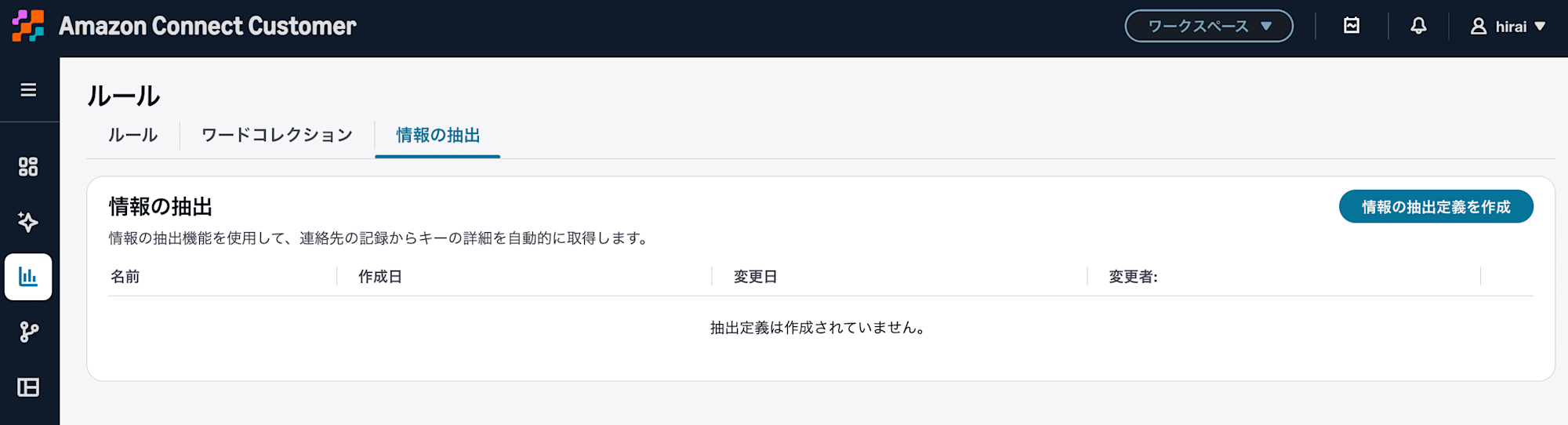
Information extraction tab added to the Rules screen
Select Create information extraction definition and configure the information to extract.
This time, I initially specified the Japanese name 解約理由 (Cancellation Reason), but received an error when saving.
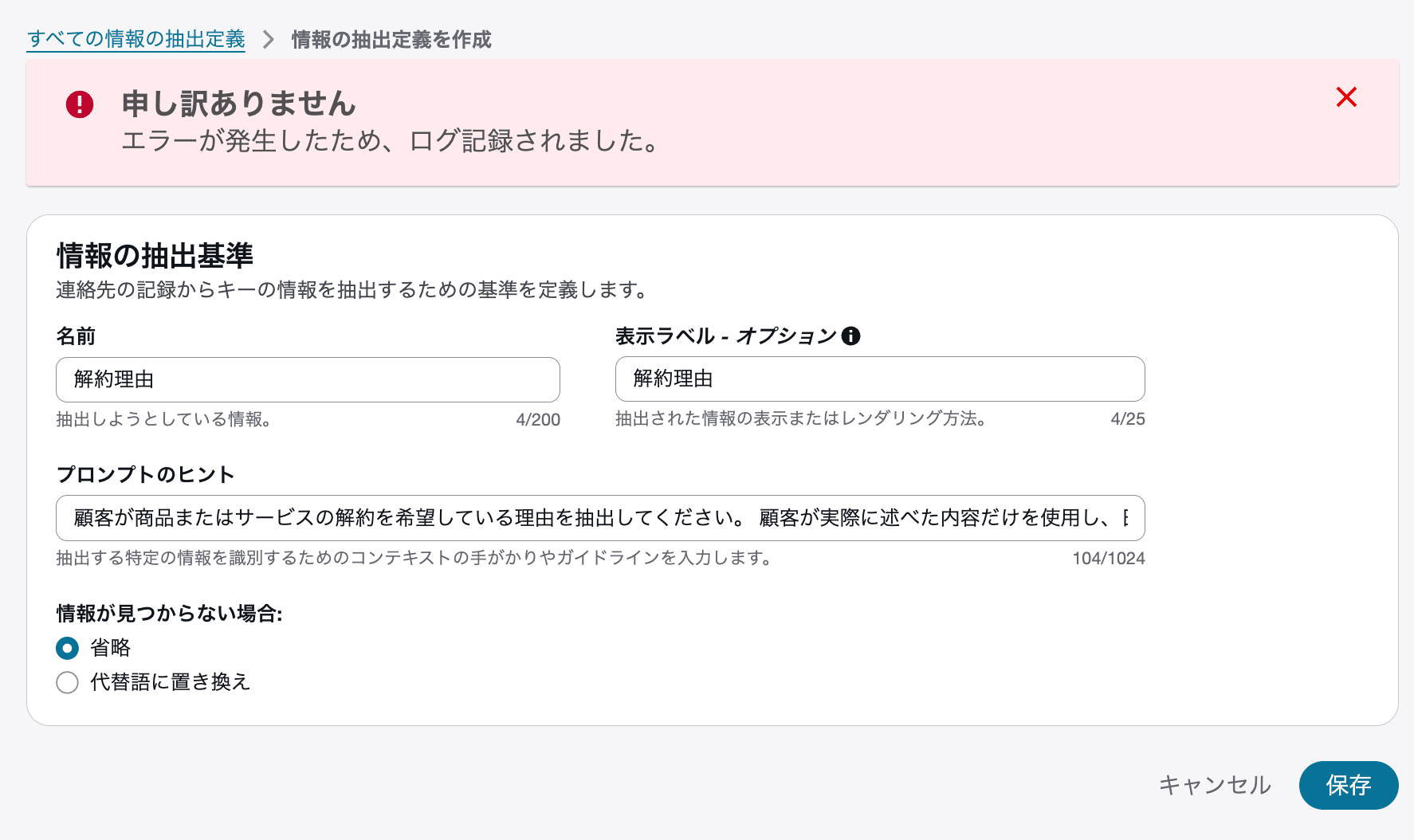
Specifying a Japanese name resulted in a save error in this verification environment
Changing the name to cancellation_reason, composed of alphanumeric characters and underscores, allowed creation to succeed.
Within the scope of this verification, no detailed error message was displayed that clearly identified Japanese characters as the direct cause of the error. Therefore, it cannot be definitively stated that Japanese cannot be used in all environments, but using alphanumeric characters for internal names appears to be the more manageable approach.
Japanese was specified in the Display label - Optional field, which is displayed to agents.
The configuration is as follows:
| Item | Setting |
|---|---|
| Name | cancellation_reason |
| Display label - Optional | Cancellation Reason |
| Prompt hint | Please extract the reason why the customer wants to cancel the product or service. |
| If information is not found | Replace with alternative text |
| Alternative text | Could not be confirmed |
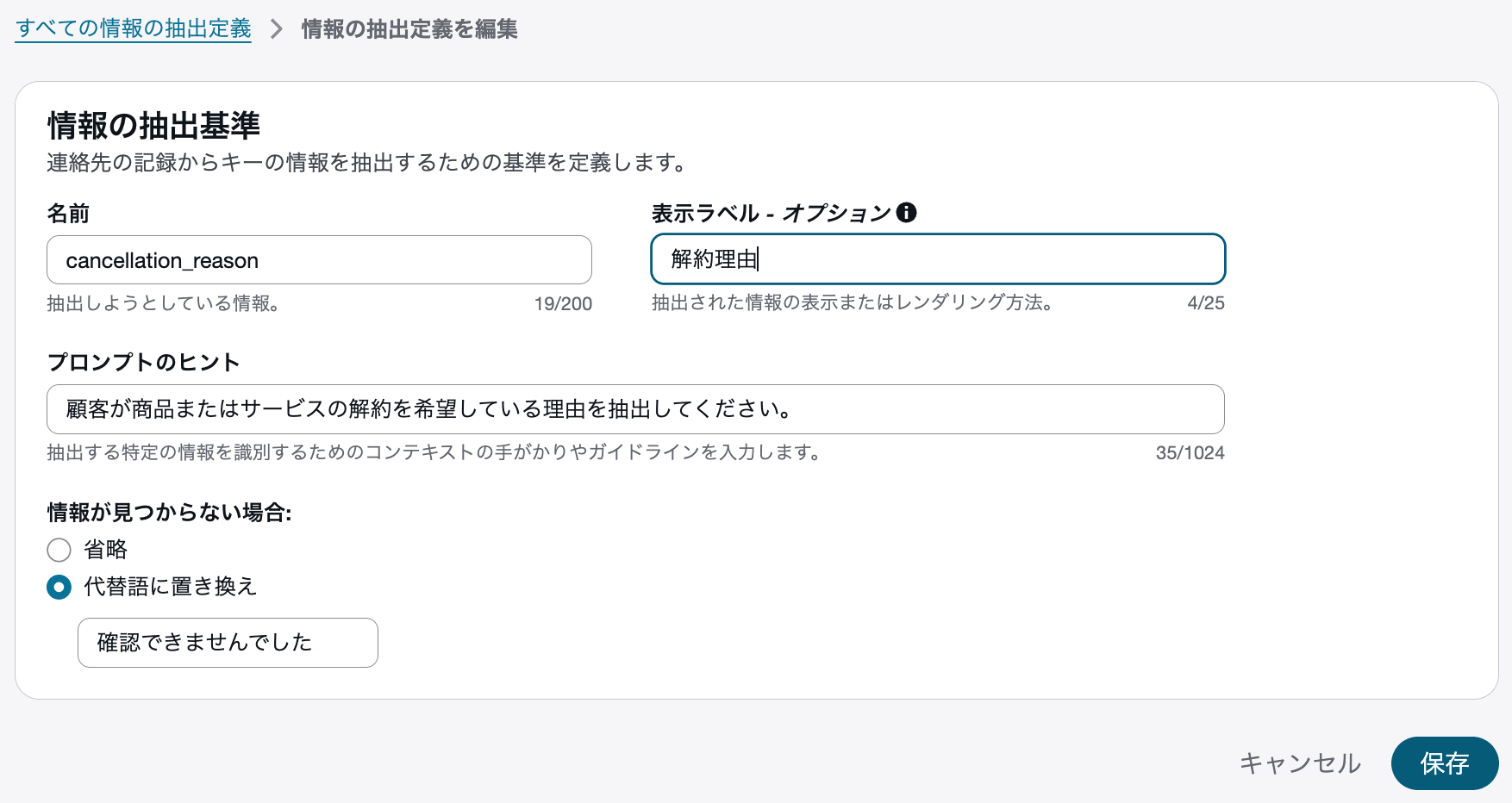
Example configuration of a definition to extract cancellation reasons
The Name is also used as input to the extraction process.
The Display label - Optional, on the other hand, is used for on-screen display and is not used as input to the extraction process.
The official documentation advises keeping the prompt hint short and descriptive rather than overly complex. It is best to keep it to a description of what you want to retrieve.
When information is not found, the following options are available:
| Setting | Behavior |
|---|---|
| Omit | Do not display the item in extraction results |
| Replace with alternative text | Display a specified fixed value |
During verification, setting an alternative text such as Could not be confirmed makes it easier to identify cases where extraction was executed but the target information could not be detected.
Create a Conversation Analysis Rule
Simply creating an information extraction definition does not trigger the extraction process.
Create a conversation analysis rule from Rules to specify when and for which contacts extraction is performed.
The configuration used this time is as follows:
| Item | Setting |
|---|---|
| Event source | After contact work analysis available |
| Condition | Queue matches cm-hirai |
| Contact category | CancellationReasonExtraction |
| Action | Extract information |
| Information extraction definition | cancellation_reason |
First, specify After contact work analysis available as the event source.
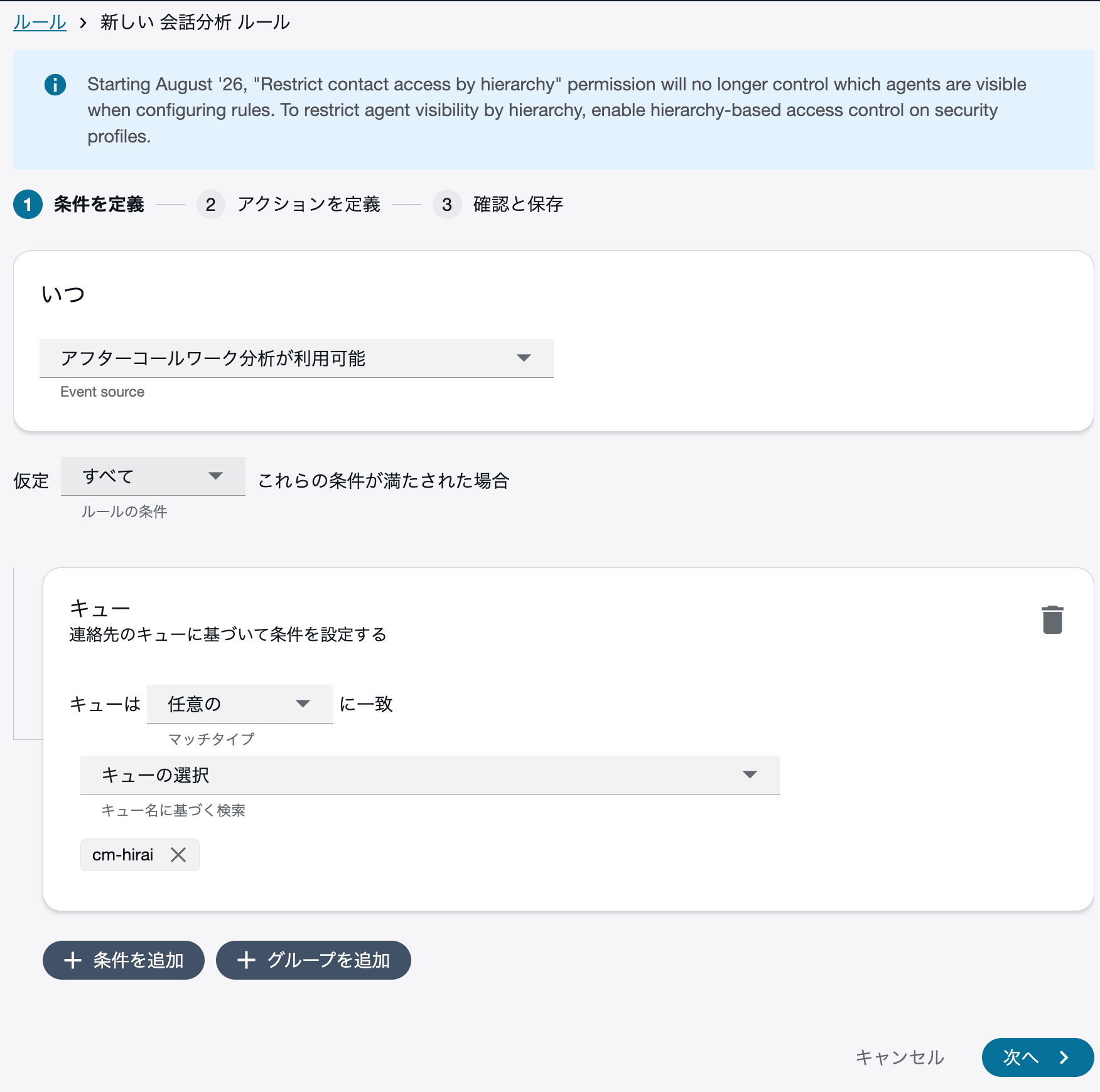
Screen with after contact work analysis set as event source and target queue configured
When After contact work analysis available is selected, information extraction is processed during ACW and results are displayed in the CCP's "Extracted information" widget and the contact detail screen.
In this verification, the target was calls handled by a specific queue.
The official documentation advises using agents or queues as conditions, rather than keywords, when targeting a large number of contacts for extraction.
Next, add the Extract information action and select the cancellation_reason created earlier.
In this case, a contact category name input was also required, so CancellationReasonExtraction was set.
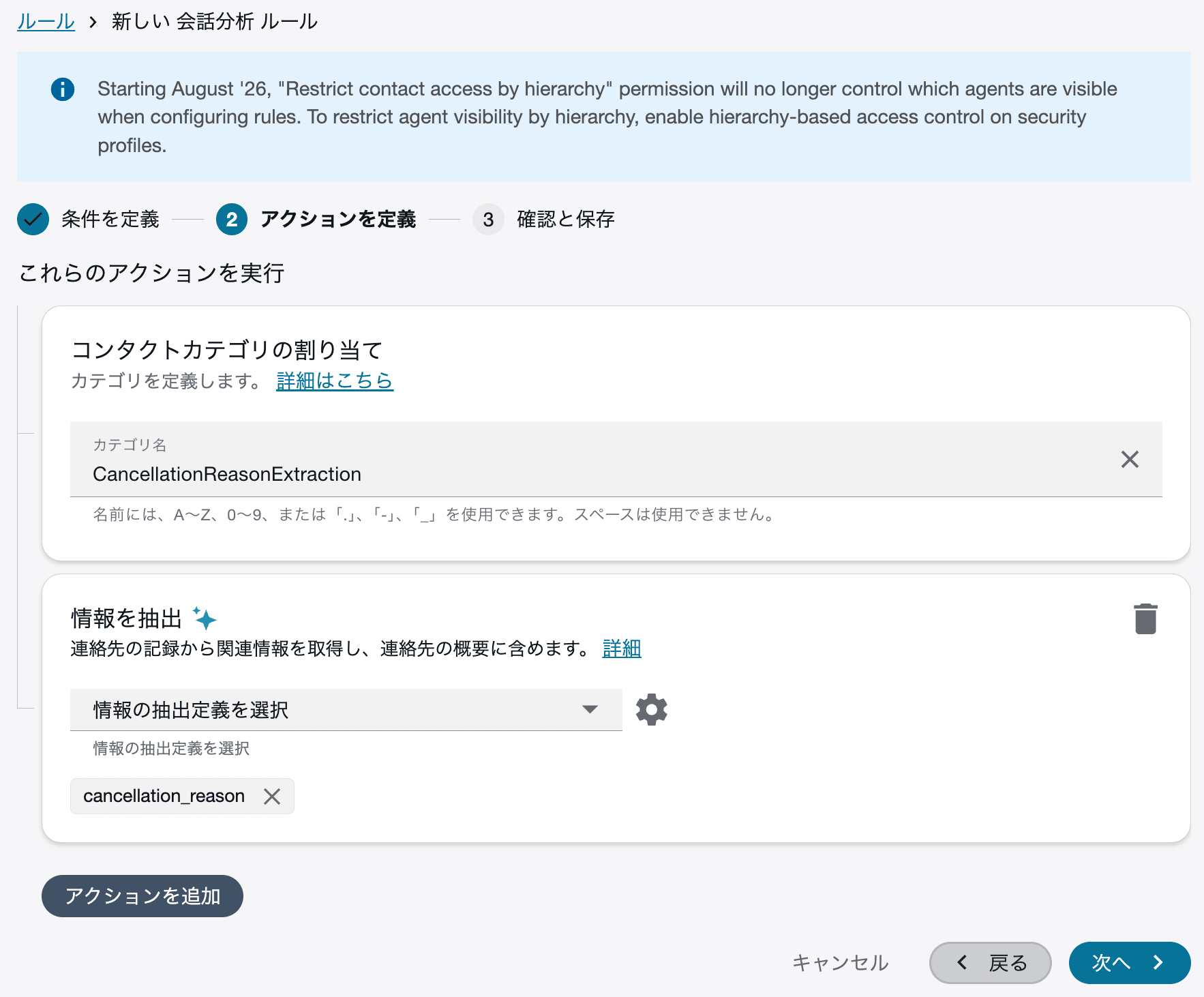
Screen with cancellation_reason specified for the Extract information action
Finally, save the rule.
The main event sources available for information extraction and their processing timing are as follows:
| Event source on screen | Processing timing | Where results are displayed |
|---|---|---|
| After contact work analysis available | During ACW | CCP, contact detail screen |
| After chat work analysis available | During ACW | Contact detail screen |
| Post-call analysis available | After contact ends and ACW is complete | Contact search, contact detail screen |
| Post-chat analysis available | After contact ends and ACW is complete | Contact search, contact detail screen |
To display results to agents during ACW, select After contact work analysis available.
If Post-call analysis available is selected, processing occurs after the contact is closed and ACW is complete, so extraction results will not be displayed in the CCP during ACW.
Configure the Inbound Flow
In the inbound flow, enable Contact Lens conversation analysis using the Set recording and analytics behavior block.
For this voice flow, the following were enabled:
- Call recording for customer and agent
- Real-time voice analysis
- Japanese
ja-JP - Post-contact summary
Post-contact summary and information extraction are separate features. For this verification, both were enabled to allow comparison later.
The inbound flow for this verification was configured as follows:
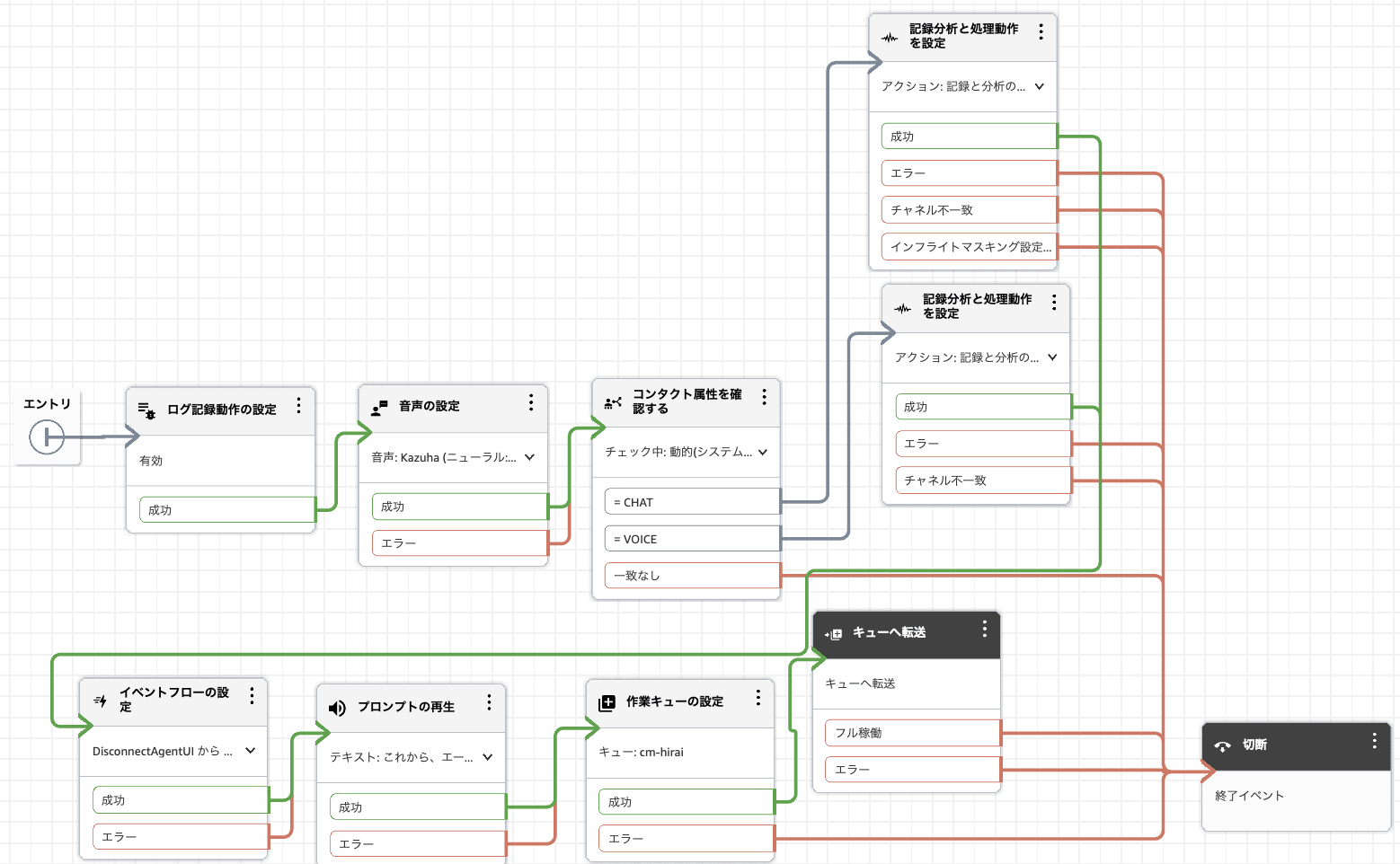
Inbound flow configured with conversation analysis and ACW event flow
This flow evaluates whether the channel is voice or chat, then enables the appropriate conversation analysis for each channel.
It then sets a work queue and transfers the contact to the queue.
The Set event flow block in the screen is a configuration for launching the ACW Step-by-Step Guide described next.
If you are not using a Step-by-Step Guide, the Set event flow block can be removed. Retain the conversation analysis settings required for information extraction, the queue settings for connecting to agents, and the queue transfer.
Configure the ACW Step-by-Step Guide
In this verification, the ACW Step-by-Step Guide provided by AWS was also configured.
The Step-by-Step Guide is a feature that displays a screen in the agent workspace for entering disposition categories, summaries, follow-ups, notes, and more when an agent enters the ACW state.
This configuration is not required for the information extraction feature. If you only need to use the extraction results displayed in the CCP, you can skip the configuration in this section.
Import the Sample after contact work flow
Copy the flow JSON from the following official documentation and import it into Amazon Connect Customer.
The imported flow includes a Show view block that displays the AWS-managed After Contact Work view.
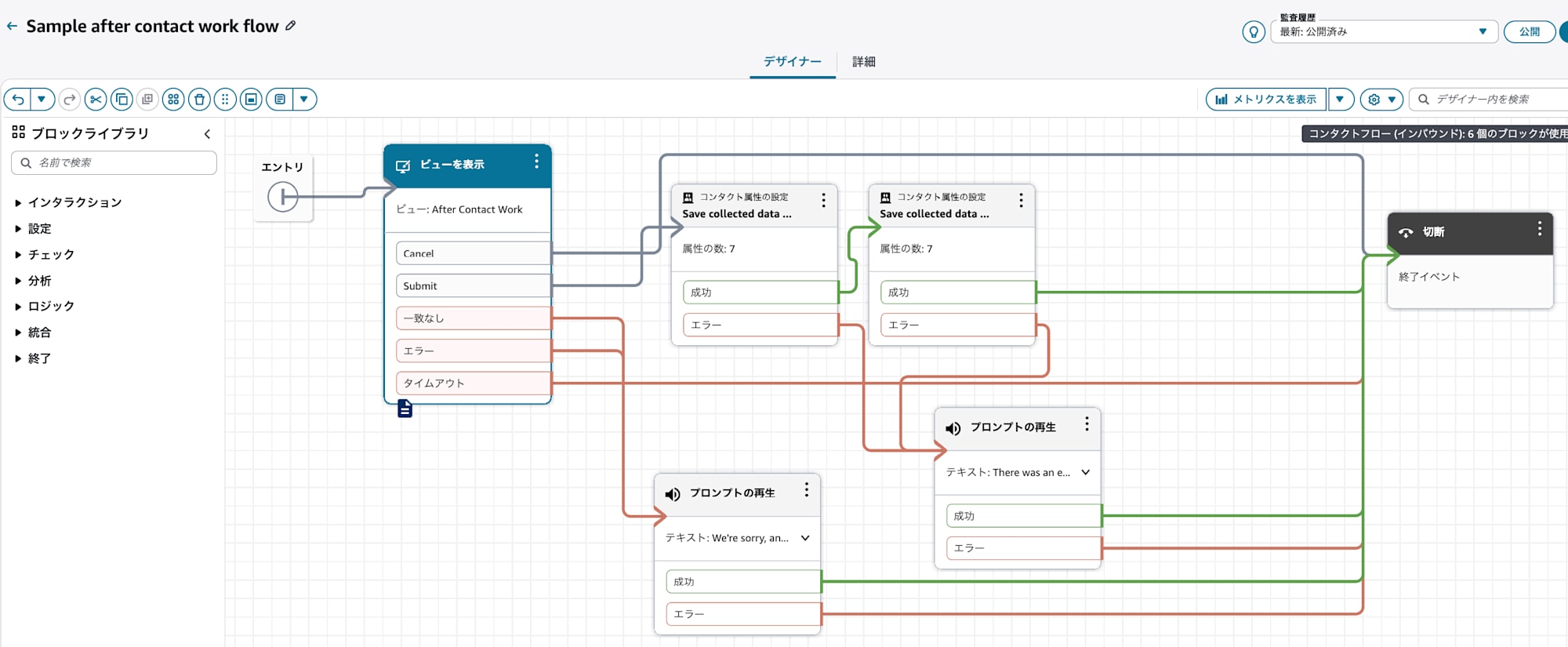
Imported Sample after contact work flow
After importing, open the Show view block and reselect the AWS-managed After Contact Work from the view dropdown.
The official documentation also advises explicitly selecting from the dropdown even if the view name appears to be displayed after import.
After configuring, save and publish the flow.
Reference the ACW Flow from the Inbound Flow
Add a Set event flow block to the inbound flow and specify the Sample after contact work flow imported earlier.
In this flow, the Set event flow block was placed before transferring the contact to the queue.
Set recording and analytics behavior
  ↓
Set event flow
  ↓
Play prompt
  ↓
Set working queue
  ↓
Transfer to queue
This ensures that when an agent enters the ACW state for contacts processed through this inbound flow, the After Contact Work view launches automatically.
Note that the sample flow contains the following fixed values:
Jane Doe
(880) 953-0129
Support
Billing inquiries
Very Satisfied
During this contact, the customer...
For production use, these fixed values should be removed or replaced with actual contact attributes.
Operation Verification
A test call was made with the following content:
Customer:
I want to cancel the service because the monthly fee has increased.

Agent:
Understood. I will process the cancellation. Thank you very much.
After the call ended and the agent entered the ACW state, the Contact Lens summary and extracted information were displayed.
Summary
The customer requested cancellation of the service citing a monthly fee increase.
The agent acknowledged the cancellation request and processed the cancellation.

Extracted Information
Cancellation Reason: Because the monthly fee increased
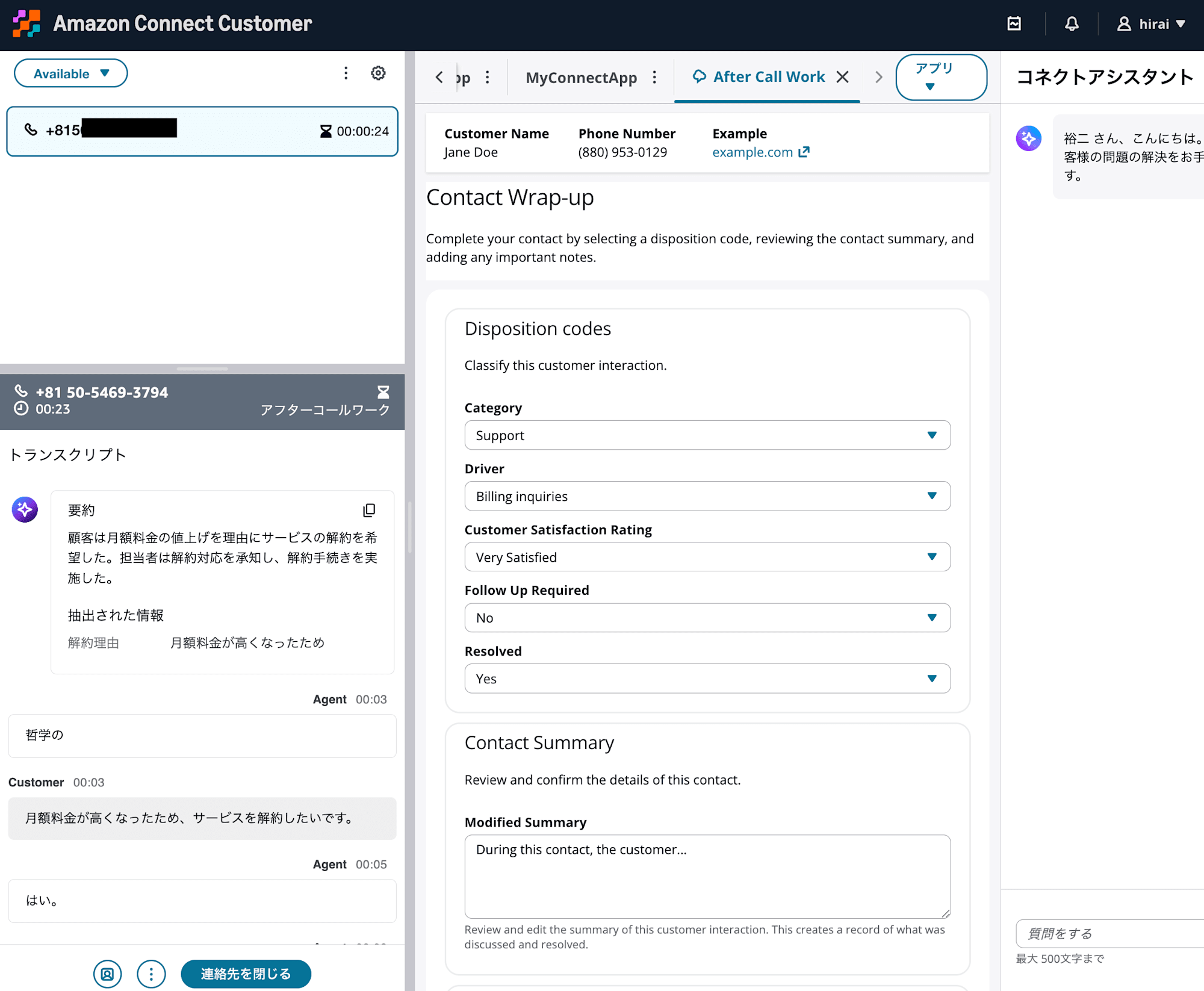
Screen showing generative AI summary and cancellation reason displayed during ACW
The summary is the post-contact summary generated by Contact Lens's generative AI.
The Cancellation Reason: Because the monthly fee increased is the information extraction result from the cancellation_reason definition created this time.
| Displayed content | Configuration |
|---|---|
| Summary | Post-contact summary enabled in the Set recording and analytics behavior block |
| Extracted information | Information extraction definition and conversation analysis rule created |
Both use generative AI, but their configurations and purposes differ.
After the contact ended, the same extraction results could also be confirmed in the contact detail screen.
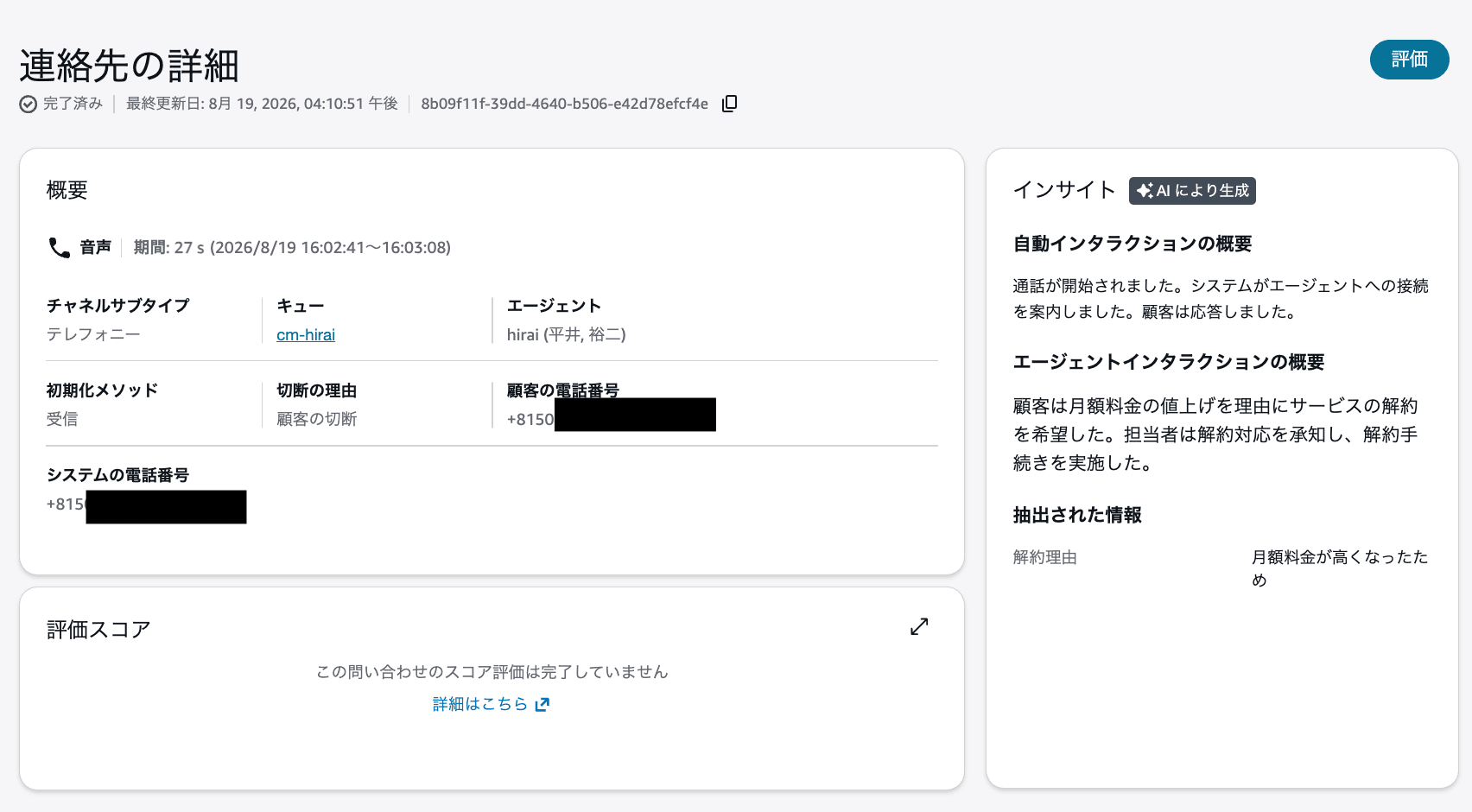
Cancellation reason displayed on the contact detail screen
Extraction results can be reviewed not only in the CCP during ACW, but also after the contact ends.
Reviewing Content Entered in the Step-by-Step Guide
The After Contact Work view allows the following items to be entered:
- Disposition category
- Reason for inquiry
- Customer satisfaction
- Follow-up required
- Resolution status
- Modified summary
- Contact notes
In the Sample after contact work flow used this time, the entered content is saved to the following contact attributes upon submission:
Category
Driver
Satisfaction
FollowUp
Resolved
ModifiedSummary
ContactNotes
This could be confirmed in the contact detail screen as user-defined attributes.
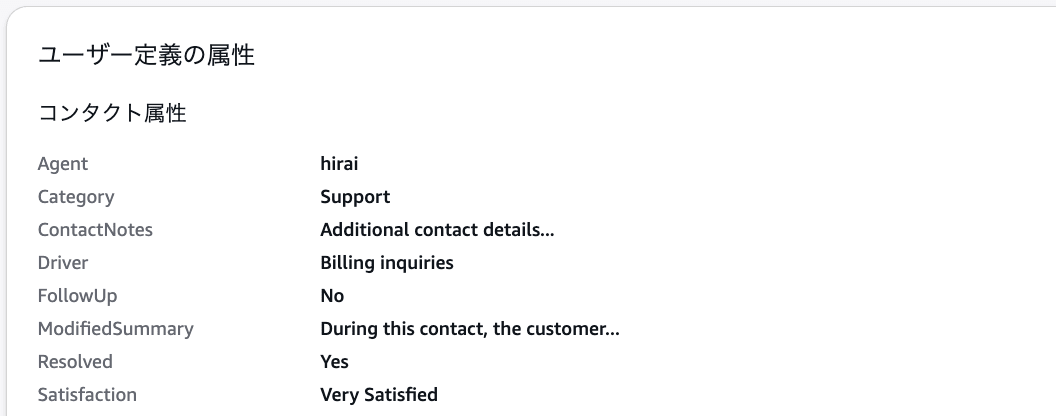
Result of content entered in the After Contact Work view being saved as contact attributes
In the Sample after contact work flow, values returned from the Show view block are saved to the current contact and associated contacts using the Set contact attributes block.
You can also review the extraction results displayed in the CCP and enter them into the modified summary or contact notes fields of the Step-by-Step Guide.
Cancellation Reason: Because the monthly fee increased
With this approach, agents can review the value extracted by generative AI before saving it as a contact attribute.
However, in this verification, the extraction results displayed in the CCP were not automatically populated into the After Contact Work view. The configuration requires agents to review the extraction results and manually transcribe them into the appropriate input fields.
Reviewing the S3 Analysis Results File
Upon reviewing the Contact Lens S3 analysis results file, the extraction results were found in the following location:
ConversationCharacteristics
.ExtractedInformation
.ExtractedInformation[]
The relevant portion, with IDs replaced for illustrative purposes, is as follows:
{
  "ConversationCharacteristics": {
    "ExtractedInformation": {
      "ExtractedInformation": [
        {
          "AnalyticsMode": "RealTime",
          "ExtractionDefinitionDisplayLabel": "Cancellation Reason",
          "ExtractionDefinitionId": "xxxxxxxx-xxxx-xxxx-xxxx-xxxxxxxxxxxx",
          "ExtractionDefinitionName": "cancellation_reason",
          "Values": [
            {
              "Content": "Because the monthly fee increased",
              "PointsOfInterest": [
                {
                  "BeginOffsetMillis": 2767,
                  "EndOffsetMillis": 6047
                }
              ]
            }
          ]
        }
      ]
    }
  }
}
The content of each item is as follows:
| JSON key | Content |
|---|---|
AnalyticsMode |
The analysis mode in which information extraction was executed |
ExtractionDefinitionDisplayLabel |
The label displayed on the agent screen |
ExtractionDefinitionId |
The ID that uniquely identifies the information extraction definition |
ExtractionDefinitionName |
The internal name of the information extraction definition |
Values[].Content |
The extracted value |
PointsOfInterest |
The position of the utterance that served as the basis for extraction |
In this example, the following values can be obtained:
ExtractionDefinitionName: cancellation_reason
Values[].Content: Because the monthly fee increased
When integrating with external systems such as CRMs, using ExtractionDefinitionName as the integration key rather than the display label appears to be more manageable.
Display labels may change during operations, but keeping the internal name fixed makes it easier to maintain the mapping with CRM fields.
Note that Values is an array. When integrating with external systems, the implementation should account for cases where a single extraction definition contains multiple values.
Can Also Be Used for CRM Integration
The following APIs have been published for retrieving extraction results generated during ACW after a call ends:
| Channel | API |
|---|---|
| Voice | ListRealtimeContactAnalysisSegments |
| Chat | ListRealtimeContactAnalysisSegmentsV2 |
For voice calls like this one, ListRealtimeContactAnalysisSegments is used.
However, during verification in August 2026, while extraction results could be retrieved when executing the API directly via signed HTTP requests, the AWS CLI's list-realtime-contact-analysis-segments command returned an empty response that did not include extraction results.
Since extraction results can be retrieved from the API itself, this appears to be an issue on the AWS CLI side. This issue has been reported to AWS as feedback and may be improved in the future, but the timeline is undetermined.
If using the AWS CLI, please verify whether extraction results can be retrieved with the latest version available at the time of use.
For processing after ACW ends, Amazon EventBridge's COMPLETED event can be used as the trigger for Lambda.
ACW ends
  ↓
Amazon EventBridge COMPLETED event
  ↓
AWS Lambda
  ↓
Execute ListRealtimeContactAnalysisSegments
  ↓
Retrieve extracted information
  ↓
Update CRM
The COMPLETED event indicates that a contact has fully ended, including ACW where applicable.
Extraction results can also be retrieved from the Contact Lens S3 analysis results file. The S3 analysis results file contains extraction results generated during both ACW processing and post-contact processing.
For cases where Lambda was previously used to send transcripts to Amazon Bedrock to generate CRM fields, there is potential to replace the Bedrock inference portion with Amazon Connect Customer's information extraction feature.
This eliminates the need to call Amazon Bedrock models from Lambda, thereby reducing the model inference costs incurred from those Bedrock calls. It also simplifies implementations such as prompt management and response parsing.
In this verification, the DescribeContact API response did not include information extraction results. Extraction results are retrieved from the real-time analysis API or the Contact Lens S3 analysis results file.
On the other hand, content entered by agents in the Step-by-Step Guide is saved as contact attributes, so it could be retrieved from Contact.Attributes in the DescribeContact API.
Summary
Amazon Connect Customer now allows you to extract arbitrary information from customer conversations using generative AI.
In this verification, the cancellation reason was extracted from the customer's utterances and confirmed in the CCP during ACW and on the contact detail screen. Extraction results can also be retrieved from the real-time analysis API and the Contact Lens S3 analysis results file.
Combining this with Step-by-Step Guides allows agents to review extraction results and save them as contact attributes along with summaries and notes.
For cases where AWS Lambda was previously used to call Amazon Bedrock to generate CRM fields, there is potential to replace this with Amazon Connect Customer's information extraction feature. This not only simplifies the integration process but also reduces the model inference costs incurred from those Bedrock calls.
