
I tried retrieving received text in Amazon Connect Customer two-way SMS and handling it with Lambda

This page has been translated by machine translation. View original
Introduction
When using Amazon Connect Customer's two-way SMS, there are cases where you want to extract specific information from received SMS messages and integrate it with external systems such as a CRM.
For example, a configuration where an inquiry number or reservation number sent by a user via SMS is extracted, processed by a subsequent Lambda function, and registered in a CRM.
This time, I tried using the [Set contact attributes] block in an Amazon Connect Customer flow to retrieve an SMS received message as a contact attribute and handle its value in Lambda.
Overview
The overall flow this time is as follows.
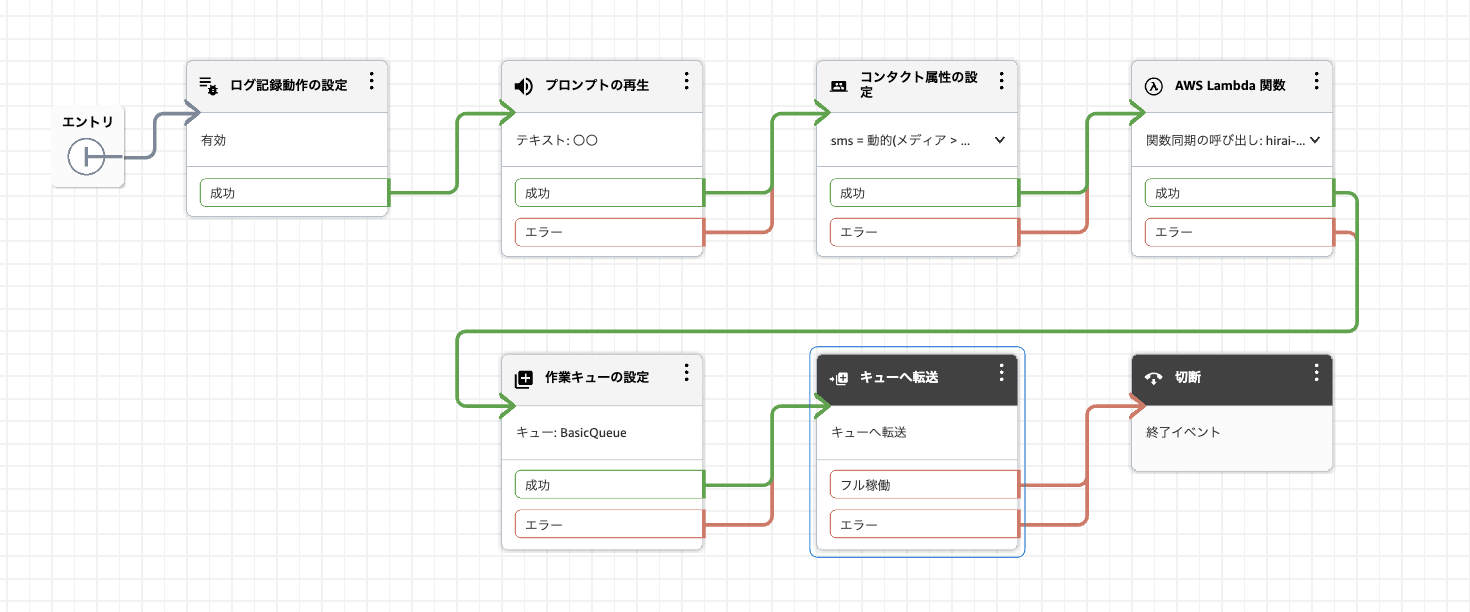
A flow that sets the SMS received message as a contact attribute and retrieves it in a subsequent Lambda
The processing flow is as follows.
- A user sends an SMS to the Amazon Connect Customer phone number
- The [Set contact attributes] block in the flow sets the SMS initial message to a user-defined attribute
sms - The [Invoke AWS Lambda function] block executes Lambda
Details.ContactData.Attributes.smsis retrieved from the Lambda event
This time, we send Test message as the received message and verify whether that value can be retrieved on the Lambda side.
About the SMS Initial Message Attribute
In the AWS documentation, the InitialMessage of the chat initial message attribute is described as the first message sent by the customer via web chat or SMS, with a JSONPath reference of $.Media.InitialMessage.
InitialMessage | The first message sent by the customer via web chat or SMS. | System | $.Media.InitialMessage
https://docs.aws.amazon.com/ja_jp/connect/latest/adminguide/connect-attrib-list.html
Therefore, when handling the received SMS body within a flow, this InitialMessage is referenced.
In the screens used this time, it was specified as Namespace: Media, Key: Initial message.
Setting the SMS Initial Message as a Contact Attribute
The received SMS message can be referenced within the flow as Media / Initial message.
This time, in order to handle it as Details.ContactData.Attributes.sms in the subsequent Lambda, we use the [Set contact attributes] block to set Media / Initial message to the user-defined attribute sms.
The following is specified as the source:
| Item | Setting |
|---|---|
| Namespace | Media |
| Key | Initial message |
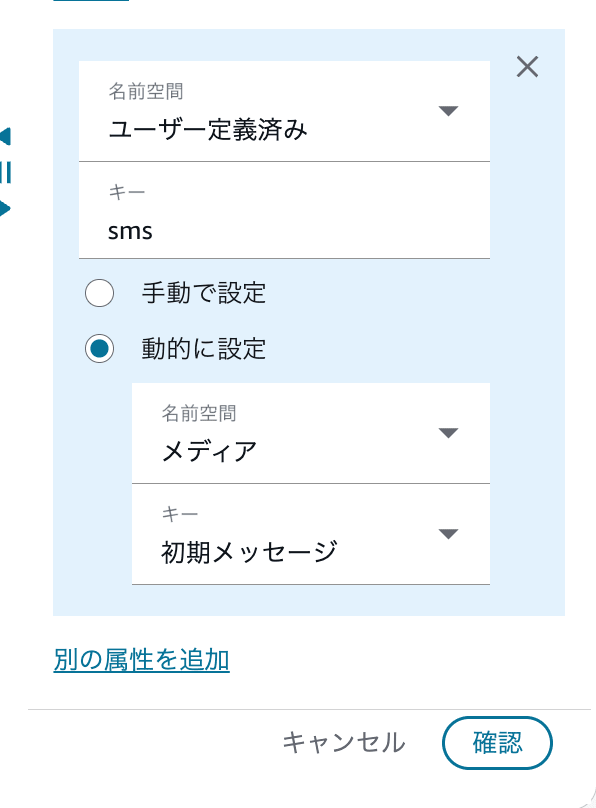
Configuration that references the Initial message of the Media namespace
The destination contact attribute is as follows:
| Item | Setting |
|---|---|
| Namespace | User defined |
| Key | sms |
With this configuration, the SMS initial message can be handled as a user-defined attribute called sms.
Retrieving the Received Message in Lambda
In the previous section, we set Media / Initial message to the user-defined attribute sms.
Therefore, on the Lambda side, the received SMS message can be retrieved from Details.ContactData.Attributes.sms in the event passed from Amazon Connect Customer.
The Lambda code used this time is as follows:
import json
import logging

logger = logging.getLogger()
logger.setLevel(logging.INFO)

def lambda_handler(event, context):
    logger.info("event:\n%s", json.dumps(event, ensure_ascii=False, indent=2))

    sms = event["Details"]["ContactData"]["Attributes"]["sms"]

    return {
        "statusCode": 200,
        "body": json.dumps({
            "sms": sms
        }, ensure_ascii=False)
    }
This code outputs the entire event passed to Lambda to CloudWatch Logs.
After that, the received SMS message is retrieved from the following key:
sms = event["Details"]["ContactData"]["Attributes"]["sms"]
When integrating with external systems such as a CRM, you use this sms value to extract the necessary information and connect it to subsequent processes such as API calls.
Invoking Lambda
Finally, Lambda is invoked from the flow.
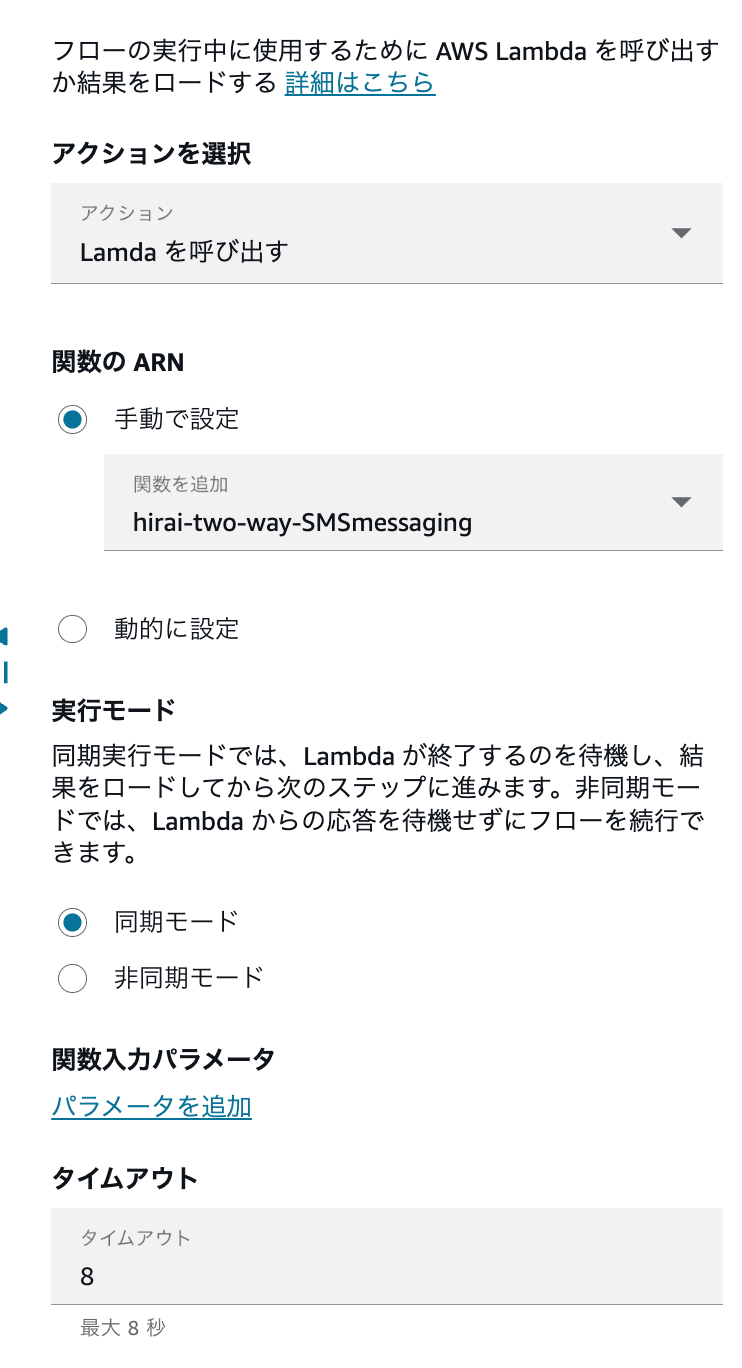
Flow configuration that invokes Lambda after setting the contact attribute sms
In this flow, Lambda is invoked after the sms attribute is set.
By following this order, the SMS initial message is included in Details.ContactData.Attributes.sms of the event passed to Lambda.
Verification
The following SMS was sent from the originating number to Amazon Connect Customer:
Test message
In the event passed to Lambda, it was confirmed that the message body was contained in Details.ContactData.Attributes.sms as follows:
{
    "Details": {
        "ContactData": {
            "Attributes": {
                "sms": "テストメッセージ"
            },
            "AwsRegion": "ap-northeast-1",
            "Channel": "CHAT",
            "ContactId": "b945b632-60cf-4b2d-a214-6f635dae0558"
        }
    }
}
Channel was passed as CHAT.
The key point to verify this time is that the SMS body is passed to Lambda as the user-defined attribute sms.
From this result, it was confirmed that by setting Media / Initial message to the user-defined attribute sms within the flow, the body of the received SMS can be retrieved from Lambda.
Summary
It was confirmed that the initial message received via Amazon Connect Customer's two-way SMS can be set to the user-defined attribute sms and retrieved from Lambda.
The key point is to set Media / Initial message to a user-defined attribute using the [Set contact attributes] block before invoking Lambda.
I hope this serves as a reference when performing subsequent processes such as CRM integration based on SMS content.
