
I tried to organize the differences between various attributes because pre-defined attributes in Amazon Connect Customer Profiles can now be used as segment attributes

This page has been translated by machine translation. View original
Introduction
In Amazon Connect Customer, you can handle information related to contacts—such as customer IDs, order numbers, and responsible departments—as attributes. Attributes can be used for branching in contact flows, sharing information with transfer destinations, and contact search.
On September 23, 2025, it became possible to associate custom attributes with interaction segments.
When researching this feature, similar-sounding names appear, such as "predefined attributes," "segment attributes," and "custom contact attributes." This article clarifies which of these refers to the attribute definition, the value set on a contact, or the configuration for search.
Note that in AWS Japanese documentation, the terms are primarily written as "事前定義された属性" (predefined attributes) and "コンタクトセグメント属性" (contact segment attributes). In this article, we use "事前定義済みの属性" (predefined attributes) and "セグメント属性" (segment attributes) respectively.
Overview of Attributes Accessible from Flows
In Amazon Connect Customer flows, you can reference not only the attributes covered in this article, but also system attributes, Amazon Lex contact attributes, Lambda contact attributes, flow attributes, and more.
Examples of attributes handled in flows
│
├─ System attributes
│   └─ Provided by Amazon Connect Customer at runtime
│      Examples: ContactId, channel, customer phone number
│
├─ User-defined contact attributes
│   └─ Arbitrary keys and values shared within a contact chain
│      Examples: CRMCaseId, OrderId
│
├─ Segment attributes
│   └─ Values set on individual contact segments using predefined attributes
│      Example: BusinessUnit = Support
│
└─ Other attributes
    Examples: Amazon Lex contact attributes, flow attributes
You can check the types of attributes and the JSONPath used to reference them in flows in the following list.
Predefined Attributes
Predefined attributes are definitions for managing attribute names and candidate values in advance.
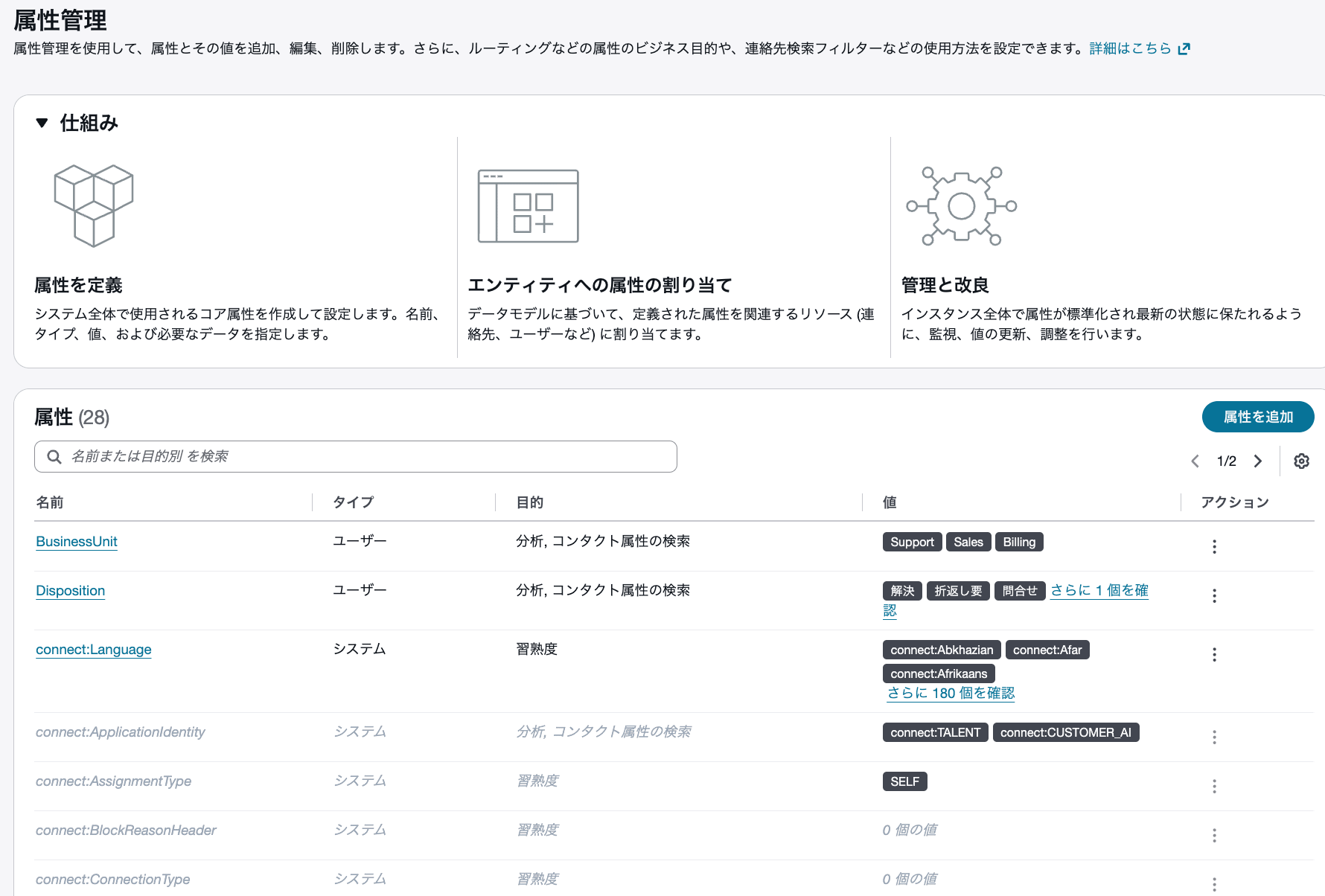
Screen for listing, creating, and managing predefined attributes
For example, you can prepare candidate values of Support, Sales, and Billing for BusinessUnit, which represents the responsible department.
Predefined attributes
  └─ Manage attribute names and candidate values
     BusinessUnit
       - Support
       - Sales
       - Billing

             ↓ Set values in flow

Segment attributes
  └─ Associated with individual contact segments
     BusinessUnit = Support
When you select a predefined attribute in the "Set contact attributes" block of a contact flow and set a value on a contact segment, it is treated as a segment attribute.
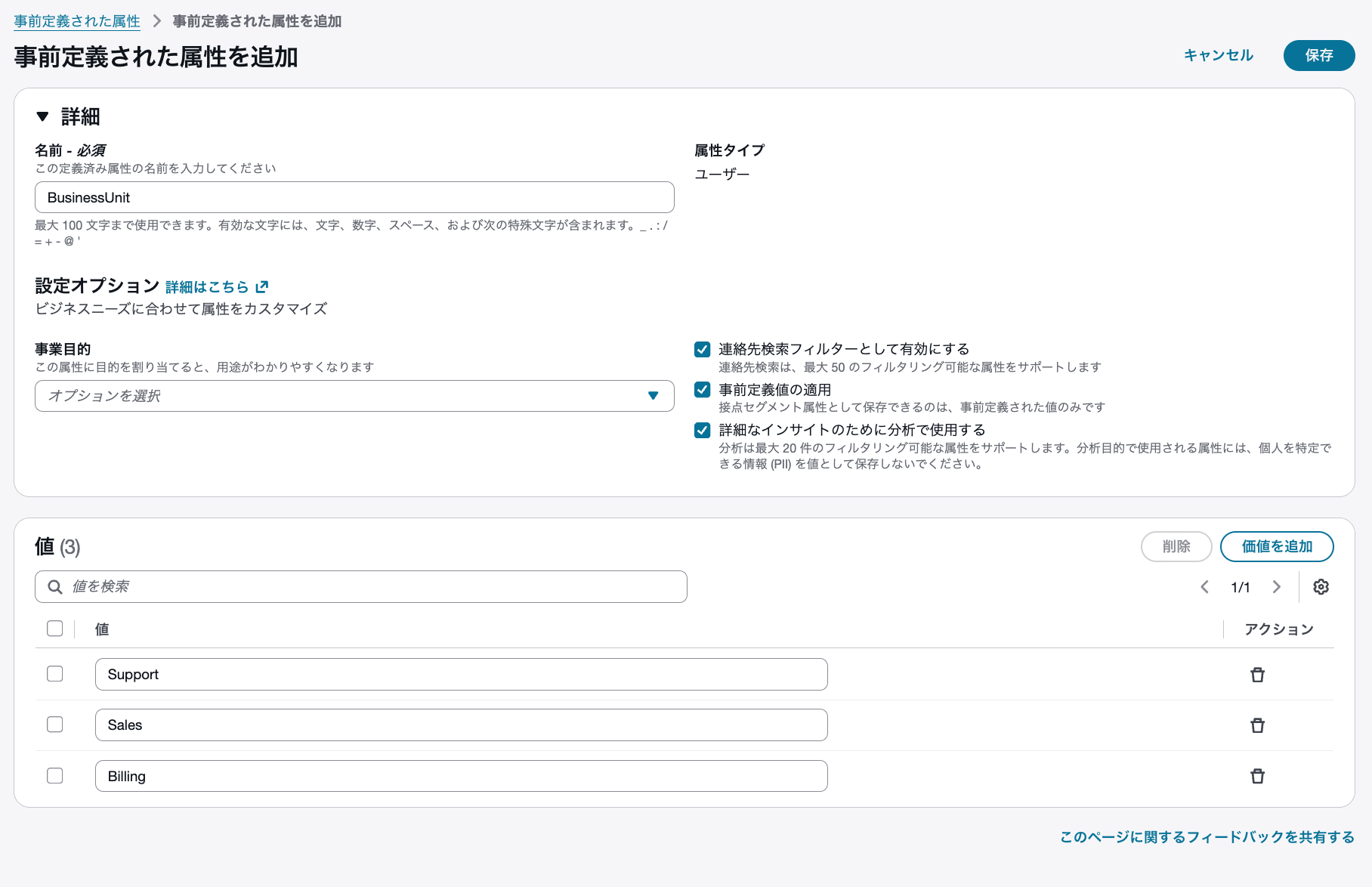
Example of defining the attribute name and candidate values for BusinessUnit
Simply creating a predefined attribute does not set BusinessUnit = Support on a contact segment. Creating a definition and setting a value on a contact are separate operations.
System Predefined Attributes
Predefined attributes also include those provided by Amazon Connect Customer. Examples are connect:Language and connect:Subtype.
Predefined attributes
│
├─ System predefined attributes
│   ├─ connect:Language
│   └─ connect:Subtype
│
└─ Predefined attributes created by users
    └─ BusinessUnit, etc.
Custom values can be added to connect:Language. On the other hand, the name and values of connect:Subtype cannot be changed. Users also cannot use connect: in attribute names they create.
The system predefined attributes referred to here are a separate concept from "system attributes" such as $.ContactId and $.Channel referenced in flows.
Settings Available for Predefined Attributes
For predefined attributes created by users, the following settings can be enabled depending on the use case.
| Setting | Description |
|---|---|
| Use as contact search filter | Use segment attribute values as conditions in contact search |
| Enforce valid values | Restrict values that can be set as segment attributes to predefined values |
| Use in analytics for detailed insights | Use segment attribute values as filters for contact-related metrics |
For example, if you define Support, Sales, and Billing for BusinessUnit and enable "Enforce valid values," the undefined value Engineering cannot be set. This is a setting to consider when you want to avoid inconsistent notation for department names.
The analytics setting is available on instances where Amazon Connect unlimited AI is enabled. The AWS documentation also advises not to include personally identifiable information in attribute values used for analytics.
Segment Attributes
Segment attributes are attributes associated with individual contact segments.
A contact segment does not necessarily mean "the time an agent handled a call." For example, you can set segment attributes on a contact that is completed in an IVR without connecting to an agent.
The difference becomes clearer in the case of transfers between agents.
A series of contacts from the customer's perspective
│
├─ Contact segment with support agent
│   ContactId: C1
│   BusinessUnit = Support
│
└─ Contact segment with billing agent
    ContactId: C2
    BusinessUnit = Billing
In this example, C1 and C2 are IDs that identify their respective contacts. Even if you change BusinessUnit = Billing in the subsequent segment after transferring from the support agent to the billing agent, the previous segment's BusinessUnit = Support is not overwritten.
Note that segment attributes are inherited by subsequent contacts. If you want a different value in a subsequent segment, update the value in that segment.
Details on the relationship between contacts, contact chains, and segment attributes are explained here.
Setting Values in Flows
The steps to set user-defined segment attributes in a flow are as follows.
- Create a predefined attribute
- Place a "Set contact attributes" block in the contact flow
- Specify "Segment attributes" as the namespace
- Select the created predefined attribute as the key
- Set a value
When you set the namespace to "Segment attributes," the created predefined attributes appear as key options.
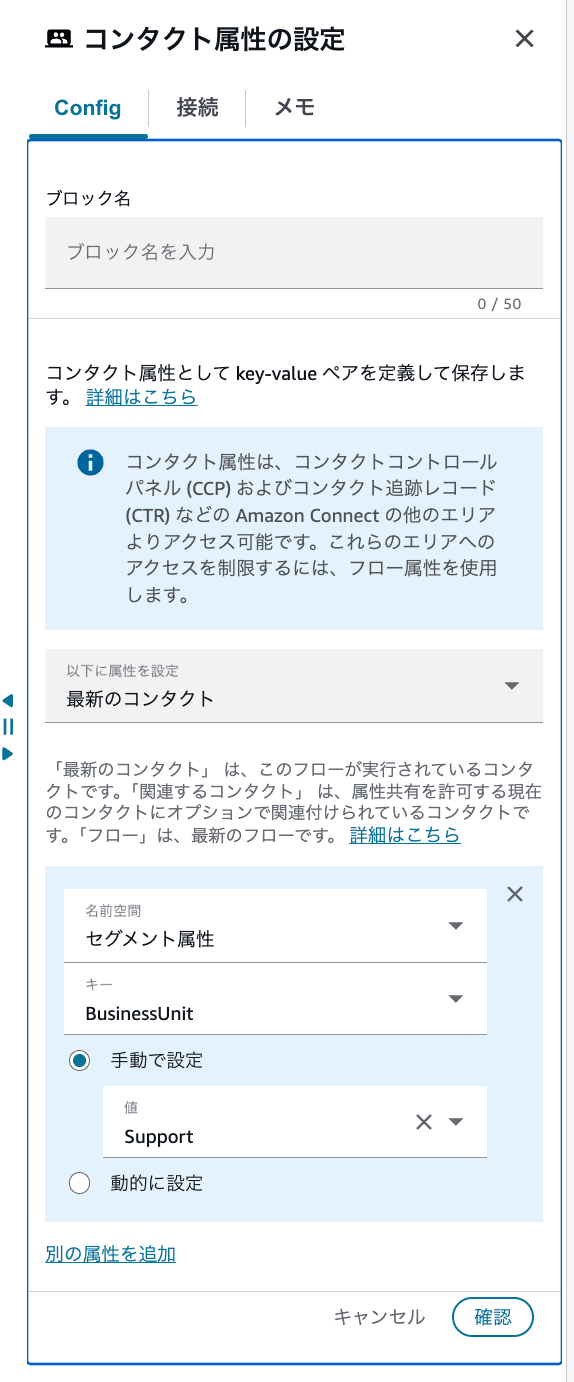
Example of setting BusinessUnit = Support as a segment attribute in the "Set contact attributes" block
As a concrete usage example, there is also an article about setting the IVR input result as a segment attribute called Disposition and checking the number of contacts per value on a dashboard. This is an example of using segment attributes even in flows that do not connect to an agent.
Contact Attributes
Contact attributes are a mechanism for handling information about a contact as key-value pairs. In flows, you can work with system attributes provided by Amazon Connect Customer, user-defined contact attributes set by users, and more.
System Attributes
System attributes are attributes provided by Amazon Connect Customer at runtime. Examples of references in flows include the following.
| Attribute | JSONPath Example | Description |
|---|---|---|
| Contact ID | $.ContactId |
ID that identifies an individual contact |
| Initial contact ID | $.InitialContactId |
ID for tracking the starting point of a series of contacts |
| Channel | $.Channel |
VOICE, CHAT, TASK, EMAIL, etc. |
| Customer email address or phone number | $.CustomerEndpoint.Address |
The customer's email address or phone number |
For example, by referencing $.Channel, you can separate flow processing for voice and chat.
Attributes such as agent usernames can also be referenced in flows, but there are restrictions on the types of flows in which they can be used. When using individual attributes in settings, please also check the applicable scope along with the JSONPath list.
User-Defined Contact Attributes
User-defined contact attributes are attributes where users set arbitrary keys and values. They are also called "custom contact attributes" on the contact search screen and in documentation.
In the "Set contact attributes" block of a flow, specify "User defined" as the namespace.
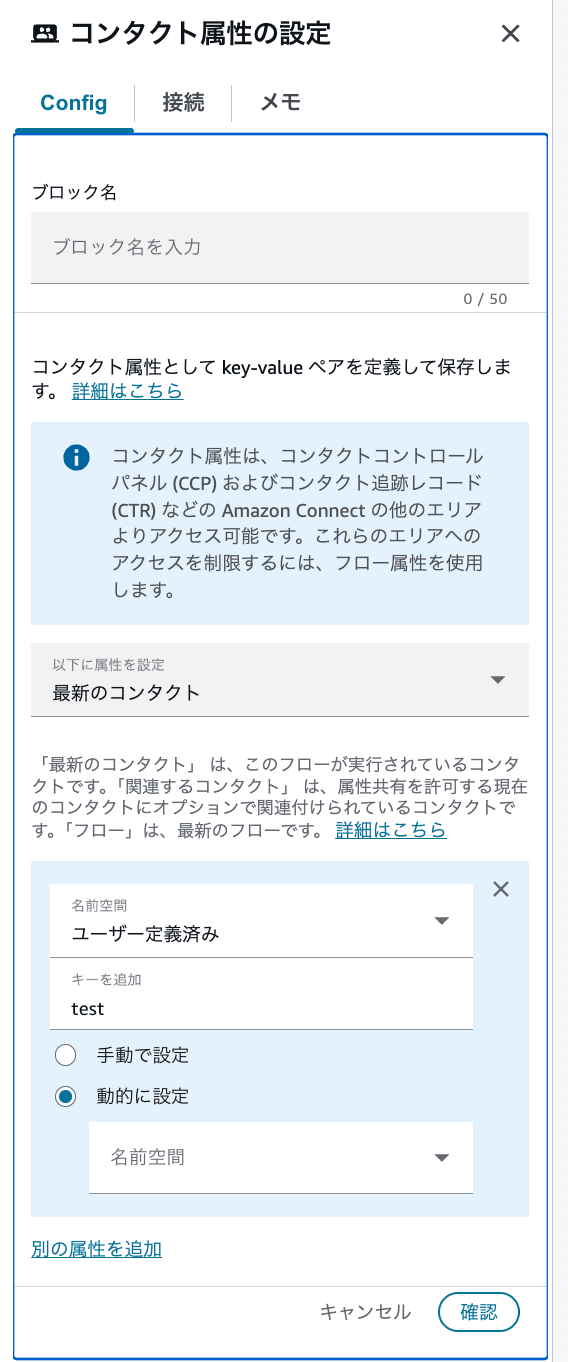
Example of specifying "User defined" as the namespace in the "Set contact attributes" block
User-defined contact attributes are shared between contacts with the same InitialContactId. For example, even when transferring from a support agent to a billing agent, CRMCaseId can be used in the subsequent handling.
A series of contacts from the customer's perspective
│
├─ Contact segment with support agent
│   CRMCaseId = CASE-98765
│
└─ Contact segment with billing agent
    CRMCaseId = CASE-98765
On the other hand, if you update the value of an attribute shared with the transfer destination, the change is also reflected in the contact prior to the transfer. For information you want to retain separately with different values before and after a transfer, use segment attributes.
Searchable Custom Contact Attributes
Searchable custom contact attributes are not a separate storage destination from user-defined contact attributes. This is a setting that specifies which keys among user-defined contact attributes to use in contact search.
For example, if you set type = Claim in a flow and add type as a searchable attribute key, you can search for contacts using that value as a condition.
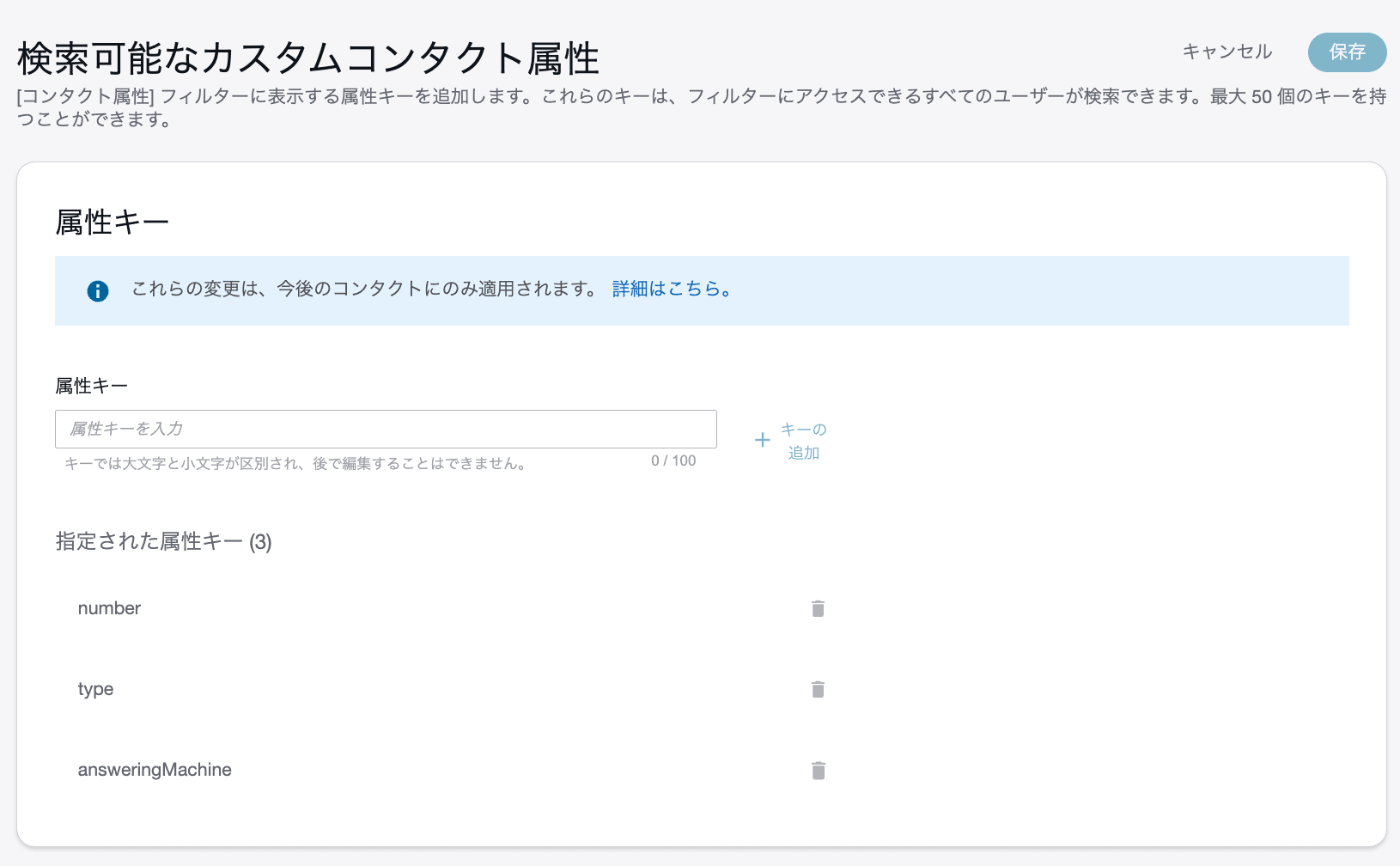
Screen for specifying custom contact attribute keys to use in contact search
User-defined contact attributes are not indexed for search just by being set in a flow. You must explicitly add the keys you want to search. Key names are case-sensitive, and contacts added after the key is registered can be searched.
Note that to search segment attributes, rather than adding a key on this screen, you enable "Use as contact search filter" in the predefined attributes settings.
| Attribute to search | Configuration for search |
|---|---|
| User-defined contact attributes | Add the key as a searchable custom contact attribute |
| Segment attributes | Enable "Use as contact search filter" in predefined attributes |
Summary
Predefined attributes are definitions for managing the names and candidate values used in segment attributes. Simply creating values does not set them on a contact; they are associated with individual contact segments from flows and similar sources.
When designing, it is easier to organize your approach by first deciding whether you want to share the same value before and after a transfer, or retain individual values for each contact segment. If you plan to use attributes in contact search, also confirm that the search configuration differs depending on the type of attribute.
