
Testing Whether Per-Container Memory and Compute Limits Are Enforced with GPU Sharing on Amazon ECS

This page has been translated by machine translation. View original
Introduction
On October 27, 2026, Amazon ECS added support for GPU sharing with NVIDIA Multi-Process Service (MPS).
Until now, ECS tasks could only be assigned GPUs in units of one whole GPU, so even a small inference model that used only part of a GPU occupied an entire GPU exclusively. With this update, you can share one GPU among multiple tasks and specify upper limits for GPU memory and compute for each container.
In this article, we will verify on an EC2 g5.xlarge whether the per-container limits are really enforced, and how performance behaves when multiple tasks run at the same time!
GPU Sharing Configuration
For GPU sharing, in the resourceRequirements of the container definition in the task definition, you specify sharingStrategy instead of the value used when occupying a GPU exclusively.
"resourceRequirements": [
  {
    "type": "GPU",
    "sharingStrategy": {
      "nvidiaMps": {
        "memory": 4096,
        "maxComputePercent": 50
      }
    }
  }
]
memory is the upper limit of GPU memory the container can use, in MiB. maxComputePercent is the upper limit of compute, specified as an integer from 1 to 100, and defaults to 100 if omitted.
ECS places tasks by looking only at the remaining GPU memory, and does not use the compute limit in placement decisions.
The documentation states that ECS starts the MPS daemon and enforces the per-container limits.
Test Environment
The test environment is as follows.
- Instance: g5.xlarge. The GPU is an NVIDIA A10G with 80 SMs and 22,587 MiB of GPU memory on ECS
- AMI: Amazon Linux 2023 GPU ECS-optimized AMI 2023.0.20261022
- Software: ECS agent v1.108.1, Docker v25.0.16, NVIDIA driver v580.178.04
- Container image: pytorch/pytorch:2.14.1-cuda12.6-cudnn9-runtime
I prepared six task definitions that differ only in the GPU specification.
| Task definition | GPU specification |
|---|---|
| mps-bench-dedicated | One GPU occupied exclusively |
| mps-bench-m4096-c25 | memory 4096, maxComputePercent 25 |
| mps-bench-m4096-c50 | memory 4096, maxComputePercent 50 |
| mps-bench-m4096-c75 | memory 4096, maxComputePercent 75 |
| mps-bench-m4096 | memory 4096, no maxComputePercent |
| mps-bench-m20480 | memory 20480, no maxComputePercent |
The measurement script is written in Python and PyTorch, and the environment variable MODE switches between the following behaviors.
mem: Allocates GPU memory in 256 MiB increments and records the amount allocated until failurecompute: Repeats FP16 8192×8192 matrix multiplications and records the throughput in TFLOPS
The result is output to the log as a single line of JSON. In case the limits did not take effect as expected, I set upper limits on the allocated memory and the run time so that the script would stop anyway.
To avoid building an image, the script is stored in an SSM parameter and passed to the container as a secret.
CloudFormation template
AWSTemplateFormatVersion: "2010-09-09"
Description: Amazon ECS GPU sharing (NVIDIA MPS) benchmark on g5.xlarge

Parameters:
  VpcId:
    Type: AWS::EC2::VPC::Id
  SubnetIds:
    Type: List<AWS::EC2::Subnet::Id>
  DesiredCapacity:
    Type: Number
    AllowedValues: [0, 1]
    Default: 0
  BenchImage:
    Type: String
    Default: pytorch/pytorch:2.14.1-cuda12.6-cudnn9-runtime
  GpuAmiId:
    Type: AWS::SSM::Parameter::Value<AWS::EC2::Image::Id>
    Default: /aws/service/ecs/optimized-ami/amazon-linux-2023/gpu/recommended/image_id

Resources:
  Cluster:
    Type: AWS::ECS::Cluster
    Properties:
      ClusterName: mps-bench
      ClusterSettings:
        - Name: containerInsights
          Value: enhanced

  LogGroup:
    Type: AWS::Logs::LogGroup
    Properties:
      LogGroupName: /ecs/mps-bench
      RetentionInDays: 14

  BenchScript:
    Type: AWS::SSM::Parameter
    Properties:
      Name: /mps-bench/bench.py
      Type: String
      Value: |
        import json, os, time, urllib.request

        MODE = os.environ.get("MODE", "info")
        KEYS = ["CUDA_MPS_PINNED_DEVICE_MEM_LIMIT", "CUDA_MPS_ACTIVE_THREAD_PERCENTAGE",
                "CUDA_MPS_PIPE_DIRECTORY", "NVIDIA_VISIBLE_DEVICES"]
        ORIG = {k: os.environ.get(k) for k in KEYS}


        def emit(**kw):
            kw.update(run=os.environ.get("RUN_ID", ""), mode=MODE, ts=round(time.time(), 3))
            print(json.dumps(kw), flush=True)


        # 上限の強制のされ方を確かめるため、CUDA の初期化前に環境変数を書き換える
        BYPASS = os.environ.get("BYPASS", "")
        if BYPASS == "unset":
            for k in KEYS[:2]:
                os.environ.pop(k, None)
        elif BYPASS == "raise":
            os.environ["CUDA_MPS_PINNED_DEVICE_MEM_LIMIT"] = "0=20G"
            os.environ["CUDA_MPS_ACTIVE_THREAD_PERCENTAGE"] = "100"

        try:
            url = os.environ["ECS_CONTAINER_METADATA_URI_V4"] + "/task"
            TASK = json.load(urllib.request.urlopen(url, timeout=2))["TaskARN"].split("/")[-1]
        except Exception:
            TASK = None

        # 全員が揃ってから計測を始めるため、指定時刻まで待つ
        start_at = float(os.environ.get("START_AT", "0"))
        if start_at > time.time():
            time.sleep(min(start_at - time.time(), 300))

        import torch

        p = torch.cuda.get_device_properties(0)
        free, total = torch.cuda.mem_get_info()
        emit(event="info", task=TASK, bypass=BYPASS, env=ORIG,
             effective={k: os.environ.get(k) for k in KEYS[:2]},
             gpu=p.name, uuid=str(getattr(p, "uuid", "")), sms=p.multi_processor_count,
             total_mib=total >> 20, free_mib=free >> 20,
             torch=torch.__version__, cuda=torch.version.cuda)

        if MODE == "mem":
            chunk = int(os.environ.get("CHUNK_MIB", "256"))
            cap = min(int(os.environ.get("MAX_MIB", "24000")), 24000)
            bufs, err = [], None
            while len(bufs) * chunk < cap:
                try:
                    bufs.append(torch.empty(chunk << 20, dtype=torch.uint8, device="cuda"))
                except Exception as e:
                    err = f"{type(e).__name__}: {str(e)[:400]}"
                    break
            torch.cuda.synchronize()
            emit(event="mem", allocated_mib=len(bufs) * chunk, error=err)
            time.sleep(min(float(os.environ.get("HOLD_SEC", "0")), 300))

        elif MODE == "compute":
            n = int(os.environ.get("N", "8192"))
            dur = min(float(os.environ.get("DURATION", "60")), 600)
            win = float(os.environ.get("WINDOW", "5"))
            a = torch.randn(n, n, device="cuda", dtype=torch.float16)
            b = torch.randn_like(a)
            for _ in range(3):
                a @ b
            torch.cuda.synchronize()
            t_start, total_it = time.time(), 0
            while time.time() - t_start < dur and total_it < 200000:
                w0, it = time.time(), 0
                while time.time() - w0 < win:
                    for _ in range(10):
                        a @ b
                    torch.cuda.synchronize()
                    it += 10
                w1 = time.time()
                total_it += it
                emit(event="window", t0=round(w0, 3), t1=round(w1, 3),
                     tflops=round(2 * n**3 * it / (w1 - w0) / 1e12, 2))
            emit(event="compute_done", iters=total_it,
                 tflops=round(2 * n**3 * total_it / (time.time() - t_start) / 1e12, 2))

        elif MODE == "crash":
            # 範囲外のインデックスで GPU 側のアサーションを発生させる
            x = torch.zeros(8, device="cuda")
            try:
                x[torch.tensor([1 << 20], device="cuda")].sum().item()
                torch.cuda.synchronize()
                emit(event="crash", error=None)
            except Exception as e:
                emit(event="crash", error=f"{type(e).__name__}: {str(e)[:400]}")

  InstanceRole:
    Type: AWS::IAM::Role
    Properties:
      AssumeRolePolicyDocument:
        Version: "2012-10-17"
        Statement:
          - Effect: Allow
            Principal: { Service: ec2.amazonaws.com }
            Action: sts:AssumeRole
      ManagedPolicyArns:
        - arn:aws:iam::aws:policy/service-role/AmazonEC2ContainerServiceforEC2Role
        - arn:aws:iam::aws:policy/AmazonSSMManagedInstanceCore

  InstanceProfile:
    Type: AWS::IAM::InstanceProfile
    Properties:
      Roles: [!Ref InstanceRole]

  ExecutionRole:
    Type: AWS::IAM::Role
    Properties:
      AssumeRolePolicyDocument:
        Version: "2012-10-17"
        Statement:
          - Effect: Allow
            Principal: { Service: ecs-tasks.amazonaws.com }
            Action: sts:AssumeRole
      ManagedPolicyArns:
        - arn:aws:iam::aws:policy/service-role/AmazonECSTaskExecutionRolePolicy
      Policies:
        - PolicyName: read-bench-script
          PolicyDocument:
            Version: "2012-10-17"
            Statement:
              - Effect: Allow
                Action: ssm:GetParameters
                Resource: !Sub arn:aws:ssm:${AWS::Region}:${AWS::AccountId}:parameter/mps-bench/*

  InstanceSecurityGroup:
    Type: AWS::EC2::SecurityGroup
    Properties:
      GroupDescription: mps-bench instances (no inbound)
      VpcId: !Ref VpcId

  LaunchTemplate:
    Type: AWS::EC2::LaunchTemplate
    Properties:
      LaunchTemplateData:
        ImageId: !Ref GpuAmiId
        InstanceType: g5.xlarge
        IamInstanceProfile: { Arn: !GetAtt InstanceProfile.Arn }
        SecurityGroupIds: [!Ref InstanceSecurityGroup]
        MetadataOptions: { HttpTokens: required, HttpPutResponseHopLimit: 2 }
        BlockDeviceMappings:
          - DeviceName: /dev/xvda
            Ebs: { VolumeSize: 80, VolumeType: gp3, DeleteOnTermination: true }
        UserData:
          Fn::Base64: !Sub |
            #!/bin/bash
            cat >> /etc/ecs/ecs.config <<EOF
            ECS_CLUSTER=${Cluster}
            ECS_ENABLE_GPU_SUPPORT=true
            ECS_IMAGE_PULL_BEHAVIOR=prefer-cached
            EOF
            systemctl enable --now amazon-ssm-agent || (dnf install -y amazon-ssm-agent && systemctl enable --now amazon-ssm-agent)

  AutoScalingGroup:
    Type: AWS::AutoScaling::AutoScalingGroup
    Properties:
      MinSize: "0"
      MaxSize: "1"
      DesiredCapacity: !Ref DesiredCapacity
      VPCZoneIdentifier: !Ref SubnetIds
      LaunchTemplate:
        LaunchTemplateId: !Ref LaunchTemplate
        Version: !GetAtt LaunchTemplate.LatestVersionNumber
      Tags:
        - Key: Name
          Value: mps-bench
          PropagateAtLaunch: true

  TdDedicated:
    Type: AWS::ECS::TaskDefinition
    Properties:
      Family: mps-bench-dedicated
      RequiresCompatibilities: [EC2]
      NetworkMode: bridge
      ExecutionRoleArn: !GetAtt ExecutionRole.Arn
      ContainerDefinitions:
        - Name: bench
          Image: !Ref BenchImage
          Essential: true
          Cpu: 512
          Memory: 3072
          Command: ["sh", "-c", "printf '%s' \"$BENCH_SCRIPT\" > /tmp/bench.py && exec python /tmp/bench.py"]
          Secrets:
            - Name: BENCH_SCRIPT
              ValueFrom: !Ref BenchScript
          ResourceRequirements:
            - Type: GPU
              Value: "1"
          LogConfiguration:
            LogDriver: awslogs
            Options:
              awslogs-group: !Ref LogGroup
              awslogs-region: !Ref AWS::Region
              awslogs-stream-prefix: mps-bench-dedicated

  TdMps25:
    Type: AWS::ECS::TaskDefinition
    Properties:
      Family: mps-bench-m4096-c25
      RequiresCompatibilities: [EC2]
      NetworkMode: bridge
      ExecutionRoleArn: !GetAtt ExecutionRole.Arn
      ContainerDefinitions:
        - Name: bench
          Image: !Ref BenchImage
          Essential: true
          Cpu: 512
          Memory: 3072
          Command: ["sh", "-c", "printf '%s' \"$BENCH_SCRIPT\" > /tmp/bench.py && exec python /tmp/bench.py"]
          Secrets:
            - Name: BENCH_SCRIPT
              ValueFrom: !Ref BenchScript
          ResourceRequirements:
            - Type: GPU
              SharingStrategy:
                NvidiaMps:
                  Memory: 4096
                  MaxComputePercent: 25
          LogConfiguration:
            LogDriver: awslogs
            Options:
              awslogs-group: !Ref LogGroup
              awslogs-region: !Ref AWS::Region
              awslogs-stream-prefix: mps-bench-m4096-c25

  TdMps50:
    Type: AWS::ECS::TaskDefinition
    Properties:
      Family: mps-bench-m4096-c50
      RequiresCompatibilities: [EC2]
      NetworkMode: bridge
      ExecutionRoleArn: !GetAtt ExecutionRole.Arn
      ContainerDefinitions:
        - Name: bench
          Image: !Ref BenchImage
          Essential: true
          Cpu: 512
          Memory: 3072
          Command: ["sh", "-c", "printf '%s' \"$BENCH_SCRIPT\" > /tmp/bench.py && exec python /tmp/bench.py"]
          Secrets:
            - Name: BENCH_SCRIPT
              ValueFrom: !Ref BenchScript
          ResourceRequirements:
            - Type: GPU
              SharingStrategy:
                NvidiaMps:
                  Memory: 4096
                  MaxComputePercent: 50
          LogConfiguration:
            LogDriver: awslogs
            Options:
              awslogs-group: !Ref LogGroup
              awslogs-region: !Ref AWS::Region
              awslogs-stream-prefix: mps-bench-m4096-c50

  TdMps75:
    Type: AWS::ECS::TaskDefinition
    Properties:
      Family: mps-bench-m4096-c75
      RequiresCompatibilities: [EC2]
      NetworkMode: bridge
      ExecutionRoleArn: !GetAtt ExecutionRole.Arn
      ContainerDefinitions:
        - Name: bench
          Image: !Ref BenchImage
          Essential: true
          Cpu: 512
          Memory: 3072
          Command: ["sh", "-c", "printf '%s' \"$BENCH_SCRIPT\" > /tmp/bench.py && exec python /tmp/bench.py"]
          Secrets:
            - Name: BENCH_SCRIPT
              ValueFrom: !Ref BenchScript
          ResourceRequirements:
            - Type: GPU
              SharingStrategy:
                NvidiaMps:
                  Memory: 4096
                  MaxComputePercent: 75
          LogConfiguration:
            LogDriver: awslogs
            Options:
              awslogs-group: !Ref LogGroup
              awslogs-region: !Ref AWS::Region
              awslogs-stream-prefix: mps-bench-m4096-c75

  TdMps100:
    Type: AWS::ECS::TaskDefinition
    Properties:
      Family: mps-bench-m4096
      RequiresCompatibilities: [EC2]
      NetworkMode: bridge
      ExecutionRoleArn: !GetAtt ExecutionRole.Arn
      ContainerDefinitions:
        - Name: bench
          Image: !Ref BenchImage
          Essential: true
          Cpu: 512
          Memory: 3072
          Command: ["sh", "-c", "printf '%s' \"$BENCH_SCRIPT\" > /tmp/bench.py && exec python /tmp/bench.py"]
          Secrets:
            - Name: BENCH_SCRIPT
              ValueFrom: !Ref BenchScript
          ResourceRequirements:
            - Type: GPU
              SharingStrategy:
                NvidiaMps:
                  Memory: 4096
          LogConfiguration:
            LogDriver: awslogs
            Options:
              awslogs-group: !Ref LogGroup
              awslogs-region: !Ref AWS::Region
              awslogs-stream-prefix: mps-bench-m4096

  TdMpsBig:
    Type: AWS::ECS::TaskDefinition
    Properties:
      Family: mps-bench-m20480
      RequiresCompatibilities: [EC2]
      NetworkMode: bridge
      ExecutionRoleArn: !GetAtt ExecutionRole.Arn
      ContainerDefinitions:
        - Name: bench
          Image: !Ref BenchImage
          Essential: true
          Cpu: 512
          Memory: 3072
          Command: ["sh", "-c", "printf '%s' \"$BENCH_SCRIPT\" > /tmp/bench.py && exec python /tmp/bench.py"]
          Secrets:
            - Name: BENCH_SCRIPT
              ValueFrom: !Ref BenchScript
          ResourceRequirements:
            - Type: GPU
              SharingStrategy:
                NvidiaMps:
                  Memory: 20480
          LogConfiguration:
            LogDriver: awslogs
            Options:
              awslogs-group: !Ref LogGroup
              awslogs-region: !Ref AWS::Region
              awslogs-stream-prefix: mps-bench-m20480

Outputs:
  ClusterName:
    Value: !Ref Cluster
  AutoScalingGroupName:
    Value: !Ref AutoScalingGroup
The stack was created with the following command. Specify subnets that can connect to Docker Hub and the AWS APIs.
aws cloudformation deploy \
  --stack-name mps-bench \
  --template-file mps-bench.yaml \
  --capabilities CAPABILITY_IAM \
  --parameter-overrides \
    VpcId=<VPC の ID> \
    SubnetIds=<サブネットの ID>,<サブネットの ID> \
    DesiredCapacity=1
I start tasks, switch behavior with an environment variable, and then collect the results. Running the script requires jq in addition to the AWS CLI.
aws ecs run-task \
  --cluster mps-bench \
  --task-definition mps-bench-m4096-c50 \
  --launch-type EC2 \
  --overrides '{"containerOverrides":[{"name":"bench","environment":[{"name":"MODE","value":"compute"}]}]}'
Script to start tasks and collect results
#!/usr/bin/env bash
# mps-bench のタスクを起動し、終了後にログの JSON 行を集めて保存する。
# 使い方: run.sh <ラベル> '<ファミリー>|K=V|K=V' ['<ファミリー>|K=V' ...] [--delay 秒] [--no-wait]
# 同じ呼び出しで指定したタスクには同じ START_AT を渡し、計測の開始を揃える。
set -eo pipefail

CLUSTER=mps-bench
LOG_GROUP=/ecs/mps-bench
OUT="$(cd "$(dirname "$0")" && pwd)/results"

label=$1; shift
delay=45 wait=true specs=()
while (($#)); do
  case $1 in
    --delay) delay=$2; shift 2 ;;
    --no-wait) wait=false; shift ;;
    *) specs+=("$1"); shift ;;
  esac
done
start_at=$(($(date +%s) + delay))
mkdir -p "$OUT"
save() { printf '%s\n' "$rec" > "$OUT/$label.json"; }

tasks='[]' failures='[]'
for i in "${!specs[@]}"; do
  IFS='|' read -ra parts <<<"${specs[$i]}"
  family=${parts[0]}
  env=$(jq -n --arg run "$label-$i" --arg at "$start_at" '{RUN_ID: $run, START_AT: $at}')
  for kv in "${parts[@]:1}"; do
    env=$(jq --arg k "${kv%%=*}" --arg v "${kv#*=}" '.[$k] = $v' <<<"$env")
  done
  overrides=$(jq -c '{containerOverrides: [{name: "bench",
    environment: (to_entries | map({name: .key, value: .value}))}]}' <<<"$env")
  r=$(aws ecs run-task --cluster "$CLUSTER" --task-definition "$family" \
    --launch-type EC2 --count 1 --overrides "$overrides" --output json)
  failures=$(jq -c --argjson r "$r" '. + $r.failures' <<<"$failures")
  tasks=$(jq -c --argjson r "$r" --arg f "$family" --argjson env "$env" \
    '. + [$r.tasks[] | {arn: .taskArn, family: $f, env: $env}]' <<<"$tasks")
done
rec=$(jq -n --arg label "$label" --argjson at "$start_at" \
  --argjson tasks "$tasks" --argjson failures "$failures" \
  '{label: $label, start_at: $at, tasks: $tasks, failures: $failures}')
jq -c '{launched: (.tasks | length), failures}' <<<"$rec"

arns=$(jq -r '.tasks[].arn' <<<"$rec")
if [[ -z $arns ]]; then save; exit; fi
sleep $((delay < 20 ? delay : 20))
gpu='[]'
ci=$(aws ecs list-container-instances --cluster "$CLUSTER" --query containerInstanceArns --output text)
if [[ -n $ci && $ci != None ]]; then
  gpu=$(aws ecs describe-container-instances --cluster "$CLUSTER" --container-instances $ci \
    --query 'containerInstances[].gpuDevices[]' --output json)
fi
running=$(aws ecs describe-tasks --cluster "$CLUSTER" --tasks $arns --query tasks --output json)
rec=$(jq --argjson g "$gpu" --argjson d "$running" \
  '.gpu_devices_running = $g | .describe_tasks_running = $d' <<<"$rec")
if ! $wait; then save; exit; fi

# 待機は 1 回あたり最大 10 分。2 回で打ち切る
for _ in 1 2; do
  aws ecs wait tasks-stopped --cluster "$CLUSTER" --tasks $arns && break
done
stopped=$(aws ecs describe-tasks --cluster "$CLUSTER" --tasks $arns --query tasks --output json)
n=$(jq '.tasks | length' <<<"$rec")
for ((i = 0; i < n; i++)); do
  arn=$(jq -r ".tasks[$i].arn" <<<"$rec")
  family=$(jq -r ".tasks[$i].family" <<<"$rec")
  lines=$(aws logs filter-log-events --log-group-name "$LOG_GROUP" \
    --log-stream-names "$family/bench/${arn##*/}" \
    --query 'events[].message' --output json 2>/dev/null || echo '[]')
  rec=$(jq --argjson i "$i" --arg arn "$arn" --argjson d "$stopped" --argjson lines "$lines" '
    ($d[] | select(.taskArn == $arn)) as $t | $t.containers[0] as $c
    | [$lines[] | fromjson? | objects] as $json
    | .tasks[$i] += {
        stopped_reason: $t.stoppedReason, exit_code: $c.exitCode, reason: $c.reason,
        gpu_ids: $c.gpuIds, gpu_sharing: $c.gpuSharingStrategy,
        json: $json, other_lines: (($lines | length) - ($json | length)),
        tail: ([$lines[] | select(startswith("{") | not)] | .[-5:])
      }' <<<"$rec")
done
save
jq -c '.tasks[] | {family, exit: .exit_code, gpu: .gpu_ids,
  events: [.json[] | select(.event | IN("info", "mem", "compute_done", "crash"))],
  other_lines}' <<<"$rec"
How the Limits Are Applied to Containers
First, I checked how MPS runs inside the instance.
In the GPU AMI, the systemd nvidia-mps.service starts the MPS control daemon with nvidia-cuda-mps-control -f -multiuser-server. It is configured to start before ecs.service, and /run/mps-ecs is used for communication with MPS.
When I started a task with memory 4096 and maxComputePercent 50, ECS set the following environment variables in the container.
{
  "CUDA_MPS_PINNED_DEVICE_MEM_LIMIT": "0=4096M",
  "CUDA_MPS_ACTIVE_THREAD_PERCENTAGE": "50",
  "CUDA_MPS_PIPE_DIRECTORY": "/run/mps-ecs",
  "NVIDIA_VISIBLE_DEVICES": "void"
}
Even when multiple tasks were started, there was only one MPS server process, and all tasks shared this server. The server-side settings remained at 100% compute and no memory limit.
In other words, the per-container limits are specified not on the server but through the containers' environment variables.
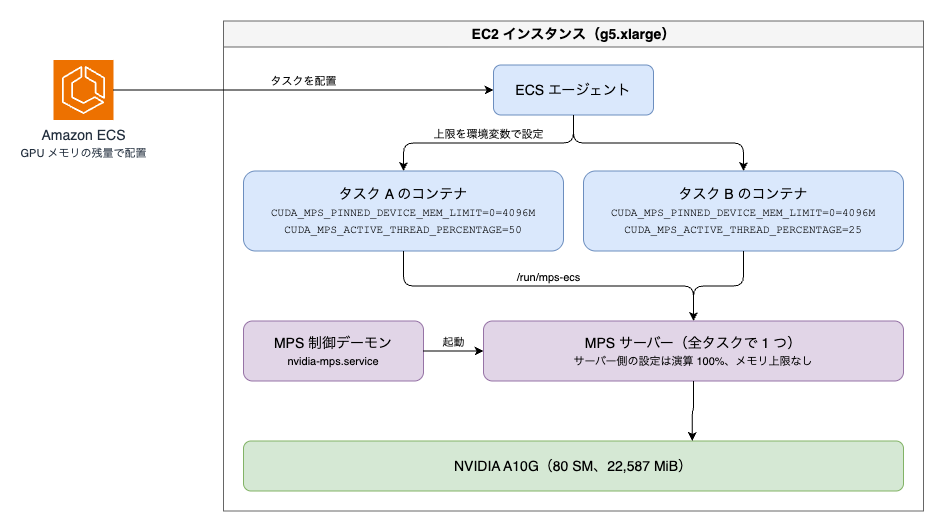
The sharing status can be checked in gpuDevices in the response of DescribeContainerInstances. The following are the values while two tasks with maxComputePercent 50 were running.
[
  {
    "gpuId": "GPU-e2499c30-9e84-17c2-4315-944340692a58",
    "sharingMode": "NVIDIA_MPS",
    "totalMemoryInMiB": 22587,
    "remainingMemoryInMiB": 14395,
    "containerCount": 2
  }
]
remainingMemoryInMiB is 22,587 MiB minus 4,096 MiB for each of the two tasks.
The per-container settings can be checked in gpuIds and gpuSharingStrategy in the response of DescribeTasks.
"gpuIds": ["GPU-e2499c30-9e84-17c2-4315-944340692a58"],
"gpuSharingStrategy": {"nvidiaMps": {"memory": 4096, "maxComputePercent": 50}}
Verifying Whether the Memory Limit Is Enforced
When I kept allocating GPU memory in a task with memory 4096, an OutOfMemoryError occurred at 3,840 MiB. When I made the allocation unit finer at 32 MiB, I could allocate up to 3,936 MiB.
The free memory obtained right after CUDA initialization was 3,960 MiB. I think this is the 4,096 MiB limit minus the amount CUDA itself uses.
As a control, when I tried the same thing in a task occupying the GPU exclusively, I could allocate up to 22,272 MiB.
In other words, the memory limit is enforced exactly as specified.
Verifying Whether the Compute Limit Is Enforced
When maxComputePercent was specified, the number of SMs visible from PyTorch decreased in proportion to the percentage.
| maxComputePercent | Number of SMs |
|---|---|
| Not specified | 80 |
| 75 | 60 |
| 50 | 40 |
| 25 | 20 |
The throughput when running matrix multiplication in only one task was as follows.
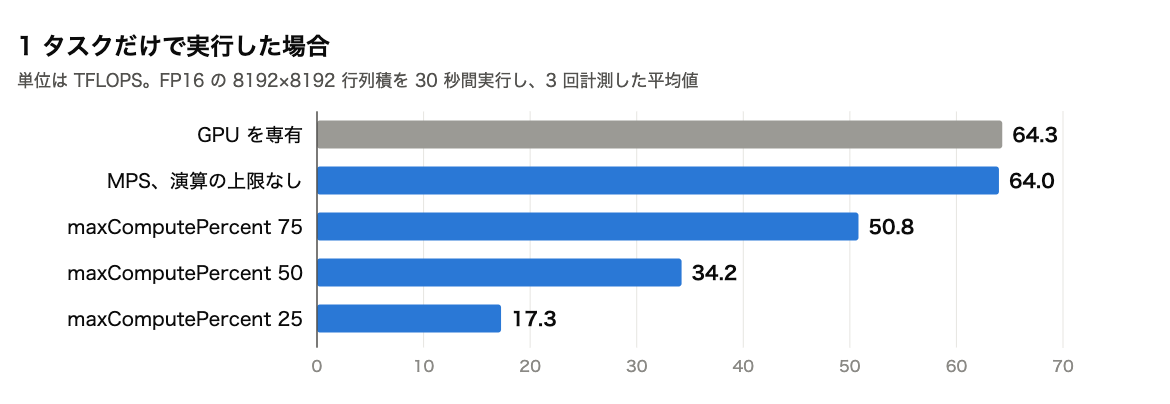
Compared with 64.3 TFLOPS when occupying the GPU exclusively, the throughputs with limits of 25, 50, and 75 were 26.9, 53.2, and 79.0% respectively. There was almost no difference across three measurements.
I speculate that the figures are slightly higher than the configured percentages because resources other than SMs, such as memory bandwidth, are not partitioned.
The MPS task with no limit reached 64.0 TFLOPS, almost the same as when occupying the GPU exclusively. It seems there is almost no performance degradation from going through MPS itself.
Performance When Running Multiple Tasks at the Same Time
Next, I ran multiple tasks at the same time and measured the throughput over 60 seconds.
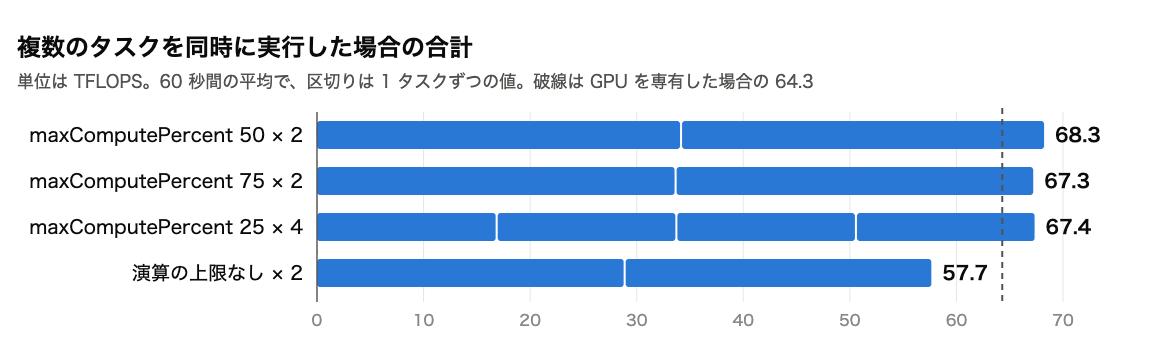
When I ran two tasks with maxComputePercent 50, each achieved 34.16 TFLOPS, almost the same as the 34.21 TFLOPS with only one task. The same was true when running four tasks with a limit of 25.
The total of the two tasks with limit 50 was 68.3 TFLOPS, exceeding the 64.3 TFLOPS of the exclusive GPU case. It seems that splitting the GPU by specifying limits increases the total throughput compared with occupying it with a single task.
With two tasks with limit 75, where the limits total 150%, each achieved 33.65 TFLOPS, and they ended up splitting the GPU almost half and half.
On the other hand, when I ran two tasks with no limit, each achieved 28.87 TFLOPS, and the total of 57.7 TFLOPS was lower than in the exclusive GPU case. I speculate that this is a loss caused by the two tasks competing for the same SMs.
When the total maxComputePercent of the tasks placed on the same GPU was kept within 100%, the tasks did not affect each other's performance.
When Rewriting Environment Variables Inside the Container
If the limits are passed as environment variables, what happens if you rewrite them inside the container? I was curious, so I tried it.
In a task with memory 4096 and maxComputePercent 25, I delete the environment variables or change their values before initializing CUDA.
import os

# 上限を消す場合
os.environ.pop("CUDA_MPS_PINNED_DEVICE_MEM_LIMIT", None)
os.environ.pop("CUDA_MPS_ACTIVE_THREAD_PERCENTAGE", None)

# 上限を変える場合
# os.environ["CUDA_MPS_PINNED_DEVICE_MEM_LIMIT"] = "0=20G"
# os.environ["CUDA_MPS_ACTIVE_THREAD_PERCENTAGE"] = "100"

import torch  # この後の最初の CUDA の呼び出しで初期化される
As a result, the limits were lifted with either method.
| Item | As limited | When env vars deleted | When env vars changed |
|---|---|---|---|
| Number of SMs | 20 | 80 | 80 |
| Throughput | 17.27 TFLOPS | 64.26 TFLOPS | 63.86 TFLOPS |
| Memory allocated | 3,840 MiB | 20,224 MiB | 20,224 MiB |
20,224 MiB is the value at which the script stopped because of the limit I set in it. It does not mean that the GPU ran out of memory.
These environment variables only work in the direction of making the limits set on the control daemon stricter[1]. In this environment there is no limit on the daemon side, so I think deleting the environment variables simply removes the limits.
Note that when I specified these environment variables through containerOverrides in RunTask, the request itself was accepted, but the containers had the values set by ECS. They cannot be overridden from outside, and only code running inside the container can lift the limits.
Impact of a Task Whose Limits Were Lifted on Other Tasks
While the task whose limits had been lifted was holding 20,224 MiB, I started another task with memory 4096.
As a result, this task could not reach its own limit of 4,096 MiB and hit an OutOfMemoryError at 1,792 MiB.
At this time remainingMemoryInMiB was 14,395 MiB, and the excess of the task whose limits were lifted was not reflected. ECS seems to calculate the remaining amount from the values in the task definition.
From the documentation's description of "enforcing per-container limits," I had imagined that enforcement happens on the server side, so this behavior was a bit surprising. It is probably better to think of the limits as a mechanism that assumes containers do not rewrite the environment variables.
The documentation says that to prevent tasks of different services from being placed on the same GPU, you should separate capacity providers or clusters.
When GPU Memory Is Insufficient
While a task with memory 20480 was running, I started a task with memory 4096. The remaining memory is 2,107 MiB, so it should not be placeable.
As expected, RESOURCE:GPU_MEMORY was returned in failures in the RunTask response, and the task did not start.
"failures": [
  {
    "arn": "arn:aws:ecs:ap-northeast-1:123456789012:container-instance/b6c1f565ead746628ff6280bbdc27ed3",
    "reason": "RESOURCE:GPU_MEMORY"
  }
]
GPU Metrics Available in Container Insights
I had enabled Container Insights with enhanced observability, but GPU-related items were not recorded for tasks sharing via MPS. For tasks occupying the GPU exclusively, GpuDevicesReserved was recorded as 1.0 in the performance logs.
According to the documentation, when sharing with MPS, task-level and container-level GPU utilization and memory usage metrics are not emitted.
Power and temperature are said to be emitted, but in this case, metrics such as utilization were not appearing, even for the exclusive GPU case. For EC2, it may be necessary to install the CloudWatch agent.
Conclusion
In conclusion, with ECS GPU sharing, the memory and compute limits were enforced as specified, and when the total compute limit was kept within 100%, the tasks did not affect each other's performance.
However, because the limits are conveyed through the containers' environment variables, code inside a container can lift the restrictions by rewriting them. If you place workloads of different teams or customers on the same GPU, separate them with capacity providers or clusters.
If you have multiple workloads that don't use up a whole GPU, please give it a try!