I tried integrating data from Amazon FSx for NetApp ONTAP with Bedrock Knowledge Bases via S3 Access Point

This page has been translated by machine translation. View original
Moving data to Amazon FSx for NetApp ONTAP makes me want to integrate with other AWS services
Hello, this is nonpi (@non____97).
Have you ever thought about wanting to integrate with other AWS services after migrating data to Amazon FSx for NetApp ONTAP (FSxN)? I have.
If you've gone through the effort of migrating your file server from on-premises to AWS, you'll naturally be interested in its compatibility with other AWS services like AI-related offerings.
FSxN has a feature to attach S3 Access Points to volumes.
This means that by using this feature, you can integrate FSxN with any service that works with S3.
As a test, I'll try connecting it with Bedrock Knowledge Bases to enable asking questions about files stored in FSxN.
Quick Summary
- Data in Amazon FSx for NetApp ONTAP can be integrated with Bedrock Knowledge Bases via S3 Access Point
- Multimodal search is also possible
- When creating an S3 Access Point for Amazon FSx for NetApp ONTAP, including backslash (
\) in Windows usernames causes errors- Domain Administrator users can't effectively be used
- Create alternate domain users instead
My Implementation
Test Environment
Here's my test environment:
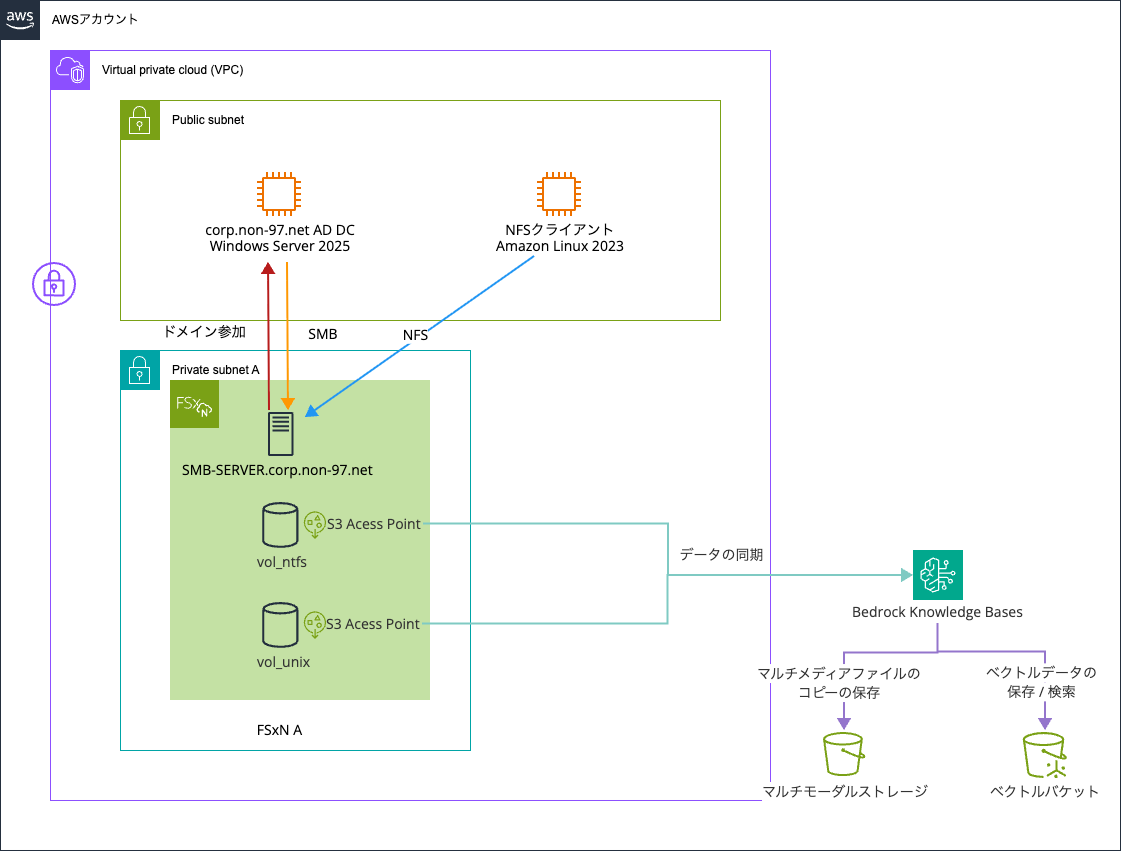
I prepared two types of volumes in the FSxN file system - one with UNIX security style and one with NTFS. I'll query information about files written via NFS and SMB using Bedrock Knowledge Bases.
Here are the volumes:
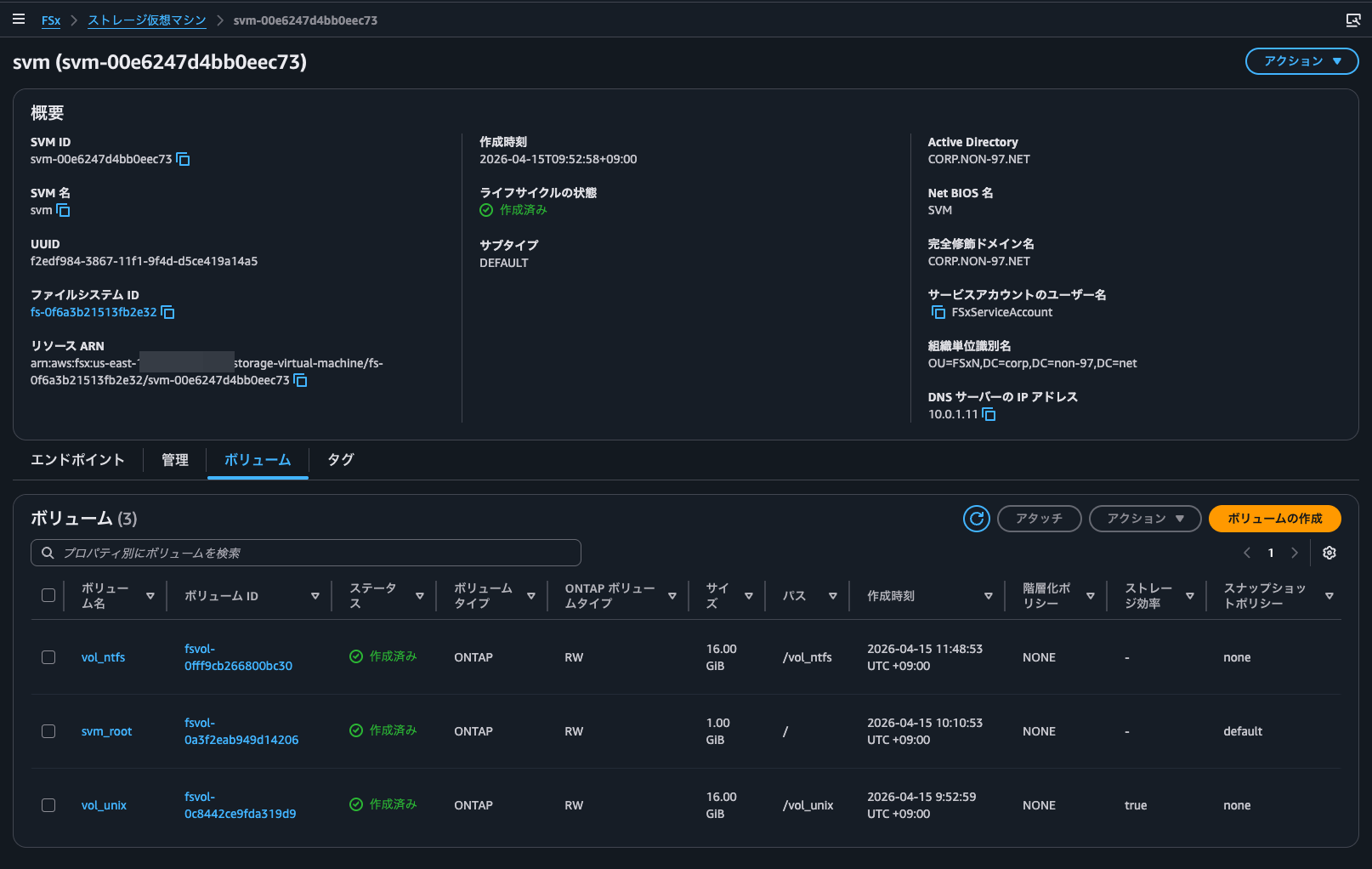
I created the FSxN file system and AD DC through the management console.
The following articles are helpful for AD DC configuration and domain joining:
The OU for the FSxN SMB server's computer objects and service accounts is OU=FSxN,DC=corp,DC=non-97,DC=net, and the service account name is FSxServiceAccount.
> New-ADOrganizationalUnit -Name FSxN -Path "DC=corp,DC=non-97,DC=net" -ProtectedFromAccidentalDeletion $True

> New-ADUser `
  -Name "FSxServiceAccount" `
  -UserPrincipalName "FSxServiceAccount@corp.non-97.net" `
  -Accountpassword (Read-Host -AsSecureString "AccountPassword") `
  -Path "OU=FSxN,DC=corp,DC=non-97,DC=net" `
  -PasswordNeverExpires $True `
  -Enabled $True
One important note when referencing these articles: you need to grant the service account permission to "set msDS-SupportedEncryptionTypes on computer objects" when delegating OU management. This wasn't required before but has become mandatory recently.
Without this permission, you'll get the following error when trying to join the SMB server to the domain:
::> cifs create -vserver svm -cifs-server SVM -domain corp.non-97.net -ou OU=FSxN,DC=corp,DC=non-97,DC=net

In order to create an Active Directory machine account for the CIFS server, you must supply the name and password of a
Windows account with sufficient privileges to add computers to the "OU=FSxN,DC=corp,DC=non-97,DC=net" container within
the "CORP.NON-97.NET" domain.

Enter the user name: FSxServiceAccount

Enter the password:

Error: Machine account creation procedure failed
  [    23] Loaded the preliminary configuration.
  [    75] Created a machine account in the domain
  [    75] SID to name translations of Domain Users and Admins
           completed successfully
  [    76] Successfully connected to ip 10.0.1.11, port 88 using TCP
  [    78] Successfully connected to ip 10.0.1.11, port 464 using TCP
  [   124] Kerberos password set for 'SVM$@CORP.NON-97.NET' succeeded
  [   124] Set initial account password
**[   143] FAILURE: Unable to set machine account attribute
**         'msDS-SupportedEncryptionTypes': Insufficient access
  [   147] Deleted existing account
           'CN=SVM,OU=FSxN,DC=corp,DC=non-97,DC=net'

Error: command failed: Failed to create the Active Directory machine account "SVM". Reason: LDAP Error: The user has
       insufficient access rights.
Since building this repeatedly would be cumbersome, I used AWS CDK to create resources for Bedrock Knowledge Bases, vector buckets, and S3 buckets for multimodal storage.
The code I used is available in this GitHub repository:
Attaching S3 Access Points to FSxN Volumes
Let's attach S3 Access Points to FSxN volumes. I'll do the same work for both NTFS and UNIX security style volumes.
First, for the NTFS volume:
Since it's NTFS, I specified Windows for the user type. I also specified Administrator as the username to access all files in FSxN. The access policy can be left empty since access is from the same account and will be authorized via IAM role.
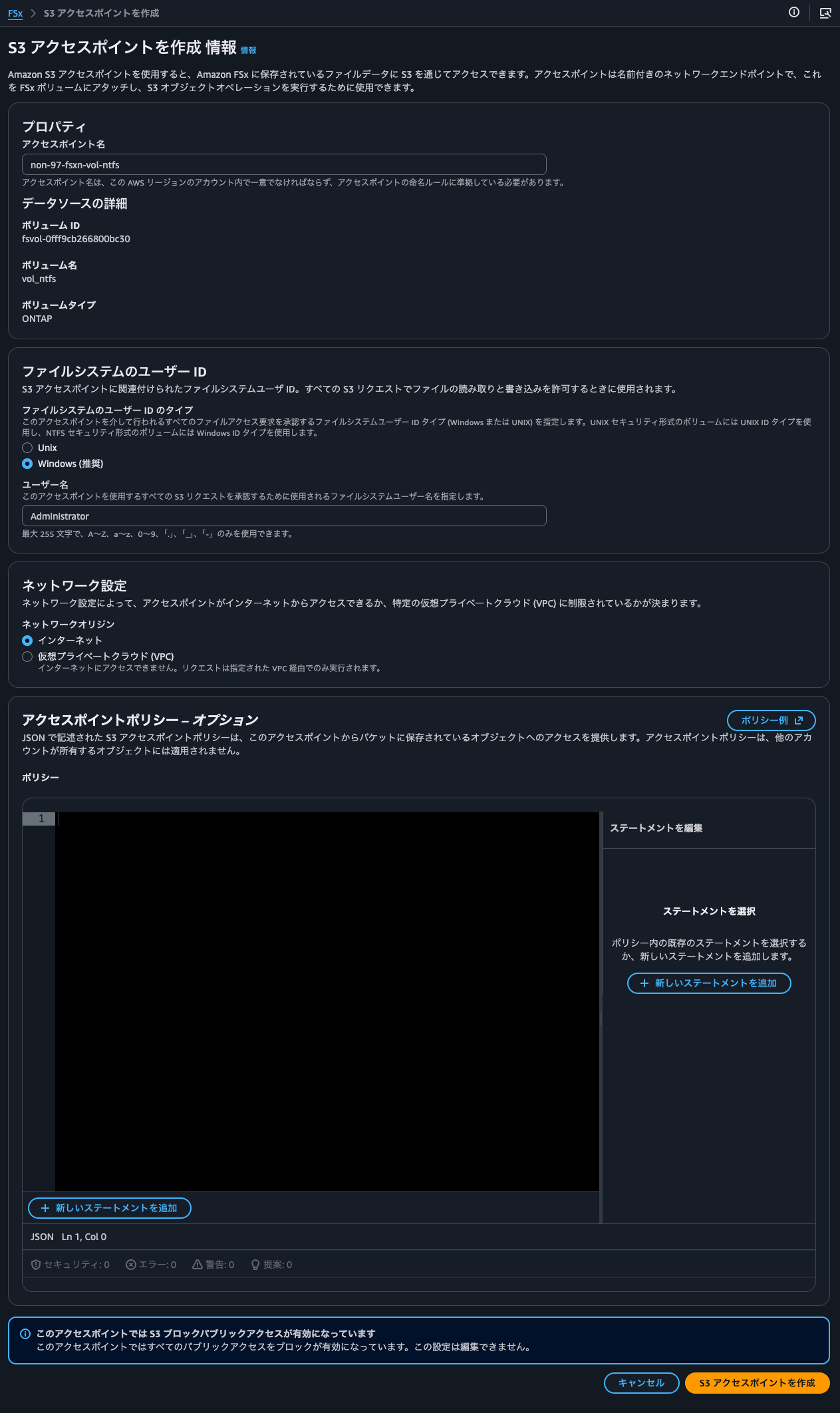
This resulted in an error: Failed to lookup the provided user in ONTAP.
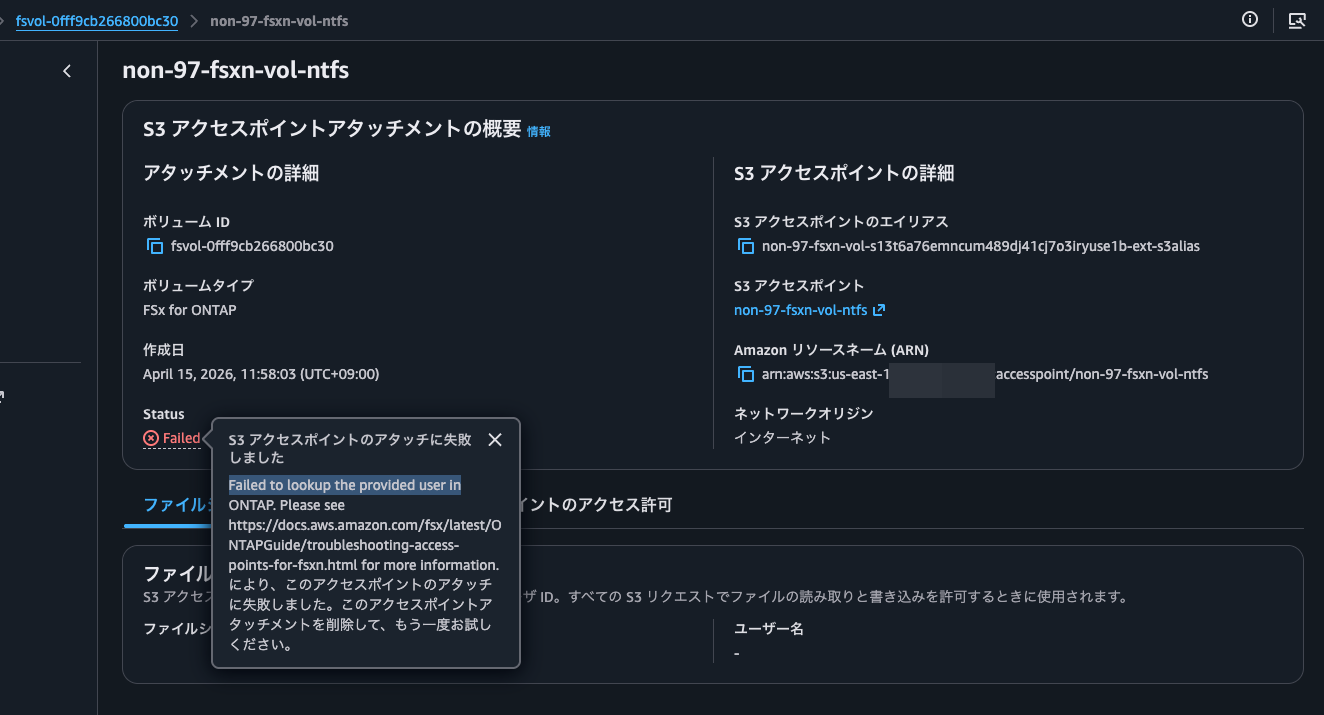
The AWS official documentation shows an ONTAP CLI command to check if a user exists:
vserver services access-check authentication show-creds -node FsxId0fd48ff588b9d3eee-01 -vserver svm_name -unix-user-name root -show-partial-unix-creds true
When I tried running it, it indeed showed an error:
::> set -privilege diagnostic

::*> vserver services access-check authentication show-creds -node FsxId0f6a3b21513fb2e32-01 -vserver svm -win-name Administrator

Vserver: svm (internal ID: 4)

Error: Get user credentials procedure failed
  [  0 ms] Using cached S-1-5-21-200422539-3497150653-4195399322-500
           to 'SVM\Administrator' mapping
**[     0] FAILURE: Account is disabled for local user
**         'Administrator'
  [     0] Could not get credentials for Windows user
           'Administrator' or SID
           'S-1-5-21-200422539-3497150653-4195399322-500'

Error: command failed: Failed to get user credentials. Reason: "cifs: user or machine account is disabled".
Based on the error, it seems Administrator alone is being interpreted as the SVM's local Administrator, which is disabled.
As a solution, I'll try explicitly specifying the domain Administrator user as CORP\Administrator.
::*> vserver services access-check authentication show-creds -node FsxId0f6a3b21513fb2e32-01 -vserver svm -win-name CORP\Administrator

 UNIX UID: root <> Windows User: CORP\Administrator (Windows Domain User)

 GID: daemon
 Supplementary GIDs:
  daemon

 Primary Group SID: CORP\Domain Users (Windows Domain group)

 Windows Membership:
  CORP\Domain Users (Windows Domain group)
  CORP\Domain Admins (Windows Domain group)
  CORP\Group Policy Creator Owners (Windows Domain group)
  CORP\Enterprise Admins (Windows Domain group)
  CORP\Schema Admins (Windows Domain group)
  CORP\Denied RODC Password Replication Group (Windows Alias)
  Service asserted identity (Windows Well known group)
  BUILTIN\Users (Windows Alias)
  BUILTIN\Administrators (Windows Alias)
 User is also a member of Everyone, Authenticated Users, and Network Users

 Privileges (0x22b7):
  SeBackupPrivilege
  SeRestorePrivilege
  SeTakeOwnershipPrivilege
  SeSecurityPrivilege
  SeChangeNotifyPrivilege
It appears to recognize the user properly now.
Let's attach the S3 Access Point using this:
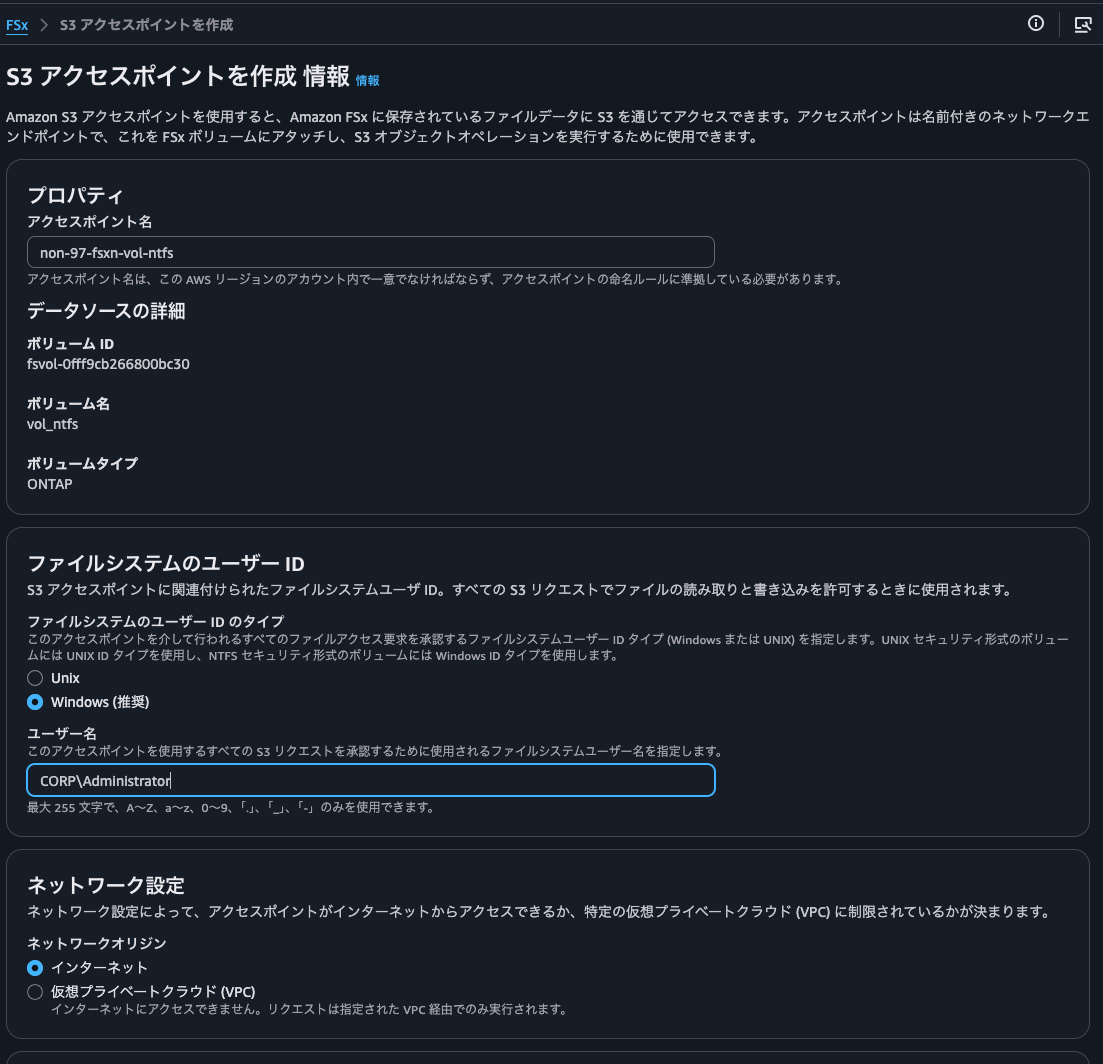
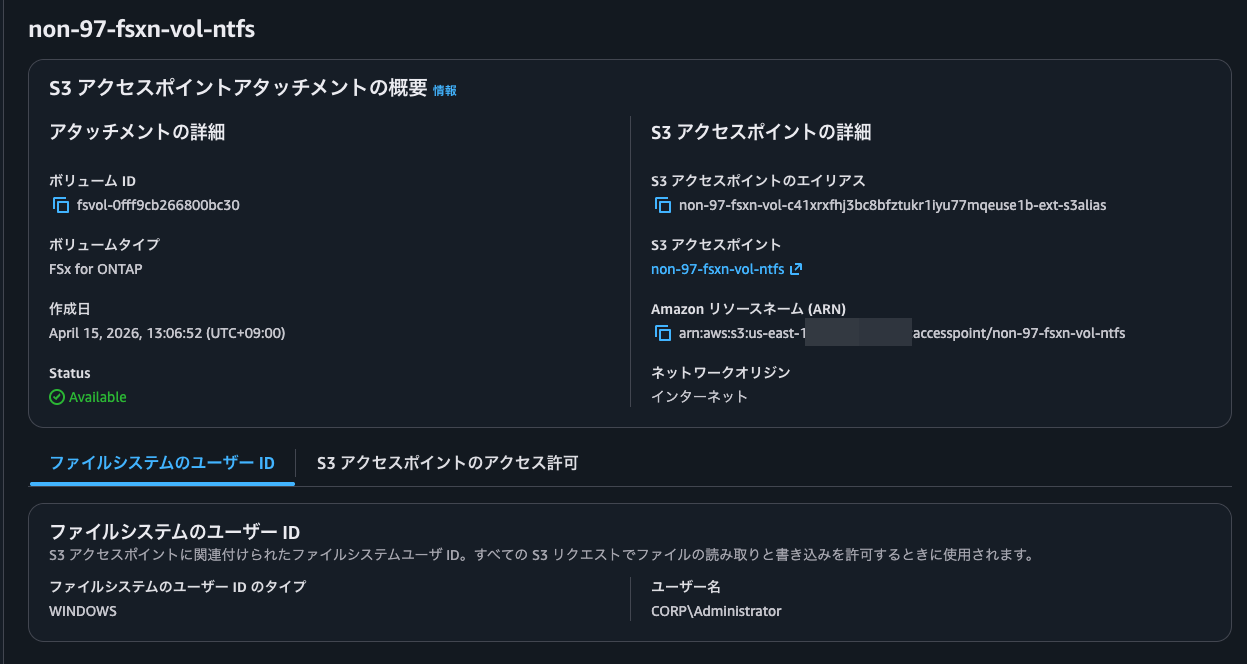
This time it completed successfully. The creation process took only about 10 seconds.
I'll also do this for the UNIX volume. The username is root.
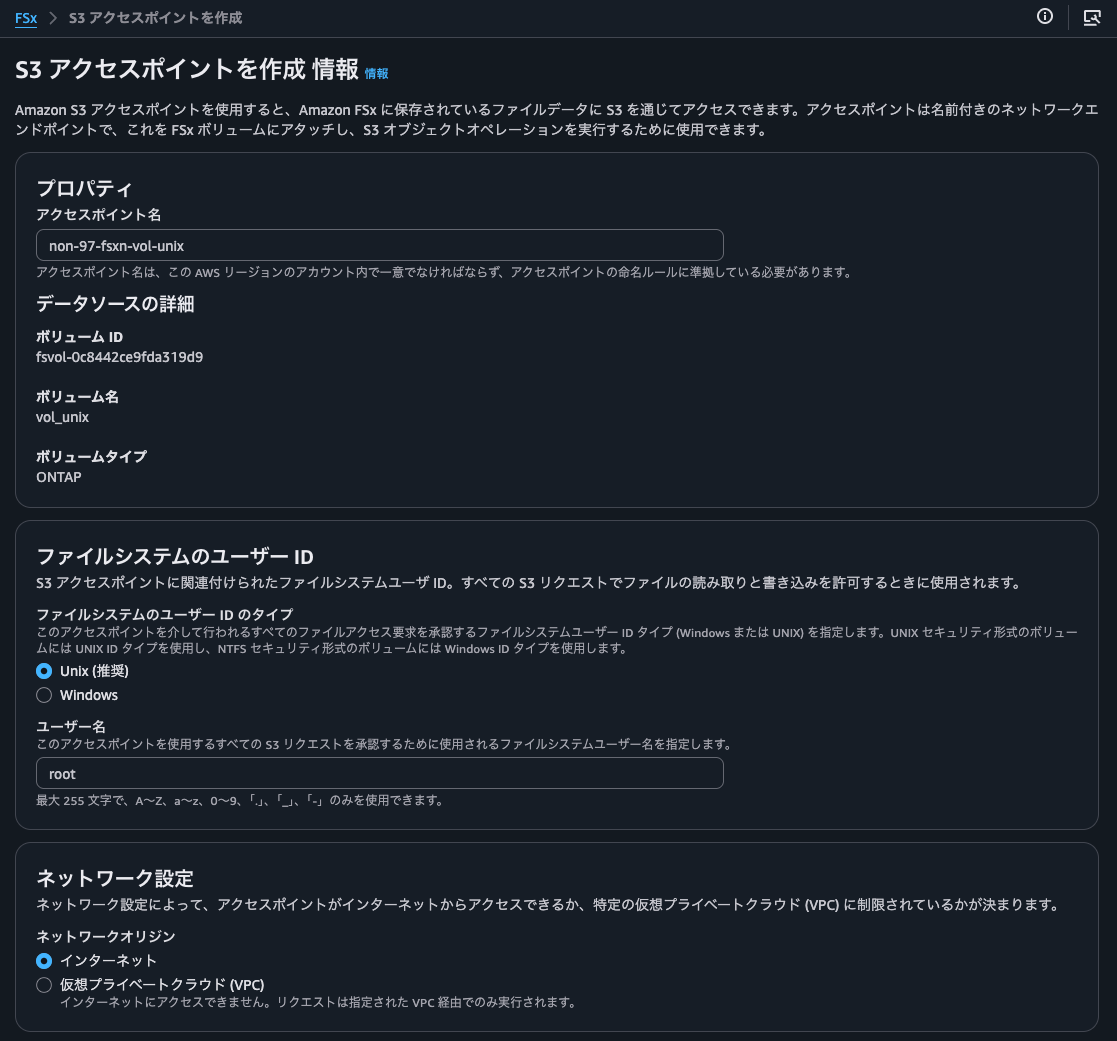
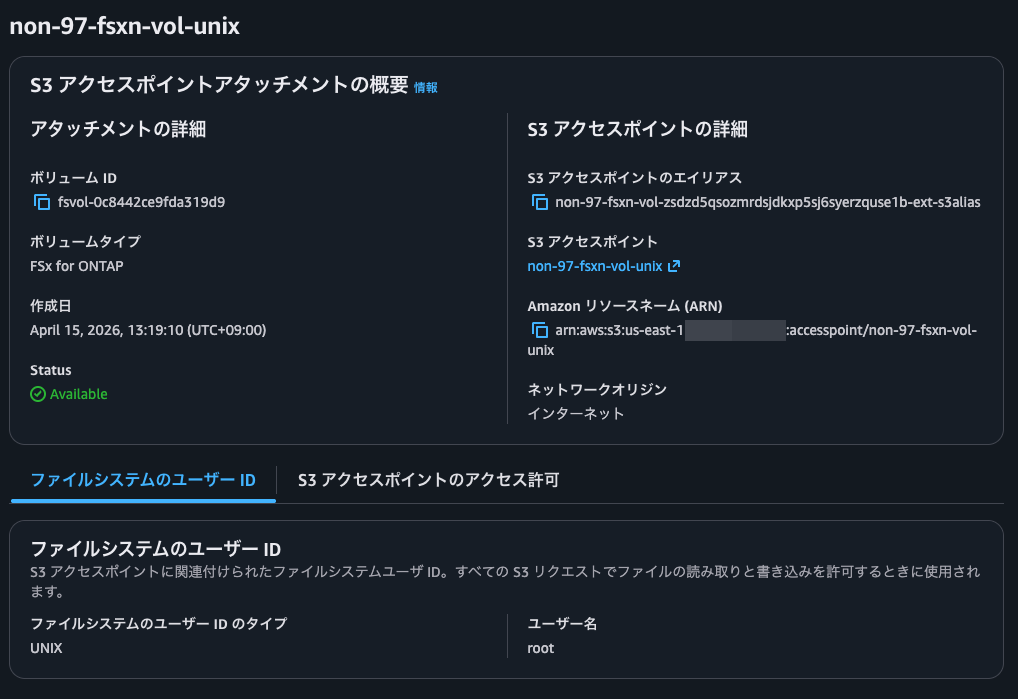
This was also created successfully.
For reference, checking with the same ONTAP CLI command shows:
# Check NSS
::*> vserver services name-service ns-switch show
                               Source
Vserver         Database       Order
--------------- ------------   ---------
svm             hosts          files,
                               dns
svm             group          files
svm             passwd         files
svm             netgroup       files
svm             namemap        files
5 entries were displayed.

# Check root user
::*> vserver services access-check authentication show-creds -node FsxId0f6a3b21513fb2e32-01 -vserver svm -unix-user-name root  -show-partial-unix-creds true

 UNIX UID: root <>

 GID: daemon
 Supplementary GIDs:
  daemon

# Check with root UID
::*> vserver services access-check authentication show-creds -node FsxId0f6a3b21513fb2e32-01 -vserver svm -uid 0  -show-partial-unix-creds true

 UNIX UID: root <>

 GID: daemon
 Supplementary GIDs:
  daemon

# Check with a non-existent user
::*> vserver services access-check authentication show-creds -node FsxId0f6a3b21513fb2e32-01 -vserver svm -unix-user-name ssm-user

Vserver: svm (internal ID: 4)

Error: Acquire UNIX credentials procedure failed
  [  1 ms] Entry for user-name: ssm-user not found in the current
           source: FILES. Entry for user-name: ssm-user not found in
           any of the available sources
**[     2] FAILURE: Unable to retrieve UID for UNIX user ssm-user

Error: command failed: Failed to resolve user name to a UNIX ID. Reason: "SecD Error: object not found".
Creating Bedrock Knowledge Bases Resources with AWS CDK
I'll create Bedrock Knowledge Bases resources using AWS CDK.
I'll specify the two S3 Access Points I created earlier:
export const appConfig: AppConfig = {
  vectorBucketName: "non-97-bedrock-kb-vectors",
  s3AccessPoints: [
    {
      alias:
        "arn:aws:s3:::non-97-fsxn-vol-zsdzd5qsozmrdsjdkxp5sj6syerzquse1b-ext-s3alias",
      arn: "arn:aws:s3:us-east-1:<AWSAccountID>:accesspoint/non-97-fsxn-vol-unix",
    },
    {
      alias:
        "arn:aws:s3:::non-97-fsxn-vol-ckrnrkqm9ufbcc7daz8tx91qajtk1use1b-ext-s3alias",
      arn: "arn:aws:s3:us-east-1:<AWSAccountID>:accesspoint/non-97-fsxn-vol-ntfs-fsxadmin",
    },
  ],
  syncSchedule: "rate(1 hour)",
};
I'm specifying both the S3 Access Point alias and ARN because of format validation requirements for Bedrock Knowledge Bases data sources and IAM policy Resource statements.
Ideally, I'd prefer to use just one format. However, IAM policies don't allow specifying aliases as shown below:
{
    "Version":"2012-10-17",
    "Statement": [
    {
        "Effect": "Allow",
        "Principal": {
            "AWS": "arn:aws:iam::123456789012:user/Jane"
        },
        "Action": ["s3:GetObject", "s3:PutObject"],
        "Resource": "arn:aws:s3:us-west-2:123456789012:accesspoint/my-access-point/object/Jane/*"
    }]
}
Excerpt from: Configuring IAM policies for using access points - Amazon Simple Storage Service
This is also mentioned in the FSxN documentation:
Access denied by default S3 Access Point permissions in automatically created service roles
Some S3-integrated AWS services create custom service roles with attached permissions tailored for specific use cases. When specifying S3 access point aliases as S3 resources, the attached permissions may include access points in bucket ARN format (e.g., arn:aws:s3:us-east-1:1234567890:accesspoint/my-fsx-ap) rather than access point ARN format (e.g., arn:aws:s3:::my-fsx-ap-foo7detztxouyjpwtu8krroppxytruse1a-ext-s3alias). To resolve this, modify the policy to use the access point ARN.
On the other hand, when specifying an S3 bucket in Bedrock Knowledge Bases data sources, the S3 Access Point ARN format doesn't match the pattern and causes an error:
BucketArn
The Amazon Resource Name (ARN) of the S3 bucket that contains your data.
Required: Yes
Type: String
Pattern: ^arn:aws(-cn|-us-gov|-eusc|-iso(-[b-f])?)?:s3:::[a-z0-9][a-z0-9.-]{1,61}[a-z0-9]$
Minimum: 1
Maximum: 2048
Update requires: No interruption
AWS::Bedrock::DataSource S3DataSourceConfiguration - AWS CloudFormation
Syncing Data
Now I'll sync the data.
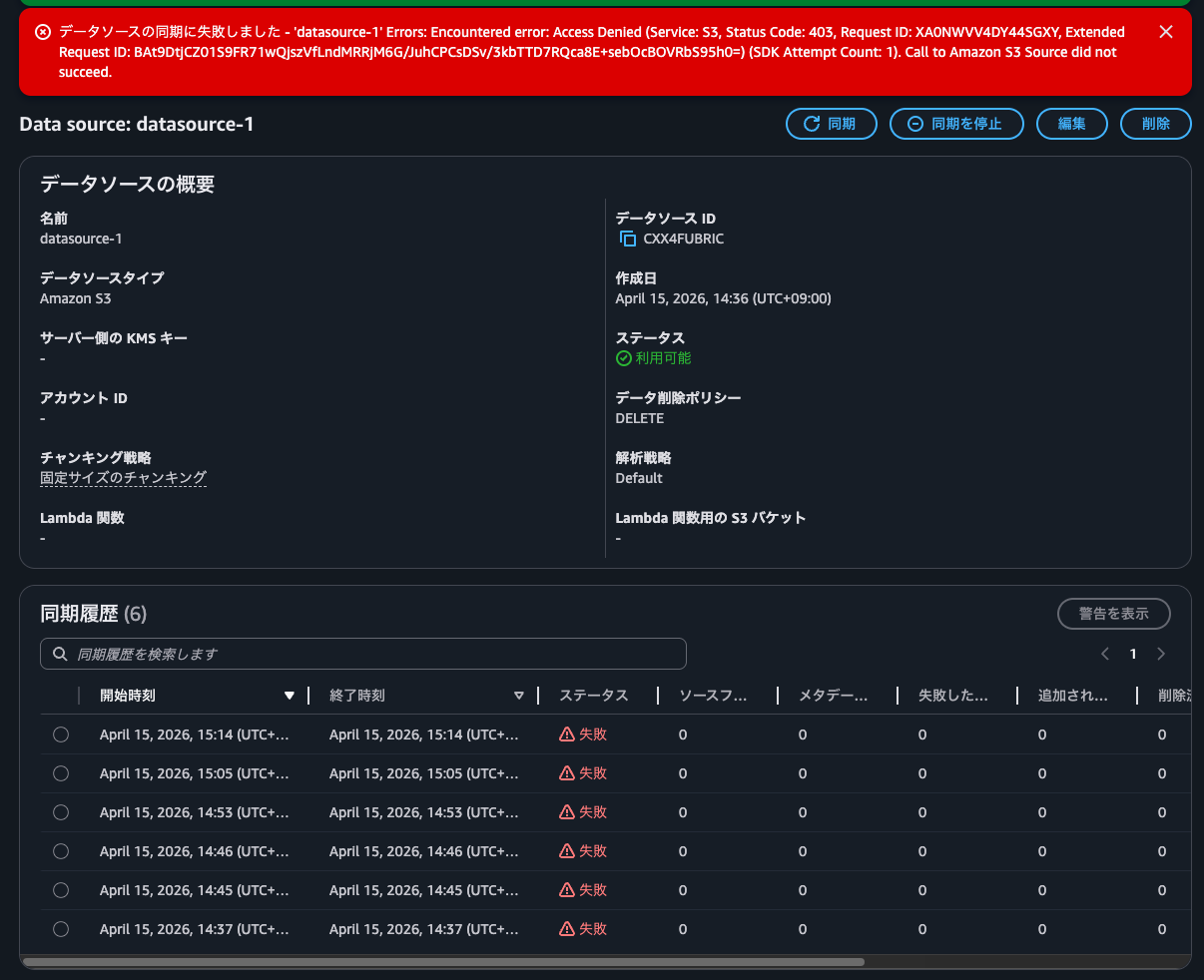
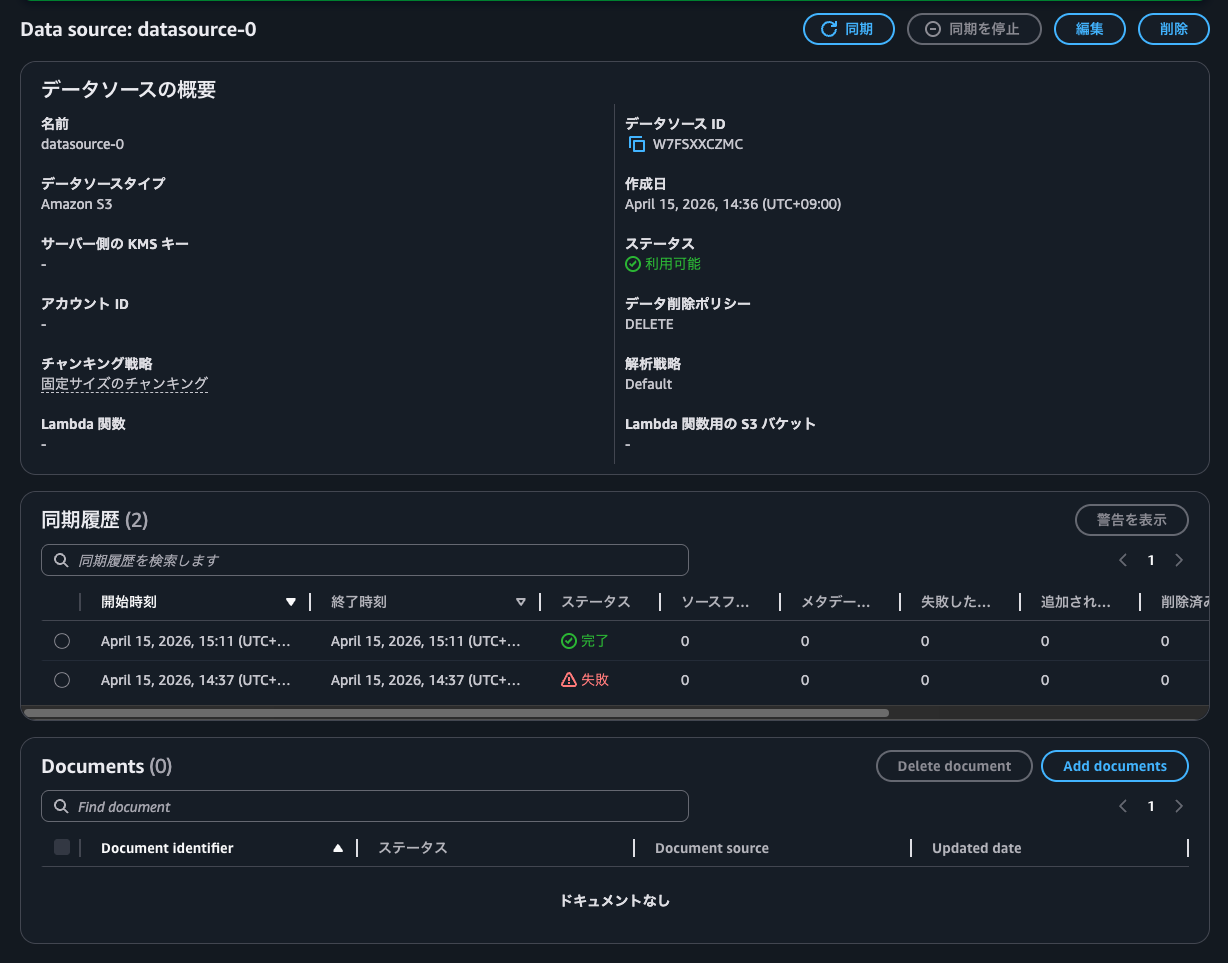
The NTFS-style volume failed with Call to Amazon S3 Source did not succeed, while the UNIX one succeeded.
-
Syncing with the S3 Access Point for NTFS-style volume:
-
Syncing with the S3 Access Point for UNIX-style volume:
After investigating, I found this was because the Windows username in the S3 Access Point contained a backslash (\).
Since Administrator didn't work as seen earlier, I'll create a domain user belonging to the delegated file system administrators group and create an S3 Access Point without specifying the domain's NetBIOS name.
For more on delegated file system administrators groups, refer to this article:
Here's how I created the domain user and security group:
> New-ADUser `
  -Name "FSxAdmin" `
  -UserPrincipalName "FSxAdmin@corp.non-97.net" `
  -Accountpassword (Read-Host -AsSecureString "AccountPassword") `
  -Path "OU=FSxN,DC=corp,DC=non-97,DC=net" `
  -PasswordNeverExpires $True `
  -Enabled $True

> New-ADGroup `
  -Name FSxAdminGroup `
  -GroupCategory Security `
  -GroupScope Global `
  -Path "OU=FSxN,DC=corp,DC=non-97,DC=net"

> Get-ADGroupMember -Identity FSxAdminGroup

distinguishedName : CN=FSxAdmin,OU=FSxN,DC=corp,DC=non-97,DC=net
name              : FSxAdmin
objectClass       : user
objectGUID        : 60c64b2c-c96c-4c63-843a-d8b175d33ec0
SamAccountName    : FSxAdmin
SID               : S-1-5-21-2619605940-2058633766-932412019-1109
To make the security group part of the delegated file system administrators group, I added it to BUILTIN\Administrators:
::*> cifs users-and-groups local-group add-members -vserver svm -group-name BUILTIN\Administrators -member-names  CORP\FSxAdminGroup

::> cifs users-and-groups local-group show-members
Vserver        Group Name                   Members
-------------- ---------------------------- ------------------------
svm            BUILTIN\Administrators       SVM\Administrator
                                            CORP\Domain Admins
                                            CORP\FSxAdminGroup
               BUILTIN\Guests               CORP\Domain Guests
               BUILTIN\Users                CORP\Domain Users
3 entries were displayed.
Now I'll check if the created domain user FSxAdmin can be recognized without concatenating the domain NetBIOS name with a backslash:
::*> vserver services access-check authentication show-creds -node FsxId0f6a3b21513fb2e32-01 -vserver svm -win-name FSxAdmin -show-partial-unix-creds true

 UNIX UID: root <> Windows User: CORP\FSxAdmin (Windows Domain User)

 GID: daemon
 Supplementary GIDs:
  daemon

 Primary Group SID: CORP\Domain Users (Windows Domain group)

 Windows Membership:
  CORP\FSxAdminGroup (Windows Domain group)
  CORP\Domain Users (Windows Domain group)
  Service asserted identity (Windows Well known group)
  BUILTIN\Administrators (Windows Alias)
  BUILTIN\Users (Windows Alias)
 User is also a member of Everyone, Authenticated Users, and Network Users

 Privileges (0x22b7):
  SeBackupPrivilege
  SeRestorePrivilege
  SeTakeOwnershipPrivilege
  SeSecurityPrivilege
  SeChangeNotifyPrivilege
It can be recognized properly.
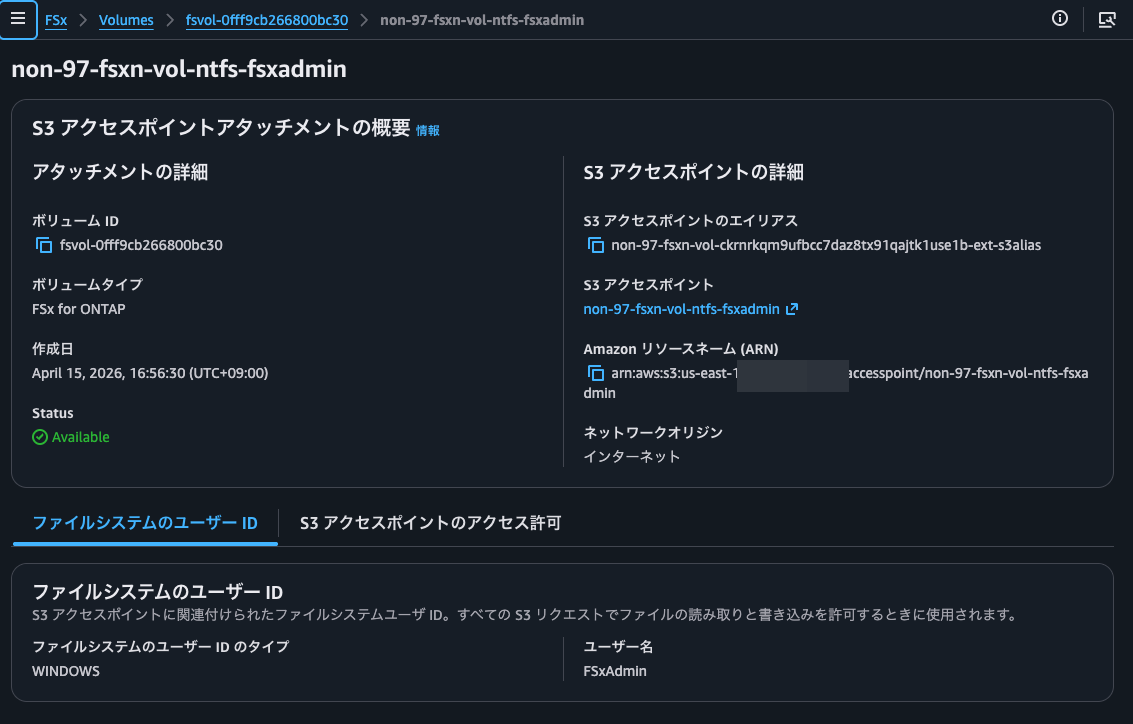
Now I'll create the S3 Access Point again:
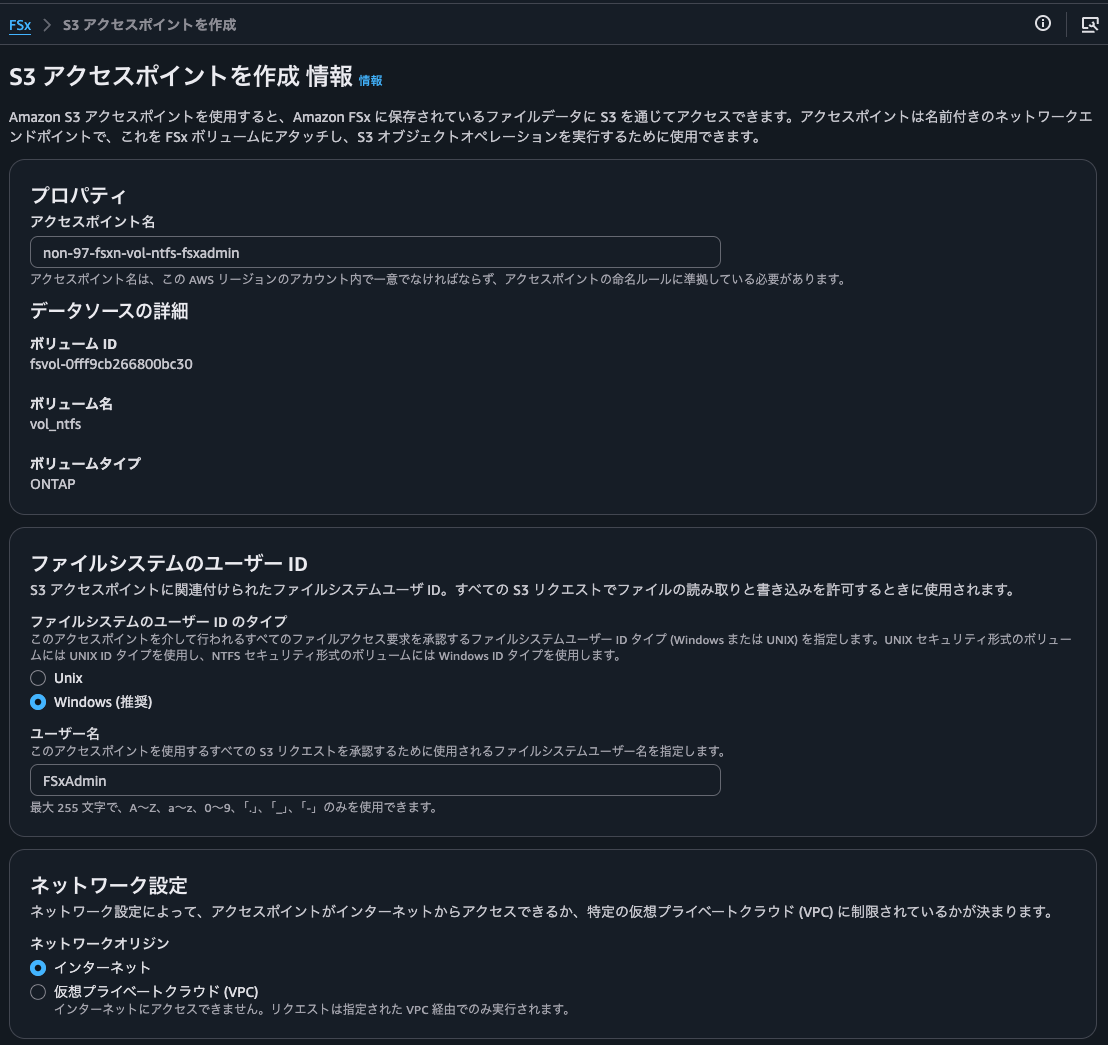
Creation successful:
Now I'll try syncing with this:
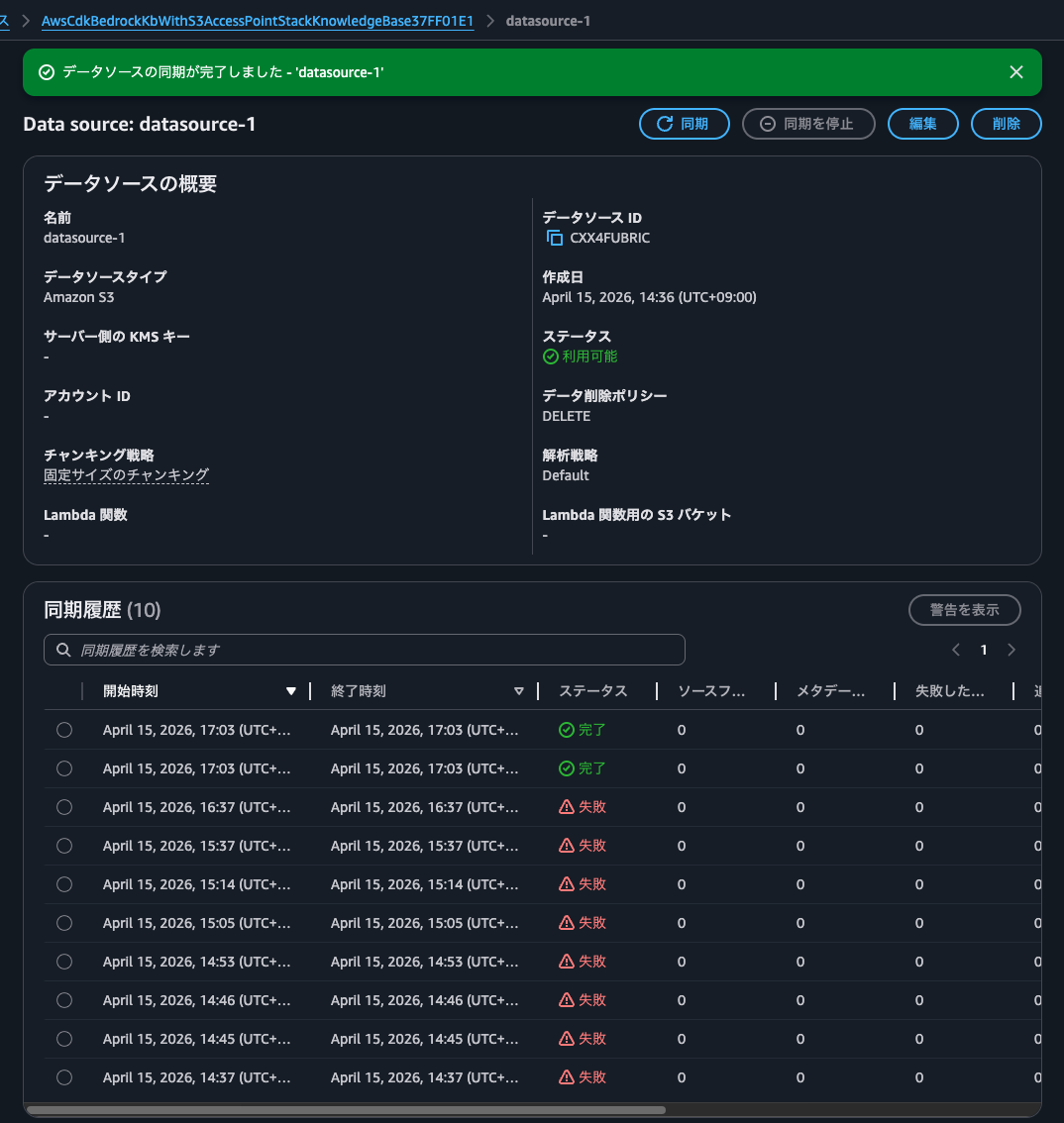
Syncing worked! Success!
After synchronization, I found that objects with keys following the pattern aws/bedrock/knowledge_bases/<knowledge base ID>/<data source ID>/ were created in the S3 bucket specified for multimodal storage, one for each image file.
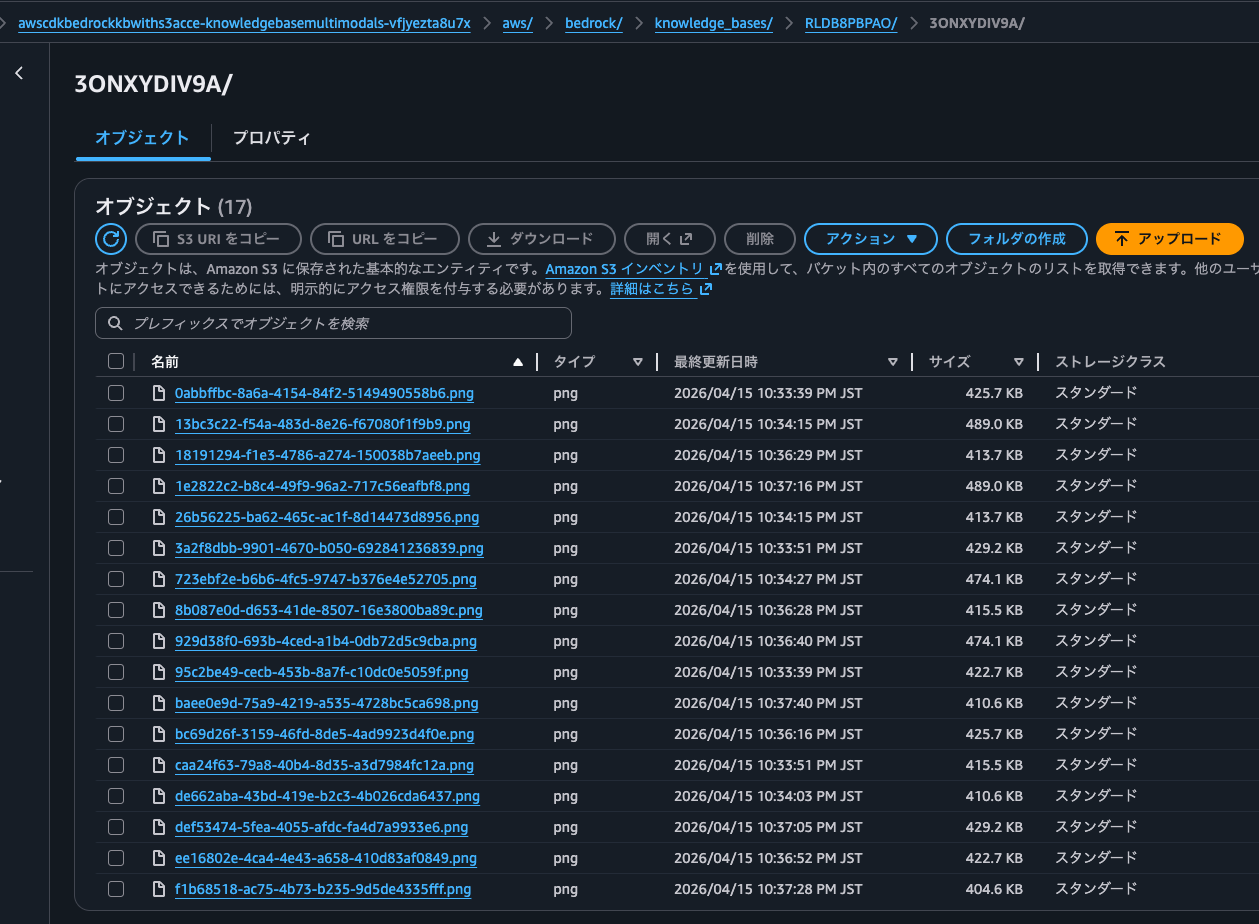
Opening 18191294-f1e3-4786-a274-150038b7aeeb.png shows it's a normal image file:

The AWS official documentation explains that images are stored in multimodal storage:
Nova Multimodal Embeddings
Required: You must configure a multimodal storage destination. This destination stores copies of your multimedia files for retrieval and ensures availability even if source files are modified or deleted.
Prerequisites for multimodal knowledge bases - Amazon Bedrock
By the way, it's recommended to allocate a separate S3 bucket for multimodal storage from your data source:
Multimodal storage destination configuration
When configuring your multimodal storage destination, consider the following:
Use separate buckets (recommended): Configure different Amazon S3 buckets for your data source and multimodal storage destination. This provides the simplest setup and avoids potential conflicts.
If using the same bucket: You must specify an inclusion prefix for your data source that limits which content is ingested. This prevents re-ingesting extracted media files.
Avoid "aws/" prefix: When using the same bucket for both data source and multimodal storage destination, do not use inclusion prefixes starting with "aws/" as this path is reserved for extracted media storage.
Operation Check
Let's perform an operational check.
I'll place the following text file on a volume with NTFS security style via SMB.
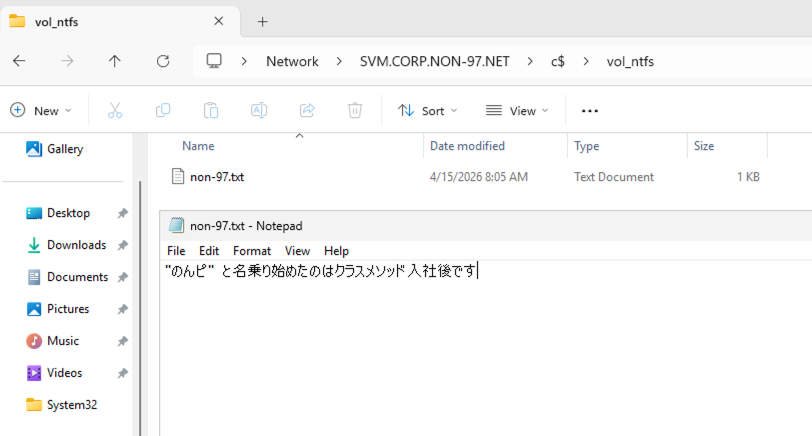
Now let's synchronize again. Since we have the opportunity, let's do it via Step Functions.
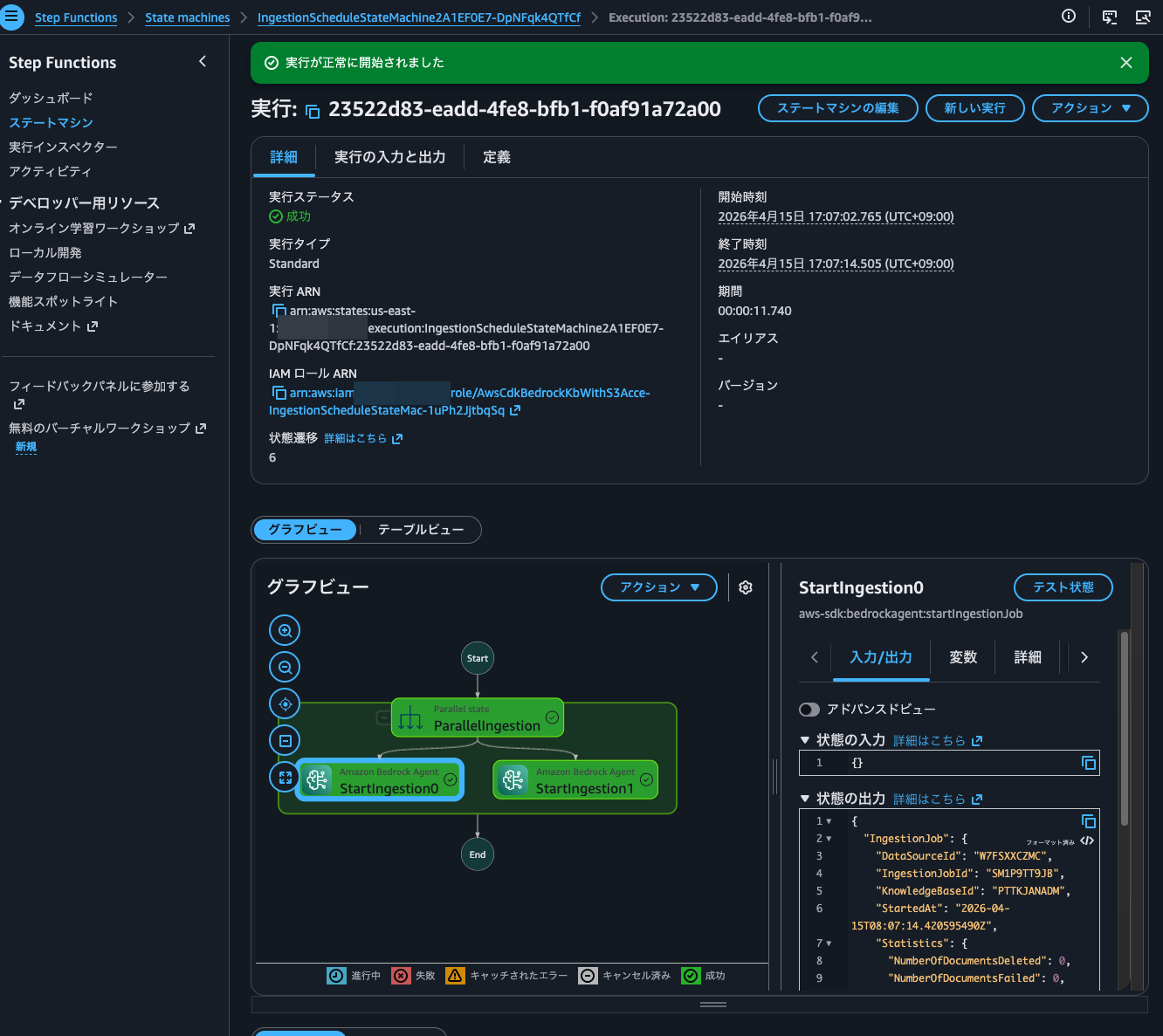
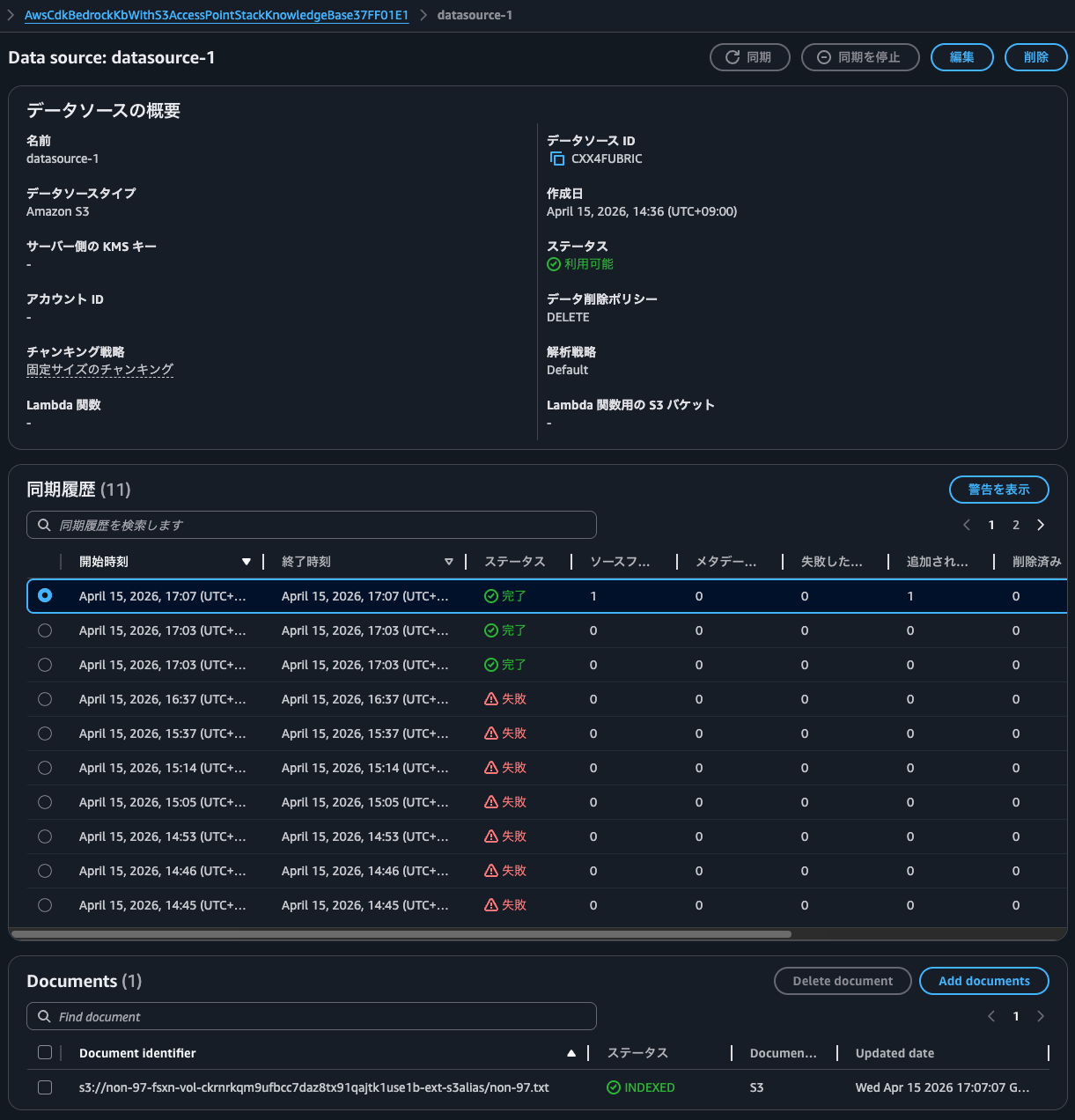
When checking the synchronization history, I confirmed that the file I just placed was synchronized.
Let's ask a question.
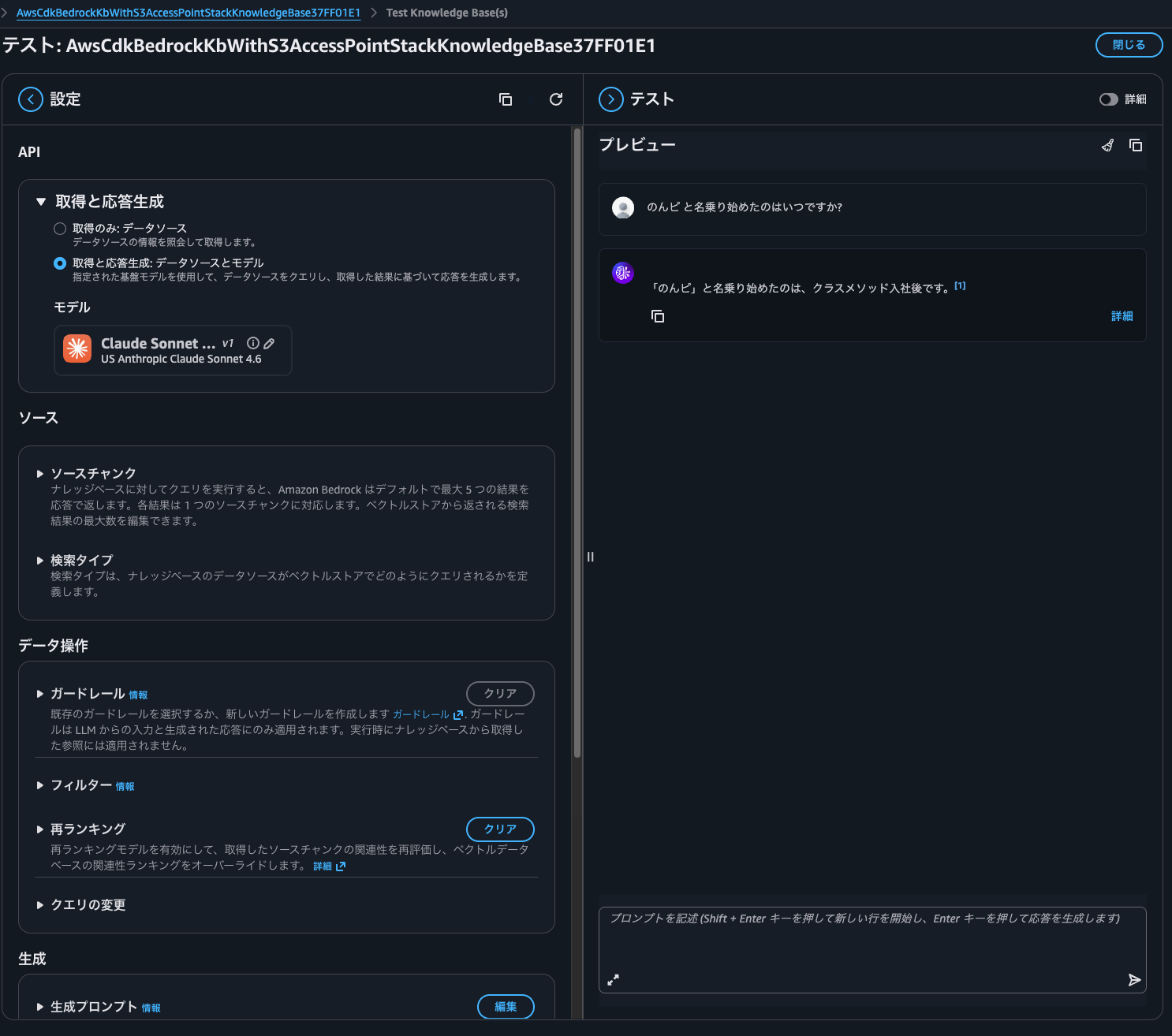
There was an answer based on the file content.
Since we're using Amazon Nova Multimodal Embeddings as the embedding model, let's also perform image searches.
For details on Amazon Bedrock Knowledge Bases multimodal search, please see the following article.
I placed photos of koalas, elephants, and other animals I took at the zoo on the FSxN volume.
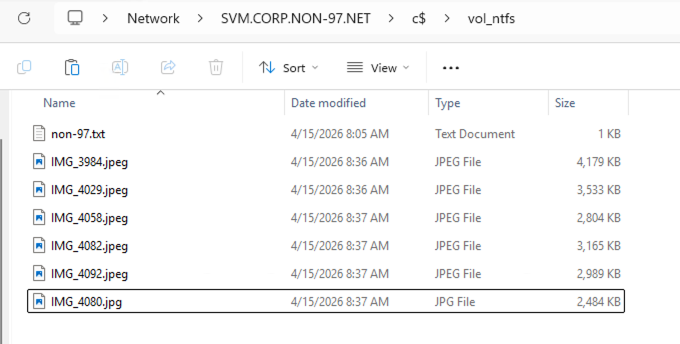
After synchronizing, some files failed to sync as shown below.
| Error warning |
|---|
| Encountered error: Unknown failure code: UNKNOWN [Files: null, null]. Call to Customer Source did not succeed. |
| Encountered error: Ignored 2 files as their file format was not supported. [Files: s3://non-97-fsxn-vol-ckrnrkqm9ufbcc7daz8tx91qajtk1use1b-ext-s3alias/IMG_2970.jpeg, s3://non-97-fsxn-vol-ckrnrkqm9ufbcc7daz8tx91qajtk1use1b-ext-s3alias/IMG_3540.jpeg]. Call to Customer Source did not succeed. |
| Encountered error: Ignored 1 files as their file format was not supported. [Files: s3://non-97-fsxn-vol-ckrnrkqm9ufbcc7daz8tx91qajtk1use1b-ext-s3alias/IMG_1493.jpeg]. Call to Customer Source did not succeed. |
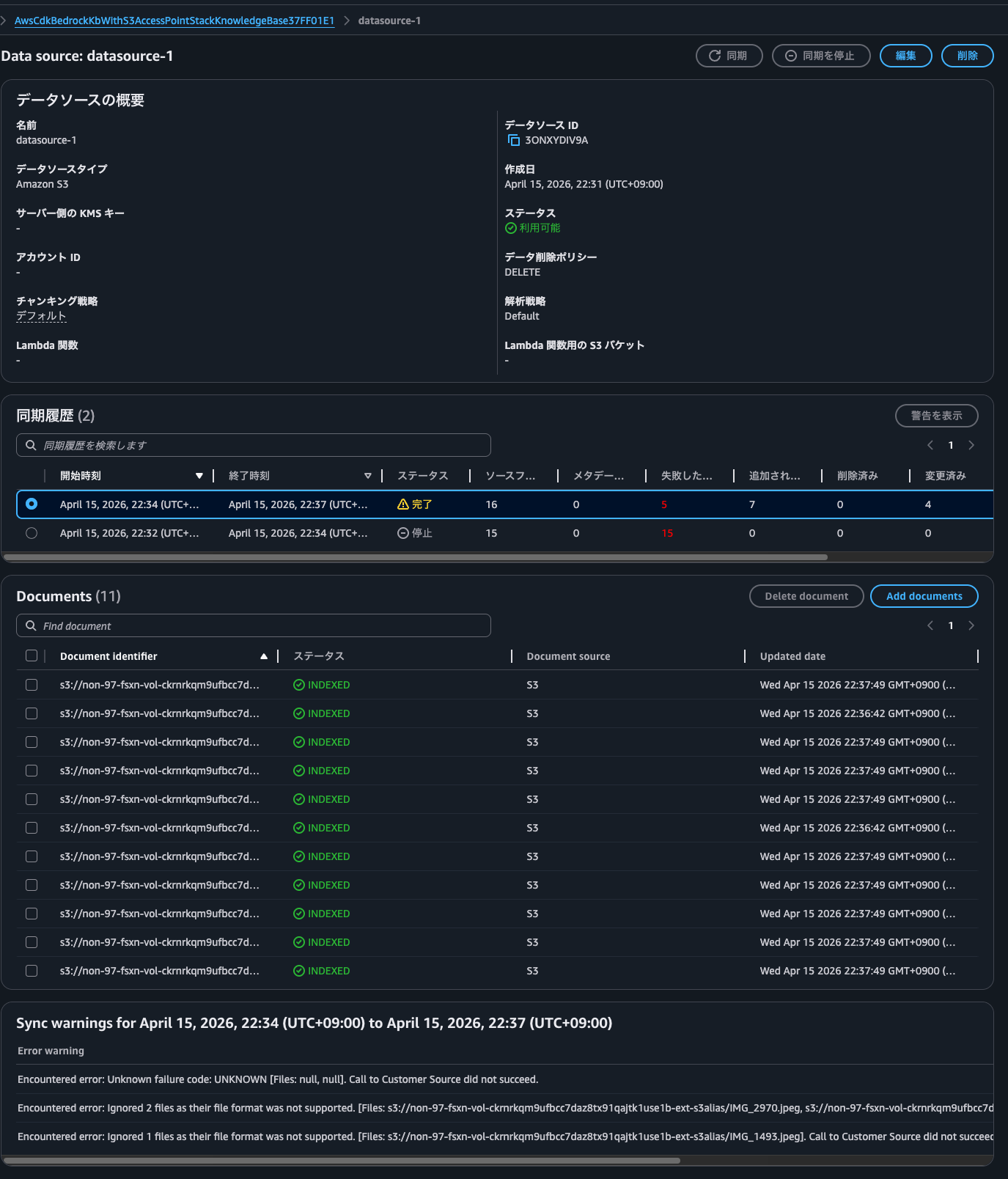
These files fail no matter how many times I synchronize, so there might be some cause.
It's a mystery since they don't seem to violate the various limitations mentioned in the documentation, such as image file size.
When you connect to a supported data source, the content is ingested into your knowledge base.
If you use Amazon S3 to store your files or your data source includes attached files, then you first must check that each source document file adheres to the following:
- The source files are of the following supported formats:
Format Extension Plain text (ASCII only) .txt Markdown .md HyperText Markup Language .html Microsoft Word document .doc/.docx Comma-separated values .csv Microsoft Excel spreadsheet .xls/.xlsx Portable Document Format
- Each file size doesn't exceed the quota of 50 MB.
If you use an Amazon S3 or custom data source, you can use multimodal data, including JPEG (.jpeg) or PNG (.png) images or files that contain tables, charts, diagrams, or other images.
Note
The maximum size of .JPEG and .PNG files is 3.75 MB.
Prerequisites for your Amazon Bedrock knowledge base data - Amazon Bedrock
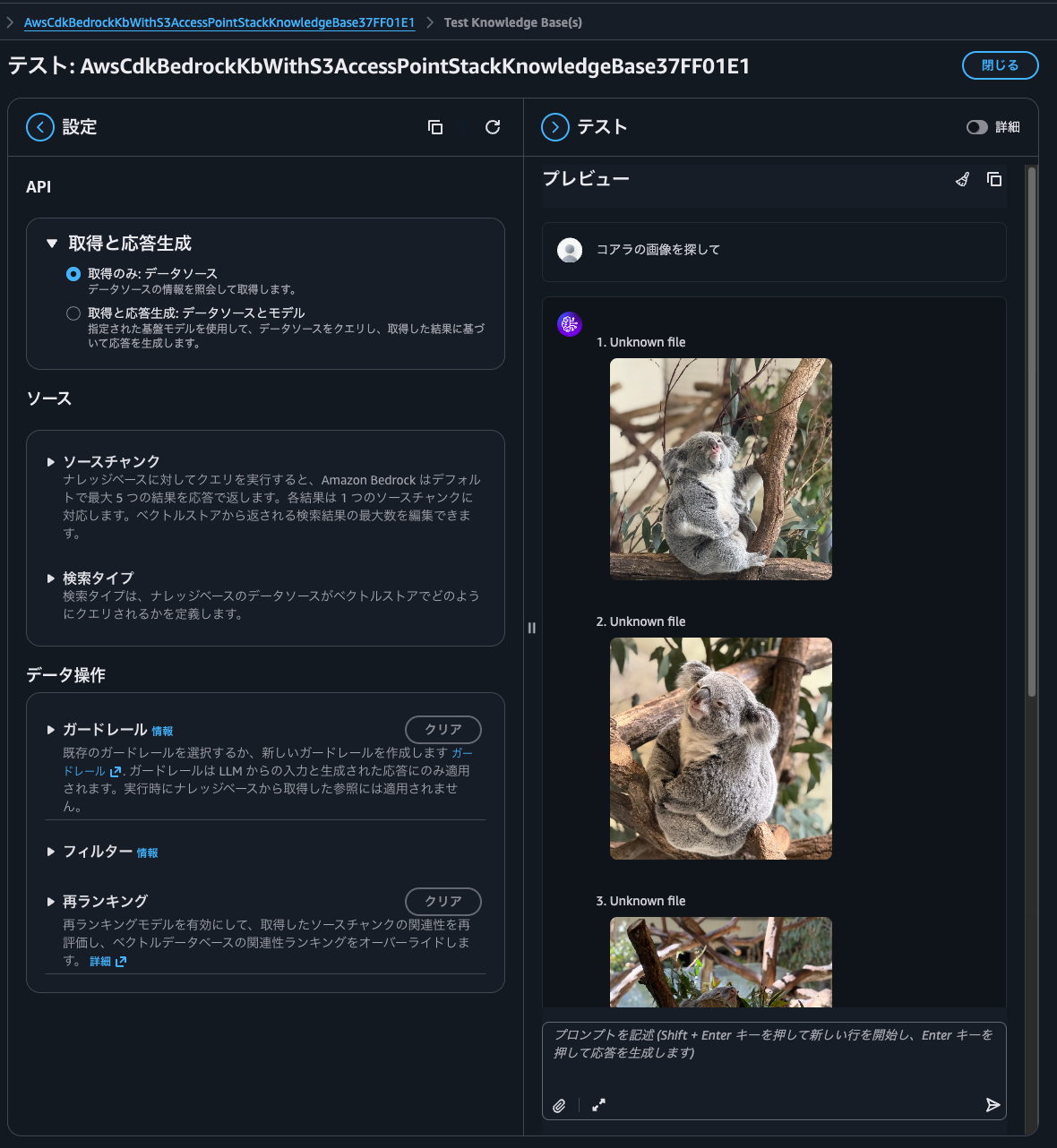
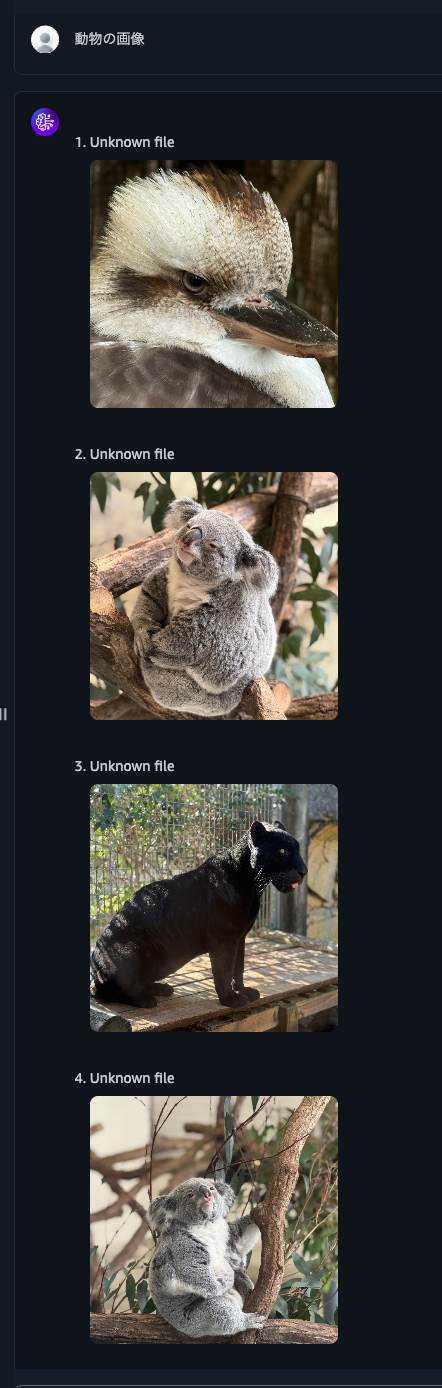
When I asked "find koala images," it indeed returned only koala images.
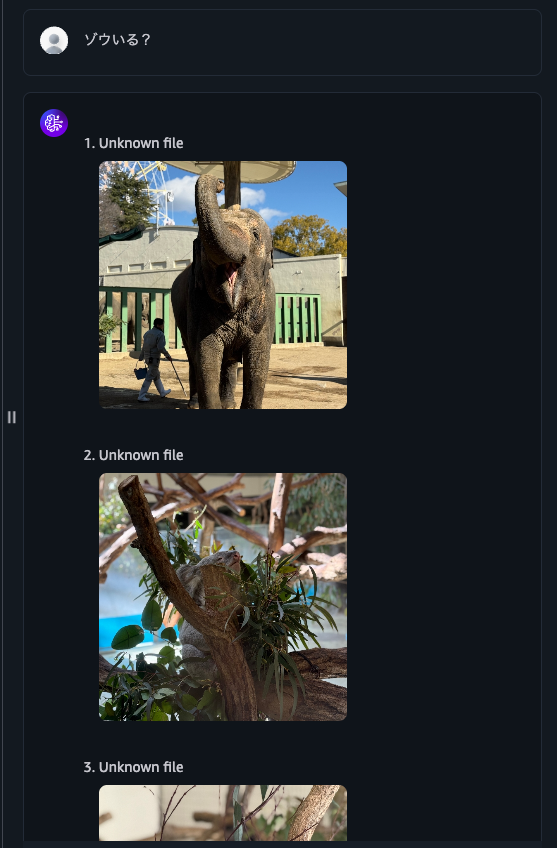
Next, when I asked "Are there elephants?", it returned elephant images but also koala images. It seems the gray color makes identification difficult.
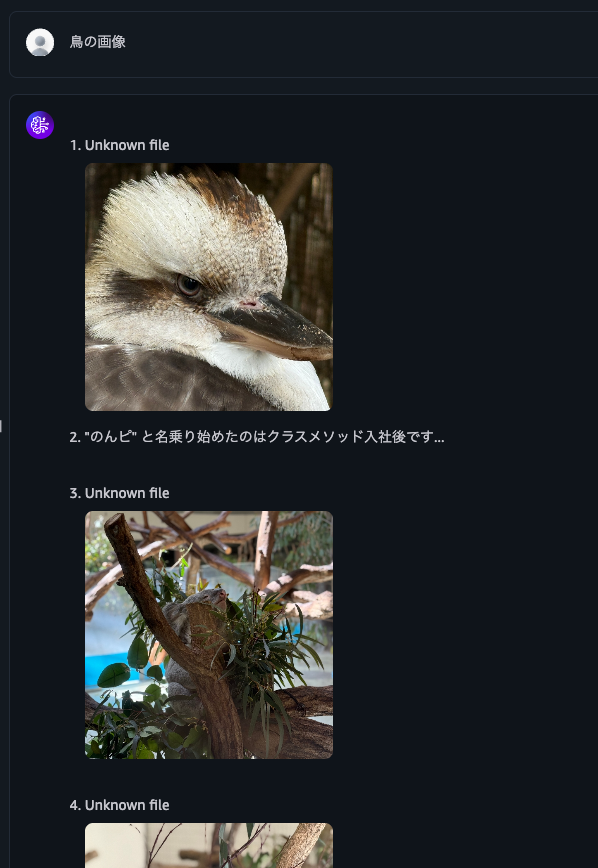
When I asked for "bird images", it returned bird images, koala images, and text files.
I'd like to improve accuracy with reranking, but currently, rerank models don't support multimodal content.
Reranker model limitations: Reranker models are not supported for multimodal content
To improve accuracy, it seems we need to select a foundation model rather than the default parser.
When I asked for "animal images," it returned various animal images.
Let me also query about the contents of a PDF file. The data I've saved is from the following presentation materials converted to PDF.
Now I'll ask about my favorite AWS services that I always include in my self-introduction.
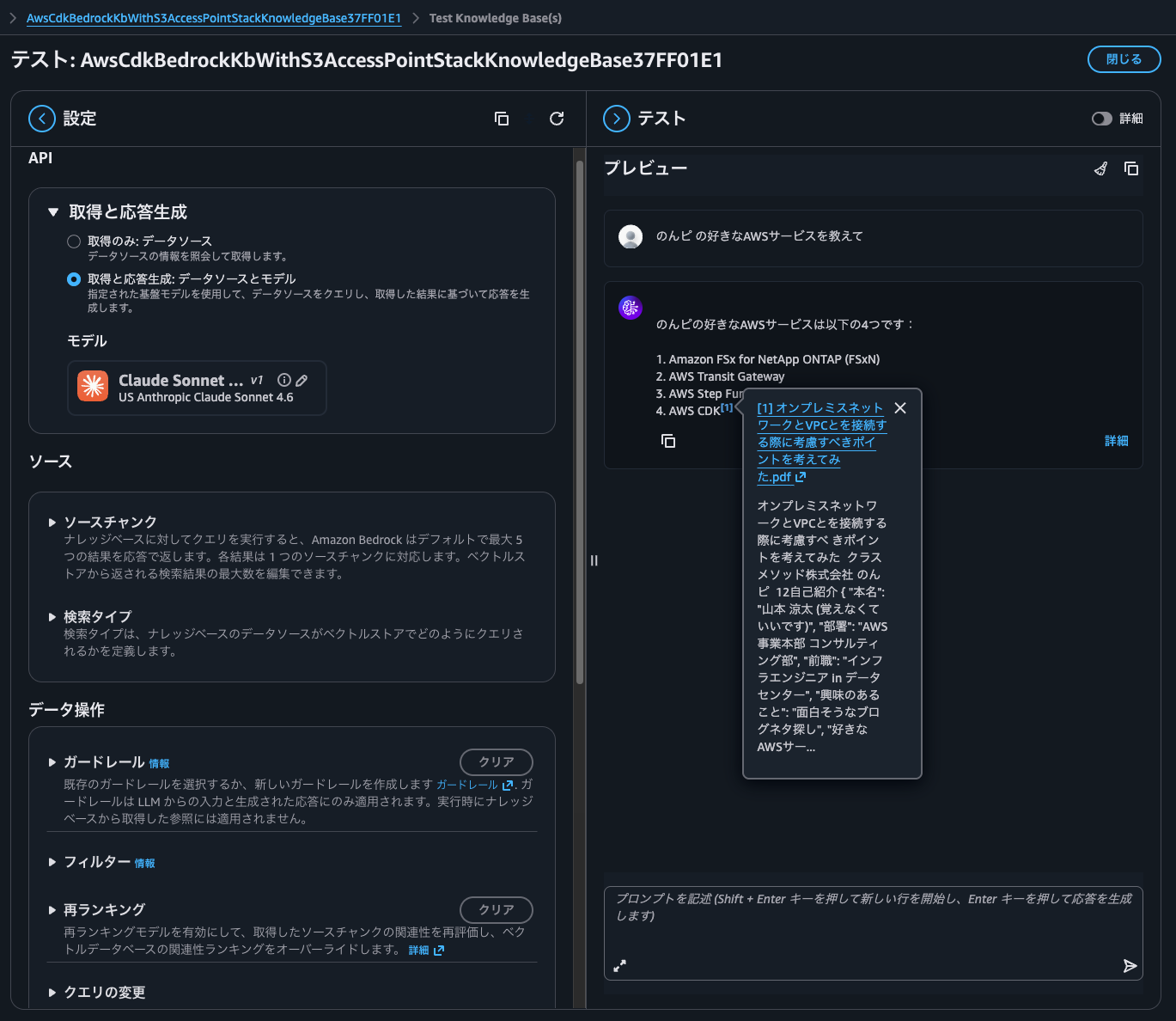
It answered with the source information, which is good.
I'll also ask "What are the key points to consider when connecting on-premises networks to VPC?"
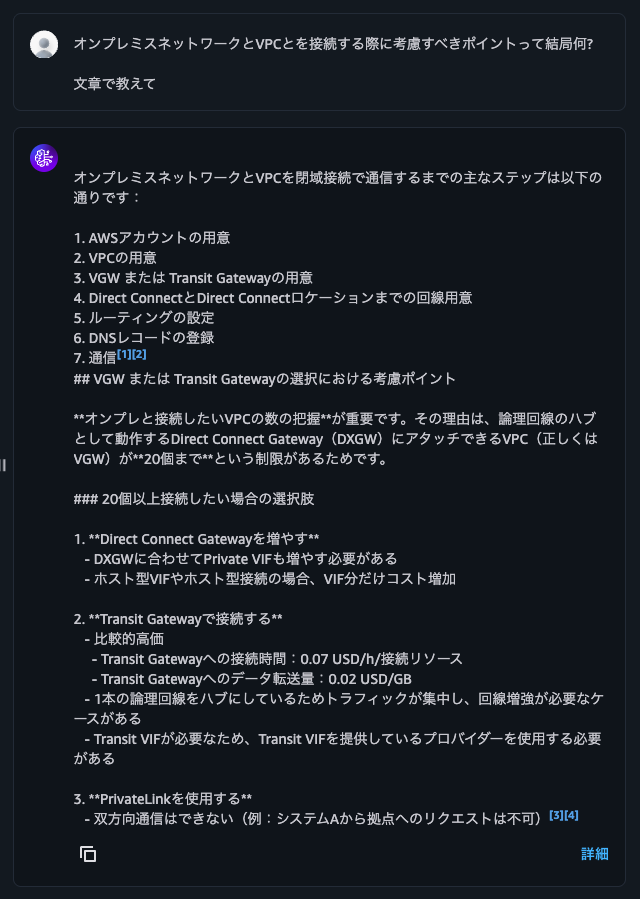
It gave me a reasonable response based on the PDF file contents.
Let me also query information about files placed on a volume with UNIX security style. The synchronized file contains names of koalas that I like.
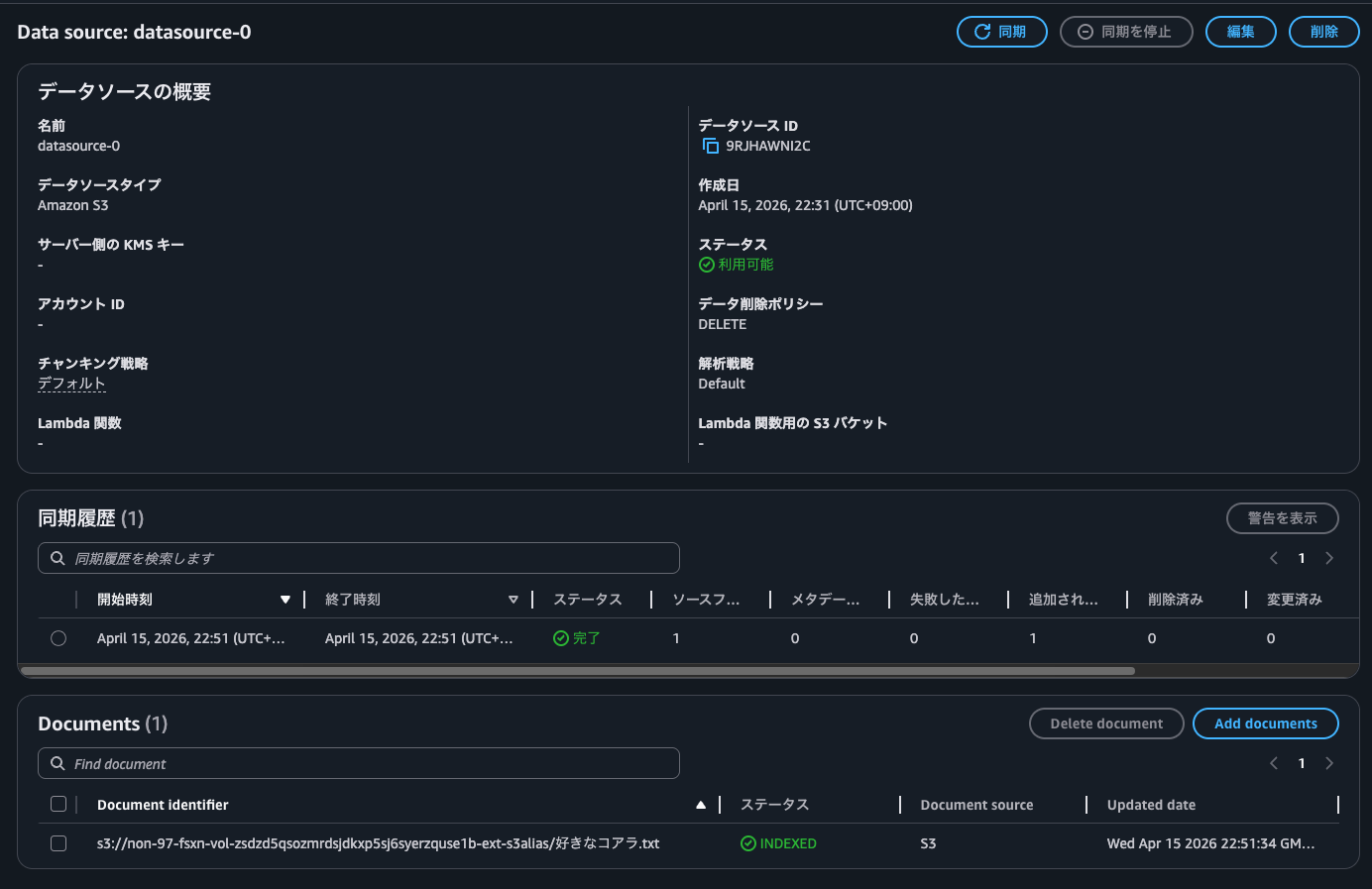
When I queried, I got "Unable to generate response as the retrieved content contains non-text data".
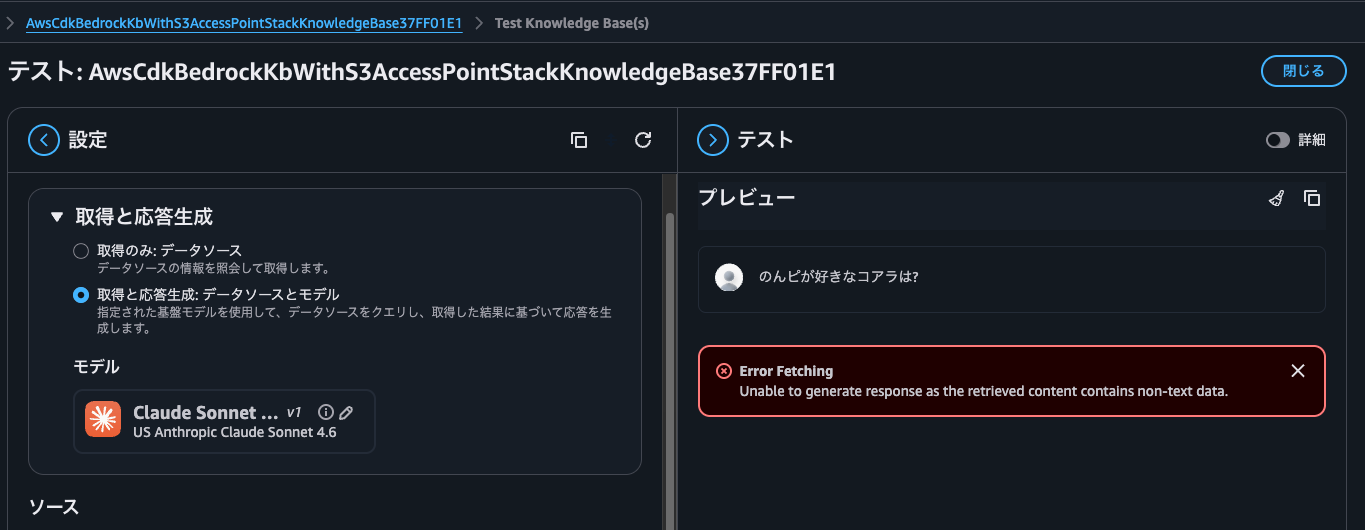
This is because the information that matched the answer contains not only text but also images. In other words, it's because I placed koala images on the NTFS volume and synchronized them.
Since I want to return only text and not images this time, I'll filter the source file format x-amz-bedrock-kb-source-file-modality to TEXT and make the same query again.
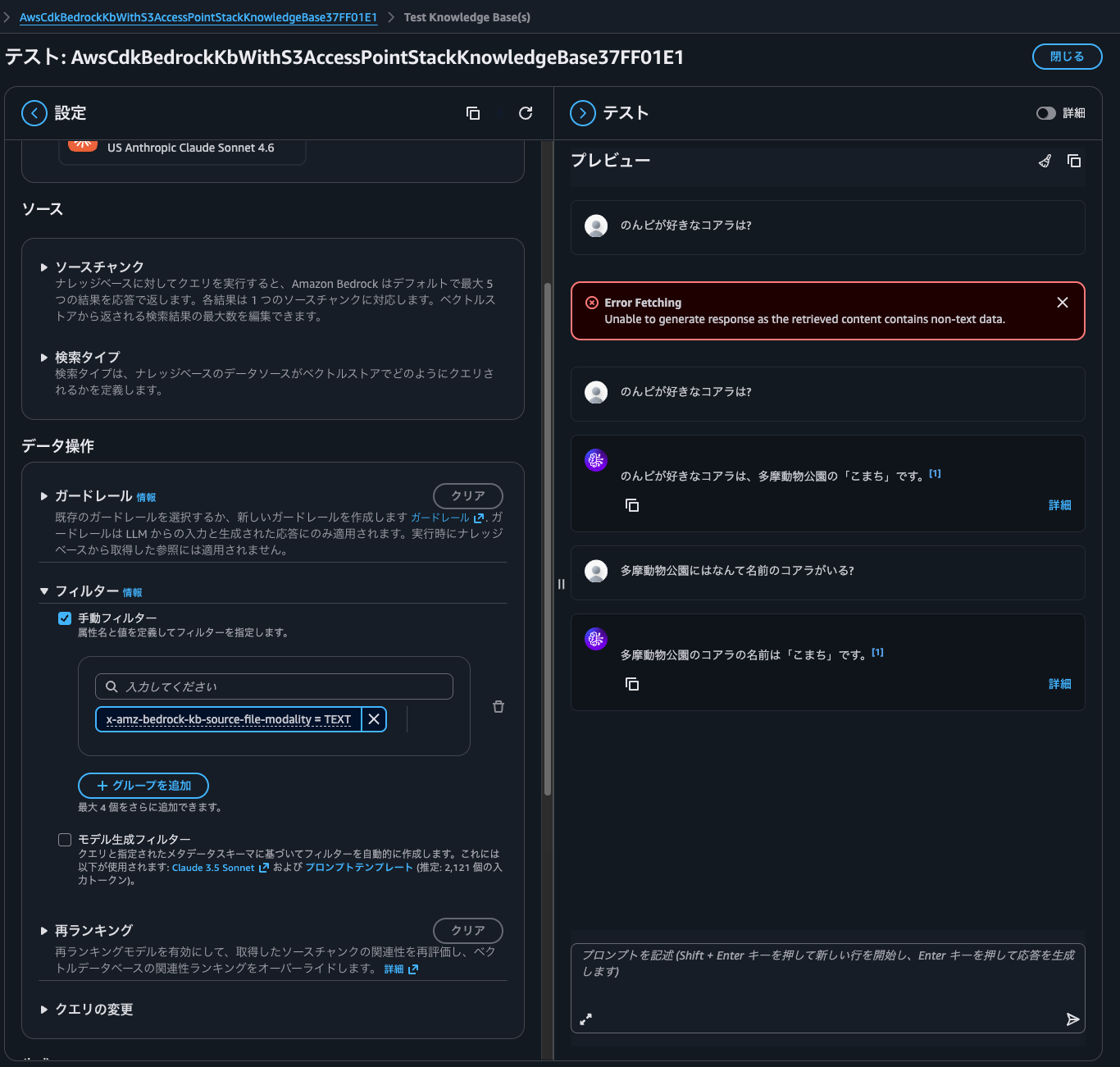
Now I got a proper response.
Let's Integrate Various AWS Services Using S3 Access Points
I've demonstrated how to integrate data within Amazon FSx for NetApp ONTAP with Bedrock Knowledge Bases via S3 Access Points.
Moving data from on-premises to AWS is common due to availability, operational maintenance, and other factors. Using this feature allows you to advance data utilization as well.
This time I used Bedrock Knowledge Bases, but you can also analyze structured files with Athena, perform ETL processing with Glue, or integrate with SaaS services like Snowflake and Databricks.
Let's try connecting various AWS services using S3 Access Points. As of April 19, 2026, FSx for Windows File Server doesn't offer this feature or similar functionality, so if you want to manipulate data stored on SMB file servers using the S3 API, you'll need to choose FSxN.
With FSxN, you can synchronize data differences at the block level using SnapMirror, so if you're using ONTAP on-premises, it's nice that you don't need to use DataSync for data utilization. Being able to synchronize storage-to-storage means you don't need to add a DataSync Agent as an additional component, which is beneficial in terms of performance, cost, and operational burden.
Note that some S3 API operations such as object copying are not yet supported. Please check the following documentation.
Other precautions are the same as for the S3 Access Point feature of FSx for OpenZFS. For details, please see the following article.
I hope this article helps someone.
That's all from nonpi (@non____97) of the Consulting Department, Cloud Business Division!
