![[Quick Tip] Why You Should Set EnablePerformanceInsights = true When Creating Amazon RDS with IaC](https://devio2024-media.developers.io/image/upload/f_auto,q_auto,w_3840/f_auto,q_auto/v1790869602/eyecatch/q1exussjxzltgdgujrkq.png)
[Quick Tip] Why You Should Set EnablePerformanceInsights = true When Creating Amazon RDS with IaC

This page has been translated by machine translation. View original
I'm Shibata.
As the title says, I ran into a minor snag when creating an Amazon RDS instance using IaC, so I'd like to share it in this article.
Background
The premise of this article is that, from the end of last year into this year, RDS Performance Insights was integrated into CloudWatch Database Insights.
As I recall, this integration did not proceed as scheduled and was postponed for a while even after the start of this year.
That said, the integration is now complete, and there are no Performance Insights settings at all on the RDS settings screen in the Management Console.
In this situation, I needed to set up a new RDS environment (RDS for PostgreSQL at the time) for work, so I built the environment using Terraform.
When creating an RDS environment with IaC such as Terraform, the parameters that used to relate to Performance Insights are
- performance_insights_enabled (Terraform)
- EnablePerformanceInsights (CloudFormation)
and both correspond to the EnablePerformanceInsights parameter of the RDS REST API.
At that time, I decided, "Performance Insights is gone now, so this value should just be false," but this setting resulted in unintended behavior.
What Happened
I ran into this with Terraform at the time, but this time I prepared minimal reproduction code using CloudFormation.
AWSTemplateFormatVersion: "2010-09-09"
Description: Amazon RDS for PostgreSQL Sample
Parameters:
  DBSubnetGroupName:
    Type: String
    Description: DB subnet group name
  SecurityGroupID:
    Type: AWS::EC2::SecurityGroup::Id
    Description: RDS Security group ID
Resources:
  # Sample RDS Instance (Single-AZ)
  DBInstance:
    Type: AWS::RDS::DBInstance
    Properties:
      DBInstanceIdentifier: "sample-instance"
      Engine: postgres
      EngineVersion: "18.6"
      DBInstanceClass: "db.t4g.medium"
      DBName: "mydb"
      MasterUsername: "postgres"
      ManageMasterUserPassword: true
      MultiAZ: false
      StorageType: gp3
      AllocatedStorage: 20
      StorageEncrypted: true
      DBSubnetGroupName:
        Ref: DBSubnetGroupName
      VPCSecurityGroups:
        - Ref: SecurityGroupID
      PubliclyAccessible: false
      DeletionProtection: false
      # Database Insights-related settings start here
      DatabaseInsightsMode: "standard"
      EnablePerformanceInsights: false # I thought Performance Insights should be disabled now...
This is a template that creates a Single-AZ RDS for PostgreSQL instance with only the minimum necessary settings.
You need to prepare a security group and a DB subnet group in advance.
What matters in this code is the last part:
# ここからDatabase Insights関連設定
DatabaseInsightsMode: "standard"
EnablePerformanceInsights: false # もうPerformance Insightsは無効で良いと思っていた...
I wrote it this way with the intention of using Database Insights in standard mode and disabling Performance Insights, which I would never use.
The environment created from the template looks like this.
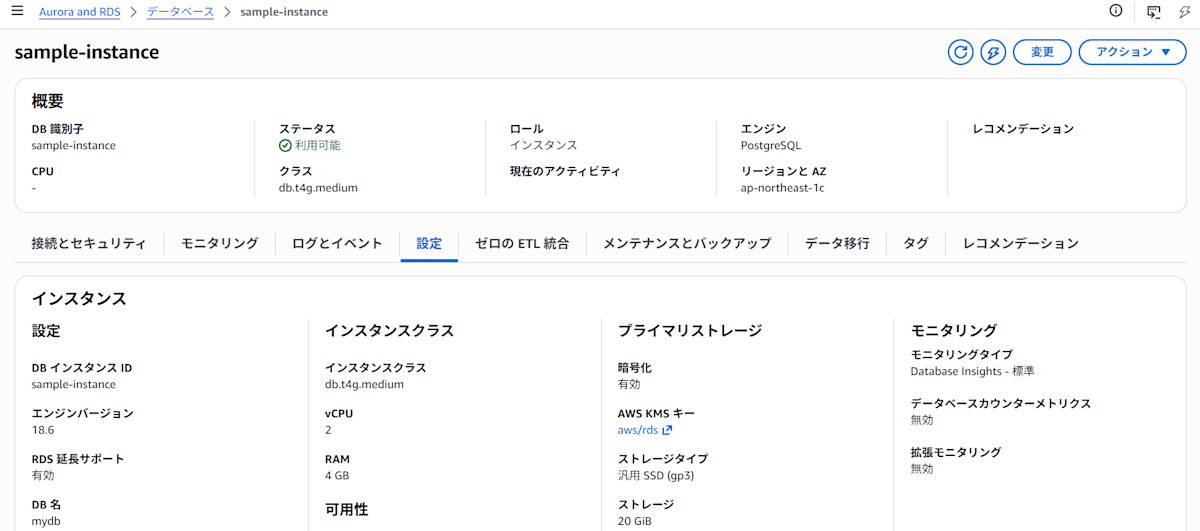
When I checked the "Monitoring" tab of this instance, it showed
To view the database load chart, enable Performance Insights from Modify.
and some metrics were not being collected.
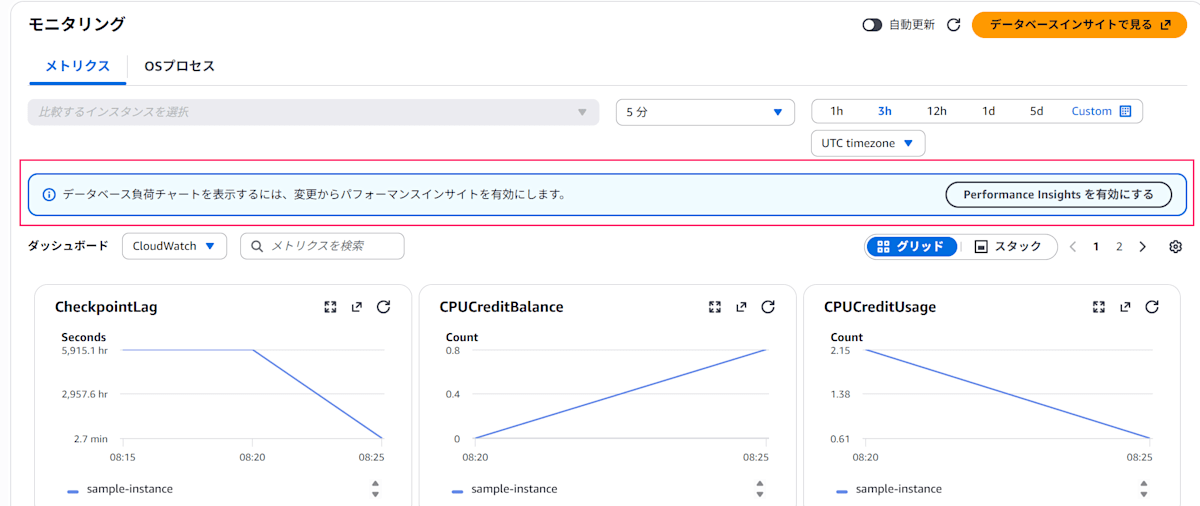
An unintended message is displayed
The "Database load" section of the Database Insights dashboard also looks odd...
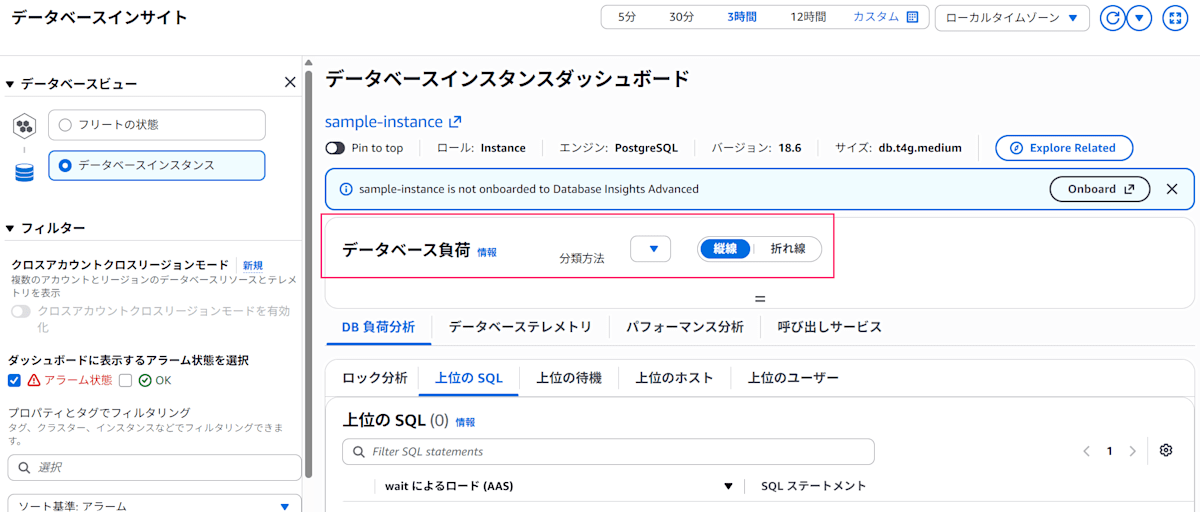
The database load isn't displayed at all...
Solution
I didn't realize this until writing this article, but after Performance Insights was retired, EnablePerformanceInsights changed its role to the "Collect detailed database and per-query metrics" setting, and disabling (unchecking) this option stops the metric collection that Performance Insights traditionally handled.
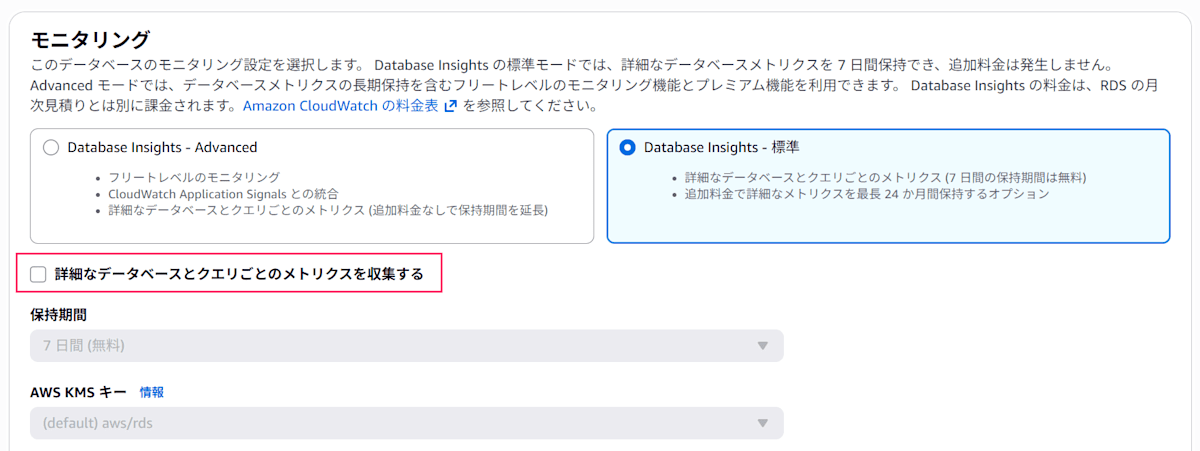
"Collect detailed database and per-query metrics" is disabled
So if you check this "Collect detailed database and per-query metrics" option, the behavior returns to what you expect. This is equivalent to EnablePerformanceInsights = true.
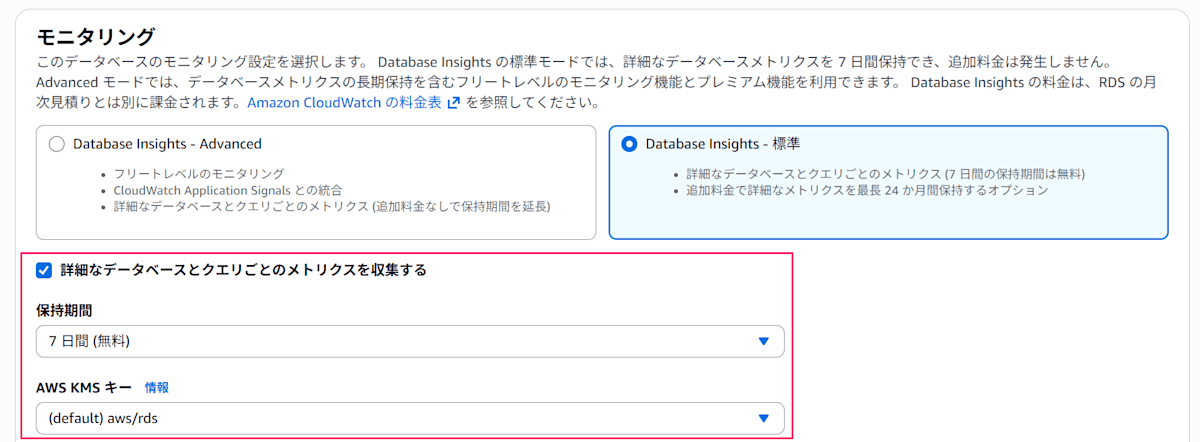
In standard mode, check the box to enable it
Just like when enabling Performance Insights, this setting change can be applied immediately, and it did not cause the RDS instance to restart.
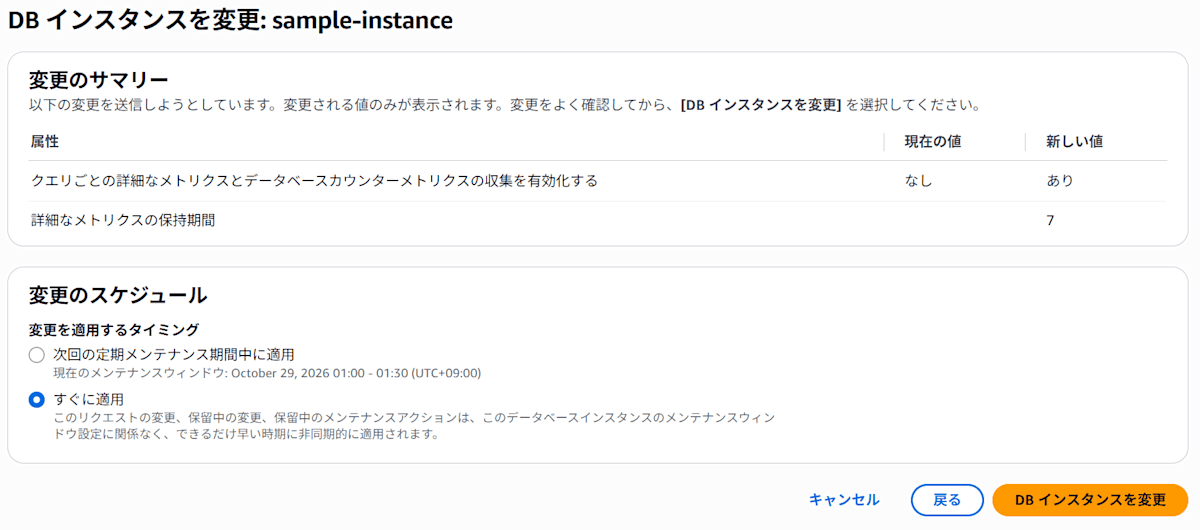
After the change, the database load is displayed in the "Monitoring" tab and in Database Insights.
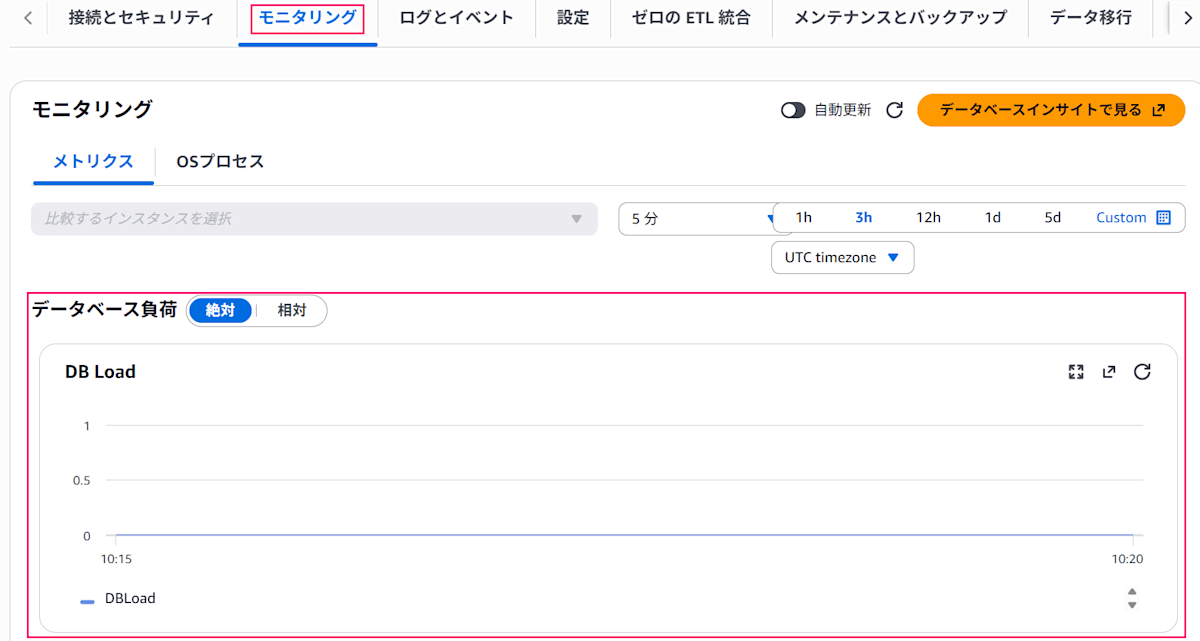
The database load section is displayed as expected
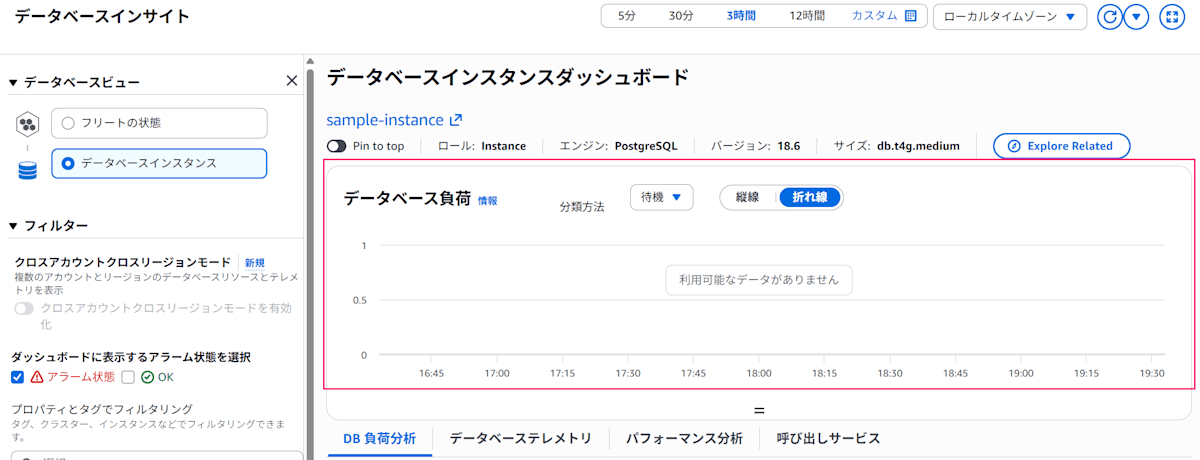
Database Insights is also displayed as expected
Incidentally, the following documentation describes the "Collect detailed database and per-query metrics" setting whose role has changed.
The Database Insights specifications are as follows:
- If you choose advanced mode, it is enabled automatically
- In standard mode, it can be turned on or off; when on, 7-day retention is free, and retention beyond 7 days incurs additional charges
The fact that retention beyond 7 days incurs additional charges seems to be carried over from Performance Insights.
- Reference: Migration Guide from Performance Insights to Database Insights: Which Mode Should You Choose?
Conclusion
This was brief, but that's all.
This was a case where, due to a specification change on the AWS side, an existing parameter name took on a different role.
Because of this, it is difficult to infer the behavior from the name, so please be careful.
