
Aqua Voice × Claude Cowork: Systematizing Voice Input Customization with Automated Weekly Analysis

This page has been translated by machine translation. View original
Hello, I'm kema.
Have you ever used voice input?
Personally, I've been handling most of my work with voice input lately, which has significantly reduced my typing time.
However, I have some issues: proper nouns and technical terms are misrecognized, and my verbal habits and speech patterns end up remaining in the text as-is.
The Aqua Voice I use allows me to customize accuracy with three features: dictionary, replacements, and customInstructions, but it's quite a hassle to think up and register these manually each time.
So in this article, I'll cover a system that has Claude analyze Aqua Voice voice input logs and automatically deliver weekly improvement suggestions for dictionary, replacements, and customInstructions.
I'm using Claude Code's Cowork schedule feature and Slack notifications.
I hope this will be helpful for those who want to continuously improve their voice input accuracy.
What is Aqua Voice?
Some of you may not be familiar with Aqua Voice, so let me briefly introduce it.
Aqua Voice is a voice input app available for Mac / Windows / iOS / Chrome extension.
There are 4 pricing plans: Free (Starter), Pro ($8/month, annual billing), Team ($12/month, annual billing), and Enterprise. customInstructions and Custom Dictionary up to 800 entries are available on the Pro plan or higher.
Source: Aqua Voice - Fast and Accurate Voice Dictation for Mac and Windows | Aqua Voice
Since Custom Instructions is not listed in the Starter plan description and Tune with Custom Instructions first appears in the Pro plan description, you need a Pro plan or higher subscription to use customInstructions.
Aqua Voice has a model called Avalon that can recognize technical terms with high accuracy.
For people like me who frequently use voice input for IT-related words, it's comfortable with fewer misrecognitions.
Additionally, there are three features to customize recognition results for personal use.
- dictionary: Register proper nouns and technical terms to reduce misrecognitions (e.g., preventing
AgentCorefrom being recognized in katakana as "エージェントコア") - replacements: Replace specific spoken phrases entirely with different text (e.g., saying "メアド" gets entered as
taro.yamada@example.com) - customInstructions: Specify style, writing style, and formatting rules for transcription results in natural language (e.g., filler removal, handling of line break commands, writing style unification)
Using these 3 features, you can improve voice input accuracy to match your own usage style.
Important: To make custom instructions (
customInstructions) work correctly, please change the Streaming Mode to "Always" in the settings screen. If left at the default setting, custom instructions may not be applied.
What we'll implement this time
Maintaining customInstructions, dictionary, and replacements requires manually updating while observing your own voice input habits and misrecognition tendencies, which takes considerable effort.
So in this article, we'll create a system that has Claude take over that work.
Specifically, once a week, we'll send Aqua Voice's voice input logs to Claude and have it analyze:
- Which words should be added to dictionary
- Which spoken phrases should be registered in replacements
- What style instructions should be added to customInstructions
and notify those suggestions to Slack.
For weekly automatic execution, I'm using Claude Code's Cowork scheduled tasks.
Overview
The overall picture of the system to be implemented is as follows.
Key points:
- Mac-side continuous processing (every 5 minutes): Whenever new history is added to Aqua Voice's
settings.json,aqua_archive.pydetects the diff and mirrors it to a separate folder - Cowork-side weekly processing: Claude reads last week's logs and current Aqua Voice settings for analysis. Saves improvement suggestions to the knowledge base and notifies Slack DM
- My work: Review the suggestions delivered via Slack and manually register only the necessary ones in Aqua Voice's UI (designed not to auto-apply)
Setup Steps
The setup steps are the following 2 steps.
The paths and settings values in this article are expressed with placeholders. Please replace them with your own environment according to the table below.
| Placeholder | What to replace with |
|---|---|
<YOUR_USER> |
macOS username (e.g., taro.yamada) |
<ARCHIVE_PATH> |
Archive save destination for voice logs (absolute path). Any folder readable by Cowork is fine. e.g., /Users/taro.yamada/Documents/aqua-voice-archive |
<KNOWLEDGE_PATH> |
Knowledge save destination for analysis results (absolute path). e.g., /Users/taro.yamada/Documents/aqua-voice-knowledge |
<YOUR_SLACK_EMAIL> |
Your own email address for Slack notifications |
0. Prerequisites
We proceed assuming the following conditions are met.
- macOS (verified with Darwin 25.5 in this article)
- Aqua Voice installed with Pro plan subscription (Pro plan required to use
customInstructions) - Aqua Voice Streaming Mode already set to "Always" (Mac only. Required to make
customInstructionswork) - Environment where Claude Code's Cowork is available
- Slack MCP connected to Cowork session (enable the Slack connector from Claude Code's MCP settings)
- Python 3 available at
/usr/bin/python3(macOS standard)
1. Create a system to automatically archive voice logs to a separate folder
Aqua Voice's voice logs are saved in the history key of ~/Library/Application Support/Aqua Voice/settings.json, but since they are overwritten FIFO with the most recent 100 entries, old logs disappear in about 22 hours if left unattended.
We'll set up a script to extract these to a folder readable by Cowork before they disappear, and a launchd to run it periodically. In this article, the save destination is expressed with the placeholder <ARCHIVE_PATH> (a regular folder like ~/Documents/aqua-voice-archive/ is fine).
Note: The reason we don't read directly from
~/Library/Application Support/is that Cowork's scheduled tasks cannot read~/Library/Application Support/due to sandbox restrictions. We need to mirror to a readable path (such as~/Documents/,~/Downloads/,~/Library/CloudStorage/..., etc.).
1-1. Place the archive script
Create the archive directory and place the Python script.
mkdir -p "$HOME/Library/Application Support/aqua-voice-archive/data"
Create $HOME/Library/Application Support/aqua-voice-archive/aqua_archive.py and paste the following. Please replace <ARCHIVE_PATH> in the script with the absolute path of your chosen save destination.
Full text of aqua_archive.py (click to expand)
#$HOME/Library/Application Support/aqua-voice-archive/aqua_archive.py
"""
Script to permanently archive Aqua Voice transcription history to a specified folder.

Reads the history array from settings.json, appends unsaved entries to
week-folder-specific history.jsonl files based on timestamp.
Also mirrors main settings such as dictionary / replacements / customInstructions
to settings-snapshot.json (so they can be referenced from Cowork).
"""

import json
import os
import sys
import traceback
from datetime import datetime, timedelta, timezone
from pathlib import Path

HOME = Path.home()
SETTINGS_PATH = HOME / "Library/Application Support/Aqua Voice/settings.json"
# Archive save destination (any folder readable by Cowork is fine)
ARCHIVE_DIR = Path("<ARCHIVE_PATH>")
SNAPSHOT_PATH = ARCHIVE_DIR / "snapshot.json"
SETTINGS_SNAPSHOT_PATH = ARCHIVE_DIR / "settings-snapshot.json"
DATA_DIR = ARCHIVE_DIR / "data"

# Main keys from settings.json to save as snapshot
SETTINGS_SNAPSHOT_KEYS = [
    "dictionary",
    "replacements",
    "customInstructions",
    "transcriptionModel",
    "language",
    "deepContext",
    "casualMessaging",
    "promptSet",
    "computerControlCustomInstructions",
]

# JST (UTC+9) fixed. Aqua Voice timestamps are UTC so conversion is needed
JST = timezone(timedelta(hours=9))

def parse_iso_to_jst(iso_str: str) -> datetime:
    """Convert ISO 8601 string to JST datetime. Supports 'Z' suffix."""
    normalized = iso_str.replace("Z", "+00:00")
    dt_utc = datetime.fromisoformat(normalized)
    return dt_utc.astimezone(JST)

def week_folder_name(dt_jst: datetime) -> str:
    """Generate Monday-based week folder name from JST datetime (YYYY-MMDD_YYYY-MMDD)."""
    days_since_monday = dt_jst.weekday()
    monday = dt_jst.date() - timedelta(days=days_since_monday)
    sunday = monday + timedelta(days=6)
    return f"{monday.strftime('%Y-%m%d')}_{sunday.strftime('%Y-%m%d')}"

def collect_known_session_ids() -> set[int]:
    """Collect known sessionIds from all history.jsonl under data/."""
    known: set[int] = set()
    if not DATA_DIR.exists():
        return known
    for jsonl_path in DATA_DIR.glob("*/history.jsonl"):
        try:
            with jsonl_path.open("r", encoding="utf-8") as f:
                for line in f:
                    line = line.strip()
                    if not line:
                        continue
                    try:
                        entry = json.loads(line)
                        sid = entry.get("sessionId")
                        if sid is not None:
                            known.add(sid)
                    except json.JSONDecodeError:
                        continue
        except OSError:
            continue
    return known

def append_entries_to_week(entries: list[dict]) -> dict[str, int]:
    """Distribute entries by week folder and append to history.jsonl."""
    by_week: dict[str, list[dict]] = {}
    for entry in entries:
        ts = entry.get("timestamp")
        if not ts:
            continue
        try:
            dt_jst = parse_iso_to_jst(ts)
        except ValueError:
            continue
        week_name = week_folder_name(dt_jst)
        by_week.setdefault(week_name, []).append(entry)

    result: dict[str, int] = {}
    for week_name, week_entries in by_week.items():
        week_dir = DATA_DIR / week_name
        week_dir.mkdir(parents=True, exist_ok=True)
        week_entries.sort(key=lambda e: e.get("timestamp", ""))
        jsonl_path = week_dir / "history.jsonl"
        with jsonl_path.open("a", encoding="utf-8") as f:
            for entry in week_entries:
                f.write(json.dumps(entry, ensure_ascii=False) + "\n")
        result[week_name] = len(week_entries)
    return result

def write_archive_log(lines: list[str]) -> None:
    """Append operation log to the week's archive.log for the execution time."""
    now_jst = datetime.now(JST)
    week_name = week_folder_name(now_jst)
    week_dir = DATA_DIR / week_name
    week_dir.mkdir(parents=True, exist_ok=True)
    log_path = week_dir / "archive.log"
    with log_path.open("a", encoding="utf-8") as f:
        for line in lines:
            f.write(line + "\n")
        f.write("---\n")

def main() -> int:
    log_lines: list[str] = []
    now_str = datetime.now(JST).strftime("%Y-%m-%d %H:%M:%S")
    log_lines.append(f"[{now_str}] start")

    if not SETTINGS_PATH.exists():
        log_lines.append(f"[{now_str}] error: settings.json not found at {SETTINGS_PATH}")
        write_archive_log(log_lines)
        return 1

    try:
        with SETTINGS_PATH.open("r", encoding="utf-8") as f:
            settings = json.load(f)
    except (OSError, json.JSONDecodeError) as e:
        log_lines.append(f"[{now_str}] error: failed to read settings.json: {e}")
        write_archive_log(log_lines)
        return 1

    history = settings.get("history", [])
    if not isinstance(history, list):
        log_lines.append(f"[{now_str}] error: history is not a list")
        write_archive_log(log_lines)
        return 1

    log_lines.append(f"[{now_str}] settings.json read: {len(history)} entries")

    known_ids = collect_known_session_ids()
    log_lines.append(f"[{now_str}] known sessionIds: {len(known_ids)}")

    new_entries = [
        e for e in history
        if isinstance(e, dict) and e.get("sessionId") is not None and e["sessionId"] not in known_ids
    ]
    log_lines.append(f"[{now_str}] new entries detected: {len(new_entries)}")

    if new_entries:
        result = append_entries_to_week(new_entries)
        for week_name in sorted(result.keys()):
            log_lines.append(f"[{now_str}] appended: {week_name}/history.jsonl  +{result[week_name]} entries")
    else:
        log_lines.append(f"[{now_str}] skip (no new entries, but snapshot refreshed)")

    try:
        ARCHIVE_DIR.mkdir(parents=True, exist_ok=True)
        with SNAPSHOT_PATH.open("w", encoding="utf-8") as f:
            json.dump(history, f, ensure_ascii=False, indent=2)
        log_lines.append(f"[{now_str}] snapshot.json updated")
    except OSError as e:
        log_lines.append(f"[{now_str}] error: failed to write snapshot.json: {e}")
        write_archive_log(log_lines)
        return 1

    try:
        settings_snapshot = {"snapshotAt": datetime.now(JST).isoformat()}
        for key in SETTINGS_SNAPSHOT_KEYS:
            settings_snapshot[key] = settings.get(key)
        with SETTINGS_SNAPSHOT_PATH.open("w", encoding="utf-8") as f:
            json.dump(settings_snapshot, f, ensure_ascii=False, indent=2)
        log_lines.append(f"[{now_str}] settings-snapshot.json updated")
    except OSError as e:
        log_lines.append(f"[{now_str}] error: failed to write settings-snapshot.json: {e}")
        write_archive_log(log_lines)
        return 1

    end_str = datetime.now(JST).strftime("%Y-%m-%d %H:%M:%S")
    log_lines.append(f"[{end_str}] done")
    write_archive_log(log_lines)
    return 0

if __name__ == "__main__":
    try:
        sys.exit(main())
    except Exception:
        traceback.print_exc(file=sys.stderr)
        sys.exit(1)
The script does the following:
- Reads
~/Library/Application Support/Aqua Voice/settings.json - Collects known
sessionIds fromdata/**/history.jsonland extracts unsaved entries - Appends to
history.jsonlby JST Monday-based week folder - Updates
snapshot.json(mirror of last 100 history entries) andsettings-snapshot.json(mirror ofdictionary,replacements,customInstructions, etc.)
Note: Why written in Python: This article assumes Mac operation, but it's intentionally written in Python to also work on Windows.
1-2. Place 2 launchd plists
Since Aqua Voice updates settings.json with atomic rename (writing to a temp file then swapping), launchd's WatchPaths may lose track of the file. Therefore we operate with periodic execution.
Create 2 types of plists.
| plist | Role | Trigger |
|---|---|---|
com.user.aquavoice-archiver |
Runs aqua_archive.py every 5 minutes |
StartInterval: 300 |
com.user.aquavoice-snapshot-weekly |
Forces sync at Monday 00:55 | StartCalendarInterval |
The Monday 00:55 forced sync is a mechanism to ensure the latest settings-snapshot.json is ready before the Cowork scheduled task runs at 01:00.
Note: 5-minute interval is fine to adjust: The
StartIntervalvalue doesn't have to be 5 minutes (300 seconds). I was initially worried that running every 5 minutes might be too heavy, but in practice each execution finishes in about 0.1–0.5 seconds, so setting the interval to 1 minute is no problem. Conversely, setting it to 10–15 minutes is also fine sincehistoryretains the last 100 entries, so nothing will be missed.
Create $HOME/Library/LaunchAgents/com.user.aquavoice-archiver.plist and paste the following. Please replace <YOUR_USER>.
<?xml version="1.0" encoding="UTF-8"?>
<!DOCTYPE plist PUBLIC "-//Apple//DTD PLIST 1.0//EN" "http://www.apple.com/DTDs/PropertyList-1.0.dtd">
<plist version="1.0">
<dict>
    <key>Label</key>
    <string>com.user.aquavoice-archiver</string>

    <key>ProgramArguments</key>
    <array>
        <string>/usr/bin/python3</string>
        <string>/Users/<YOUR_USER>/Library/Application Support/aqua-voice-archive/aqua_archive.py</string>
    </array>

    <key>StartInterval</key>
    <integer>300</integer>

    <key>RunAtLoad</key>
    <true/>

    <key>StandardOutPath</key>
    <string>/Users/<YOUR_USER>/Library/Application Support/aqua-voice-archive/data/launchd-stdout.log</string>

    <key>StandardErrorPath</key>
    <string>/Users/<YOUR_USER>/Library/Application Support/aqua-voice-archive/data/launchd-stderr.log</string>
</dict>
</plist>
Next, create $HOME/Library/LaunchAgents/com.user.aquavoice-snapshot-weekly.plist.
<?xml version="1.0" encoding="UTF-8"?>
<!DOCTYPE plist PUBLIC "-//Apple//DTD PLIST 1.0//EN" "http://www.apple.com/DTDs/PropertyList-1.0.dtd">
<plist version="1.0">
<dict>
    <key>Label</key>
    <string>com.user.aquavoice-snapshot-weekly</string>

    <key>ProgramArguments</key>
    <array>
        <string>/usr/bin/python3</string>
        <string>/Users/<YOUR_USER>/Library/Application Support/aqua-voice-archive/aqua_archive.py</string>
    </array>

    <key>StartCalendarInterval</key>
    <dict>
        <key>Weekday</key>
        <integer>1</integer>
        <key>Hour</key>
        <integer>0</integer>
        <key>Minute</key>
        <integer>55</integer>
    </dict>

    <key>StandardOutPath</key>
    <string>/Users/<YOUR_USER>/Library/Application Support/aqua-voice-archive/data/launchd-weekly-stdout.log</string>

    <key>StandardErrorPath</key>
    <string>/Users/<YOUR_USER>/Library/Application Support/aqua-voice-archive/data/launchd-weekly-stderr.log</string>
</dict>
</plist>
1-3. Register with launchd
Load the 2 plists with the following commands.
launchctl load "$HOME/Library/LaunchAgents/com.user.aquavoice-archiver.plist"
launchctl load "$HOME/Library/LaunchAgents/com.user.aquavoice-snapshot-weekly.plist"
Since com.user.aquavoice-archiver has RunAtLoad: true, it will execute once immediately upon registration.
Verify the registration.
launchctl list | grep aquavoice
# Example output
-	0	com.user.aquavoice-archiver
-	0	com.user.aquavoice-snapshot-weekly
If there are errors, they will be output to the standard error log.
cat "$HOME/Library/Application Support/aqua-voice-archive/data/launchd-stderr.log"
An empty file means everything is working correctly.
2. Create the Cowork scheduled task
From here, we'll create the mechanism to have Claude (Cowork) perform the analysis.
2-1. Create a new scheduled task in Cowork
-
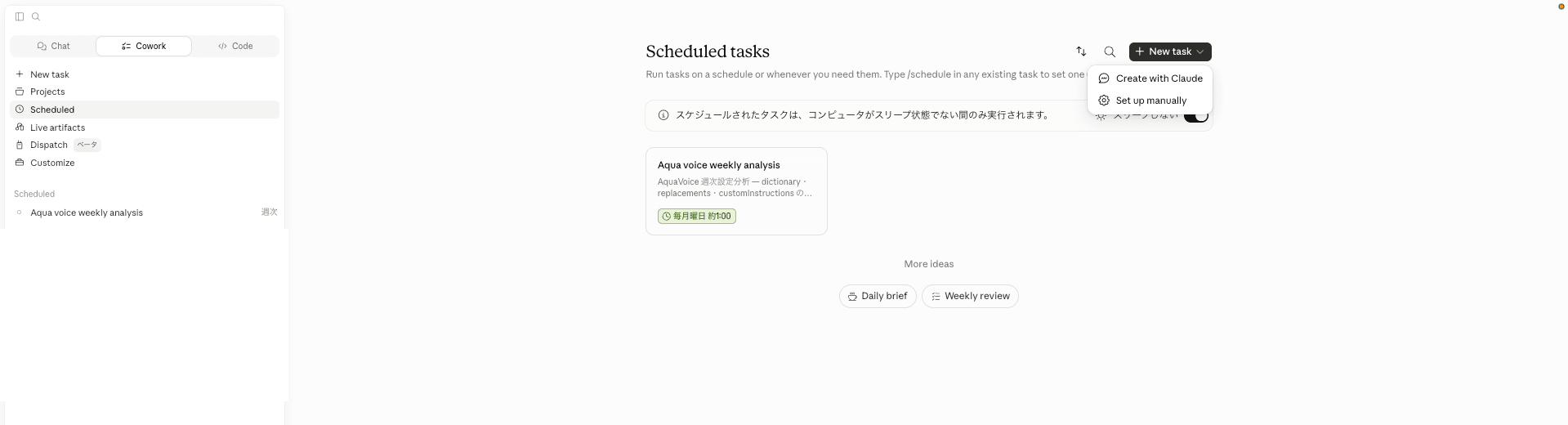
Click "Scheduled" in the Cowork sidebar to open the Scheduled tasks screen
-
Click the "+ New task" button in the upper right of the screen, and select "Set up manually" from the dropdown that appears
- The "Create scheduled task" dialog will open. Please enter the following:
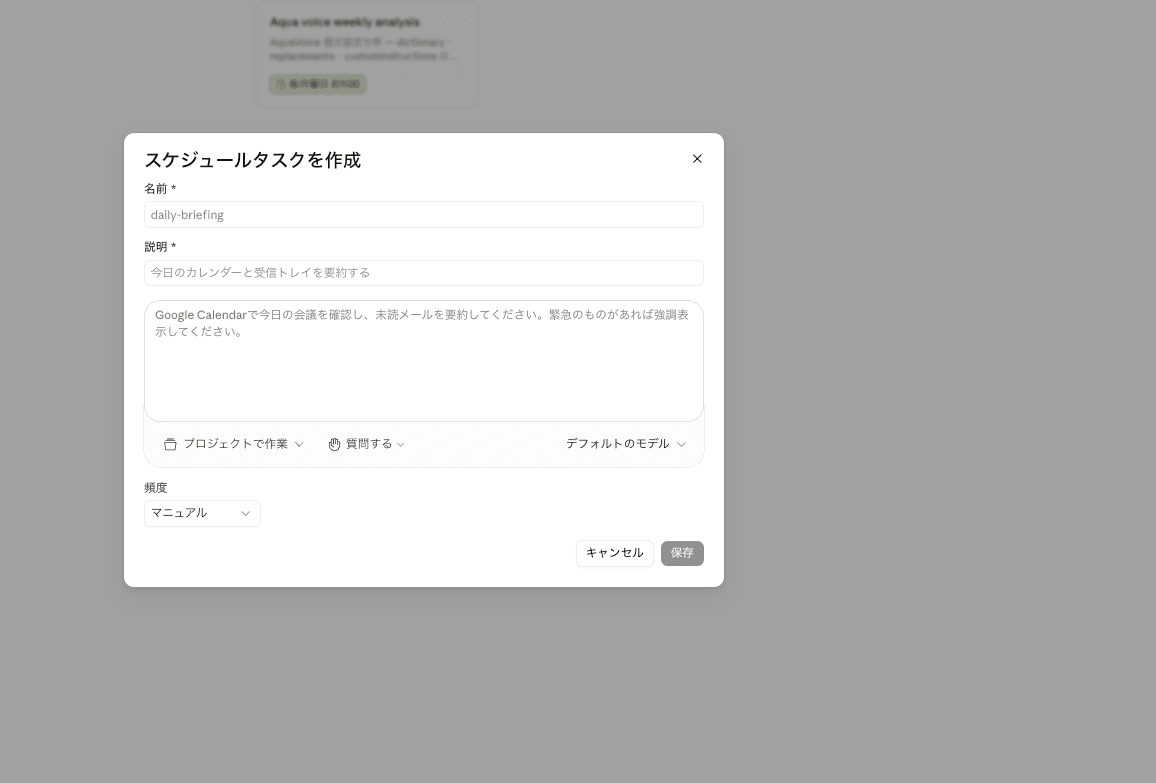
| Field | Input content |
|---|---|
| Name | aqua-voice-weekly-analysis |
| Description | Aqua Voice weekly settings analysis task |
| Prompt body | Content equivalent to the SKILL.md described below (write the prompt directly) |
| Frequency | Select "Weekly" and specify Every Monday 01:00 |
| Model | Claude Sonnet 4.6 recommended |
- Press the "Save" button to create the task
2-2. Prompt body to pass to the task
Replace the generated SKILL.md with the following content. Keep the name from the task creation ID in the frontmatter, and only replace the description. Please replace <ARCHIVE_PATH> and <KNOWLEDGE_PATH> with the absolute paths of your chosen save destinations.
The prompt includes not only addition candidates but also deletion candidate detection logic. The Aqua Voice Pro plan allows registering up to 800 entries in dictionary, so in the beginning you won't need to worry about deletions. However, if used for a long time, registered words will keep increasing, so to avoid trouble when reaching the limit, I built in a mechanism from the start that proposes words as deletion candidates if they haven't appeared for 8 consecutive weeks.
Full text of SKILL.md (click to expand)
---
name: aqua-voice-weekly-analysis
description: Aqua Voice weekly settings analysis — Generate improvement suggestions for dictionary, replacements, and customInstructions and save to knowledge base
---

# Aqua Voice Weekly Settings Analysis Task

Automatically executed every Monday at 01:00. Analyzes Aqua Voice voice logs, generates improvement suggestions for dictionary, replacements, and customInstructions, saves them to the knowledge base, and notifies Slack.

All data is mirror-saved to a specified folder readable by Cowork. Do not directly access `~/Library/Application Support/` (cannot be read from sandbox).

---

## Step 1: Identify and load last week's history.jsonl

Archive directory:
`<ARCHIVE_PATH>/data/`

Identify "last week (Mon–Sun)" folder using Bash on the execution date (Monday):

```bash
python3 -c "
from datetime import datetime, timedelta
today = datetime.today()
last_monday = today - timedelta(days=today.weekday() + 7)
last_sunday = last_monday + timedelta(days=6)
print(f'{last_monday.strftime(\"%Y-%m%d\")}_{last_sunday.strftime(\"%Y-%m%d\")}')
"
```

Using the folder name obtained above, read all lines of `history.jsonl`. If the folder does not exist, record "no last week's logs" and finish with output in Steps 7 and 8.

---

## Step 2: Load current settings snapshot

Load the following file:
`<ARCHIVE_PATH>/settings-snapshot.json`

Keys included: `dictionary`, `replacements`, `customInstructions`, `transcriptionModel`, `language`, `deepContext`, `casualMessaging`, `promptSet`, `computerControlCustomInstructions`, `snapshotAt`

---

## Step 3: Load past suggestion files (last 4 weeks; dictionary deletions use last 8 weeks)

Load `aqua-voice-suggestions-*.md` files under `<KNOWLEDGE_PATH>/notes/`, with the last 4 weeks for addition candidates and the last 8 weeks for dictionary deletion candidates.

For each suggestion, aggregate the following from past files:
- Number of weeks appeared (for calculating continuation score)
- Number of occurrences per week (history)

Criteria for identifying the same suggestion:
- dictionary: matching word to add
- replacements: both from and to match
- customInstructions: equivalent meaning (text similarity 80% or higher)

---

## Step 4: Analysis

### 4-1. Detecting dictionary addition candidates

Important: Do not judge based solely on simple divergence between `rawText` and `content` (to avoid false positives where content has been correctly fixed by LLM correction).

Detection targets are cases where problems remain in content (final output):

| Detection condition | Example |
|---|---|
| Notation variation: multiple notations mixed in content for the same intent | Both `Claude` and `クロード` appear |
| Remaining katakana: proper nouns that should be in English appear in katakana in content | `プレジデント` (should be `Presigned`) |
| Remaining mistranslation: clearly different conversion from intent becomes established in content | `蔵人` (should be `Claude`) |

Must not semantically overlap with already registered dictionary words.

### 4-2. Detecting dictionary deletion candidates

Among existing dictionary registered words, those that have not appeared in either content or rawText for 8 consecutive weeks.

### 4-3. Detecting replacements addition candidates

- The same URL, command, or template text appears 3 or more times in content, including similar patterns
- Always present "from (spoken phrase) → to (converted text)" as a pair

### 4-4. Detecting replacements deletion candidates

The `from` phrase of existing replacements has not appeared in either content or rawText for 8 consecutive weeks.

### 4-5. Detecting customInstructions addition candidates

| Category | Detection condition |
|---|---|
| Filler removal | "あー", "えー", "えーと", "あのー", "まあ", "なんか" remain in content 5 or more times each |
| Missing command words | "改行", "かっこ", "かぎかっこ" remain as character strings in content |
| Duplicate rephrasing | Same expression appears consecutively |
| Notation variation (style-related) | Mixed half-width/full-width numbers, inconsistent katakana long vowels, etc. |

### 4-6. Recommendation score calculation logic (common to all types)

```
Recommendation score = max(frequency score, continuation score) + match bonus + decay
```

Frequency score (strength of this week alone):

| Occurrences this week | Score |
|---|---|
| 20 or more | 90% |
| 10–19 | 75% |
| 5–9 | 55% |
| 3–4 | 40% |
| 1–2 | 20% |
| 0 | 0% |

Continuation score (number of weeks appeared in the last 4 weeks):

| Weeks appeared | Score |
|---|---|
| 4 consecutive weeks | 95% |
| 3 weeks | 75% |
| 2 weeks | 55% |
| 1 week | 30% |
| 0 weeks | 0% |

- Match bonus (matches past pending suggestion): +10%
- Decay (0 occurrences this week + exists only as past pending): -15%
- Recommendation score clipped to 0–100%

Auto-archive:
- Addition candidates: Remove from suggestion list if zero occurrences for 4 consecutive weeks
- Dictionary deletion candidates: First proposed only after 8 consecutive weeks of zero occurrences

---

## Step 5: Generate suggestions

Summarize each suggestion in the following format (dictionary additions/deletions, replacements additions/deletions, customInstructions additions):

```
### [Type] Value: <Content>
- Type: <Type>
- Recommendation Rate: XX%
- Frequency Score: XX% (N items this week)
- Continuity Score: XX% (appeared N weeks in the last 4 weeks)
- Adjustment: +10% / -15% / none
- Appearance History: [N items this week, N items 1 week ago, N items 2 weeks ago, N items 3 weeks ago]
- Status: Confirmed Candidate (80% or above) / Pending (below 80%)
```

---

## Step 6: Saving to Knowledge Base

Create a Markdown file at the following path (overwrite and update if file already exists):

`<KNOWLEDGE_PATH>/notes/aqua-voice-suggestions-YYYY-MM-DD.md`

Front matter:
```yaml
---
created: YYYY-MM-DD
tags: [aqua-voice, wip]
summary: Aqua Voice Weekly Analysis YYYY-MM-DD - N confirmed candidates, N pending
---
```

Body structure:
1. Confirmed Candidates (recommendation rate 80% or above)
2. Pending (recommendation rate below 80%)
3. Archived suggestions (if any)
4. This week's statistics

---

## Step 7: Output Notification Summary (Chat)

Always write the file path as a full path.

```
Aqua Voice Weekly Analysis Report YYYY-MM-DD

[This Week's Statistics]
• Number of analyzed entries: N
• Confirmed candidates (80% or above): N
• Pending: N

[Confirmed Candidates (Recommendation Rate 80% or above)]
• [dictionary add] <word> — Recommendation rate XX% (N items this week, appeared N weeks in last 4 weeks)
• [replacements add] from "<utterance>" → to "<conversion target>" — Recommendation rate XX%
• [customInstructions add] <category>: <one-line description> — Recommendation rate XX%

[Pending (Recommendation Rate below 80%)]
(Same as above)

[Detail File]
<KNOWLEDGE_PATH>/notes/aqua-voice-suggestions-YYYY-MM-DD.md
```

If both confirmed candidates and pending are 0, just send a short message saying "No suggestions this week."

---

## Step 8: Slack DM Notification to Self

1. Search for `<YOUR_SLACK_EMAIL>` using `slack_search_users` to obtain your own user ID
2. Send a DM to the obtained user ID using `slack_send_message`

If Slack MCP is unavailable or sending fails, note that fact only in the chat output and finish.
2-3. Manually Test-Run the Task Once
Rather than waiting for the scheduled execution, first do a manual test run to confirm everything works correctly.
- Click the
aqua-voice-weekly-analysistask you created from the "Scheduled" section in the Cowork sidebar - Press the "Run now" button on the task detail screen
- Confirm that the analysis report is output in the execution result chat
On the first run, Cowork will display access permission dialogs in sequence. Press "Allow" for all of them.
- Read permission for the archive folder (
<ARCHIVE_PATH>) - Read/write permission for the knowledge folder (
<KNOWLEDGE_PATH>) - Permission to execute
slack_send_messagefor Slack MCP
Approved content is automatically recorded in userSelectedFolders and approvedPermissions.
Subsequent automated runs will proceed without dialogs, so there is no need to manually edit scheduled-tasks.json.
Note: Since Cowork's scheduled tasks run in a sandbox, only permitted paths can be read. However,
~/Library/Application Support/itself is outside the sandbox scope and cannot be permitted, meaning Aqua Voice's ownsettings.jsoncannot be read directly. This is why we mirror it to a separate folder in Step 1.
Verification
Verify the results of the test run performed in "2-3. Manually Test-Run the Task Once" using the following 2 points.
Verifying Cowork Task Operation
The report is delivered in two forms: a Slack DM summary and a Markdown detail file saved in the knowledge base.
Let's look at the contents of each.
Summary Delivered via Slack DM
Success is confirmed when the test results from "2-3. Manually Test-Run the Task Once" arrive in Slack. The actual report will look like the following.
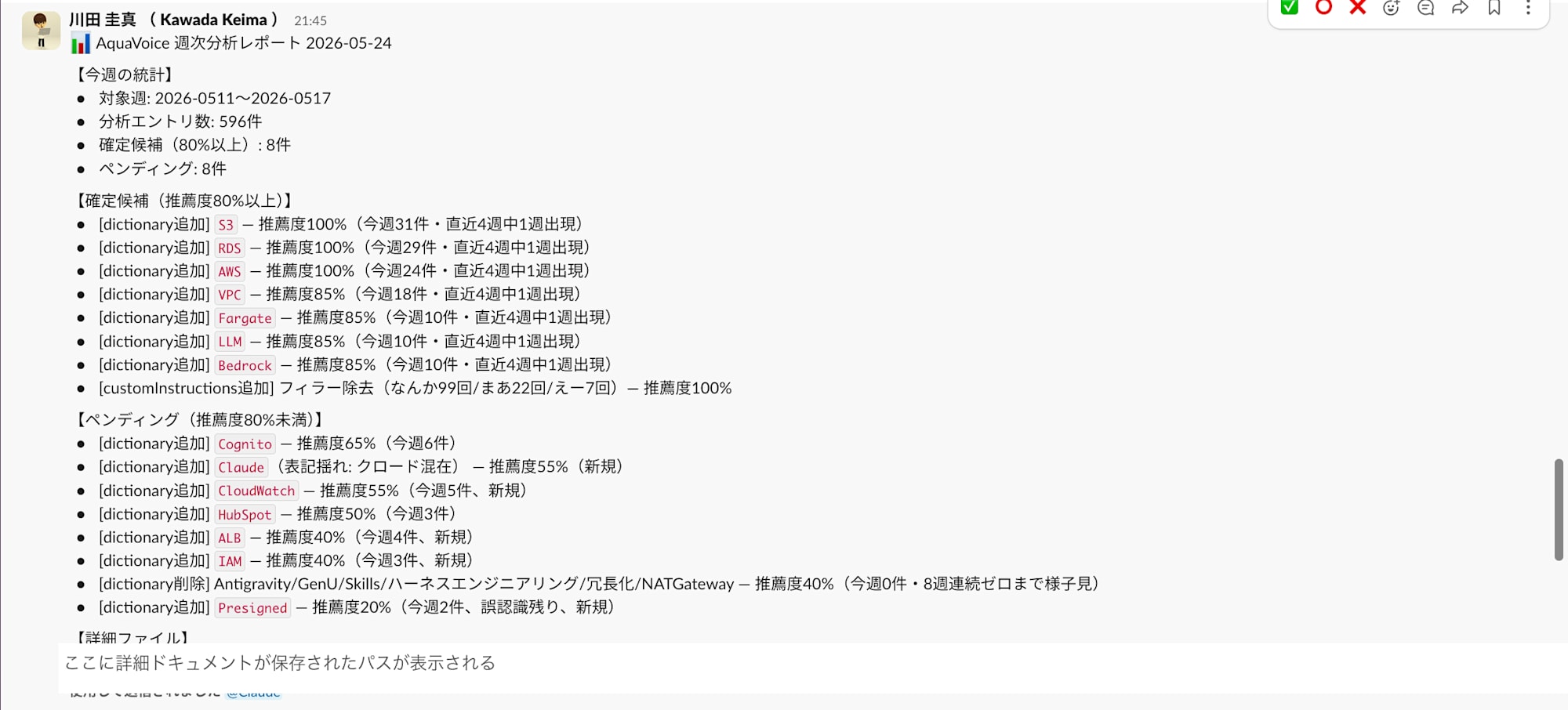
The body text will be in the following format (only a one-line summary of type, recommendation rate, and count).
Aqua Voice Weekly Analysis Report 2026-05-24

[This Week's Statistics]
• Number of analyzed entries: 596
• Confirmed candidates (80% or above): 8
• Pending: 8

[Confirmed Candidates (Recommendation Rate 80% or above)]
• [dictionary add] S3 — Recommendation rate 100% (31 items this week)
• [dictionary add] Bedrock — Recommendation rate 85% (10 items this week)
• [customInstructions add] Filler removal: Instruction text to remove "なんか", "まあ", "えー" — Recommendation rate 100% (99 instances of なんか this week)

[Pending (Recommendation Rate below 80%)]
• [dictionary add] Cognito — Recommendation rate 65% (6 items this week)
• [dictionary delete] Antigravity / GenU / ハーネスエンジニアリング / 冗長化 — Recommendation rate 65%

[Detail File]
<KNOWLEDGE_PATH>/notes/aqua-voice-suggestions-2026-05-24.md
The Slack side contains only a list of what was suggested.
The specific instruction text block used for registering customInstructions is not included in the Slack message body.
Opening the Markdown Detail File
Opening the path shown under "Detail File" at the end of the Slack message lets you view the Markdown report saved in the knowledge base.
open "<KNOWLEDGE_PATH>/notes/aqua-voice-suggestions-2026-05-24.md"
The full text of the actual delivered report is as follows.
Full content of aqua-voice-suggestions-2026-05-24.md (click to expand)
---
created: 2026-05-24
tags: [aqua-voice, wip]
summary: AquaVoice Weekly Analysis 2026-05-24 - 8 confirmed candidates, 8 pending (analyzed 596 items from 2026-0511 to 0517)
---

# AquaVoice Weekly Analysis Report 2026-05-24

Target week: 2026-0511 to 2026-0517 (596 items). Settings snapshot: 2026-05-24T18:53:37+09:00.

---

## 1. Confirmed Candidates (Recommendation Rate 80% or above)

### [dictionary add] Value: S3
- Type: dictionary add
- Word to add: `S3`
- Detection reason: Appears in content but absent in rawText (correction by deep context)
- Recommendation rate: 100%
- Frequency score: 90% (appeared in 31 entries this week)
- Continuity score: 30% (appeared in 1 week out of last 4 weeks)
- Adjustment: +10% (matches past pending)
- Appearance history: [31 items this week, 1 week ago -, 2 weeks ago -, 3 weeks ago -]
- Status: **Confirmed Candidate**

### [dictionary add] Value: RDS
- Type: dictionary add
- Word to add: `RDS`
- Detection reason: Appears in content but absent in rawText (misrecognized as "RTS", etc.)
- Recommendation rate: 100%
- Frequency score: 90% (appeared in 29 entries this week)
- Continuity score: 30% (appeared in 1 week out of last 4 weeks)
- Adjustment: +10% (matches past pending)
- Appearance history: [29 items this week, 1 week ago -, 2 weeks ago -, 3 weeks ago -]
- Status: **Confirmed Candidate**

### [dictionary add] Value: AWS
- Type: dictionary add
- Word to add: `AWS`
- Detection reason: Appears in content but absent in rawText
- Recommendation rate: 100%
- Frequency score: 90% (appeared in 24 entries this week)
- Continuity score: 30% (appeared in 1 week out of last 4 weeks)
- Adjustment: +10% (matches past pending)
- Appearance history: [24 items this week, 1 week ago -, 2 weeks ago -, 3 weeks ago -]
- Status: **Confirmed Candidate**

### [dictionary add] Value: VPC
- Type: dictionary add
- Word to add: `VPC`
- Detection reason: content 18 entries / rawText 20 entries (also appears in rawText but with correction discrepancy)
- Recommendation rate: 85%
- Frequency score: 75% (18 entries this week, in the 10–19 range)
- Continuity score: 30% (appeared in 1 week out of last 4 weeks)
- Adjustment: +10% (matches past pending)
- Appearance history: [18 items this week, 1 week ago -, 2 weeks ago -, 3 weeks ago -]
- Status: **Confirmed Candidate**

### [dictionary add] Value: Fargate
- Type: dictionary add
- Word to add: `Fargate`
- Detection reason: Appears in content but absent in rawText
- Recommendation rate: 85%
- Frequency score: 75% (10 entries this week)
- Continuity score: 30% (appeared in 1 week out of last 4 weeks)
- Adjustment: +10% (matches past pending)
- Appearance history: [10 items this week, 1 week ago -, 2 weeks ago -, 3 weeks ago -]
- Status: **Confirmed Candidate**

### [dictionary add] Value: LLM
- Type: dictionary add
- Word to add: `LLM`
- Detection reason: Appears in content but absent in rawText
- Recommendation rate: 85%
- Frequency score: 75% (10 entries this week)
- Continuity score: 30% (appeared in 1 week out of last 4 weeks)
- Adjustment: +10% (matches past pending)
- Appearance history: [10 items this week, 1 week ago -, 2 weeks ago -, 3 weeks ago -]
- Status: **Confirmed Candidate**

### [dictionary add] Value: Bedrock
- Type: dictionary add
- Word to add: `Bedrock`
- Detection reason: Appears in content but absent in rawText
- Recommendation rate: 85%
- Frequency score: 75% (10 entries this week)
- Continuity score: 30% (appeared in 1 week out of last 4 weeks)
- Adjustment: +10% (matches past pending)
- Appearance history: [10 items this week, 1 week ago -, 2 weeks ago -, 3 weeks ago -]
- Status: **Confirmed Candidate**

### [customInstructions add] Filler removal
- Type: customInstructions add
- Category: Filler removal
- Instruction text to register (English recommended, copy-paste ready):
  ```
  Remove filler words and verbal tics from the transcription output. Specifically, remove or omit: 「なんか」「まあ」「えー」「えーと」「あのー」when used as fillers (not meaningful words). Do not remove these if they carry semantic meaning.
  ```
- Recommendation rate: 100%
- Frequency score: 90% (なんか=99 times, まあ=22 times, えー=7 times remaining in content)
- Continuity score: 30% (appeared in 1 week out of last 4 weeks)
- Adjustment: +10% (matches past pending)
- Appearance history: [this week なんか99/まあ22/えー7/えーと4, 1 week ago -, 2 weeks ago -, 3 weeks ago -]
- Status: **Confirmed Candidate**
- Note: "なんか" is often used as a meaningful word (in approximately 5 out of 76 entries it is clearly a filler). It is important to explicitly state in the instruction text to "retain it when used as a meaningful word."

---

## 2. Pending (Recommendation Rate below 80%)

### [dictionary add] Value: Cognito
- Type: dictionary add
- Word to add: `Cognito`
- Detection reason: content 6 entries / rawText 0 entries
- Recommendation rate: 65%
- Frequency score: 55% (6 entries this week, in the 5–9 range)
- Continuity score: 30% (appeared in 1 week out of last 4 weeks)
- Adjustment: +10% (matches past pending)
- Appearance history: [6 items this week, 1 week ago -, 2 weeks ago -, 3 weeks ago -]
- Status: Pending

### [dictionary add] Value: Claude (variant spelling)
- Type: dictionary add
- Word to add: `Claude`
- Detection reason: "Claude" (7 instances) and "クロード" (4 instances) mixed in content. In rawText, "クロード" is dominant (6 instances), "Claude" is zero.
- Recommendation rate: 55%
- Frequency score: 55% (7 entries this week, in the 5–9 range)
- Continuity score: 0% (no previous suggestion, new)
- Adjustment: none
- Appearance history: [7 items this week (+ 4 mixed instances of クロード), 1 week ago -, 2 weeks ago -, 3 weeks ago -]
- Status: Pending (new)
- Note: Anthropic is already registered. Adding Claude alone is expected to unify "クロード" → "Claude".

### [dictionary add] Value: CloudWatch
- Type: dictionary add
- Word to add: `CloudWatch`
- Detection reason: content 5 entries / rawText 0 entries (misrecognized as "クラウドウォッチドッグス", etc.)
- Recommendation rate: 55%
- Frequency score: 55% (5 entries this week, in the 5–9 range)
- Continuity score: 0% (no previous suggestion, new)
- Adjustment: none
- Appearance history: [5 items this week, 1 week ago -, 2 weeks ago -, 3 weeks ago -]
- Status: Pending (new)

### [dictionary add] Value: HubSpot
- Type: dictionary add
- Word to add: `HubSpot`
- Detection reason: content 3 entries / rawText 0 entries
- Recommendation rate: 50%
- Frequency score: 40% (3 entries this week, in the 3–4 range)
- Continuity score: 30% (appeared in 1 week out of last 4 weeks)
- Adjustment: +10% (matches past pending)
- Appearance history: [3 items this week, 1 week ago -, 2 weeks ago -, 3 weeks ago -]
- Status: Pending

### [dictionary add] Value: ALB
- Type: dictionary add
- Word to add: `ALB`
- Detection reason: content 4 entries / rawText 0 entries
- Recommendation rate: 40%
- Frequency score: 40% (4 entries this week, in the 3–4 range)
- Continuity score: 0% (no previous suggestion, new)
- Adjustment: none
- Appearance history: [4 items this week, 1 week ago -, 2 weeks ago -, 3 weeks ago -]
- Status: Pending (new)

### [dictionary add] Value: IAM
- Type: dictionary add
- Word to add: `IAM`
- Detection reason: content 3 entries / rawText 0 entries
- Recommendation rate: 40%
- Frequency score: 40% (3 entries this week, in the 3–4 range)
- Continuity score: 0% (no previous suggestion, new)
- Adjustment: none
- Appearance history: [3 items this week, 1 week ago -, 2 weeks ago -, 3 weeks ago -]
- Status: Pending (new)

### [dictionary delete] Antigravity / GenU / Skills / ハーネスエンジニアリング / 冗長化 / NATGateway
- Type: dictionary delete
- Target words: `Antigravity`, `GenU`, `Skills`, `ハーネスエンジニアリング`, `冗長化`, `NATGateway`
- Detection reason: Zero appearances in both content and rawText this week
- Recommendation rate: 40%
- Frequency score: 0% (0 items this week)
- Continuity score: 30% (appeared 1 week in pending over last 4 weeks)
- Adjustment: +10% (matches past pending)
- Appearance history: [0 items this week, 1 week ago -, 2 weeks ago -, 3 weeks ago -]
- Status: Pending (8 consecutive weeks of zero required. Currently only 1 week)

### [dictionary add] Value: Presigned (remaining misrecognition)
- Type: dictionary add
- Word to add: `Presigned`
- Detection reason: In rawText, misrecognized as "プレゼント URL", "プレザイン", etc. Some cases in content also not fully corrected.
- Recommendation rate: 20%
- Frequency score: 20% (2 entries this week, in the 1–2 range)
- Continuity score: 0% (no previous suggestion, new)
- Adjustment: none
- Appearance history: [2 items this week, 1 week ago -, 2 weeks ago -, 3 weeks ago -]
- Status: Pending (new)

---

## 3. Archived Suggestions

None

---

## 4. This Week's Statistics

- Number of analyzed entries: 596
- Confirmed candidates (recommendation rate 80% or above): 8
- Pending (recommendation rate below 80%): 8
- replacements addition candidates: none (no repeating patterns 3 or more times)
- replacements deletion candidates: none
- Usage of major dictionary terms: AgentCore=20 items, Anthropic=8 items, Markdown=8 items, ナレッジ=5 items (all in continued use)

---

_Auto-generated: AquaVoice weekly analysis task (executed 2026-05-24). Apply changes manually._
If this report arrives, all that remains is registering the items listed in the "Confirmed Candidates" section directly into the Aqua Voice UI. Readers do not need to craft English instruction text themselves or analyze misrecognition trends.
- dictionary add: Register each item's
Word to add(e.g.,S3,RDS,AWS,VPC...) directly from the "+" Add button in the Dictionary tab - customInstructions add: Copy the entire
instruction textcode block and paste it into the Instructions tab, then save - dictionary delete: Remove the words listed under
Target wordsfrom the Dictionary tab
Simply reflecting what is written in the report keeps the weekly operation running. The specific registration steps are explained in the next section, "Applying Suggestions to Aqua Voice."
Applying Suggestions to Aqua Voice
Among the candidates that appear in the report, manually register the ones you find convincing into the Aqua Voice UI (no automatic application is done).
The registration destinations correspond to the 3 tabs matching the type in the report ([dictionary add] / [replacements add] / [customInstructions add]).
Using "+ Add" in the Dictionary tab, paste and register the words listed under [dictionary add] in the report.
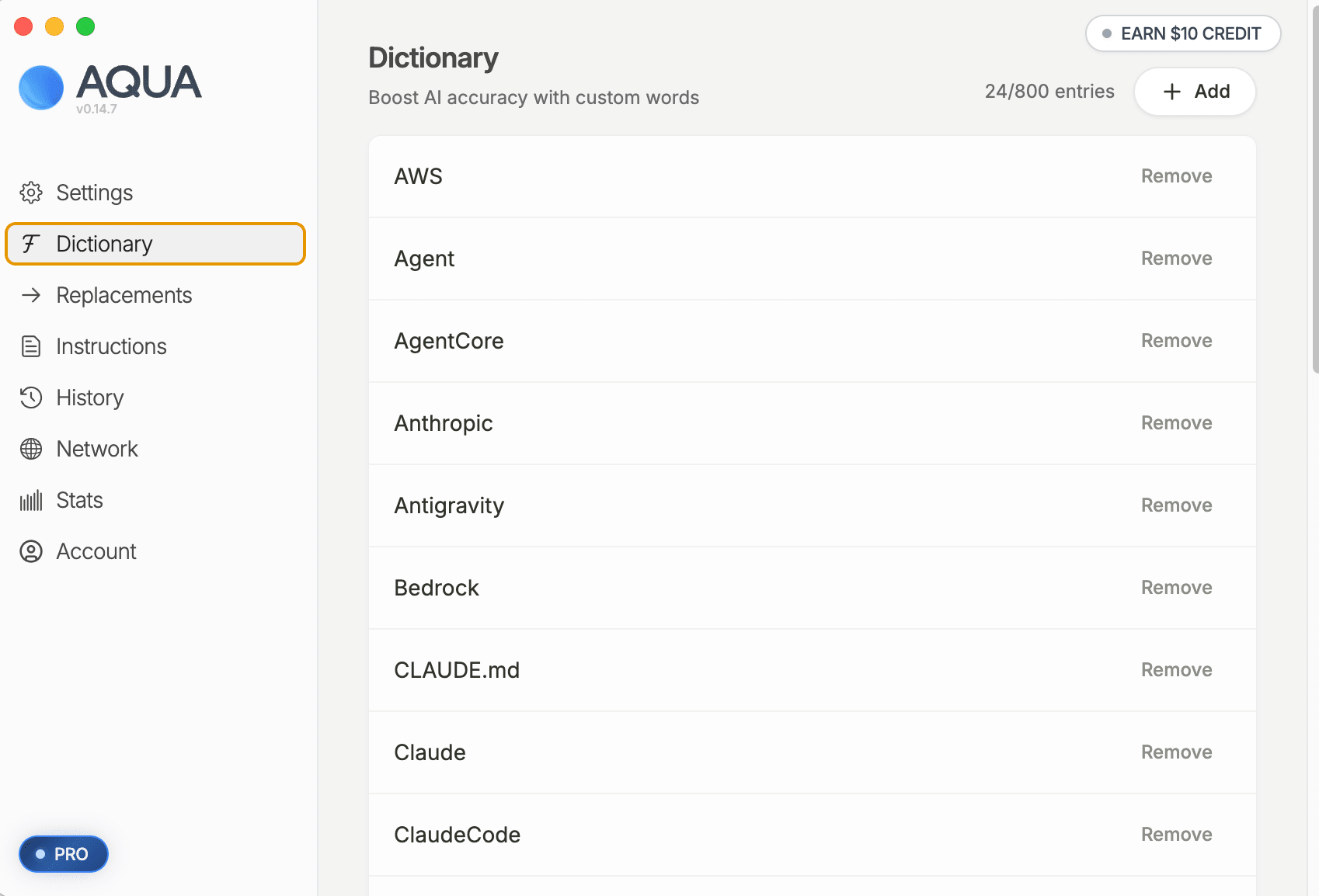
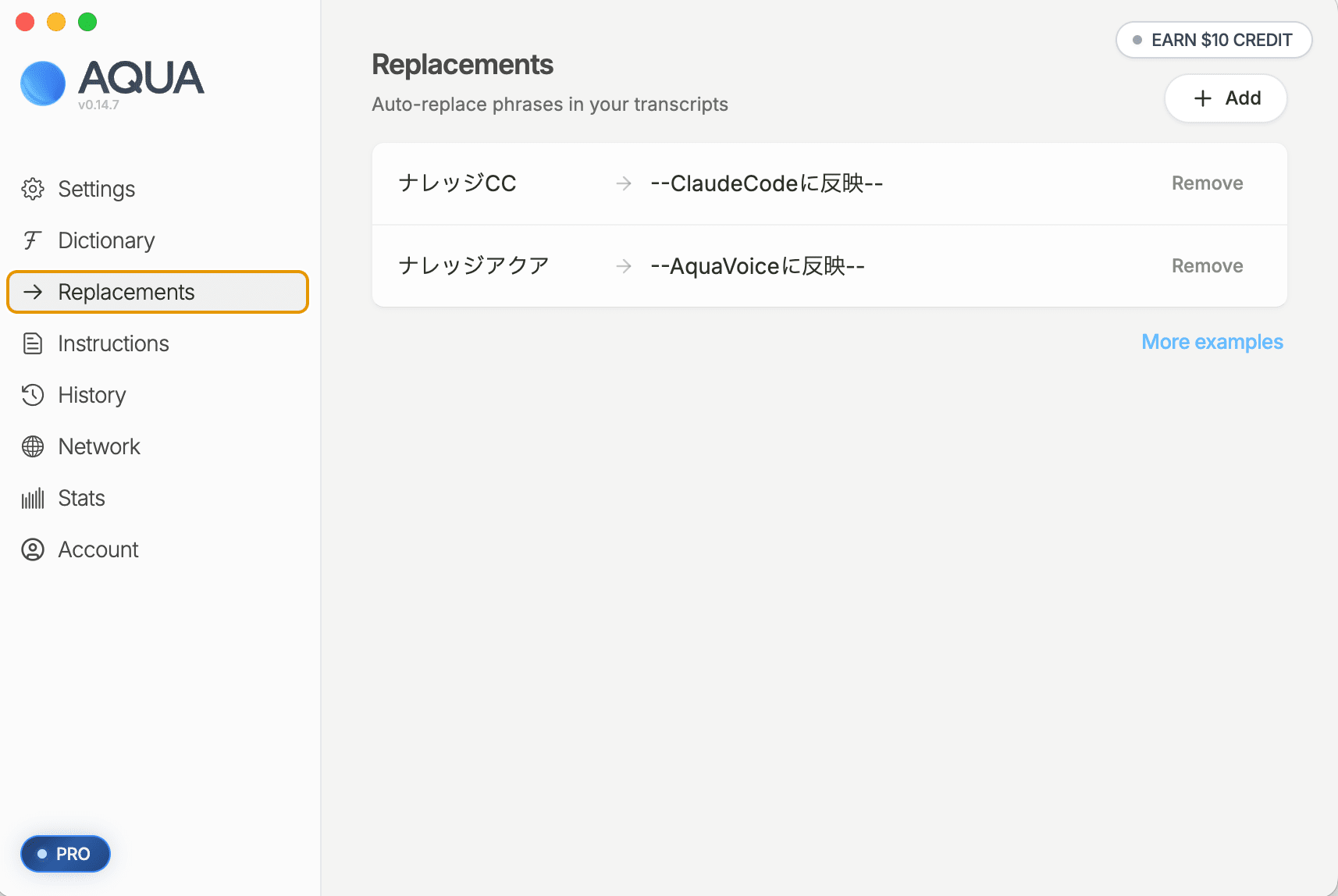
Using "+ Add" in the Replacements tab, paste the from (utterance phrase) and to (conversion target text) listed under [replacements add] in the report directly as-is.
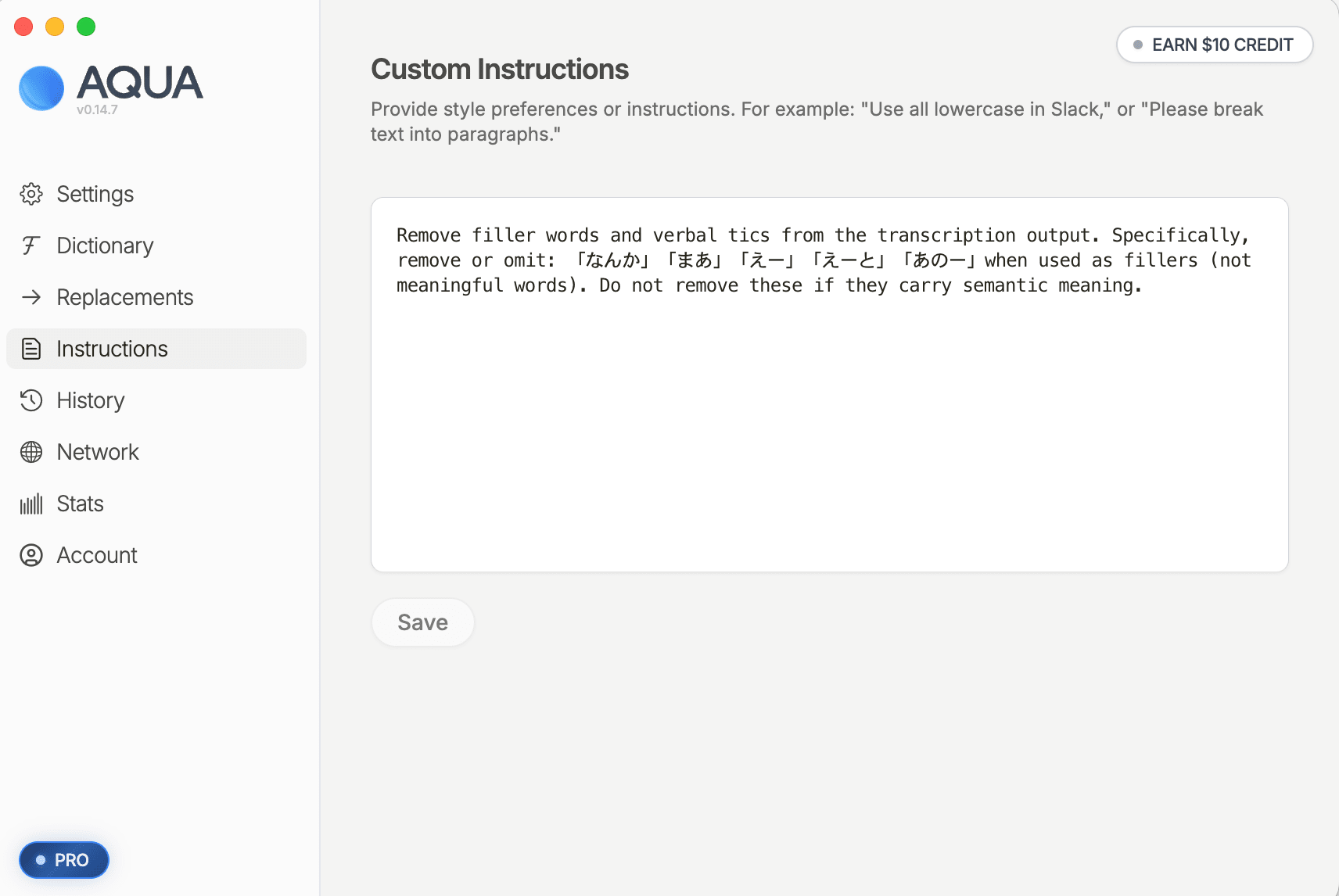
In the Instructions tab, paste the Markdown-format instruction text presented under [customInstructions add] in the report, then press "Save".
Rather than plain English prose, you can paste the Markdown as generated by Claude (including headings, bullet points, and code examples), and structured descriptions tend to work more reliably on the Aqua Voice side as well.
This completes the end-to-end verification. From here, you simply enter the operation of checking Slack each week on a fixed day and registering the convincing suggestions into Aqua Voice. The execution schedule (day of week and time) runs according to the timing you specified in "2-1. Creating a New Scheduled Task in Cowork," so feel free to set it to whatever fits your own rhythm.
Summary
Recently, I've been hearing the term "harness engineering" more and more.
It tends to come up in contexts like using coding AI such as Claude Code, but the idea of not just adopting AI and stopping there—but rather continuously improving it through ongoing operation—is expected to become more widely mainstream going forward.
Voice input is no exception.
Collect logs, feed them to AI, receive improvement suggestions.
Just by running this cycle, the quality of voice input keeps improving the more you use it.
In addition, speaking your thoughts aloud and leaving them in logs turns those logs into a personal knowledge base. Voice input logs have potential applications extending to areas like verbalizing one's thinking and making tacit knowledge explicit.
I still have a lot more to say about voice input, so I hope to continue publishing related articles on DevelopersIO.
