
I tried observability and evaluation of LLM apps with Arize Phoenix

This page has been translated by machine translation. View original
Introduction
Hello, I'm Morishige from Classmethod's Manufacturing Business Technology Department.
As you develop LLM apps, you eventually find yourself spending more time on observation and evaluation work — things like "which requests were slow?", "which prompts caused accuracy to drop?", and "how much would scores change if we swapped in a new judge model?"
So this time, I've put together notes from working hands-on through the full range of Arize Phoenix features: trace collection, session aggregation, dataset management, experiment comparison, LLM-as-judge evaluation, prompt management, and annotation. The verification was done on a DGX Spark, but the code in this article is written to work on both Mac and Linux.
What is Arize Phoenix
Arize Phoenix is an OSS LLM observability platform sponsored by Arize AI. The server itself and arize-phoenix-evals are distributed under Elastic License 2.0, while only arize-phoenix-otel, the OTel transmission wrapper, is distributed under Apache 2.0. These are all permissive licenses that allow self-hosted commercial use, and the standout features are that the server can be launched with a single Docker command, and an evaluation library and LLM playground are all bundled together.
Comparing its positioning against other LLM observability tools looks like this:
| Comparison Axis | Arize Phoenix | Langfuse | LangSmith | MLflow Tracing |
|---|---|---|---|---|
| License | OSS (EL 2.0) | OSS (MIT) | Commercial SaaS | OSS (Apache) |
| Prompt Playground | Bundled | Bundled | Bundled | None |
| LLM-as-judge Evals | Bundled | Bundled | Bundled | External integration |
| OTel / OpenInference compliance | Native | Proprietary SDK-leaning | Proprietary | Partial support |
| Self-hosted configuration | Single Docker | Redis + Clickhouse | Limited | Standalone |
In terms of OSS + all features bundled, Langfuse is similar, and choosing between the two comes down to fine-grained personal preference. Personally, the two deciding factors were "OTel / OpenInference native" and "launches with a single Docker command," so in my local sandbox I lean toward Phoenix. Langfuse has a more proprietary SDK, which gives the impression of being a bit more work when capturing traces through frameworks other than LangChain.
Running Phoenix in 3 Minutes
There are three main options for launching Phoenix.
| Option | Use Case | Persistence |
|---|---|---|
px.launch_app() |
Want to try it quickly in Jupyter | Process lifetime only |
| Single Docker line | Want to spin it up locally for development | SQLite (built-in) |
| Docker Compose | Team sharing, authentication or backup needed | PostgreSQL |
Minimal Configuration (Single Docker Line)
docker run -d --name phoenix \
  -p 6006:6006 -p 4317:4317 \
  arizephoenix/phoenix:14.9.1
Port 6006 is for the Web UI and OTLP HTTP (/v1/traces), and 4317 is for OTLP gRPC. Open http://localhost:6006 in your browser and you'll already see an empty project list.
The arizephoenix/phoenix:latest image supports both amd64 and arm64 as a multi-arch image, so it runs as-is on your local Mac (Apple Silicon) or a Linux server. You can also confirm that the linux/arm64 manifest is included via docker manifest inspect.
PostgreSQL Persistence (Docker Compose)
services:
  phoenix:
    image: arizephoenix/phoenix:14.9.1
    depends_on:
      postgres:
        condition: service_healthy
    ports:
      - '6006:6006'
      - '4317:4317'
    environment:
      PHOENIX_SQL_DATABASE_URL: postgresql+psycopg://phoenix:phoenix@postgres:5432/phoenix
      PHOENIX_WORKING_DIR: /mnt/phoenix
    volumes:
      - phoenix-data:/mnt/phoenix
  postgres:
    image: postgres:17
    environment:
      POSTGRES_USER: phoenix
      POSTGRES_PASSWORD: phoenix
      POSTGRES_DB: phoenix
    volumes:
      - phoenix-pg:/var/lib/postgresql/data
    healthcheck:
      test: ['CMD-SHELL', 'pg_isready -U phoenix']
      interval: 3s
volumes:
  phoenix-data:
  phoenix-pg:
In the v14 series, PHOENIX_SQL_DATABASE_READ_REPLICA_URL for read replicas has also been added, so read load balancing for production operations is within reach. SQLite is sufficient for small-scale trials, but if you want longer span retention or team sharing, choosing the PostgreSQL version will save you trouble later.
Client-Side Environment
The verification code in this article was built using uv. It should work with the same steps on Python 3.12 or later.
cd ~/works/phoenix-handson
uv venv --python 3.12
uv pip install \
  "arize-phoenix>=14.9.1" \
  "arize-phoenix-otel" \
  "arize-phoenix-evals" \
  "arize-phoenix-client" \
  "openinference-instrumentation-langchain" \
  "openinference-instrumentation-openai" \
  "openinference-instrumentation-anthropic" \
  "langchain" "langchain-openai" "langchain-anthropic" \
  "openai" "anthropic" "pandas" "datasets"
arize-phoenix is the Web UI and REST API core, arize-phoenix-otel is the register() function wrapper, arize-phoenix-evals is the official LLM-as-judge, and arize-phoenix-client is a Python client for calling Datasets, Experiments, and Annotations. The packages are separated into fine-grained pieces because v14 introduced a refactor to "separate the server from a lightweight client."
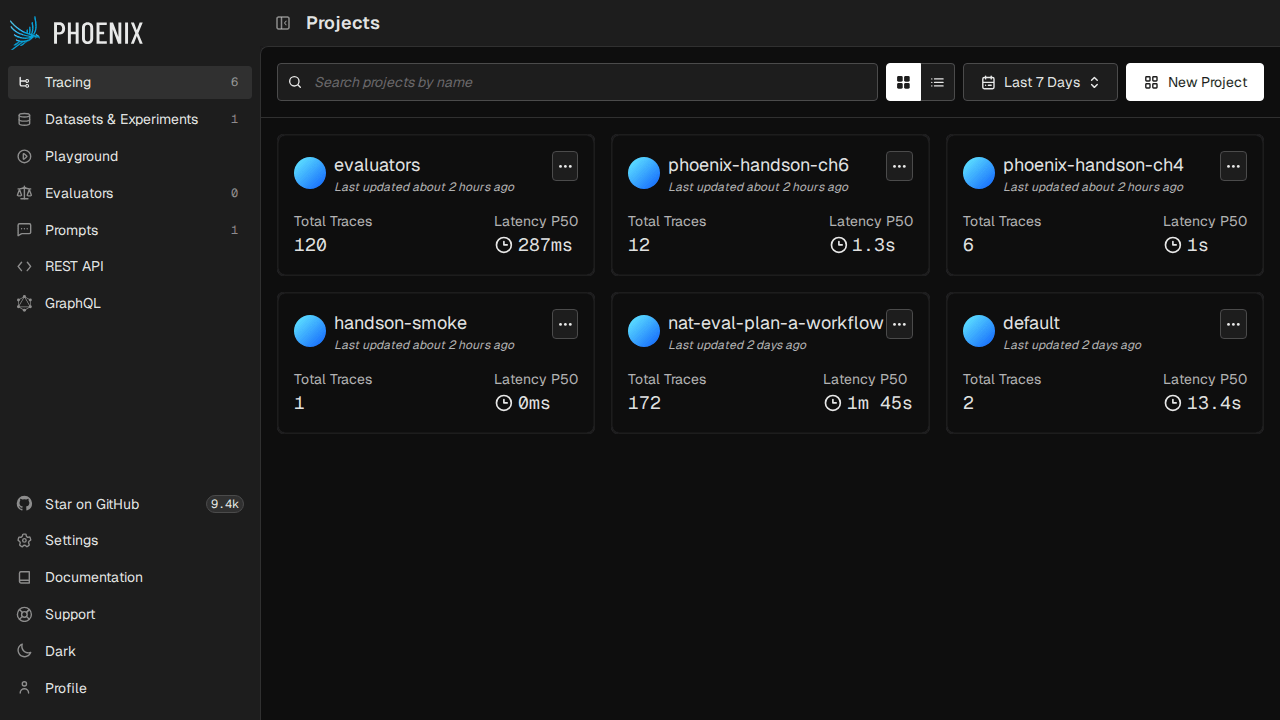
Launch it and open http://localhost:6006 to see the Projects screen. The projects we'll be creating in this article will keep getting added here, making it the starting point for tracing back "which script produced which trace" later on.
Capturing Traces from LLM Apps with OpenInference
A key feature of Phoenix is that instead of being locked into a proprietary SDK, it uses OpenInference, an OTel-based semantic convention, to capture traces from frameworks. openinference-instrumentation-* packages are provided for major LLM frameworks including LangChain, LlamaIndex, OpenAI SDK, Anthropic SDK, CrewAI, DSPy, Bedrock, and Vertex AI, and calling register() triggers auto-instrumentation.
As an example, here is code that instruments a LangChain QA chain with tracing:
import os
from langchain_core.output_parsers import StrOutputParser
from langchain_core.prompts import ChatPromptTemplate
from phoenix.otel import register

tracer_provider = register(
    project_name=os.environ.get("PHOENIX_PROJECT_NAME", "phoenix-handson-ch4"),
    endpoint="http://localhost:6006/v1/traces",
    auto_instrument=True,
)

# Switch between OpenAI / Anthropic / OpenAI-compatible endpoints via environment variables
def build_llm():
    if os.environ.get("OPENAI_API_KEY") or os.environ.get("OPENAI_BASE_URL"):
        from langchain_openai import ChatOpenAI
        return ChatOpenAI(
            model=os.environ.get("OPENAI_MODEL", "gpt-4o-mini"),
            temperature=0,
            base_url=os.environ.get("OPENAI_BASE_URL"),
        )
    from langchain_anthropic import ChatAnthropic
    return ChatAnthropic(model="claude-haiku-4-5", temperature=0)

prompt = ChatPromptTemplate.from_messages([
    ("system", "You are a concise assistant. Reply in a single sentence."),
    ("human", "{question}"),
])
chain = prompt | build_llm() | StrOutputParser()

for q in [
    "What is the capital of Japan?",
    "Who wrote 'Pride and Prejudice'?",
    "Briefly: why is the sky blue?",
]:
    print(chain.invoke({"question": q}))
The key is the single line register(auto_instrument=True), which detects all installed OpenInference packages and hooks into them. In my environment, openinference-instrumentation-langchain and openinference-instrumentation-anthropic were installed, so both the LangChain Runnable hierarchy and the Anthropic SDK's messages.create calls became spans and were sent to Phoenix.
The code is structured to switch providers via environment variables: if there's an OpenAI API key it uses that, otherwise falls back to Anthropic, and specifying OPENAI_BASE_URL also allows using local vLLM or Ollama. It's convenient to be able to directly accommodate the requirement of "I want to try it with my local endpoint."
Here is a summary of the main Python trace-capturing packages available:
| Category | Package Name |
|---|---|
| LLM SDK | openinference-instrumentation-openai |
openinference-instrumentation-anthropic |
|
openinference-instrumentation-google-genai |
|
openinference-instrumentation-mistralai |
|
openinference-instrumentation-litellm |
|
| Agent Platforms | openinference-instrumentation-langchain |
openinference-instrumentation-llama-index |
|
openinference-instrumentation-dspy |
|
openinference-instrumentation-crewai |
|
openinference-instrumentation-openai-agents |
|
| Tools & Guards | openinference-instrumentation-haystack |
openinference-instrumentation-guardrails |
|
openinference-instrumentation-mcp |
|
| Cloud | openinference-instrumentation-bedrock |
openinference-instrumentation-vertexai |
On the TypeScript side, version 1.0 of @arizeai/phoenix-otel was released in April 2026, allowing trace capture for the Vercel AI SDK and LangChain.js to be written in the same style. It's becoming easier to set things up for cases where you're writing a backend in Python while also wanting to send OTLP directly from a Next.js frontend.
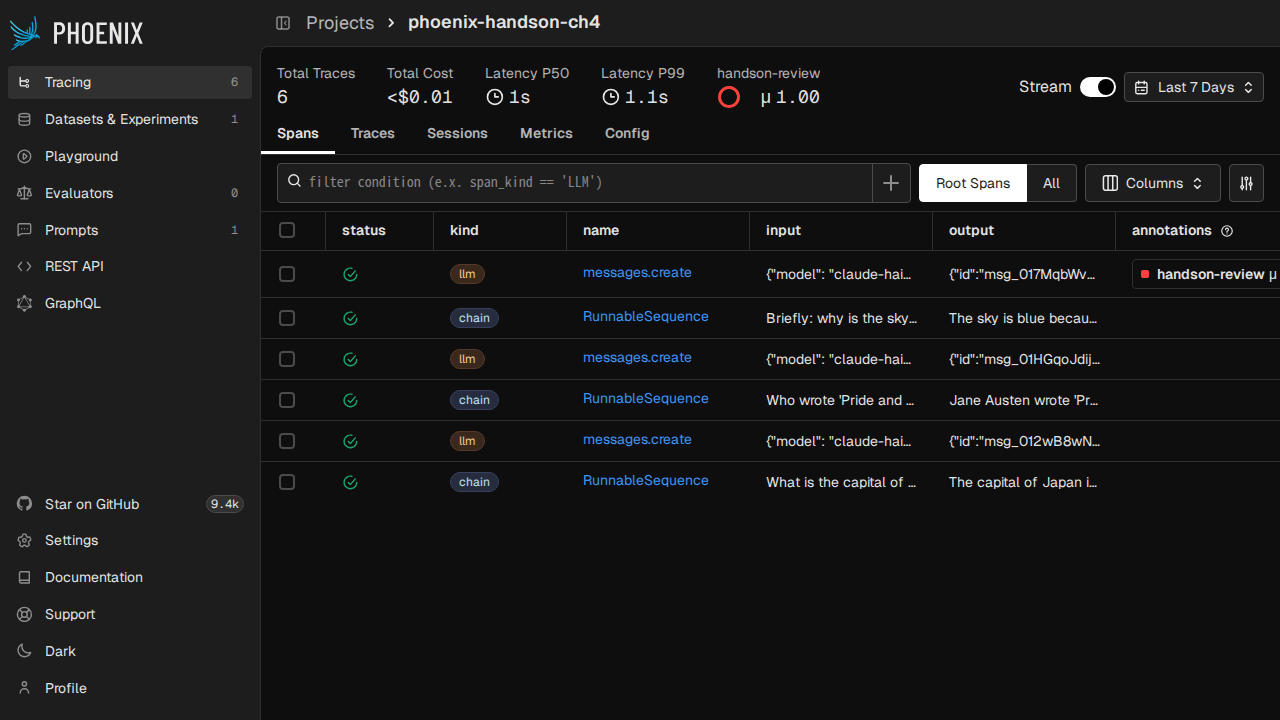
Immediately after running the script, opening the Spans tab in Phoenix shows 15 spans from the 3 questions flowing in.
Reading the Trace Spans
These 15 spans are broken down as 3 questions × 5 spans each.
| Span Name | span_kind | Role |
|---|---|---|
RunnableSequence |
CHAIN | The entire LangChain LCEL pipeline |
ChatPromptTemplate |
PROMPT | Prompt rendering |
ChatAnthropic |
LLM | LLM call as seen from the LangChain abstraction layer |
messages.create |
LLM | Raw-level API of the Anthropic SDK |
StrOutputParser |
UNKNOWN | Output parser (no category definition in OpenInference) |
The hierarchy is CHAIN → PROMPT + LLM + UNKNOWN, and the parent-child relationships are displayed in a waterfall view in the Phoenix UI. Attributes like input.value / output.value / llm.token_count.prompt / llm.token_count.completion / llm.model_name are automatically attached to each span, so you can see at a glance "which question caused token counts to spike" or "where time was being spent."
Opening a trace shows a span tree in the left pane, Input / Output in the center, and an Annotation editor on the right — a layout that lets you directly follow "what text passed through where."
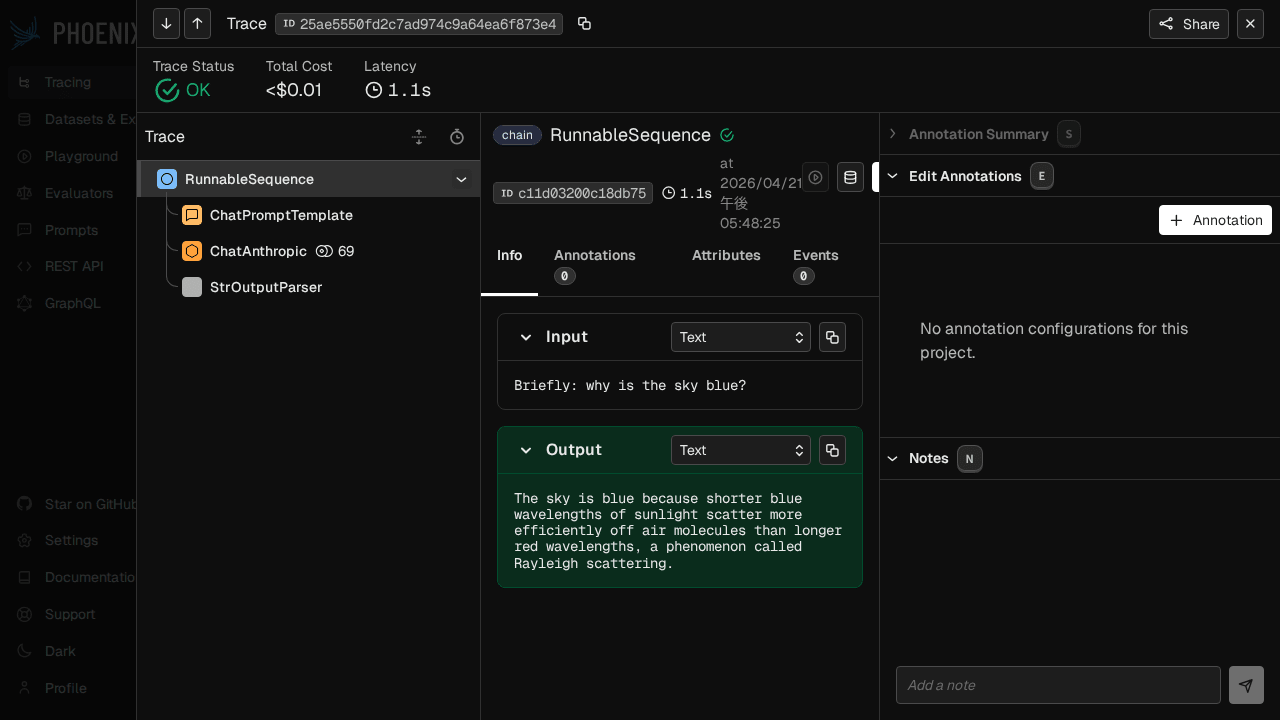
One thing to note is that ChatAnthropic and messages.create becoming double-stacked LLM spans representing the same request is because both the LangChain and Anthropic SDK OpenInference hooks are active. If you want to limit it to just one, you can set register(auto_instrument=False) and explicitly enable only the Instrumentor you want to use, like LangChainInstrumentor().instrument().
The reason StrOutputParser shows up as UNKNOWN is that the OpenInference semantic convention doesn't define an "output parser" category, so LangChain attaches UNKNOWN as a fallback. The behavior is correct, but it's a bit noticeable when looking at the UI, so it's better to avoid operations that rely solely on span_kind for aggregation.
When you want to retrieve spans in bulk from Python, you can pull a DataFrame via phoenix-client:
from phoenix.client import Client

c = Client(base_url="http://localhost:6006")
df = c.spans.get_spans_dataframe(project_identifier="phoenix-handson-ch4")
print(df[["name", "span_kind", "status_code"]].head())
In situations involving CSV exports or pandas aggregation, hitting the API is faster than looking at the UI.
Grouping Multi-Turn Conversations with Sessions
Once you move beyond single Q&A to building a chat app, you'll want to see things like "how long did this conversation take in total?" or "which turn went off track?". Using Phoenix's Sessions feature, you can group related traces together under a session.id key for display.
Using the using_session() context manager from the openinference-instrumentation package automatically attaches attributes.session.id to the top-level spans generated within it. Child spans are navigated from the parent-child relationship on the UI side, so you only need to attach it to the top level.
import os, uuid
from langchain_core.messages import HumanMessage, SystemMessage
from langchain_anthropic import ChatAnthropic
from openinference.instrumentation import using_session
from phoenix.otel import register

register(project_name="phoenix-handson-ch6",
         endpoint="http://localhost:6006/v1/traces",
         auto_instrument=True)

def run_session(session_id: str, turns: list[str]) -> None:
    llm = ChatAnthropic(model="claude-haiku-4-5", temperature=0)
    history = [SystemMessage(content="You are a concise assistant. Keep every reply under 30 words.")]
    with using_session(session_id):
        for user_text in turns:
            history.append(HumanMessage(content=user_text))
            result = llm.invoke(history)
            history.append(result)

run_session(f"handson-{uuid.uuid4()}", [
    "Tell me three famous sights in Kyoto.",
    "Which one is closest to Kyoto Station?",
    "How long does it take on foot?",
])
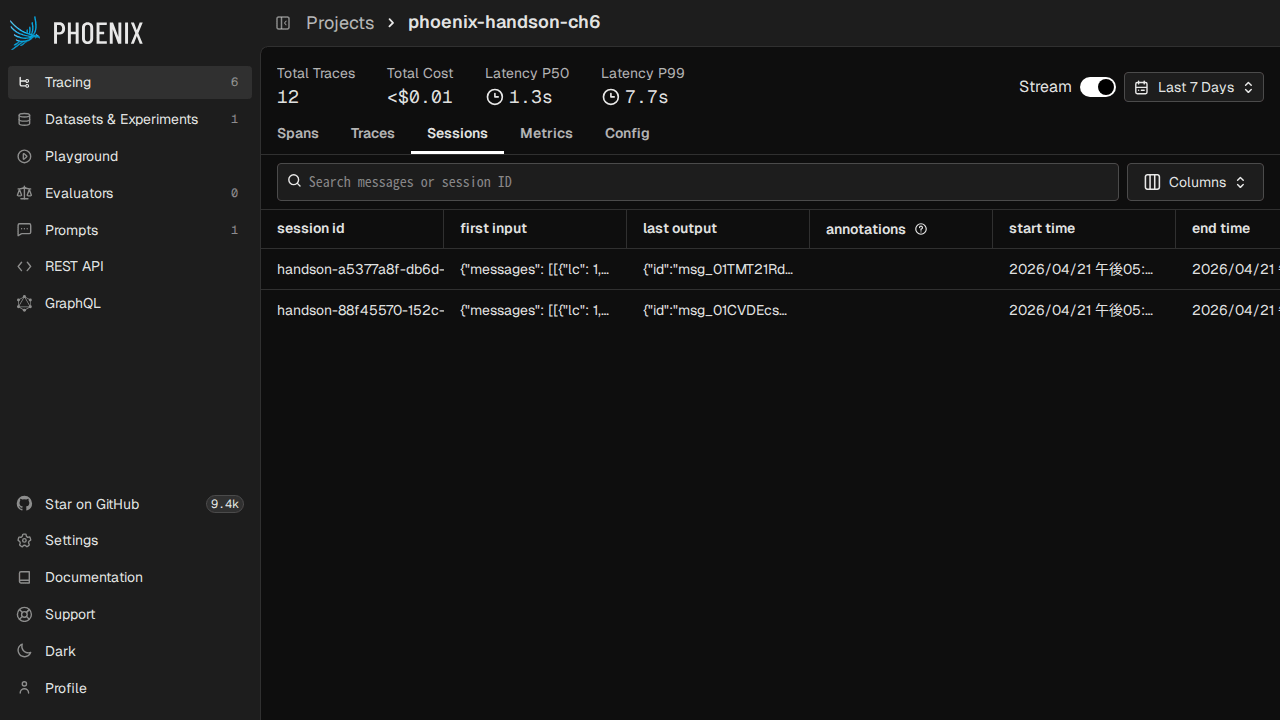
After running this for 2 sessions, opening the Sessions tab in Phoenix shows the first input, last output, start/end times, and annotations aggregated per session id. Clicking a session lets you jump to the traces for each turn, making it easier to track down "which turn caused a hallucination" during debugging.
Using the Sessions API added in the v14 series, you can retrieve ordered conversations from the SDK:
from phoenix.client import Client

c = Client(base_url="http://localhost:6006")
turns = c.sessions.get_session_turns(session_id="<session-id>")
A common pitfall with Sessions behavior is trying to write the attribute directly to a span without using using_session(). Writing span.set_attribute("session.id", "xxx") inside tracer.start_as_current_span(...) will show up in the UI, but propagation to child spans is not automatic, so when using it through frameworks like LangChain, using_session() is the more straightforward approach.
Preparing Data for Regression Testing with Datasets
To see "how did scores change compared to before after swapping the prompt?", the standard approach is to prepare a fixed dataset. Phoenix lets you stand up a dataset by simply passing a pandas DataFrame to phoenix.client.Client.datasets.create_dataset.
import pandas as pd
from phoenix.client import Client

QA = [
    ("What is the capital of France?", "Paris"),
    ("Who painted the Mona Lisa?", "Leonardo da Vinci"),
    # ... 30 general knowledge QA items
]

df = pd.DataFrame(QA, columns=["question", "answer"])
df["id"] = [f"qa-{i:03d}" for i in range(len(df))]

client = Client(base_url="http://localhost:6006")
ds = client.datasets.create_dataset(
    name="handson-general-qa",
    dataframe=df,
    input_keys=["question"],
    output_keys=["answer"],
    metadata_keys=["id"],
)
print(f"dataset id={ds.id} rows={len(df)}")
Running this issues a dataset id and version_id, and 30 rows appear in the Datasets tab of the UI. The assignment of input_keys / output_keys / metadata_keys becomes the names used for access like example["input"]["question"] when writing Experiments later, so the names decided here have effects a few steps ahead.
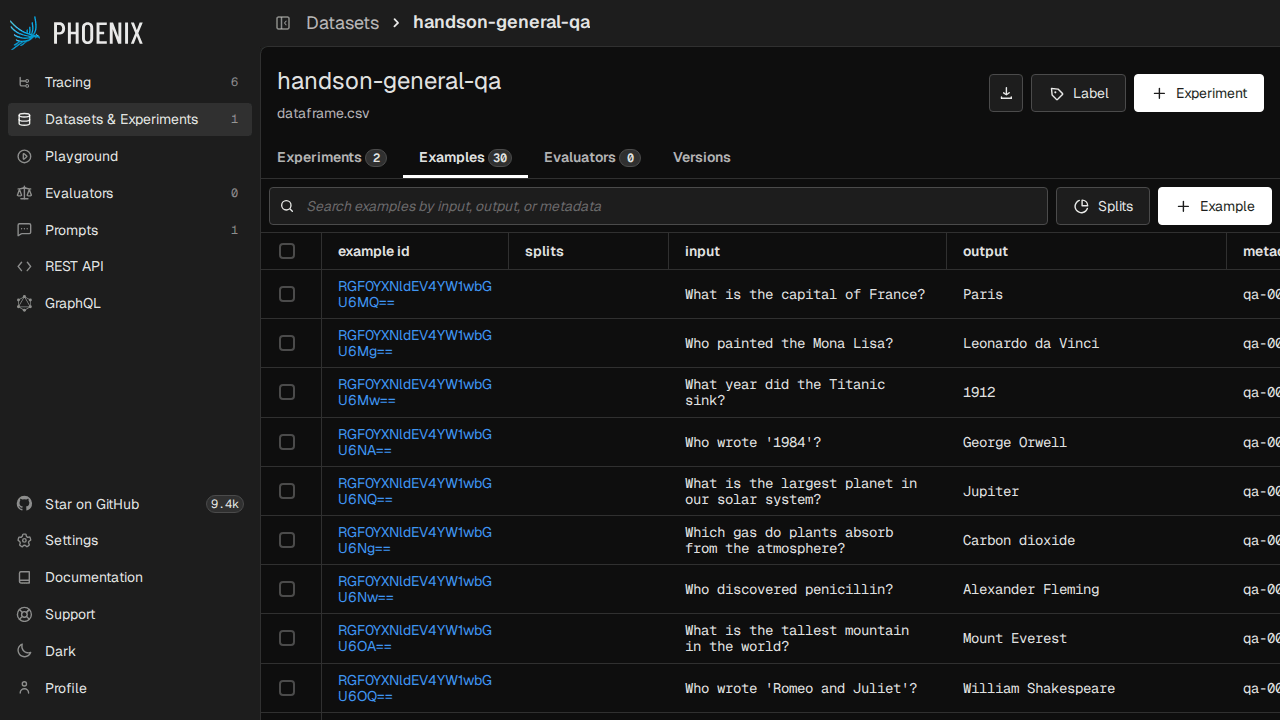
In v14, a concept called Splits was added, allowing you to manage the same dataset divided into sections like train / test. For example, a workflow where you split 30 items into 20 for train and 10 for test, refine the prompt on train, then do the final evaluation on test, can all be done within Phoenix.
Besides DataFrame, other routes for dataset creation include CSV upload (UI), direct JSONL PUT (REST), and importing from HuggingFace Datasets. Personally, creating from Python and directly passing ds.id to the next step was the most convenient approach.
Comparing Prompts and Judges with Experiments
Once Datasets are ready, the job of Experiments is to pit multiple implementations against the same input and compare them. Passing a "task function" and "evaluation functions (evaluators)" to run_experiment handles everything from executing the task for each example → scoring with evaluators → recording to DB → appearing in the comparison UI.
This time, I ran prompt A ("answer in exactly one word") and prompt B ("answer in at most 3 words") against the same 30 QA items. For evaluation, I lined up (1) contains_match (code-based evaluation) that checks whether the expected value is contained in the output, and (2) llm_correctness (using Claude Haiku 4.5 as a judge) that uses LLM-as-judge to determine yes/no.
from anthropic import Anthropic
from phoenix.client import Client

anthropic = Anthropic()
client = Client(base_url="http://localhost:6006")
dataset = client.datasets.get_dataset(dataset="handson-general-qa")

def _ask(system: str, question: str) -> str:
    resp = anthropic.messages.create(
        model="claude-haiku-4-5", max_tokens=128, system=system,
        messages=[{"role": "user", "content": question}],
    )
    return resp.content[0].text.strip()

def task_one_word(example):
    return _ask("Answer in exactly one word.", example["input"]["question"])

def task_short_phrase(example):
    return _ask("Provide a short factual answer in at most 3 words.", example["input"]["question"])

def contains_match(output, expected):
    return float(expected.get("answer", "").lower() in str(output).lower())

def llm_correctness(input, output, expected):
    prompt = (
        f"Question: {input['question']}\n"
        f"Expected answer: {expected['answer']}\n"
        f"Model answer: {output}\n\n"
        "Is the model answer semantically correct? Reply 'yes' or 'no'."
    )
    resp = anthropic.messages.create(
        model="claude-haiku-4-5", max_tokens=5,
        messages=[{"role": "user", "content": prompt}],
    )
    return 1.0 if resp.content[0].text.strip().lower().startswith("yes") else 0.0

client.experiments.run_experiment(
    dataset=dataset, task=task_one_word,
    evaluators=[contains_match, llm_correctness],
    experiment_name="prompt-A-one-word",
)
client.experiments.run_experiment(
    dataset=dataset, task=task_short_phrase,
    evaluators=[contains_match, llm_correctness],
    experiment_name="prompt-B-short-phrase",
)
In my local run, a running tasks progress bar appeared, with 30 tasks completing in about 30 seconds, and 30 items × 2 evaluators = 60 evaluations completing in about 27 seconds. 120 evaluations are recorded in Phoenix for each of prompts A and B, and opening the Experiments tab shows them listed by experiment name, with the mean, median, and distribution of scores available for comparison.
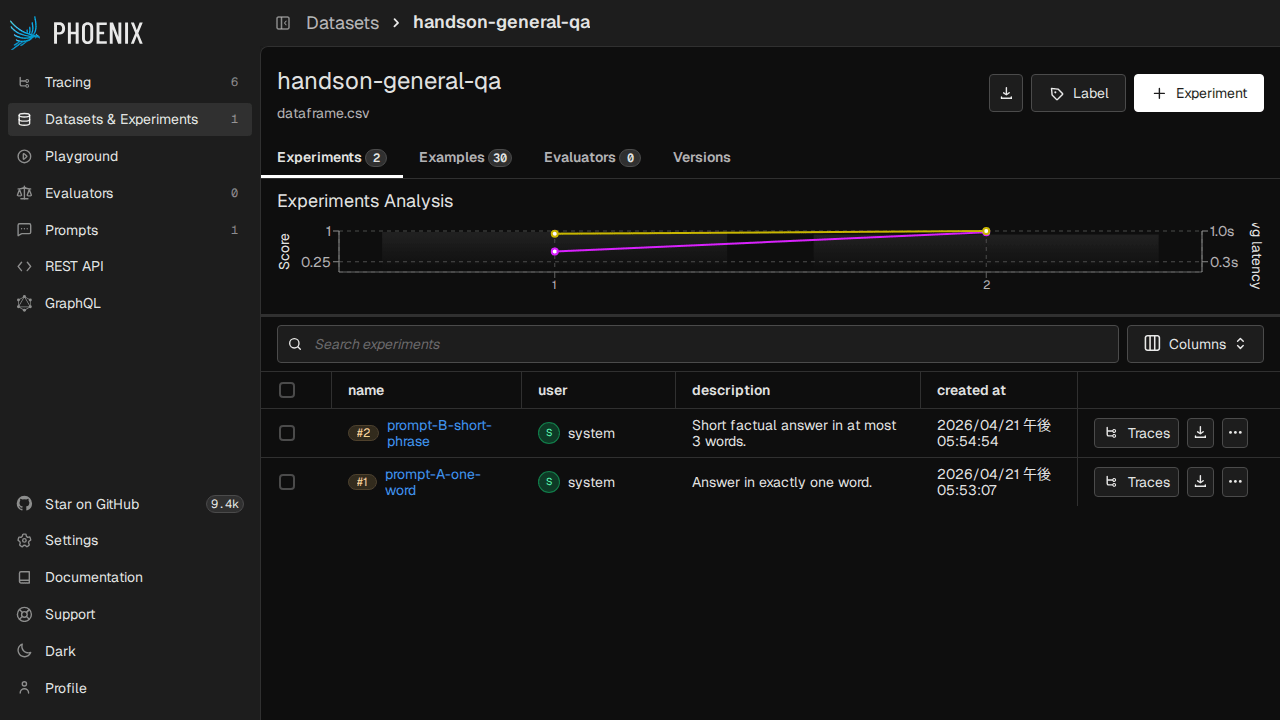
Experiments tied to the same Dataset can be directly double-clicked to enter an "example-by-example side-by-side diff" view, making it easy to spot things like "prompt A is failing on this particular question."
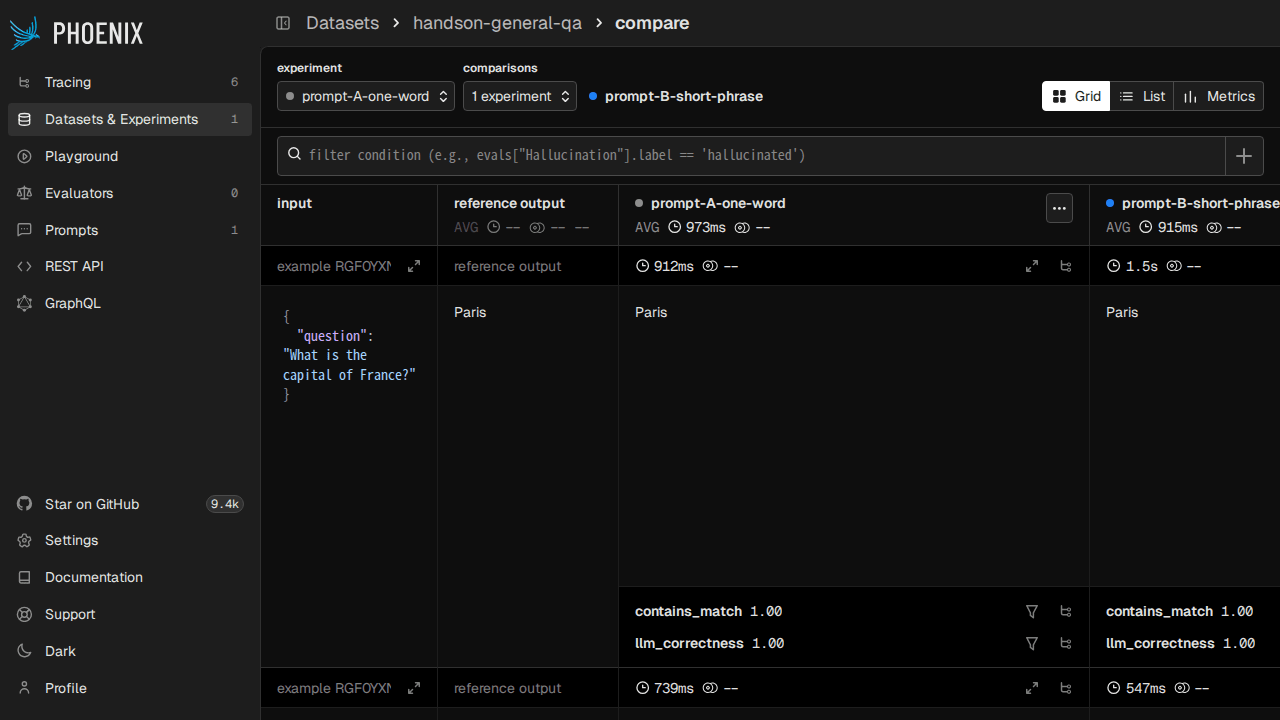
The task function signature is flexible — besides receiving only example, you can also destructure with keys like input / expected / metadata. Evaluators are also matched by argument name, making it easy to reuse the same evaluator in both Experiments and Evals. The return value can be any of dict / bool / float / str / (float, str) tuple / EvaluationResult, so you can write it casually in a script-style manner.
Running LLM-as-judge with phoenix-evals
You can also write evaluators within Experiments, but there are days when you just want to "pull the output into pandas and evaluate it later." In those cases, the arize-phoenix-evals package can be used independently, making it easy to call from Jupyter and similar tools. In the modern v3 API, the LLM provider is specified with LLM(provider=..., model=...) and injected into metric classes like CorrectnessEvaluator and ConcisenessEvaluator.
import pandas as pd
from anthropic import Anthropic
from phoenix.evals import LLM, evaluate_dataframe
from phoenix.evals.metrics import ConcisenessEvaluator, CorrectnessEvaluator

QA = [
    ("What is the capital of France?", "Paris"),
    ("Who painted the Mona Lisa?", "Leonardo da Vinci"),
    # ... 10 items
]

anthropic = Anthropic()

def answer(q: str) -> str:
    r = anthropic.messages.create(model="claude-haiku-4-5", max_tokens=128,
                                   messages=[{"role": "user", "content": q}])
    return r.content[0].text.strip()

rows = [{"input": q, "output": answer(q), "expected": ex} for q, ex in QA]
df = pd.DataFrame(rows)

judge = LLM(provider="anthropic", model="claude-haiku-4-5")
scored = evaluate_dataframe(df, evaluators=[
    CorrectnessEvaluator(llm=judge),
    ConcisenessEvaluator(llm=judge),
])
print(scored[["correctness_score", "conciseness_score"]].describe())
Running 10 QA × 2 evaluators locally, the CorrectnessEvaluator returned correct (score=1.0) for all 10 items, while the ConcisenessEvaluator returned concise for only 1 item and verbose for the remaining 9. Since Claude Haiku 4.5 tends to return "answer + supplementary info + background information" for questions, this cleanly visualized the distribution of "correct but verbose."
Scores come back as a set of label (correct / concise / etc.), a score from 0.0 to 1.0, and an explanation written by the LLM. Localizing the explanation to Japanese or customizing the rubric can be done by writing an arbitrary prompt template with create_classifier / create_evaluator, so it's directly applicable to use cases like "checking output against company-specific Japanese guidelines."
The representative metrics available in Evals are as follows. In arize-phoenix-evals 3.x, legacy APIs like QAEvaluator remain, but for new code the phoenix.evals.metrics class API is the safe choice.
| Category | Evaluator |
|---|---|
| Answer Quality | CorrectnessEvaluator / FaithfulnessEvaluator (successor to former HallucinationEvaluator) |
| Style & Refusal | ConcisenessEvaluator / RefusalEvaluator |
| RAG | DocumentRelevanceEvaluator |
| Agent | ToolSelectionEvaluator / ToolInvocationEvaluator / ToolResponseHandlingEvaluator |
| Code Evaluation | MatchesRegex / PrecisionRecallFScore / exact_match |
Version Control Prompts with Prompt Hub
Many people manage prompts with git, but since Phoenix comes bundled with Prompt Hub, you can manage the history of "the actual prompts used in experiments" within Phoenix. Simply create a PromptVersion from the Python client and push it to increment the version.
from phoenix.client import Client
from phoenix.client.types import PromptVersion

c = Client(base_url="http://localhost:6006")

v1 = PromptVersion(
    [
        {"role": "system", "content": "You are a concise assistant. Reply in a single sentence."},
        {"role": "user", "content": "{{question}}"},
    ],
    model_name="claude-haiku-4-5",
    model_provider="ANTHROPIC",
    description="v1 baseline concise prompt",
    template_format="MUSTACHE",
)
v2 = PromptVersion(
    [
        {"role": "system", "content": "You are a precise factual assistant. Answer with exactly one short sentence, no preamble."},
        {"role": "user", "content": "{{question}}"},
    ],
    model_name="claude-haiku-4-5",
    model_provider="ANTHROPIC",
    description="v2 stricter one-sentence prompt",
    template_format="MUSTACHE",
)

pv1 = c.prompts.create(name="handson-concise-qa", version=v1)
pv2 = c.prompts.create(name="handson-concise-qa", version=v2)
c.prompts.tags.create(prompt_version_id=pv1.id, name="baseline")
c.prompts.tags.create(prompt_version_id=pv2.id, name="production")

latest = c.prompts.get(prompt_identifier="handson-concise-qa")
baseline = c.prompts.get(prompt_identifier="handson-concise-qa", tag="baseline")
model_provider covers all major options including ANTHROPIC / OPENAI / AZURE_OPENAI / GOOGLE / AWS (Bedrock) / OLLAMA / GROQ / DEEPSEEK / XAI / TOGETHER. template_format can be chosen from MUSTACHE / F_STRING / NONE, and the example above uses {{question}} as a placeholder.
In the Phoenix UI's Prompts tab, differences between versions (changes in the system prompt between v1 and v2) are displayed with color highlighting, and you can also see at a glance which version is pinned with the production tag.
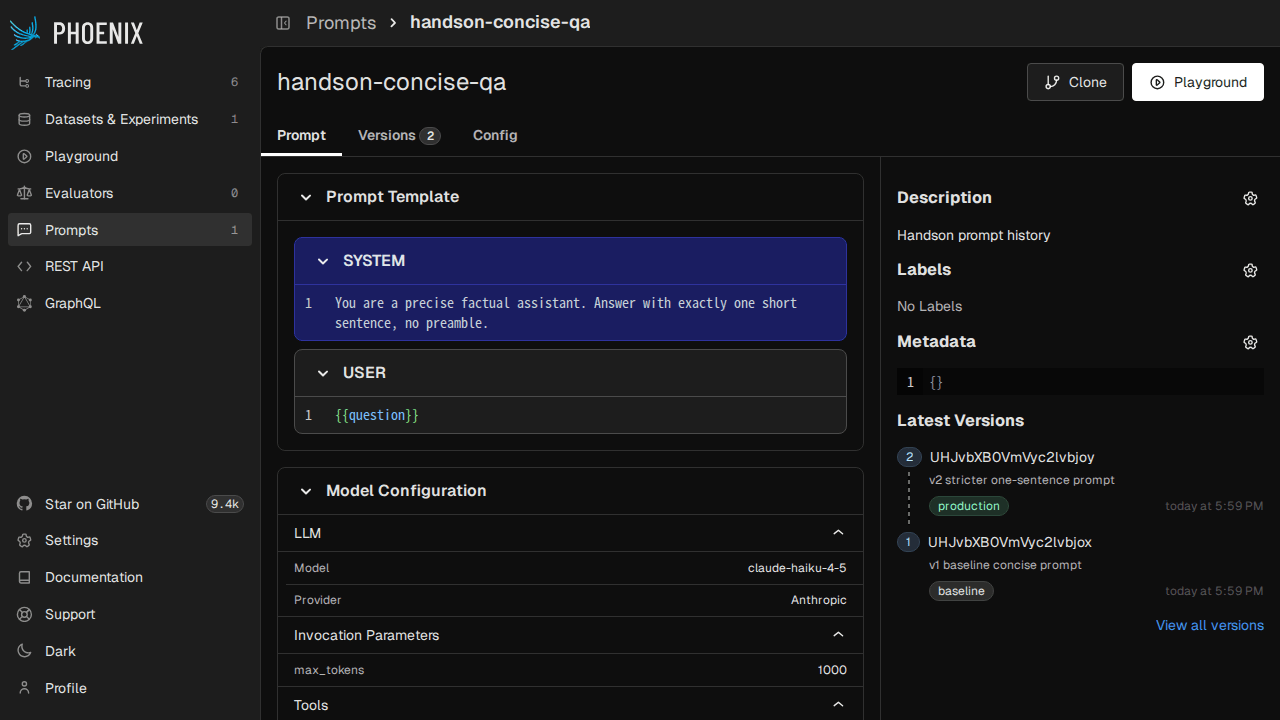
The Playground screen also lets you directly edit prompts and verify behavior by "sending them to an LLM on the spot and viewing the results." By registering an OpenAI-compatible endpoint as a Custom Provider, you can also call your local vLLM or Ollama from the Playground.
History can also be checked from the CLI using px prompts (list) or px prompt <identifier> (reference). If you use Phoenix Hub as a separate history system from git, it may be natural to push from phoenix-client within your CI pipeline.
Aligning Automated Scores and Manual Reviews with Annotations
When operating an observability tool, the need often arises to "view automated evaluation scores alongside manually assigned labels from reviewers on the same screen." Phoenix unifies this with a mechanism called Annotations, where both automated scores and human feedback are stored in the span_annotations table under the same schema.
Adding an annotation manually to an existing span is just one line with the Python client.
from phoenix.client import Client

c = Client(base_url="http://localhost:6006")
spans_df = c.spans.get_spans_dataframe(project_identifier="phoenix-handson-ch4")
llm_span_id = str(spans_df[spans_df["span_kind"] == "LLM"].index[0])

c.spans.add_span_annotation(
    span_id=llm_span_id,
    annotation_name="handson-review",
    annotator_kind="HUMAN",
    label="correct",
    score=1.0,
    explanation="Manually reviewed in handson session — looks good.",
    sync=True,
)
annotator_kind has 3 options: LLM / CODE / HUMAN, and even if multiple annotations are added to the same span, each is stored separately. In the UI's individual span detail view, the annotation list is displayed expanded, allowing you to track who assigned which label and score, and when.
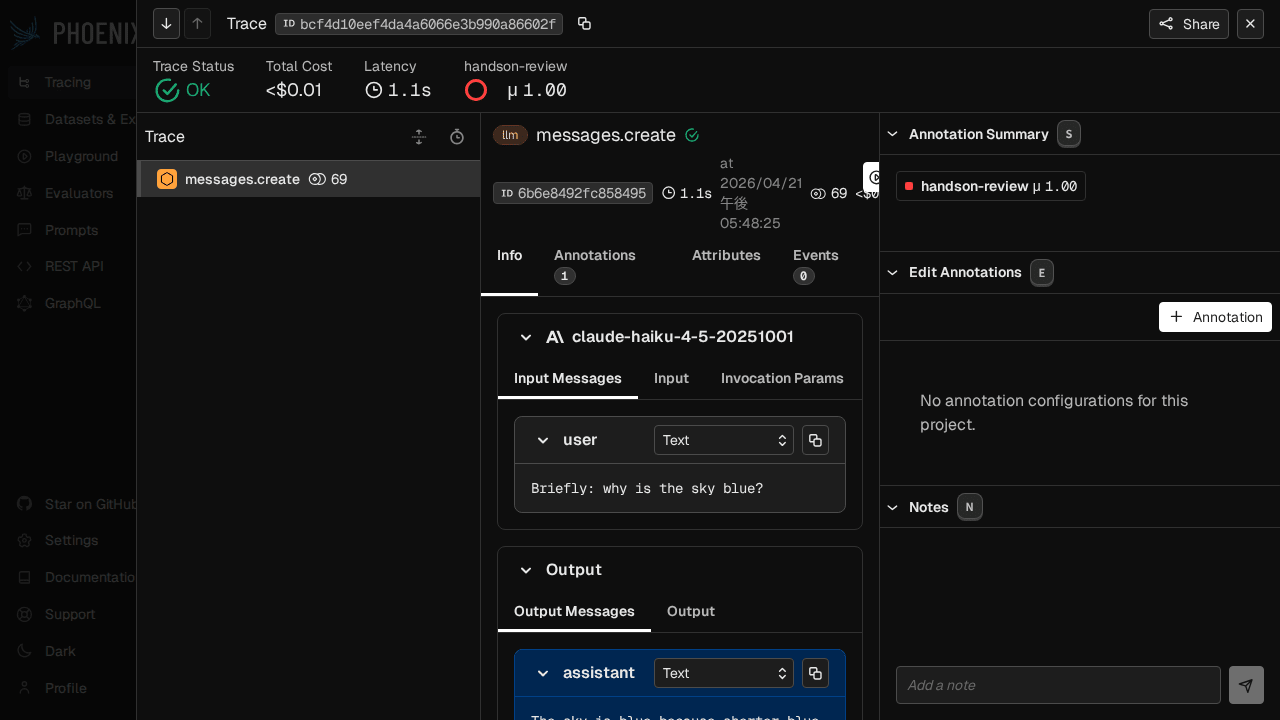
In v14, the REST endpoints were reorganized, the old /v1/evaluations was deprecated, and it was split into the following 3 endpoints.
| Endpoint | Target |
|---|---|
POST /v1/span_annotations |
Per-span evaluation |
POST /v1/trace_annotations |
Per-trace evaluation |
POST /v1/document_annotations |
Per-RAG document |
Since you can cross-search automated scores from evaluators and human reviews with manual flags on the same screen, it becomes easier to find discrepancies such as "spans where the LLM judge says 0.9 but a human marked NG." For batch processing, you can use c.spans.log_span_annotations_dataframe(df) to bulk-register from a pandas DataFrame, making it easy to write back the output of an evaluation pipeline all at once.
Features Not Covered, Competitor Comparison, and Pitfalls
Phoenix has several other interesting features that I wasn't able to fully cover this time. Here is a list of ones that caught my attention.
| Feature | Overview |
|---|---|
| Inferences | Put embeddings into px.Dataset for UMAP + HDBSCAN visualization |
| A2A Tracing | Tracing for Agent-to-Agent protocol (proposed by Google / Anthropic) |
| PostgreSQL read replica | From v14.0, offload the read side to a separate DB for load distribution |
| Shareable Project URL | Name-based shared URL via /redirects/projects/<name> |
| LDAP / OAuth2 auth | Enterprise authentication integration from v12.20~ |
Inferences was historically Phoenix's starting-point feature (embedding drift visualization), but recent documentation is centered on Tracing, and it seems to remain as "more of a legacy" in terms of official positioning. It's useful when you want to use it for RAG retriever tuning, so it's worth trying if the use case fits.
Tool Selection Map vs. Competitors
| Scenario | Suitable Tool |
|---|---|
| Want to self-host all features with OSS | Arize Phoenix |
| Want thorough prompt management across the team (paid OK) | Langfuse / LangSmith |
| Tightly coupled with LangChain and don't want additional costs | LangSmith |
| Want to integrate ML / LLM into MLflow | MLflow Tracing + Phoenix combo |
| Want to get started easily in the cloud | Phoenix Cloud / Langfuse Cloud |
Both Phoenix and Langfuse are attractive, and my personal distinction is: "Single container, OTel native, want to leverage OpenInference assets → Phoenix" vs. "MIT license makes it easier to pass company regulations, no objection to a heavier setup including Redis / Clickhouse → Langfuse." LangSmith is natural if you're using it as part of the LangChain / LangGraph ecosystem, but since it's not OSS, the selection criteria change.
Minor Pitfalls Encountered in v14
Finally, here is a summary of issues I ran into during the hands-on session. This reflects behavior as of the time of writing (Phoenix 14.9.1 / phoenix-otel 0.15.0 / phoenix-evals 3.0.0).
- Project name gets aggregated to
default: Unless you specifyproject_nameinregister()or pass it via thePHOENIX_PROJECT_NAMEenvironment variable, traces will get mixed into existing projects. - Annotation writes have moved to
/v1/span_annotations: If you were calling/v1/evaluationsfrom v13 or earlier, you'll get a 404. Via the Python client you don't need to worry about this, but anyone who was POSTing directly via shell needs to migrate. Additionally, the oldpx.Client()has been deprecated and migrated toClient(base_url=...)from thephoenix-clientpackage, so code from v13 or earlier will fail even at the import stage. - LLM spans appear doubled with LangChain + Anthropic: Both
ChatAnthropic(LangChain-side tracing) andmessages.create(Anthropic SDK-side tracing) become spans. If you want to clean this up, setregister(auto_instrument=False)and explicitly call the necessary Instrumentors. StrOutputParserspan_kind isUNKNOWN: This is because there is no "output parser" category in the OpenInference semantic conventions, and is a display-only issue. Be careful not to miss these when filtering withspan_kind=LLM.- Sending uppercase headers over gRPC causes
H2Error: protocol_error: Per the HTTP/2 spec, header keys must be lowercase, so when writing your own OTLP, make sure to use all lowercase. If you go throughPHOENIX_API_KEY, it will be attached in the correct format automatically. - Empty tables on first startup after switching to PostgreSQL: When first starting up with
PHOENIX_SQL_DATABASE_URLset, migration should run automatically, but depending on timing, the UI may come up with an empty DB. In that case, you can recover by runningdocker restarton the container or explicitly runningphoenix db migrate. - ARM64 Docker image is multi-arch but tags can be confusing:
:latestis multi-arch, but versioned tags likearizephoenix/phoenix:14.9.1also correctly pull the ARM64 image. If you specifically need x86, explicitly specify--platform linux/amd64. authlib.joseDeprecation warning: As of 14.9.1, migration tojoserfcis not yet complete, so a warning appears, but it does not affect behavior. If it bothers you, you can suppress it withwarnings.filterwarnings.
Summary
After exploring Arize Phoenix end to end, I was once again struck by the strength of having "observability, evaluation, prompt management, and manual review all in one OSS." Since OpenInference lets you capture traces across frameworks like LangChain / OpenAI SDK / Anthropic SDK / LlamaIndex, plugging it into an existing LLM app takes just a few lines, and the evaluation side is self-contained with arize-phoenix-evals, so you can run it quickly in Jupyter.
In terms of order of exploration, the fastest path is to spin it up with a single Docker command, connect your local LLM app with register(), and browse the spans. From there, adding Datasets / Experiments / Prompts / Annotations one by one will naturally build out a "workflow you can continue to grow over time."
There's even more to explore with Phoenix Cloud and enterprise authentication (LDAP / OAuth2), but I think the biggest selling point is being able to try all features for free locally. If you're interested, please use the verification scripts from this session as a template and try integrating them into your own app.

