
I Built an Agent That Automatically Generates and Executes SQL from Natural Language Using Amazon Athena × Bedrock Converse API

This page has been translated by machine translation. View original
Introduction
Amazon Bedrock's Knowledge Base (RAG) is powerful for searching unstructured documents, but it cannot fully handle questions involving aggregation, comparison, or ranking, such as "What is the total sales for Q1 FY2025?"
To address this challenge, I used Bedrock's Converse API (tool_use) and built an agent loop on the application side, enabling Claude to generate SQL, execute it on Athena, and generate answers based on the results.
While Bedrock Agents (managed service) is also an option, building your own agent loop gives you the advantage of freedom in streaming control and custom UI. This article introduces the implementation of this approach.
Architecture
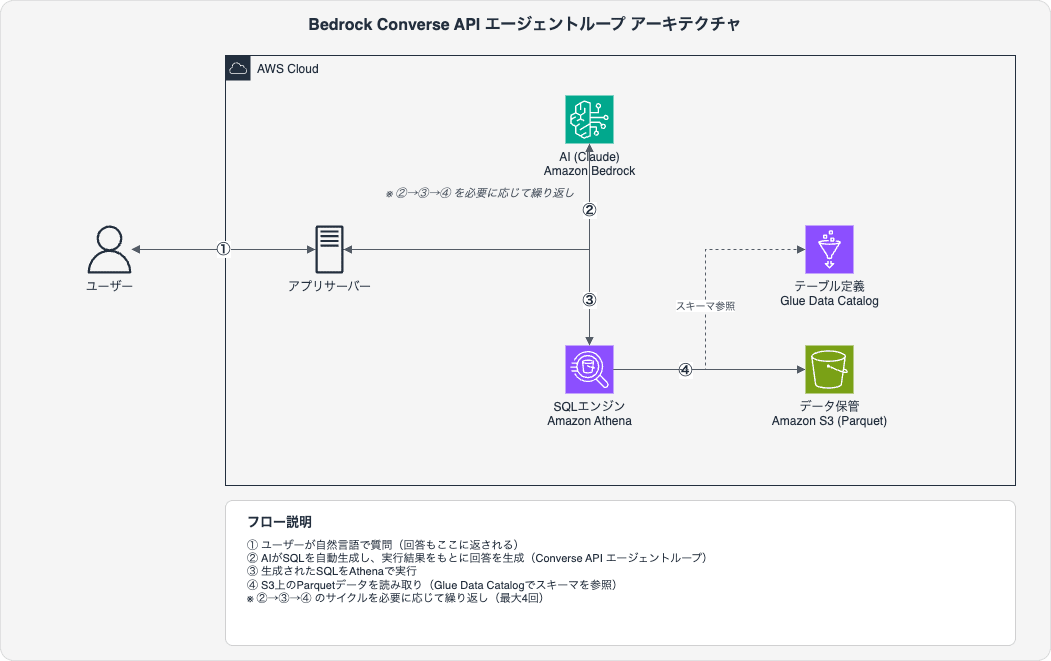
User's question
  ↓
Application server (FastAPI, etc.)
  ↓
bedrock_runtime.converse()  ← SQL tool defined via tool_use
  ↓
Claude generates SQL (stop_reason: "tool_use")
  ↓
App receives SQL and executes directly on Athena (no Lambda needed)
  ↓
Result added to messages as toolResult
  ↓
bedrock_runtime.converse()  ← Generate answer based on result
  ↓
(If needed, generate additional SQL → re-execute → loop)
  ↓
stop_reason: "end_turn" → answer complete
Key point: Instead of Bedrock Agents (managed service), we use toolConfig in the Converse API to control the loop on the application side. No Lambda or Action Group is needed — Athena is called directly from the app.
Why Converse API instead of Bedrock Agents?
| Aspect | Bedrock Agents | Converse API + custom loop |
|---|---|---|
| Tool execution | Via Lambda (Action Group) | Direct call from app |
| Streaming | Controlled by Agent | Freely customizable |
| UX | Fixed | Full control per step: SQL display, result display, etc. |
| Loop control | Left to Agent | Fine-grained control such as max iterations |
| Debugging | Check via trace logs | Check directly in app logs |
| Deployment | Agent + Lambda + Action Group | App only |
If you already have an application server, the Converse API approach is simpler to set up.
Prerequisites & Environment
- An AWS account must be available
- Access to Claude models must be enabled in Amazon Bedrock
- Structured data (CSV/Excel, etc.) must already be converted to Parquet format
- Python 3.12 + boto3
- Region: ap-northeast-1 (Tokyo)
Why Parquet?
Athena can also read CSV, but Parquet has the following advantages:
- Columnar format: Only the necessary columns are read, reducing scan volume and cost
- Retains type information: Types such as INT and STRING are automatically recognized
- Higher compression efficiency: Snappy compression also reduces storage costs
For conversion in Python, pandas + pyarrow is easy:
import pandas as pd

df = pd.read_excel("data.xlsx", sheet_name="Sheet1")
df.to_parquet("output/data.parquet", engine="pyarrow", compression="snappy")
Steps
Step 1: Place Data in S3
Upload Parquet files to S3. The key point is to separate each table into its own prefix (folder).
s3://your-bucket/sql/
  ├── sales/
  │   └── sales.parquet
  ├── employees/
  │   └── employees.parquet
  └── products/
      └── products.parquet
Open the target bucket in the S3 console, create a folder for each table name under the sql/ prefix, and upload the corresponding Parquet file to each folder.
Also, create the folder for Athena query result output (athena-results/), which will be described later.
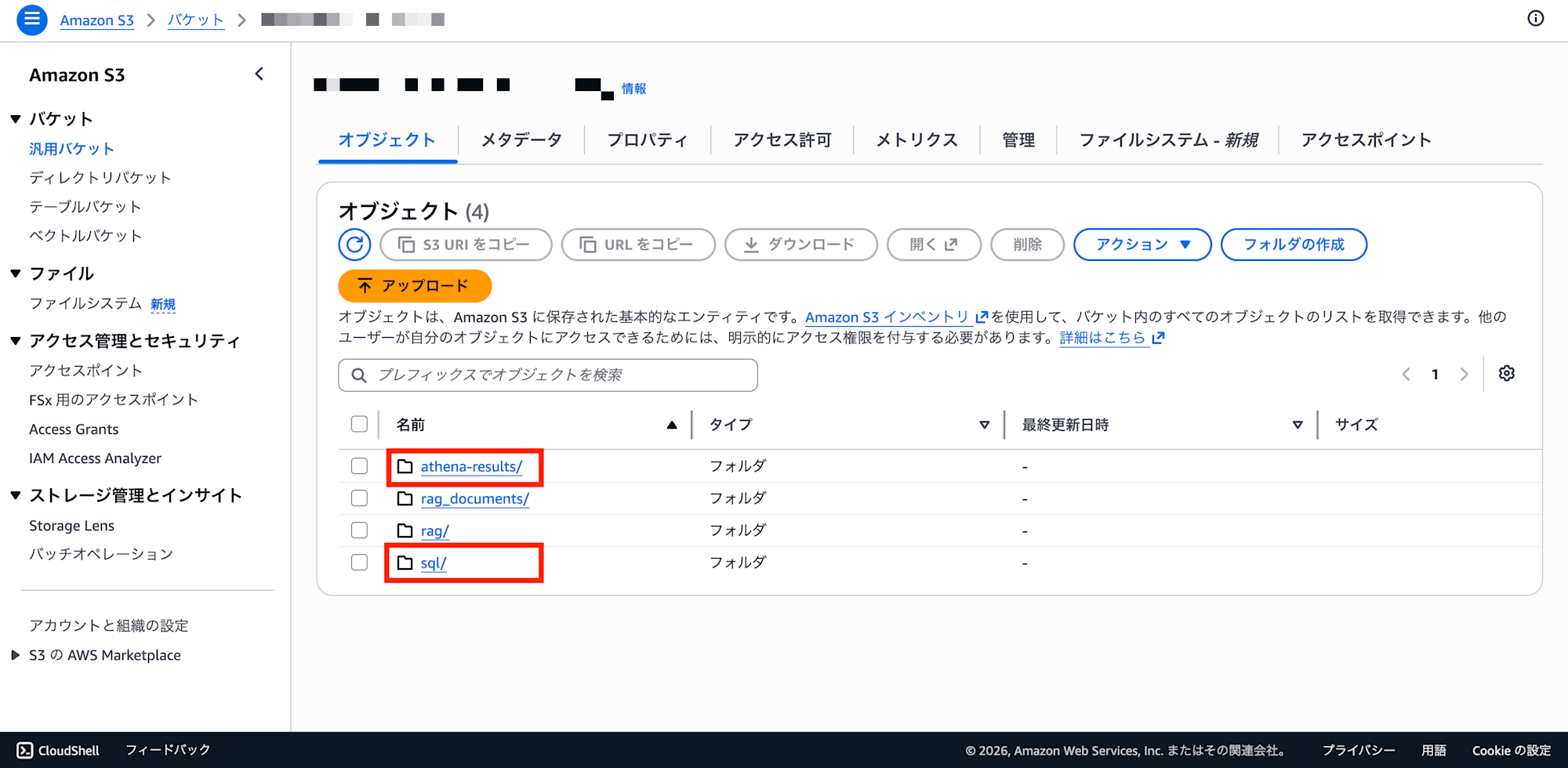
Note: Athena Query Result Output Location (athena-results/)
Every time Athena executes a query, it always writes the results to S3. This is an Athena specification that cannot be omitted.
s3://your-bucket/
  ├── sql/                  ← Source data (Parquet)
  │   ├── sales/
  │   └── employees/
  └── athena-results/       ← Auto-generated by Athena (query results)
      ├── <query-id-1>.csv
      ├── <query-id-1>.csv.metadata
      ├── <query-id-2>.csv
      ├── <query-id-2>.csv.metadata
      └── ... (grows with each query execution)
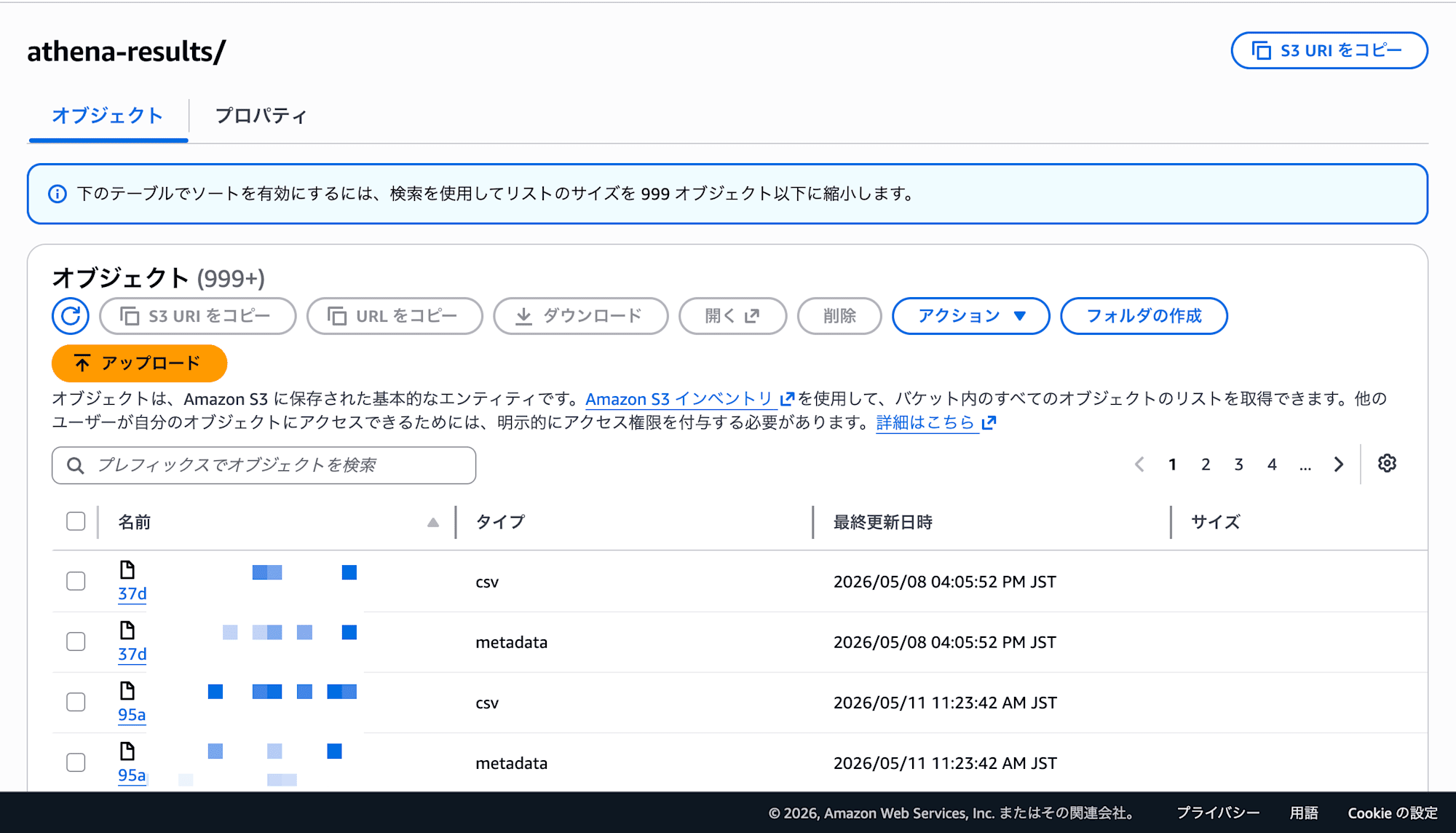
Why write to S3:
Athena is a serverless query engine that has no persistent storage of its own. Workers spin up for each query execution, process the query, and immediately terminate when done. For this reason, writing to S3 is mandatory as the place to store query results.
Output file structure:
| File | Content |
|---|---|
<query-id>.csv |
The query result itself (CSV with column headers) |
<query-id>.csv.metadata |
JSON recording query metadata (statistics, scan volume, etc.) |
Processing flow:
- Specify the output destination in
ResultConfiguration.OutputLocationwithstart_query_execution() - Athena executes the query and writes the results as a
.csv+.csv.metadatapair get_query_results()reads that CSV and returns the results
The number of files at this output location keeps growing with each query execution. Repeated development and testing can quickly produce hundreds to thousands of files, so it is recommended to configure automatic deletion using S3 lifecycle rules.
Note that the IAM policy requires both s3:PutObject (for Athena to write) and s3:GetObject (to read results) for this output location.
Step 2: Clean Up athena-results/
As mentioned above, Athena writes result files to S3 with every query execution. Left unchecked, the number of objects will balloon, so set up automatic deletion with an S3 lifecycle rule.
Configuration in the S3 console:
- Open the target bucket in the S3 console
- Go to the "Management" tab → Click "Create lifecycle rule"
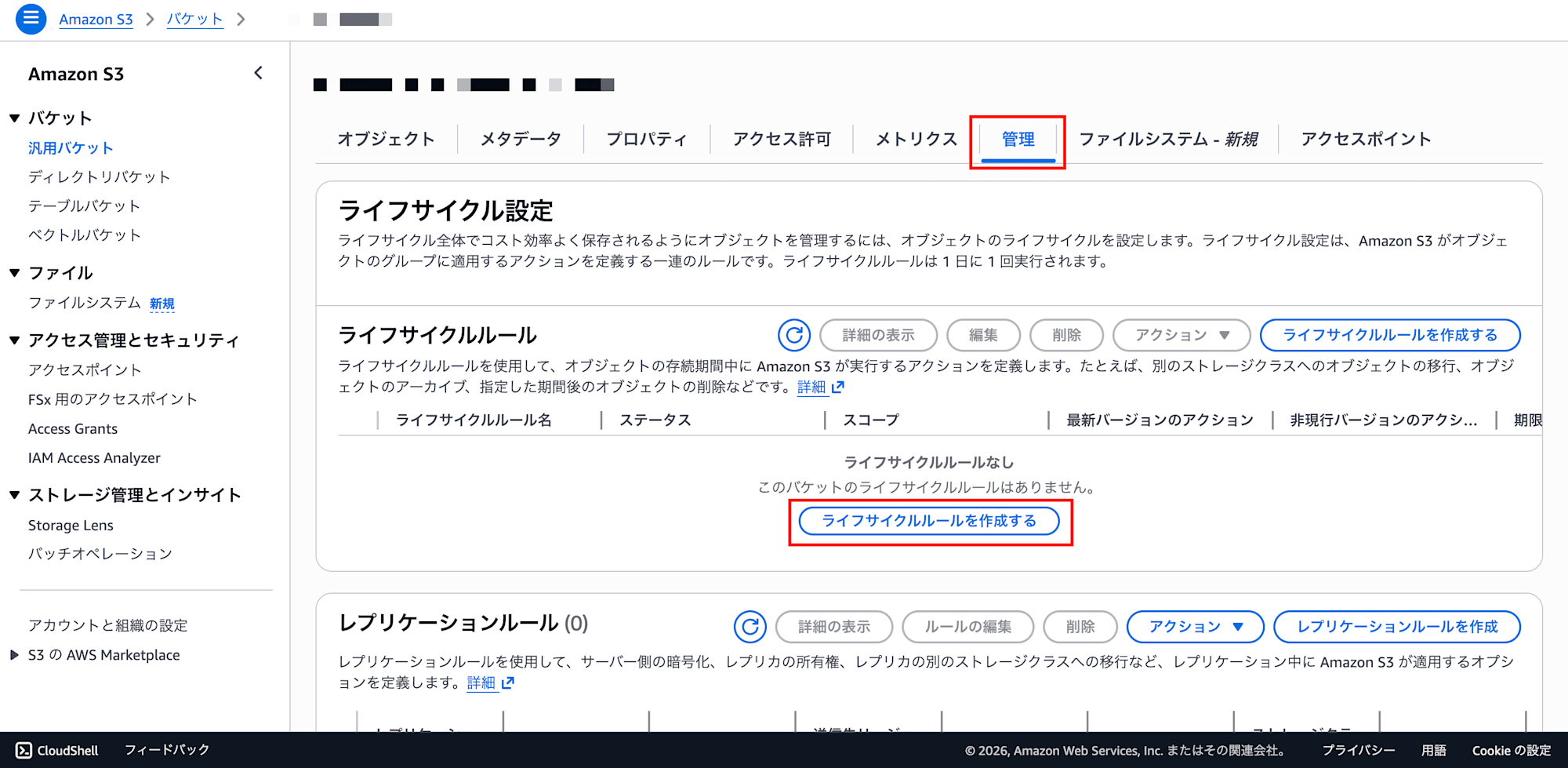
- Lifecycle rule settings:
- Lifecycle rule name:
delete-athena-results-after-7-days - Rule scope: Select "Limit the scope of this rule using one or more filters"
- Prefix: Enter
athena-results/ - Object tags and object size can be left empty
- Lifecycle rule name:
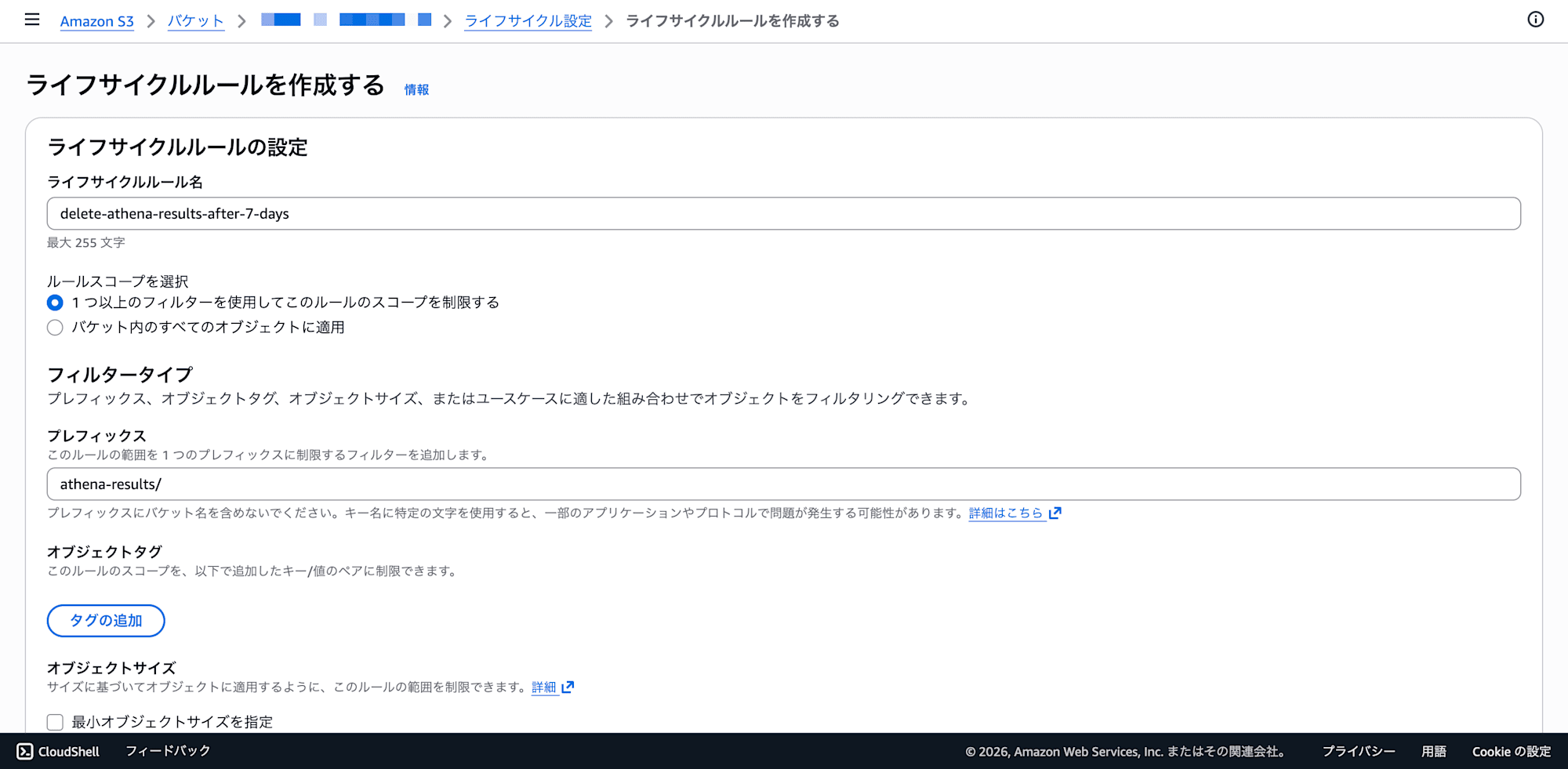
- Lifecycle rule actions:
- Check "Expire current versions of objects"
- A days input field will appear in the "Review transition and expiration actions" section at the bottom
- Days: Enter
7(shorter is fine for development environments; adjust based on requirements for production)
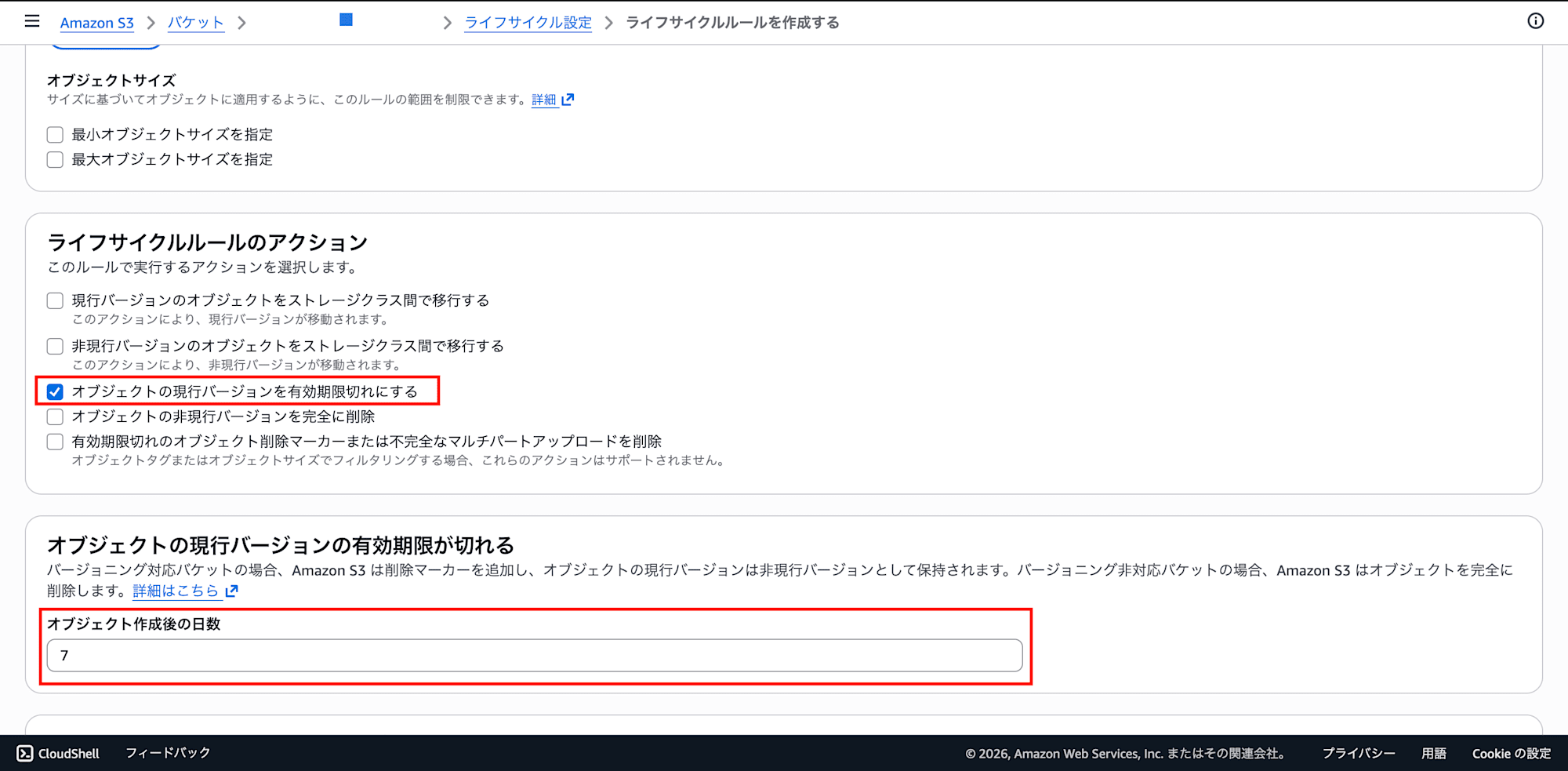
- Click "Create rule"
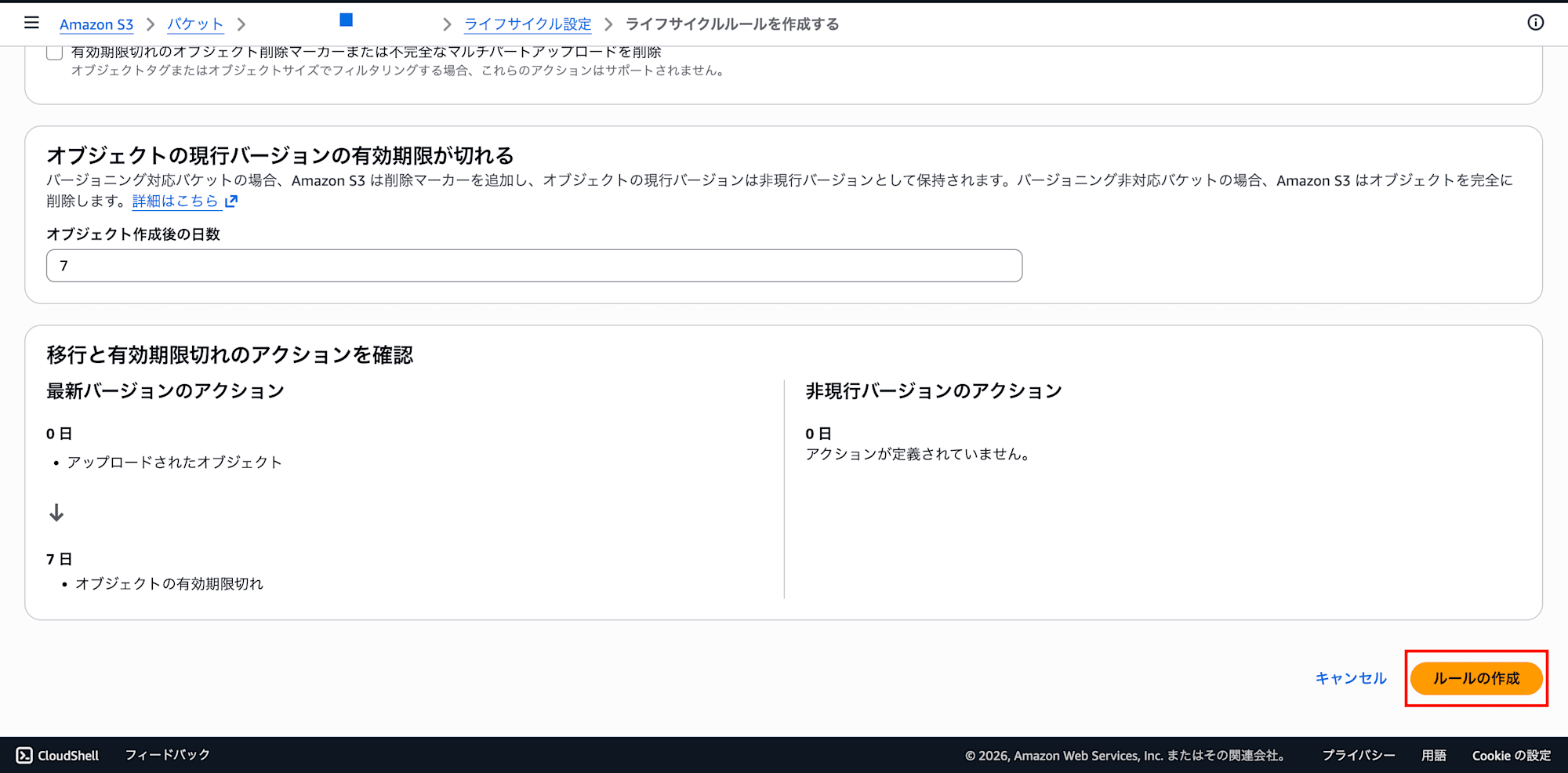
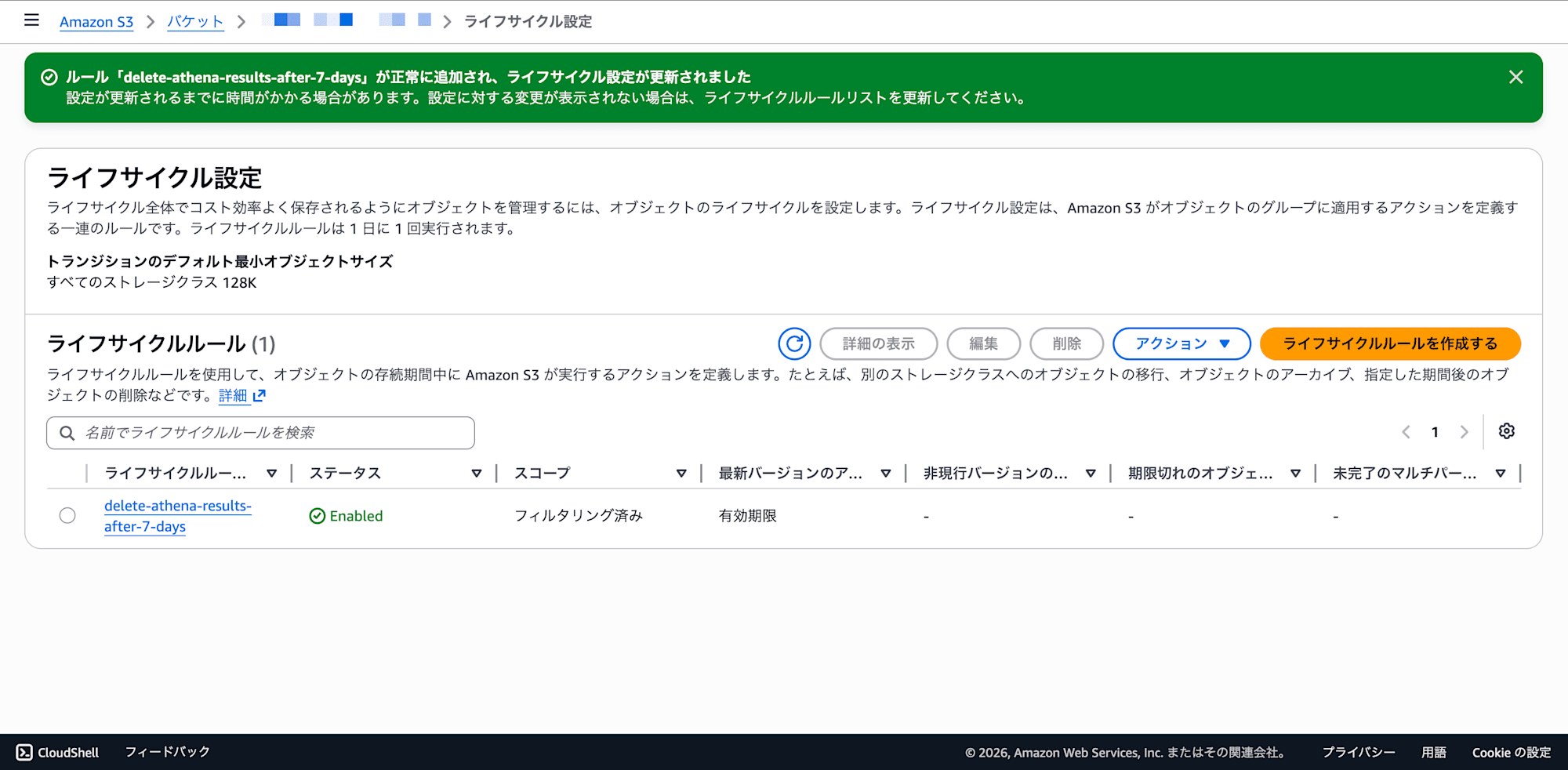
This will automatically delete query results after 7 days, keeping unnecessary storage costs and object count growth in check.
Step 3: Define Database and Tables in Athena
Athena uses Glue Data Catalog metadata to access data on S3. The easiest approach is to run DDL directly from the query editor in the Athena console.
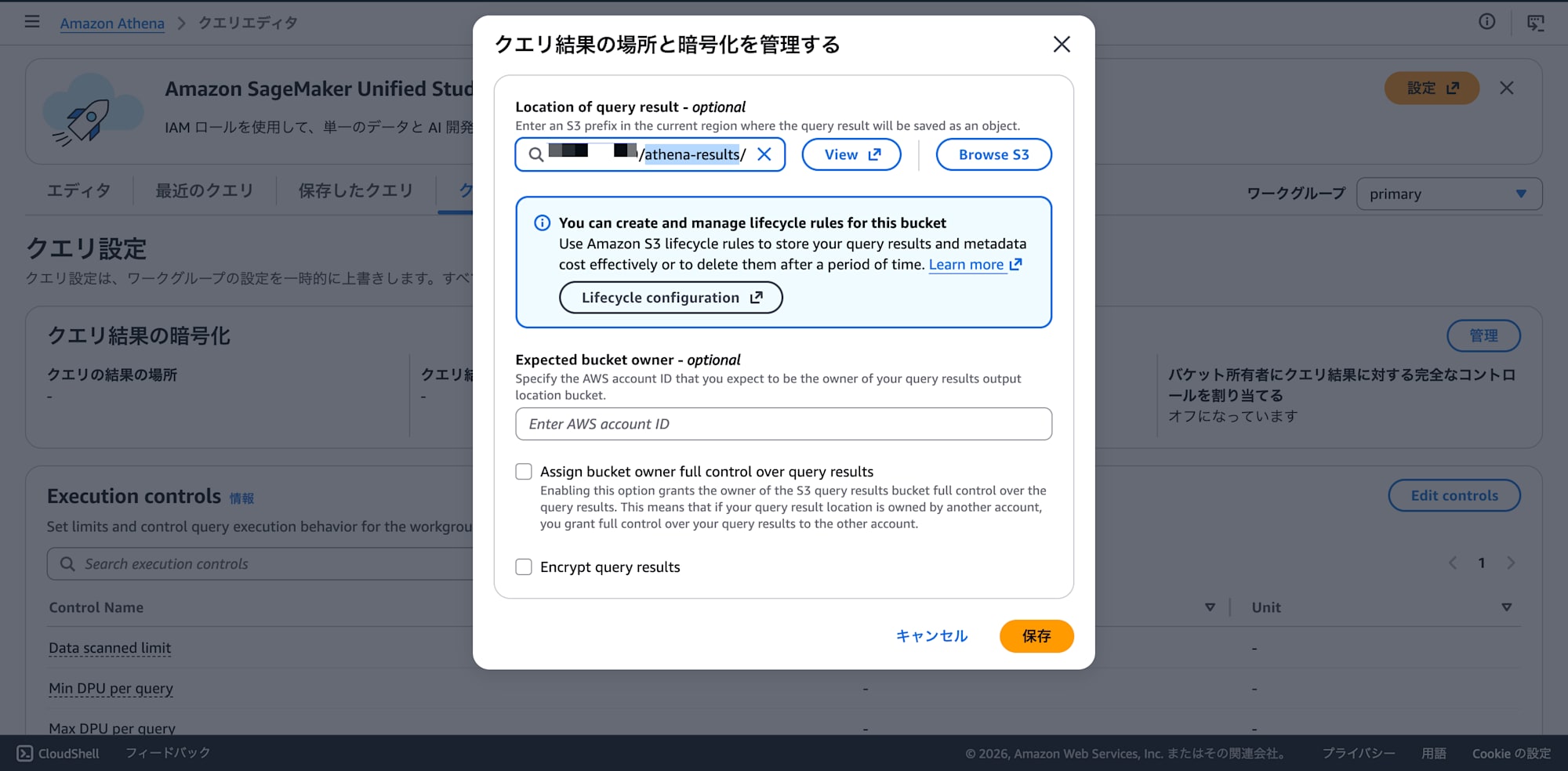
Initial setup — Configure the query result output location:
If you are using Athena for the first time, you need to configure the result output location before running any queries.
- Athena console → Query editor → "Settings" tab → "Manage" button
- Enter
s3://your-bucket/athena-results/in "Location of query result" - Other fields (Expected bucket owner, encryption, etc.) can be left empty
- Click "Save"
Running the DDL:
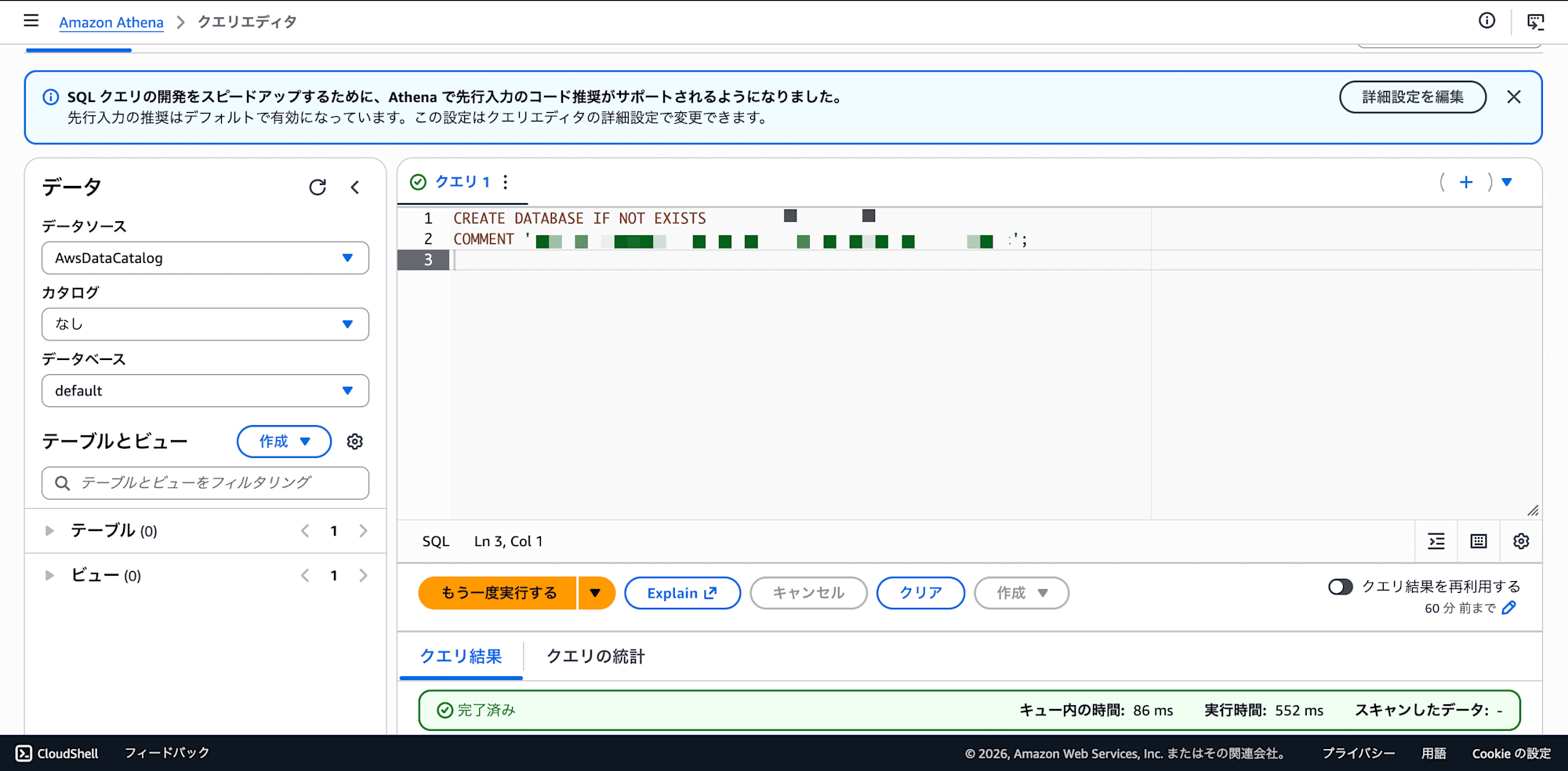
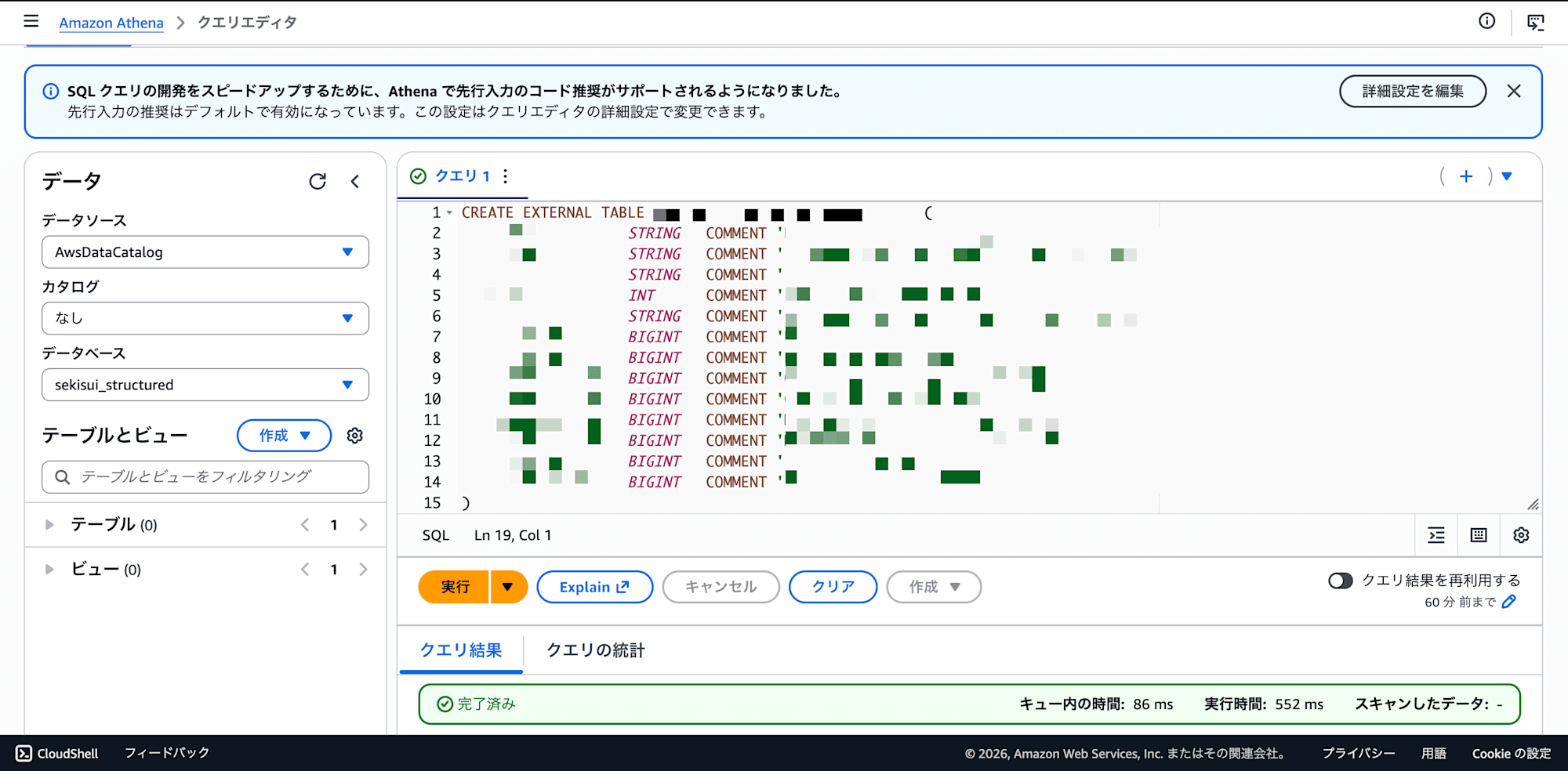
Paste the following DDL statements one at a time into the query editor and run them. Athena only accepts one statement per query execution, so running multiple CREATE TABLE statements together will result in an error.
-- Query 1: Create database
CREATE DATABASE IF NOT EXISTS your_database
COMMENT 'Structured data for SQL agent';
-- Query 2: Example table: sales data
CREATE EXTERNAL TABLE your_database.sales (
  `region`         STRING   COMMENT 'Region name',
  `fiscal_year`    INT      COMMENT 'Fiscal year',
  `quarter`        STRING   COMMENT 'Quarter (1Q, 2Q, 3Q, 4Q)',
  `revenue_plan`   BIGINT   COMMENT 'Planned revenue',
  `revenue_actual`  BIGINT  COMMENT 'Actual revenue'
)
STORED AS PARQUET
LOCATION 's3://your-bucket/sql/sales/'
TBLPROPERTIES ('parquet.compression'='SNAPPY');
Key points:
CREATE EXTERNAL TABLEonly references the data on S3 as-is; no data copying occursLOCATIONspecifies a folder path, not a single file (don't forget the trailing/)- When using Japanese column names, wrap them in backticks in DDL and double quotes in SELECT statements
- To change the schema, redefine with
DROP TABLE→CREATE TABLE(data on S3 will not be deleted)
After creating, verify (also run one at a time):
SELECT * FROM your_database.sales LIMIT 10;
SELECT COUNT(*), MIN(fiscal_year), MAX(fiscal_year) FROM your_database.sales;
Step 4: Configure Application Environment Variables
Manage the configuration for connecting the application to Athena using environment variables. Set them using a method appropriate for your deployment, such as ECS Fargate task definitions, Docker env files, or .env files.
| Environment Variable | Value | Description |
|---|---|---|
ATHENA_DATABASE |
your_database |
Database name created in Step 3 |
ATHENA_WORKGROUP |
primary |
Athena workgroup (default is primary) |
ATHENA_OUTPUT_S3 |
s3://your-bucket/athena-results/ |
Query result output destination |
Step 5: Configure IAM Policy
Grant the application's execution role (ECS task role, etc.) permissions to access Athena, S3, and Glue.
{
    "Version": "2012-10-17",
    "Statement": [
        {
            "Effect": "Allow",
            "Action": [
                "athena:StartQueryExecution",
                "athena:GetQueryExecution",
                "athena:GetQueryResults",
                "athena:StopQueryExecution",
                "athena:GetWorkGroup"
            ],
            "Resource": "*"
        },
        {
            "Effect": "Allow",
            "Action": [
                "glue:GetDatabase",
                "glue:GetTable",
                "glue:GetTables",
                "glue:GetPartition",
                "glue:GetPartitions"
            ],
            "Resource": "*"
        },
        {
            "Effect": "Allow",
            "Action": [
                "s3:GetBucketLocation",
                "s3:ListBucket"
            ],
            "Resource": "arn:aws:s3:::your-bucket"
        },
        {
            "Effect": "Allow",
            "Action": [
                "s3:PutObject",
                "s3:GetObject"
            ],
            "Resource": "arn:aws:s3:::your-bucket/*"
        }
    ]
}
Key points:
s3:PutObjectis required for Athena to write query results toathena-results/s3:GetObjectis required for both data reading (Parquet files insql/) and result retrievalglue:GetPartition(s)is required when using partitioned tables (include it in preparation for future expansion)- In production, scoping
Resourcetoarn:aws:s3:::your-bucket/sql/*andarn:aws:s3:::your-bucket/athena-results/*is more secure
Step 6: Implement the Athena Query Execution Module
Instead of Lambda, create a module within the application that calls Athena directly.
"""athena.py — Athena query execution module"""

import asyncio
import re
import time
import boto3

MAX_ROWS = 200
POLL_INTERVAL = 0.5
MAX_WAIT = 30

ATHENA_DATABASE = "your_database"
ATHENA_WORKGROUP = "primary"
ATHENA_OUTPUT_S3 = "s3://your-bucket/athena-results/"

_SELECT_ONLY = re.compile(r"^\s*SELECT\b", re.IGNORECASE)

def _validate_sql(sql: str) -> None:
    """Reject anything other than SELECT statements."""
    if not _SELECT_ONLY.match(sql):
        raise ValueError(
            f"Only SELECT statements are allowed. Received: {sql[:80]!r}"
        )

def _run_query_sync(sql: str) -> dict:
    """Execute a query on Athena and return the results (synchronous)."""
    athena = boto3.client("athena")

    response = athena.start_query_execution(
        QueryString=sql,
        QueryExecutionContext={"Database": ATHENA_DATABASE},
        WorkGroup=ATHENA_WORKGROUP,
        ResultConfiguration={"OutputLocation": ATHENA_OUTPUT_S3},
    )
    execution_id = response["QueryExecutionId"]

    # Poll for completion
    deadline = time.time() + MAX_WAIT
    while time.time() < deadline:
        status = athena.get_query_execution(QueryExecutionId=execution_id)
        state = status["QueryExecution"]["Status"]["State"]
        if state == "SUCCEEDED":
            break
        if state in ("FAILED", "CANCELLED"):
            reason = status["QueryExecution"]["Status"].get(
                "StateChangeReason", "unknown"
            )
            raise RuntimeError(f"Athena query {state}: {reason}")
        time.sleep(POLL_INTERVAL)
    else:
        raise TimeoutError(
            f"Athena query did not complete within {MAX_WAIT}s"
        )

    # Retrieve results
    paginator = athena.get_paginator("get_query_results")
    pages = paginator.paginate(QueryExecutionId=execution_id)

    rows: list[list] = []
    columns: list[str] = []
    for page in pages:
        result = page["ResultSet"]
        if not columns:
            columns = [
                c["Label"]
                for c in result["ResultSetMetadata"]["ColumnInfo"]
            ]
        for row in result["Rows"][1 if not rows else 0:]:
            values = [d.get("VarCharValue") for d in row["Data"]]
            rows.append(values)
            if len(rows) >= MAX_ROWS:
                return {"columns": columns, "rows": rows, "row_count": len(rows)}

    return {"columns": columns, "rows": rows, "row_count": len(rows)}

async def execute_query(sql: str) -> dict:
    """Async wrapper. Executes synchronous processing in a thread pool."""
    _validate_sql(sql)
    loop = asyncio.get_event_loop()
    return await loop.run_in_executor(None, _run_query_sync, sql)
Design points:
| Point | Details |
|---|---|
| SELECT only | Checked with regex. Even if Claude accidentally generates DML, it won't be executed |
| Polling approach | Athena executes asynchronously, so the flow is: start_query_execution → status check → get_query_results |
| 200-row result limit | To prevent overflow of Claude's context window |
| Async wrapper | Wrapped with run_in_executor for use in async frameworks like FastAPI |
Step 7: Tool Definition (toolConfig for Converse API)
Create the tool definition to pass to the Converse API. This is the interface that tells Claude "an SQL execution tool is available."
EXECUTE_SQL_TOOL = {
    "toolSpec": {
        "name": "execute_sql_query",
        "description": (
            "Executes a Presto SQL SELECT query on Athena and returns results as JSON."
        ),
        "inputSchema": {
            "json": {
                "type": "object",
                "properties": {
                    "sql": {
                        "type": "string",
                        "description": "The Presto SQL SELECT statement to execute",
                    }
                },
                "required": ["sql"],
            }
        },
    }
}
Compared to Bedrock Agents' Action Group + OpenAPI schema, this is extremely simple. You only need to define the tool's name, description, and parameters as a Python dictionary.
Step 8: Implement the Agent Loop
This is the core of this article. Using the Converse API, we build our own loop that "has Claude generate SQL → executes it → returns the result → has Claude generate an answer."
"""agent_loop.py — SQL agent loop using the Converse API"""

import json
import boto3
from athena import execute_query

MODEL_ID = "ap-northeast-1.anthropic.claude-sonnet-4-6"
MAX_ITERATIONS = 4  # Maximum number of SQL execution iterations

bedrock = boto3.client("bedrock-runtime", region_name="ap-northeast-1")

# Tool definition (created in Step 4)
TOOL_CONFIG = {"tools": [EXECUTE_SQL_TOOL]}

def load_system_prompt() -> str:
    with open("system_prompt.md", encoding="utf-8") as f:
        return f.read()

async def run_agent(user_message: str, history: list[dict]) -> str:
    """
    Runs the agent loop for a user's question and returns the final answer.

    Flow:
    1. Send messages + tool definition to the Converse API
    2. If stop_reason is "tool_use" → extract SQL → execute on Athena → add result to messages → resend
    3. If stop_reason is "end_turn" → return text answer
    4. Force exit when max iterations are reached
    """
    system_prompt = load_system_prompt()
    messages = _build_messages(history, user_message)

    for iteration in range(MAX_ITERATIONS):
        # ── Call Converse API ──
        response = bedrock.converse(
            modelId=MODEL_ID,
            system=[{"text": system_prompt}],
            messages=messages,
            toolConfig=TOOL_CONFIG,
            inferenceConfig={"maxTokens": 4096, "temperature": 0},
        )

        assistant_message = response["output"]["message"]
        stop_reason = response["stopReason"]

        # ── If Claude returns a text answer → done ──
        if stop_reason != "tool_use":
            for block in assistant_message.get("content", []):
                if "text" in block:
                    return block["text"]
            return ""

        # ── If Claude returns a tool call ──
        tool_use_block = _extract_tool_use(assistant_message)
        if not tool_use_block:
            return "Failed to generate SQL."

        sql = tool_use_block["input"]["sql"]
        tool_use_id = tool_use_block["toolUseId"]

        print(f"[iteration {iteration + 1}] SQL: {sql}")

        # ── Execute SQL on Athena ──
        try:
            result = await execute_query(sql)
        except (ValueError, RuntimeError, TimeoutError) as exc:
            result = {"error": str(exc)}

        # ── Add result as toolResult to the conversation ──
        messages = messages + [
            assistant_message,  # Claude's assistant message (including tool_use)
            {
                "role": "user",
                "content": [
                    {
                        "toolResult": {
                            "toolUseId": tool_use_id,
                            "content": [
                                {"text": json.dumps(result, ensure_ascii=False)}
                            ],
                        }
                    }
                ],
            },
        ]
        # Call converse() again in the next iteration of the loop

    return "Maximum number of iterations reached."

def _extract_tool_use(message: dict) -> dict | None:
    """Extracts the execute_sql_query toolUse block from an assistant message."""
    for block in message.get("content", []):
        if "toolUse" in block and block["toolUse"]["name"] == "execute_sql_query":
            return block["toolUse"]
    return None

def _build_messages(history: list[dict], current: str) -> list[dict]:
    """Converts conversation history to the Converse API message format."""
    messages = []
    for turn in history:
        role = turn.get("role")
        content = turn.get("content", "")
        if role in ("user", "assistant") and content:
            messages.append({"role": role, "content": [{"text": content}]})
    messages.append({"role": "user", "content": [{"text": current}]})
    return messages
Diagram of the agent loop flow:
messages = [user_message]

┌─── Loop start (max 4 times) ───────────────────────┐
│                                                    │
│  response = converse(messages, toolConfig)          │
│                                                    │
│  stop_reason == "end_turn"?  ──→ Return text answer │
│        │ No                                        │
│        ↓                                           │
│  stop_reason == "tool_use"                         │
│        │                                           │
│        ↓                                           │
│  Extract SQL → Execute on Athena                    │
│        │                                           │
│        ↓                                           │
│  messages += [assistant_msg, toolResult_msg]        │
│        │                                           │
│        └──→ Return to top of loop                  │
│                                                    │
└────────────────────────────────────────────────────┘
Implementation key points:
| Point | Details |
|---|---|
Branch on stop_reason |
If "tool_use", execute SQL and continue the loop; if "end_turn", the answer is complete |
toolResult format |
Link to the corresponding tool call via toolUseId. This is the Converse API specification |
| Adding messages | Add the assistant message (including the tool call) and user message (toolResult) as a pair |
| Iteration limit | Since Claude may query multiple tables in sequence, set a limit to prevent infinite loops |
| Return errors as results too | Returning Athena errors as JSON allows Claude to fix the SQL and retry |
Step 9: Embed Schema Information in the System Prompt
This is the most important step. For Claude to generate correct SQL, you need to explicitly describe the table definitions and data characteristics in the system prompt.
You are a data analyst for [domain].

## Answer Rules
1. Quote exact figures from the search results when answering
2. Always include units with numerical values
3. If data is not found, respond with "No matching data was found"
4. Do not make assumptions or estimates

## SQL Query Rules
- Syntax: Presto SQL (Athena-compatible)
- Wrap Japanese column names in double quotes (e.g., "revenue")
- Use single quotes for string values (e.g., '1Q')

## Table Definitions

### Table name: sales
| Column | Type | Description | Example values |
|--------|-----|------|--------|
| `region` | STRING | Region name | Tokyo, Osaka |
| `fiscal_year` | INT | Fiscal year | 2021–2026 |
| `quarter` | STRING | Quarter | 1Q, 2Q, 3Q, 4Q, Full Year |
| `revenue_plan` | BIGINT | Planned revenue (millions JPY) | — |
| `revenue_actual` | BIGINT | Actual revenue (millions JPY) | — |

## Data Notes
- [Filter conditions to avoid double-counting during aggregation]
- [Constraints on specific combinations of column values]
- [Fiscal years / periods with missing data]
- [Rules for disambiguating ambiguous terms]
Prompt design tips:
| Point | Details |
|---|---|
| Table definitions are mandatory | Claude does not know the DB schema. List all column names, types, descriptions, and possible values |
| Document aggregation rules | For data that includes summary rows, explicitly describe the filter conditions to prevent double-counting |
| Show JOIN patterns | If joins across multiple tables are needed, include concrete SQL examples |
| Define ambiguous terms | If the same word has multiple meanings (e.g., "sales" referring to either amount or unit count), define disambiguation rules |
| Include example values | Claude doesn't know whether values in the quarter column are '1Q' or 'Q1' |
Lesson from experience: The quality of the system prompt determines 80% of SQL generation accuracy. Writing not just the table definitions but also "notes specific to this data" carefully will significantly reduce Claude's mistakes. In production use, we stabilized accuracy by including more than 14 rules in the prompt.
Step 10: Verify Operation
Verify operation with questions like:
What is the total actual sales across all regions for Q1 FY2025?
When operating correctly, you should see a flow like the following in the logs:
[iteration 1] SQL: SELECT SUM("revenue_actual") AS total FROM sales WHERE "fiscal_year" = 2025 AND "quarter" = '1Q'
Success is confirmed when Claude behaves as follows:
- Analyzes the question and decides to use the
execute_sql_querytool (stop_reason: "tool_use") - Generates an appropriate SELECT statement
- The app executes the query directly on Athena
- Returns the result as
toolResult - Claude interprets the result and responds in natural language (
stop_reason: "end_turn")
Cases where multiple SQL executions occur: For questions like "Compare sales across all business segments," Claude may execute SQL multiple times for each table. In this case, the loop runs multiple times and aggregates all results before answering.
Common Pitfalls
Insufficient IAM Permissions
The app's execution role (ECS task role, etc.) requires athena:*, s3:* (for both data and results buckets), and glue:Get*.
Athena Query Result Output Location
Athena writes query results to S3. Verify write permissions to the path specified in ATHENA_OUTPUT_S3.
Handling Japanese Column Names
- DDL (CREATE TABLE): Enclose with backticks
` - DML (SELECT): Enclose with double quotes
" - Explicitly state the rule to use double quotes in the system prompt. Claude tends to use backticks by default
toolResult Format Errors
In the Converse API, the toolUseId in toolResult must match the ID of the immediately preceding toolUse block. A mismatch will cause the API to return an error.
Claude Not Using SQL
Specifying "Please use the execute_sql_query tool for all questions" in the system prompt improves this behavior.
Cost Estimate
| Service | Billing Unit | Estimate |
|---|---|---|
| Athena | Amount of data scanned | $5/TB (minimal with Parquet) |
| S3 | Storage + requests | Negligible for Parquet at a few MB |
| Bedrock Converse API | Number of input/output tokens | Model-dependent |
The Parquet + Athena combination involves minimal scan volume, and for internal tool-level usage, costs often stay within a few dollars per month. With no Lambda required, the number of components to manage is also reduced.
Summary
By leveraging tool_use in the Bedrock Converse API and building an agent loop on the application side, we achieved natural language SQL queries against structured data.
Key Takeaways:
- You can build your own agent simply by detecting
stop_reason: "tool_use"in the Converse API and running the loop. The setup is simpler than Bedrock Agents (managed service) - The accuracy of SQL generation is directly tied to the quality of the system prompt. Write not just table definitions, but also data characteristics, aggregation rules, rules for interpreting ambiguous terms, and concrete SQL examples
- By calling Athena directly from the application, Lambda cold starts and Action Group configuration become unnecessary, and response times are faster
- Returning errors as
toolResultallows Claude to independently correct SQL and retry
If you're feeling the limitations of RAG for structured data search, or if you're concerned about Bedrock Agents constraints (streaming and UI control), please try this Converse API + custom loop approach.