I tried registering A2A agents in Agent Registry and dynamically calling them from Strands Agents

This page has been translated by machine translation. View original
Introduction
Hello, I'm Jinno from the Consulting Department, and I love supermarkets.
In my previous article, I introduced how to register Agent Skills in the Agent Registry and dynamically load them from Strands Agents.
This time is the sequel, an A2A version. We'll quickly create 2 Strands Agents A2A servers deployed on AgentCore Runtime using Terraform, register them in the Agent Registry, and then dynamically call them from an orchestrator agent via the Registry.
The image looks something like this.
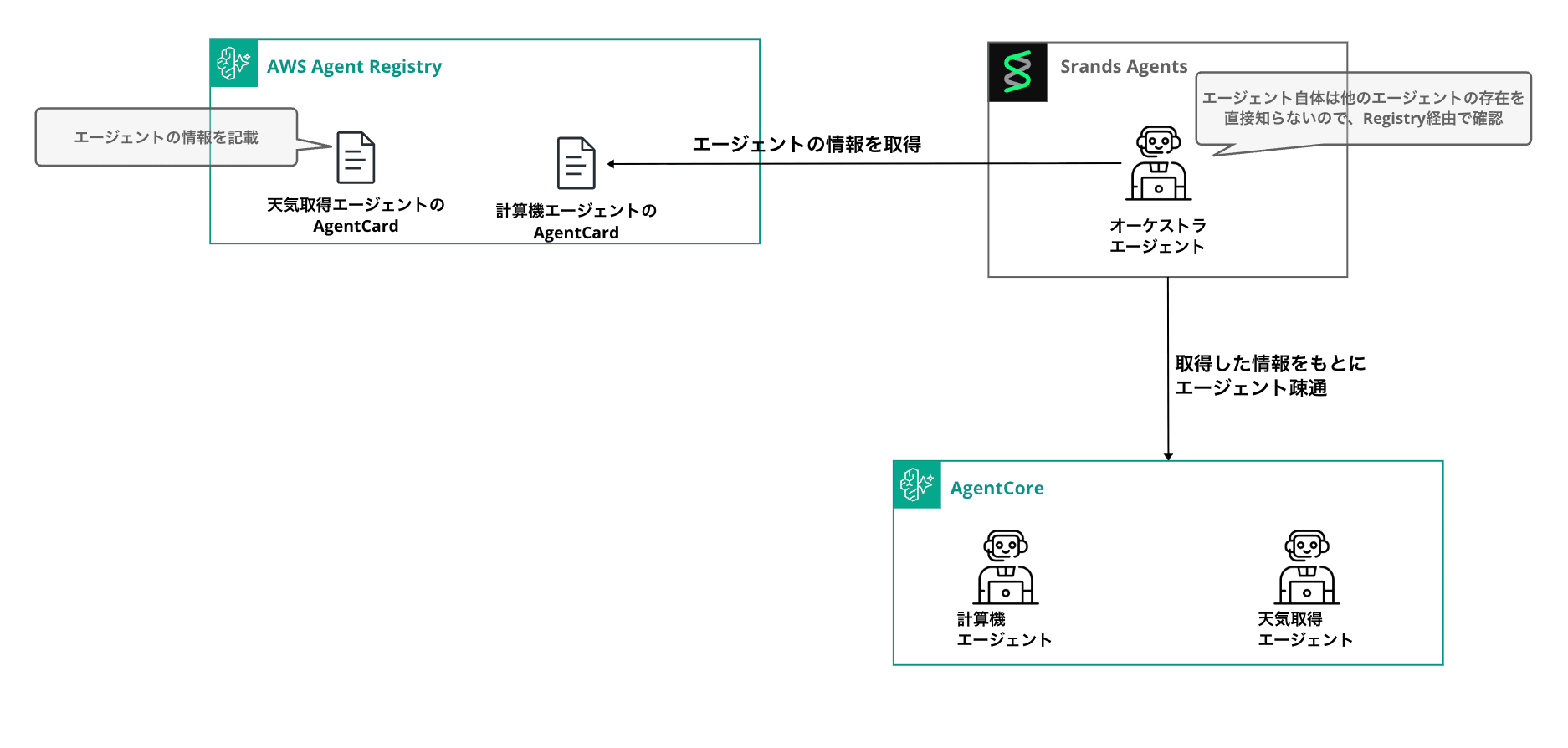
Since the orchestrator side doesn't hold any URLs or tool definitions for A2A partners and can dynamically reference other agents' information via the Registry, the code can remain unchanged even when the number of agents to support increases or decreases — that's the nice part.
The more A2A agents grow across the organization, the more the orchestrator's capabilities automatically expand as well. Of course, there's a trade-off with the latency at runtime and the difficulty of predicting what gets called due to dynamic referencing, so that depends on the use case. As capabilities increase, tuning the orchestrator might also become more challenging...
Prerequisites
The versions used this time are as follows.
| Item | Version / Setting |
|---|---|
| Python | 3.12 |
| Package Management | uv |
| Terraform | >= 1.5.0 |
| AWS Provider | >= 6.25.0 |
| strands-agents[a2a] | >= 1.36.0 |
| strands-agents-tools | >= 0.5.0 |
| Region | us-east-1 |
| Model | us.anthropic.claude-haiku-4-5-20251001-v1:0 |
Authentication to the AgentCore Runtime A2A server is done via IAM (SigV4).
We'll use the auto-approval Registry created in the previous article as-is. Please keep a note of the Registry ID. Refer to the previous article for instructions on creating the Registry.
The complete code used this time is available in this repository. Please clone it before proceeding if you want to try it locally.
git clone https://github.com/yuu551/a2a-agentcore-strands.git
cd a2a-agentcore-strands
uv sync
Overall Flow
The implementation flow proceeds as follows!
- Deploy A2A servers to ECR & AgentCore Runtime using Terraform (Calculator / Weather)
- Register A2A Agent Cards in the Agent Registry
- Local orchestrator agent searches the Registry and connects to A2A servers
- Mount the orchestrator on AgentCore Runtime as well, and call Runtime→Runtime
The file structure looks like this.
.
├── register_a2a.py             # Register A2A Agent Cards to Registry
├── registry_a2a_loader.py      # Build A2AClientToolProvider from Registry
├── a2a_client.py               # Run orchestrator locally
├── invoke_orchestrator.py      # Call orchestrator on Runtime via SSE
├── sigv4_auth.py               # SigV4 Auth for httpx
└── terraform/
    ├── versions.tf
    ├── variables.tf
    ├── iam.tf
    ├── runtime.tf
    ├── outputs.tf
    └── agent/
        ├── calculator/         # A2A: Calculator agent
        │   ├── server.py
        │   ├── Dockerfile
        │   └── requirements.txt
        ├── weather/            # A2A: Weather agent
        │   ├── server.py
        │   ├── Dockerfile
        │   └── requirements.txt
        └── orchestrator/       # HTTP: Orchestrator
            ├── server.py
            ├── registry_a2a_loader.py  # Copied from root
            ├── sigv4_auth.py           # Copied from root
            ├── Dockerfile
            └── requirements.txt
A2A Server Implementation
Calculator Agent
We wrap the Agent with Strands Agents' A2AServer and expose it as a FastAPI application. The calculation tool uses strands_tools.calculator provided by Strands as-is.
AgentCore Runtime injects the environment variable AGENTCORE_RUNTIME_URL for A2A, so we pass it to the http_url of A2AServer. This URL goes into the url field of the Agent Card, and the client sends JSON-RPC to that endpoint.
from __future__ import annotations

import os

import uvicorn
from strands import Agent
from strands.models import BedrockModel
from strands.multiagent.a2a import A2AServer
from strands_tools.calculator import calculator

MODEL_ID = "us.anthropic.claude-haiku-4-5-20251001-v1:0"
REGION = os.environ.get("AWS_REGION", "us-east-1")
RUNTIME_URL = os.environ.get("AGENTCORE_RUNTIME_URL", "http://127.0.0.1:9000/")

model = BedrockModel(model_id=MODEL_ID, region_name=REGION)

agent = Agent(
    name="計算エージェント",
    description="四則演算・代数・微積分・記号計算を行うエージェントです。",
    model=model,
    tools=[calculator],
    callback_handler=None,
)

server = A2AServer(
    agent=agent,
    host="0.0.0.0",
    port=9000,
    http_url=RUNTIME_URL,
    serve_at_root=True,
)

app = server.to_fastapi_app()

if __name__ == "__main__":
    uvicorn.run(app, host="0.0.0.0", port=9000)
To run A2A on AgentCore Runtime, port 9000 and root path are required. A2AServer automatically creates endpoints for /ping and /.well-known/agent-card.json, so there's no need to write them yourself.
Weather Agent
The second agent returns weather information. This time we'll tool-ify a function that returns fixed mock data.
from __future__ import annotations

import os

import uvicorn
from strands import Agent, tool
from strands.models import BedrockModel
from strands.multiagent.a2a import A2AServer

MODEL_ID = "us.anthropic.claude-haiku-4-5-20251001-v1:0"
REGION = os.environ.get("AWS_REGION", "us-east-1")
RUNTIME_URL = os.environ.get("AGENTCORE_RUNTIME_URL", "http://127.0.0.1:9000/")

_MOCK_WEATHER = {
    "tokyo": {"condition": "Sunny", "temperature_c": 22, "humidity": 55},
    "osaka": {"condition": "Cloudy", "temperature_c": 20, "humidity": 65},
    "sapporo": {"condition": "Snowy", "temperature_c": -2, "humidity": 80},
    "fukuoka": {"condition": "Rainy", "temperature_c": 18, "humidity": 75},
    "naha": {"condition": "Sunny", "temperature_c": 27, "humidity": 70},
}

@tool
def get_weather(city: str) -> dict:
    """Returns current weather information for cities in Japan. Supported cities: Tokyo, Osaka, Sapporo, Fukuoka, Naha."""
    data = _MOCK_WEATHER.get(city.strip().lower())
    if data is None:
        return {"error": f"Unknown city: {city}. Supported: {list(_MOCK_WEATHER)}"}
    return {"city": city, **data}

model = BedrockModel(model_id=MODEL_ID, region_name=REGION)

agent = Agent(
    name="天気エージェント",
    description="日本の主要都市の現在の天気情報を返すエージェントです。",
    model=model,
    tools=[get_weather],
    callback_handler=None,
)

server = A2AServer(
    agent=agent,
    host="0.0.0.0",
    port=9000,
    http_url=RUNTIME_URL,
    serve_at_root=True,
)

app = server.to_fastapi_app()

if __name__ == "__main__":
    uvicorn.run(app, host="0.0.0.0", port=9000)
Common Dockerfile
Both agents use the same Dockerfile structure. Since AgentCore Runtime requires ARM64, don't forget --platform=linux/arm64.
FROM --platform=linux/arm64 public.ecr.aws/docker/library/python:3.12-slim

WORKDIR /app

COPY requirements.txt .
RUN pip install --no-cache-dir -r requirements.txt

COPY server.py .

EXPOSE 9000

CMD ["python", "server.py"]
strands-agents[a2a]>=1.36.0
strands-agents-tools>=0.5.0
fastapi>=0.115.0
uvicorn>=0.32.0
Deploy with Terraform
We'll create 2 ECRs with Docker build & push, and 2 agents running on AgentCore Runtime. Specify server_protocol = "A2A" in the Runtime's protocol_configuration.
locals {
  agents = {
    calculator = { source_dir = "${path.module}/agent/calculator" }
    weather    = { source_dir = "${path.module}/agent/weather" }
  }
}

resource "aws_ecr_repository" "calculator" {
  name                 = "${var.project_name}-calculator-${random_string.suffix.result}"
  image_tag_mutability = "MUTABLE"
  force_delete         = true
}

resource "aws_ecr_repository" "weather" {
  name                 = "${var.project_name}-weather-${random_string.suffix.result}"
  image_tag_mutability = "MUTABLE"
  force_delete         = true
}

resource "null_resource" "calculator_build_push" {
  triggers = {
    dockerfile   = filemd5("${local.agents.calculator.source_dir}/Dockerfile")
    server       = filemd5("${local.agents.calculator.source_dir}/server.py")
    requirements = filemd5("${local.agents.calculator.source_dir}/requirements.txt")
  }

  provisioner "local-exec" {
    working_dir = local.agents.calculator.source_dir
    command     = <<-EOT
      aws ecr get-login-password --region ${data.aws_region.current.region} | \
        docker login --username AWS --password-stdin ${aws_ecr_repository.calculator.repository_url}
      docker buildx build --platform linux/arm64 \
        -t ${aws_ecr_repository.calculator.repository_url}:latest --push .
    EOT
  }

  depends_on = [aws_ecr_repository.calculator]
}

# weather_build_push has the same structure, so it's omitted

resource "aws_bedrockagentcore_agent_runtime" "calculator" {
  agent_runtime_name = replace("${var.project_name}_calculator_${random_string.suffix.result}", "-", "_")
  description        = "Calculator A2A server"
  role_arn           = aws_iam_role.agent_runtime.arn

  agent_runtime_artifact {
    container_configuration {
      container_uri = "${aws_ecr_repository.calculator.repository_url}:latest"
    }
  }

  network_configuration {
    network_mode = "PUBLIC"
  }

  protocol_configuration {
    server_protocol = "A2A"
  }

  depends_on = [
    null_resource.calculator_build_push,
    aws_iam_role_policy.runtime_ecr,
    aws_iam_role_policy.runtime_logs,
    aws_iam_role_policy.runtime_bedrock,
  ]
}

# aws_bedrockagentcore_agent_runtime.weather has the same structure, so it's omitted
The Runtime execution role grants three types of permissions: ECR pull, CloudWatch Logs write, and Bedrock InvokeModel.
resource "aws_iam_role" "agent_runtime" {
  name = "${var.project_name}-runtime-${random_string.suffix.result}"

  assume_role_policy = jsonencode({
    Version = "2012-10-17"
    Statement = [{
      Effect    = "Allow"
      Action    = "sts:AssumeRole"
      Principal = { Service = "bedrock-agentcore.amazonaws.com" }
      Condition = {
        StringEquals = { "aws:SourceAccount" = data.aws_caller_identity.current.account_id }
      }
    }]
  })
}

resource "aws_iam_role_policy" "runtime_bedrock" {
  name = "bedrock-invoke"
  role = aws_iam_role.agent_runtime.id

  policy = jsonencode({
    Version = "2012-10-17"
    Statement = [{
      Effect = "Allow"
      Action = ["bedrock:InvokeModel", "bedrock:InvokeModelWithResponseStream"]
      Resource = "*"
    }]
  })
}

# runtime_ecr / runtime_logs are omitted. See the GitHub repository for details
In outputs, we expose the Runtime ARN for A2A use.
output "calculator_runtime_arn" {
  value = aws_bedrockagentcore_agent_runtime.calculator.agent_runtime_arn
}

output "weather_runtime_arn" {
  value = aws_bedrockagentcore_agent_runtime.weather.agent_runtime_arn
}
The URL passed to the client is assembled in the form https://bedrock-agentcore.<region>.amazonaws.com/runtimes/<arn>/invocations (the ARN is URL-encoded with urllib.parse.quote).
Let's deploy.
cd terraform
terraform init
terraform apply
Once deployment is complete, register these agents in the Registry.
Register A2A Agent Cards in the Registry
A2A descriptor structure
The descriptorType in Agent Registry has A2A available. The A2A descriptor puts the Agent Card JSON in a2a.agentCard.inlineContent.
Before registering, we fetch the actual Agent Card from the Runtime and register its contents in the Registry. This registration allows the client side to know the agent name, skills, connection URL, and so on.
For A2A details, please refer to the blog I wrote previously.
SigV4 Authentication Helper
Since the Runtime uses IAM authentication for bedrock-agentcore, both Agent Card retrieval and JSON-RPC calls require SigV4 signing. We'll create a custom httpx Auth.
from __future__ import annotations

import boto3
import httpx
from botocore.auth import SigV4Auth
from botocore.awsrequest import AWSRequest

class SigV4HttpxAuth(httpx.Auth):
    requires_request_body = True

    def __init__(self, region: str, service: str = "bedrock-agentcore") -> None:
        credentials = boto3.Session().get_credentials()
        if credentials is None:
            raise RuntimeError("No AWS credentials found.")
        self._signer = SigV4Auth(credentials, service, region)

    def auth_flow(self, request: httpx.Request):
        aws_request = AWSRequest(
            method=request.method,
            url=str(request.url),
            data=request.content,
            headers=dict(request.headers),
        )
        self._signer.add_auth(aws_request)
        for key, value in aws_request.headers.items():
            request.headers[key] = value
        yield request
Note that if requires_request_body = True is not set, the JSON-RPC body won't be included in the signature target, causing 4xx errors on POST requests.
Registration Script
"""Register A2A agents (Calculator / Weather) to AWS Agent Registry."""
from __future__ import annotations

import json
import logging
import os
import time
from urllib.parse import quote

import boto3
import httpx

from sigv4_auth import SigV4HttpxAuth

logging.basicConfig(level=logging.INFO, format="%(asctime)s %(levelname)s: %(message)s")
logger = logging.getLogger(__name__)

REGISTRY_ID = os.environ["AGENT_REGISTRY_ID"]
REGION = os.environ.get("AWS_REGION", "us-east-1")

def runtime_base_url(arn: str) -> str:
    return f"https://bedrock-agentcore.{REGION}.amazonaws.com/runtimes/{quote(arn, safe='')}/invocations"

def fetch_agent_card(base_url: str, auth: SigV4HttpxAuth) -> dict:
    card_url = f"{base_url}/.well-known/agent-card.json"
    response = httpx.get(card_url, auth=auth, timeout=30.0)
    response.raise_for_status()
    return response.json()

def wait_until_not(control, registry_id: str, record_id: str, transient: str, *, timeout: float = 30.0) -> str:
    deadline = time.monotonic() + timeout
    while True:
        status = control.get_registry_record(registryId=registry_id, recordId=record_id)["status"]
        if status != transient:
            return status
        if time.monotonic() > deadline:
            raise TimeoutError(f"record {record_id} stuck in {transient}")
        time.sleep(1.0)

def register(control, name: str, description: str, card: dict) -> str:
    created = control.create_registry_record(
        registryId=REGISTRY_ID,
        name=name,
        description=description,
        recordVersion="1.0",
        descriptorType="A2A",
        descriptors={"a2a": {"agentCard": {"inlineContent": json.dumps(card)}}},
    )
    record_id = created["recordArn"].rsplit("/", 1)[-1]
    logger.info("Created record %s (status=%s)", record_id, created["status"])

    wait_until_not(control, REGISTRY_ID, record_id, "CREATING")
    control.submit_registry_record_for_approval(registryId=REGISTRY_ID, recordId=record_id)
    status = wait_until_not(control, REGISTRY_ID, record_id, "SUBMITTING")
    logger.info("Record %s reached status %s", record_id, status)
    return record_id

def main() -> None:
    control = boto3.client("bedrock-agentcore-control", region_name=REGION)
    auth = SigV4HttpxAuth(region=REGION)

    targets = [
        ("calculator-a2a", "Calculator A2A agent (SymPy)", os.environ["CALCULATOR_RUNTIME_ARN"]),
        ("weather-a2a", "Weather A2A agent (mock for Japan cities)", os.environ["WEATHER_RUNTIME_ARN"]),
    ]

    for name, description, arn in targets:
        base = runtime_base_url(arn)
        card = fetch_agent_card(base, auth)
        logger.info("Fetched agent card for %s: %s", name, card["name"])
        record_id = register(control, name, description, card)
        print(f"{name}: {record_id}")

if __name__ == "__main__":
    main()
We assemble the base URL from the Runtime ARN, fetch the Agent Card, and register it directly in the Registry. Since this Registry is set to auto-approve, the flow goes create → submit → auto-approve → APPROVED.
export AGENT_REGISTRY_ID="xxx"
export CALCULATOR_RUNTIME_ARN="$(cd terraform && terraform output -raw calculator_runtime_arn)"
export WEATHER_RUNTIME_ARN="$(cd terraform && terraform output -raw weather_runtime_arn)"
uv run python register_a2a.py
INFO: Fetched agent card for calculator-a2a: 計算エージェント
INFO: Created record ul4ncy9CGo0p (status=CREATING)
INFO: Record ul4ncy9CGo0p reached status APPROVED
INFO: Fetched agent card for weather-a2a: 天気エージェント
INFO: Created record vZspJcEwxhy5 (status=CREATING)
INFO: Record vZspJcEwxhy5 reached status APPROVED
calculator-a2a: ul4ncy9CGo0p
weather-a2a: vZspJcEwxhy5
Dynamically Load A2A Agents from Registry
A2A Loader
This loader searches the Registry for A2A records, extracts the url field from the Agent Card, and builds an A2AClientToolProvider.
"""Search AWS Agent Registry for A2A records and build A2AClientToolProvider."""
from __future__ import annotations

import json
import logging
from dataclasses import dataclass
from typing import Any

import boto3
from strands_tools.a2a_client import A2AClientToolProvider

from sigv4_auth import SigV4HttpxAuth

logger = logging.getLogger(__name__)

@dataclass
class RegistryA2ALoaderConfig:
    registry_id: str
    region_name: str = "us-east-1"
    max_results: int = 10

class RegistryA2ALoader:
    def __init__(self, config: RegistryA2ALoaderConfig) -> None:
        self._config = config
        self._client = boto3.client("bedrock-agentcore", region_name=config.region_name)

    def search(self, query: str) -> A2AClientToolProvider:
        response = self._client.search_registry_records(
            registryIds=[self._config.registry_id],
            searchQuery=query,
            maxResults=self._config.max_results,
            filters={"descriptorType": {"$eq": "A2A"}},
        )
        records = response.get("registryRecords") or []
        logger.info("Fetched %d A2A record(s) from registry", len(records))

        urls: list[str] = []
        for record in records:
            url = self._extract_url(record)
            if url:
                urls.append(url)
                logger.info("Loaded A2A: %s -> %s", record.get("name"), url[:80])

        auth = SigV4HttpxAuth(region=self._config.region_name)
        return A2AClientToolProvider(
            known_agent_urls=urls,
            httpx_client_args={"auth": auth},
        )

    @staticmethod
    def _extract_url(record: dict[str, Any]) -> str | None:
        descriptors = record.get("descriptors") or {}
        a2a_desc = descriptors.get("a2a") or {}
        card_json = (a2a_desc.get("agentCard") or {}).get("inlineContent")
        if not card_json:
            return None
        card = json.loads(card_json)
        return card.get("url")
The flow is simple: search Registry → extract url from Agent Card → pass to A2AClientToolProvider. Authentication is configured via httpx_client_args.
Orchestrator
We bind A2A tools retrieved from the Registry to a local Strands Agent and try executing a compound task.
We'll send an instruction like: Please tell me the weather in Tokyo. Then, convert the current temperature (Celsius) to Fahrenheit (Fahrenheit = Celsius × 9 / 5 + 32).
"""Orchestrator Strands Agent that loads A2A tools from Agent Registry."""
from __future__ import annotations

import logging
import os

from strands import Agent
from strands.models import BedrockModel

from registry_a2a_loader import RegistryA2ALoader, RegistryA2ALoaderConfig

logging.basicConfig(level=logging.INFO, format="%(asctime)s %(name)s %(levelname)s: %(message)s")
logger = logging.getLogger(__name__)

MODEL_ID = "us.anthropic.claude-haiku-4-5-20251001-v1:0"

def main() -> None:
    region = os.environ.get("AWS_REGION", "us-east-1")

    config = RegistryA2ALoaderConfig(
        registry_id=os.environ["AGENT_REGISTRY_ID"],
        region_name=region,
    )
    loader = RegistryA2ALoader(config)
    provider = loader.search("calculator weather")

    model = BedrockModel(model_id=MODEL_ID, region_name=region)

    agent = Agent(
        model=model,
        tools=provider.tools,
        system_prompt=(
            "You are an orchestrator that delegates tasks to remote A2A agents. "
            "Use the A2A tools to send requests to the appropriate agent discovered from the registry."
        ),
    )

    user_input = (
        "東京の天気を教えてください。その後、現在の気温(摂氏)を華氏に変換してください(華氏 = 摂氏 × 9 / 5 + 32)。"
    )

    logger.info("Query: %s", user_input)
    result = agent(user_input)
    print("\n--- result ---")
    print(result.message)

if __name__ == "__main__":
    main()
Operation Verification
Now that the implementation is complete, let's run it. For the ID, specify the Registry created in advance.
AGENT_REGISTRY_ID="xxx" uv run python a2a_client.py
registry_a2a_loader INFO: Fetched 2 A2A record(s) from registry
registry_a2a_loader INFO: Loaded A2A: calculator-a2a -> https://bedrock-agentcore.us-east-1.amazonaws.com/runtimes/...
registry_a2a_loader INFO: Loaded A2A: weather-a2a -> https://bedrock-agentcore.us-east-1.amazonaws.com/runtimes/...
strands_tools.a2a_client INFO: Successfully discovered and cached agent card for (Weather)
strands_tools.a2a_client INFO: Sending message to (Weather)
strands_tools.a2a_client INFO: Successfully discovered and cached agent card for (Calculator)
strands_tools.a2a_client INFO: Sending message to (Calculator)
## Tokyo Weather Information
- Weather: Sunny
- Temperature: 22°C
- Humidity: 55%

## Temperature Conversion
Converting Celsius 22°C to Fahrenheit:
Formula: Fahrenheit = Celsius × 9 / 5 + 32
22 × 9 ÷ 5 + 32 = 71.6°F

Therefore, Tokyo's current temperature of 22°C is 71.6°F in Fahrenheit!
The orchestrator used A2A tools retrieved from the Registry to sequentially call the weather agent → calculator agent, successfully completing the composite task!
It's great that the agent-side code has no individual tool definitions at all, yet can integrate using only the endpoint information dynamically retrieved from the Registry.
Hosting the Orchestrator on AgentCore Runtime
Up until now we've been running the orchestrator locally, but the same logic can be hosted on AgentCore Runtime with the HTTP protocol and served as-is. You just need to wrap it with BedrockAgentCoreApp from the bedrock-agentcore SDK.
from __future__ import annotations

import logging
import os

from bedrock_agentcore.runtime import BedrockAgentCoreApp
from strands import Agent
from strands.models import BedrockModel

from registry_a2a_loader import RegistryA2ALoader, RegistryA2ALoaderConfig

logging.basicConfig(level=logging.INFO, format="%(asctime)s %(name)s %(levelname)s: %(message)s")
logger = logging.getLogger(__name__)

MODEL_ID = "us.anthropic.claude-haiku-4-5-20251001-v1:0"
REGION = os.environ.get("AWS_REGION", "us-east-1")
REGISTRY_ID = os.environ["AGENT_REGISTRY_ID"]

app = BedrockAgentCoreApp()

@app.entrypoint
async def handler(payload: dict, context):
    query = payload.get("prompt")
    if not query:
        yield {"error": "`prompt` is required"}
        return

    search_query = payload.get("search_query", query)

    config = RegistryA2ALoaderConfig(registry_id=REGISTRY_ID, region_name=REGION)
    loader = RegistryA2ALoader(config)
    provider = loader.search(search_query)

    model = BedrockModel(model_id=MODEL_ID, region_name=REGION)
    agent = Agent(
        model=model,
        tools=provider.tools,
        system_prompt=(
            "You are an orchestrator that delegates tasks to remote A2A agents."
        ),
    )

    async for event in agent.stream_async(query):
        yield event

if __name__ == "__main__":
    app.run()
Configure BedrockAgentCoreApp and implement a simple agent that integrates via A2A through the Registry.
The Dockerfile is also implemented as follows.
FROM --platform=linux/arm64 public.ecr.aws/docker/library/python:3.12-slim

WORKDIR /app

COPY requirements.txt .
RUN pip install --no-cache-dir -r requirements.txt
RUN pip install --no-cache-dir aws-opentelemetry-distro==0.12.2

COPY server.py .
COPY registry_a2a_loader.py .
COPY sigv4_auth.py .

EXPOSE 8080

CMD ["opentelemetry-instrument", "python", "server.py"]
On the Terraform side, add a new Runtime with server_protocol = "HTTP". The Registry ID is set via environment variable.
resource "aws_bedrockagentcore_agent_runtime" "orchestrator" {
  agent_runtime_name = replace("${var.project_name}_orchestrator_${random_string.suffix.result}", "-", "_")
  description        = "Orchestrator HTTP server calling A2A agents via Registry"
  role_arn           = aws_iam_role.orchestrator_runtime.arn

  agent_runtime_artifact {
    container_configuration {
      container_uri = "${aws_ecr_repository.orchestrator.repository_url}:latest"
    }
  }

  network_configuration {
    network_mode = "PUBLIC"
  }

  protocol_configuration {
    server_protocol = "HTTP"
  }

  environment_variables = {
    AGENT_REGISTRY_ID = var.agent_registry_id
  }
}
GetAgentCard Permission is Also Required
When connecting via A2A to other AgentCore Runtimes, bedrock-agentcore:InvokeAgentRuntime alone is not enough. According to the A2A specification, it first calls GET /.well-known/agent-card.json to retrieve agent information, and this API has a separate action bedrock-agentcore:GetAgentCard assigned to it.
I'm noting this as a heads-up because I ran into the pattern where Registry search works fine but then get a 403 Forbidden at the Agent Card retrieval stage. Worth being careful about.
resource "aws_iam_role_policy" "orchestrator_invoke_runtime" {
  name = "invoke-a2a-runtime"
  role = aws_iam_role.orchestrator_runtime.id

  policy = jsonencode({
    Version = "2012-10-17"
    Statement = [{
      Effect = "Allow"
      Action = [
        "bedrock-agentcore:InvokeAgentRuntime",
        "bedrock-agentcore:InvokeAgentRuntimeForUser",
        "bedrock-agentcore:GetAgentCard",  # ← Required for A2A Agent Card retrieval
      ]
      Resource = [
        aws_bedrockagentcore_agent_runtime.calculator.agent_runtime_arn,
        "${aws_bedrockagentcore_agent_runtime.calculator.agent_runtime_arn}/runtime-endpoint/*",
        aws_bedrockagentcore_agent_runtime.weather.agent_runtime_arn,
        "${aws_bedrockagentcore_agent_runtime.weather.agent_runtime_arn}/runtime-endpoint/*",
      ]
    }]
  })
}
Invoking the Orchestrator (via Runtime)
Let's try invoking the orchestrator deployed on AgentCore.
Prepare a simple client invoke_orchestrator.py for formatting the response and run it.
"""Invoke the Orchestrator Runtime and pretty-print the SSE stream."""
from __future__ import annotations

import json
import os
import sys

import boto3

REGION = os.environ.get("AWS_REGION", "us-east-1")

def stream_events(body: bytes):
    for chunk in body.decode("utf-8", errors="replace").split("\n\n"):
        chunk = chunk.strip()
        if not chunk.startswith("data:"):
            continue
        try:
            yield json.loads(chunk[5:].strip())
        except json.JSONDecodeError:
            continue

def pretty_print(body: bytes) -> None:
    tool_use: dict[str, dict] = {}
    for event in stream_events(body):
        if not isinstance(event, dict):
            continue
        ev = event.get("event") or {}

        if "contentBlockStart" in ev:
            tu = (ev["contentBlockStart"].get("start") or {}).get("toolUse")
            if tu:
                tool_use[tu["toolUseId"]] = {"name": tu.get("name"), "input": ""}
                print(f"\n[tool_call] {tu.get('name')}", flush=True)

        if "contentBlockDelta" in ev:
            delta = ev["contentBlockDelta"].get("delta") or {}
            if "text" in delta:
                sys.stdout.write(delta["text"])
                sys.stdout.flush()
            if "toolUse" in delta:
                frag = delta["toolUse"].get("input", "")
                for tu in tool_use.values():
                    tu["input"] += frag
                    break

        if "contentBlockStop" in ev:
            for tu in list(tool_use.values()):
                if tu["input"]:
                    try:
                        args = json.loads(tu["input"])
                        print(f"  args: {json.dumps(args, ensure_ascii=False)[:200]}", flush=True)
                    except json.JSONDecodeError:
                        pass
                    tu["input"] = ""

        if "messageStop" in ev:
            print(flush=True)

def main() -> None:
    arn = os.environ["ORCHESTRATOR_RUNTIME_ARN"]
    prompt = " ".join(sys.argv[1:]) or "Tell me the weather in Tokyo and convert the temperature to Fahrenheit."
    search_query = os.environ.get("SEARCH_QUERY", "calculator weather")

    client = boto3.client("bedrock-agentcore", region_name=REGION)
    response = client.invoke_agent_runtime(
        agentRuntimeArn=arn,
        qualifier="DEFAULT",
        payload=json.dumps({"prompt": prompt, "search_query": search_query}).encode(),
        contentType="application/json",
    )
    pretty_print(response["response"].read())

if __name__ == "__main__":
    main()
Let's verify this works.
export ORCHESTRATOR_RUNTIME_ARN="$(cd terraform && terraform output -raw orchestrator_runtime_arn)"
uv run python invoke_orchestrator.py "東京の天気を教えて、気温を華氏に変換して。"
I'll help you with Tokyo's weather information and temperature conversion to Fahrenheit. First, let me check the available agents.
[tool_call] a2a_list_discovered_agents

Perfect! The weather agent and calculator agent are available. I'll retrieve Tokyo's weather information and then convert the temperature to Fahrenheit.
[tool_call] a2a_send_message
  args: {"message_text": "東京の現在の天気情報を教えてください。", "target_agent_url": "https://.../a2a_demo_weather_.../invocations/"}

Excellent! I've retrieved Tokyo's weather information. Next, I'll convert the temperature of 22°C to Fahrenheit.
[tool_call] a2a_send_message
  args: {"message_text": "22度セルシウスを華氏に変換してください。計算式は (22 * 9/5) + 32 です。", "target_agent_url": "https://.../a2a_demo_calculator_.../invocations/"}

Perfect! Tokyo's weather information and temperature conversion to Fahrenheit are complete.

## 📍 Tokyo Weather Information

**Current Weather:**
- **Weather:** Sunny
- **Temperature:** 22°C → **71.6°F (Fahrenheit)**
- **Humidity:** 55%

The nice weather continues with a comfortable temperature. 22 degrees Celsius is 71.6 degrees Fahrenheit, which is a comfortable room temperature.
You can confirm the flow of retrieving the agent list from the Registry via a2a_list_discovered_agents → sending a message to the weather agent → sending a message to the calculator agent!
Looking at the CloudWatch Logs on the Runtime side, I was also able to confirm the internal flow of Registry search → Agent Card retrieval → JSON-RPC transmission being executed!
Fetched 2 A2A record(s) from registry
Loaded A2A: calculator-a2a -> https://bedrock-agentcore.us-east-1.amazonaws.com/...
Loaded A2A: weather-a2a -> https://bedrock-agentcore.us-east-1.amazonaws.com/...
Successfully discovered and cached agent card for ...weather...
Successfully discovered and cached agent card for ...calculator...
Sending message to ...weather...
Sending message to ...calculator...
Closing Remarks
Following the previous Skills version, this time I tried dynamic loading with the A2A version.
It's interesting that an orchestrator-type agent doesn't need to directly hold information about the A2A targets it wants to connect with, but can reference them via the Registry and dynamically connect to what it needs. It seems like it would be easier to manage as the number of connected components grows. It also looks useful as a foundation for centrally managing approved agents within an organization. (It's a shame that Registry doesn't support HTTPS — I hope that gets supported someday...)
I hope this article was helpful in some way. Thank you for reading to the end!
