
I tried dynamically loading Skills from AWS Agent Registry and injecting them into Strands Agent

This page has been translated by machine translation. View original
Introduction
Hello, I'm Jinno from the Consulting Department, and I'm a fan of supermarkets.
In a previous article, I introduced the preview release of AWS Agent Registry. This service allows you to register and manage Skills, MCP Servers, and Agents.
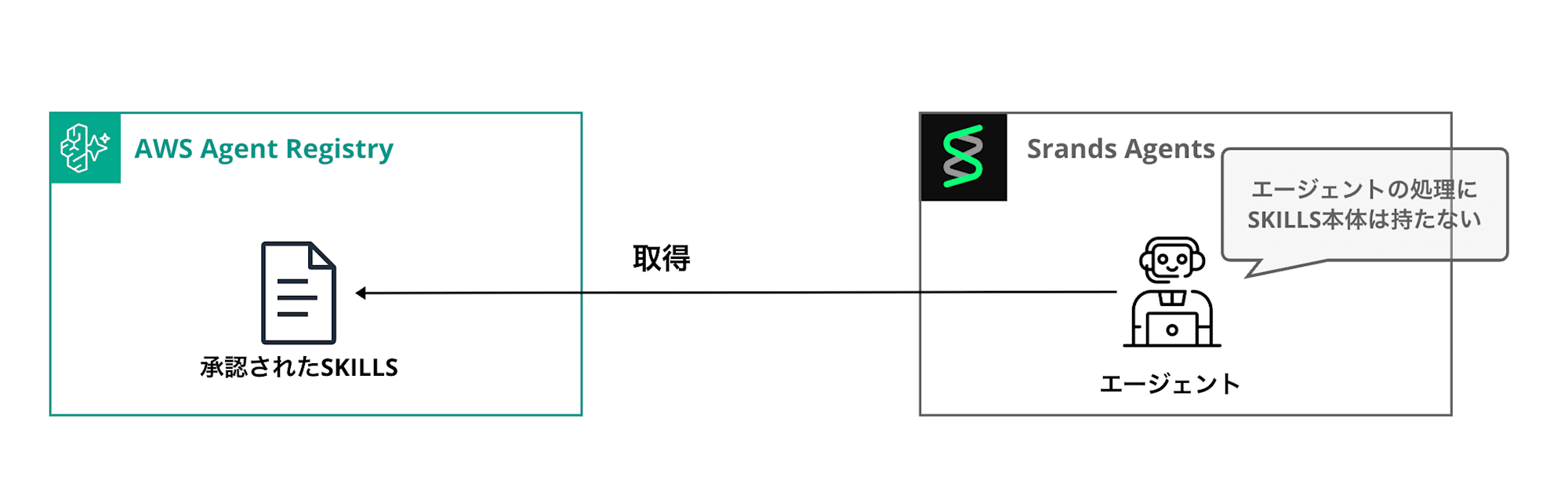
Rather than just referencing registered skills, wouldn't it be convenient if you could dynamically retrieve and inject only approved skills from the Registry without having to write the skills into the agent itself? In this verification, I'll test registering Agent Skills in the Registry and then searching for and injecting them from Strands, with a comparison of with and without skills!
The implementation will be as simple as shown in the diagram below.
Prerequisites
Here are the versions and models used in this article.
| Item | Version/Setting |
|---|---|
| Python | 3.13 |
| Package Manager | uv 0.9.26 |
| Region | us-east-1 |
| Model | us.anthropic.claude-haiku-4-5-20251001-v1:0 |
Implementation
Project Creation
Initialize the project with uv and add the necessary packages.
uv init skills-dynamic-import-strands -p 3.13
cd skills-dynamic-import-strands
uv add "boto3>=1.42.87" "strands-agents>=1.36.0" "strands-agents-tools>=0.5.0" "pyyaml>=6.0"
The actual versions installed in this verification are as follows:
| Package | Installed Version | Role |
|---|---|---|
| boto3 | 1.42.92 | Agent Registry registration & search |
| botocore | 1.42.92 | boto3 core (auto-dependency) |
| strands-agents | 1.36.0 | Agent/Skill/AgentSkills plugin core |
| strands-agents-tools | 0.5.0 | Built-in tools like file_read / shell |
| pyyaml | 6.0.3 | Parsing SKILL.md frontmatter |
The final file structure is as follows:
.
├── pyproject.toml
├── register_skill.py          # Register SKILL.md to Registry
├── registry_skill_loader.py   # Search Registry and convert to Skills
├── agent.py                   # Build and compare Agent with/without skills
└── skills/
    └── doc-reviewer/
        └── SKILL.md
Create Registry
First, create a Registry with auto-approval enabled using the API.
uv run python3 -c "
import boto3, json
c = boto3.client('bedrock-agentcore-control', region_name='us-east-1')
resp = c.create_registry(
    name='skills-auto-approve',
    description='Agent Skills registry with auto-approval enabled',
    approvalConfiguration={'autoApproval': True},
)
print(json.dumps(resp, indent=2, default=str))
"
With auto-approval enabled, skills will be automatically approved when registered. The end of the registryArn in the response is the Registry ID, which we'll need for registering and searching skills later.
SKILL.md to Register
Let's register a skill that reviews documents in a fixed format. To make the skill difference clear, we'll specify headings, emojis, and priority tags.
---
name: doc-reviewer
description: Perform structured reviews of specifications and documents in Japanese, returning key points, risks, and prioritized improvement suggestions
---

You are a Japanese-speaking document review assistant.

For any document input, you must provide output with the following Markdown heading structure.
Do not change the order, heading names, or emojis.

## 🎯 要点 (TL;DR)
- Summarize in bullet points, maximum 3 items, each within 40 characters

## ⚠️ リスク
- Maximum 5 bullet points. Format each as "Risk content — Expected impact"

## 🛠 改善提案
- Maximum 5 bullet points. Always start with priority tags `[P1]`/`[P2]`/`[P3]`
- `[P1]` requires immediate action, `[P2]` for next sprint, `[P3]` for whenever feasible

Do not add any sections beyond those specified. Avoid verbose preambles or concluding paragraphs.
Register Skills in the Registry
Here's the script to register the SKILL.md in the Registry.
"""Register a local SKILL.md to AWS Agent Registry and approve it immediately."""
from __future__ import annotations

import argparse
import logging
import os
import re
import time
from pathlib import Path

import boto3
import yaml

logging.basicConfig(level=logging.INFO)
logger = logging.getLogger(__name__)

FRONTMATTER_RE = re.compile(r"^---\s*\n(.*?)\n---\s*\n(.*)$", re.DOTALL)

def _wait_until_not(control, registry_id: str, record_id: str, transient: str, *, timeout: float = 30.0) -> str:
    deadline = time.monotonic() + timeout
    while True:
        status = control.get_registry_record(
            registryId=registry_id,
            recordId=record_id,
        )["status"]
        if status != transient:
            return status
        if time.monotonic() > deadline:
            raise TimeoutError(f"record {record_id} stuck in {transient}")
        time.sleep(1.0)

def parse_skill_md(path: Path) -> tuple[str, str, str]:
    text = path.read_text(encoding="utf-8")
    match = FRONTMATTER_RE.match(text)
    if not match:
        raise ValueError(f"{path} must start with YAML frontmatter")
    meta = yaml.safe_load(match.group(1)) or {}
    name = meta.get("name")
    if not name:
        raise ValueError(f"{path} frontmatter must define 'name'")
    return name, meta.get("description", ""), text

def register_skill(registry_id: str, skill_md_path: Path, record_version: str = "1.0", region_name: str = "us-east-1") -> str:
    name, description, inline_content = parse_skill_md(skill_md_path)
    control = boto3.client("bedrock-agentcore-control", region_name=region_name)

    created = control.create_registry_record(
        registryId=registry_id,
        name=name,
        description=description,
        recordVersion=record_version,
        descriptorType="AGENT_SKILLS",
        descriptors={"agentSkills": {"skillMd": {"inlineContent": inline_content}}},
    )
    record_id = created["recordArn"].rsplit("/", 1)[-1]
    logger.info("Created record %s (status=%s)", record_id, created["status"])

    _wait_until_not(control, registry_id, record_id, "CREATING")
    control.submit_registry_record_for_approval(registryId=registry_id, recordId=record_id)
    status = _wait_until_not(control, registry_id, record_id, "SUBMITTING")
    logger.info("Record %s reached status %s", record_id, status)

    return record_id
This script extracts the name and description from the SKILL.md frontmatter and registers them in the Registry using the control plane API. It waits for the record status to transition before submitting, and with auto-approval, it's immediately approved.
export AGENT_REGISTRY_ID="xxx"
export AWS_REGION="us-east-1"
uv run python register_skill.py skills/doc-reviewer/SKILL.md
INFO:__main__:Created record xxx (status=CREATING)
INFO:__main__:Record xxx reached status APPROVED
Note that immediately after approval, it's not yet reflected in the search index - in this verification, there was a lag of about 20 seconds.
Skill Loader from Registry
Here's a loader that searches for skills in the Registry and converts them to Strands Skill objects.
"""Load Agent Skills dynamically from AWS Agent Registry."""
from __future__ import annotations

import logging
from dataclasses import dataclass

import boto3
from strands.vended_plugins.skills import Skill

logger = logging.getLogger(__name__)

@dataclass
class RegistrySkillLoaderConfig:
    registry_id: str
    region_name: str = "us-east-1"
    max_results: int = 10

class RegistrySkillLoader:
    def __init__(self, config: RegistrySkillLoaderConfig) -> None:
        self._config = config
        self._client = boto3.client("bedrock-agentcore", region_name=config.region_name)

    def search(self, query: str) -> list[Skill]:
        response = self._client.search_registry_records(
            registryIds=[self._config.registry_id],
            searchQuery=query,
            maxResults=self._config.max_results,
            filters={"descriptorType": {"$eq": "AGENT_SKILLS"}},
        )
        records = response.get("registryRecords") or []
        logger.info("Fetched %d skill record(s) from registry", len(records))
        return [skill for record in records if (skill := self._to_skill(record))]

    def _to_skill(self, record: dict) -> Skill | None:
        descriptors = record.get("descriptors") or {}
        markdown = ((descriptors.get("agentSkills") or {}).get("skillMd") or {}).get("inlineContent")
        if markdown:
            return Skill.from_content(markdown)
        name = record.get("name", "unknown")
        description = record.get("description") or ""
        logger.warning("Skill '%s' has no skillMd content; falling back", name)
        return Skill(name=name, description=description, instructions=description)
This passes the contents of the records retrieved from the Registry directly to Skill.from_content(). Since the content of the SKILL.md we registered is returned as-is, it can be simply converted.
Building the Agent (Comparing with/without Skills)
"""Compare Strands Agent output with and without Skills loaded from AWS Agent Registry."""
from __future__ import annotations

import argparse
import logging
import os

from strands import Agent
from strands.models import BedrockModel
from strands.vended_plugins.skills import AgentSkills

from registry_skill_loader import RegistrySkillLoader, RegistrySkillLoaderConfig

logging.basicConfig(level=logging.INFO, format="%(asctime)s %(name)s %(levelname)s: %(message)s")
logger = logging.getLogger(__name__)

HAIKU_MODEL_ID = "us.anthropic.claude-haiku-4-5-20251001-v1:0"

def build_model() -> BedrockModel:
    return BedrockModel(
        model_id=HAIKU_MODEL_ID,
        region_name=os.environ.get("AWS_REGION", "us-east-1"),
        temperature=0.0,
    )

def build_plain_agent() -> Agent:
    return Agent(model=build_model())

def build_skill_agent(search_query: str) -> Agent:
    loader = RegistrySkillLoader(RegistrySkillLoaderConfig(
        registry_id=os.environ["AGENT_REGISTRY_ID"],
        region_name=os.environ.get("AWS_REGION", "us-east-1"),
    ))
    skills = loader.search(search_query)
    logger.info("Loaded skills: %s", [s.name for s in skills])
    return Agent(model=build_model(), plugins=[AgentSkills(skills=skills)])

SAMPLE_DOC = """\
# 新機能: 社内ナレッジ検索ボット v0.3 仕様書 (ドラフト)

- 利用者: 全社員 (約1200名)
- 想定QPS: 平均3, ピーク20
- LLM: Claude Haiku / Sonnet を動的切替
- データソース: Confluence, Google Drive, Slack 過去ログ
- 認証: Slack OAuth のみ
- データ取り込み: 夜間バッチで全件再同期
- ログ: CloudWatch に会話ログを平文保存 (検索用)
- リリース予定: 来週金曜日, 段階ロールアウトなし
- 監視: なし (まずは出してみる)
- 予算: LLMコストは月上限なし
"""

PROMPT = f"下記のドキュメントをレビューしてください。\n\n{SAMPLE_DOC}"

def run(mode: str) -> None:
    print(f"MODE: {mode}")
    agent = build_plain_agent() if mode == "plain" else build_skill_agent("仕様書をレビューして要点・リスク・改善提案を返すスキル")
    print(agent(PROMPT).message)

def main() -> None:
    parser = argparse.ArgumentParser()
    parser.add_argument("mode", choices=["plain", "skills"])
    run(parser.parse_args().mode)

if __name__ == "__main__":
    main()
By simply passing the Skill instances retrieved from the Registry to the AgentSkills plugin, we can configure the Agent without having SKILL.md locally.
Testing
Running without Skills
AGENT_REGISTRY_ID="xxx" AWS_REGION="us-east-1" uv run python agent.py plain
Full Output (plain)
# レビュー結果: 重大な懸念事項あり

このドキュメントには、本番環境への展開前に**必ず対応すべき問題**が複数あります。

## 🔴 **重大リスク(即対応必須)**

### 1. **セキュリティ**
- ❌ 認証が Slack OAuth のみ → 退職者アクセス制御なし
- ❌ 会話ログを平文保存 → 機密情報露出リスク
  - **対策**: ログの暗号化、アクセス制御、保持期間設定
  - **質問**: どの情報を記録する必要があるのか?

### 2. **データプライバシー**
- ❌ Confluence/Drive/Slack の全データを無制限に学習
  - **対策**: データ分類、アクセス権限に基づくフィルタリング
  - **質問**: 個人情報・機密情報の除外ルールは?

### 3. **スケーラビリティ**
- ⚠️ ピーク20QPS で Haiku/Sonnet 動的切替 → コスト爆発の可能性
  - **対策**: レート制限、キューイング、キャッシング戦略の明記
  - **質問**: 月間コスト試算は?

### 4. **リリース計画**
- ❌ 段階ロールアウトなし + 監視なし = 本番障害時に全社影響
  - **対策**:
    - 段階ロールアウト(10% → 50% → 100%)
    - 基本的な監視(エラー率、レイテンシ、コスト)

---

## 🟡 **中程度の懸念**

| 項目 | 問題 | 推奨対応 |
|------|------|--------|
| **データ同期** | 夜間バッチのみ → 情報が最大24時間遅延 | 増分同期の検討 |
| **LLM選択** | Haiku/Sonnet の切替基準が不明 | 明確な判定ロジック定義 |
| **エラーハンドリング** | 記載なし | フォールバック戦略を定義 |
| **ユーザー教育** | 記載なし | 利用ガイド、制限事項の周知 |

---

## 📋 **推奨される追加項目**

```
- [ ] セキュリティレビュー(情報セキュリティ部門)
- [ ] データ保持ポリシー(法務・コンプライアンス)
- [ ] コスト試算と予算承認プロセス
- [ ] インシデント対応計画
- [ ] ユーザーフィードバック収集方法
- [ ] 段階ロールアウトスケジュール
- [ ] 基本的なダッシュボード(エラー、コスト、利用状況)
```

---

## ✅ **良い点**

- 想定QPS の明記
- 複数データソースの統合
- 段階的な LLM 選択

---

## 🎯 **次のステップ**

**来週金曜日のリリースは現実的ではありません。** 以下を推奨します:

1. **今週中**: セキュリティ・プライバシーレビュー実施
2. **来週**: 修正 + 限定ユーザー(10-20名)でのパイロット
3. **2週間後**: 段階ロールアウト開始

ご質問があればお答えします。
It provided a review. Without skills, the model freely decides the headings, so the structure changes with each execution.
Running with Skills
AGENT_REGISTRY_ID="xxx" AWS_REGION="us-east-1" uv run python agent.py skills
registry_skill_loader INFO: Fetched 1 skill record(s) from registry
__main__ INFO: Loaded skills: ['doc-reviewer']
...
doc-reviewer スキルを使用して、このドキュメントを構造化レビューします。
Tool #1: skills
We confirmed that doc-reviewer was retrieved from the Registry and the agent loaded the skills tool!
Let's check the output result.
Full Output (with skills)
## 🎯 要点 (TL;DR)
- 全社1200名向けの社内ナレッジ検索ボット、来週金曜日リリース予定
- Claude Haiku/Sonnetで複数データソース検索、Slack OAuth認証
- 監視・段階ロールアウト・予算管理なし、本番環境への準備不足

## ⚠️ リスク
- **監視なし** — 障害検知遅延、ユーザー影響の把握不可、原因特定困難
- **段階ロールアウトなし** — 1200名同時アクセスで障害発生時、全社影響、ロールバック困難
- **会話ログ平文保存** — 機密情報漏洩、個人情報保護方針違反、コンプライアンスリスク
- **LLMコスト上限なし** — プロンプトインジェクション攻撃時の無制限課金、予算超過
- **夜間バッチ全件再同期** — 古い情報提供、削除済みデータの復活、データ一貫性問題

## 🛠 改善提案
- `[P1]` CloudWatch ログの暗号化・アクセス制御導入、機密情報マスキング機能追加
- `[P1]` 段階ロールアウト計画策定(初期100名→500名→全社)、ロールバック手順確立
- `[P1]` 基本的な監視設定(エラー率、レイテンシ、API呼び出し数)、アラート閾値定義
- `[P2]` LLMコスト上限設定、プロンプトインジェクション対策、レート制限実装
- `[P3]` 増分同期への移行検討、データ削除ポリシー明確化、キャッシュ戦略導入
It's perfectly aligned with the 3-section fixed format defined in SKILL.md!
We've successfully dynamically imported skills from Agent Registry.
The nice thing is that you can change the agent's behavior just by adding or updating approved skills in the Registry without modifying the agent code. By shifting skill management to the Registry side, you can separate agent development from skill development.
Conclusion
In this implementation, the Registry is fetched once when building the Agent. If you build the Agent for each request, the latest skills will be fetched every time; if you build it per session, skills will be updated when sessions change. The appropriate granularity for fetching is something to consider.
In the future, I'll try use cases of registering and utilizing MCP Servers and Agents in the Registry!
I hope this article has been helpful. Thank you for reading to the end!