I tried building a complete AWS Cloud WAN environment with AWS CDK and implemented Network Firewall inspection via Service Insertion and consolidation of outbound Internet traffic

This page has been translated by machine translation. View original
Multiple regions with VPCs and adjusting VPC route tables is challenging
Hello, I'm nonPi (@non____97).
Have you ever felt that setting up multiple regions with VPCs and adjusting VPC route tables is challenging when testing AWS Cloud WAN? I certainly have.
I believe one scenario for adopting Cloud WAN is when you want to manage VPCs distributed across multiple regions in an integrated manner.
Actually testing this is quite challenging as you need to set up VPCs in multiple regions each time. Especially since it can take about 20 minutes for a Core Network to be created in Cloud WAN, you'll have to wait before connecting VPCs. It's hard to maintain focus. Particularly when using Service Insertion to inspect East-West traffic with Network Firewall or route traffic to VPCs with NAT Gateways, there are many components to manage.
For more about Service Insertion, please refer to the following AWS Blog posts:
So, I've created an AWS CDK solution to quickly set up a Cloud WAN environment.
Test Environment
Here's the test environment:
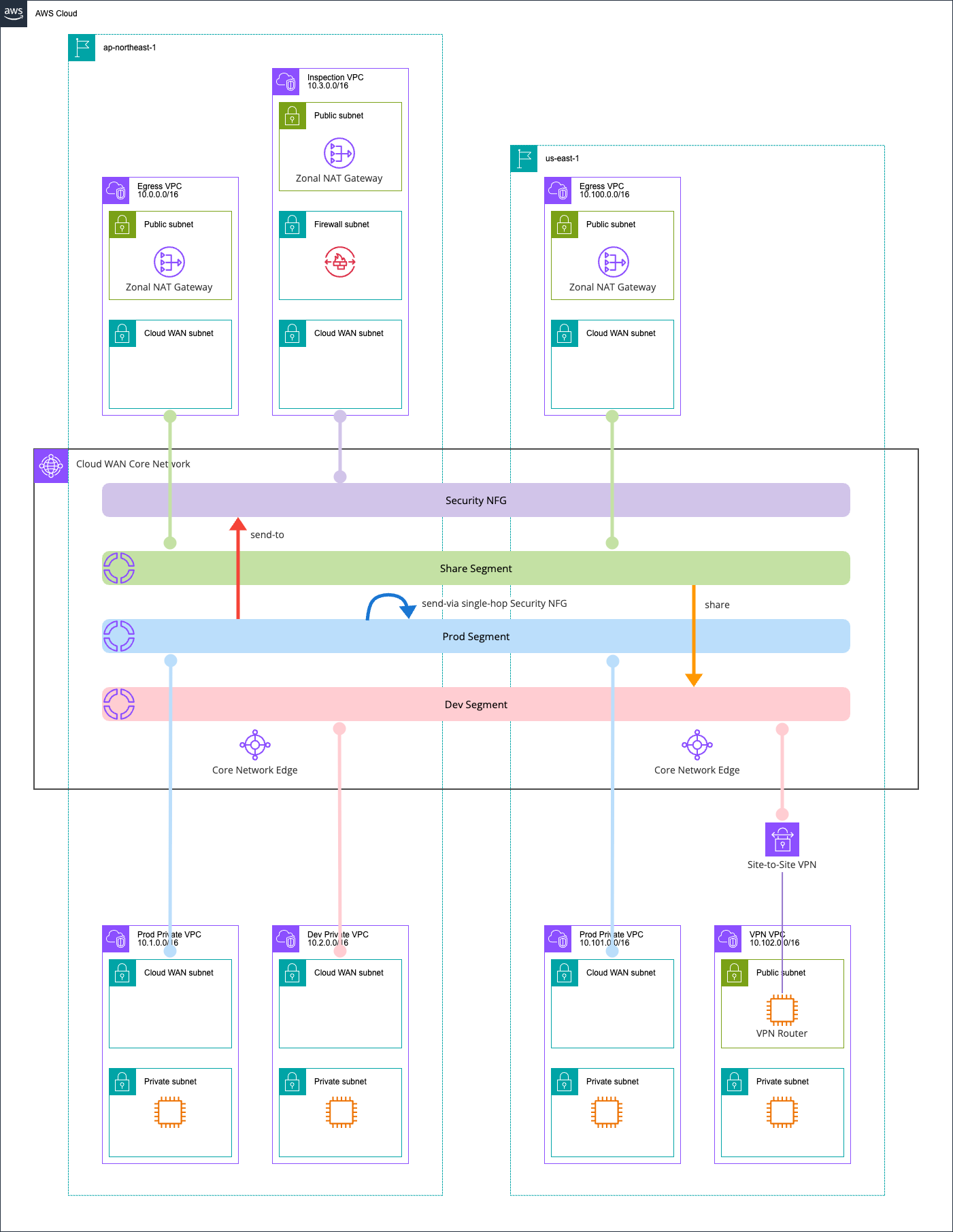
I'm using two regions, ap-northeast-1 and us-east-1, with three segments: dev, prod, and share.
Inter-segment traffic is routed through Network Firewall. Additionally, prod segment traffic going to the internet is routed through an Egress VPC.
I've set up a VPN VPC as an on-premises equivalent, connected via Site-to-Site VPN with BGP route exchange. The VPN server uses Libreswan and FRR.
The hourly cost of this configuration is as follows:
| Resource | Unit Price (USD/hour) | Quantity | Subtotal (USD/hour) |
|---|---|---|---|
| Cloud WAN Core Network Edge | $0.500 | 2 | $1.000 |
| Cloud WAN VPC Attachment (ap-northeast-1) | $0.090 | 4 | $0.360 |
| Cloud WAN VPC Attachment (us-east-1) | $0.065 | 2 | $0.130 |
| Cloud WAN Site-to-Site VPN Attachment | $0.065 | 1 | $0.065 |
| Network Firewall Endpoint | $0.395 | 1 | $0.395 |
| NAT Gateway (ap-northeast-1) | $0.062 | 2 | $0.124 |
| NAT Gateway (us-east-1) | $0.045 | 1 | $0.045 |
| EC2 t3.micro (ap-northeast-1) | $0.0136 | 2 | $0.027 |
| EC2 t3.micro (us-east-1) | $0.0104 | 2 | $0.021 |
| EC2 t3.small VPN Router (us-east-1) | $0.0208 | 1 | $0.021 |
| VPN Connection | $0.048 | 1 | $0.048 |
| EIC Endpoint | Free | 3 | $0.000 |
| Total | $2.236 |
Additional charges for EBS volumes and data transfer will also apply. The cost is reasonable, but avoid leaving it running for extended periods.
AWS CDK Code
The AWS CDK code structure is as follows:
.
├── bin
│   └── aws-cdk-cloud-wan.ts          # CDK application entry point. Defines 2 Stacks (Region1/Region2)
├── lib
│   ├── constructs
│   │   ├── core-network.ts           # Construct defining Cloud WAN Global Network / Core Network / policies
│   │   ├── egress-vpc.ts             # Construct for internet egress VPC (NAT Gateway / IGW). Belongs to share segment
│   │   ├── index.ts                  # Barrel file for Constructs
│   │   ├── inspection-vpc.ts         # Construct for Network Firewall inspection VPC. Used for send-to and send-via routing
│   │   ├── private-vpc.ts            # Construct for workload VPCs. Used in prod / dev segments
│   │   └── vpn-vpc.ts                # Construct for on-premises connection VPC. Includes VPN Router / Site-to-Site VPN / BGP
│   ├── network-config.ts             # Centralized config for CIDR / ASN / segment names / tag keys to inject into Stacks
│   ├── region1-stack.ts              # ap-northeast-1 Stack. Deploys Core Network / Egress / Prod / Dev / Inspection VPCs
│   └── region2-stack.ts              # us-east-1 Stack. Deploys Egress / Prod / VPN VPCs
├── src
│   └── ec2
│       └── vpn-router-userdata.sh    # UserData script for VPN Router EC2. Auto-setup for Libreswan (IPsec) / FRR (BGP)
├── test
│   └── aws-cdk-cloud-wan.test.ts     # Stack snapshot tests. Validates VPC Attachment tags and resource counts
├── cdk.context.json
├── cdk.json
├── package.json
└── tsconfig.json
To attach us-east-1 VPCs to the Core Network, I pass Core Network information using crossRegionReferences which makes cross-region value references easy:
#!/usr/bin/env node
import * as cdk from 'aws-cdk-lib/core';
import { Region1Stack } from '../lib/region1-stack';
import { Region2Stack } from '../lib/region2-stack';

const app = new cdk.App();

const region1 = 'ap-northeast-1';
const region2 = 'us-east-1';

const region1Stack = new Region1Stack(app, 'CloudWanRegion1Stack', {
  env: { account: process.env.CDK_DEFAULT_ACCOUNT, region: region1 },
  region2,
  crossRegionReferences: true,
});

const region2Stack = new Region2Stack(app, 'CloudWanRegion2Stack', {
  env: { account: process.env.CDK_DEFAULT_ACCOUNT, region: region2 },
  coreNetworkId: region1Stack.coreNetworkId,
  coreNetworkArn: region1Stack.coreNetworkArn,
  crossRegionReferences: true,
});

region2Stack.addDependency(region1Stack);
For more details, see the following article:
Note that crossRegionReferences creates strong references, but this isn't a problem as recreating a Core Network would impact the entire network topology anyway.
Deployment takes about 40 minutes total - 25 minutes for the Core Network Stack and 15 minutes for the other Stack.
The code is available in the following GitHub repository:
Checking the Cloud WAN Environment
Global Network
Since there aren't many articles about Cloud WAN on DevelopersIO, I'll share what information you can see in the AWS Management Console.
First, let's look at the Global Network.
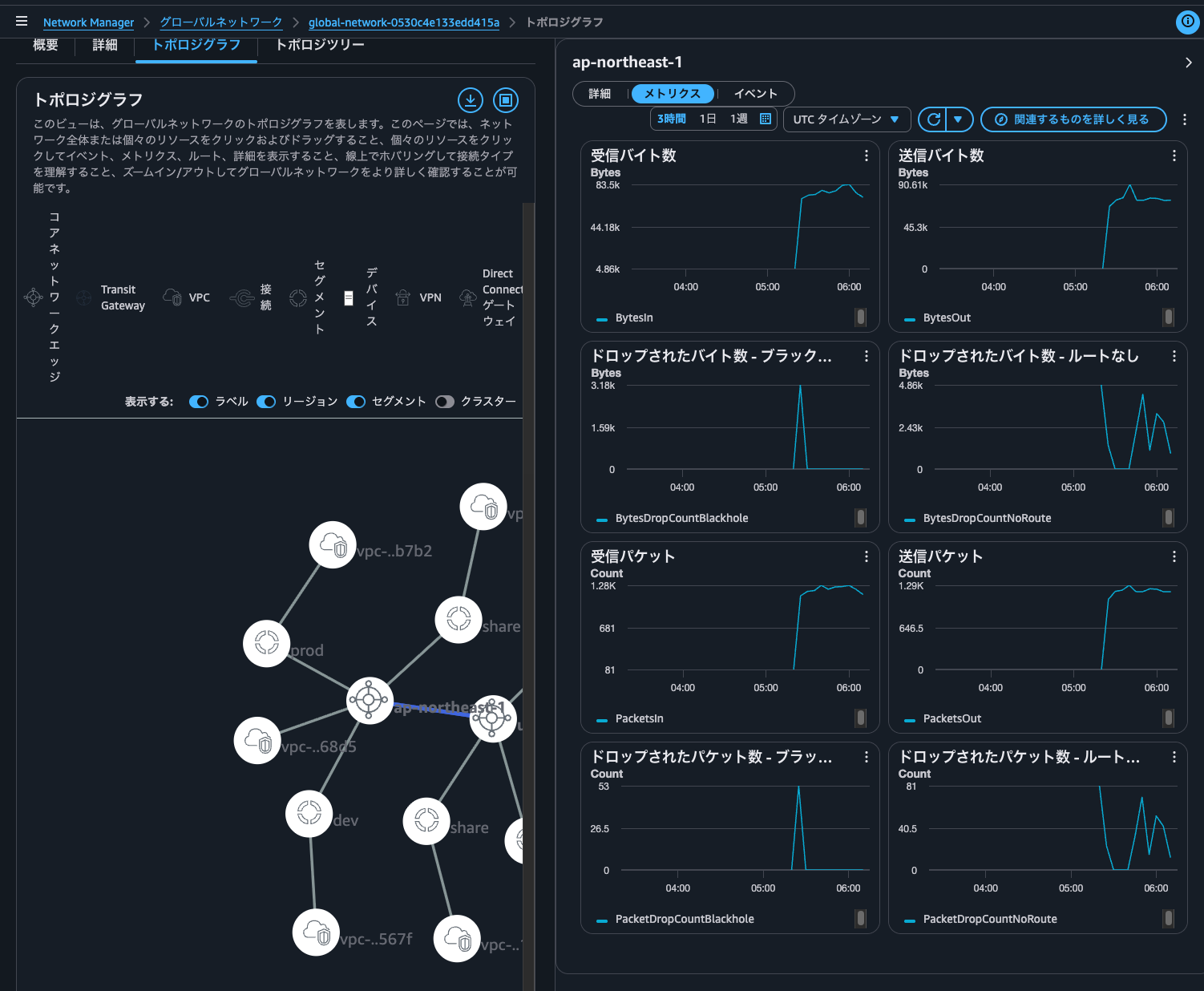
The topology graph shows regions, segments, and resources attached to segments. This is useful for understanding the overall network configuration.
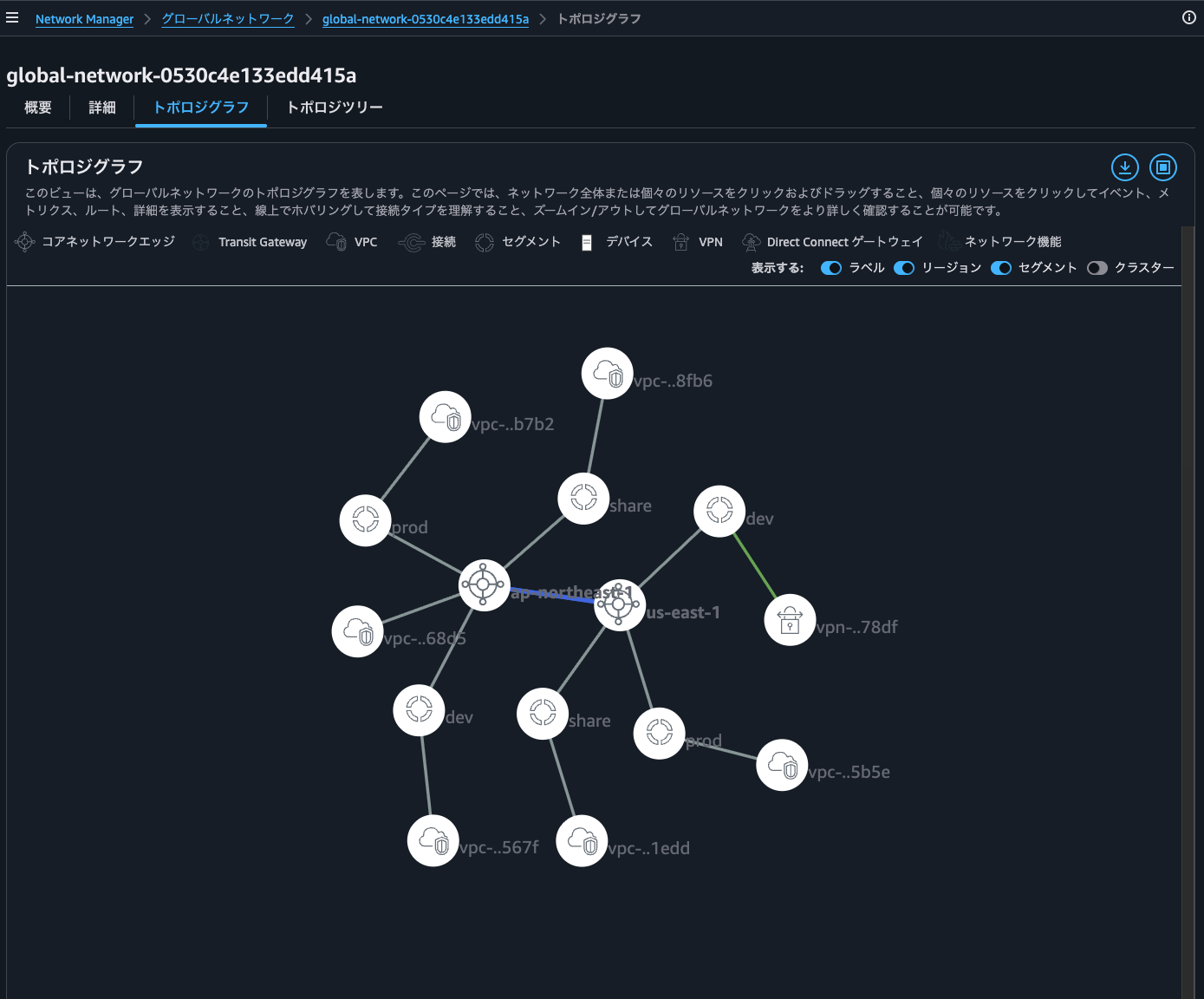
Clicking on ap-northeast-1 shows the ASN and internal CIDR blocks used by the Core Network Edge.
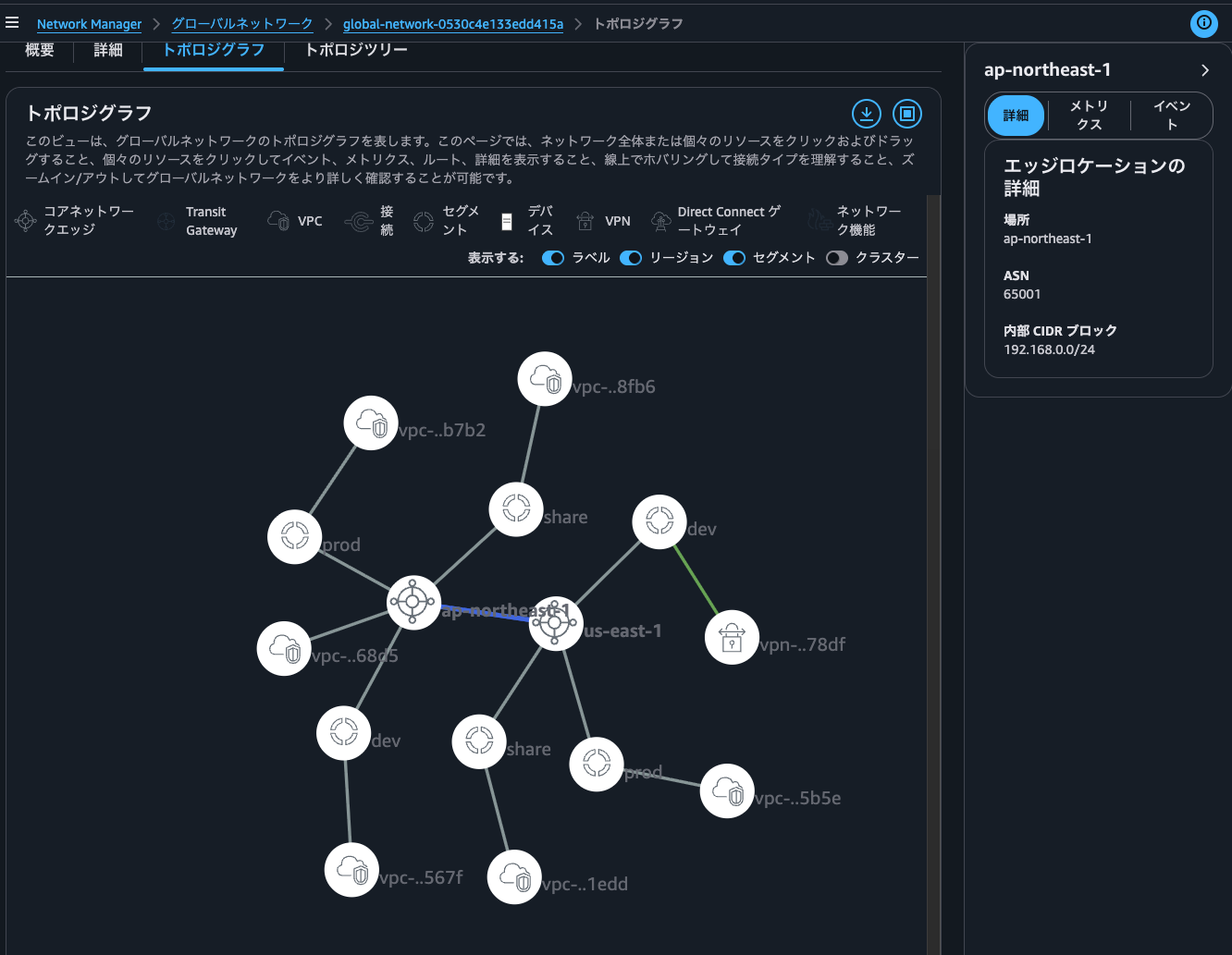
The internal CIDR blocks are used for Transit Gateway Connect, which isn't used in this environment.
Selecting Metrics shows information about data volume and packet count in this region, which helps understand the overall traffic.
Clicking on a segment shows the Core Network Edge regions it's connected to and the segments it shares with.
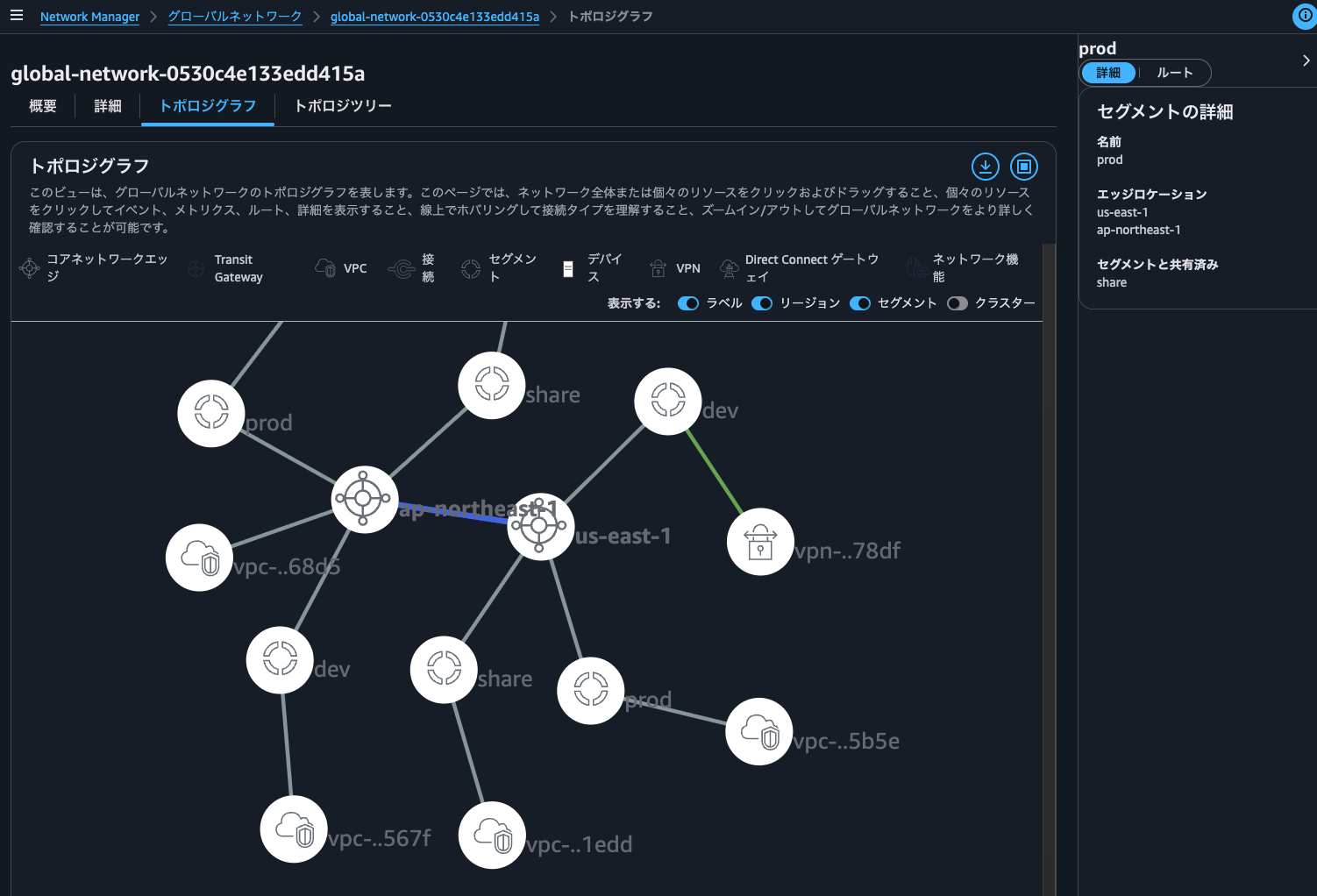
Note: My screenshot shows sharing with the share segment, but I'm not actually doing that in the current environment.
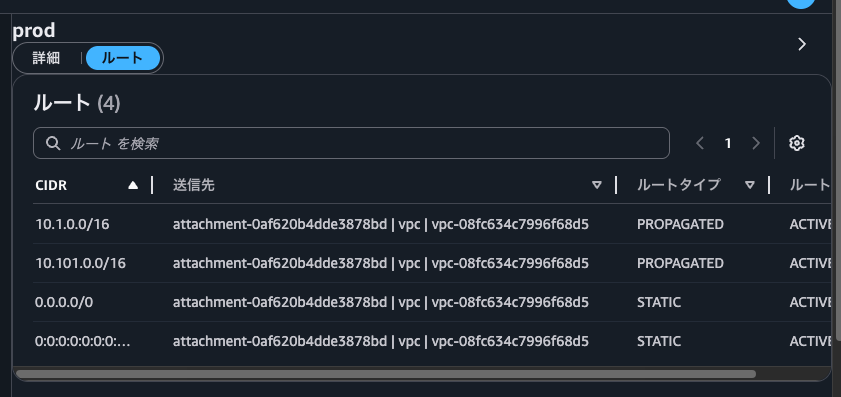
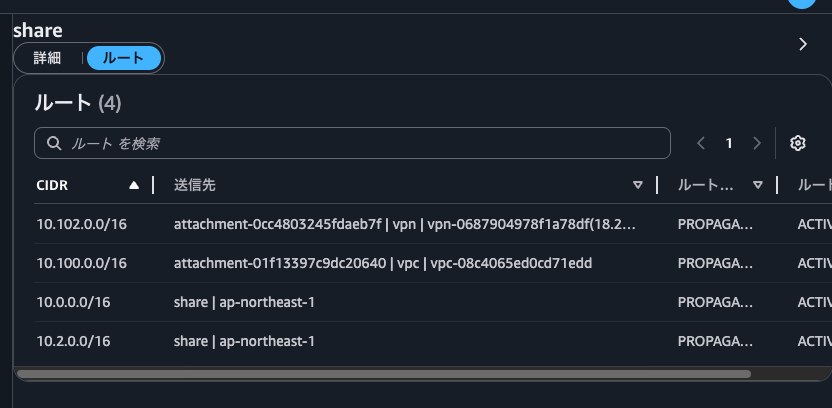
Selecting Routes shows routing information for this segment. A STATIC default route is registered because I'm using Service Insertion with the send-to action. Also, the destination for PROPAGATED routes is the Inspection VPC because I've configured the send-via action for accessing other networks within the Prod segment through the Security NFG.
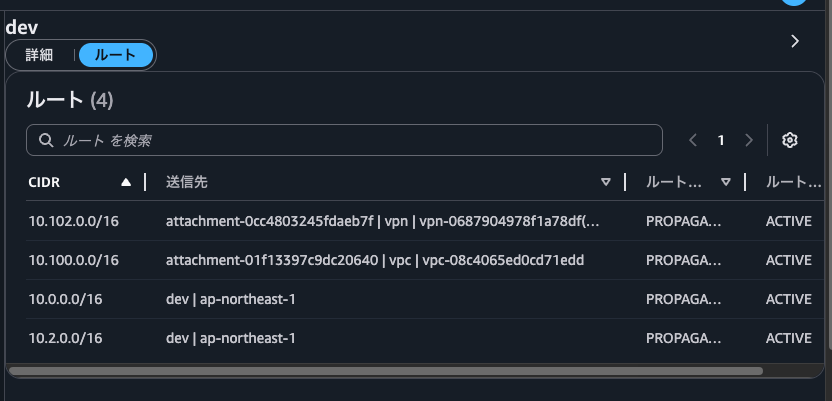
For reference, here are the routes for the dev and share segments. Since dev and share segments share routes, they have the same routes configured.
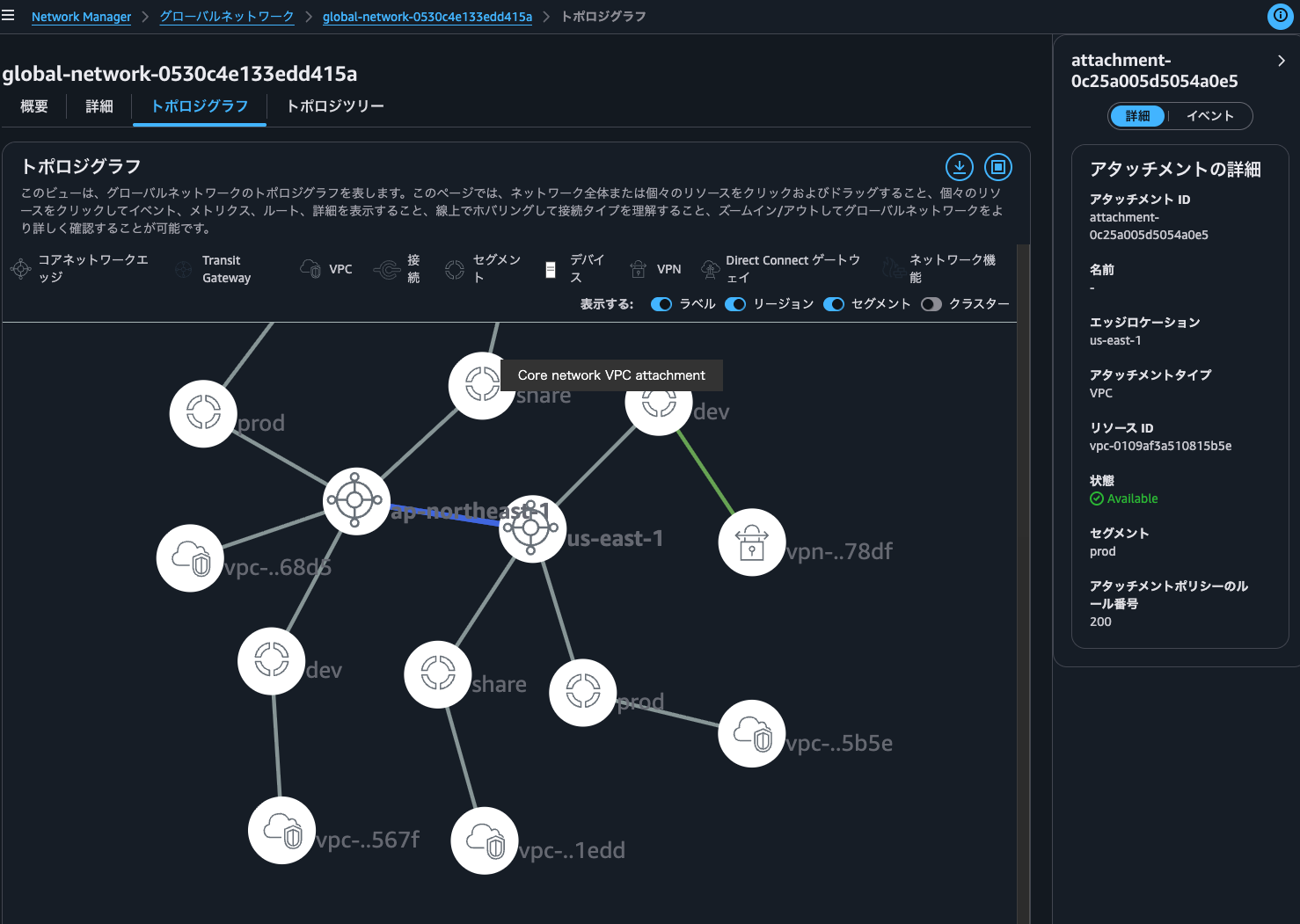
Clicking on a VPC shows information such as edge location, attachment type, segment membership, and attachment policy rule numbers.
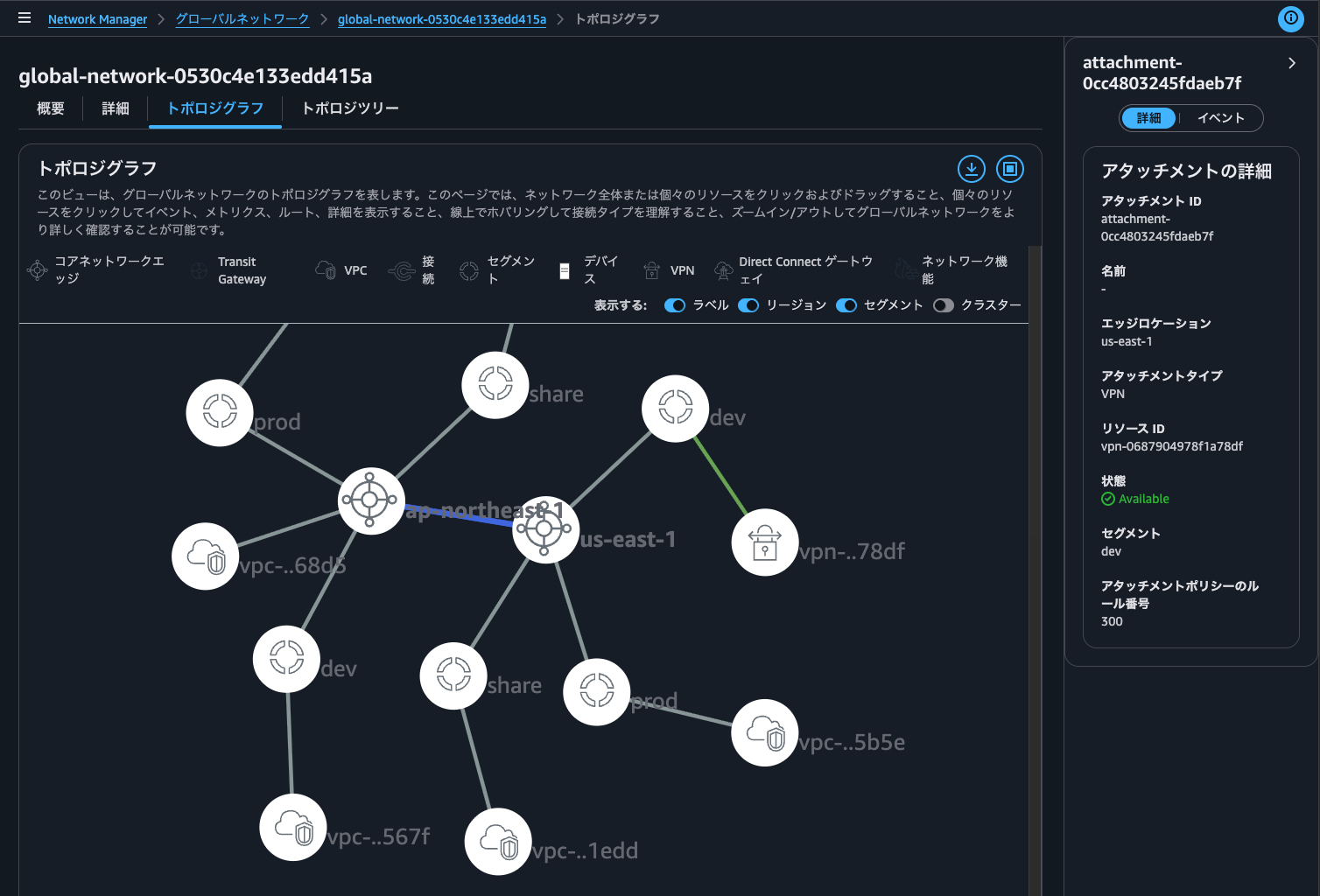
Similar information is available when clicking on a Site-to-Site VPN.
For Site-to-Site VPNs, you can check the current connection status. If a tunnel is down, the normally green line turns red, and hovering over it displays "Core network VPN attachment, at least one connection is down".
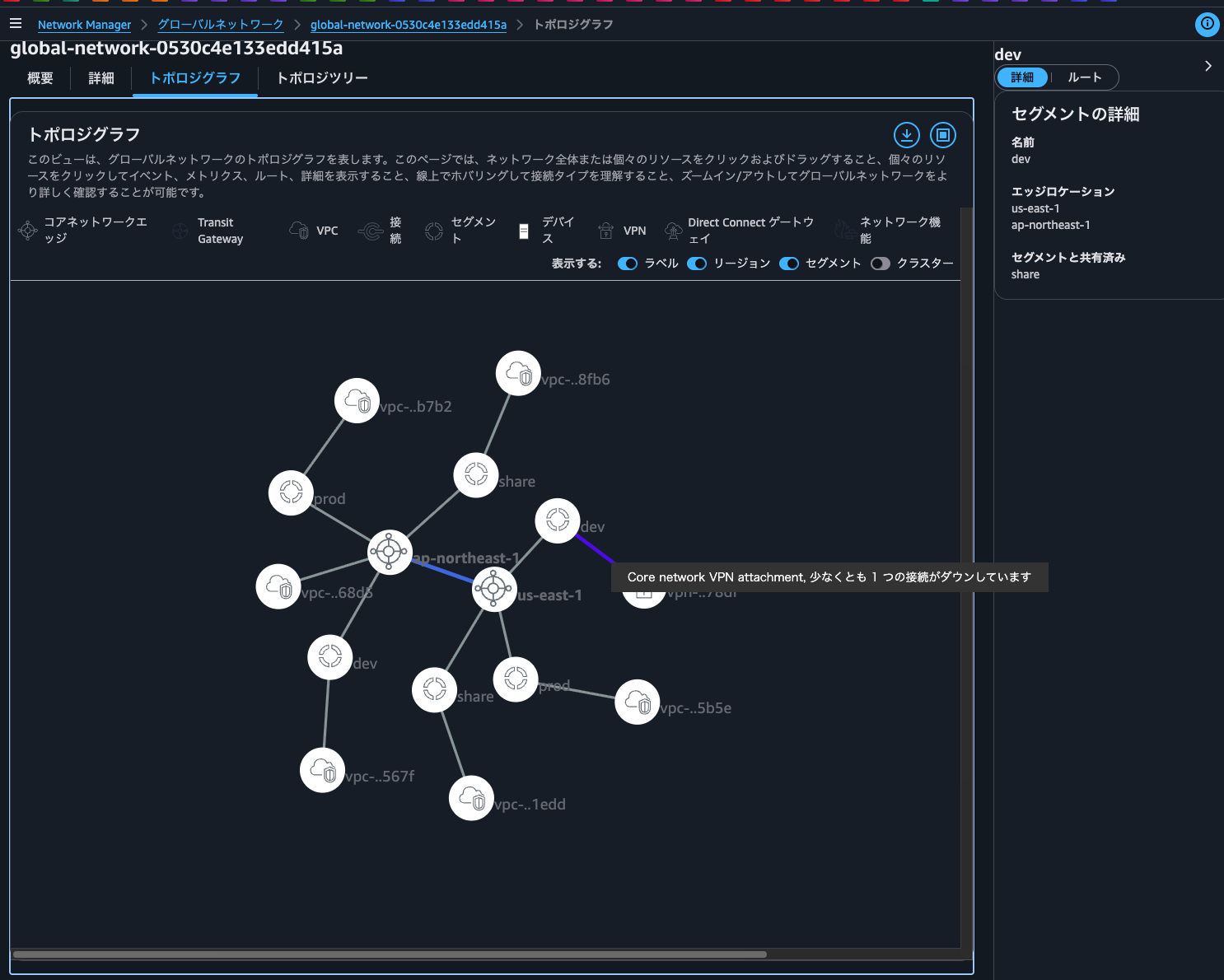
Being able to see the entire connection status of a global network on a single screen is very convenient.
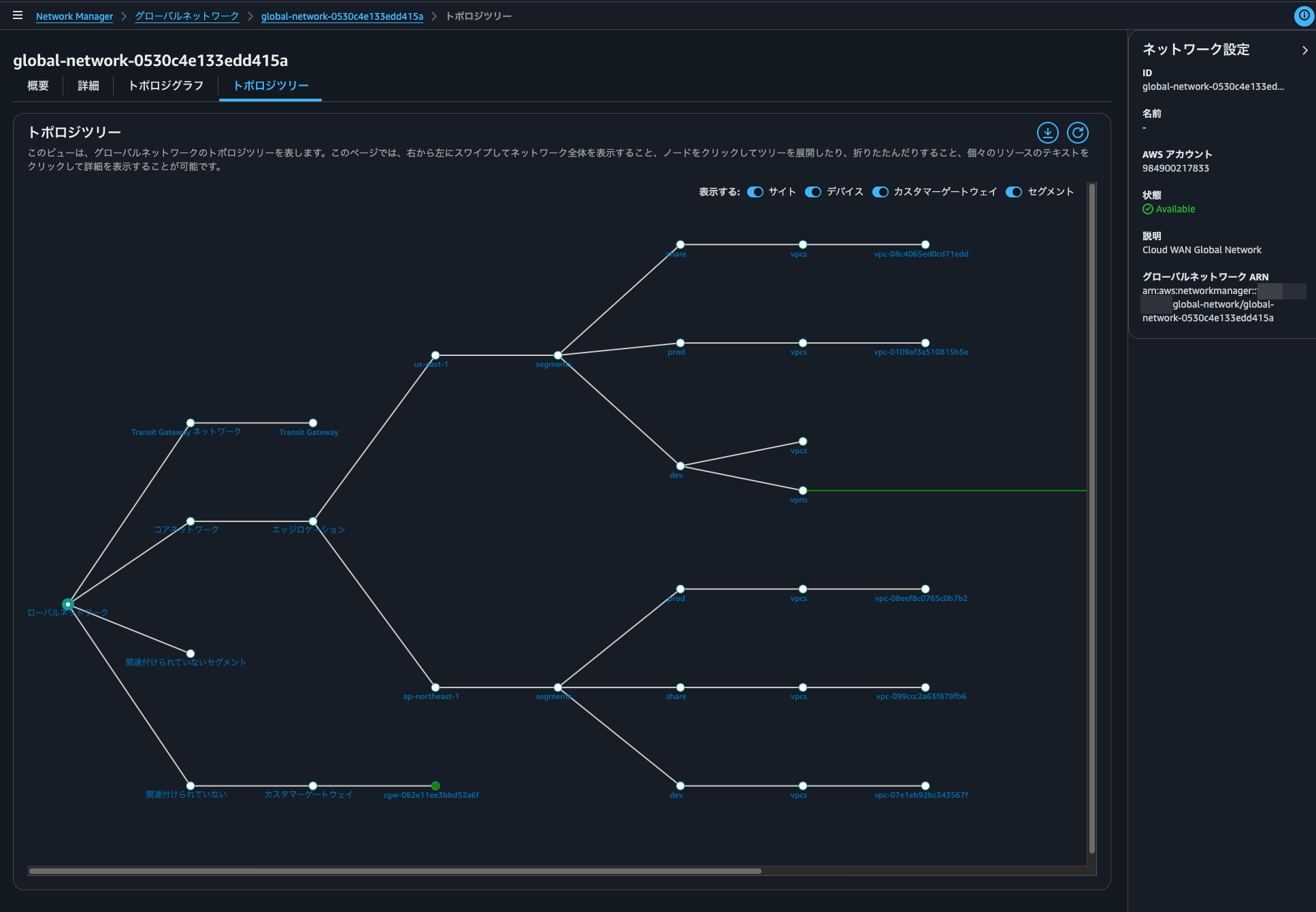
Clicking the Topology Tree tab displays the network topology in a tree format, which some people might find easier to understand.
Core Network
Next, let's look at the Core Network.
Here's the current Core Network policy:
{
  "core-network-configuration": {
    "vpn-ecmp-support": true,
    "asn-ranges": [
      "65000-65099"
    ],
    "edge-locations": [
      {
        "location": "ap-northeast-1",
        "asn": 65001
      },
      {
        "location": "us-east-1",
        "asn": 65002,
        "inside-cidr-blocks": [
          "192.168.100.0/24"
        ]
      }
    ],
    "inside-cidr-blocks": [
      "192.168.0.0/16"
    ]
  },
  "version": "2021.12",
  "attachment-policies": [
    {
      "rule-number": 100,
      "condition-logic": "or",
      "description": "attachment segment share",
      "action": {
        "association-method": "constant",
        "segment": "share"
      },
      "conditions": [
        {
          "type": "tag-value",
          "value": "share",
          "operator": "equals",
          "key": "cloudwan-seg"
        }
      ]
    },
    {
      "rule-number": 200,
      "condition-logic": "or",
      "description": "attachment segment prod",
      "action": {
        "association-method": "constant",
        "segment": "prod"
      },
      "conditions": [
        {
          "type": "tag-value",
          "value": "prod",
          "operator": "equals",
          "key": "cloudwan-seg"
        }
      ]
    },
    {
      "rule-number": 300,
      "condition-logic": "or",
      "description": "attachment segment dev",
      "action": {
        "association-method": "constant",
        "segment": "dev"
      },
      "conditions": [
        {
          "type": "tag-value",
          "value": "dev",
          "operator": "equals",
          "key": "cloudwan-seg"
        }
      ]
    },
    {
      "rule-number": 400,
      "condition-logic": "or",
      "description": "attachment nfg security",
      "action": {
        "add-to-network-function-group": "security"
      },
      "conditions": [
        {
          "type": "tag-value",
          "value": "security",
          "operator": "equals",
          "key": "cloudwan-nfg"
        }
      ]
    }
  ],
  "network-function-groups": [
    {
      "name": "security",
      "require-attachment-acceptance": false
    }
  ],
  "segments": [
    {
      "name": "share",
      "require-attachment-acceptance": false,
      "edge-locations": [
        "ap-northeast-1",
        "us-east-1"
      ]
    },
    {
      "isolate-attachments": true,
      "name": "prod",
      "require-attachment-acceptance": false,
      "edge-locations": [
        "ap-northeast-1",
        "us-east-1"
      ]
    },
    {
      "name": "dev",
      "require-attachment-acceptance": false,
      "edge-locations": [
        "ap-northeast-1",
        "us-east-1"
      ]
    }
  ],
  "segment-actions": [
    {
      "mode": "attachment-route",
      "segment": "share",
      "action": "share",
      "share-with": [
        "dev"
      ]
    },
    {
      "segment": "prod",
      "action": "send-to",
      "via": {
        "network-function-groups": [
          "security"
        ]
      },
      "when-sent-to": {
        "segments": "prod"
      }
    },
    {
      "mode": "single-hop",
      "when-sent-to": {
        "segments": [
          "prod"
        ]
      },
      "segment": "prod",
      "action": "send-via",
      "via": {
        "network-function-groups": [
          "security"
        ]
      }
    }
  ]
}
Sample Core Network policies are available in the following AWS official documentation:
For policy parameters, see the following AWS official documentation:
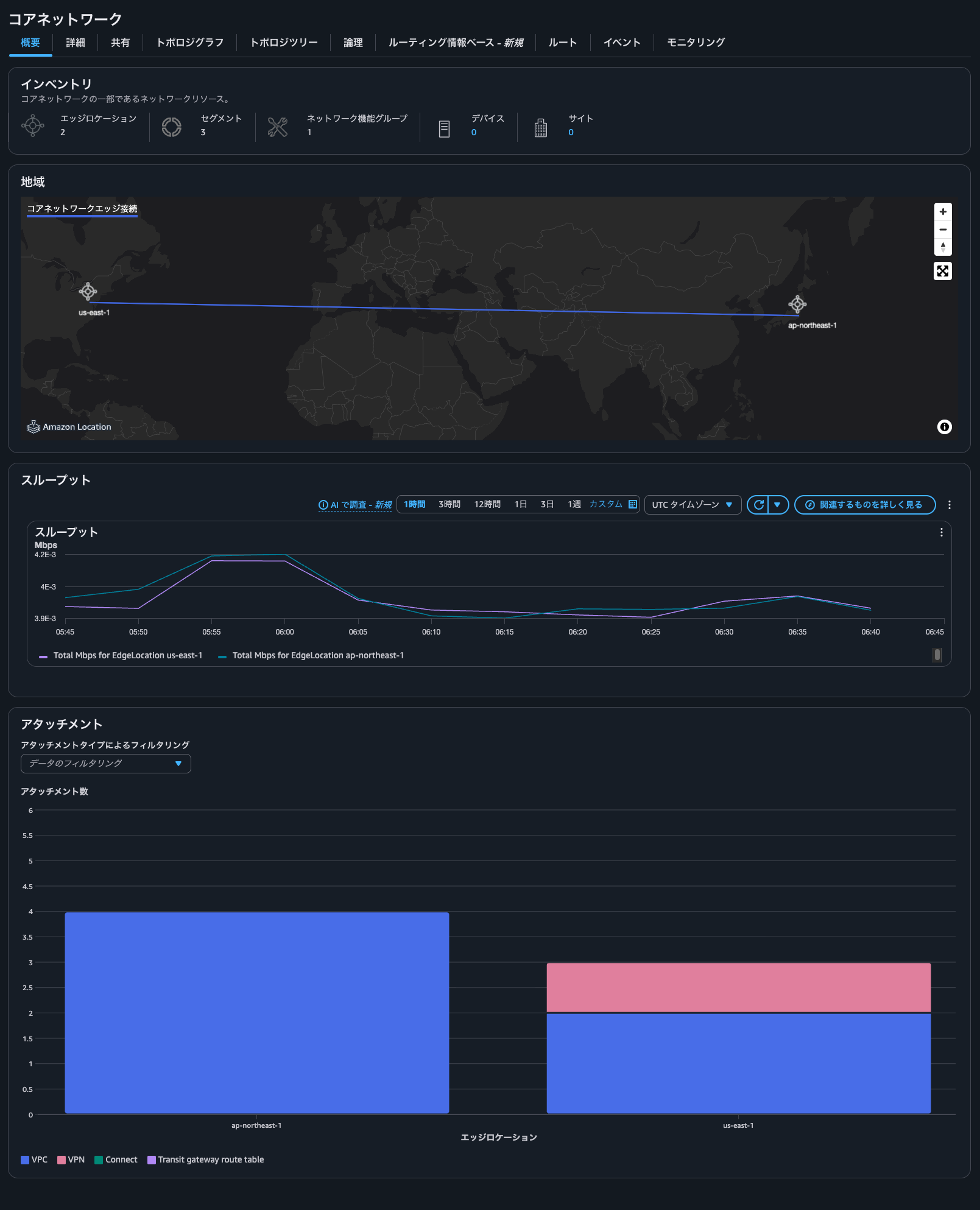
In the management console, selecting Core Network shows information about the regions used, network throughput, and attachment information.
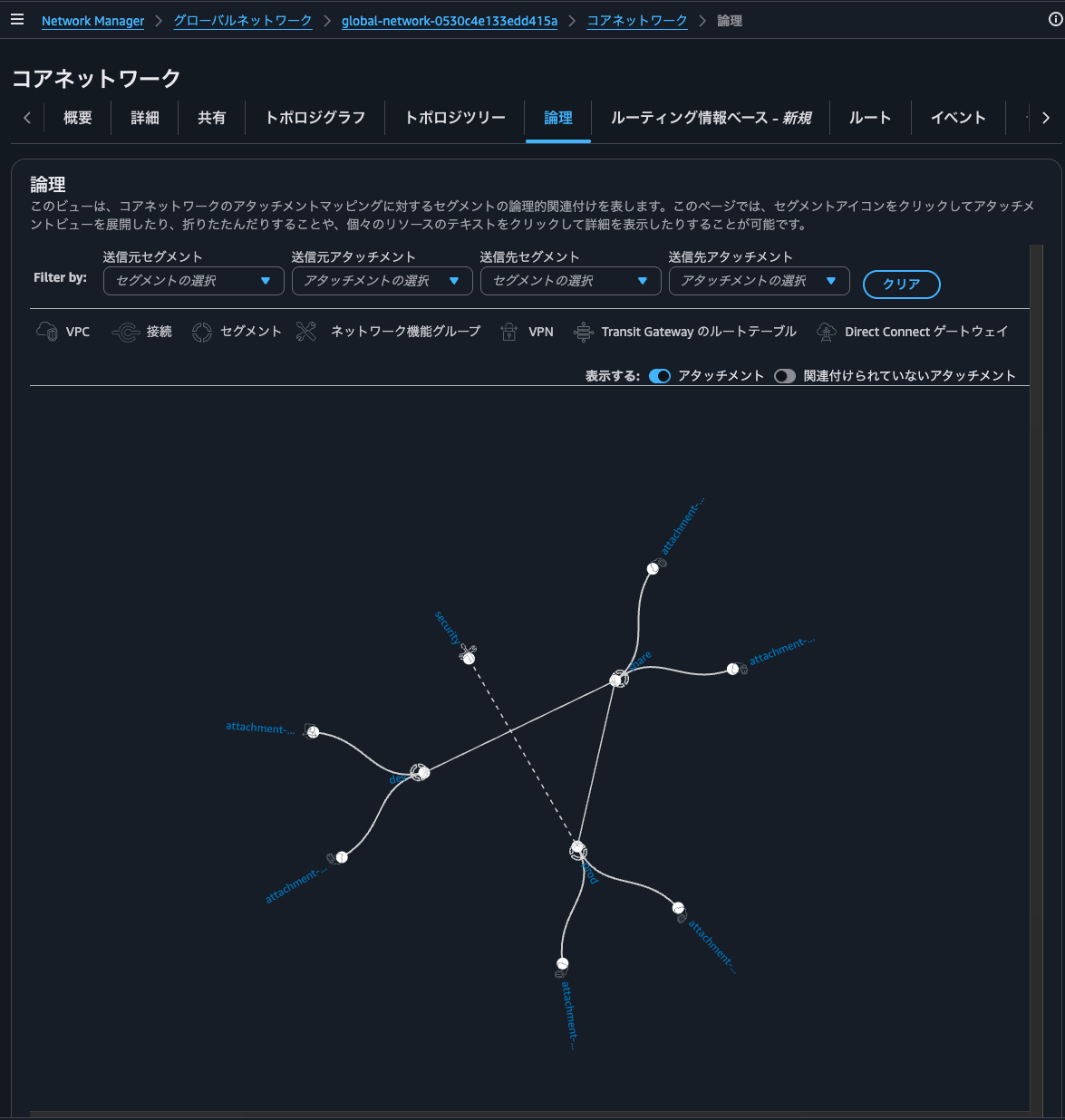
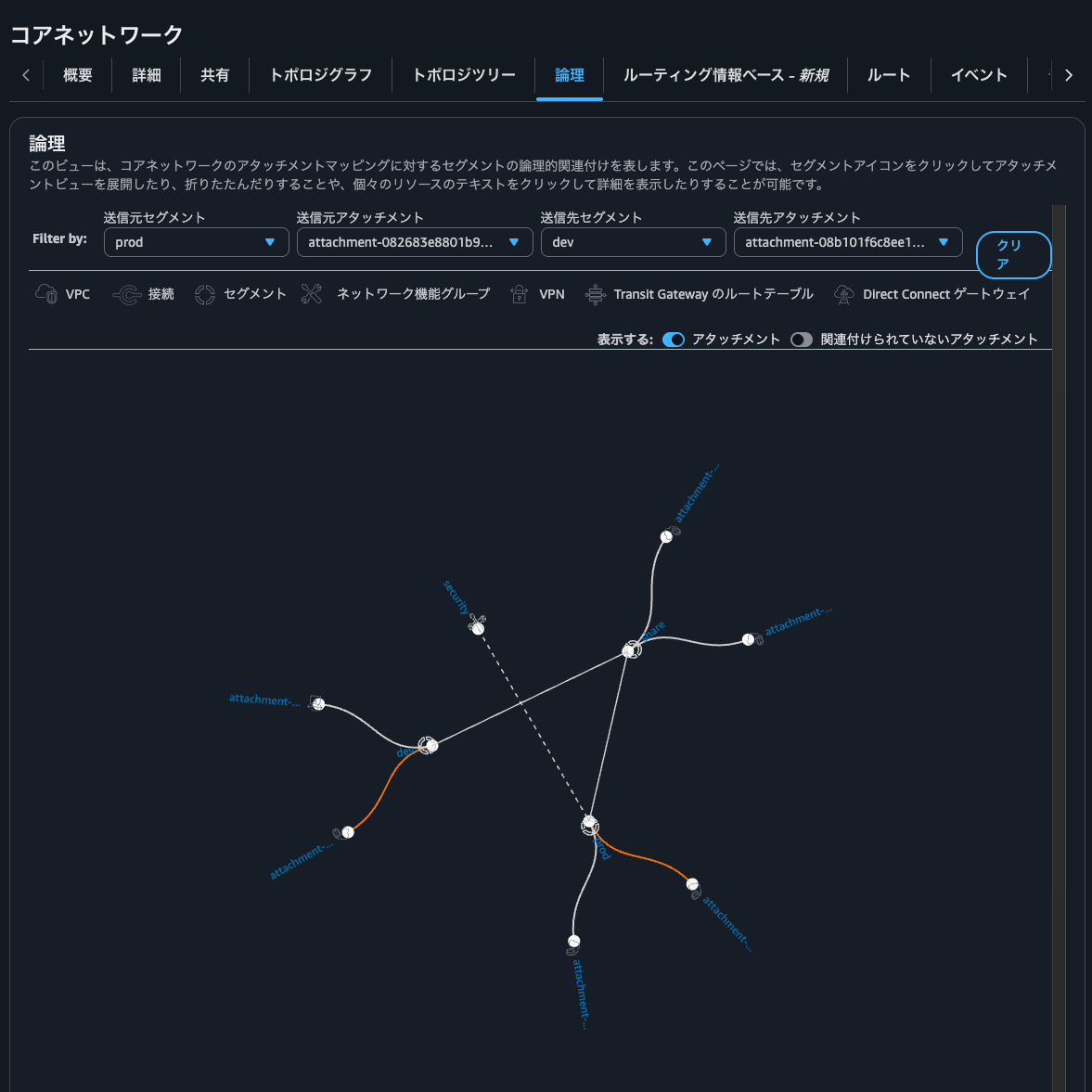
Clicking the Logical tab shows the relationships between networks.
Note: My screenshot shows routes between Prod and Share segments, but they don't actually exist in the current environment.
By adjusting the Filter by parameters, you can check connectivity between networks.
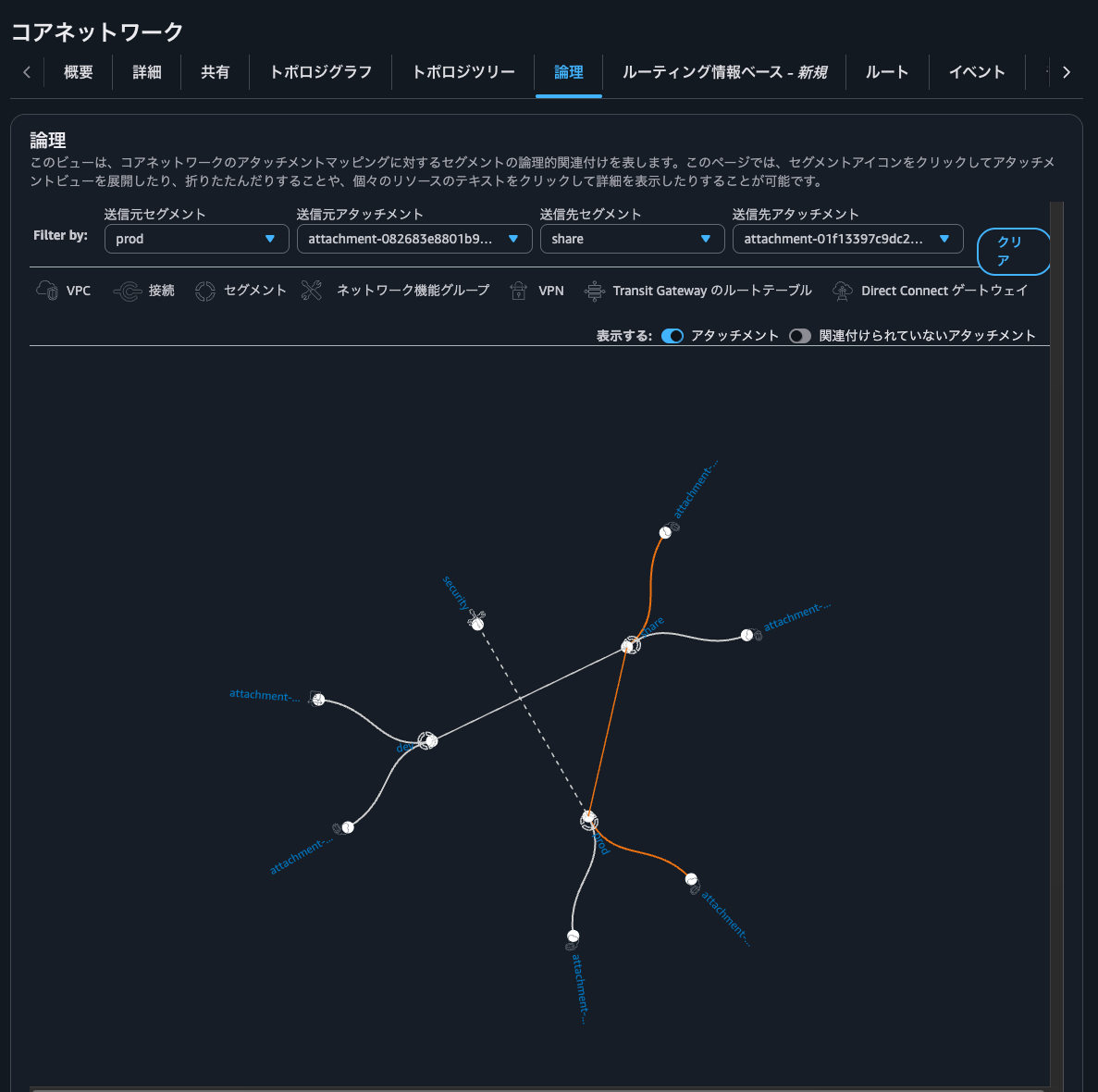
If there's no connectivity, orange lines won't connect as shown below.
Clicking the Routing Information Base tab lets you check route information flowing to specified segments and edge locations.
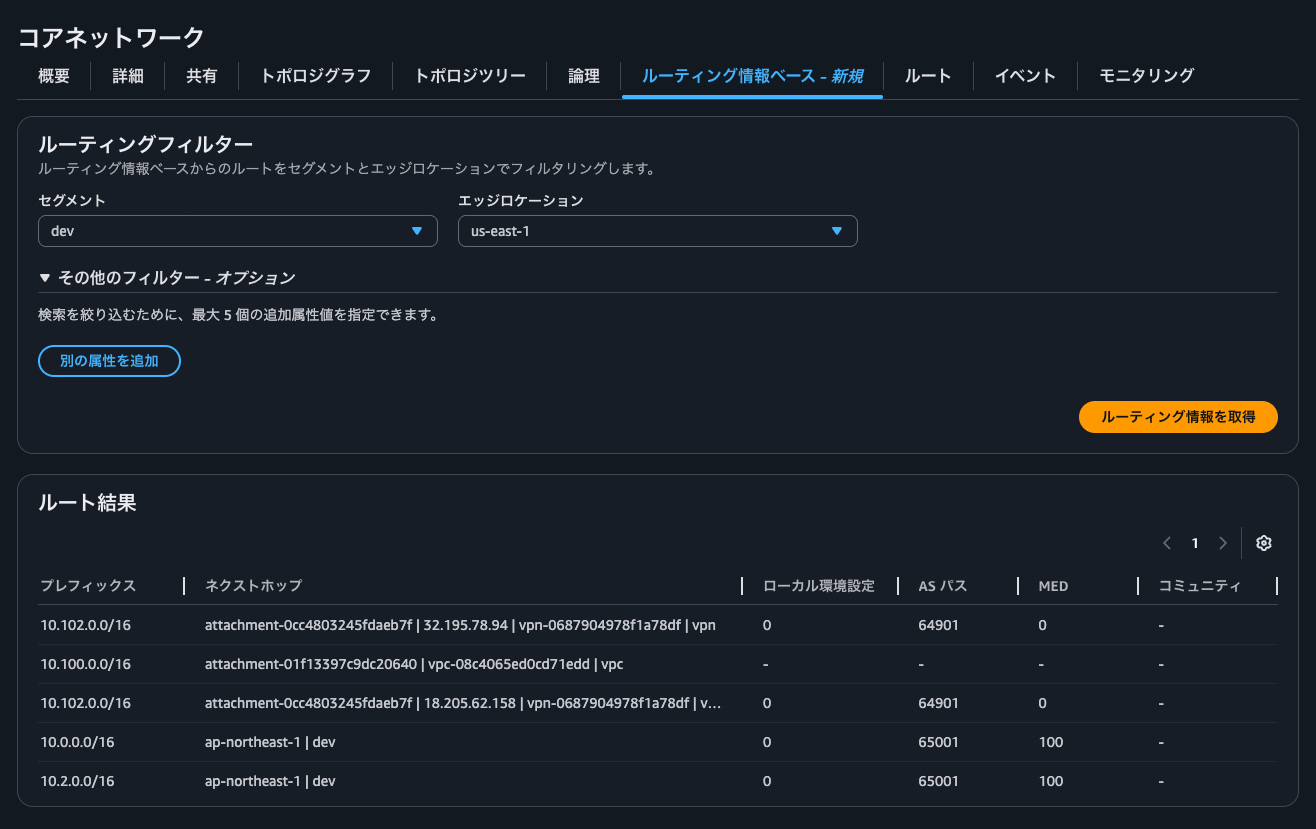
You can also check Local Preference, AS Path, MED, and BGP community tags, which helps organize route information when exchanging routes via BGP with Site-to-Site VPN or Direct Connect.
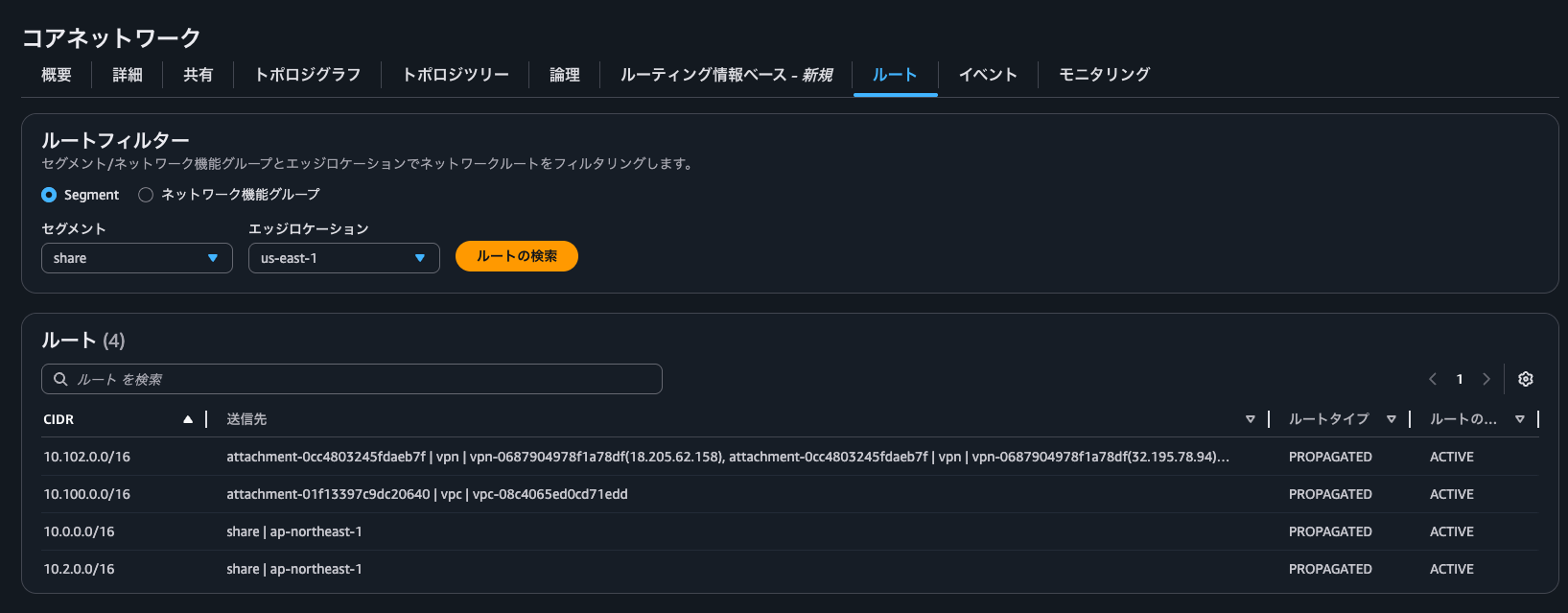
Clicking the Routes tab shows the actual routes as seen in the topology tree.
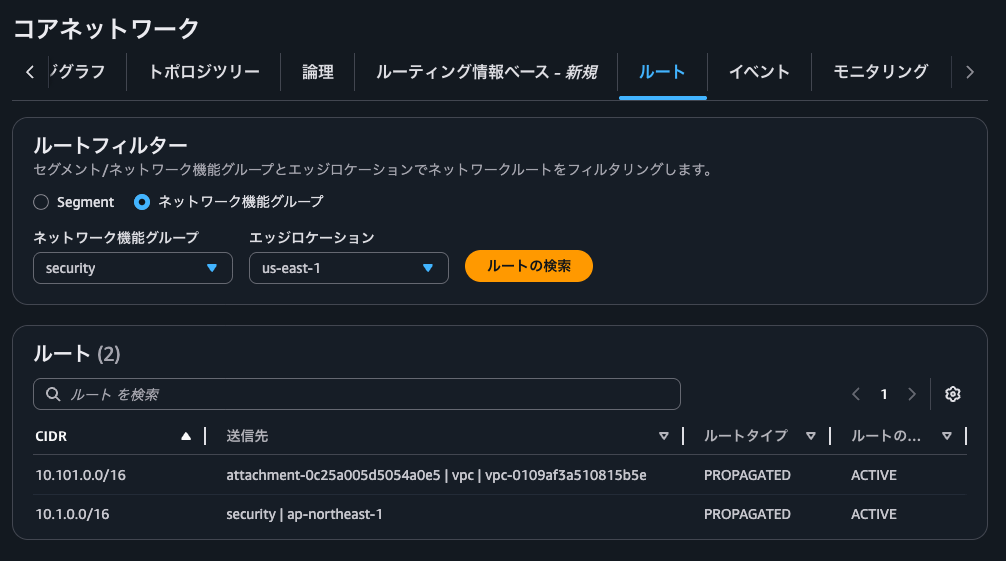
NFG routes can also be checked here.
Clicking the Events tab shows event logs that occurred in the Core Network.
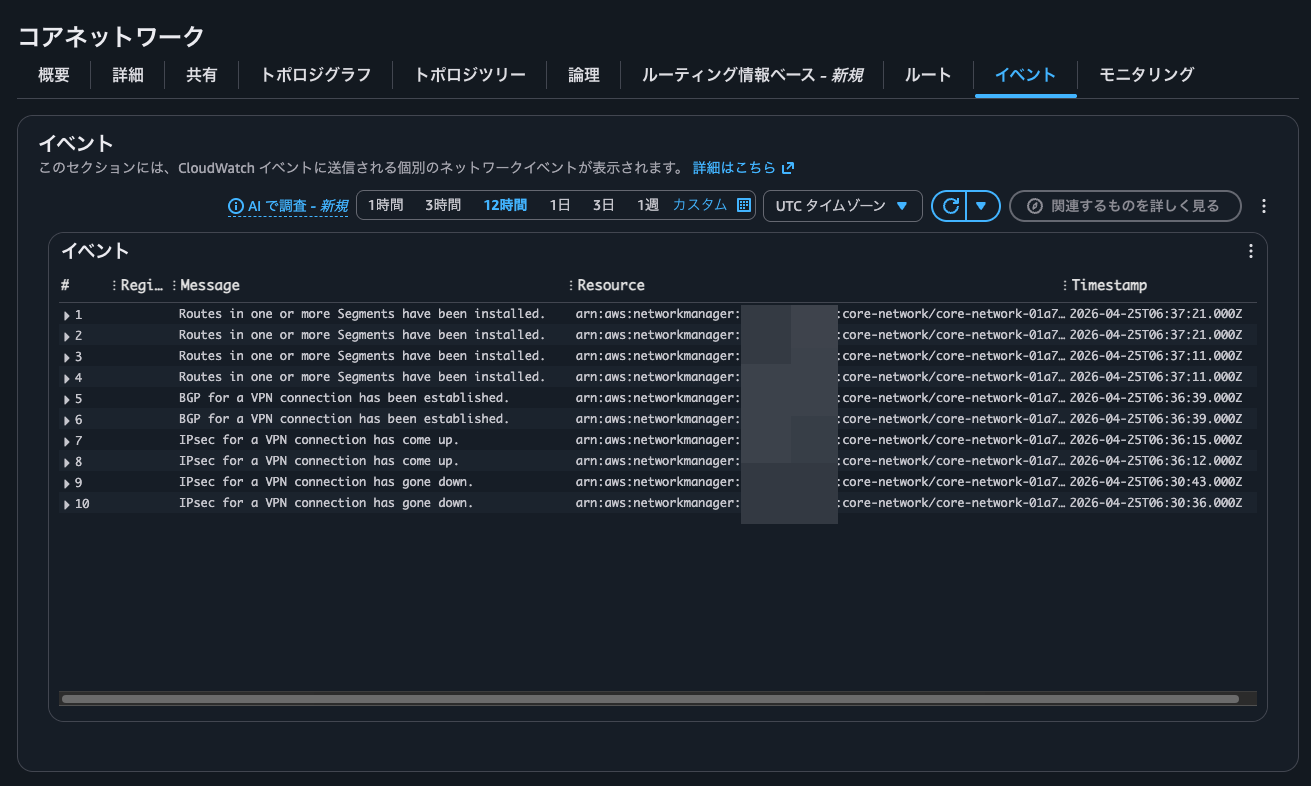
To use this feature, you need to configure event logging. For details, see the following AWS official documentation:
Logs are output to /aws/events/networkmanagerloggrou in the Oregon region.
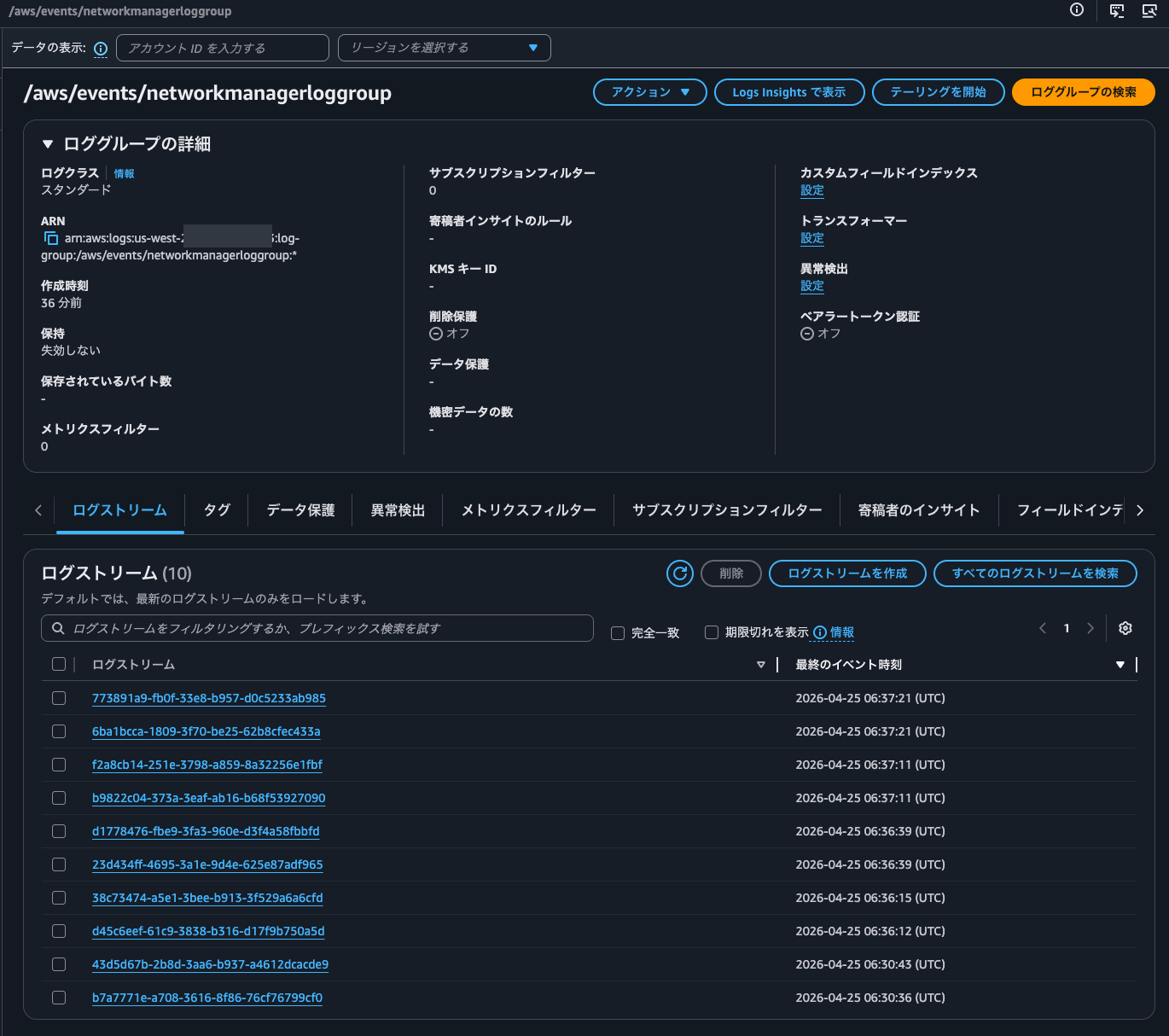
Here are some of the actual logs recorded:
{
    "version": "0",
    "id": "911ea313-9caf-9588-4a11-a31b23625678",
    "detail-type": "Network Manager Routing Update",
    "source": "aws.networkmanager",
    "account": "<AWSアカウントID>",
    "time": "2026-04-25T06:37:11Z",
    "region": "us-west-2",
    "resources": [
        "arn:aws:networkmanager::<AWSアカウントID>:global-network/global-network-0530c4e133edd415a",
        "arn:aws:networkmanager::<AWSアカウントID>:core-network/core-network-01a763d8efb75dd43"
    ],
    "detail": {
        "changeType": "SEGMENT_ROUTE_INSTALLED",
        "changeDescription": "Routes in one or more Segments have been installed.",
        "edgeLocation": "us-east-1",
        "segments": [
            "share"
        ],
        "routes": [
            {
                "destinationCidrBlock": "10.102.0.0/16",
                "attachments": [
                    {
                        "attachmentId": "attachment-0cc4803245fdaeb7f",
                        "resourceId": "vpn-0687904978f1a78df",
                        "attachmentType": "vpn",
                        "vpnOutsideIpAddress": "32.195.78.94"
                    },
                    {
                        "attachmentId": "attachment-0cc4803245fdaeb7f",
                        "resourceId": "vpn-0687904978f1a78df",
                        "attachmentType": "vpn",
                        "vpnOutsideIpAddress": "32.195.78.94"
                    }
                ],
                "routeType": "route_propagated",
                "routeState": "active",
                "bgpAttributes": {
                    "med": "0",
                    "asPath": [
                        "AS_SEQ: [64901]"
                    ]
                }
            }
        ],
        "coreNetworkArn": "arn:aws:networkmanager::<AWSアカウントID>:core-network/core-network-01a763d8efb75dd43"
    }
}
{
    "version": "0",
    "id": "87e21c34-fb54-ec8d-038c-3486184ad41a",
    "detail-type": "Network Manager Status Update",
    "source": "aws.networkmanager",
    "account": "<AWSアカウントID>",
    "time": "2026-04-25T06:36:39Z",
    "region": "us-west-2",
    "resources": [
        "arn:aws:networkmanager::<AWSアカウントID>:global-network/global-network-0530c4e133edd415a",
        "arn:aws:networkmanager::<AWSアカウントID>:core-network/core-network-01a763d8efb75dd43",
        "arn:aws:ec2:us-east-1:712953625629:vpn-connection/vpn-0687904978f1a78df"
    ],
    "detail": {
        "changeType": "VPN_CONNECTION_BGP_UP",
        "changeDescription": "BGP for a VPN connection has been established.",
        "edgeLocation": "us-east-1",
        "attachmentArn": "arn:aws:networkmanager::<AWSアカウントID>:attachment/attachment-0cc4803245fdaeb7f",
        "vpnConnectionArn": "arn:aws:ec2:us-east-1:712953625629:vpn-connection/vpn-0687904978f1a78df",
        "outsideIpAddress": "32.195.78.94",
        "coreNetworkArn": "arn:aws:networkmanager::<AWSアカウントID>:core-network/core-network-01a763d8efb75dd43"
    }
}
{
    "version": "0",
    "id": "ab55c864-d2d2-9089-6d04-0f17b5c84bf1",
    "detail-type": "Network Manager Status Update",
    "source": "aws.networkmanager",
    "account": "<AWSアカウントID>",
    "time": "2026-04-25T06:36:12Z",
    "region": "us-west-2",
    "resources": [
        "arn:aws:networkmanager::<AWSアカウントID>:global-network/global-network-0530c4e133edd415a",
        "arn:aws:networkmanager::<AWSアカウントID>:core-network/core-network-01a763d8efb75dd43",
        "arn:aws:ec2:us-east-1:712953625629:vpn-connection/vpn-0687904978f1a78df"
    ],
    "detail": {
        "changeType": "VPN_CONNECTION_IPSEC_UP",
        "changeDescription": "IPsec for a VPN connection has come up.",
        "edgeLocation": "us-east-1",
        "attachmentArn": "arn:aws:networkmanager::<AWSアカウントID>:attachment/attachment-0cc4803245fdaeb7f",
        "vpnConnectionArn": "arn:aws:ec2:us-east-1:712953625629:vpn-connection/vpn-0687904978f1a78df",
        "outsideIpAddress": "32.195.78.94",
        "coreNetworkArn": "arn:aws:networkmanager::<AWSアカウントID>:core-network/core-network-01a763d8efb75dd43"
    }
}
{
    "version": "0",
    "id": "a5cf3fe0-0e14-1ed1-e8f2-5f8d301ae277",
    "detail-type": "Network Manager Status Update",
    "source": "aws.networkmanager",
    "account": "<AWSアカウントID>",
    "time": "2026-04-25T06:30:43Z",
    "region": "us-west-2",
    "resources": [
        "arn:aws:networkmanager::<AWSアカウントID>:global-network/global-network-0530c4e133edd415a",
        "arn:aws:networkmanager::<AWSアカウントID>:core-network/core-network-01a763d8efb75dd43",
        "arn:aws:ec2:us-east-1:712953625629:vpn-connection/vpn-0687904978f1a78df"
    ],
    "detail": {
        "changeType": "VPN_CONNECTION_IPSEC_DOWN",
        "changeDescription": "IPsec for a VPN connection has gone down.",
        "edgeLocation": "us-east-1",
        "attachmentArn": "arn:aws:networkmanager::<AWSアカウントID>:attachment/attachment-0cc4803245fdaeb7f",
        "vpnConnectionArn": "arn:aws:ec2:us-east-1:712953625629:vpn-connection/vpn-0687904978f1a78df",
        "outsideIpAddress": "18.205.62.158",
        "coreNetworkArn": "arn:aws:networkmanager::<AWSアカウントID>:core-network/core-network-01a763d8efb75dd43"
    }
}
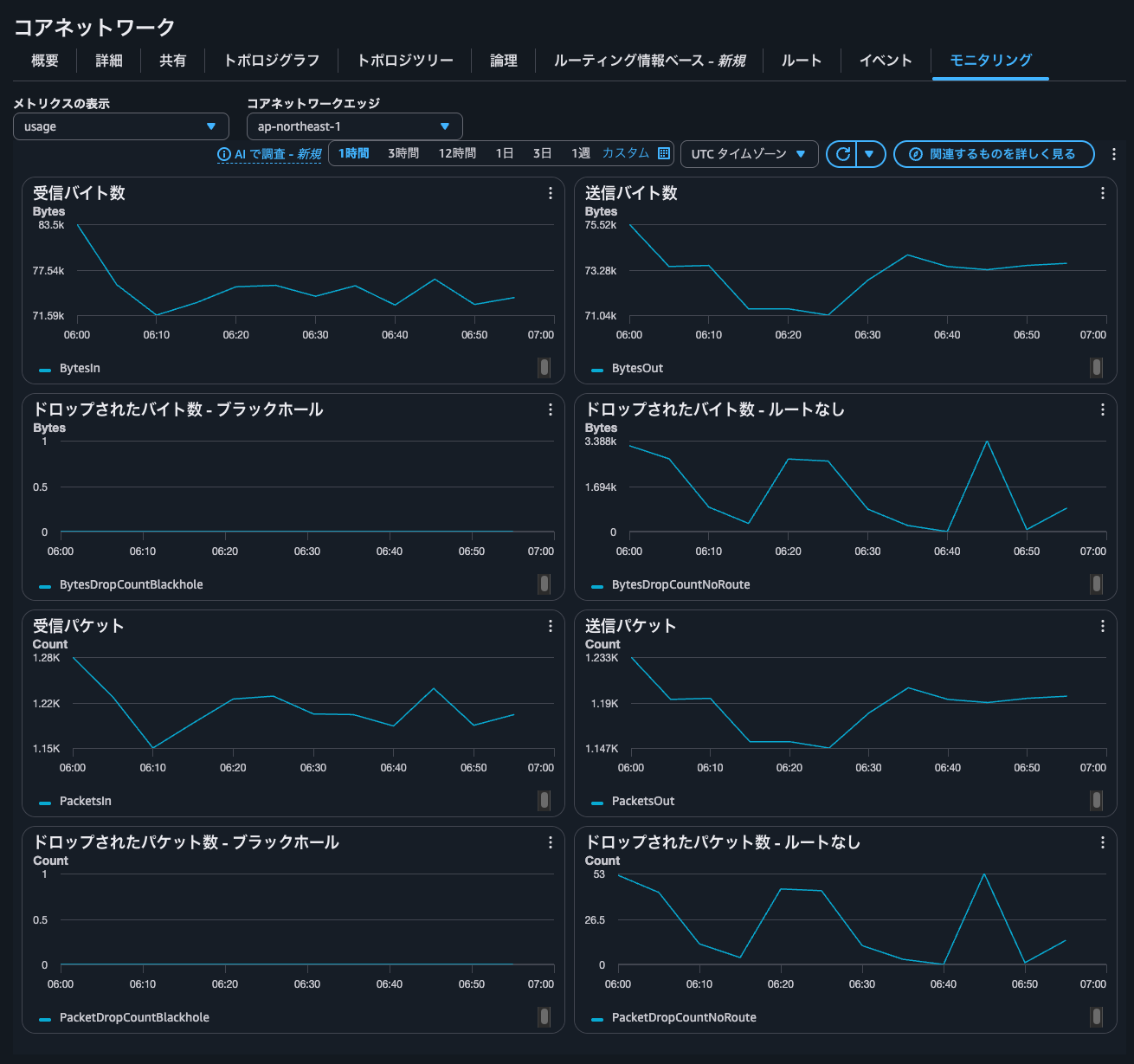
Clicking the Monitoring tab shows the overall data transfer volume and packet count for the entire Core Network.
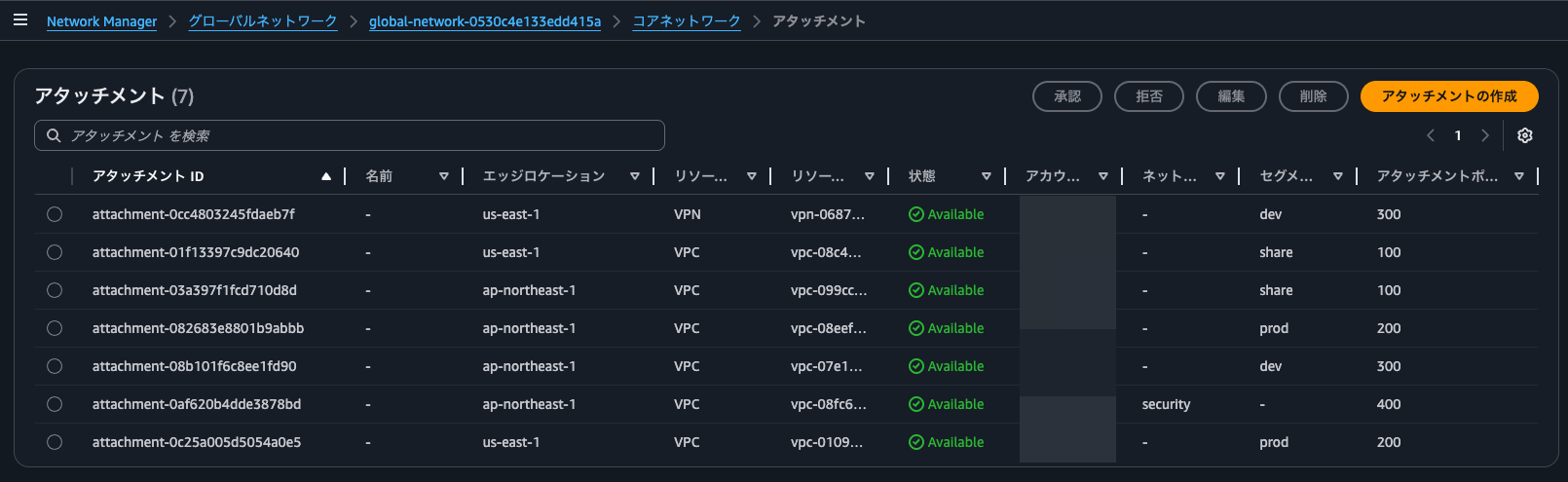
You can also view a list of Core Network attachments.
Connectivity Testing
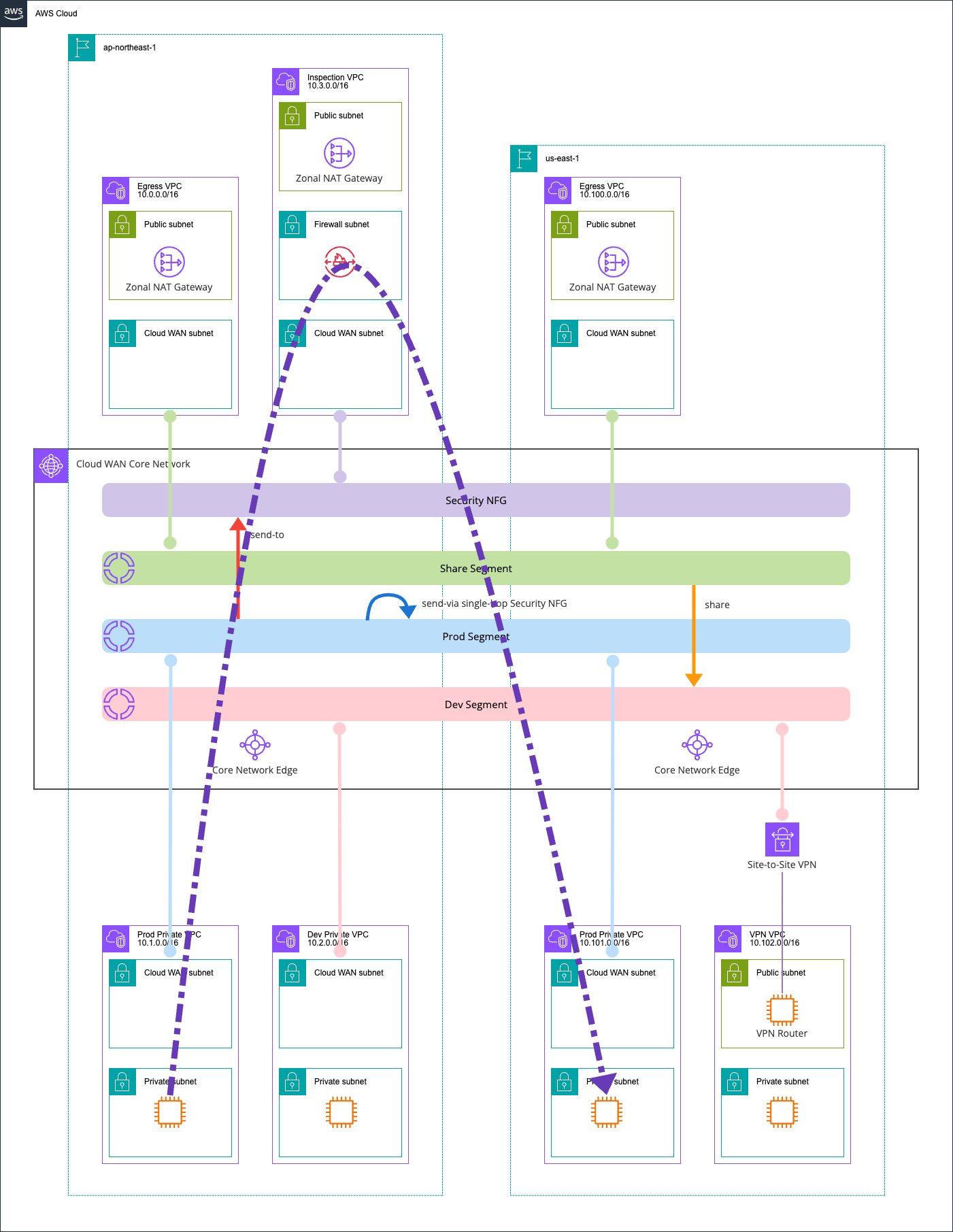
ap-northeast-1 Prod Private VPC EC2 instances and us-east-1 Prod Private VPC EC2 instances
Next, I will perform actual connectivity tests.
First, let's check communication between ap-northeast-1 Prod Private VPC EC2 instances and us-east-1 Prod Private VPC EC2 instances.
I'll run ping:
$ hostname -f
ip-10-1-0-180.ap-northeast-1.compute.internal

$ ping -c 4 10.101.0.38
PING 10.101.0.38 (10.101.0.38) 56(84) bytes of data.
64 bytes from 10.101.0.38: icmp_seq=1 ttl=122 time=152 ms
64 bytes from 10.101.0.38: icmp_seq=2 ttl=122 time=150 ms
64 bytes from 10.101.0.38: icmp_seq=3 ttl=122 time=150 ms
64 bytes from 10.101.0.38: icmp_seq=4 ttl=122 time=150 ms

--- 10.101.0.38 ping statistics ---
4 packets transmitted, 4 received, 0% packet loss, time 3005ms
rtt min/avg/max/mdev = 149.811/150.464/152.267/1.041 ms
Communication works!
In this case, we've set isolate-attachments : true to prevent direct communication between networks within the same segment, and configured a send-via action to route traffic through the Security NFG.
When checking the Network Firewall alert logs, the following was recorded:
{
    "firewall_name": "ClounVpc825C25AF-Nfw",
    "availability_zone": "ap-northeast-1a",
    "event_timestamp": "1777122477",
    "event": {
        "icmp_type": 8,
        "aws_category": "",
        "src_ip": "10.1.0.180",
        "src_port": 0,
        "event_type": "alert",
        "alert": {
            "severity": 3,
            "signature_id": 2000002,
            "rev": 1,
            "signature": "ICMP ping detected",
            "action": "allowed",
            "category": ""
        },
        "flow_id": 1543805544049109,
        "dest_ip": "10.101.0.38",
        "proto": "ICMP",
        "verdict": {
            "action": "pass"
        },
        "icmp_code": 0,
        "dest_port": 0,
        "pkt_src": "geneve encapsulation",
        "timestamp": "2026-04-25T13:07:57.490517+0000",
        "direction": "to_server"
    }
}
Here's a diagram of the communication path:
ap-northeast-1 Prod Private VPC EC2 instances and ap-northeast-1 Dev Private VPC EC2 instances
Next, let's check communication between ap-northeast-1 Prod Private VPC EC2 instances and ap-northeast-1 Dev Private VPC EC2 instances.
This is communication between different segments.
$ hostname -f
ip-10-1-0-180.ap-northeast-1.compute.internal

$ ping -c 4 10.2.0.21
PING 10.2.0.21 (10.2.0.21) 56(84) bytes of data.

--- 10.2.0.21 ping statistics ---
4 packets transmitted, 0 received, 100% packet loss, time 3152ms
This failed, as expected.
This is because there's no route sharing between the Prod segment and Dev segment.
ap-northeast-1 Dev Private VPC EC2 instances and us-east-1 VPN VPC EC2 instances
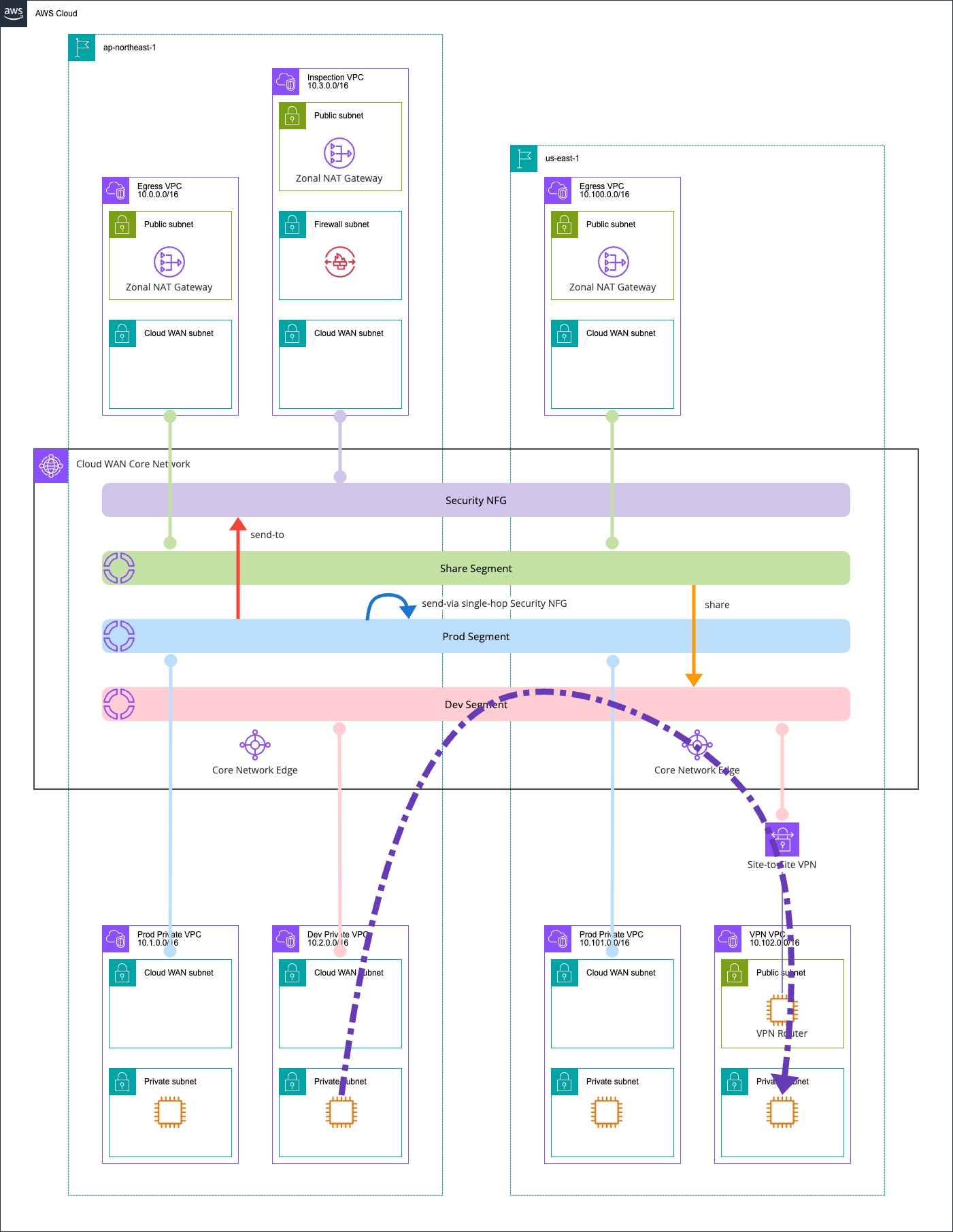
Now let's check communication between ap-northeast-1 Dev Private VPC EC2 instances and us-east-1 VPN VPC EC2 instances.
This is communication within the same segment.
$ hostname -f
ip-10-2-0-21.ap-northeast-1.compute.internal

$ ping -c 4 10.102.1.18
PING 10.102.1.18 (10.102.1.18) 56(84) bytes of data.
64 bytes from 10.102.1.18: icmp_seq=1 ttl=124 time=151 ms
64 bytes from 10.102.1.18: icmp_seq=2 ttl=124 time=148 ms
64 bytes from 10.102.1.18: icmp_seq=3 ttl=124 time=148 ms
64 bytes from 10.102.1.18: icmp_seq=4 ttl=124 time=149 ms

--- 10.102.1.18 ping statistics ---
4 packets transmitted, 4 received, 0% packet loss, time 3004ms
rtt min/avg/max/mdev = 148.291/149.107/151.029/1.115 ms
Communication works perfectly.
In this case, since isolate-attachments : false and no segment-action like send-via is configured, traffic doesn't go through the Network Firewall.
Here's a diagram of the communication path:
ap-northeast-1 Prod Private VPC EC2 instances and Internet
Next, let's check communication between ap-northeast-1 Prod Private VPC EC2 instances and the internet.
We'll access https://checkip.amazonaws.com to see which exit point is being used.
$ hostname -f
ip-10-1-0-180.ap-northeast-1.compute.internal

$ curl -m 5 -v https://checkip.amazonaws.com
* Host checkip.amazonaws.com:443 was resolved.
* IPv6: (none)
* IPv4: 3.0.185.196, 18.138.142.246, 52.74.183.204, 18.139.26.116, 52.74.9.231, 13.228.196.61, 52.76.181.204, 54.255.102.50
*   Trying 3.0.185.196:443...
* ALPN: curl offers h2,http/1.1
* TLSv1.3 (OUT), TLS handshake, Client hello (1):
* SSL Trust Anchors:
*   CAfile: /etc/pki/tls/certs/ca-bundle.crt
* TLSv1.3 (IN), TLS handshake, Server hello (2):
* TLSv1.3 (IN), TLS change cipher, Change cipher spec (1):
* TLSv1.3 (IN), TLS handshake, Encrypted Extensions (8):
* TLSv1.3 (IN), TLS handshake, Certificate (11):
* TLSv1.3 (IN), TLS handshake, CERT verify (15):
* TLSv1.3 (IN), TLS handshake, Finished (20):
* TLSv1.3 (OUT), TLS change cipher, Change cipher spec (1):
* TLSv1.3 (OUT), TLS handshake, Finished (20):
* SSL connection using TLSv1.3 / TLS_AES_128_GCM_SHA256 / x25519 / RSASSA-PSS
* ALPN: server accepted h2
* Server certificate:
*   subject: CN=checkip.amazonaws.com
*   start date: Nov  3 00:00:00 2025 GMT
*   expire date: Dec  2 23:59:59 2026 GMT
*   issuer: C=US; O=Amazon; CN=Amazon RSA 2048 M04
*   Certificate level 0: Public key type RSA (2048/112 Bits/secBits), signed using sha256WithRSAEncryption
*   Certificate level 1: Public key type RSA (2048/112 Bits/secBits), signed using sha256WithRSAEncryption
*   Certificate level 2: Public key type RSA (2048/112 Bits/secBits), signed using sha256WithRSAEncryption
*   subjectAltName: "checkip.amazonaws.com" matches cert's "checkip.amazonaws.com"
* SSL certificate verified via OpenSSL.
* Established connection to checkip.amazonaws.com (3.0.185.196 port 443) from 10.1.0.180 port 40244
* using HTTP/2
* [HTTP/2] [1] OPENED stream for https://checkip.amazonaws.com/
* [HTTP/2] [1] [:method: GET]
* [HTTP/2] [1] [:scheme: https]
* [HTTP/2] [1] [:authority: checkip.amazonaws.com]
* [HTTP/2] [1] [:path: /]
* [HTTP/2] [1] [user-agent: curl/8.17.0]
* [HTTP/2] [1] [accept: */*]
> GET / HTTP/2
> Host: checkip.amazonaws.com
> User-Agent: curl/8.17.0
> Accept: */*
>
* Request completely sent off
* TLSv1.3 (IN), TLS handshake, Newsession Ticket (4):
< HTTP/2 200
< date: Sat, 25 Apr 2026 13:32:14 GMT
< content-type: text/plain;charset=UTF-8
< content-length: 13
< server: nginx
< vary: Origin
< vary: Access-Control-Request-Method
< vary: Access-Control-Request-Headers
<
57.181.60.10
* Connection #0 to host checkip.amazonaws.com:443 left intact
Communication works successfully.
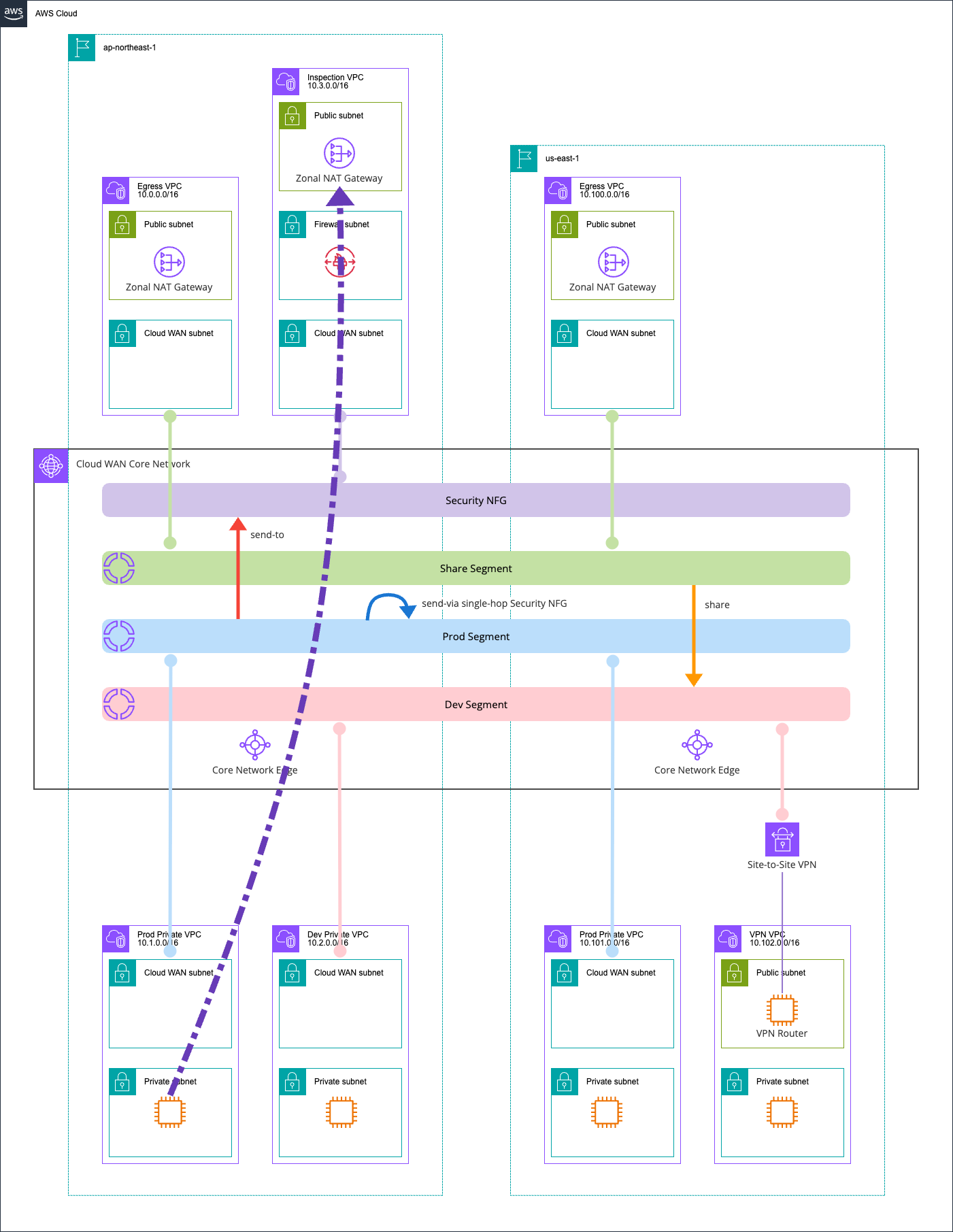
The IP 57.181.60.10 is the NAT Gateway in the ap-northeast-1 Inspection VPC.

This happens because in the Prod segment, we've configured a send-to action to route traffic to the Security NFG.
This path also goes through the Network Firewall. Checking the Network Firewall logs confirms that this communication was recorded:
{
    "firewall_name": "ClounVpc825C25AF-Nfw",
    "availability_zone": "ap-northeast-1a",
    "event_timestamp": "1777123934",
    "event": {
        "aws_category": "",
        "tx_id": 0,
        "app_proto": "tls",
        "src_ip": "10.1.0.180",
        "src_port": 40244,
        "event_type": "alert",
        "alert": {
            "severity": 3,
            "signature_id": 2000001,
            "rev": 1,
            "signature": "Access to checkip.amazonaws.com detected",
            "action": "allowed",
            "category": ""
        },
        "flow_id": 1802298880418392,
        "dest_ip": "3.0.185.196",
        "proto": "TCP",
        "verdict": {
            "action": "pass"
        },
        "tls": {
            "sni": "checkip.amazonaws.com",
            "version": "UNDETERMINED"
        },
        "dest_port": 443,
        "pkt_src": "geneve encapsulation",
        "timestamp": "2026-04-25T13:32:14.425631+0000",
        "direction": "to_server"
    }
}
Here's a diagram of the communication path:
us-east-1 Prod Private VPC EC2 instances and Internet
Next, let's check communication between us-east-1 Prod Private VPC EC2 instances and the internet.
Unlike the previous pattern, the source VPC region and the Inspection VPC region are different.
Here's the communication result:
$ hostname -f
ip-10-101-0-38.ec2.internal

$ curl -m 5 -v https://checkip.amazonaws.com
* Host checkip.amazonaws.com:443 was resolved.
* IPv6: (none)
* IPv4: 44.194.153.254, 107.23.164.39, 98.95.253.57, 100.49.40.12, 44.214.94.248, 52.0.234.61, 54.211.239.28, 34.232.152.199
*   Trying 44.194.153.254:443...
*   Trying 107.23.164.39:443...
* ALPN: curl offers h2,http/1.1
* TLSv1.3 (OUT), TLS handshake, Client hello (1):
* SSL Trust Anchors:
*   CAfile: /etc/pki/tls/certs/ca-bundle.crt
* TLSv1.3 (IN), TLS handshake, Server hello (2):
* TLSv1.3 (IN), TLS change cipher, Change cipher spec (1):
* TLSv1.3 (IN), TLS handshake, Encrypted Extensions (8):
* TLSv1.3 (IN), TLS handshake, Certificate (11):
* TLSv1.3 (IN), TLS handshake, CERT verify (15):
* TLSv1.3 (IN), TLS handshake, Finished (20):
* TLSv1.3 (OUT), TLS change cipher, Change cipher spec (1):
* TLSv1.3 (OUT), TLS handshake, Finished (20):
* SSL connection using TLSv1.3 / TLS_AES_128_GCM_SHA256 / x25519 / RSASSA-PSS
* ALPN: server accepted h2
* Server certificate:
*   subject: CN=checkip.amazonaws.com
*   start date: Nov  3 00:00:00 2025 GMT
*   expire date: Dec  2 23:59:59 2026 GMT
*   issuer: C=US; O=Amazon; CN=Amazon RSA 2048 M04
*   Certificate level 0: Public key type RSA (2048/112 Bits/secBits), signed using sha256WithRSAEncryption
*   Certificate level 1: Public key type RSA (2048/112 Bits/secBits), signed using sha256WithRSAEncryption
*   Certificate level 2: Public key type RSA (2048/112 Bits/secBits), signed using sha256WithRSAEncryption
*   subjectAltName: "checkip.amazonaws.com" matches cert's "checkip.amazonaws.com"
* SSL certificate verified via OpenSSL.
* Established connection to checkip.amazonaws.com (44.194.153.254 port 443) from 10.101.0.38 port 43182
* using HTTP/2
* [HTTP/2] [1] OPENED stream for https://checkip.amazonaws.com/
* [HTTP/2] [1] [:method: GET]
* [HTTP/2] [1] [:scheme: https]
* [HTTP/2] [1] [:authority: checkip.amazonaws.com]
* [HTTP/2] [1] [:path: /]
* [HTTP/2] [1] [user-agent: curl/8.17.0]
* [HTTP/2] [1] [accept: */*]
> GET / HTTP/2
> Host: checkip.amazonaws.com
> User-Agent: curl/8.17.0
> Accept: */*
>
* Request completely sent off
* TLSv1.3 (IN), TLS handshake, Newsession Ticket (4):
< HTTP/2 200
< date: Sat, 25 Apr 2026 13:35:54 GMT
< content-type: text/plain;charset=UTF-8
< content-length: 13
< server: nginx
< vary: Origin
< vary: Access-Control-Request-Method
< vary: Access-Control-Request-Headers
<
57.181.60.10
* Connection #0 to host checkip.amazonaws.com:443 left intact
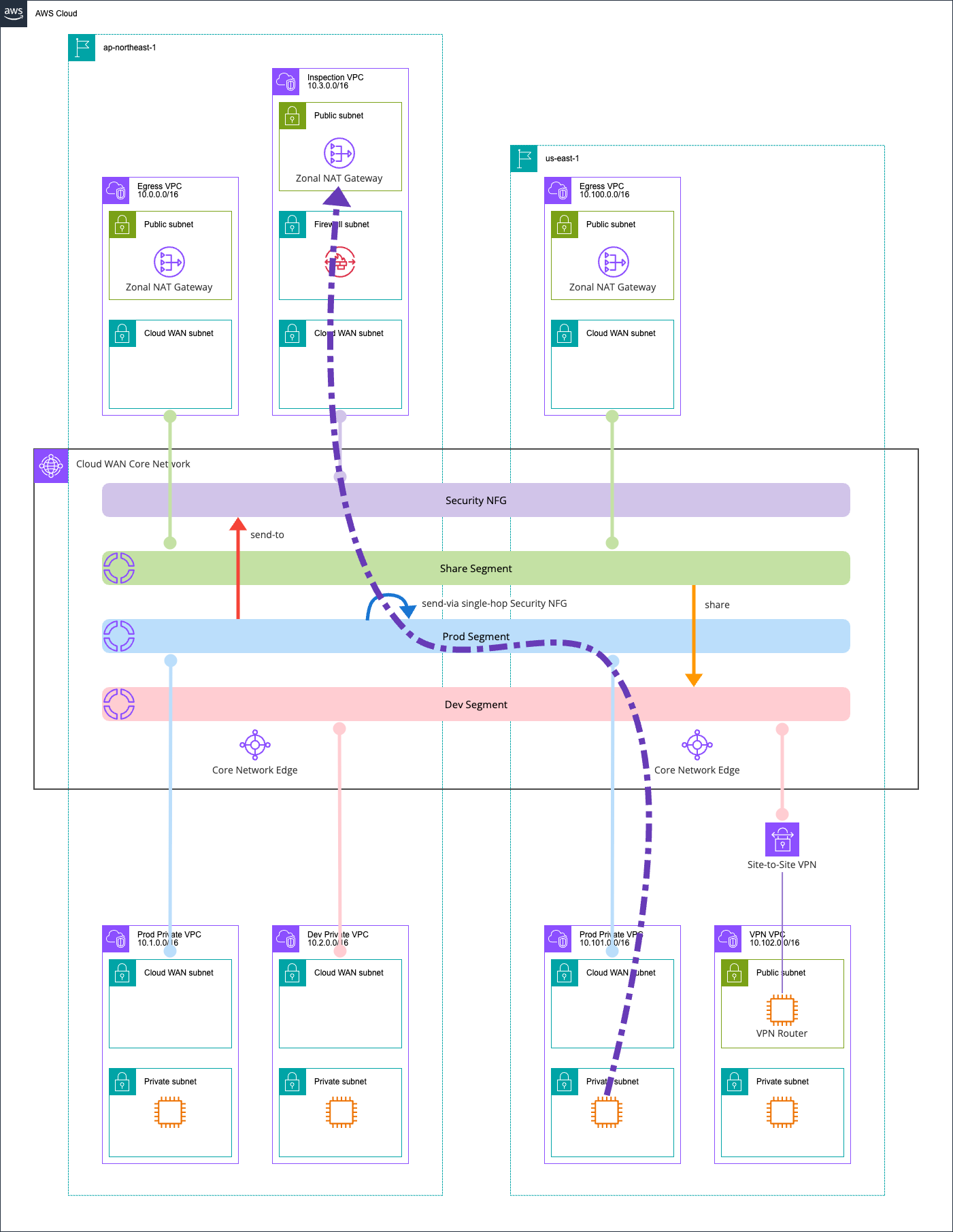
The same IP 57.181.60.10 was returned.
This confirms that traffic is being routed to the Inspection VPC even across different regions.
The Network Firewall logs also recorded this:
{
    "firewall_name": "ClounVpc825C25AF-Nfw",
    "availability_zone": "ap-northeast-1a",
    "event_timestamp": "1777124154",
    "event": {
        "aws_category": "",
        "tx_id": 0,
        "app_proto": "tls",
        "src_ip": "10.101.0.38",
        "src_port": 43182,
        "event_type": "alert",
        "alert": {
            "severity": 3,
            "signature_id": 2000001,
            "rev": 1,
            "signature": "Access to checkip.amazonaws.com detected",
            "action": "allowed",
            "category": ""
        },
        "flow_id": 622001668079509,
        "dest_ip": "44.194.153.254",
        "proto": "TCP",
        "verdict": {
            "action": "pass"
        },
        "tls": {
            "sni": "checkip.amazonaws.com",
            "version": "UNDETERMINED"
        },
        "dest_port": 443,
        "pkt_src": "geneve encapsulation",
        "timestamp": "2026-04-25T13:35:54.573607+0000",
        "direction": "to_server"
    }
}
Here's a diagram of the communication path:
ap-northeast-1 Dev Private VPC EC2 instances and Internet
Next, let's check communication between ap-northeast-1 Dev Private VPC EC2 instances and the internet.
$ hostname -f
ip-10-2-0-21.ap-northeast-1.compute.internal

$ curl -m 5 -v https://checkip.amazonaws.com
* Host checkip.amazonaws.com:443 was resolved.
* IPv6: (none)
* IPv4: 52.74.9.231, 18.138.142.246, 52.74.183.204, 54.255.102.50, 47.131.141.155, 52.76.181.204, 3.0.185.196, 18.139.26.116
*   Trying 52.74.9.231:443...
*   Trying 18.138.142.246:443...
*   Trying 52.74.183.204:443...
*   Trying 54.255.102.50:443...
*   Trying 47.131.141.155:443...
*   Trying 52.76.181.204:443...
*   Trying 3.0.185.196:443...
*   Trying 18.139.26.116:443...
* Connection timed out after 5001 milliseconds
* closing connection #0
curl: (28) Connection timed out after 5001 milliseconds
Communication failed.
This is because there's no route from the Dev segment that sets the Egress VPC as the default gateway.
While there's route sharing with the Share segment that the Egress VPC belongs to, this only shares routes that propagate from network resources.
As a solution, we need to set up a static default route.
All routing in Cloud WAN is controlled by a single Core Network Policy. Let's update the Core Network Policy.
Click on the policy that's currently "LIVE".
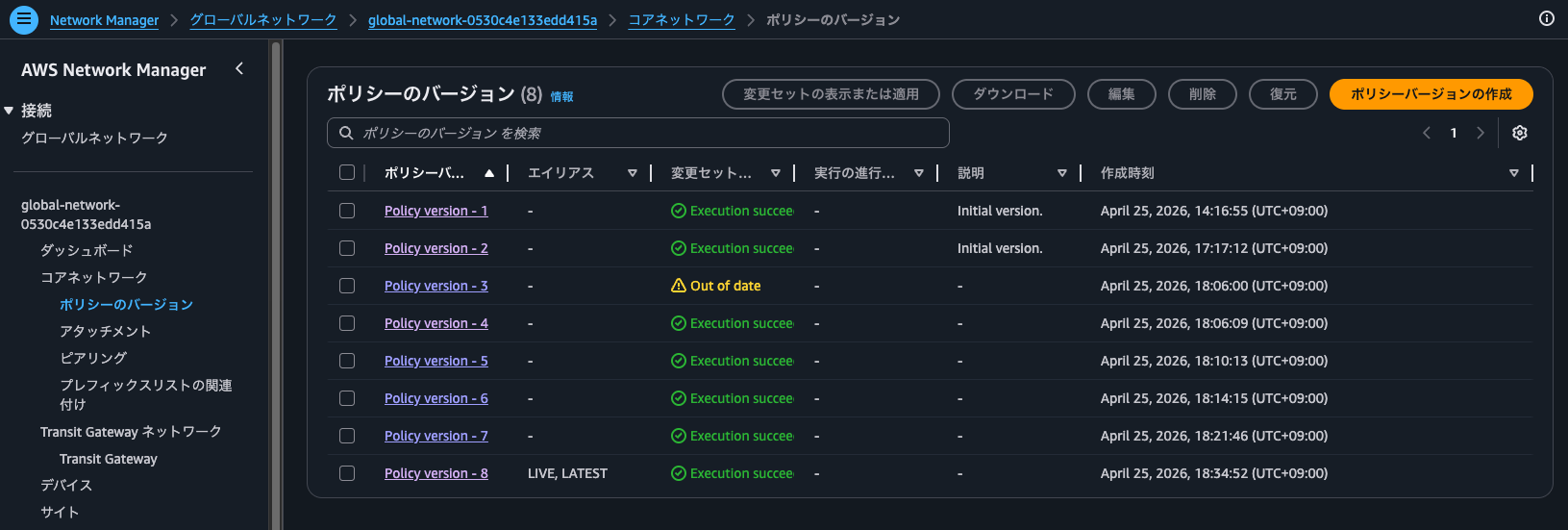
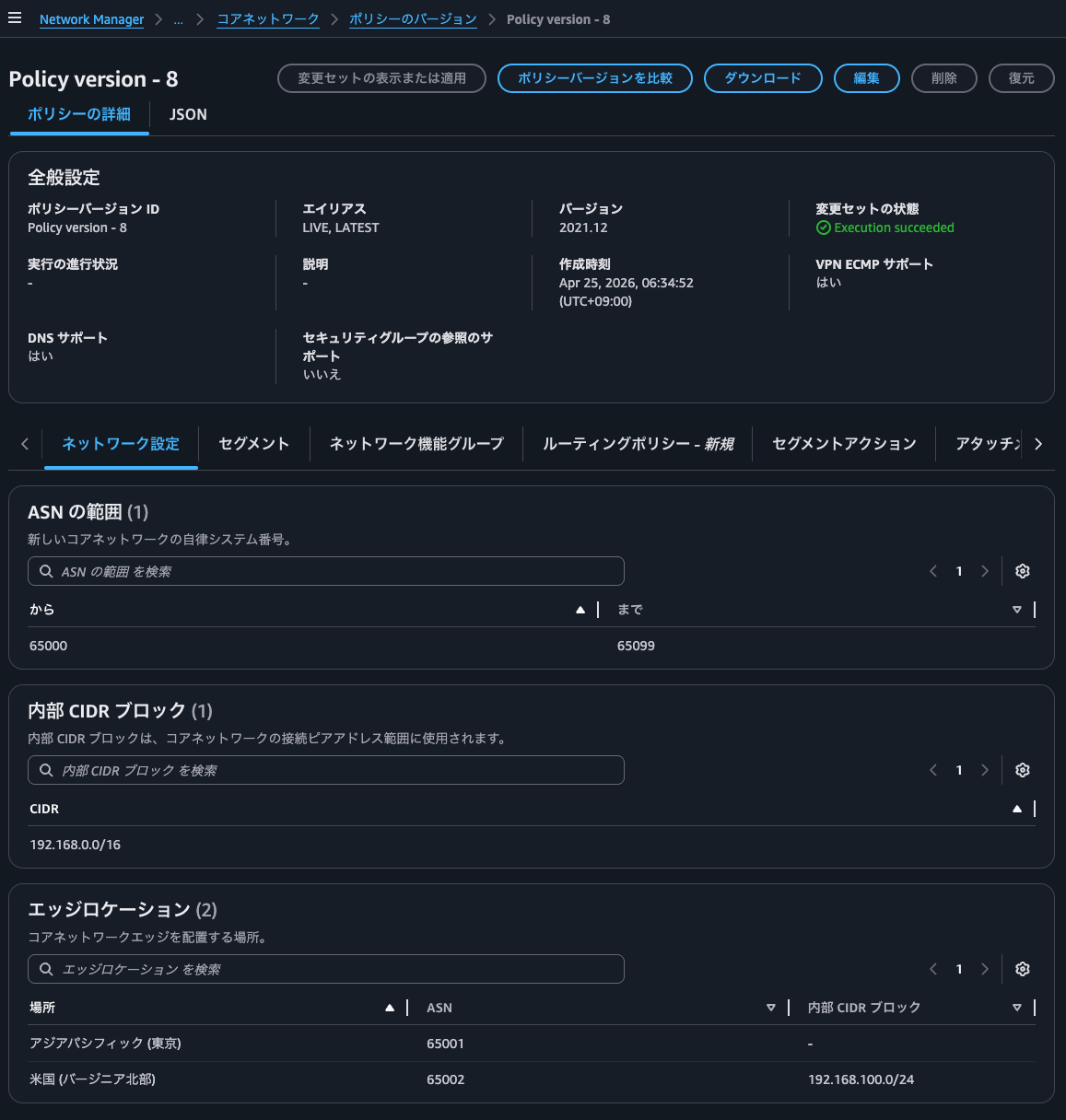
You can check various information in the GUI:
- "Network settings" tab
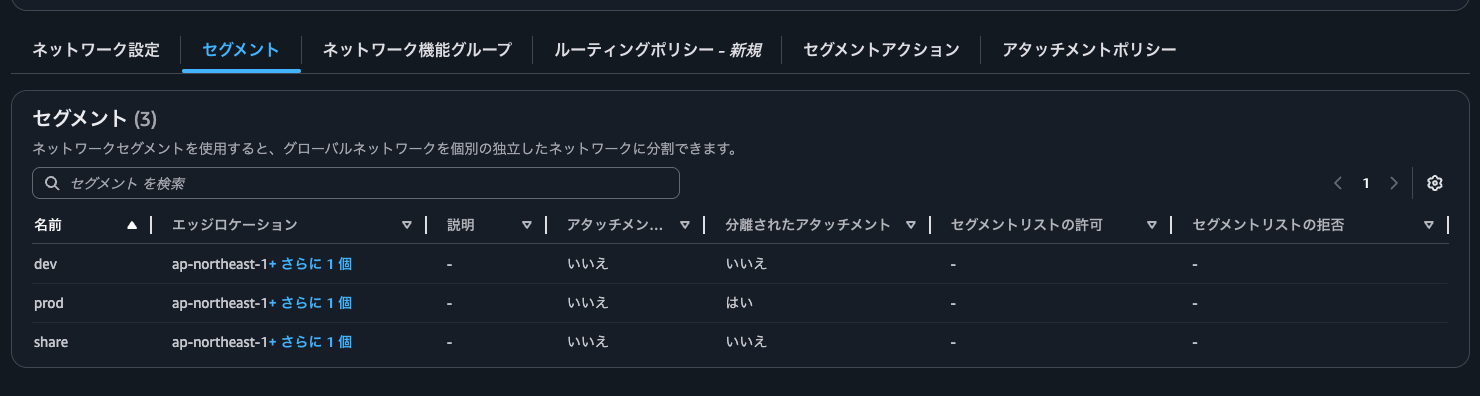
- "Segments" tab
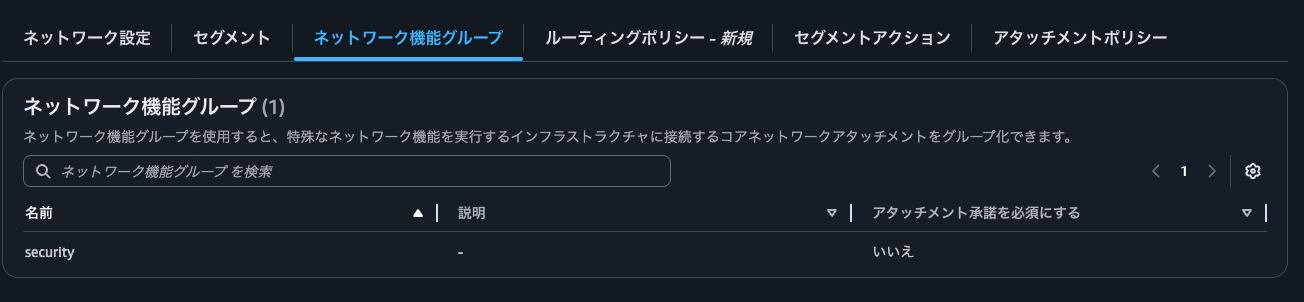
- "Network function groups" tab
- "Routing policies" tab

- "Segment actions" tab
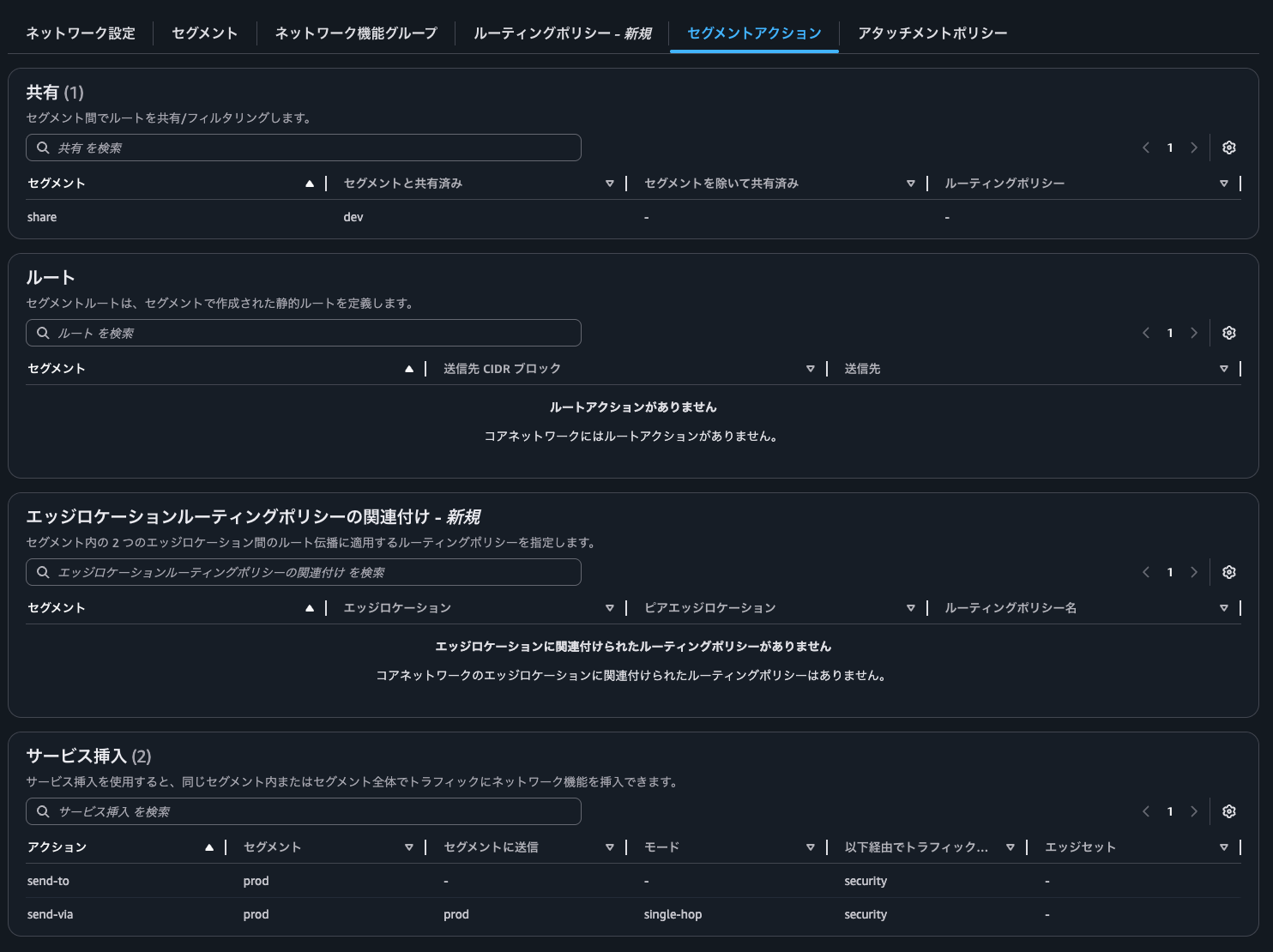
- "Attachment policies" tab
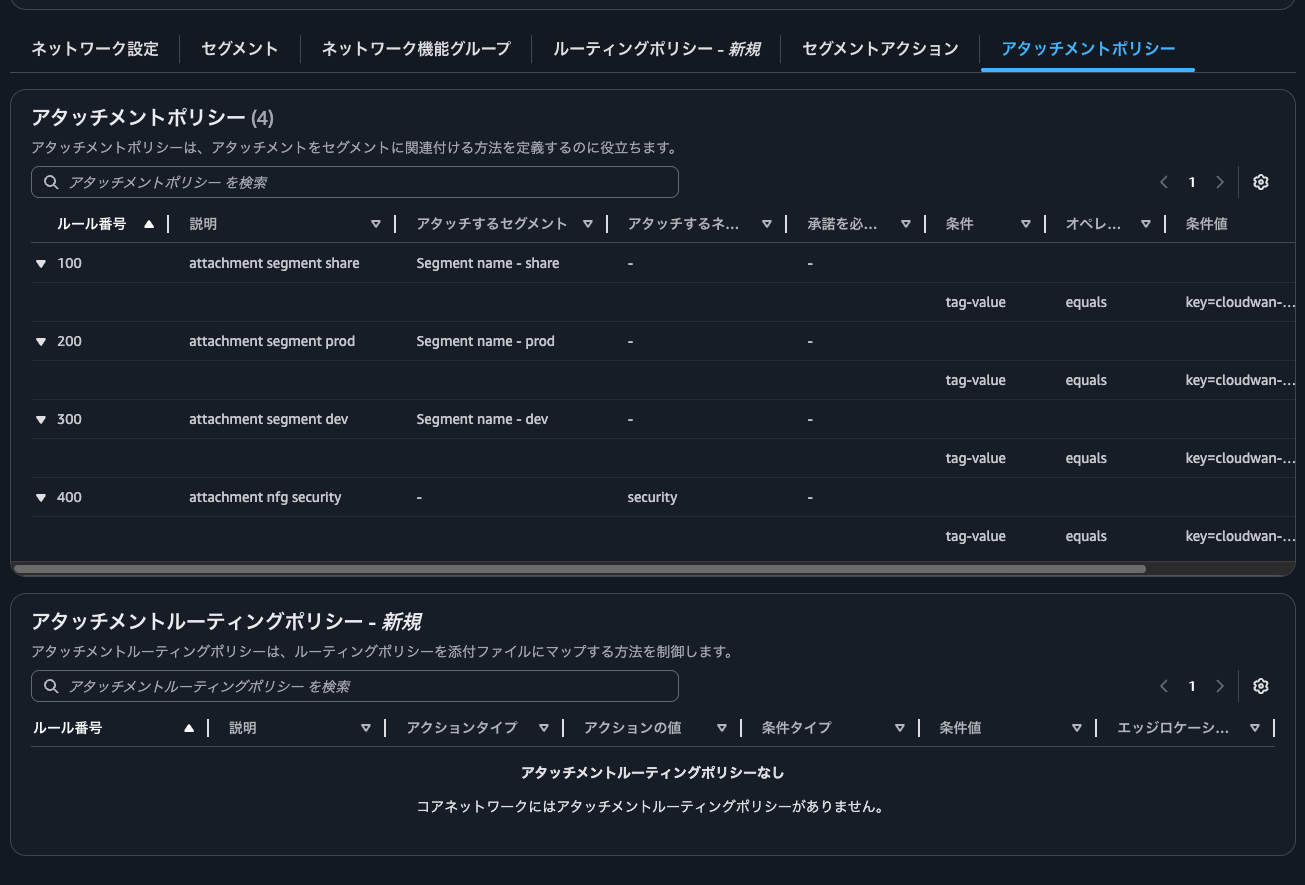
Let's edit the policy.
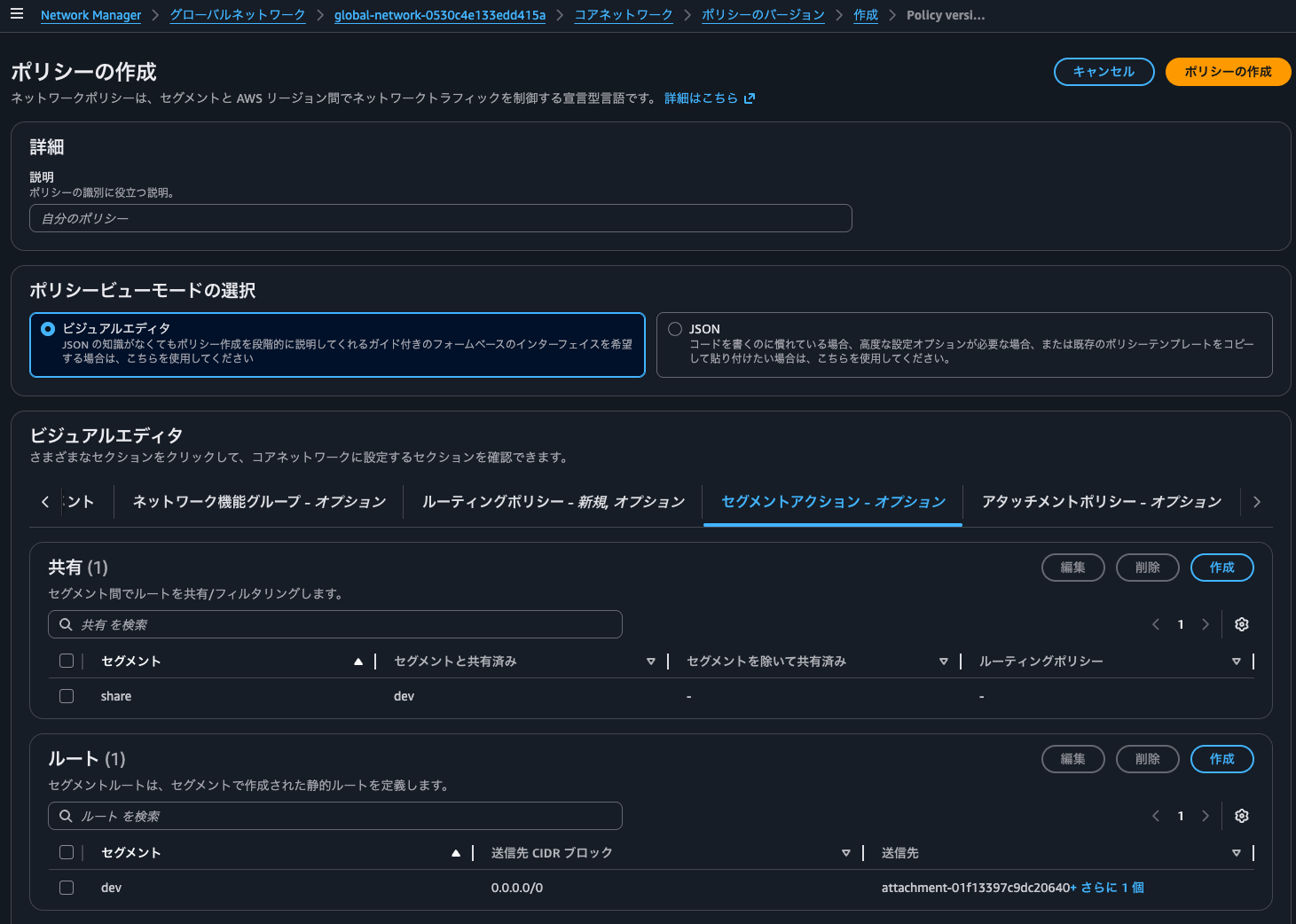
Since we want to add a static route, click on the "Segment actions" tab.
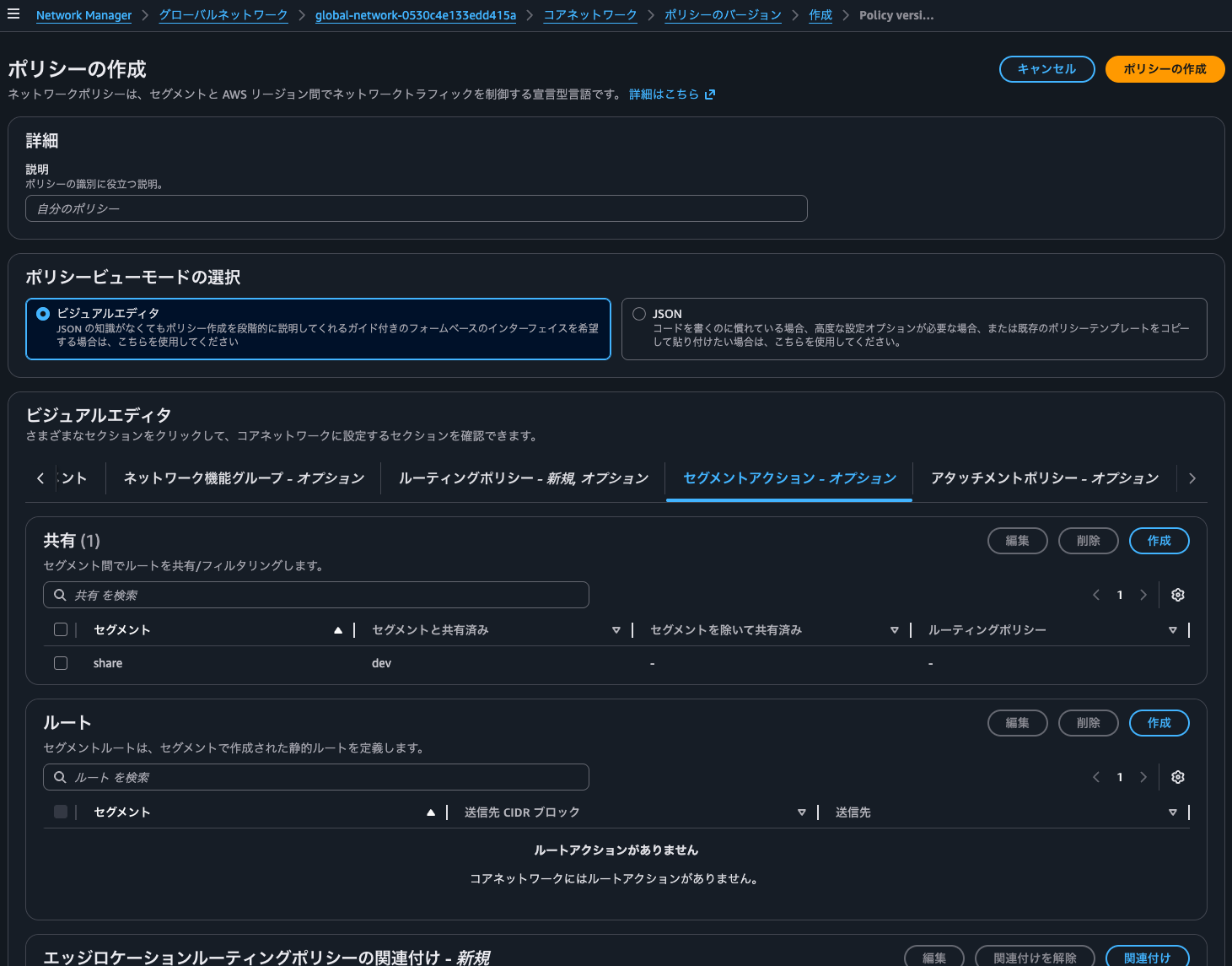
Click "Create" under "Routes".
We want to set the default route for the dev segment to go through the Egress VPCs in ap-northeast-1 and us-east-1.
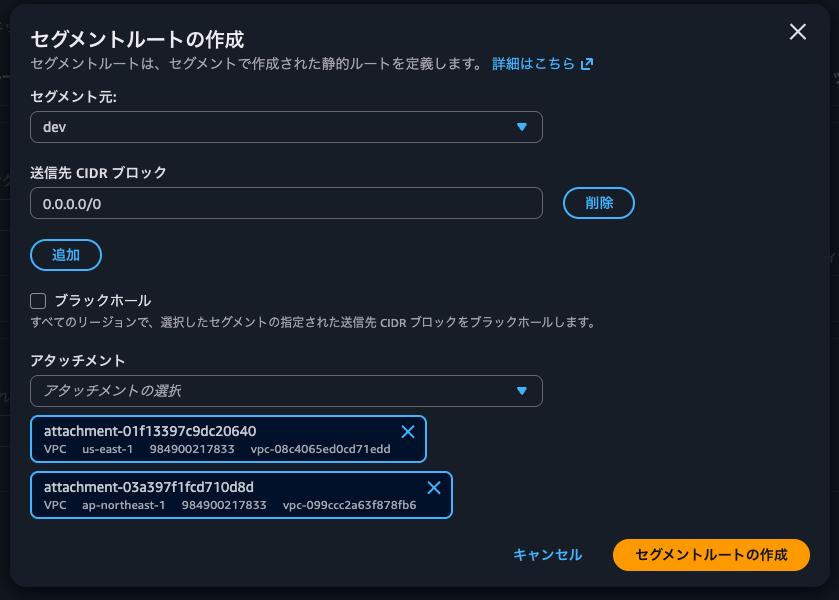
Note that destinations are limited to one per region, so you can't set up multiple Egress VPCs in the same region.
destinations — Defines the list of attachments to send the traffic to, with up to one attachment-id per Region. Because a segment is a global object, you should design your routing so that every AWS Region has an attachment in the destinations list. Regions that do not have attachments in this list will receive a propagated version of this route through cross-Region peering connections, and will use the static route of another Region. This is the same case for multiple attachments that are defined across multiple remote Regions.
Core network policy version parameters in AWS Cloud WAN - AWS Network Manager
After adding, the routes look like this:
In the Core Network Policy JSON, this is added as:
{
.
.
(omitted)
.
.
  "segment-actions": [
    {
      "action": "create-route",
      "segment": "dev",
      "destination-cidr-blocks": [
        "0.0.0.0/0"
      ],
      "destinations": [
        "attachment-01f13397c9dc20640",
        "attachment-03a397f1fcd710d8d"
      ]
    },
.
.
(omitted)
.
.
  ],
.
.
(omitted)
.
.
}
For return traffic from the Egress VPC, no additional routes are needed since we're sharing route information through the Share action.
Clicking "Create policy" creates a new policy version with the alias "LATEST" and status "Ready to execute".
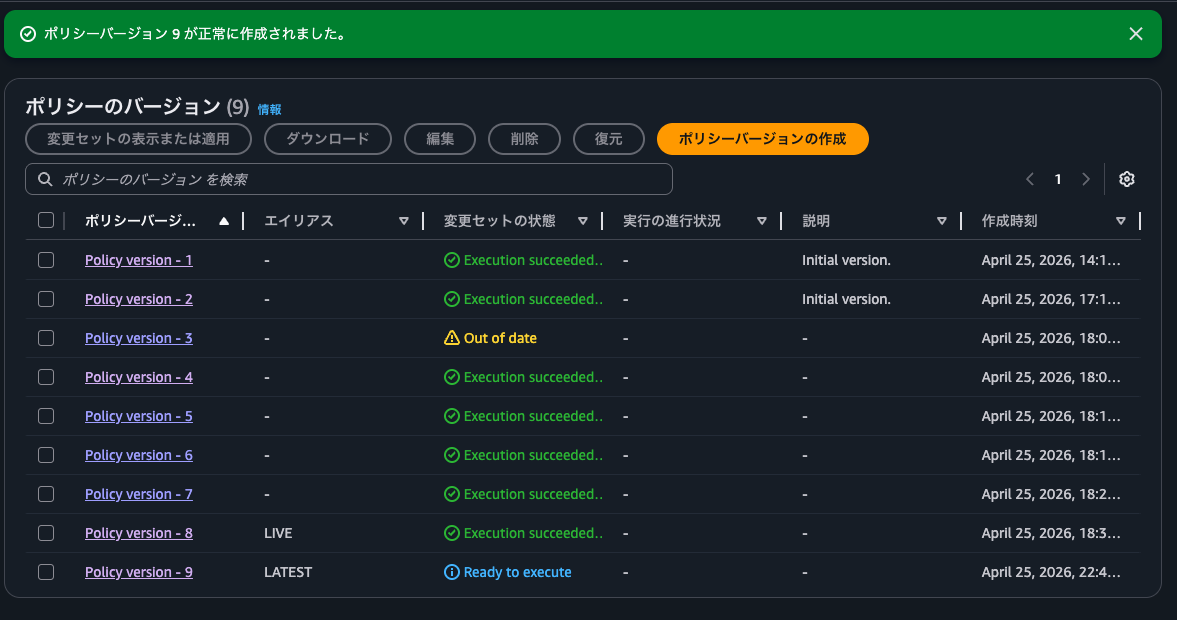
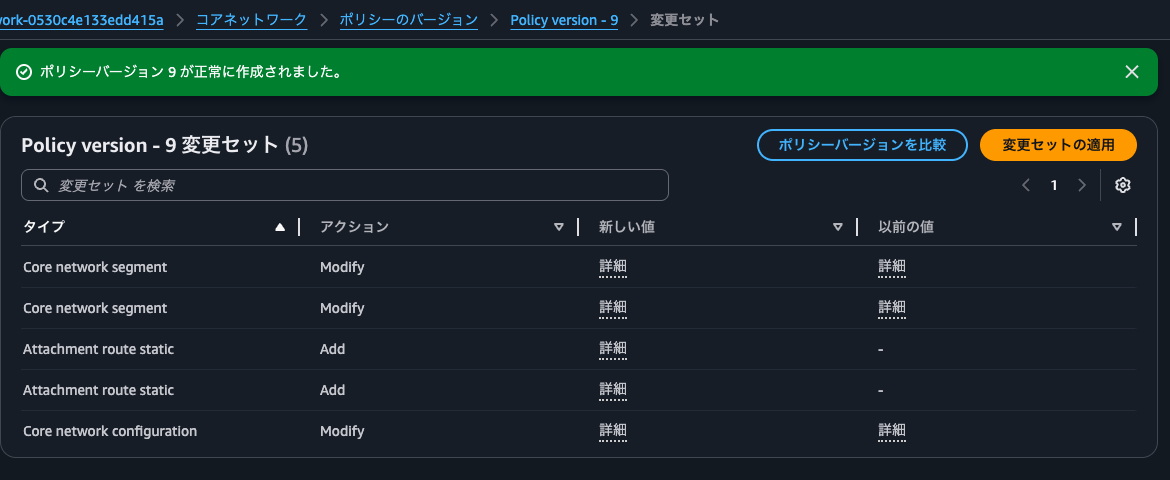
Select the new policy version and click "View or apply change set".
This shows what updates will be made, similar to CloudFormation's Change Set:
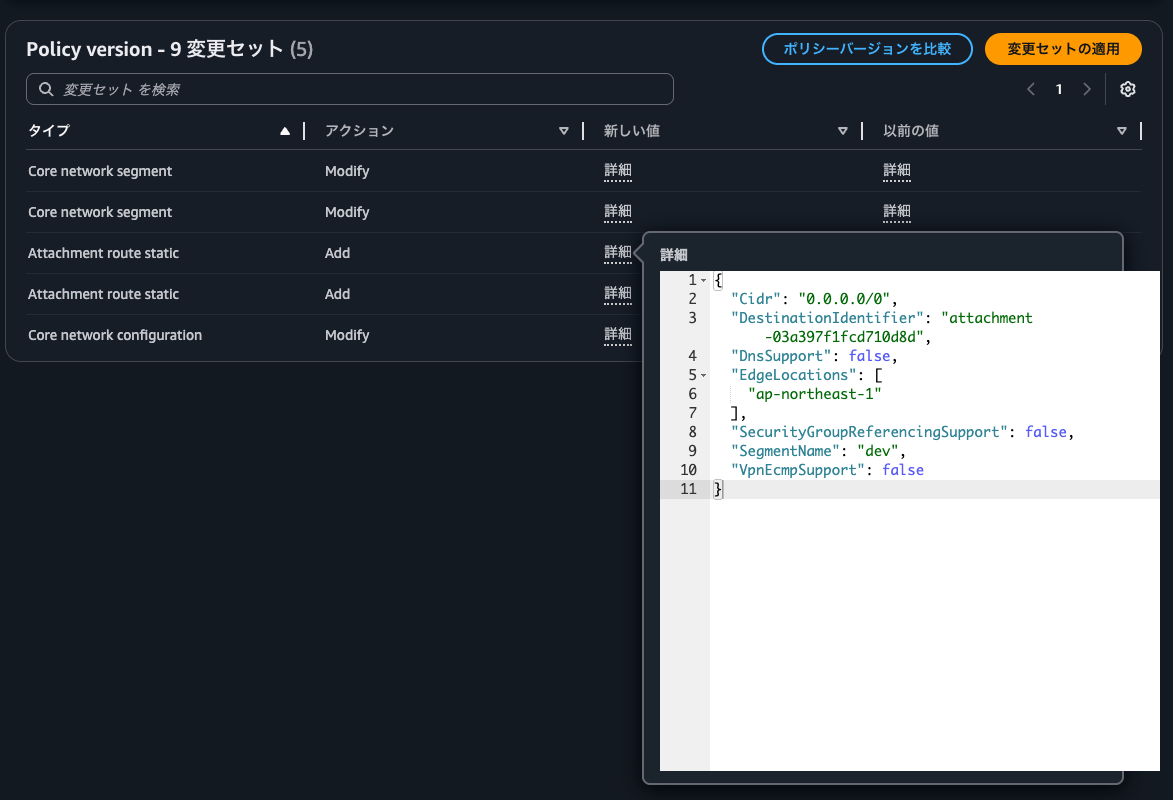
Clicking "Details" shows exactly what changes will be made:
Click "Apply change set" to apply the new version:
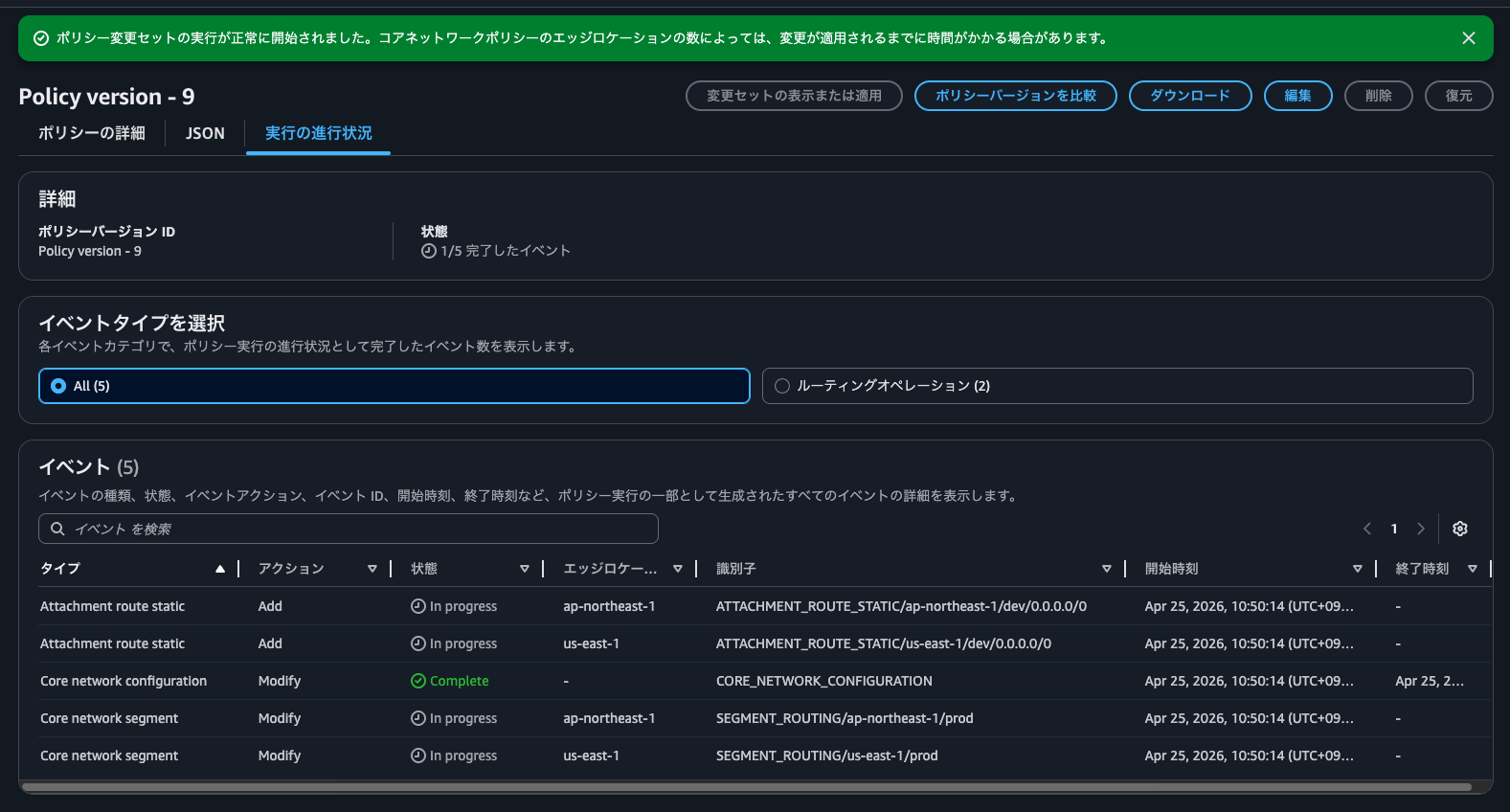
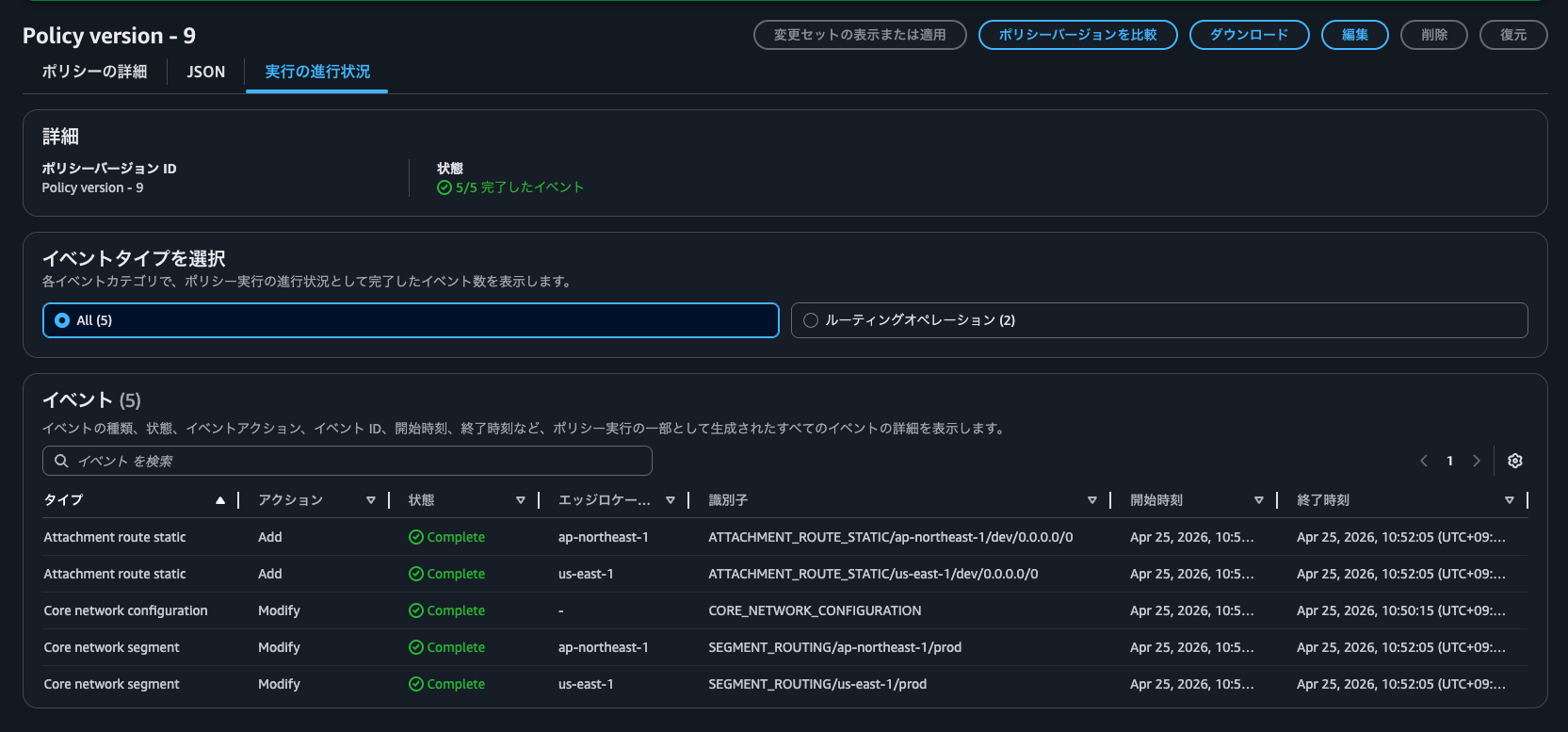
After about two minutes, all events are completed:
Now let's try accessing https://checkip.amazonaws.com again:
$ hostname -f
ip-10-2-0-21.ap-northeast-1.compute.internal
$
$ curl -m 5 -v https://checkip.amazonaws.com
* Host checkip.amazonaws.com:443 was resolved.
* IPv6: (none)
* IPv4: 18.139.26.116, 52.74.9.231, 3.0.185.196, 52.74.183.204, 54.255.102.50, 47.131.141.155, 13.228.196.61, 18.138.142.246
*   Trying 18.139.26.116:443...
* ALPN: curl offers h2,http/1.1
* TLSv1.3 (OUT), TLS handshake, Client hello (1):
* SSL Trust Anchors:
*   CAfile: /etc/pki/tls/certs/ca-bundle.crt
* TLSv1.3 (IN), TLS handshake, Server hello (2):
* TLSv1.3 (IN), TLS change cipher, Change cipher spec (1):
* TLSv1.3 (IN), TLS handshake, Encrypted Extensions (8):
* TLSv1.3 (IN), TLS handshake, Certificate (11):
* TLSv1.3 (IN), TLS handshake, CERT verify (15):
* TLSv1.3 (IN), TLS handshake, Finished (20):
* TLSv1.3 (OUT), TLS change cipher, Change cipher spec (1):
* TLSv1.3 (OUT), TLS handshake, Finished (20):
* SSL connection using TLSv1.3 / TLS_AES_128_GCM_SHA256 / x25519 / RSASSA-PSS
* ALPN: server accepted h2
* Server certificate:
*   subject: CN=checkip.amazonaws.com
*   start date: Nov  3 00:00:00 2025 GMT
*   expire date: Dec  2 23:59:59 2026 GMT
*   issuer: C=US; O=Amazon; CN=Amazon RSA 2048 M04
*   Certificate level 0: Public key type RSA (2048/112 Bits/secBits), signed using sha256WithRSAEncryption
*   Certificate level 1: Public key type RSA (2048/112 Bits/secBits), signed using sha256WithRSAEncryption
*   Certificate level 2: Public key type RSA (2048/112 Bits/secBits), signed using sha256WithRSAEncryption
*   subjectAltName: "checkip.amazonaws.com" matches cert's "checkip.amazonaws.com"
* SSL certificate verified via OpenSSL.
* Established connection to checkip.amazonaws.com (18.139.26.116 port 443) from 10.2.0.21 port 38934
* using HTTP/2
* [HTTP/2] [1] OPENED stream for https://checkip.amazonaws.com/
* [HTTP/2] [1] [:method: GET]
* [HTTP/2] [1] [:scheme: https]
* [HTTP/2] [1] [:authority: checkip.amazonaws.com]
* [HTTP/2] [1] [:path: /]
* [HTTP/2] [1] [user-agent: curl/8.17.0]
* [HTTP/2] [1] [accept: */*]
> GET / HTTP/2
> Host: checkip.amazonaws.com
> User-Agent: curl/8.17.0
> Accept: */*
>
* Request completely sent off
* TLSv1.3 (IN), TLS handshake, Newsession Ticket (4):
< HTTP/2 200
< date: Sat, 25 Apr 2026 13:56:15 GMT
< content-type: text/plain;charset=UTF-8
< content-length: 13
< server: nginx
< vary: Origin
< vary: Access-Control-Request-Method
< vary: Access-Control-Request-Headers
<
13.113.18.78
* Connection #0 to host checkip.amazonaws.com:443 left intact
Now the access is successful!
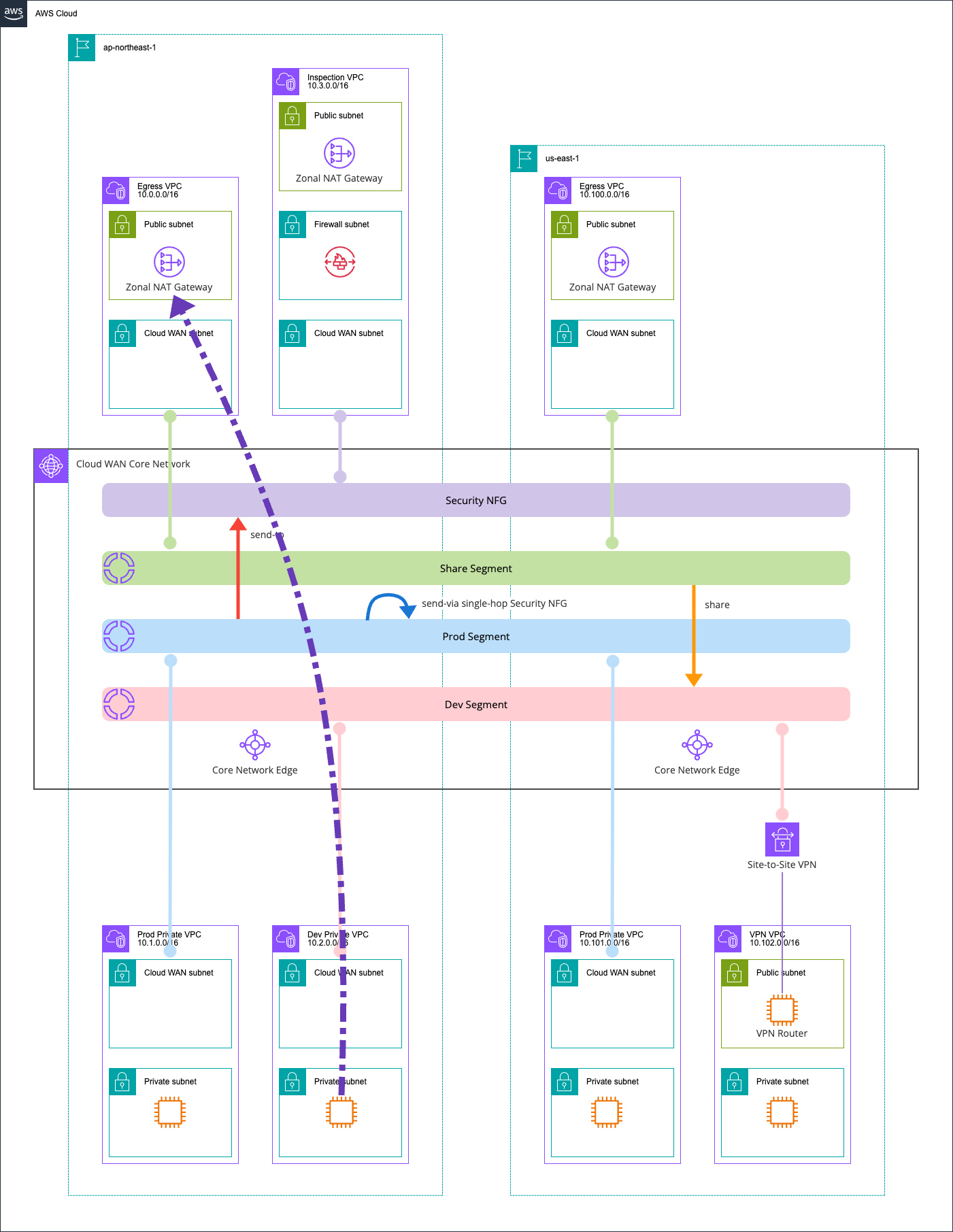
This IP address is the NAT Gateway IP address in ap-northeast-1.
Here's a diagram of the communication path:
us-east-1 VPC EC2 Instance and Internet Communication
Finally, here's the communication between us-east-1 VPC EC2 instance and the Internet.
$ hostname -f
ip-10-102-1-18.ec2.internal

$ curl -m 5 -v https://checkip.amazonaws.com
* Host checkip.amazonaws.com:443 was resolved.
* IPv6: (none)
* IPv4: 18.208.47.218, 98.95.253.57, 54.211.239.28, 32.193.53.71, 107.23.164.39, 44.214.94.248, 52.5.178.197, 3.226.147.200
*   Trying 18.208.47.218:443...
* ALPN: curl offers h2,http/1.1
* TLSv1.3 (OUT), TLS handshake, Client hello (1):
* SSL Trust Anchors:
*   CAfile: /etc/pki/tls/certs/ca-bundle.crt
* TLSv1.3 (IN), TLS handshake, Server hello (2):
* TLSv1.3 (IN), TLS change cipher, Change cipher spec (1):
* TLSv1.3 (IN), TLS handshake, Encrypted Extensions (8):
* TLSv1.3 (IN), TLS handshake, Certificate (11):
* TLSv1.3 (IN), TLS handshake, CERT verify (15):
* TLSv1.3 (IN), TLS handshake, Finished (20):
* TLSv1.3 (OUT), TLS change cipher, Change cipher spec (1):
* TLSv1.3 (OUT), TLS handshake, Finished (20):
* SSL connection using TLSv1.3 / TLS_AES_128_GCM_SHA256 / x25519 / RSASSA-PSS
* ALPN: server accepted h2
* Server certificate:
*   subject: CN=checkip.amazonaws.com
*   start date: Nov  3 00:00:00 2025 GMT
*   expire date: Dec  2 23:59:59 2026 GMT
*   issuer: C=US; O=Amazon; CN=Amazon RSA 2048 M04
*   Certificate level 0: Public key type RSA (2048/112 Bits/secBits), signed using sha256WithRSAEncryption
*   Certificate level 1: Public key type RSA (2048/112 Bits/secBits), signed using sha256WithRSAEncryption
*   Certificate level 2: Public key type RSA (2048/112 Bits/secBits), signed using sha256WithRSAEncryption
*   subjectAltName: "checkip.amazonaws.com" matches cert's "checkip.amazonaws.com"
* SSL certificate verified via OpenSSL.
* Established connection to checkip.amazonaws.com (18.208.47.218 port 443) from 10.102.1.18 port 59376
* using HTTP/2
* [HTTP/2] [1] OPENED stream for https://checkip.amazonaws.com/
* [HTTP/2] [1] [:method: GET]
* [HTTP/2] [1] [:scheme: https]
* [HTTP/2] [1] [:authority: checkip.amazonaws.com]
* [HTTP/2] [1] [:path: /]
* [HTTP/2] [1] [user-agent: curl/8.17.0]
* [HTTP/2] [1] [accept: */*]
> GET / HTTP/2
> Host: checkip.amazonaws.com
> User-Agent: curl/8.17.0
> Accept: */*
>
* Request completely sent off
* TLSv1.3 (IN), TLS handshake, Newsession Ticket (4):
< HTTP/2 200
< date: Sat, 25 Apr 2026 13:59:03 GMT
< content-type: text/plain;charset=UTF-8
< content-length: 14
< server: nginx
< vary: Origin
< vary: Access-Control-Request-Method
< vary: Access-Control-Request-Headers
<
54.80.107.232
* Connection #0 to host checkip.amazonaws.com:443 left intact
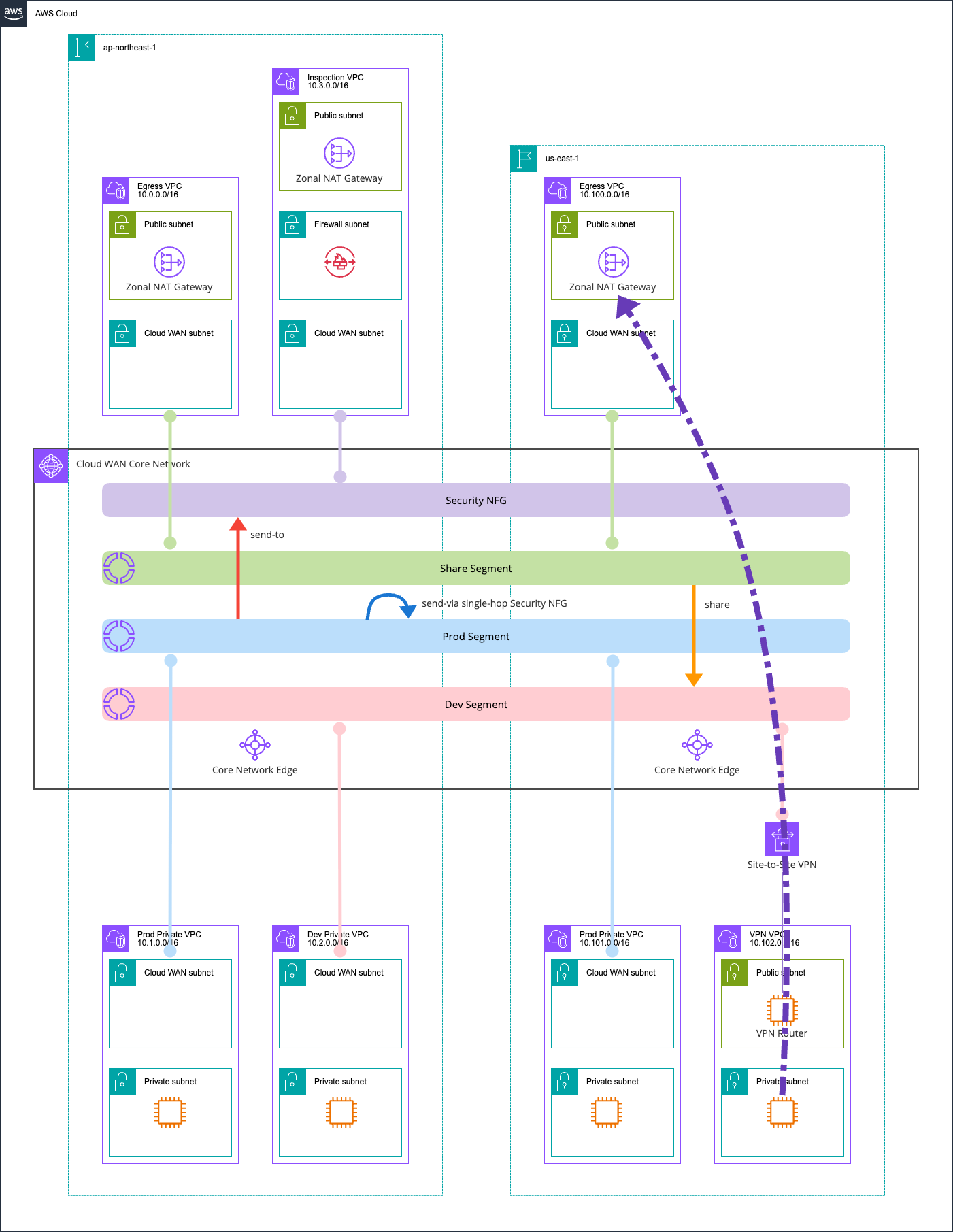
Access was successful. This IP address belongs to the NAT Gateway of the us-east-1 Egress VPC.

I believe this is because of Cloud WAN's evaluation order - when there are different forwarding destinations for the same destination IP address, routes in the same region are prioritized. While the official AWS documentation doesn't specifically mention priorities between Static Routes, it does explain that VPC-propagated routes from the same region are prioritized.
Route evaluation
Cloud WAN evaluates routes at each core network edge in the following order:
- The most specific route for the destination
- For routes with the same destination IP address, but different targets, the following route priority is used:
- Static routes
- VPC-propagated routes in the same Region.
- For dynamic routes received at the core network with an unequal AS path length and/or MED BGP attributes, Cloud WAN evaluates them in the following order:
- AS path length
- MED
- For dynamic routes received at the core network with equal AS path length and MED BGP attributes, Cloud WAN evaluates them in the following order:
- Direct Connect gateway-propagated routes.
- Cloud WAN Connect-propagates routes in the same Region.
- Site-to-Site VPN-propagated routes in the same Region.
- Routes propagated from other sources, such as transit gateway peering and core network edges in other remote Regions over the AWS global infrastructure. If identical routes are received from two or more sources, a single attachment will be chosen in a deterministically random manner.
The communication path is illustrated below:
When you want to quickly set up a Cloud WAN environment
I built a complete AWS Cloud WAN environment using AWS CDK, implementing Network Firewall inspection through Service Insertion and consolidating outbound internet traffic.
Feel free to use this when you want to quickly set up a Cloud WAN environment.
When using patterns with three or more regions, interconnecting with Transit Gateway becomes challenging. In such cases, adopting or migrating to Cloud WAN is a viable option. Let's consider this with reference to the following AWS blog:
Additionally, there's an official workshop for Cloud WAN that can deepen your understanding:
I hope this article is helpful to someone.
That's all from nonPi (@non____97) of the Cloud Business Headquarters Consulting Department!
