I Built a Simple CI/CD Pipeline with AWS CDK That Replaces a Single ECS Container, Triggered by Artifacts Being PUT to an S3 Bucket

This page has been translated by machine translation. View original
I Want to Build a Simple CI/CD Pipeline That Just Swaps Containers in ECS
Hello, this is Nonpi (@non____97).
Have you ever wanted to build a simple CI/CD pipeline that just swaps containers in ECS? I have.
After updating content, you have to go through the following steps to reflect it in the environment.
- Build the container image
- If there are assets required for building the container image, you also need to bring them to your local machine
- Push the container image to ECR
- Update the task definition
- Update the ECS service
It's quite a hassle. I'd like to build a CI/CD pipeline.
So, I'll try building a simple CI/CD pipeline with AWS CDK.
Trying It Out
Test Environment
The test environment is as follows.
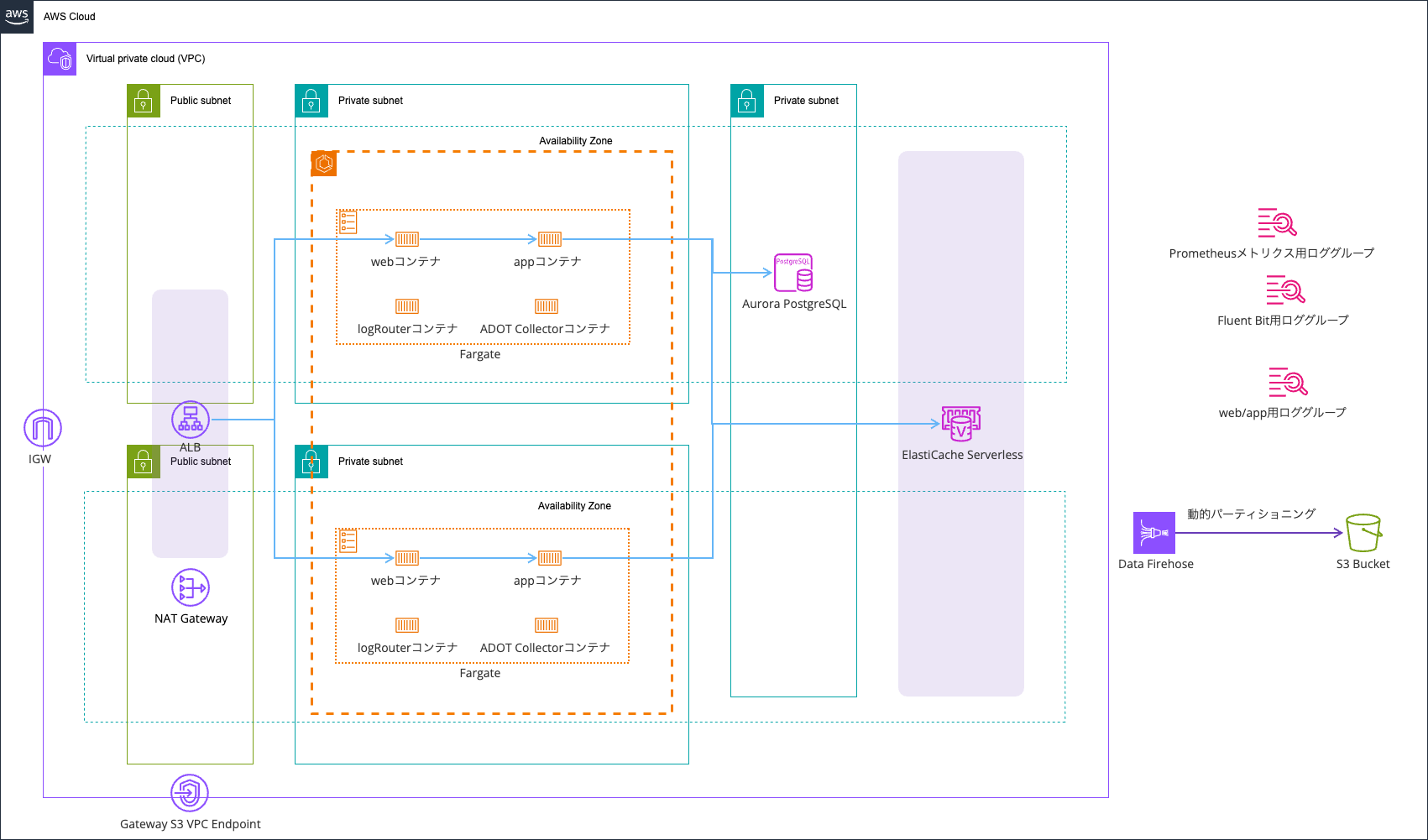
Multiple containers coexist in a single ECS task. This time, we'll swap only the web container among them.
What the CI/CD pipeline does is as follows.
In short, uploading content such as HTML files triggers the pipeline, which downloads a zip file bundling the Dockerfile, Nginx config files, and so on, then builds and deploys the container image.
This time, I assume that Git is not used or cannot be used due to the application's development environment. Therefore, the pipeline is set to run when content is uploaded to an S3 bucket.
Also, on the ECS service side, I use ECS native Blue/Green Deployment.
The code for this CI/CD pipeline and the shell script is stored in the following GitHub repository.
For the description of the web application environment itself and its code, please see the following article and GitHub repository.
Verification
Let's verify the behavior.
Currently, when accessing it, it returns text as follows.
> curl http://EcsNat-AlbCo-MVM2FDwH12Al-988247753.us-east-1.elb.amazonaws.com/
index.txt v1.0
We'll change this to index.txt v1.1.
Modify the index.html file.
Then, run a shell script that zips the specified directory and places it in the S3 bucket used by the CodePipeline Source stage. The tag to assign to the built image is also specified as an argument.
> bash ./scripts/upload-contents.sh 1.0.1 ./assets/html "" CicdPipelineStack
[1/3] html ディレクトリを zip に固めています: ./assets/html
      ステージングディレクトリを作成...
      staging_dir=/var/folders/4s/dby8gc1n2dj9n433fh6dsksr0000gn/T/tmp.jgtKZwncTU
      html をコピー: ./assets/html -> /var/folders/4s/dby8gc1n2dj9n433fh6dsksr0000gn/T/tmp.jgtKZwncTU/html
      zip 化: /var/folders/4s/dby8gc1n2dj9n433fh6dsksr0000gn/T/contents-XXXXXX.zip.sK55E8pazl
      zip 作成: /var/folders/4s/dby8gc1n2dj9n433fh6dsksr0000gn/T/contents-XXXXXX.zip.sK55E8pazl
[2/3] ContentsBucket を解決しています (引数 or Stack 'CicdPipelineStack' の CfnOutput)
      ContentsBucket: cicdpipelinestack-contentsbucket571b0902-ecg8fnfbdlxv
[3/3] S3 にアップロードしています (version=1.0.1)
アップロード完了: contents.zip (version=1.0.1) -> s3://cicdpipelinestack-contentsbucket571b0902-ecg8fnfbdlxv/contents.zip
The upload seems to have completed.
Checking CodePipeline, it has already progressed to the Deploy stage.

Checking the state of the ECS tasks, a total of four ECS tasks, two old and two new, were running.

Since I had configured a lifecycle hook, a notification arrived in the specified Slack channel.

In this state, access the production listener and the test listener.
> curl http://EcsNat-AlbCo-MVM2FDwH12Al-988247753.us-east-1.elb.amazonaws.com/
index.txt v1.0

> curl http://EcsNat-AlbCo-MVM2FDwH12Al-988247753.us-east-1.elb.amazonaws.com:10080/
index.txt v1.1
When accessing the test listener, you can see that the text has changed.
Press the reroute button to reroute the production traffic.
Then, the response content on the production listener also changed.
> curl http://EcsNat-AlbCo-MVM2FDwH12Al-988247753.us-east-1.elb.amazonaws.com/
index.txt v1.1
CodePipeline also completed execution successfully.

Let's also check the behavior when rolling back.
Change the content of index.html to index.txt v1.2, and PUT it to the S3 bucket again with upload-contents.sh.
After a while, a confirmation notification asking whether to reroute or roll back arrived in the specified Slack channel.
Let's verify the behavior.
> curl http://EcsNat-AlbCo-MVM2FDwH12Al-988247753.us-east-1.elb.amazonaws.com/
index.txt v1.1

> curl http://EcsNat-AlbCo-MVM2FDwH12Al-988247753.us-east-1.elb.amazonaws.com:10080/
index.txt v1.2
Only the test listener's response content changed.
Since this time we want to check the rollback behavior, press the rollback button.

When the rollback was performed, the CodePipeline Deploy action failed.

When accessing again after the rollback, the content when accessing the test listener returned to the original, as shown below.
> curl http://EcsNat-AlbCo-MVM2FDwH12Al-988247753.us-east-1.elb.amazonaws.com/
index.txt v1.1

> curl http://EcsNat-AlbCo-MVM2FDwH12Al-988247753.us-east-1.elb.amazonaws.com:10080/
index.txt v1.1
Let's Build a CI/CD Pipeline Even for Simple Tasks
Using AWS CDK, I built a simple CI/CD pipeline that swaps a single ECS container, triggered by materials being PUT to an S3 bucket.
Even a simple task, if repeated many times, ends up consuming quite a lot of time in total. Let's automate whatever can be automated.
I hope this article helps someone.
This was Nonpi (@non____97) of the Consulting Department, Cloud Business Division!